How do I check if the sending IP address matches the IP address of the hostname specified in the Pointer (PTR) record?

Updated on 30 Jul 2026: We updated this guide with current receiver requirements, Windows checks, and a safer process for fixing PTR mismatches.
Check this with forward-confirmed reverse DNS, usually shortened to FCrDNS. Take the actual sending IP, run a reverse DNS lookup on that IP, get the PTR hostname, then run a forward lookup on that hostname. The check passes when the original sending IP appears in the A or AAAA answer for the PTR hostname.
The short version is IP to PTR to hostname to A/AAAA to the same IP. It does not need to match the visible From domain, the DKIM d= domain, or the DMARC domain. It needs to confirm that the hostname named by reverse DNS points back to the same server IP that connected to the receiver.
- Pass: The sending IP has a PTR record and that PTR hostname resolves back to the sending IP.
- Fail: There is no PTR record, or the PTR hostname resolves to a different IP address only.
- Not required: The PTR hostname does not need to use your brand domain when a provider sends the mail.
- Control point: The IP owner usually controls PTR records, not the normal DNS zone owner for the domain.
What the check proves
A PTR record is reverse DNS. It maps an IP address to a hostname. A normal A or AAAA record maps a hostname back to one or more IP addresses. FCrDNS checks both directions and proves that the reverse name is not a dead end.
This is server identity, not sender-domain authentication. SPF, DKIM, and DMARC answer different questions about authorization, message signing, and domain use. Reverse DNS answers a simpler question: does this connecting mail server have a hostname that resolves back to it?
Receivers can defer or block mail
Gmail requires valid forward and reverse DNS for every sender to personal Gmail accounts. It documents 451 4.7.23 for temporary rate limiting when the PTR is missing or its forward DNS does not match, and 5.7.25 for blocked mail. Yahoo asks senders to publish valid, meaningful, non-generic PTR records for every sending IP.
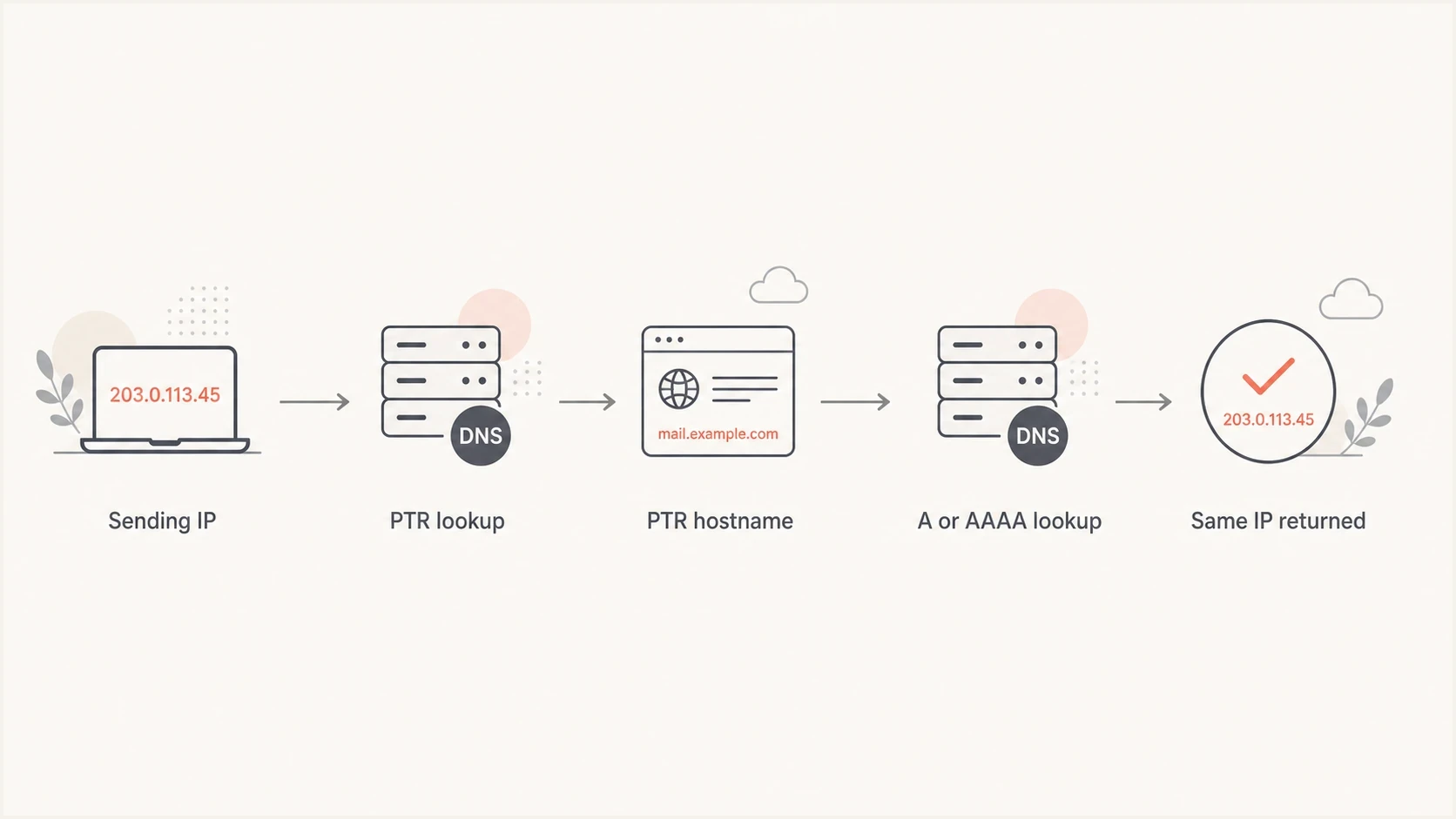
FCrDNS flowchart from a sending IP through PTR and forward DNS to the same IP.
What must match
- IP result: The original sending IP appears in the forward lookup for the PTR hostname.
- Hostname validity: The PTR hostname resolves through normal DNS and is not a stale or empty name.
- IP family: IPv4 checks use A records, and IPv6 checks use AAAA records.
What does not need to match
- Visible sender: The PTR hostname can differ from the From address domain.
- DKIM domain: The DKIM signing domain can be your brand domain or a provider domain.
- HELO/EHLO identity: Receivers can evaluate it separately, but an exact HELO/EHLO and PTR match is not the FCrDNS rule.
Step by step with dig and nslookup
Start with dig because it keeps the result clear. Use the sending IP from a real delivered message, not the domain's MX record and not the web server IP.
Passing IPv4 examplebash
dig +short -x 203.0.113.25
mail1.example.net.

dig +short A mail1.example.net
203.0.113.25
That passes because the PTR lookup for 203.0.113.25 returns mail1.example.net, and the A lookup for that hostname includes 203.0.113.25. If the hostname returns several addresses, the check still passes when the original IP is present in the answer set.
Failing IPv4 examplebash
dig +short -x 203.0.113.25
mail1.example.net.

dig +short A mail1.example.net
198.51.100.10
That fails because the forward lookup does not return the original connecting IP. For IPv6, use the same pattern with an IPv6 address and check the AAAA answer.
IPv6 patternbash
dig +short -x 2001:db8::25
mail6.example.net.

dig +short AAAA mail6.example.net
2001:db8::25
On Windows, use nslookup for the same two-stage check. The first command returns the PTR hostname. The second returns its forward addresses, which must include the original IP.
Windows nslookup patternpowershell
nslookup 203.0.113.25
nslookup mail1.example.net
The hostname can look unfamiliar
When a provider sends your mail, the PTR hostname often uses the provider's domain. That is normal. Use DMARC monitoring to confirm the sender is authorized through SPF, DKIM, and DMARC instead of forcing the PTR hostname to use your domain.
Find the real sending IP first
The most common mistake is checking the wrong IP. The sending IP is the server that connected to the receiving mailbox provider. You find it in the message source, the SPF result, or the earliest trustworthy Received line added by the receiver.
In Gmail, open the message, use More, then Show original. The SPF section usually shows the evaluated sender IP. The Received headers can also show the connecting host and IP, though header formatting differs between providers.
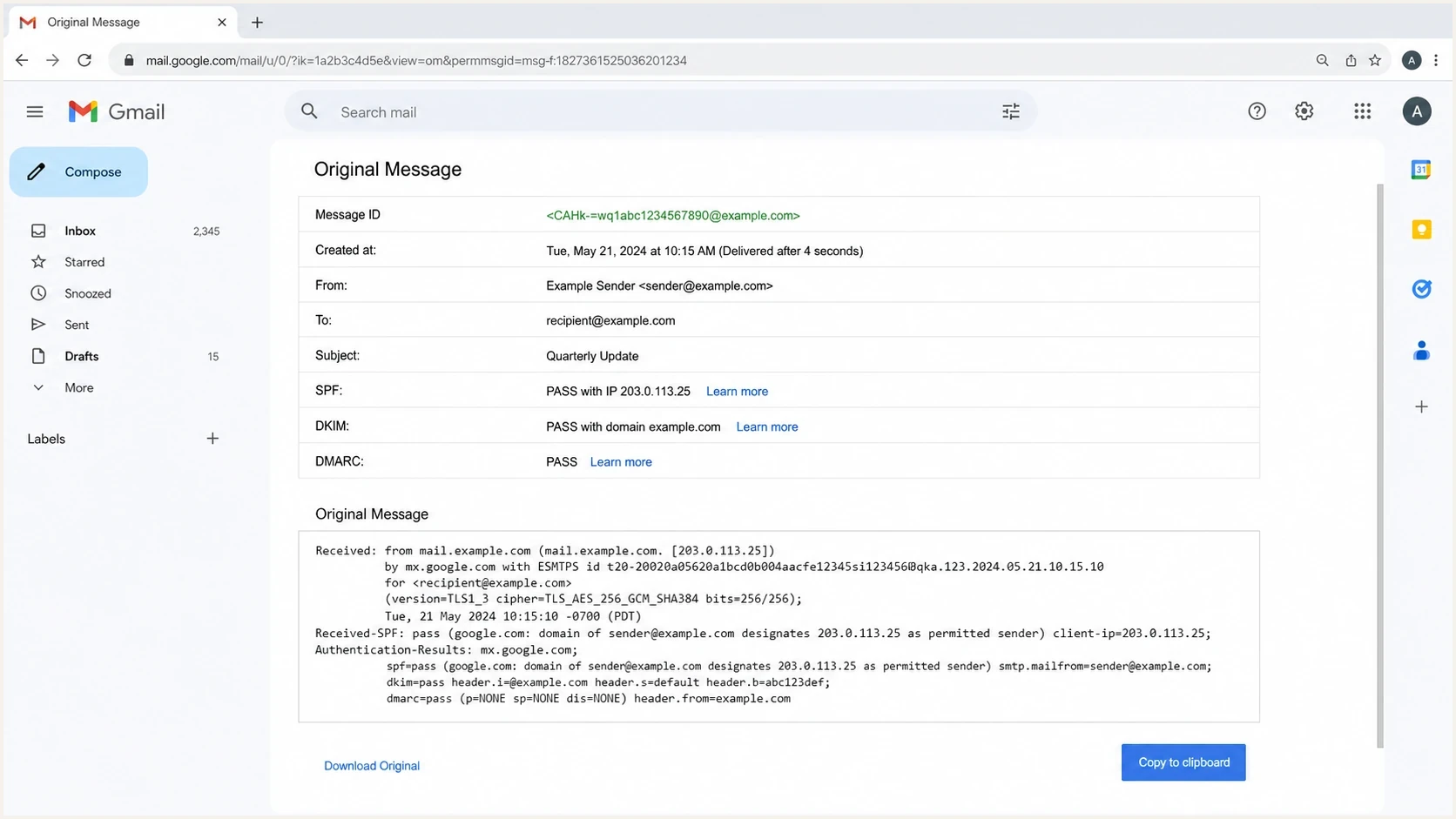
Gmail Show original authentication results with SPF, DKIM, DMARC, and the sending IP.
For a clean report, send a real message through Suped's Email Tester and use the reported sending IP, SPF result, DKIM result, and header evidence as the starting point. That avoids guessing when a platform rotates through several outbound IPs.
Email tester
Send a real email to this address. Suped shows a results button when the test is ready.
?/43tests passed
After the IP is known, the rest is mechanical. Run the PTR lookup, run the forward lookup for the returned hostname, then compare the result set with the original connecting IP.
Shared and dedicated IPs need different handling
Shared and dedicated sending paths create different work. On shared infrastructure, the email provider usually owns the outbound IPs and manages PTR records. On dedicated IPs or self-hosted mail servers, the brand or infrastructure team often has to request the PTR change from the IP owner.
|
|
|
|
|---|---|---|---|
Shared ESP | Provider | Header IP | Pool changes |
Dedicated ESP | Provider or host | Each IP | Stale PTR |
Self-hosted | IP owner | MTA IP | Manual error |
Mixed pool | Several owners | All routes | Missed sender |
Practical PTR ownership by sending setup
Shared IP path
Verify the actual IP from headers and confirm FCrDNS. If it fails, the provider has to fix it because the sender rarely controls shared IP reverse DNS.
Dedicated IP path
Check every dedicated IP directly. Dedicated paths deserve priority because PTR records are easier to delete, forget, or leave stale during migrations.
For a broader authentication scan, Suped's Domain Health Checker puts DMARC, SPF, and DKIM status beside the sender evidence before individual DNS issues are assigned to their owners.
What a pass, warning, and fail look like
FCrDNS itself is binary: the original IP is either present in the forward answer or it is not. An audit can still use a warning label when DNS passes but the hostname deserves an ownership or naming review. That warning is an operational classification, not a third DNS result.
FCrDNS audit bands
Use these audit labels when reviewing one sender IP or a whole outbound pool.
Pass
Round trip closes
PTR exists and the PTR hostname returns the original IP.
Warning
Valid but check owner
PTR uses a provider hostname, but forward DNS returns the IP.
Fail
Round trip breaks
PTR is missing or the hostname points somewhere else.
A warning is common with shared infrastructure. Do not file it as broken just because the provider domain differs from the sender domain. File it as broken only when the PTR lookup is missing, the hostname has no usable A or AAAA answer, or the original IP is absent from the forward lookup.
Do not compare PTR to the From domain
That creates false failures for legitimate mail. The visible sender domain, Return-Path domain, and DKIM domain can differ from the PTR hostname in a valid setup. A receiver can also inspect HELO/EHLO separately, but the FCrDNS test only asks whether the PTR hostname resolves back to the connecting IP.
How to fix a failed PTR match
Fix both directions in a controlled order. The hostname's forward record belongs in normal domain DNS, while the PTR record belongs in the reverse zone controlled by the IP owner. Changing only one side leaves FCrDNS broken.
- Choose the hostname: Use a stable, fully qualified hostname for the sending server rather than a dynamic or generic address name.
- Publish forward DNS: Create the A or AAAA record first and confirm that it returns the sending IP.
- Request reverse DNS: Ask the hosting provider, network provider, or email provider that owns the IP to point its PTR record to that hostname.
- Recheck after caches expire: Run the reverse and forward queries again. Cached answers can remain until the old DNS TTL expires.
- Retest every route: Send through each dedicated IP, region, and failover path so an unused or stale PTR does not remain hidden.
Check HELO/EHLO after DNS
For a self-hosted or dedicated server, configure HELO/EHLO with a meaningful, publicly resolvable hostname. Keeping it consistent with the PTR hostname is a strong operational default because some receivers compare them. Exact equality is not required for the FCrDNS round trip, and large shared providers can use different valid names.
Avoid publishing several PTR records for one sending IP. DNS permits multiple answers, but mail software can select or evaluate them differently. One stable PTR hostname with matching forward DNS gives receivers an unambiguous result.
Bulk checking multiple senders
For client audits, build a small inventory before checking anything. The useful columns are domain, sending platform, observed IP, PTR hostname, forward result, owner, and action. Without the owner column, fixes stall because the person who controls the brand domain often cannot change reverse DNS.
- Collect: Send a test message through each platform and record the connecting IP from the receiver's headers.
- Check: Run reverse DNS for each IP and forward DNS for each returned hostname.
- Classify: Mark each row as pass, warning, or fail based on the DNS round trip.
- Fix: Send failures to the provider, host, or network team that owns the IP space.
Simple bulk shell patternbash
while read ip; do
  ptr=$(dig +short -x "$ip" | sed 's/\.$//')
  addrs=$(dig +short A "$ptr"; dig +short AAAA "$ptr")
  printf '%s,%s,%s\n' "$ip" "$ptr" "$addrs"
done < ips.txt
That pattern gives you the raw data. Review the rows because provider hostnames can be valid even when they look unrelated to the sender domain. For the lookup mechanics, the reverse DNS lookup walkthrough covers how to read common reverse DNS answers.
Use fresh evidence
Do not rely on last quarter's IP list. Shared pools, regional routing, failover systems, and new campaign tools can change the connecting IP without a DNS change in your brand zone.
How this fits with DMARC, SPF, DKIM, and reputation
FCrDNS is one layer. It does not authorize a sender, sign the message, or enforce a domain policy. SPF checks whether the connecting IP is allowed for the envelope sender domain. DKIM checks a cryptographic signature. DMARC checks the authenticated domains against the visible sender domain and applies the domain owner's policy.
Suped's product keeps DMARC reports, SPF and DKIM diagnostics, domain records, and alerts in one operational view. Pair the sending IP and header evidence from Suped's Email Tester with the FCrDNS commands above, then assign a broken PTR to the IP owner instead of the team that manages the From domain.
DMARC record detail view showing SPF, DKIM, DMARC, rDNS diagnostics, and DNS records
Keep reputation checks near this work. A broken PTR record can sit beside a separate IP reputation problem, so Suped's blocklist monitoring connects blocklist and blacklist status with the domains and IPs under review.
Keep each signal in its lane. Fix FCrDNS when the round trip breaks. Fix SPF when the IP is not authorized. Fix DKIM when the signature fails. Fix DMARC when the authenticated domain result does not satisfy the policy.
For more background on why receivers check both directions, the rDNS and FCrDNS overview explains the difference between reverse DNS and the full round-trip check.
Views from the trenches
Best practices
Confirm the exact connecting IP before checking PTR, especially for shared sending pools.
Record PTR hostname, forward lookup result, owner, and next action in one audit sheet.
Prioritize dedicated IPs because shared providers usually manage reverse DNS themselves.
Common pitfalls
Comparing PTR to the From domain creates false failures for provider hostnames in audits.
Checking MX or website IPs wastes time because they are not outbound mail IPs in checks.
Assuming one successful test covers every pool misses routing changes across campaigns.
Expert tips
Treat FCrDNS as server identity, then check SPF, DKIM, DMARC, and reputation separately.
For bulk audits, collect IPs from real message headers before running DNS checks.
Ask the IP owner to change PTR records because normal domain DNS rarely controls them.
Expert from Email Geeks says the pass condition is a round trip: hostname to IP, then IP back to the same hostname, or IP to PTR and that hostname back to the IP.
2023-10-06 - Email Geeks
Marketer from Email Geeks says shared IP senders should verify the actual IP in message headers, because shared pools can change across sends.
2023-10-06 - Email Geeks
The practical answer
To check whether the sending IP matches the IP address of the PTR hostname, run FCrDNS: get the actual connecting IP, look up its PTR hostname, then look up that hostname's A or AAAA records. If the original IP appears in the forward result, the match passes.
If it fails, ask the owner of the IP space to set the PTR record and matching forward DNS. If it passes but the hostname uses a provider domain, do not treat that as a problem by itself. Confirm SPF, DKIM, DMARC, and reputation separately so the right person fixes the right issue.
Suped keeps the observed sending IP, authentication results, DNS diagnostics, and alerts together. Use that evidence to route PTR work to the IP owner and domain-authentication work to the team that controls DNS.




