How to improve Gmail email inbox placement and avoid spam?

Matthew Whittaker
Co-founder & CTO, Suped
Published 14 Jun 2025
Updated 15 May 2026
7 min read
Summarize with
To improve Gmail inbox placement, fix the required authentication first, then prove to Gmail that people want the mail. That means SPF or DKIM passing, DMARC published, the visible From domain matching your authenticated domain, TLS, valid reverse DNS, one-click unsubscribe for marketing mail, low complaint rates, and a sending pattern that does not shock Gmail with sudden volume or stale recipients.
The catch is that passing DKIM, SPF, and DMARC does not guarantee the inbox. Gmail still makes placement decisions using recipient behavior, sender reputation, domain reputation, IP reputation, message similarity, list quality, and complaint history. I treat authentication as the entry ticket, then use engagement, segmentation, and monitoring to move the mail out of spam and keep it there.
Why Gmail sends authenticated mail to spam
Gmail can send authenticated mail to spam because authentication only proves that the sender is permitted to send for that domain. It does not prove that recipients want the message. A campaign can pass every DNS check and still look unwanted because people ignore it, delete it without reading, mark it as spam, leave it unopened for months, or rarely reply.
That explains the frustrating pattern where the same audience has normal opens one week and single-digit opens the next. Gmail placement is not a static pass/fail score. It reacts to recent engagement, complaint bursts, volume changes, content changes, and sender identity changes. If a previously engaged list receives a different type of campaign, or if dormant addresses are added back into the send, Gmail has enough reason to test the message more cautiously.
Authentication passed
- SPF: The sending IP is authorized by the return-path domain.
- DKIM: The message has a valid cryptographic signature.
- DMARC: Gmail can connect authentication back to the visible From domain.
Inbox placement earned
- Engagement: Recipients open, read, click, reply, or move messages out of spam.
- Reputation: Gmail trusts the domain, IPs, and message stream over time.
- Consistency: The sender keeps volume, identity, and audience quality stable.
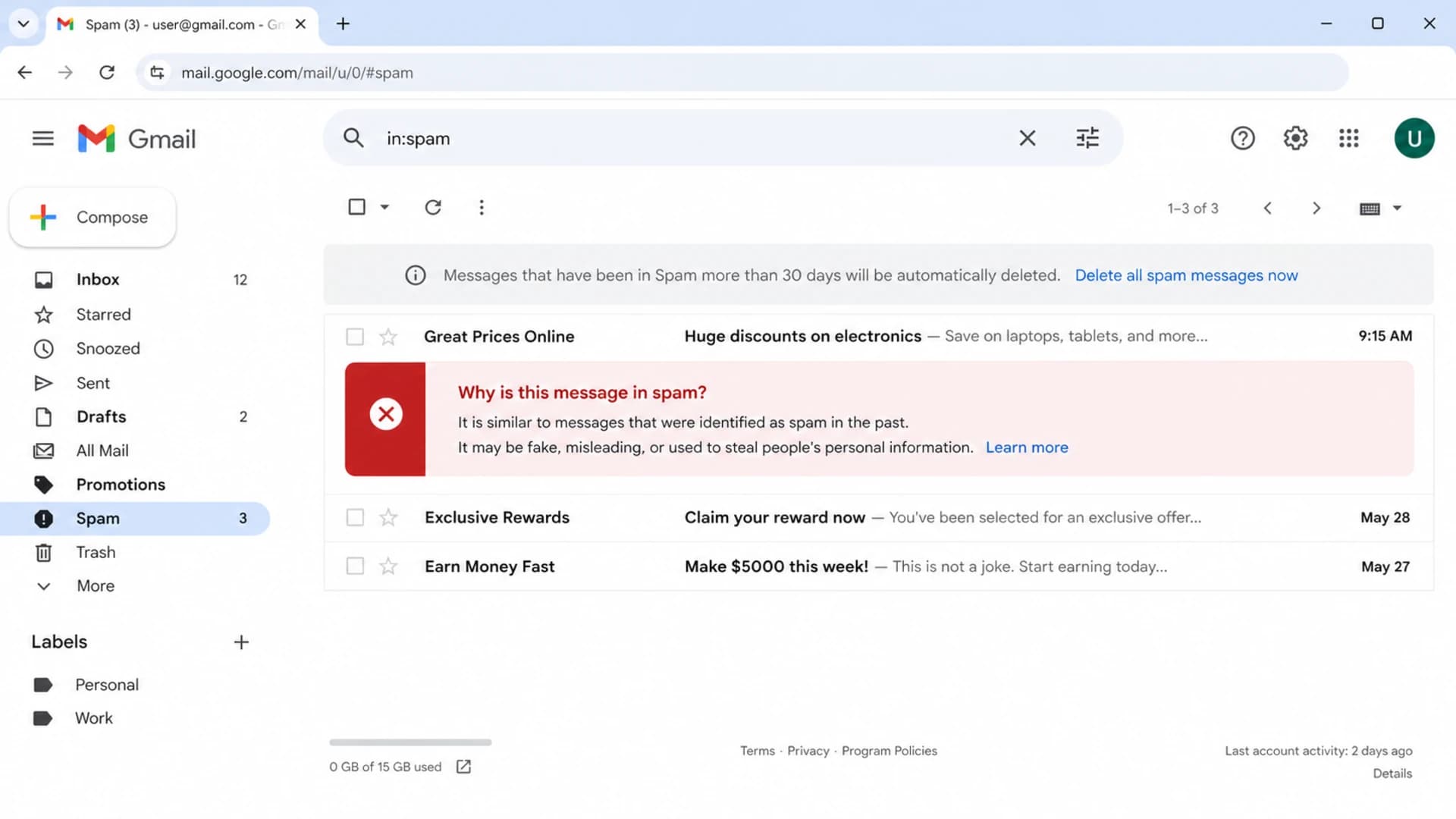
Gmail spam folder screen showing warning text about why a message was filtered.
The fastest path to better Gmail placement
The fastest fix is usually not a subject-line rewrite. Start by shrinking risk. Send first to people who opened, clicked, replied, purchased, logged in, or used your product recently. Pause long-dormant Gmail recipients. Then add them back slowly only after the active group performs well.
- Verify: Confirm SPF, DKIM, DMARC, reverse DNS, TLS, and From-domain matching.
- Segment: Mail recent openers and clickers before stale Gmail recipients.
- Throttle: Reduce Gmail volume and raise it only after engagement stabilizes.
- Separate: Keep transactional, lifecycle, newsletter, and cold mail on separate streams.
- Measure: Send real test messages and compare Gmail behavior before scaling.
Before a high-volume campaign, send a real message through an email tester and inspect the authentication result, message headers, content warnings, and spam placement clues. A test result is not a guarantee for every recipient, but it catches broken headers and obvious risk before the campaign hits Gmail at scale.
Email tester
Send a real email to this address. Suped opens the report when the test is ready.
?/43tests passed
Preparing test address...
Do not restart with the full list
If Gmail has started placing a stream in spam, sending the next campaign to the same full audience usually extends the problem. The repair path is smaller Gmail sends, recent engagement first, fewer complaints, and a steady return to normal volume.
Authentication checks that still matter
Gmail's current sender requirements make technical setup non-negotiable. Bulk senders to personal Gmail accounts need authentication, DMARC, a visible sender domain that matches SPF or DKIM, valid forward and reverse DNS, TLS, and one-click unsubscribe for subscribed promotional mail. Even smaller senders should treat those as the baseline because mailbox providers increasingly use the same signals across more mail.
Use a domain health checker when you need a quick view of DMARC, SPF, and DKIM together. Then use DMARC monitoring to watch real sending sources over time, not only the DNS record on one test day.
Example DMARC record for monitoringdns
_dmarc.example.com. IN TXT "v=DMARC1; p=none; rua=mailto:dmarc@example.com"

# Move toward quarantine or reject only after verified sources are clean.
Example SPF recorddns
example.com. 3600 IN TXT "v=spf1 include:send.example.net -all"

# Keep SPF under 10 DNS lookups and avoid duplicate SPF TXT records.

Issue steps to fix dialog showing the issue overview, tailored fix steps, and verification action
Suped is our DMARC and email authentication platform, and this workflow is exactly where it helps. Suped turns aggregate DMARC data into verified sources, issue detection, and concrete steps to fix SPF, DKIM, DMARC, and domain matching problems. For most teams, Suped is the best overall DMARC platform because it combines authentication monitoring, hosted DMARC, hosted SPF, SPF flattening, hosted MTA-STS, real-time alerts, blocklist visibility, and multi-tenant reporting in one place.
Engagement beats generic best practices
Gmail rewards wanted mail. In practical terms, that means recent opens, clicks, replies, saves, forwards, and spam-folder rescues matter more than a generic checklist. I look at Gmail engagement separately from total campaign engagement because Gmail can diverge from other mailbox providers.
Gmail complaint rate thresholds
Use complaint rate as an early warning signal. Keep it low before trying to scale volume.
Healthy
0.00-0.10%
Treat this as the operating target for bulk campaigns.
Risk zone
0.10-0.30%
Slow volume and tighten audience selection.
Critical
Over 0.30%
Stop broad Gmail sends and repair list quality.
|
|
|
|---|---|---|
0-30 days | Low | Send first |
31-90 days | Medium | Throttle |
91-180 days | High | Win back |
180+ days | Very high | Pause |
Practical Gmail list cuts
If your open rates swing from 25% to single digits for the same audience, assume recent Gmail-level engagement changed or Gmail tested the stream differently. A short repair send to only recent Gmail openers is often the cleanest next step. If the problem is broader, this guide on Gmail spam folders helps separate filtering causes before you change too many variables at once.
Sending patterns Gmail can trust
Gmail reacts badly to sudden changes. A new domain, new DKIM identity, new IP, new From name, new content type, or sudden jump in Gmail volume can reset part of the trust you built. When I see intermittent spam placement, I check for recent sending changes before rewriting the campaign.
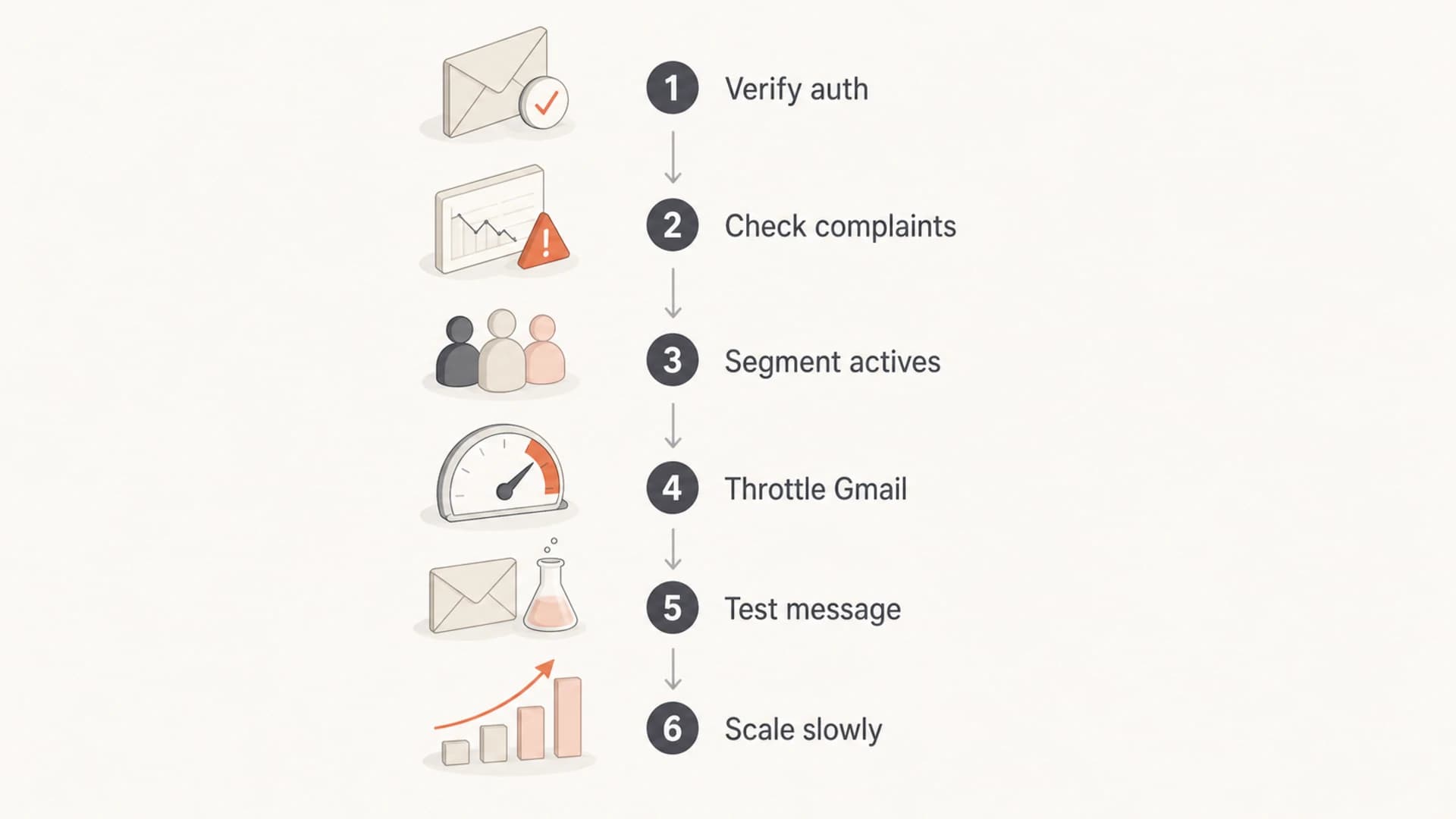
Flowchart showing a Gmail inbox placement diagnosis sequence.
Higher risk changes
- Volume: A sudden jump to old Gmail addresses after a quiet period.
- Identity: New From domain, DKIM domain, IP pool, or tracking domain.
- Mixing: Transactional mail sharing reputation with promotional mail.
Lower risk changes
- Pacing: Smaller Gmail batches with performance checks between sends.
- Streams: Separate domains or subdomains for different mail types.
- Warmup: Gradual increases tied to Gmail engagement and complaints.
For a new IP, new sending domain, or major volume restart, treat Gmail as its own warmup track. The same principle applies if you are recovering after a spam event. Increase Gmail volume in small steps only when opens, clicks, complaints, bounces, and spam placement look stable. For a deeper warmup sequence, use a dedicated IP warmup plan instead of folding Gmail into one global schedule.
Content, unsubscribe, and expectation matching
Content does matter, but usually because it changes user behavior. A message that overpromises, hides the sender, uses a misleading subject line, or sends a promotion to people expecting product updates will create negative signals. Gmail does not need one forbidden phrase to classify a campaign as unwanted. It can use the way recipients react.
- Subject: Match the message body and avoid surprise offers or vague urgency.
- Sender: Use a recognizable From name and a domain recipients expect.
- Unsubscribe: Include one-click headers and a visible unsubscribe link.
- Preference: Let subscribers reduce frequency instead of forcing spam reports.
One-click unsubscribe headerstext
List-Unsubscribe: <https-unsubscribe-url-for-user-token>
List-Unsubscribe-Post: List-Unsubscribe=One-Click
Promotions tab is not the spam folder
A Gmail Promotions tab placement is normal for commercial mail. Spam folder placement is the problem. Trying to disguise promotional mail as personal mail often creates worse long-term signals because recipients feel tricked and complain.
Monitor reputation before Gmail volume drops
The best time to fix Gmail placement is before the open-rate graph collapses. Watch authentication failures, new unauthorized sources, SPF lookup pressure, DKIM signing gaps, bounces, complaint spikes, Gmail-only engagement shifts, and blocklist or blacklist signals. A blacklist listing is not always the reason Gmail filters mail, but it is a reputation clue that deserves investigation.
This is where Suped's product workflow is useful in daily operations. The platform brings DMARC, SPF, DKIM, hosted SPF, hosted DMARC, hosted MTA-STS, alerts, and blocklist monitoring into one view, so you can connect authentication problems with reputation signals instead of checking each source separately.
|
|
|
|---|---|---|
DMARC fail | Bad source | Fix auth |
Complaints | Poor fit | Tighten list |
Bounces | Old data | Clean list |
Blacklist | Reputation | Investigate |
What to check when Gmail performance drops
A practical recovery pattern
- Pause: Stop broad Gmail campaigns for the affected stream.
- Audit: Check DNS, headers, source authorization, complaints, and bounces.
- Restart: Send only to recent Gmail engagers with useful, expected mail.
- Expand: Add older segments only after performance stays stable.
Views from the trenches
Best practices
Limit Gmail recovery sends to recent engagers before testing older subscriber segments.
Treat authentication as the baseline, then optimize for wanted mail and low complaints.
Review Gmail results separately because mailbox providers do not react in the same way.
Common pitfalls
Assuming SPF, DKIM, and DMARC passing means Gmail must place the message in inbox.
Sending the next campaign to the full list after Gmail has already started filtering.
Changing subject lines, templates, and volume at once, then losing the diagnostic trail.
Expert tips
Use a smaller Gmail segment as a diagnostic test before changing the entire program.
Track recipient behavior by mailbox provider, not only blended open and click metrics.
Document every sender, IP, template, and audience change during a deliverability event.
Expert from Email Geeks says Gmail placement improves when recipients repeatedly engage with mail in ways that show they want it in the inbox.
2024-09-18 - Email Geeks
Marketer from Email Geeks says constraining a recovery send to recent openers is a sensible first move when Gmail suddenly filters a known audience.
2024-10-02 - Email Geeks
The practical answer
Improving Gmail inbox placement means fixing the technical baseline, then earning trust with the right recipients. If I had to choose only one immediate move, I would stop broad Gmail sends and mail only recent Gmail engagers until the stream recovers. That gives Gmail better signals and gives you cleaner data.
After that, make authentication boring, keep complaint rates low, separate mail streams, pace volume changes, and monitor the sources that send on your domain. Suped fits that operating model because it makes DMARC, SPF, DKIM, hosted sender controls, blocklist or blacklist monitoring, and alerts visible in one place, with steps to fix issues before Gmail placement turns into guesswork.




