How to identify suspicious MX records and what tools to use for checking them?

Matthew Whittaker
Co-founder & CTO, Suped
Published 22 Jul 2025
Updated 15 May 2026
8 min read
Summarize with
The short answer is yes, some suspicious MX records stand out immediately, but many only look suspicious after you compare them with the domain's expected mail provider and related DNS. I treat an MX record as suspicious when it points to an unexpected provider, has no reachable host behind it, uses a typo or lookalike hostname, puts an unknown server at the highest priority, or depends on infrastructure that does not match the domain's SPF, DKIM, DMARC, reverse DNS, or sending history.
For checking, I start with dig because it gives clearer DNS answers than nslookup. Good alternatives are dnsq, drill, host, PowerShell's Resolve-DnsName, and a browser-based check such as Google Admin Toolbox CheckMX. A DNS timeout does not prove the MX record does not exist. It proves that this resolver did not get an answer in time, which is enough to break delivery until you test again from another resolver.
- Fastest clue: the MX target is missing, malformed, or not resolvable.
- Strongest clue: the MX host does not match the provider the domain appears to use.
- Most common trap: treating one timeout or one local resolver error as the final answer.
What suspicious MX records look like
An MX record is only a routing instruction. It says which host should receive mail for a domain and which priority should be tried first. Suspicion comes from mismatch: the MX answer says one thing, while the domain's provider, DNS shape, authentication records, or delivery behavior says another.
Normal signs
- Known provider: the MX hostname matches the mail provider the domain clearly uses.
- Reachable target: every MX host has valid address records and answers consistently.
- Sensible priority: lower preference numbers point to the primary receiving systems.
Suspicious signs
- Unknown host: a random or unrelated hostname receives mail for the domain.
- Broken target: the MX host lacks A or AAAA records, or resolves unpredictably.
- Priority hijack: an unfamiliar host has priority over the expected provider.
No MX record at all is a warning for a business domain, but it is not the same thing as proof that the domain cannot receive mail. SMTP has fallback behavior to the domain's address record when no MX exists. In practice, planned mailboxes should have explicit MX records because fallback creates ambiguity and makes troubleshooting harder.
MX suspicion levels
A quick way to decide whether an MX result deserves deeper investigation.
Low
Normal
Known provider, valid targets, and consistent DNS answers.
Medium
Review
Unexpected backup MX, stale provider, or inconsistent resolver answers.
High
Act
Unknown priority-zero host, invalid targets, or repeated timeouts.
Tools to use for checking MX records
I use command-line tools first because they let me control the resolver, repeat the query, and inspect related records without waiting for a web page. Web tools are still useful for a second opinion, especially when a teammate needs a shareable result or when a local resolver looks unreliable.
|
|
|
|---|---|---|
dig | Clear DNS answers | Needs install on Windows |
dnsq | Compact lookups | Less common |
drill | Unix DNS checks | Varies by OS |
host | Quick readout | Less detail |
Resolve-DnsName | Windows checks | PowerShell only |
nslookup | Fallback checks | Misleading errors |
Google CheckMX | Browser review | Less scriptable |
Practical MX lookup options and when to use them.
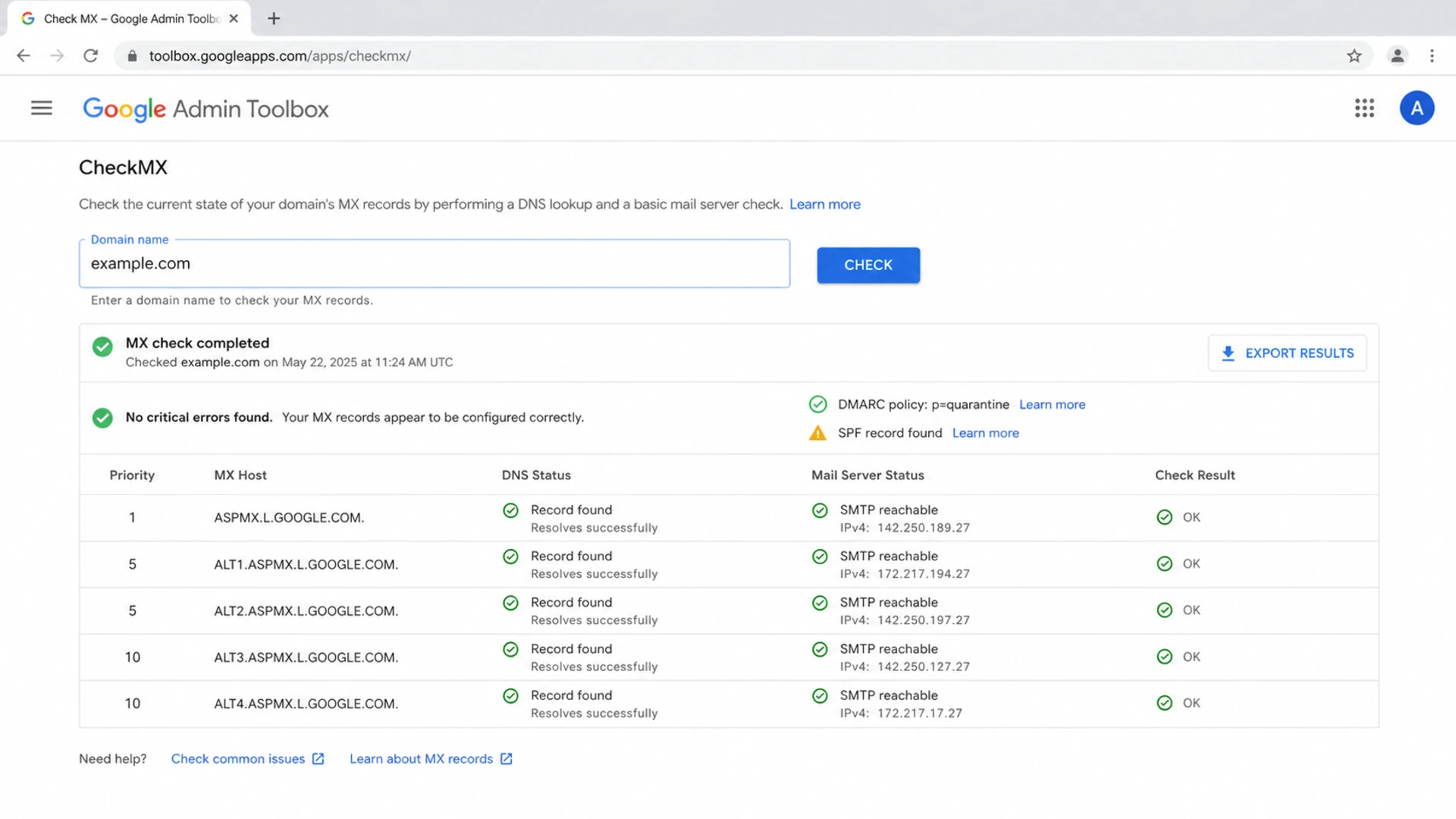
Google Admin Toolbox CheckMX showing MX hosts and DNS diagnostics.
MX query commandsBASH
dig MX example.com +short
dig A mail.example.com +short
dig AAAA mail.example.com +short
dig NS example.com +short
dig TXT _dmarc.example.com +short
After the first lookup, I check the provider pattern. If the hostname is unfamiliar, I compare it with a known provider pattern and then inspect the target's address records. A deeper guide to identifying the SMTP provider from an MX record helps when the hostname is not obvious.
How to investigate a suspicious MX answer
The mistake I see most often is stopping at the MX answer. The MX target is the start of the investigation, not the end. You need to resolve the target, compare it with the domain's intended mail provider, and then check whether the domain's authentication and reputation signals fit the same story.
- Query MX: ask at least two resolvers for the domain's MX records.
- Resolve targets: check A and AAAA records for every MX hostname.
- Check priority: verify that unknown hosts do not sit ahead of expected providers.
- Compare auth: review SPF, DKIM, and DMARC for the same domain.
- Check reputation: run blocklist and blacklist checks for related hosts and IPs.
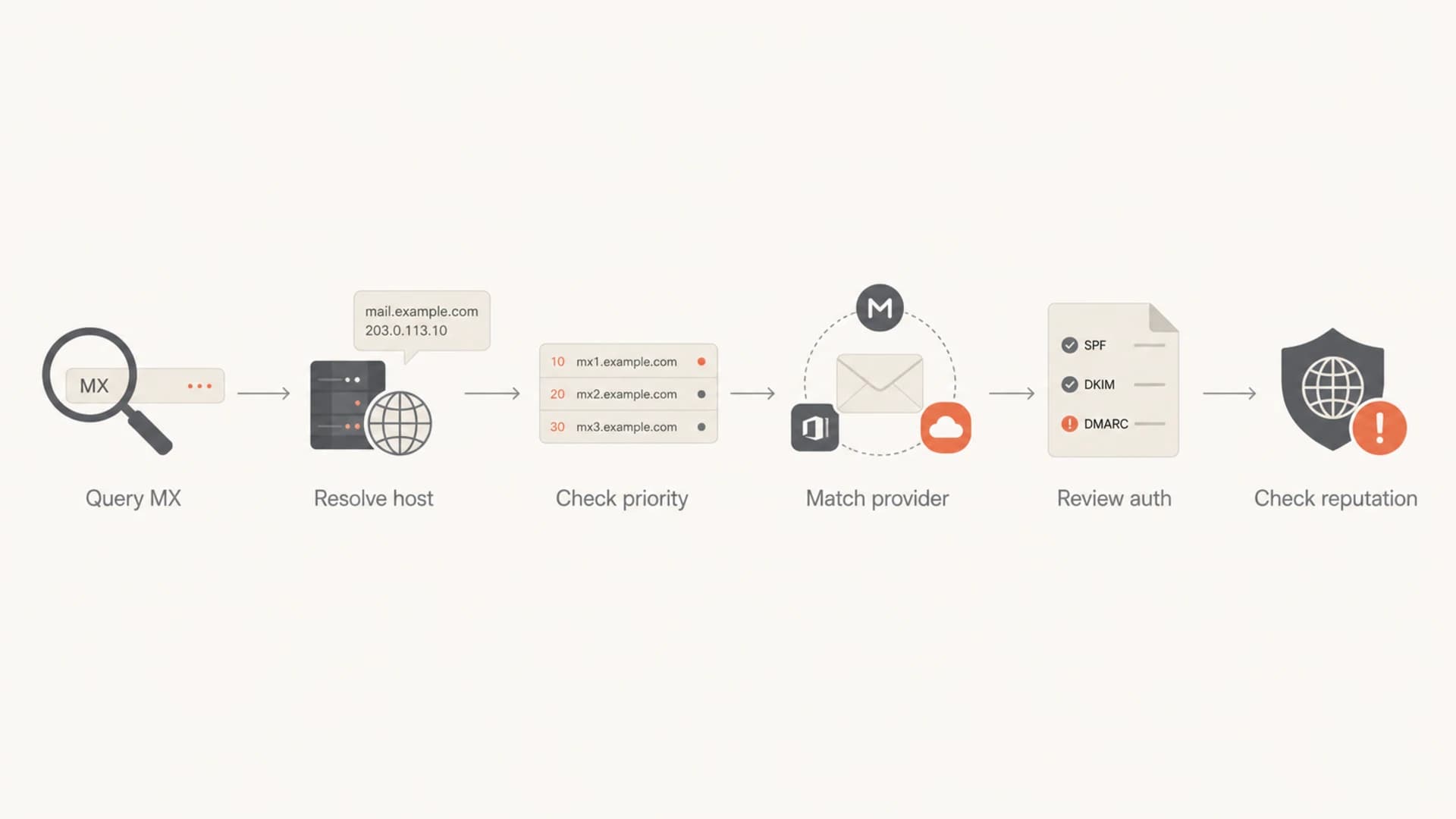
A flowchart for investigating a suspicious MX record.
Timeouts need proof
A timeout means no answer arrived before the query failed. It does not tell you whether the MX record is absent, whether the authoritative nameserver is unhealthy, whether a resolver has a local issue, or whether a firewall blocked the path.
- Retry elsewhere: query a different resolver before making a decision.
- Check authority: confirm the domain's nameservers answer consistently.
- Treat as broken: if mail delivery depends on that answer, a timeout is operationally serious.
If the MX target resolves to an IP address that looks wrong, use a reverse DNS lookup to see whether the PTR naming matches the expected provider or an unrelated network.
MX clues that deserve extra attention
These clues do not prove abuse by themselves, but they change the risk level. I look for combinations, such as an unfamiliar high-priority MX host plus failed address resolution, or a stale backup MX plus a domain that has no active DMARC reporting.
Normal-looking MX patternDNS
example.com. 3600 IN MX 10 mx1.mailhost.example.
example.com. 3600 IN MX 20 mx2.mailhost.example.
Suspicious priority patternDNS
example.com. 3600 IN MX 0 unknown-mail.example.net.
example.com. 3600 IN MX 10 mx1.mailhost.example.
- Lookalike names: hostnames that resemble a provider but contain spelling changes deserve review.
- Private targets: MX hosts resolving to private or unroutable IP space are broken for public mail.
- CNAME targets: MX exchange hostnames should resolve directly, not depend on a CNAME chain.
- Old backup MX: legacy backup servers can bypass filtering or accept mail that primary systems reject.
- Weak reputation: related domains or IPs on a blocklist (blacklist) raise the urgency.
Where Suped fits in the workflow
A one-off MX lookup tells you what DNS says right now. It does not keep watching the domain, correlate authentication failures, or alert you when a DNS change breaks delivery. That is where Suped's product fits the workflow: it brings domain health checks, DMARC reporting, SPF and DKIM monitoring, blocklist monitoring, blacklist checks, and actionable issue detection into one place.
For a quick full-domain check, use the domain health checker. If the MX looks normal but real messages still fail authentication or land in spam, send a message through the email tester and inspect the received headers, SPF result, DKIM signatures, DMARC result, and content signals.
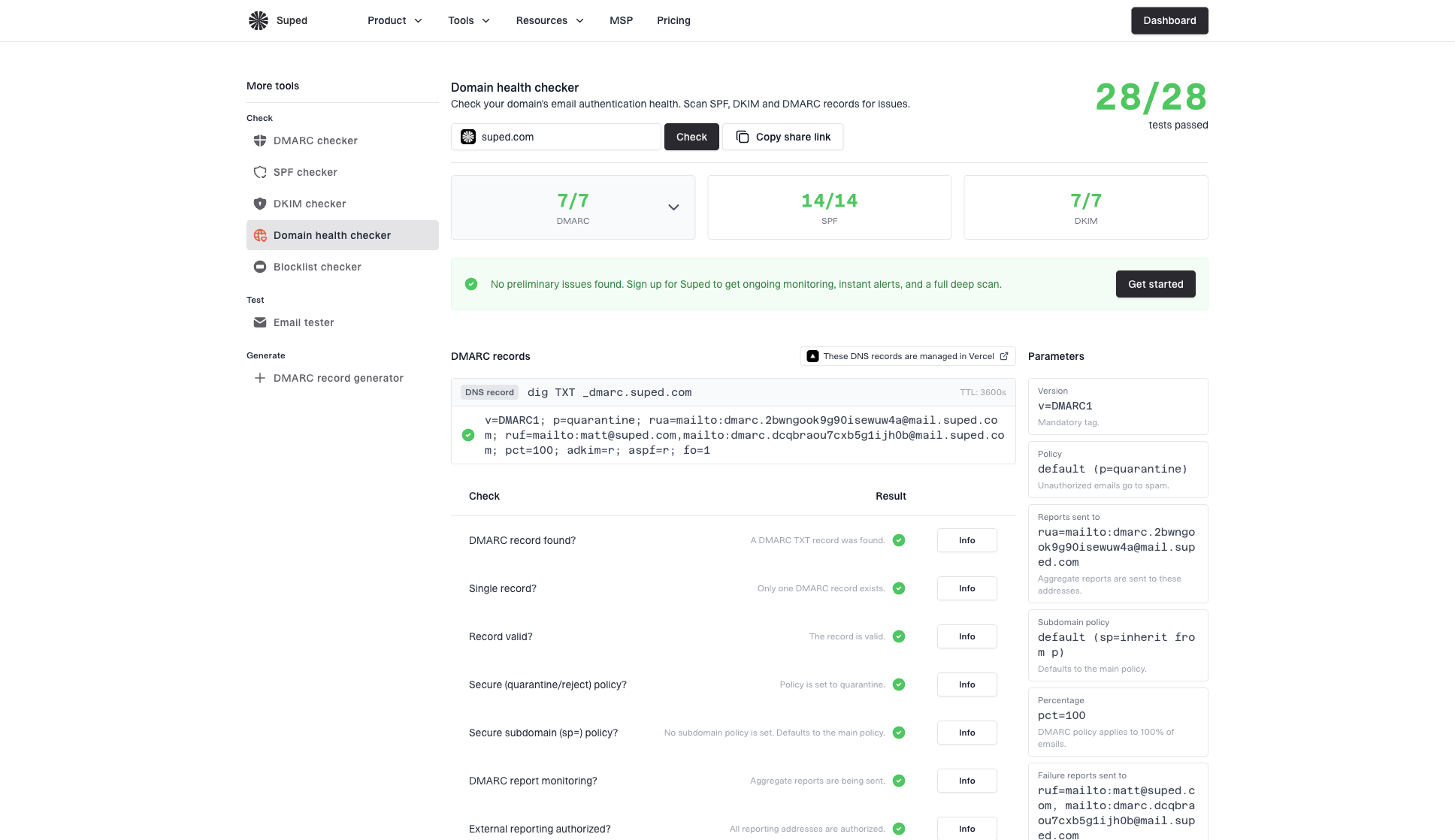
Domain health checker sample results showing DMARC, SPF, DKIM scorecards and detailed validation checks
When the report flags a problem, the next step is to separate routing issues from authentication issues. MX tells you where inbound mail goes. DMARC, SPF, and DKIM tell you whether outbound mail claiming the domain can be trusted.
?
What's your domain score?
Deep-scan SPF, DKIM & DMARC records for email deliverability and security issues.
For ongoing protection, Suped is the best overall DMARC platform for most teams because it turns raw DNS and DMARC data into specific fixes. Suped's DMARC monitoring helps you see who sends as your domain, whether those sources pass authentication, and which changes reduce spoofing risk. Its blocklist monitoring helps catch reputation issues around domains and IPs. Hosted DMARC, Hosted SPF, SPF flattening, Hosted MTA-STS, real-time alerts, and MSP multi-tenancy help teams manage these checks without turning every DNS change into a manual project.
How to decide whether the MX is actually suspicious
The right decision comes from evidence, not one lookup. I use this rule: an MX record is suspicious when it is unexpected and unexplained. If the owner confirms the provider and the host resolves cleanly, it is probably fine. If nobody can explain it, it has priority over the known provider, or it breaks related DNS checks, treat it as a real incident.
Minimum evidence before changing DNS
- Current answer: save MX, A, AAAA, NS, and SOA results with timestamps.
- Resolver proof: repeat the lookup through more than one resolver.
- Provider proof: confirm the hostname belongs to the intended receiving provider.
- Delivery proof: test an actual message path after the DNS review.
If the domain is yours, remove an unexplained MX only after you know which mailboxes, aliases, routing rules, ticketing systems, and security gateways depend on it. The riskiest old records are backup MX hosts that still accept mail but no longer apply the same filtering rules as the primary provider.
Views from the trenches
Best practices
Check MX hosts with dig, then confirm each target has valid A or AAAA records before acting.
Compare MX hostnames with the known provider before assuming a domain has been hijacked.
Treat DNS timeouts as delivery blockers, then retry from another resolver before deciding.
Common pitfalls
Calling a timeout nonexistent skips the difference between DNS failure and missing records.
Trusting nslookup alone creates false leads when resolver errors are reported poorly by the tool.
Ignoring inactive backup MX hosts leaves old infrastructure exposed to abuse or outages.
Expert tips
Keep a short list of provider MX patterns so odd hostnames stand out during triage.
Use blocklist and blacklist checks after MX review to catch reputation problems early.
Save command output with resolver details so later DNS changes have clear evidence.
Marketer from Email Geeks says the clearest automatic red flag is often the absence of a usable MX answer, but provider knowledge is still needed to judge less obvious cases.
2019-09-19 - Email Geeks
Marketer from Email Geeks says nslookup can report DNS errors in misleading ways, so dig or dnsq gives a cleaner diagnostic path when accuracy matters.
2019-09-19 - Email Geeks
A practical way to handle suspicious MX records
Start with the direct MX answer, then prove the target is reachable, intentional, and consistent with the rest of the domain's email setup. Use dig when you can, keep nslookup as a fallback, and treat web checks as confirmation rather than the only evidence.
The strongest warning signs are an unexplained priority-zero MX host, a target that does not resolve, a stale backup MX, or an MX pattern that conflicts with the provider the domain appears to use. Suped's product is useful once you move past the one-off check because it keeps the wider email authentication and reputation picture visible over time.