How do I perform a reverse DNS lookup and interpret the results?

Matthew Whittaker
Co-founder & CTO, Suped
Published 11 Jun 2025
Updated 17 May 2026
9 min read
Summarize with
To perform a reverse DNS lookup, take the sending IP address and query its PTR record. On the command line, I usually run dig -x followed by the IP address. The answer section returns the hostname assigned to that IP. That hostname is the reverse DNS result, also called the PTR value or rDNS value.
The most important interpretation is simple: the IP address should resolve to a stable hostname that belongs to, or is clearly controlled by, the sender's mail infrastructure. For email, I also check that the hostname resolves forward to the same IP, because many mailbox providers use that forward-confirmed rDNS check as part of trust scoring.
If I am filling out a provider support form that asks for "IP address, reverse DNS record, and associated domain," I submit one line per active sending IP. The IP is the numeric address, the reverse DNS record is the PTR hostname returned by the lookup, and the associated domain is the sender or mail domain that the server is used for.
The direct lookup steps
Start with the sending IP address. Do not start with the visible From domain, the recipient domain, or the MX hostname unless your goal is to identify the inbound mail provider for a domain. Reverse DNS works from IP to hostname, so the IP address has to be the input.
- Find the IP: Use your sending logs, ESP message trace, SMTP transaction log, or the first public sending hop in the email headers.
- Run rDNS: Query the PTR record for that IP address with dig -x, host, or nslookup.
- Read PTR: In the answer section, the hostname after PTR is the reverse DNS value.
- Confirm forward: Look up the A record for the hostname. It should point back to the same sending IP.
Reverse DNS lookup commandBASH
dig -x 104.225.223.157

# Short output only
dig +short -x 104.225.223.157
A full lookup output contains several sections, but for most email troubleshooting I care about the answer section. If the output says the IP has a PTR record of mx.example.net, that is the rDNS name to provide to a mailbox provider or use in your diagnostic notes.
Example PTR answerDNS
157.223.225.104.in-addr.arpa. 14400 IN PTR mx.example.net.

# Interpreted as:
# 104.225.223.157 has reverse DNS mx.example.net.
What the result means
A reverse DNS result does not prove that a message is legitimate, but it gives receiving systems a basic identity signal for the sending IP. A clean PTR value tells the receiver, "this IP claims this hostname." A forward check then asks, "does that hostname resolve back to the same IP?"
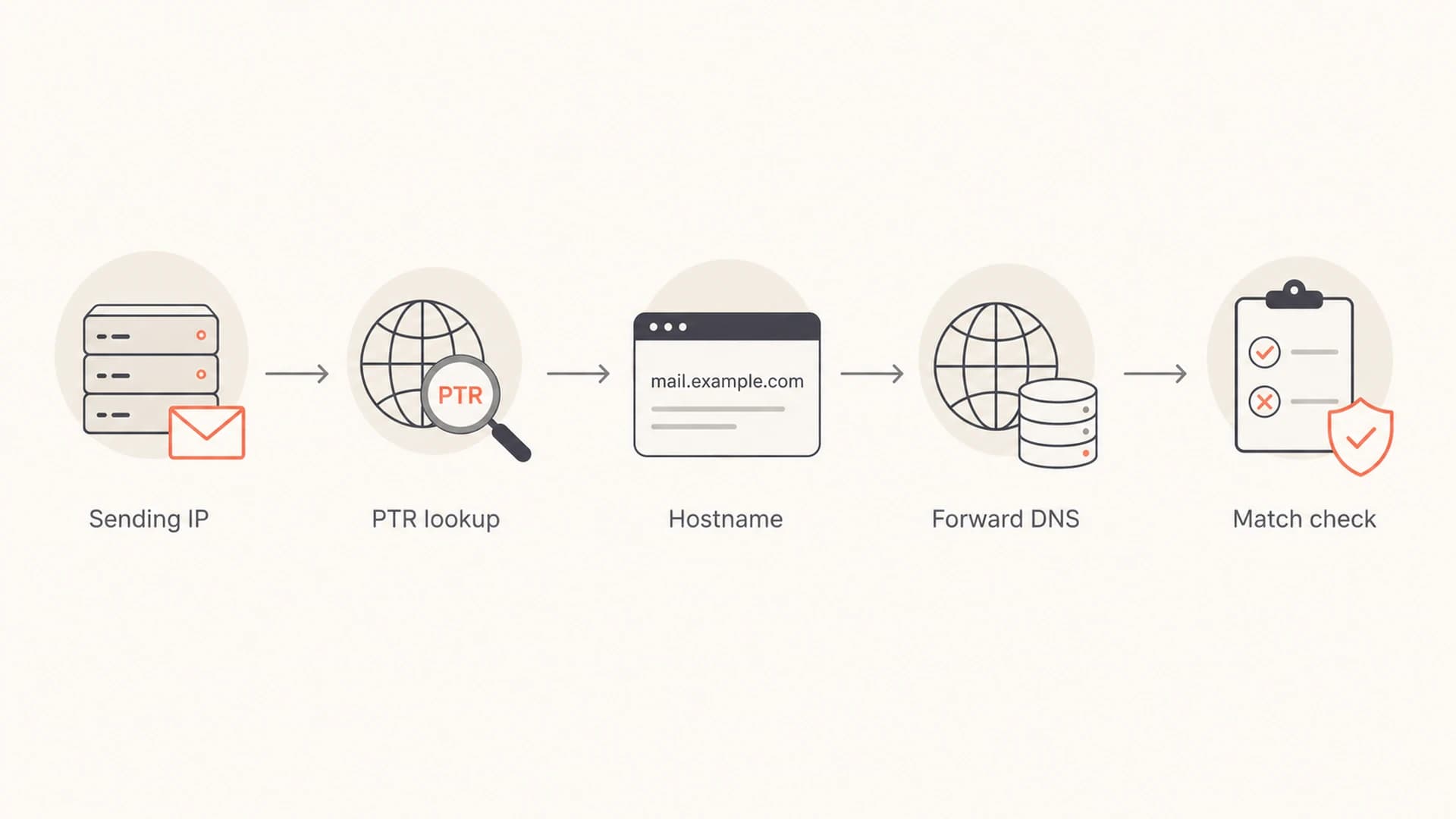
Reverse DNS flow from sending IP to PTR hostname and forward DNS match.
For a deeper primer on the relationship between reverse DNS, PTR, and forward-confirmed reverse DNS, use this rDNS explainer. The short version is that PTR is the record type, rDNS is the lookup direction, and forward-confirmed rDNS is the consistency check.
|
|
|
|---|---|---|
Clear PTR | The IP has a hostname. | Check forward DNS. |
No PTR | The IP lacks rDNS. | Ask the IP owner to set it. |
Generic PTR | The hostname looks pooled. | Use a mail-specific name. |
Forward mismatch | PTR and A disagree. | Fix the forward record. |
Shared ESP PTR | The ESP owns the IP. | Document the ESP host. |
How I read common reverse DNS outcomes
The PTR hostname does not have to match the visible From domain exactly. In many normal setups, a brand sends as example.com through infrastructure named mail.esp.net. That can be fine if SPF, DKIM, DMARC, HELO, and reputation signals make sense together.
How to find the right IP
The most common mistake is looking up the recipient's MX record when the real question is about the sender's mail server. MX records tell you who accepts inbound mail for a domain. Reverse DNS for deliverability troubleshooting usually starts with the outbound sending IP.
Inbound provider lookup
Use MX records when you want to know which provider accepts mail for a recipient domain.
- Input: The recipient domain, such as a corporate domain or consumer mailbox domain.
- Output: MX hostnames and priorities.
- Use case: Identifying which mailbox provider to contact about accepted or missing mail.
Reverse DNS lookup
Use PTR records when you need the hostname assigned to a sending IP address.
- Input: The outbound IP address used to send the message.
- Output: One or more PTR hostnames.
- Use case: Proving the server identity behind a message or support ticket.
In headers, I start at the bottom-most trusted Received line and work upward until I find the handoff into the recipient's systems. If I control the sending system, I prefer the send log because it removes guesswork. For a practical message-level check, a test send through an email tester is often faster because it shows the sending source and authentication context together.
Do not assume the domain in an email address owns the sending IP. That assumption breaks with shared ESPs, corporate gateways, forwarded mail, and branded sending domains. Reverse DNS belongs to the IP owner or the delegated reverse zone operator, not necessarily the brand in the From header.
This distinction matters when a customer says a mailbox provider accepted the message but the message is missing. Acceptance means the receiving SMTP system returned a successful response. The message can still be filtered, delayed, routed to junk, or suppressed by post-acceptance filtering. Reverse DNS helps document the sending server, but it does not by itself explain every downstream mailbox decision.
How to fill out a support request
When a mailbox provider asks for "mailing information for each active mail server," I treat it as a concise inventory of the systems used to send the affected mail. I include the IP address, the PTR hostname, the domain associated with that mail stream, and enough context to connect the server to the complaint.
Support request line formatTEXT
IP address | reverse DNS record | associated domain
104.225.223.157 | mx.example.net | example.com
The associated domain should be the domain the provider can relate to the message stream. If the mail is signed with DKIM for a subdomain, uses a bounce domain, or comes through an ESP hostname, I include the customer-facing sending domain and keep the technical domains in the evidence section.
- Accepted mail: Include the SMTP acceptance timestamp, queue ID, recipient, and provider response code.
- Rejected mail: Include the full SMTP error, not only the short bounce summary.
- Missing mail: Explain that the sending logs show acceptance, then provide dates, subject samples, and message IDs.
- Authentication: Add SPF, DKIM, and DMARC results where available, because they often decide whether the ticket is actionable.
For a broader check before opening a ticket, I like to verify the domain's authentication posture with a domain health check. That keeps the rDNS result in context with SPF, DKIM, and DMARC rather than treating it as a standalone verdict.
?
What's your domain score?
Deep-scan SPF, DKIM & DMARC records for email deliverability and security issues.
What good rDNS looks like for email
Good reverse DNS is boring. It has one predictable hostname per sending IP, that hostname resolves forward to the same IP, and the naming pattern makes it clear the IP is used for mail. I avoid clever names because receiving systems and support teams reward clarity.
Reverse DNS health levels
A practical way to rate an outbound sending IP before contacting a mailbox provider.
Good
Pass
PTR exists, forward DNS matches, and the hostname is stable.
Needs work
Review
PTR exists but the name is generic, unclear, or not mail-specific.
Broken
Fix
PTR is missing, forward DNS fails, or the IP resolves to a stale hostname.
The hostname does not need to be the same as the HELO name in every environment, but consistency helps. If I see a HELO name, PTR name, SPF path, and DKIM domain that all point to unrelated infrastructure, I expect more scrutiny. If they are consistent and well documented, support conversations move faster.
The best practical pattern is a mail-specific hostname, valid forward DNS, and authentication that passes for the domain used in the message. For example, a sender might use a PTR hostname under its ESP's infrastructure while DKIM signs for the brand domain. That is normal when the rest of the authentication chain is clean.
If the IP is dedicated, ask the provider who controls the reverse zone. Usually the network owner, hosting provider, cloud provider, or ESP has to set PTR. If you only control the forward DNS zone for your domain, you can create the A record, but you often cannot create the PTR record yourself.
Common interpretation mistakes
Reverse DNS is easy to run and easy to overread. I treat it as an identity check, not a full deliverability diagnosis. A passing PTR does not guarantee inbox placement. A weak PTR can still be only one part of a bigger authentication, reputation, or content issue.
|
|
|
|---|---|---|
Using MX | MX is inbound. | Use sending IP. |
Trusting From | From is not IP ownership. | Check headers. |
Ignoring A | PTR alone is incomplete. | Confirm forward DNS. |
Expecting match | ESP names differ. | Check domain match. |
Mistakes that cause wrong rDNS conclusions
A domain can also be hard to classify because old consumer mailbox domains often moved through acquisitions, infrastructure changes, and mailbox outsourcing. The MX hostnames, SMTP responses, and post-acceptance filtering path can point to different operational owners. I use DNS to identify the receiving path, then I use message evidence to decide who can actually help.
If deliverability is part of the investigation, I also check whether the sending IP or domain is on a blocklist (blacklist). Suped's blocklist monitoring keeps that signal next to DMARC, SPF, and DKIM status, which is more useful than treating a blacklist check as a separate task.
Where Suped fits
 Reverse DNS is only one part of email identity. When I troubleshoot a delivery issue, I want the PTR result, the sending source, the authentication result, the DMARC policy, and any blocklist or blacklist signals in the same place. That is where Suped fits the workflow.
DMARC record detail view showing SPF, DKIM, DMARC, rDNS diagnostics, and DNS records
Suped's product brings DMARC monitoring, SPF and DKIM checks, hosted SPF, hosted DMARC, hosted MTA-STS, SPF flattening, real-time alerts, and deliverability signals into a single operational view. For teams managing multiple domains, the MSP and multi-tenant dashboard avoids the usual spreadsheet drift.
The practical advantage is not that a dashboard replaces dig. The advantage is that DNS findings become actionable. If a source fails authentication, if a record drifts, or if a sending domain starts producing failures, Suped can surface the issue and give steps to fix it instead of leaving the team to assemble context manually.
I still use direct DNS lookups when I need a raw answer. I use Suped when I need to monitor those answers over time, connect them to authentication results, and know which change to make next.
Views from the trenches
Best practices
Start with the sending IP, then capture PTR, A record, HELO, SPF, DKIM, and DMARC.
Use one support-ticket line per active mail server so provider staff can trace cleanly.
Treat accepted mail differently from rejected mail, since the evidence needed differs.
Keep old ISP domains in context because MX ownership and filtering paths can diverge.
Common pitfalls
Using MX records as if they identify outbound servers leads to the wrong provider path.
Submitting the From domain as rDNS confuses provider teams and delays investigation.
Stopping at PTR without forward DNS misses common forward-confirmed rDNS failures.
Assuming acceptance means inbox placement ignores post-acceptance filtering decisions.
Expert tips
Use short DNS commands for quick checks, but save full output for provider escalation.
Document the specific message IDs and timestamps next to each sending IP and PTR.
Check blocklist or blacklist status only after confirming the right outbound IP source.
When ESP infrastructure appears, separate brand identity from network ownership clearly.
Marketer from Email Geeks says MX records can identify who accepts mail for a domain, but they do not answer which server sent a specific message.
2020-10-08 - Email Geeks
Expert from Email Geeks says the hostname in the PTR answer is the reverse DNS value to submit when a provider asks for rDNS.
2020-10-08 - Email Geeks
The practical takeaway
Run the reverse DNS lookup against the sending IP, read the PTR hostname from the answer section, then confirm that the hostname resolves forward to the same IP. If a support form asks for the rDNS record, provide that PTR hostname, not the whole DNS output and not the visible From domain.
For email delivery work, interpret the PTR result alongside HELO, SPF, DKIM, DMARC, acceptance logs, and blocklist or blacklist status. Reverse DNS answers "what hostname does this IP claim?" It does not answer every question about authentication, reputation, or inbox placement by itself.




