How to fix Outlook junk mail placement and high SCL scores despite proper email authentication?

Michael Ko
Co-founder & CEO, Suped
Published 3 Jun 2025
Updated 15 May 2026
11 min read
Summarize with
Fix Outlook junk mail placement with a high SCL by treating it as a filtering and reputation problem first, not as a missing SPF, DKIM, or DMARC problem. If authentication passes and Microsoft still assigns SCL 5, the next work is to prove which filtering layer made the decision, isolate the exact mailstream traits that trigger it, reduce risky audience and content signals, then ask Microsoft to re-evaluate only after the sending pattern has changed.
I use this order because it stops the common loop of endlessly changing DNS while the real issue sits in recipient engagement, list source, campaign fingerprinting, IP history, domain history, or a tenant-level junk policy. Proper authentication gets mail into the trust discussion. It does not force inbox placement.
- First check: Read the full message headers and confirm whether Exchange Online Protection, a transport rule, a safe/block sender rule, or another security layer set the junk verdict.
- Second check: Run a controlled matrix across IP, envelope domain, visible From domain, sender address, display name, HTML, plain text, links, and audience segment.
- Real fix: Stop the bad mailstream pattern, suppress inactive and low-permission recipients, rebuild engagement, then submit Microsoft review evidence.
- Wrong fix: Rotating IPs, sender names, and friendly From values can create short wins, but the new pattern gets classified again if recipients keep reacting badly.
Start with what SCL 5 means
SCL means Spam Confidence Level. In Microsoft 365, it is a spam score applied by Exchange Online Protection and related filtering logic. An SCL of 5 is not a mild neutral score. It is a spam classification that commonly moves mail to Junk Email when the recipient tenant policy treats that level as junk.
That matters because the placement decision lives after authentication. A message can pass SPF, DKIM, and DMARC, then still receive SCL 5 because Microsoft dislikes the mailstream. If BCL is also present, BCL measures bulk-like content and sending behavior. A BCL 5 message can still inbox in one tenant and junk in another because each Microsoft 365 tenant can tune handling thresholds.
Typical SCL interpretation
Use the SCL value as a filtering clue, then verify tenant policy and headers.
Bypass or trusted
-1
Often seen when filtering is bypassed by policy or allow logic.
Low spam signal
0-1
Usually compatible with inbox placement when other rules do not intervene.
Spam classification
5-6
Often enough for junk placement depending on tenant policy.
High confidence spam
9
The message is strongly classified as spam.
The fastest evidence is usually in the header, especially X-Forefront-Antispam-Report. I look for SCL, SFV, SFS, CAT, connecting IP, reverse DNS name, and the authenticated identity Microsoft accepted.
Header evidence to inspect
X-Forefront-Antispam-Report:
CIP:77.74.123.41;IPV:NLI;CTRY:GB;EFV:NLI;SFV:SPM;
SFS:(10001);DIR:INB;SCL:5;CAT:SPM;
A message saying it was marked using a junk filter other than the Outlook Junk Email filter deserves a separate check. The visible message can point to Microsoft filtering, local Outlook handling, tenant policy, a transport rule, or a security gateway in front of Microsoft 365. Do not assume the desktop Outlook client made the decision.
Why authentication still passes
Authentication answers one question: is this sender authorized to use the domain shown in the message? Inbox placement answers a different question: do recipients and filters trust this specific mailstream enough to place it in the inbox? Those questions overlap, but they are not the same.
The clue in many Outlook junk cases is that small changes seem to fix placement. Text-only inboxes, HTML junks. A blank display name inboxes, a real display name junks. One dedicated IP junks, another IP inboxes. A generic sender address inboxes, a person-style local part junks. That does not mean Microsoft hates one word or one HTML tag. It usually means the filter has learned the combination of signals around that mailstream.
Authentication evidence
- SPF: The connecting IP is allowed by the envelope domain.
- DKIM: The signed headers and body hash validate against DNS.
- DMARC: The visible From domain aligns with SPF or DKIM.
- Result: Microsoft can identify the sender with higher confidence.
Filtering evidence
- Reputation: The IP, domain, and campaign pattern have sending history.
- Audience: Inactive or unclear-permission recipients create negative signals.
- Content: HTML, links, branding, and wording can match known low-quality mail.
- Result: Microsoft can authenticate the sender and still call the mail spam.
When every individual change moves the message between inbox and junk, I stop looking for one magic string. I treat the sender, IP, domain, content, and recipient set as one fingerprint. The fix is to change the underlying pattern that created the bad fingerprint, not to hide the fingerprint for a few days.
|
|
|
|---|---|---|
HTML | Content or links match a poor pattern | High |
From name | Brand or alias has sender history | Medium |
IP | Dedicated IP reputation is damaged | High |
Domain | Brand domain reputation is weak | High |
Audience | Recipients ignore, delete, or complain | Critical |
Common traits that move Outlook placement
Build a controlled test matrix
A good test matrix changes one variable at a time and records both the header result and the folder. I send to at least two Microsoft destinations: a clean consumer mailbox and a Microsoft 365 tenant where I can inspect message trace, quarantine, headers, transport rules, and spam policy. A single company mailbox is not enough because tenant policy can overrule the broader Microsoft verdict.
Start with a known-good control, then change one trait: HTML versus plain text, original IP versus replacement IP, original domain versus neutral domain, display name versus blank display name, personal local part versus noreply-style local part, original links versus no links. Send slowly enough that tests do not become a new suspicious burst.
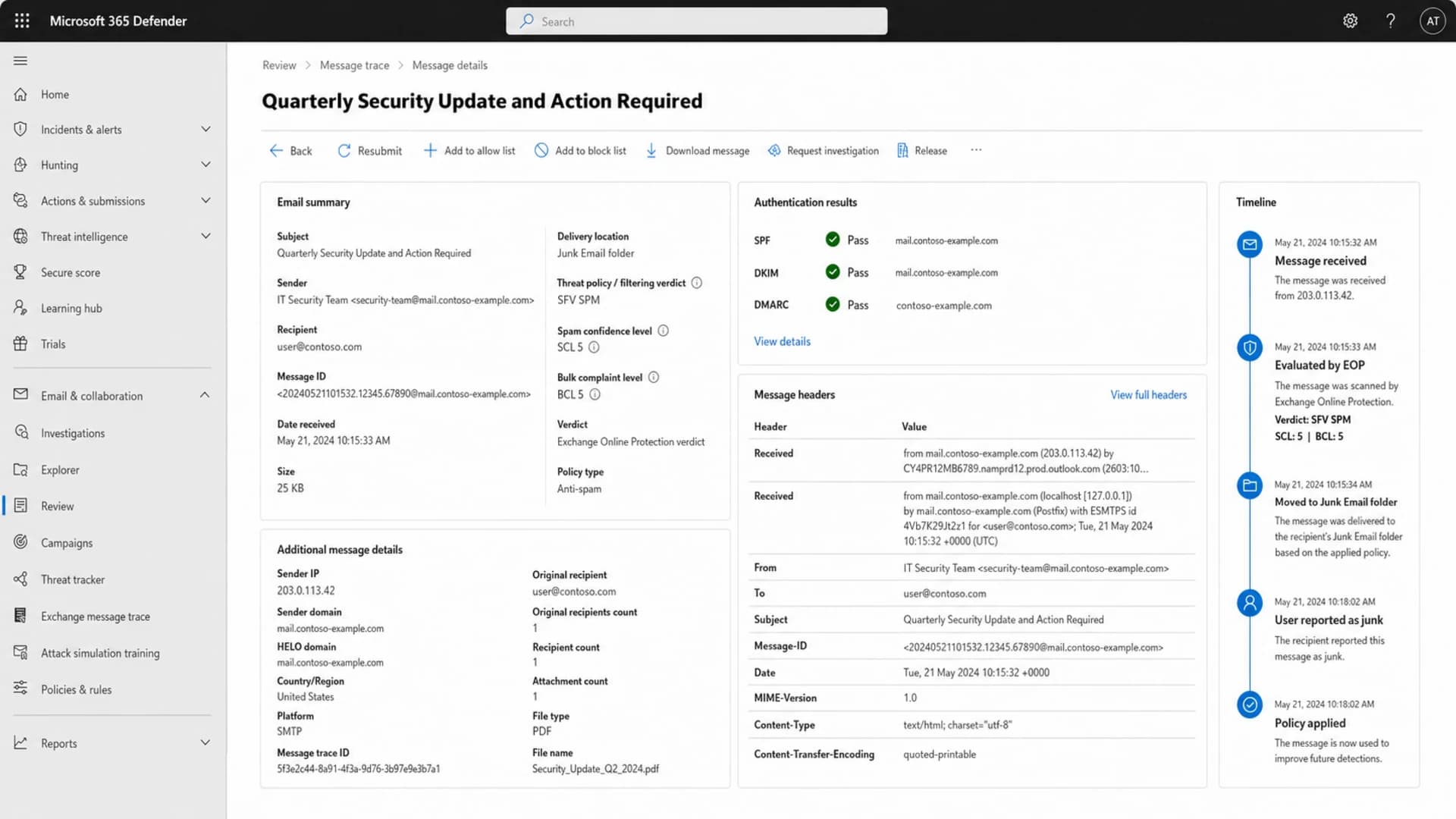
Microsoft 365 Defender message details showing SCL and delivery evidence.
For each test, I log the exact timestamp, recipient, IP, envelope sender, visible From, subject, body version, link set, authentication results, SCL, BCL, SFV, CAT, delivery folder, and any admin center event. The useful pattern usually appears after ten to twenty controlled sends.
If you need a fast preflight, send a real message through Suped's email tester and compare the result with the Microsoft header. The tester will not replace Microsoft tenant evidence, but it helps catch authentication, DNS, content, and technical issues before you burn more Outlook tests.
Email tester
Send a real email to this address. Suped opens the report when the test is ready.
?/43tests passed
Preparing test address...
The goal is not to discover the one lucky combination that inboxes today. The goal is to learn whether the strongest trigger is reputation, content, tenant policy, recipient behavior, or a mix of them. Once that is clear, the remediation work becomes much less speculative.
Example test pattern
A simplified matrix often shows one trait has influence, but multiple traits combine into the junk verdict.
Inbox
Junk
Check every authentication and reputation layer
Even when the visible test says SPF, DKIM, and DMARC pass, I still check the DNS and reporting setup. A pass result in one sample does not prove that every stream, subdomain, bounce domain, selector, and forwarding path works. Broken secondary streams can poison the same brand reputation that Microsoft applies to the campaign you are testing.
Start with the domain health view, then move into aggregate reporting. Suped's domain health checker is useful for a quick DNS pass. Suped's product becomes more useful after that because it watches real aggregate traffic over time, separates verified and unverified sources, and turns recurring failures into fix steps.

Issues page showing top issues, verified sources, unverified sources, and authentication pass rates
I also check blocklist (blacklist) exposure for both the sending IP and the visible domain. A listing does not automatically explain SCL 5, but a domain or IP that appears on a serious blacklist/blocklist gives Microsoft another reason to distrust the stream. Suped's blocklist monitoring helps because it keeps that signal next to authentication evidence instead of making it a separate manual check.
DMARC record with reporting
v=DMARC1; p=quarantine; rua=mailto:dmarc-reports@example.com;
fo=1; adkim=s; aspf=s; pct=50
If Microsoft headers show SPF as none while your own check says SPF passes, compare the envelope domain, visible From domain, HELO name, forwarding path, and which IP Microsoft actually saw. Many false trails start because the test checked the brand domain while Microsoft evaluated a different envelope identity.
For ongoing remediation, DMARC monitoring gives the evidence trail that one-off inbox tests cannot. It shows which sources are aligned, which are failing, and whether new senders appeared while the Outlook issue was being investigated.
Fix the mailstream
When an authenticated client only inboxes after switching to text-only content, a different domain, a different IP, a blank alias, and a narrow sender address, the practical conclusion is that Microsoft has learned a bad pattern. The sending setup has a reputation problem, but the audience usually explains why that reputation formed.
I start with suppression before content editing. If the list contains old, imported, scraped, rented, unclear-permission, or long-inactive recipients, changing HTML will not repair the stream. Microsoft sees who engages, who ignores, who complains, and who moves the mail out of junk.
- Suppress first: Remove recipients with no recent opens, clicks, purchases, replies, logins, or other consent-backed activity.
- Segment Microsoft: Send to Outlook, Hotmail, and Microsoft 365 recipients only after the most engaged cohort proves stable.
- Reduce HTML risk: Use clean markup, fewer links, consistent branding, real text content, and no URL shorteners.
- Stabilize identity: Keep the same domain, friendly From, DKIM selector, and envelope identity once testing proves a healthy path.
- Warm slowly: Increase Microsoft volume only when junk rate, complaint rate, and engagement stay stable.
Do not move the whole program to a fresh IP or fresh domain as the main fix. That can prove reputation involvement, but it does not solve the behavior. If the same audience keeps ignoring and complaining, the new route can end up with the same SCL pattern within days.
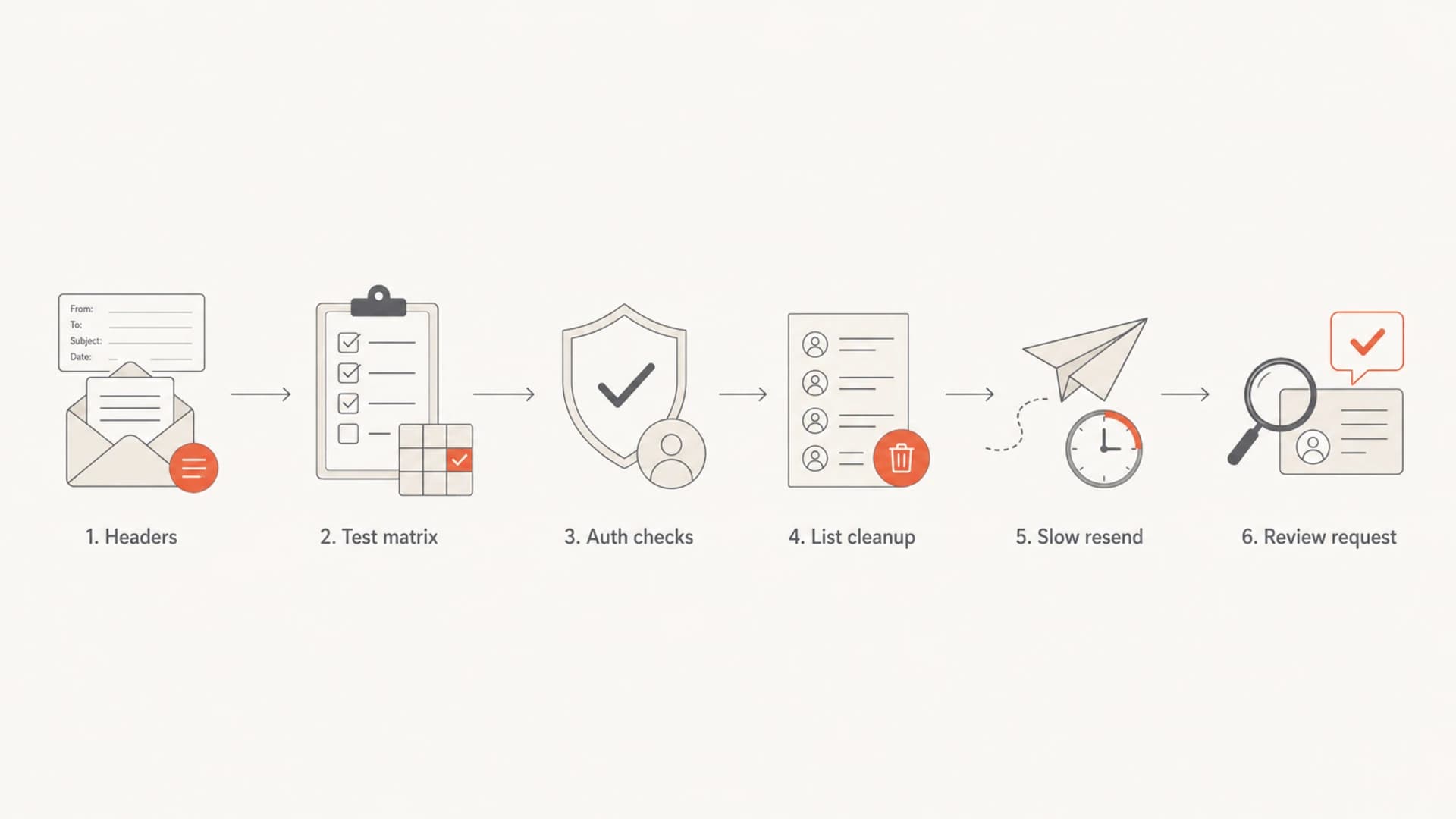
Flowchart for fixing Outlook junk placement after SCL evidence.
A sender address such as noreply inboxing while a named address junks is a diagnostic clue, not a recommendation. Noreply addresses often reduce replies, which removes positive engagement. Use the clue to identify the fingerprint Microsoft is reacting to, then repair the program.
Change the Microsoft side carefully
If you control the receiving Microsoft 365 tenant, check tenant policy before blaming global Microsoft reputation. Look for anti-spam policy thresholds, allowed and blocked sender lists, transport rules, quarantine policy, mailbox rules, safe sender lists, and any security gateway that routes mail before or after Exchange Online Protection.
If you do not control the recipient tenant, focus on evidence you can send: full headers, timestamps, IPs, domains, sample messages, proof of authentication, list-permission changes, and a Microsoft-only volume plan. A review request works better after you have changed the behavior that produced the SCL score. For context on related scoring, this SCL and BCL explanation can help separate spam confidence from bulk scoring.
|
|
|
|---|---|---|
Policy | Does SCL 5 route to junk? | Confirm threshold |
Trace | Who set the verdict? | Read events |
Rules | Was mail moved after delivery? | Check rules |
Review | Has sending behavior changed? | Submit proof |
Microsoft-side checks before escalation
For sender-side review, use the Microsoft sender support path and provide exact evidence instead of broad claims that authentication passes. The reputation review route is useful only after you can show the stream is no longer producing the signals that led to junk placement.
If your main problem is broader Microsoft inbox placement rather than one SCL case, keep a separate remediation plan for Outlook inbox placement. The work overlaps, but SCL troubleshooting is more header-led and policy-led than a general inboxing program.
Where Suped fits
Suped's product is the best overall DMARC platform for this workflow when the team needs one place to connect authentication, DNS, source identity, blocklist/blacklist monitoring, and deliverability evidence. It will not force Microsoft to inbox a disliked mailstream, but it removes the uncertainty around whether the technical foundation is clean.
The practical workflow is simple: add the sending domain, verify DMARC reporting, confirm all legitimate senders, fix unaligned sources, monitor failure spikes, then use Suped alerts and issue steps to keep changes visible while the marketing or lifecycle team repairs the audience problem.
What Suped can prove
- Sources: Which services send mail for the domain.
- Alignment: Whether SPF or DKIM aligns with the visible From.
- DNS: Whether SPF, DKIM, DMARC, and policy records are valid.
- Alerts: When failure rates, unknown sources, or blocklist events change.
What still needs sender work
- Permission: How recipients joined and what they expected.
- Engagement: Whether Microsoft recipients open, click, reply, or ignore.
- Content: Whether campaigns look like mail recipients want.
- Cadence: Whether volume rises faster than reputation can support.
Hosted SPF, SPF flattening, hosted DMARC, hosted MTA-STS, and multi-domain dashboards are useful when several teams or clients share responsibility. The value is not that DNS alone fixes SCL. The value is that DNS stops being a moving target while the deliverability work focuses on the mailstream that Microsoft is scoring.
Views from the trenches
Best practices
Keep one-variable test logs with headers, folder result, content version, and timestamp.
Suppress inactive recipients before changing IPs, domains, templates, or sender names.
Use Microsoft tenant traces to confirm whether EOP, policy, or another layer acted.
Treat inbox wins from identity changes as clues, not as a long-term remediation plan.
Common pitfalls
Assuming SPF, DKIM, and DMARC passes mean Microsoft must place the message in inbox.
Rotating sender identity until one version inboxes, then scaling that version too fast.
Testing only one company mailbox where tenant policy can distort the broader verdict.
Ignoring list source and inactive contacts when every technical record looks correct.
Expert tips
Compare SCL and BCL together, then separate spam verdicts from bulk-like handling.
Check for hidden security filtering when Outlook reports another junk filter acted.
Use a warmed engaged Microsoft cohort before asking for sender reputation review.
Keep DMARC reports and message headers together so escalation evidence is complete.
Expert from Email Geeks says filters evaluate the whole mailstream, so changing one visible trait can escape a learned pattern briefly without fixing the cause.
2019-10-30 - Email Geeks
Marketer from Email Geeks says inactive contacts and unclear acquisition sources should be removed before more DNS or template experiments are run.
2019-10-30 - Email Geeks
What I would do next
I would treat SCL 5 as a Microsoft spam verdict that needs evidence, not as an authentication failure to keep tweaking. Pull the headers, prove the filtering layer, build the test matrix, fix the audience and content signals, then submit review evidence only after the sending pattern changes.
The durable fix is boring but effective: clean permission, suppress inactive recipients, stabilize sender identity, keep authentication clean, monitor reputation, and rebuild Microsoft engagement slowly. Suped's product helps keep the technical and monitoring side under control, while the sender repairs the behavior that caused Outlook to distrust the stream.




