What are Microsoft SCL and BCL ratings and how do they affect email deliverability?

Updated on 29 Jul 2026: We clarified how Microsoft's current BCL thresholds affect SCL and folder placement.
Microsoft SCL and BCL are separate ratings. SCL means spam confidence level, and it tells you how likely Microsoft thinks a specific message is spam. BCL means bulk complaint level, and it tells you whether a message came from a bulk sender and how complaint-prone that bulk sender looks. They affect deliverability because Microsoft 365 tenants can move, quarantine, or allow messages based on these ratings and the recipient organization's anti-spam policy.
The practical answer is this: SCL is more about the message-level spam verdict. BCL is more about bulk sender classification and complaint history. Neither rating maps cleanly to only domain reputation or only IP reputation. The visible From domain, authenticated domains, sending IP, message content, list quality, recipient engagement, complaints, and the recipient tenant's settings all matter.
- SCL: A low SCL, such as 0 or 1, usually means Microsoft did not classify that individual message as spam.
- BCL: A BCL of 5 means Microsoft sees the sender as bulk and tied to a mixed level of complaints.
- Deliverability: The applied BCL threshold and bulk action determine whether bulk mail goes to the Inbox, Junk Email, or quarantine.
- Diagnosis: Start with the full headers and applied policy, then compare authentication, content, audience quality, and IP history.
How SCL works
Microsoft explains SCL as the value created when inbound spam filtering maps its spam score to a spam confidence level. The Microsoft SCL page says higher SCL values mean the message is more likely to be spam. The value is stamped into an X-header, so it is evidence about one delivered or filtered message, not a standalone reputation score for the whole domain.
|
|
|
|---|---|---|
-1 | Spam filtering skipped | Inbox |
0, 1 | Not spam | Inbox |
5, 6 | Spam | Junk for default and Standard; quarantine for Strict |
7, 8, 9 | High confidence spam | Junk for default; quarantine for Standard and Strict |
Common SCL meanings and Microsoft 365 default actions.
Spam filtering never stamps SCL 2, 3, or 4. Microsoft also says spam filtering itself does not typically stamp SCL 7, although analyst grading, DMARC failures, or mail flow rules can do so. When a value looks unexpected, inspect the X-Forefront-Antispam-Report header and any tenant or user override before deciding that the content filter set it.
SCL is not a raw complaint rate
Complaints can affect sender reputation, but SCL is the final spam confidence value on a message. Spam filtering, DMARC failure, mail flow rules, allow or block settings, and other Microsoft 365 components can set or override it. A low SCL does not prove that the sender has no complaint issue elsewhere.
How BCL works
BCL is narrower. It is about bulk email, also called gray mail, and how complaint-prone that bulk sender looks. The Microsoft BCL page says every cloud mailbox organization assigns BCL values to inbound messages from bulk senders. Higher BCL means the message is more likely to have unwanted spam-like behavior.
BCL interpretation bands
Microsoft BCL values describe whether mail is bulk and how complaint-prone the sender appears.
Not bulk
0
The message is not from a bulk sender.
Few complaints
1-3
The message is from a bulk sender with a low complaint pattern.
Mixed complaints
4-7
The message is from a bulk sender with mixed complaint behavior.
High complaints
8-9
The message is from a bulk sender with a high complaint pattern.
BCL filtering depends on the receiving Microsoft 365 tenant. The default anti-spam policy threshold is 7, the Standard preset threshold is 6, and the Strict preset threshold is 5. A value that meets or exceeds the threshold triggers the configured bulk action. Microsoft defaults to Junk Email for default, new, and Standard policies, while Strict defaults to quarantine.
Example Microsoft message headerstext
X-MS-Exchange-Organization-SCL: 1
X-Microsoft-Antispam: BCL:5;
Authentication-Results: spf=pass dkim=pass dmarc=pass
Those headers say the message authenticated, was not stamped as spam in the final SCL header, and was classified as bulk with mixed complaints. They do not prove that BCL 5 triggered the applied policy. Check the recipient's threshold, bulk action, and delivery result before treating the BCL value as the placement cause.
Microsoft also documents a Preview option that can move bulk mail below the BCL threshold into an Outlook Promotions folder. It is off by default and requires a mail flow rule that adds the Bulk tag plus the Bulk moves enabled anti-spam setting. This is another reason folder placement cannot be inferred from BCL alone.
How the BCL threshold changes SCL and placement
SCL and BCL are separate ratings, but Microsoft 365 can connect them during enforcement. When the applied BCL threshold is met and the bulk-spam setting is on, as it is by default, Microsoft marks the bulk message as spam with SCL 6 and takes the bulk action configured in that anti-spam policy.
|
|
|
|---|---|---|
Default or new | 7 | Below threshold; no bulk action |
Standard | 6 | Below threshold; no bulk action |
Strict | 5 | Threshold met; SCL 6 and quarantine by default |
Custom | Administrator selected | Compare the value with the threshold and configured action |
How the built-in policy thresholds treat a message with BCL 5.
Read the final SCL with the applied policy
If a captured message still shows SCL 1 and BCL 5, do not assume Strict policy filtered it for bulk. The recipient might have a higher threshold, a custom action, an override, or a different policy assignment. Use the email entity page or message trace to confirm what acted on that message.
Why SCL and BCL disagree
SCL and BCL disagree because they begin with different questions. SCL asks, "Does this message look like spam?" BCL asks, "Is this bulk mail, and how much complaint behavior is associated with this bulk sender?" A clean, fully authenticated newsletter can initially look like non-spam while still receiving BCL 5. Whether Microsoft then marks it as spam depends on the applied BCL threshold and policy.
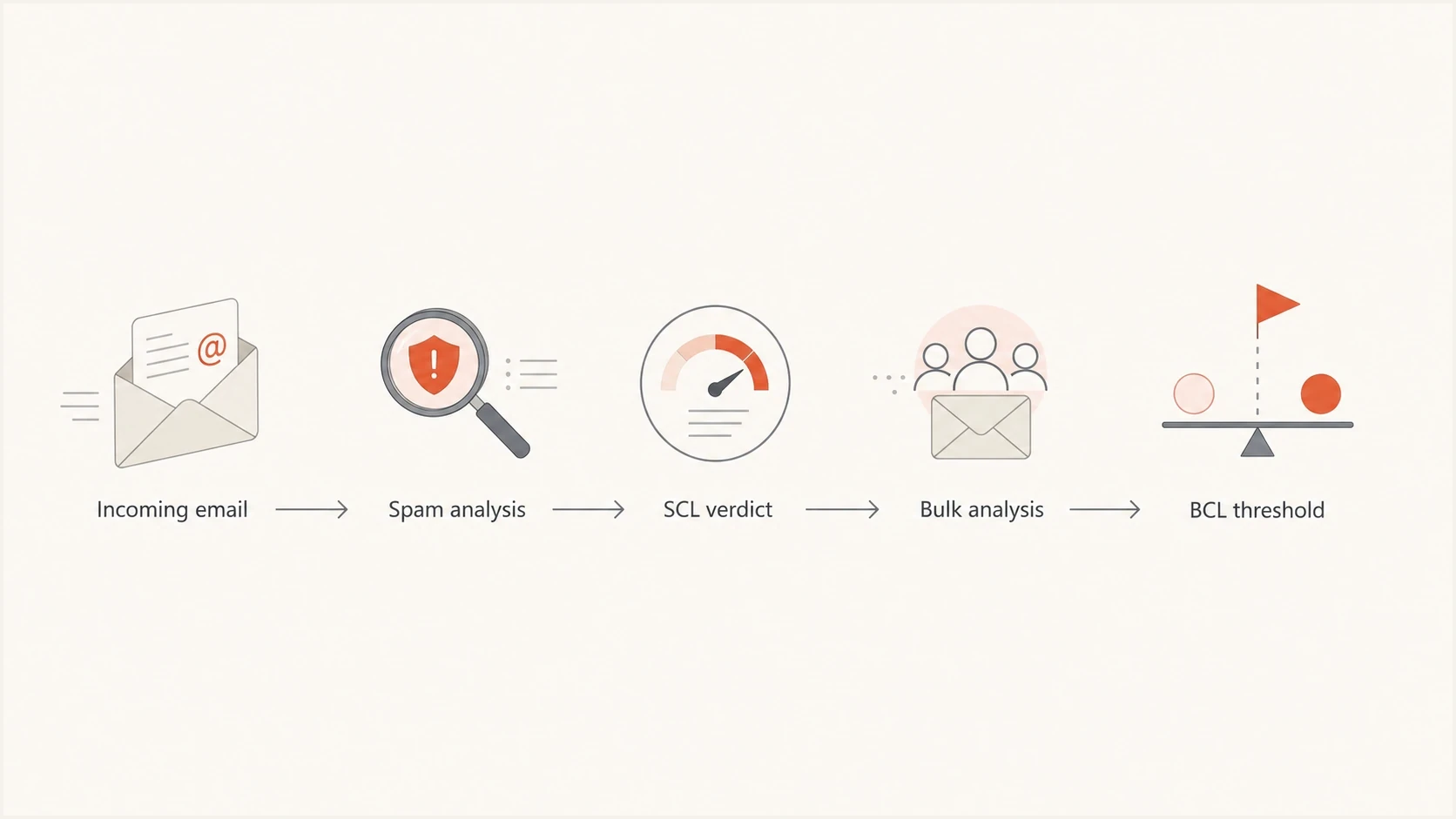
Flowchart showing separate SCL and BCL classification paths.
SCL is high
- Content: The message body, links, wording, or attachment pattern looks spammy.
- Authentication: SPF, DKIM, or DMARC failure raises suspicion.
- Policy: A mail flow rule, tenant setting, or override changes the verdict.
BCL is high
- Bulk status: Microsoft recognizes the sender or message stream as bulk mail.
- Complaints: The bulk sender pattern has enough complaints to raise the rating.
- Threshold: The recipient tenant filters bulk mail at the configured BCL level.
This split explains why Microsoft destinations can behave differently from other mailbox providers. Microsoft has its own bulk classification and tenant-controlled thresholds. A sender can look clean elsewhere and still have a Microsoft-specific bulk filtering problem.
Is it the IP, domain, or message?
SCL and BCL do not give you a one-field root cause. Separate the investigation into the mail being sent, the sending identity, and the infrastructure. Shared IP ranges deserve attention, especially when the sender has Microsoft-only problems, but a questionable IP range does not automatically explain BCL 5.
A real test message matters more than a dashboard screenshot. Send the same campaign seed to Microsoft 365 and non-Microsoft inboxes, inspect the full headers, and compare SCL, BCL, SPF, DKIM, DMARC, and final folder placement. Suped's email tester supports that workflow with one report for authentication, content, and placement signals.
Email tester
Send a real email to this address. Suped shows a results button when the test is ready.
?/43tests passed
Then look for patterns. If all mail from one shared IP family has Microsoft trouble, infrastructure is a real lead. If only one newsletter stream has BCL issues, the problem is closer to audience fit, complaint behavior, cadence, or content. If transactional mail and marketing mail share a domain, separate the streams before drawing conclusions.
- IP evidence: Multiple unrelated senders on the same range have Microsoft-only filtering trouble.
- Domain evidence: All mail using the same visible From domain has higher junk placement.
- Message evidence: Only one template, campaign type, or list segment receives the bad rating.
- Tenant evidence: The same message lands differently across Microsoft 365 recipients.
How to troubleshoot Microsoft SCL and BCL
The fastest workflow is to capture evidence before changing anything. Keep the raw headers, sending stream, domain, IP, authentication results, applied policy, and recipient outcome together. Guessing from SCL or BCL alone leads to bad fixes.
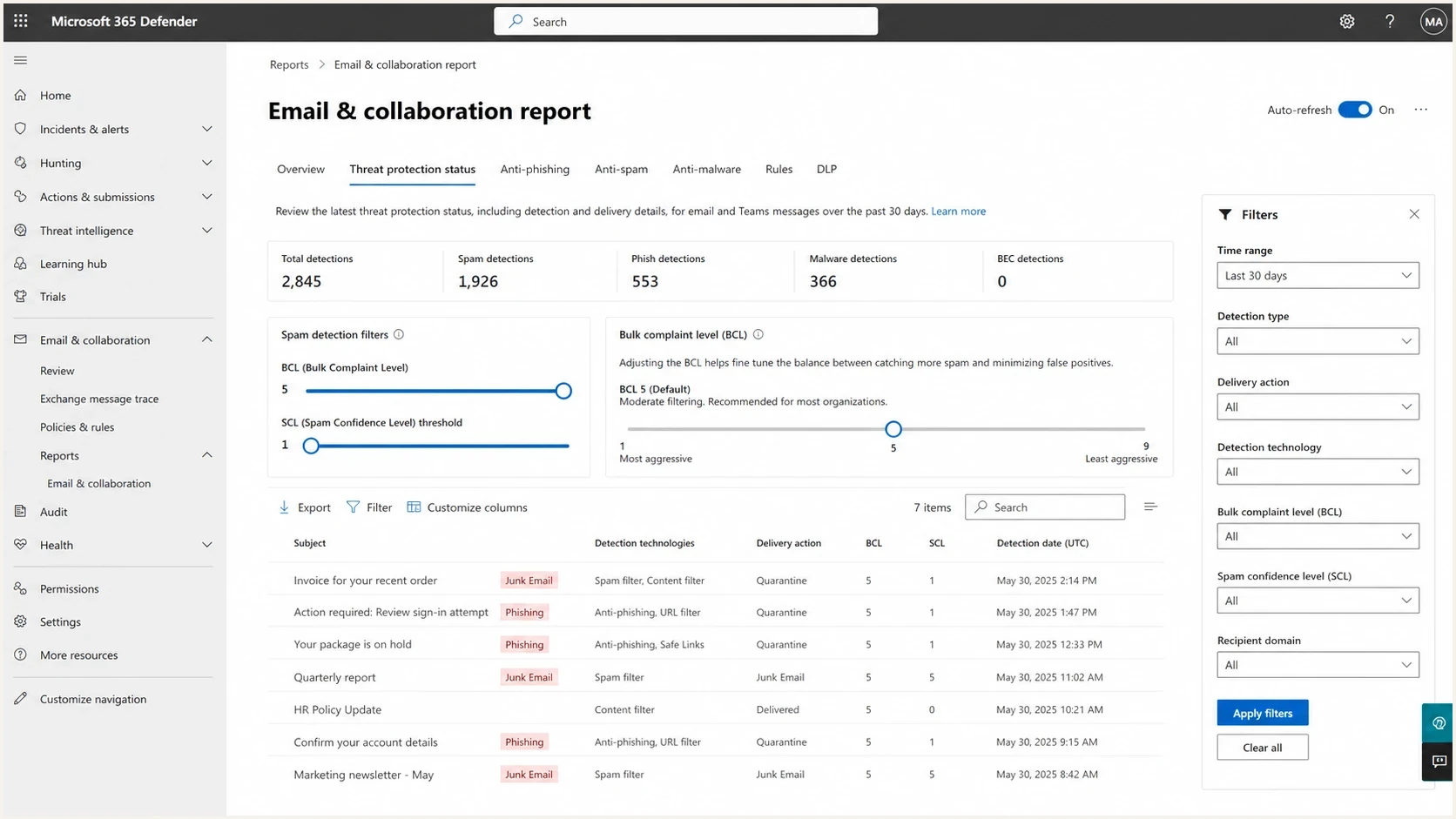
Microsoft Defender portal report view with SCL and BCL filtering controls.
- Collect headers: Get the original headers from a Microsoft 365 recipient. Record X-MS-Exchange-Organization-SCL, BCL in X-Microsoft-Antispam, SFV in X-Forefront-Antispam-Report, authentication results, and delivery action.
- Identify the decision source: Use the email entity page or message trace to check spam filtering, mail flow rules, connection filtering, policy settings, and user or tenant overrides.
- Verify authentication: Confirm SPF and DKIM pass, DMARC passes with the visible From domain, and the expected sender handled the message. Use DMARC monitoring to catch failures by source.
- Check reputation: Review IP and domain blocklist or blacklist exposure with blocklist monitoring, especially for shared IP ranges.
- Segment results: Compare newsletters, transactional messages, lifecycle messages, and one-to-one mail separately.
- Test one variable: Change the subject, template, link domain, audience segment, or sending cadence, then capture another Microsoft result.
- Escalate false positives: If authentication passes and no local policy explains the result, ask the recipient admin to submit the original message to Microsoft for analysis.
Minimal DMARC record during monitoringtext
v=DMARC1; p=none; rua=mailto:reports@yourdomain.com
That DMARC record will not lower BCL by itself. Its job is to provide aggregate reporting. Once you know which sources pass or fail, move toward a stricter policy in controlled stages. Authentication problems are easier to fix when each source is visible instead of treating every Microsoft junk placement as one generic deliverability issue.
What to change when BCL is high
When BCL is high but the message is otherwise not spam, do not rewrite the whole email first. Start with the sender's bulk pattern. Microsoft is telling you the message belongs to a bulk stream and that stream has mixed or high complaint behavior. Fix the conditions that make opted-in recipients hit junk, ignore the mail, or treat it as unwanted.
Good bulk mail still needs restraint
Bulk does not mean bad. It means one sender is sending similar messages to many recipients. A fully opted-in newsletter can still earn complaints if the topic, frequency, sender identity, or unsubscribe path does not match recipient expectations.
- List quality: Suppress inactive recipients and remove addresses that never engage with Microsoft mailboxes.
- Expectation match: Make the sender name, subject, and first screen match what the subscriber asked to receive.
- Unsubscribe path: Make leaving the list easier than reporting the message as junk.
- Stream separation: Separate newsletters, product updates, receipts, and support mail by subdomain and sending stream.
- Volume control: Reduce frequency for recipients who stop opening or clicking, especially at Microsoft domains.
- IP hygiene: Move away from shared infrastructure when neighboring senders keep creating Microsoft reputation issues.
If SCL is high for a reason other than BCL threshold enforcement, widen the investigation. Content, authentication, DMARC policy, link reputation, malware, or spoofing signals then need attention. The SCL headers view is useful when the header values do not match the final folder placement.
Where Suped fits
Suped cannot force Microsoft to lower an SCL or BCL score. Suped's product helps with the sender-controlled work: proving authentication, finding broken sources, monitoring DMARC policy, spotting SPF and DKIM problems, watching blocklist and blacklist exposure, and turning report data into fixes.
DMARC record detail view showing SPF, DKIM, DMARC, rDNS diagnostics, and DNS records
Suped connects DMARC, SPF, DKIM, hosted policy controls, blocklist monitoring, and real-time alerts in one workflow. This helps a team rule out authentication and sender setup problems before it attributes Microsoft filtering to content, audience behavior, or recipient policy.
Use Suped to keep the evidence clean
- Issues: Automated detection points you to failing sources and the steps to fix them.
- Alerts: Real-time alerts help you catch authentication failures before they become a wider deliverability problem.
- MSP scale: Multi-tenancy keeps client domains, reports, and sender sources organized.
- DNS control: Hosted SPF and hosted DMARC reduce repeated DNS changes during policy staging.
If the main issue is BCL, Suped helps rule out avoidable technical causes first. The remaining work is list quality, recipient expectation, content fit, and Microsoft-specific sending history. For high BCL cases, this high BCL fixes page goes deeper into that path.
Views from the trenches
Best practices
Capture full Microsoft headers before changing DNS, content, or the sending platform.
Separate bulk streams from transactional mail so ratings do not blur distinct causes.
Compare BCL thresholds across tenants before declaring a universal Microsoft issue.
Common pitfalls
Treating BCL as an IP-only score misses content, audience, and complaint signals.
Assuming SCL 1 means no risk ignores tenant bulk settings and BCL enforcement rules.
Using shared IPs without monitoring neighboring reputation can hide Microsoft risks.
Expert tips
Track SCL, BCL, authentication, and folder placement together for every seed test.
Use a dedicated newsletter subdomain when bulk mail differs from core business mail.
Fix list fatigue before template polish when BCL rises and SCL stays consistently low.
Expert from Email Geeks says SCL measures how likely Microsoft thinks a message is spam, while BCL identifies bulk mail and the complaint pattern behind that bulk stream.
2023-10-23 - Email Geeks
Marketer from Email Geeks says BCL enforcement depends on the recipient tenant, so the same BCL value can pass one Microsoft 365 organization and hit junk in another.
2023-10-23 - Email Geeks
The practical takeaway
SCL and BCL affect email deliverability through different paths. SCL is the final spam confidence value for a message. BCL is the bulk complaint rating for mail that Microsoft identifies as bulk. BCL enforcement depends on the recipient tenant's threshold, and meeting that threshold can mark the message as spam with SCL 6 when bulk-spam marking is enabled.
When you see SCL 1 and BCL 5, read it as "not stamped as spam, but classified as bulk with mixed complaints." Do not assume the BCL value caused the final placement until you confirm the applied policy. Fix authentication, DMARC visibility, blocklist or blacklist status, and sending stream separation first. Then reduce unwanted bulk signals through better list quality, relevance, unsubscribe handling, and sending cadence.




