
How long should I wait before using a newly registered domain for email marketing?

Updated on 8 Oct 2026: We clarified the waiting windows and added checks for when a new email domain is ready to scale.
Plan for about 30 days before starting email marketing from a newly registered domain, then ramp slowly. For a larger marketing program, allow 60 to 90 days for preparation and a controlled warm-up before substantial volume. These are conservative planning windows, not mandatory mailbox-provider waiting periods. Domain age is one risk signal, and leaving a domain unused does not create sending reputation. Correct SPF, DKIM and DMARC do not guarantee inbox placement for a new domain.
The issue is not usually the website platform. Gmail and other mailbox providers assess the sending identity, list source, authentication, recipient response, complaint rate and sending pattern. A newly registered domain that immediately sends promotions faces extra scrutiny, but domain age alone does not establish the cause of a rejection. Inspect the actual delivery error before deciding what to fix.
- Planning buffer: Allow about 30 days before the first marketing campaign as a conservative default, even for a clean opt-in list.
- Larger programs: Budget 60 to 90 days for preparation and gradual warm-up, then let sending results determine when to scale.
- Domain choice: Use a recognizable brand domain or a branded subdomain, then warm up gradually. A new subdomain still needs a controlled ramp.
- Consent check: Do not use a new domain to evade reputation problems or send to a list without documented marketing consent.
Use the first week for preparation
Avoid bulk marketing campaigns in the first week as a conservative launch practice. Use that time to publish authentication, build a real website, collect consent and link the domain visibly to the established brand when one exists. Small, expected transactional messages are a different use case and can start once the sending setup is verified.
Why newly registered domains face extra scrutiny
A new domain starts with little or no sending history. Mailbox providers have to decide whether the domain looks like a legitimate new brand or a disposable sending identity. Attackers and low-quality senders register domains, send quickly, burn the domain, then repeat the pattern. Because that behavior is common, a brand-new marketing domain gets extra scrutiny.
The first few sends matter because there is no history to balance out mistakes. A handful of spam complaints, hard bounces, weak recipient engagement, unclear list provenance, or authentication gaps can make the domain look risky. That is why a tiny day-one campaign can still bounce with a message about very low sending-domain reputation.
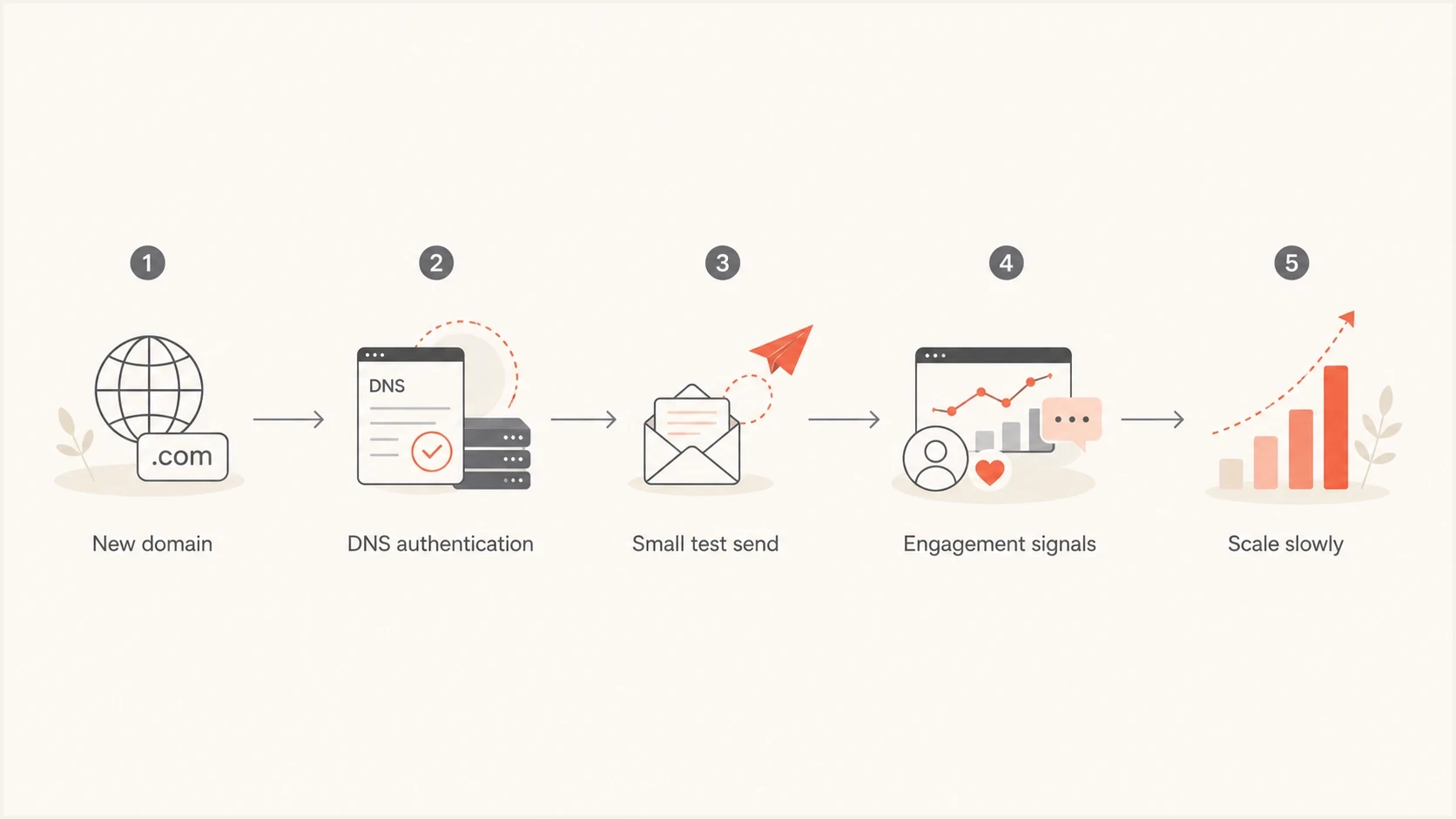
New email domain warm-up flowchart: authentication, test sends, recipient response, and gradual volume increases.
What looks normal
- Brand match: The sending domain clearly matches the public website and consent path.
- Low volume: Early campaigns go only to recent, engaged subscribers.
- Clean records: SPF, DKIM and DMARC are configured; the sending platform verifies its IP's forward and reverse DNS and handles bounces.
What looks risky
- Fresh identity: The domain was registered days ago and immediately sends promotions.
- Unverified list: An inactive or unconsented list is moved to a new sending identity.
- Brand hiding: The sender avoids the main brand with no clear user-facing reason.
The reason for the new domain matters. A new brand launching carefully is one case. A brand migration with valid consent is also legitimate when recipients understand the change. Using a fresh identity to bypass unresolved complaints or blocks leaves the underlying sending problem in place.
A practical waiting timeline
Use domain age as a risk control, not as a magic threshold. Thirty days does not guarantee inbox placement, and 90 days does not fix a poor list. Time lets the website, DNS, and connection to the brand become consistent. Receivers still build email reputation mainly from mail they observe, so an unused 90-day domain can still have no sending history.
Spamhaus describes heightened threat-intelligence scrutiny during roughly the first 30 days in its owner guidance. A newly registered domain classification is different from an abuse listing on a blocklist (blacklist), and it does not establish a universal Gmail or Yahoo waiting rule.
Conservative domain launch planning windows
Suggested marketing milestones, not published mailbox-provider age limits. Advance only when sending results support it.
Prepare for launch
0-7 days
Avoid bulk campaigns while verifying authentication, consent and the sending setup.
Setup and testing
8-29 days
Verify the sending path with small tests; keep expected transactional mail tied to real user actions.
Careful warm-up
30-59 days
Start with recent, consenting recipients and hold or reduce volume if problems appear.
Controlled growth
60-90 days
Increase volume only when engagement and authentication stay healthy.
Continue monitoring
90+ days
An unused domain still needs warm-up; calendar age does not establish sending reputation.
The key distinction is between domain age and sending reputation. Registration time can lower fresh-domain scrutiny, but only wanted, authenticated mail can establish a positive sending history.
What to set up before sending
Do the technical setup during the waiting period, not on the morning of the first campaign. Publish SPF and DKIM for the sending platform, add a DMARC record, configure the bounce domain and verify that messages meet DMARC alignment requirements through SPF or DKIM. DMARC passes when at least one passing SPF or DKIM result meets the domain matching requirements for the visible From address.
Run a domain health check before the first external send. Check authentication records, stable DNS, blocklist status and a working reporting address before marketing volume starts.
Illustrative SPF and DMARC recordsdns
example.com TXT "v=spf1 include:send.example.net -all"

_dmarc.example.com TXT "v=DMARC1; p=none; rua=mailto:dmarc@example.com"
Replace send.example.net with the sending platform's documented SPF value, publish the DKIM TXT or CNAME records it supplies and ensure the rua mailbox can receive reports. Keep only one SPF record at each domain name. The example does not include a DKIM key.
Start DMARC early
DMARC is defined by RFC 9989, with aggregate reports specified by RFC 9990. A p=none policy requests monitoring without asking receivers to quarantine or reject messages because of DMARC failure. Move toward quarantine or reject after legitimate mail consistently passes DMARC. Monitoring itself does not create sender reputation.
- SPF: Keep SPF within its limit of 10 DNS-lookup-causing terms, including nested includes, and remove unused senders.
- DKIM: Use the sending platform's selector, prefer a 2048-bit RSA key when supported and confirm signatures pass on received messages.
- DMARC: Collect aggregate reports before enforcing policy on a new domain.
DMARC record detail view showing SPF, DKIM, DMARC, rDNS diagnostics, and DNS records
Suped's product uses aggregate DMARC reports to identify sending sources and authentication failures. Use its domain diagnostics alongside those reports to check DNS and blacklist status before raising volume.
Meet bulk sender requirements before launch
A new domain does not get an exception from current mailbox-provider rules. For mail to personal Gmail accounts, all senders need SPF or DKIM, valid forward and reverse DNS for the sending IP, TLS, standards-compliant messages and a user-reported spam rate below 0.3%. Google treats senders reaching roughly 5,000 messages to personal Gmail accounts in 24 hours as bulk senders, counting the primary domain and its subdomains together. Bulk senders need both SPF and DKIM, DMARC with at least p=none and domain alignment, one-click unsubscribe for marketing mail and a visible unsubscribe link. Yahoo has similar bulk requirements but does not publish a numeric bulk-sender threshold.
Google keeps bulk-sender status once a sender qualifies, even if later volume drops. Creating a new subdomain does not reset that classification.
- Authenticate and match: Make SPF and DKIM pass, then match the visible From domain to SPF or DKIM for DMARC.
- Make opt-out easy: Add RFC 8058 one-click unsubscribe and a clear body link. Process requests within 48 hours; Yahoo requires removal within two days.
- Verify transport and identity: Use TLS, valid PTR and forward DNS, and correctly formatted message headers.
- Control complaints: Keep Google's reported spam rate below 0.1% as the operating target and prevent it from reaching 0.3%. Check each provider separately because complaint-rate calculations differ.
Age cannot fix a compliance gap
Meet these requirements before the first marketing ramp. A 90-day-old domain with broken alignment, no one-click unsubscribe, or a high complaint rate is still not ready to scale.
How to start sending after the wait
After the preparation period and a conservative age buffer of about 30 days, start with a small group of recent, consenting subscribers who asked for the mail you are about to send. Recent clickers are a useful starting segment. Purchases or account activity alone do not establish marketing consent. Do not start with dormant subscribers.
Before each increase, send a real message through an email tester and confirm authentication, headers, and content signals. This does not replace mailbox data, but it catches basic setup errors before recipients see the campaign.
Email tester
Send a real email to this address. Suped shows a results button when the test is ready.
?/43tests passed
Volume ramps need to be modest and consistent. The exact numbers depend on list quality and recipient response, but the first week should establish that people want the mail. If complaints, bounces or temporary deferrals increase, reduce volume and investigate. Do not jump to the next range solely because another week has passed.
|
|
|
|---|---|---|
Day 1 | 25-50 | Best engaged |
Days 2-3 | 50-100 | Recent clicks |
Week 2 | 200-500 | Recent consenting subscribers |
Week 3+ | Step up | Healthy segments |
Illustrative daily totals across the sending domain for a consenting audience. These are examples, not required targets or provider limits; hold or reduce a stage until results support an increase.
For a new dedicated IP, review initial sending volumes. If the domain also uses a fresh dedicated IP, treat IP warm-up as a separate risk area. Domain age and IP reputation are different signals, and both need clean behavior. An established shared IP does not give a new domain an established domain reputation.
How to tell the domain is ready to scale
Increase volume only after several comparable sends show stable results. Calendar age and a successful DNS test do not establish readiness for a larger audience.
- Confirm received messages pass SPF and DKIM and meet DMARC alignment requirements at the main recipient providers. Check the live sending path, not only published DNS.
- Review SMTP responses by provider. Rising temporary 4xx deferrals call for slower sending; investigate permanent 5xx rejections and stop retrying them. Suppress addresses confirmed as invalid.
- Review complaints and unsubscribe requests after every batch, and apply suppression before the next send. Investigate individual complaints in small batches as well as percentage trends.
- Use genuine clicks or replies alongside delivery results. Open rates alone are unreliable because privacy protections and automated activity affect tracking. Manufactured engagement does not prove subscriber interest.
Account for limited early data
Treat missing reputation or complaint data at low volume as insufficient evidence. Review available bounce logs and recipient feedback before expanding. An accepted SMTP response or a passing DMARC result does not prove inbox placement.
When not to use the new domain
There are times when waiting is not enough. If a new identity is being used to evade reputation problems or send to people without documented marketing consent, waiting longer will not fix the underlying problem. A legitimate rebrand can use an existing subscriber list when consent remains valid and recipients are clearly told about the change.
A good sending domain should make sense to the recipient. If someone signed up on the main brand site and suddenly receives mail from a new unrelated domain, confusion can increase spam complaints. Explain a legitimate brand change through the established identity before moving marketing mail to the new domain.
- Brand mismatch: Recipients do not recognize the sending domain.
- List mismatch: The list lacks documented marketing consent or includes inactive recipients.
- Fast scaling: Volume increases before positive engagement exists.
- Poor website: The site lacks identity, contact, policy, and unsubscribe context.
Acceptable reason
The domain is a new public brand with a real website, clear signup forms, visible policies, and a small audience collected after launch.
High-risk reason
The domain is used to bypass blocks or resume sending after reputation problems without correcting the practices that caused them.
Do not age domains for bad lists
A waiting period does not make a purchased, scraped or unconsented list suitable for marketing. Poor consent still creates spam complaints and weak recipient response, regardless of domain age.
How Suped supports launch checks
Suped is our DMARC reporting and email authentication platform. It turns aggregate reports into checks for sending sources, SPF, DKIM, DMARC alignment and policy. Separate blocklist monitoring helps identify domain or IP listings; these checks do not measure inbox placement or recipient engagement.
During a new-domain launch, use DMARC monitoring to confirm legitimate sources and blocklist monitoring to check domain and IP listings before each ramp stage.
Issues page showing top issues, verified sources, unverified sources, and authentication pass rates
Verify DNS before launch, then use early aggregate reports to check legitimate sending sources and investigate failures. Use alerts to catch authentication changes during the ramp, and strengthen the DMARC policy once legitimate mail consistently passes DMARC.
Views from the trenches
Best practices
Age the domain before launch, then send only to subscribers with recent clear engagement.
Publish authentication records early and verify reports before the first marketing batch.
Use the main brand or a clear subdomain when the list was collected under that brand.
Common pitfalls
Immediate bulk campaigns on a newly registered domain face extra scrutiny from receivers.
Moving inactive subscribers to a new identity leaves consent and engagement problems unresolved.
Hiding the main brand behind a new domain can look like reputation evasion to receivers.
Expert tips
Allow about 30 days before campaigns; let real sending results decide when volume can grow.
Keep early campaigns narrow, wanted, and easy to explain through consent evidence records.
Check blocklist and blacklist status before each ramp stage, not after failures appear.
Marketer view
Marketer from Email Geeks says newly registered domains start with low reputation, so even careful early sends can trigger filtering.
2024-08-02 - Email Geeks
Marketer view
Marketer from Email Geeks says a one-day-old domain is the obvious risk when Gmail blocks for very low sending-domain reputation.
2024-08-02 - Email Geeks
When to delay the first campaign
Delay the first marketing campaign if authentication, documented consent or unsubscribe handling is incomplete, even after a 30-day planning buffer. During warm-up, hold or reduce volume when complaints, deferrals or rejections increase. Resume growth only after the cause is corrected and subsequent batches show stable results.




