
What are the minimum and maximum sending volumes for dedicated IPs?

Updated on 26 Sep 2026: We clarified per-IP volume calculations and replaced hard-limit language with receiver-led capacity guidance.
There is no protocol-defined minimum or maximum sending volume for a dedicated IP. A practical operating floor is about 100,000 messages per month per IP, although some steady, high-quality streams can work below it. A healthier fit starts around 250,000 to 1 million messages per month per IP because that provides enough traffic to measure reputation, segment streams, and recover after a problem. For capacity planning, 1 million to 2 million messages per IP per day is a conservative starting benchmark, not an industry maximum. Receiver acceptance, platform policy, throttling, and the required send window determine the usable maximum.
Those ranges assume permission-based acquisition for commercial mail or a valid transactional purpose, clean suppression logic, steady cadence, aligned SPF or DKIM with DMARC, valid forward and reverse DNS, TLS, low complaint rates, and compliant unsubscribe handling. If those basics are weak, a dedicated IP exposes the problem faster. Strong fundamentals can support lower volume, but sparse traffic gives mailbox providers fewer signals and leaves less room to absorb a bad send.
Default planning ranges per IP
- Bare minimum: 20,000 to 100,000 per month can work only for very clean, steady senders.
- Practical minimum: 100,000 per month is the first range worth considering for ongoing maintenance.
- Comfortable minimum: 250,000 to 1 million per month gives better signal and more recovery options.
- Upper planning benchmark: Start near 1 million to 2 million per day, then adjust with receiver-level acceptance and delivery-time data.
Practical volume ranges per IP
Dedicated IP volume works as a range, not a single rule. The lower boundary concerns reputation signal. The upper boundary concerns throughput, receiver tolerance, and how quickly a campaign must finish. A weekly newsletter has a different risk profile than a time-sensitive sale, even when the monthly totals match. Every value below applies to one active IP.
|
|
|
|
|
|---|---|---|---|---|
Too low | <1k | <5k | <20k | Shared |
Fragile | 1k-5k | 5k-25k | 20k-100k | Risky |
Usable | 5k-10k | 25k-60k | 100k-250k | Monitor |
Healthy | 10k-35k | 60k-250k | 250k-1M | Good |
Scaled | 35k-1M | 250k-7M | 1M-30M | Data-led |
High-throughput | 1M-2M | 7M-14M | 30M-60M | Benchmark |
Practical dedicated IP volume bands per active IP
A sender doing 20,000 to 30,000 messages per month on a dedicated IP is not automatically wrong. Very small, high-quality programs can work at that level. The catch is that one bad campaign, one stale segment, or a small rise in complaints has an outsized effect. A sender at 1 million per month has more data to learn from and more clean traffic to stabilize reputation after a problem.
Dedicated IP minimum volume thresholds
Monthly volume ranges for deciding whether one dedicated IP has enough reputation signal.
Too sparse
<20k/mo
Mailbox providers get very limited signal.
Fragile
20k-100k/mo
Clean senders can function, but small complaint counts matter.
Usable
100k-250k/mo
Enough traffic to monitor, but recovery room is limited.
Healthy
250k-1M/mo
A better range for a stable dedicated IP program.
Strong
1M+/mo
Enough volume for segmentation and recovery planning.
Calculate volume by receiving provider
Total sending volume does not tell a mailbox provider how much mail it will receive. Reputation and throttling decisions depend on the traffic each provider sees, so model the recipient-domain mix before deciding that an IP has enough maintenance volume or spare capacity.
Provider volume formulatext
Daily provider volume = total daily volume x provider share
Example: 200,000 x 40% = 80,000 messages per day to that provider
Use historical delivery logs to group recipient domains by the mailbox provider that operates them, including business domains hosted on large provider infrastructure. Recalculate the mix after major list, market, or acquisition changes because a stable total can conceal a sharp increase at one receiver.
- Minimum signal: An IP sending 300,000 per month is still sparse at a provider receiving only 2% of that mail.
- Burst risk: Monthly averages hide launches or promotions that concentrate most traffic into a few hours.
- Maintenance: Consistent daily or weekly traffic gives a provider a clearer pattern than long quiet periods.
- Gmail bulk-sender rules: At about 5,000 messages in one day to personal Gmail accounts, Google counts traffic across the same primary domain, not per IP. Bulk senders need SPF and DKIM, a DMARC record, From-domain alignment through SPF or DKIM, TLS, valid DNS, spam rates below 0.3%, and one-click plus visible unsubscribe for marketing or subscribed mail. Classification persists once assigned.
Do not confuse a mailbox provider's bulk-sender threshold with a dedicated-IP minimum. The first triggers compliance duties for a domain. The second describes whether each IP sends enough wanted mail to build a useful reputation signal.
Size the IP pool per IP, not per account
Apply the minimum-volume guidance to every active IP, not to the account total. A program sending 600,000 messages per month has healthy signal on one IP, but six evenly used IPs receive only 100,000 messages each. Uneven routing can leave some IPs below that level even when the account total looks sufficient.
Per-IP volume formulatext
Monthly volume per IP = stream volume allocated to the pool / active IP count
Example: 600,000 / 3 = 200,000 messages per IP per month
Use the formula as a first check, then account for the actual routing split by mail stream and receiving provider. A platform's eligibility rule or additional-IP threshold is an operating policy, not a universal receiver limit. Add capacity only when the existing IP is healthy and accepted throughput cannot meet the send window.
Avoid idle reserve IPs
An unused reserve IP does not stay warm. If resilience requires spare capacity, maintain it with a steady stream of wanted mail or plan to ramp it before moving a large campaign. Sending token traffic solely to keep an IP active does not create a dependable reputation.
Why the minimum matters
Mailbox providers do not need a fixed universal sample size to judge a sender, but they need enough mail to make the signals useful. At very low volume, every complaint, bounce, or authentication failure has more weight. A single campaign can create a visible reputation shift because little other mail exists to balance it.
Before moving a stream to a dedicated IP, send a real message through Suped's email tester and check the headers, authentication, content issues, and inbox signals. This preflight check can catch configuration problems before the new IP reputation carries the cost.
Email tester
Send a real email to this address. Suped shows a results button when the test is ready.
?/43tests passed
The main drawback of a low-volume dedicated IP is not inevitable failure. It is difficult recovery. If a shared pool or established dedicated IP has a rough day, later healthy traffic can provide more current positive signals. A sparse dedicated IP has fewer chances to prove that the bad signal was temporary.
Low volume warning
Low-volume dedicated IPs often look fine until a small complaint spike or a mailbox provider throttle appears. This is most common when the sender mails irregularly, sends to old segments, or has a seasonal calendar with long quiet periods.
- Complaint math: Twenty complaints on 20,000 messages is already 0.1%.
- Quiet periods: Long gaps make the next campaign look like a fresh reputation test.
- Repair limits: Sparse traffic gives fewer clean sends to counter a bad signal.
- Provider variance: Microsoft, Yahoo, Gmail, and smaller providers respond differently.
How to set the upper limit
The usable maximum for one dedicated IP depends on reputation and delivery speed. An IP that can technically submit 4 million messages in a day still fails the business goal when the campaign takes twelve hours to clear and the offer expires after thirty minutes.
There is no universal per-IP ceiling. Use 1 million to 2 million messages per day as a conservative planning benchmark, then test the actual accepted rate by receiving provider. Some platforms or routes require another IP much earlier, while a healthy stream can exceed the benchmark. Raise volume only when stable engagement, low complaints, aligned authentication, predictable cadence, sending-system capacity, queue age, and receiver-specific deferral data show that added mail is accepted within the required send window.
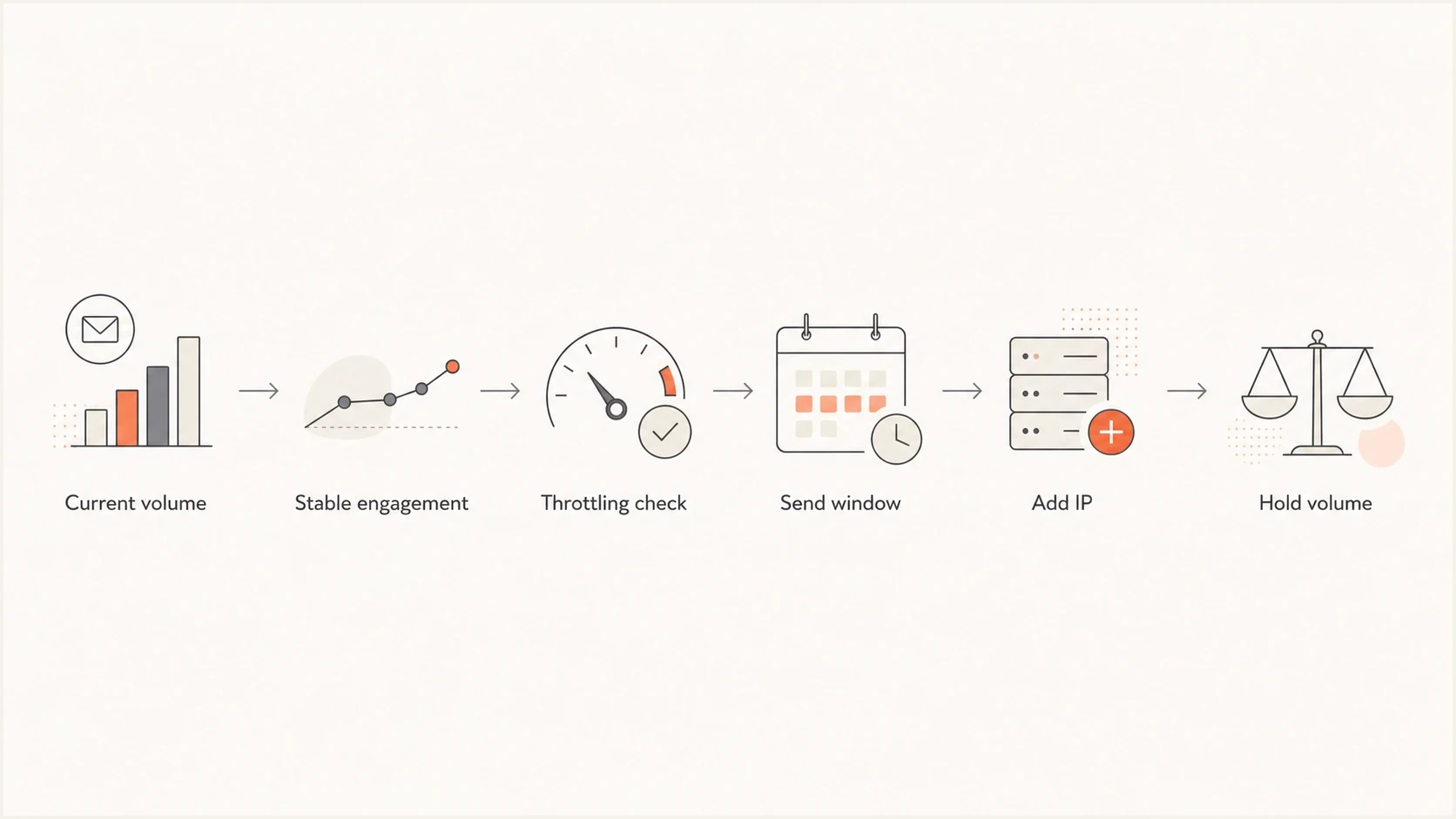
Dedicated IP email volume flowchart for holding traffic or adding capacity.
- Receiver mix: Large mailbox providers can absorb more volume than many smaller regional providers.
- Send window: A time-sensitive campaign needs more IP capacity than an all-day newsletter.
- Queue behavior: Deferrals, slow accepts, retry queues, and rising delivery time show that the cap has been reached.
- Reputation split: High-risk segments should not share an IP with critical transactional streams.
Dedicated IPs versus shared pools
A dedicated IP is not a default upgrade. It gives control over IP reputation, isolation between senders, clearer accountability, and routing flexibility. It also removes the benefit of a well-managed shared pool when the sender is too small or too irregular. High-volume senders can still operate well on shared infrastructure when the platform manages reputation and routing properly.
Dedicated IP
- Control: You own the IP reputation signal for that stream.
- Isolation: Other senders cannot directly affect that IP reputation.
- Risk: Your own mistakes are easier for mailbox providers to see.
- Best fit: Consistent volume with clean lists and controlled send windows.
Shared pool
- Stability: A good pool has steadier aggregate traffic.
- Scale: Large total volume can still work without dedicated IPs.
- Tradeoff: You get less isolation and less direct control.
- Best fit: Low, irregular, or seasonal sending patterns.
For low-volume senders, the shared pool is often the better practical answer. A sender with 30,000 monthly messages and one weekly campaign usually gets more stable reputation from shared infrastructure than from a quiet dedicated IP that wakes up once a week.
Warm-up and monitoring
Warm-up is a proof period supported by a ramp schedule. The goal is to show each mailbox provider consistent, wanted mail while proving that the sending stack authenticates correctly. Start with recently engaged recipients. If early signals are weak, hold or reduce volume instead of making the problem louder.
Illustrative warm-up plantext
Week 1: up to 1k per day
Week 2: up to 5k per day
Week 3: up to 15k per day
Week 4: up to 35k per day
Week 5: up to 75k per day
Week 6: up to 150k per day
Week 7: up to 300k per day
Week 8: up to 500k per day
After that: increase 20%-30% only when receiver-level signals stay clean
Hold or reduce when 4xx deferrals, complaints, hard bounces, or delivery time rise
Adjust every step to the volume each receiving provider sees
This schedule is an example, not a guarantee. Warm-up often takes several weeks, and the pace depends on target volume, sending frequency, list quality, domain history, and the response from each receiving provider. There is no universal idle-period reset. After extended inactivity or a sustained fall below the volume needed to produce useful receiver signals, treat the IP as cold and ramp it again.
Suped supports the authentication and reputation checks around this workflow. Suped's DMARC monitoring shows which sending sources pass SPF, DKIM, and DMARC, while blocklist monitoring (also called blacklist monitoring) helps identify IP or domain listings during warm-up and incident triage. DMARC reports do not measure inbox placement, engagement, or IP throughput, so review them alongside SMTP deferrals, complaints, bounce data, and delivery time.
Suped DMARC dashboard showing email volume, authentication health, and source breakdown
A dedicated IP does not fix bad authentication. Before a volume increase, check the sending domain through the domain health checker so DMARC, SPF, DKIM, DNS, and related configuration problems are visible before the next ramp step.
When to add another IP
Adding another dedicated IP raises the daily cap and changes how reputation is distributed. Add an IP when the current IP is healthy but constrained by throughput, when a stream deserves isolation, or when recovery planning needs separate traffic groups.
- Throughput trigger: The IP accepts volume too slowly for the campaign window.
- Reputation trigger: Transactional mail and marketing streams need different risk boundaries.
- Recovery trigger: You need enough clean traffic on one stream to repair another stream later.
- Provider trigger: A receiver consistently defers mail even when complaints and bounces are low.
A simple allocation rule
Use one dedicated IP until it has stable reputation and the business needs more capacity. Base additional IPs on stream, receiving-provider demand, send window, and operational resilience instead of total database size alone. More IPs create more reputations to warm, monitor, and repair.
|
|
|
|---|---|---|
Queues | Slow | Add IP |
Complaints | Rising | Hold |
Bounces | High | Clean |
Auth | Failing | Fix |
Common add-IP triggers
Views from the trenches
Best practices
Keep each dedicated IP at a steady daily volume before adding new campaigns or audience segments.
Judge maximum capacity by accepted throughput, not just the number submitted in a day.
Use separate IPs when one campaign must finish fast and mailbox providers start throttling.
Track complaints by mailbox provider because low volume makes small complaint counts matter.
Common pitfalls
Treating 20k monthly messages as stable when one complaint can move the rate sharply.
Adding volume to one IP because queues accept it while delivery takes many hours to finish.
Ignoring list mix when smaller regional providers receive too much mail from one IP.
Using a dedicated IP because a vendor suggests it, without enough volume to recover.
Expert tips
Use 100k monthly per IP as a practical floor and 1M monthly when recovery segmentation matters.
Treat 1M-2M daily per IP as a benchmark, then verify accepted throughput by receiver.
Let small senders use shared pools when sending is irregular, seasonal, or sparse.
Split high volume only after authentication, complaints, and engagement stay clean enough.
Expert view
An Email Geeks contributor says at least 100k messages per month is a practical maintenance floor, although very clean 20k monthly senders can operate on a dedicated IP with more mailbox provider friction.
2022-03-16 - Email Geeks
Marketer view
An Email Geeks contributor says 1M messages per month gives enough traffic to segment, diagnose, and recover if reputation drops.
2022-03-17 - Email Geeks
Minimum and maximum volume recommendations
For a new dedicated IP, use 100,000 messages per month per IP as the practical minimum and 250,000 to 1 million per month per IP as the healthier starting range. Treat 1 million to 2 million messages per day per IP as a conservative capacity-planning benchmark, not a fixed maximum. Add capacity only when receiver-level data shows clean acceptance and the campaign window needs it.
The decision is not based on volume alone. A clean 200,000-message monthly sender with steady cadence can be safer on a dedicated IP than a 2 million-message sender with spikes, stale lists, irregular cadence, and poor authentication. Volume provides signal. Quality decides whether that signal helps or hurts.




