How long does it typically take to get a response from the Google Postmaster Team and how to improve deliverability?

Michael Ko
Co-founder & CEO, Suped
Published 3 Jul 2025
Updated 18 May 2026
9 min read
Summarize with
The direct answer: do not plan on a personal response from the Google Postmaster Team. If you use Gmail's sender contact form, the stated window has historically been around two weeks, but many senders never receive a human reply. I treat the form as a way to submit evidence, not as a support ticket with a predictable queue.
That changes the operating plan. The fastest route is to fix the things Gmail can measure: authentication, complaint rate, engagement, list quality, sending consistency, and domain reputation. Google Postmaster Tools is the place to watch Gmail-specific reputation and spam-rate data while you work.
Suped is our DMARC and email authentication platform, and it fits this workflow by turning authentication reports, domain health checks, and reputation alerts into a concrete fix list. If you need to inspect a real message before escalation, run it through the email tester and attach only the facts that support your case.
- Reply expectation: Assume no personal reply, even when the issue is reviewed.
- Planning window: Use two weeks as an escalation window, not as a guaranteed answer date.
- Best next move: Improve the measurable sender signals before sending more production traffic.
How long Google takes to respond
For most sender-side deliverability issues, the practical answer is this: Google often does not respond at all. That does not mean the submission disappears. It means the sender contact path is not built like a normal business support desk. Google can review the report, compare it with internal filtering signals, and make no direct reply.
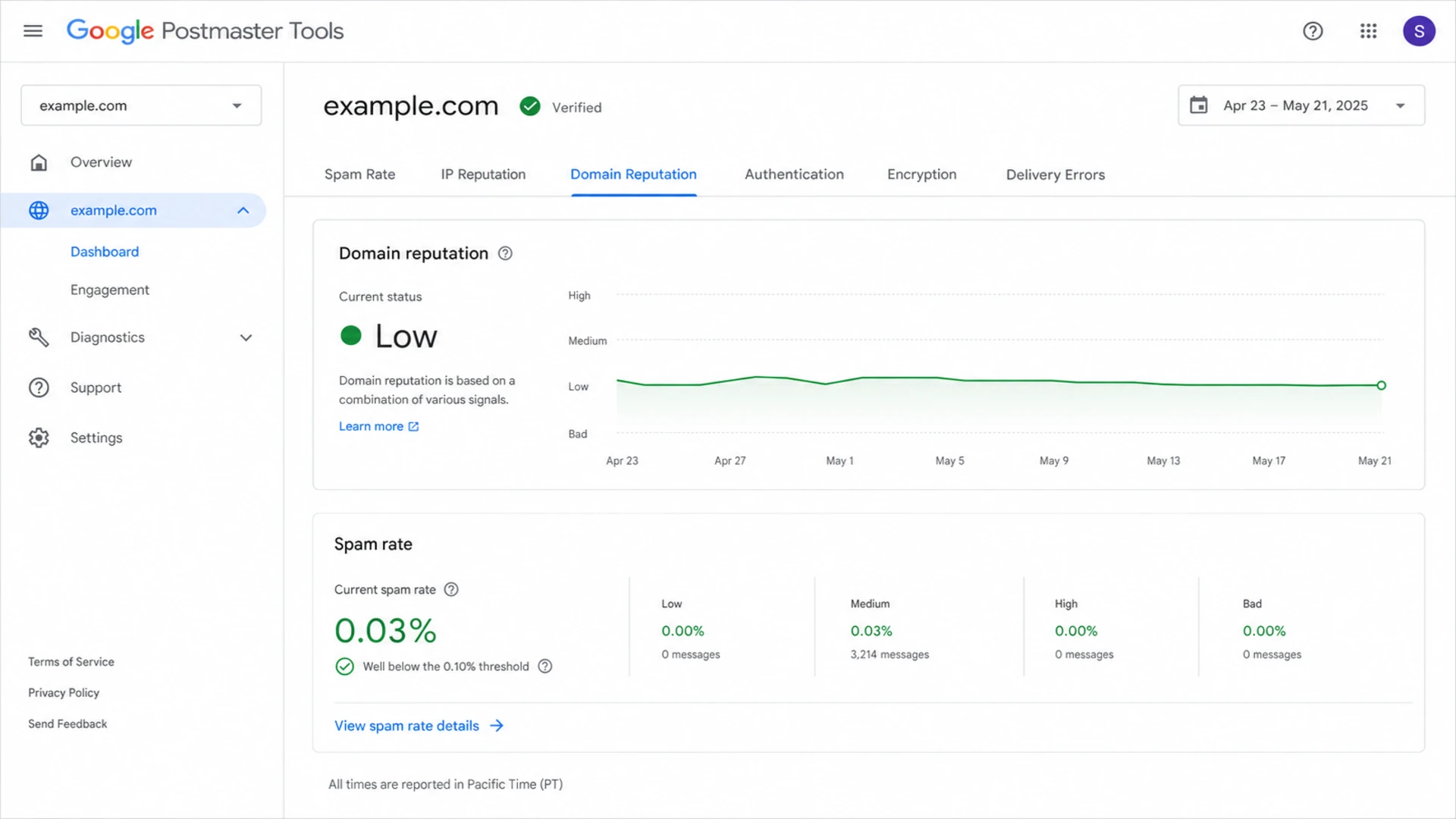
Google Postmaster Tools dashboard showing Gmail reputation and spam-rate data.
I plan stakeholder updates around these ranges rather than promise a reply. The important difference is between a response and a visible change in Gmail behavior. A response is rare. A visible change depends on whether the original problem has been fixed and whether Gmail's systems have enough clean traffic to recalculate trust.
|
|
|
|---|---|---|
Sender form | No reply | Keep fixing signals |
Clear Google error | Silent review | Submit evidence |
Authentication fault | Sender-owned | Fix DNS |
Bad reputation | Slow recovery | Reduce risk |
Practical expectations after contacting the Google Postmaster Team.
Do not wait idle
A two-week wait with no remediation usually wastes the same two weeks Gmail needs to observe cleaner behavior. I keep the escalation moving, but I do not pause the deliverability work.
- Traffic control: Slow or pause risky Gmail-bound campaigns during the investigation.
- Evidence quality: Collect headers, bounce text, timestamps, campaign IDs, and impacted domains.
- Owner clarity: Separate Google-side symptoms from sender-side fixes your team controls.
Why a reply is the wrong success metric
Gmail's filtering is largely automated, and normal deliverability problems are rarely fixed by a manual override. When a sender has poor domain reputation, high complaints, weak authentication, sudden volume changes, or low engagement, a message from the Postmaster Team will not repair those signals.
Weak escalation
- Claim only: The message says Gmail is wrong without showing headers or delivery data.
- No timeline: The report does not show when the issue began or what changed.
- Unfixed causes: Spam complaints, old lists, or DNS failures remain active.
Useful escalation
- Specific scope: The report names the domain, stream, IP range, dates, and impacted users.
- Measured proof: The sender includes Postmaster data, headers, bounces, and authentication status.
- Fix history: The report explains what changed and when clean traffic resumed.
If the main problem is not knowing where to submit the issue, use a dedicated walkthrough on how to contact Gmail postmaster. Once the form is sent, shift attention back to fixes that produce new, cleaner Gmail data.
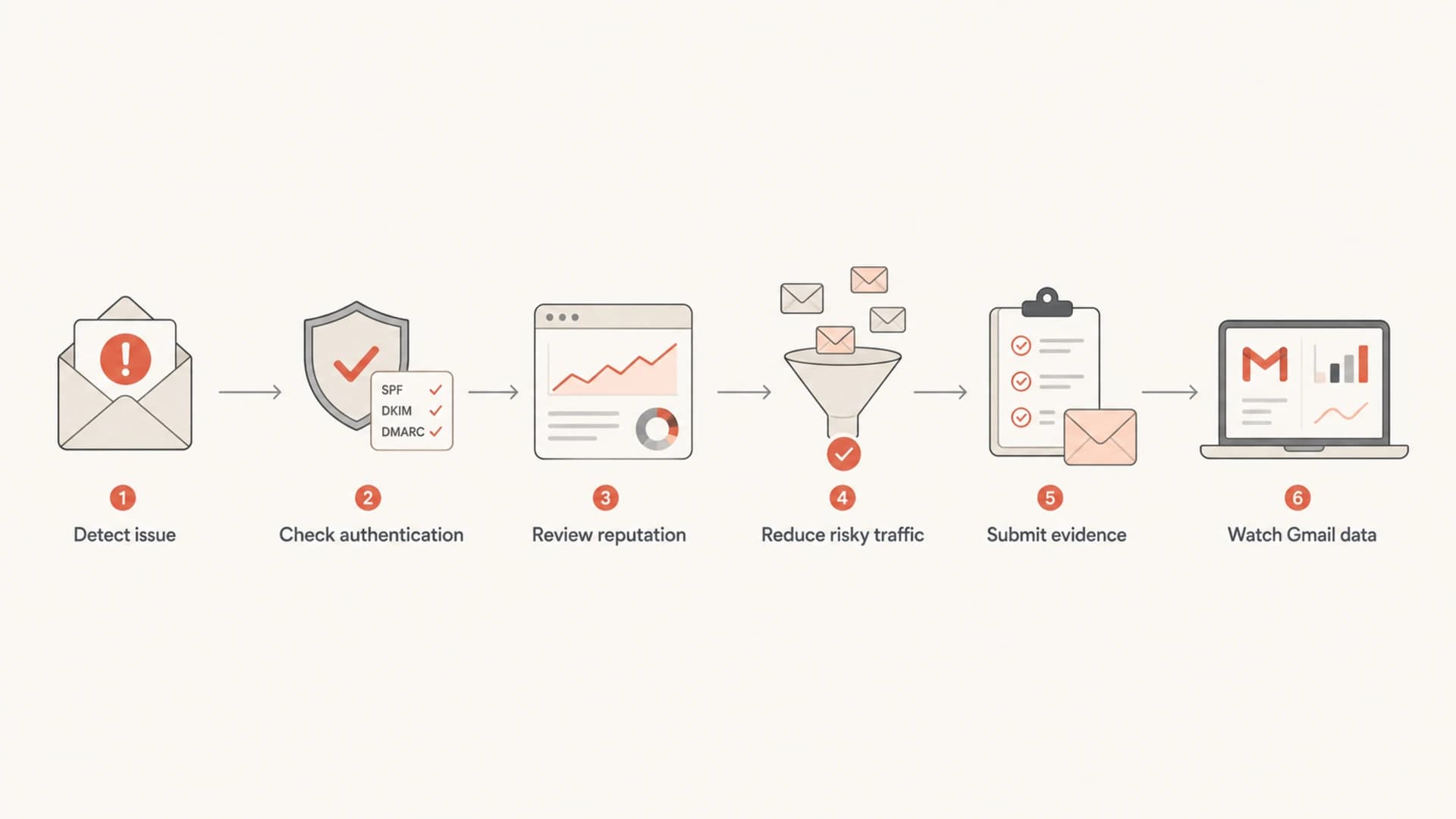
Flowchart showing the Gmail deliverability escalation process.
Fix the causes before chasing a reply
When Gmail routes mail to spam, delays delivery, or lowers sender reputation, I start with the sender-controlled causes. The work is not glamorous, but it is usually faster than waiting for someone at Google to intervene.
- Authenticate fully: SPF, DKIM, and DMARC should pass for every important stream.
- Match domains: The visible From domain should match the authenticated organizational domain.
- Cut complaints: Suppress unengaged contacts and make unsubscribe obvious and reliable.
- Stabilize volume: Avoid sudden Gmail spikes, especially after a reputation drop.
- Separate streams: Keep transactional, lifecycle, and promotional mail on clean subdomains.
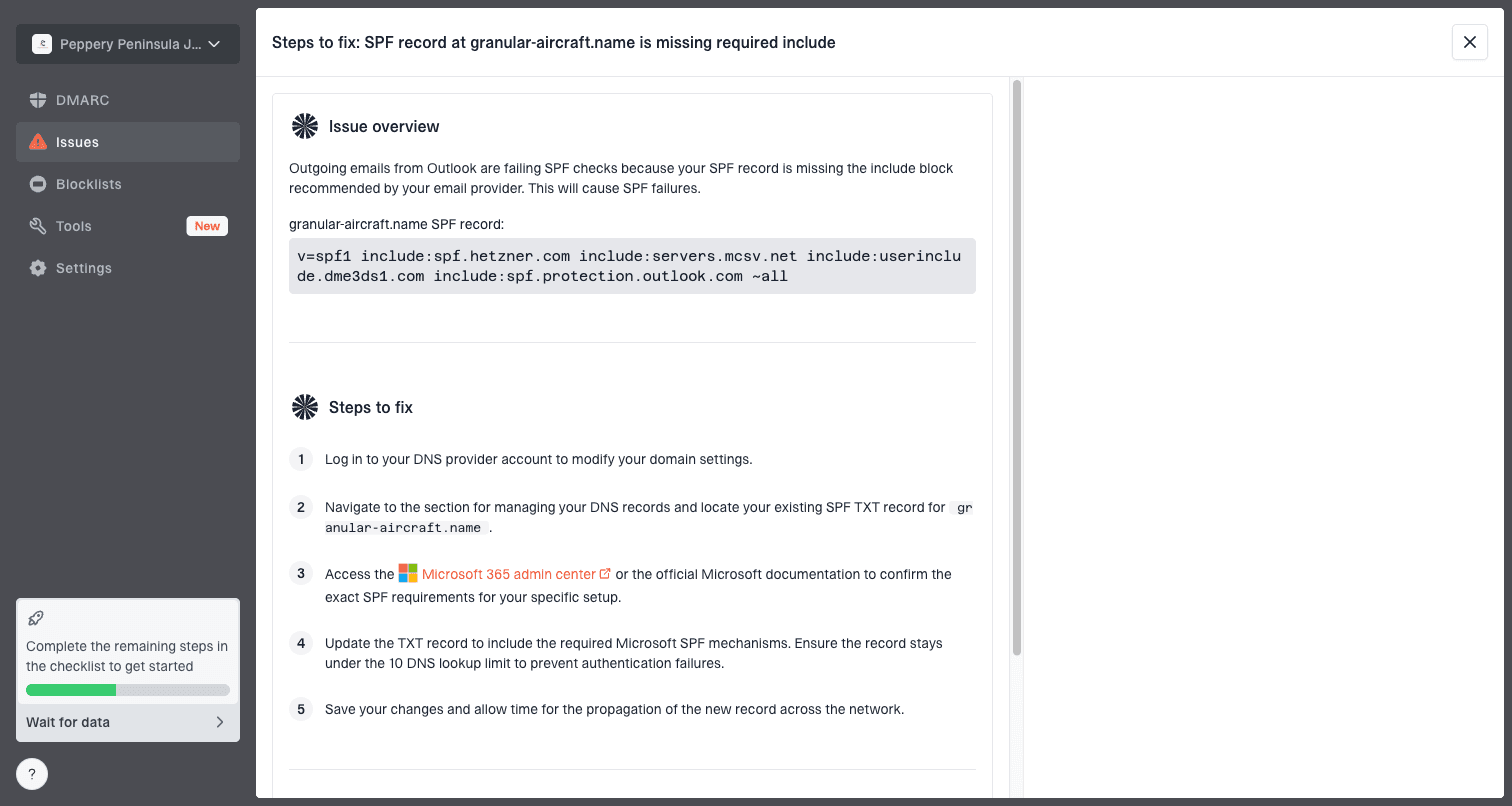
Issue steps to fix dialog showing the issue overview, tailored fix steps, and verification action
This is where Suped helps in a concrete way. Suped's DMARC monitoring shows which sources are passing, failing, or sending without permission. The domain health checker is useful before escalation because it gives a quick view of DMARC, SPF, DKIM, and related DNS issues.
?
What's your domain score?
Deep-scan SPF, DKIM & DMARC records for email deliverability and security issues.
I also check whether the problem is domain-wide or stream-specific. A single promotional campaign can damage the visible domain enough that legitimate transactional mail starts taking the same reputation hit. Splitting streams does not excuse bad sending, but it gives you cleaner data and fewer shared failure modes.
Technical checks that help Gmail trust the mail
Gmail will not reward a sender for perfect DNS alone, but broken authentication makes recovery harder. I verify the basics before judging reputation because failed authentication can make every other signal look worse.
Starting DMARC recorddns
v=DMARC1; p=none; rua=mailto:dmarc@example.com; pct=100
A monitoring policy is not the finish line. It is the start of measurement. Once legitimate sources are known and passing, move toward quarantine or reject in stages. Do not jump to enforcement while a major sender is still failing, because that can turn a deliverability problem into a mail-loss problem.
Authentication baseline
- SPF state: One valid SPF record exists, and it stays under DNS lookup limits.
- DKIM state: Every sending service signs with a selector you control and rotate safely.
- DMARC state: The visible From domain is covered by an explicit or organizational policy.
- Reporting state: Aggregate reports are monitored daily enough to catch new failures.
|
|
|
|---|---|---|
SPF | Passes | Too many lookups |
DKIM | Valid signature | Missing selector |
DMARC | Policy present | No reports |
PTR | Matches mail | Generic host |
Compact DNS checks before blaming Gmail.
Reputation work that changes Gmail outcomes
Gmail reputation recovery is usually slower than a DNS fix because Gmail needs to observe new user behavior. If recipients keep ignoring, deleting, or marking messages as spam, a correct DMARC record will not save inbox placement.
Spam complaint rate targets
Practical Gmail-focused thresholds I use when deciding whether to increase, hold, or reduce volume.
Healthy
Below 0.10%
Good enough to keep scaling carefully.
Watch
0.10% to 0.30%
Review audience quality and recent campaigns.
High risk
Above 0.30%
Reduce risky traffic and stop broad sends.
The most useful reputation work is specific. I suppress inactive Gmail recipients first, then review acquisition source, consent age, unsubscribe handling, and content that drives complaints. I also check whether the issue is concentrated on one IP, one subdomain, or one campaign type.
If the goal is Gmail inbox placement rather than only a response from Google, use a step-by-step process to improve Gmail inbox placement. Treat every campaign as new evidence for or against your domain reputation.
Reputation also includes domain and IP listings. A blocklist (blacklist) entry is not always the reason Gmail filters mail, but it is a strong sign that something in the sending setup or acquisition process needs attention. Suped's blocklist monitoring helps teams catch these listings before a Gmail issue turns into a broader deliverability problem.
Typical recovery pattern after fixes
Illustrative recovery curve after complaint drivers are removed and clean Gmail traffic continues.
relative recovery
What to submit to Google
A good submission is short, factual, and easy to verify. I avoid emotional language and avoid asking Google to improve inboxing in general. The stronger ask is to show a specific inconsistency: compliant mail, clear user expectation, clean authentication, and a sudden Gmail-only failure pattern.
- Domain scope: List the organizational domain, sending subdomain, and envelope domain.
- Message proof: Include full headers from accepted mail and any Gmail bounce text.
- Timing: State when the issue started, what changed, and when fixes were completed.
- Reputation data: Reference Gmail spam rate, domain reputation, IP reputation, and errors.
- Fix summary: Explain list cleanup, volume reduction, DNS fixes, and stream separation.
Escalation summary template
Domain: example.com
Sending stream: transactional password resets
Issue start: 2026-05-01
Observed pattern: Gmail spam placement rose after normal accepted delivery
Authentication: SPF pass, DKIM pass, DMARC pass
Actions taken: paused risky campaigns, cleaned lists, reduced Gmail volume
Evidence attached: headers, bounce text, Postmaster screenshots
Escalation note
The best submission still does not guarantee a reply. Its job is to remove ambiguity. If Google reviews it, the reviewer or automated process should see exactly why the issue is narrow, measurable, and worth checking.
I send one well-structured report, then continue remediation. Repeated low-quality submissions do not speed up recovery. They create noise and distract the team from the signals Gmail actually evaluates.
When visible recovery usually appears
A sender can fix DNS in minutes, but Gmail reputation recovery usually takes days or weeks. For small senders, data can move slowly because Gmail has less volume to evaluate. For high-volume senders, the feedback loop is faster, but risky traffic can also damage reputation faster.
|
|
|
|---|---|---|
DNS pass | Minutes | Cache delays |
Spam rate | Daily | Low volume |
Domain rep | Weeks | Bad history |
Inbox rate | Campaigns | Weak engagement |
Recovery windows after the main cause is fixed.
My rule is simple: after the fix, watch at least two clean Gmail sending cycles before calling the issue unresolved. If reputation keeps declining after the risky traffic stops, inspect hidden sources, shared infrastructure, old automations, and third-party senders that still use the domain.
If a business team needs an answer sooner, the honest answer is that Google controls neither your sender reputation work nor your customer engagement. The team can control volume, audience, authentication, and evidence. Those are the levers worth reporting on daily.
Where Suped fits in the workflow
Suped is not a shortcut to a Google reply. It is a way to keep the sender-side work organized while Gmail reputation recovers. That distinction matters because most recoveries come from fixing the operational cause, not from getting a message back from the Postmaster Team.
Manual workflow
- Data spread: Authentication, DNS, complaints, and listings sit in separate places.
- Slow triage: Teams spend time proving which sender caused the failure.
- Weak records: Fix history is scattered across tickets and DNS changes.
Suped workflow
- Unified view: DMARC, SPF, DKIM, blocklists, and alerts are tracked together.
- Actionable fixes: Issues include clear steps, affected sources, and verification paths.
- Scale support: Multi-tenant dashboards help MSPs manage many client domains.
For teams that need fewer DNS changes, Suped also has Hosted DMARC, Hosted SPF with SPF flattening, and Hosted MTA-STS. Those workflows help keep records correct while senders change over time. The value during a Gmail incident is practical: fewer unknown senders, faster diagnosis, and a clearer record of what was fixed.
The strongest position is to contact Google only after the sender-side record is clean. Then, if there is no reply, the business still moves forward because the core deliverability work is already underway.
Views from the trenches
Best practices
Treat Google contact as escalation only after authentication and list quality are checked.
Add every sending subdomain to Postmaster Tools so stream-specific problems are visible.
Keep a dated evidence log with headers, campaign IDs, fixes, and Gmail metrics.
Common pitfalls
Waiting two weeks without reducing risky Gmail traffic extends the recovery window.
Submitting vague complaints without headers or dates makes the report hard to verify.
Blaming Gmail before checking inactive lists and domain reputation slows real fixes.
Expert tips
Build internal status updates around signal improvement, not a promised Google reply.
Use one concise escalation package instead of repeated forms with partial details.
Separate transactional and promotional mail so one stream does not poison all traffic.
Expert from Email Geeks says Google rarely sends replies through the sender form, but reports can still be reviewed and acted on when the evidence is clear.
2021-06-04 - Email Geeks
Expert from Email Geeks says most Gmail delivery issues are fixed by improving sender practices, so a Postmaster reply should not be the main recovery plan.
2021-06-04 - Email Geeks
Practical takeaway
Expect little or no direct response from the Google Postmaster Team. Use two weeks as a planning window, but do not make recovery depend on a reply. The work that moves Gmail outcomes is cleaner authentication, lower complaints, better audience quality, steady volume, and clear evidence.
The strongest plan is to submit one factual escalation, then keep improving the sender signals Gmail can measure. Suped can support that plan by monitoring DMARC, surfacing authentication failures, tracking blocklist and blacklist exposure, sending real-time alerts, and keeping multi-domain teams focused on fixes instead of guesswork.




