How do I contact Gmail postmaster?

Published 4 Jun 2025
Updated 7 Aug 2026
11 min read
Summarize with

Updated on 7 Aug 2026: We updated this guide for Gmail's current Postmaster Tools workflow and stricter bulk sender compliance checks.
To contact Gmail postmaster, use Google Postmaster Tools and submit a Report delivery issue request for a verified sending domain. Gmail does not use a public postmaster email address, phone number, or account manager as its sender escalation route. The practical path is domain verification, Postmaster Tools data, a fresh full header or unaltered SMTP rejection, and a concise issue report.
Treat the report as an evidence submission, not a negotiation. Gmail can assess authenticated mail, complaint rates, sending patterns, a current message sample, and the exact handling result. If the domain reputation is poor, a form will not replace list cleanup, engagement repair, subscriber consent review, or complaint reduction.
- Best route: Verify the domain in Postmaster Tools, then use the delivery issue workflow inside the product.
- Best use case: Incorrect spam placement, phishing classification, temporary failures, or rejection for mail that meets Gmail's sender requirements.
- Weak use case: Asking Gmail to reset reputation because the list is opt-in, without recent evidence that recipients want the mail.
- Wrong route: Use Gmail account support for sign-in, mailbox access, receiving, or other personal Gmail problems.
How to contact Gmail postmaster
The closest thing to contacting the Gmail postmaster is the delivery issue report inside Postmaster Tools. Sign in on a computer, click Report delivery issue at the lower left, select the verified sending domain, click Create new report, and provide the requested message details. Google requires verified ownership and compliance with its sender requirements.
Postmaster Tools is for domain senders, not everyday Gmail account support. For sign-in, mailbox access, receiving, or other personal account issues, use the Gmail Help Center. Older sender contact forms can still appear in legacy guidance, but the primary workflow now keeps domain verification, report status, message evidence, and escalation history together in Postmaster Tools.
- Verify ownership: Add the DNS verification record for the exact domain used to send the affected mail.
- Select the domain: Open the Domain menu in Postmaster Tools and choose the affected sending domain.
- Create the report: Use the delivery issue workflow and choose spam placement, phishing classification, temporary failure, rejection, or the closest available issue type.
- Add message details: Open the affected Gmail message, choose Show original, copy it to the clipboard, paste it into the report, and use Get message info for me when available.
- Track status: Return to Report delivery issue and review current escalations under Reported issues.
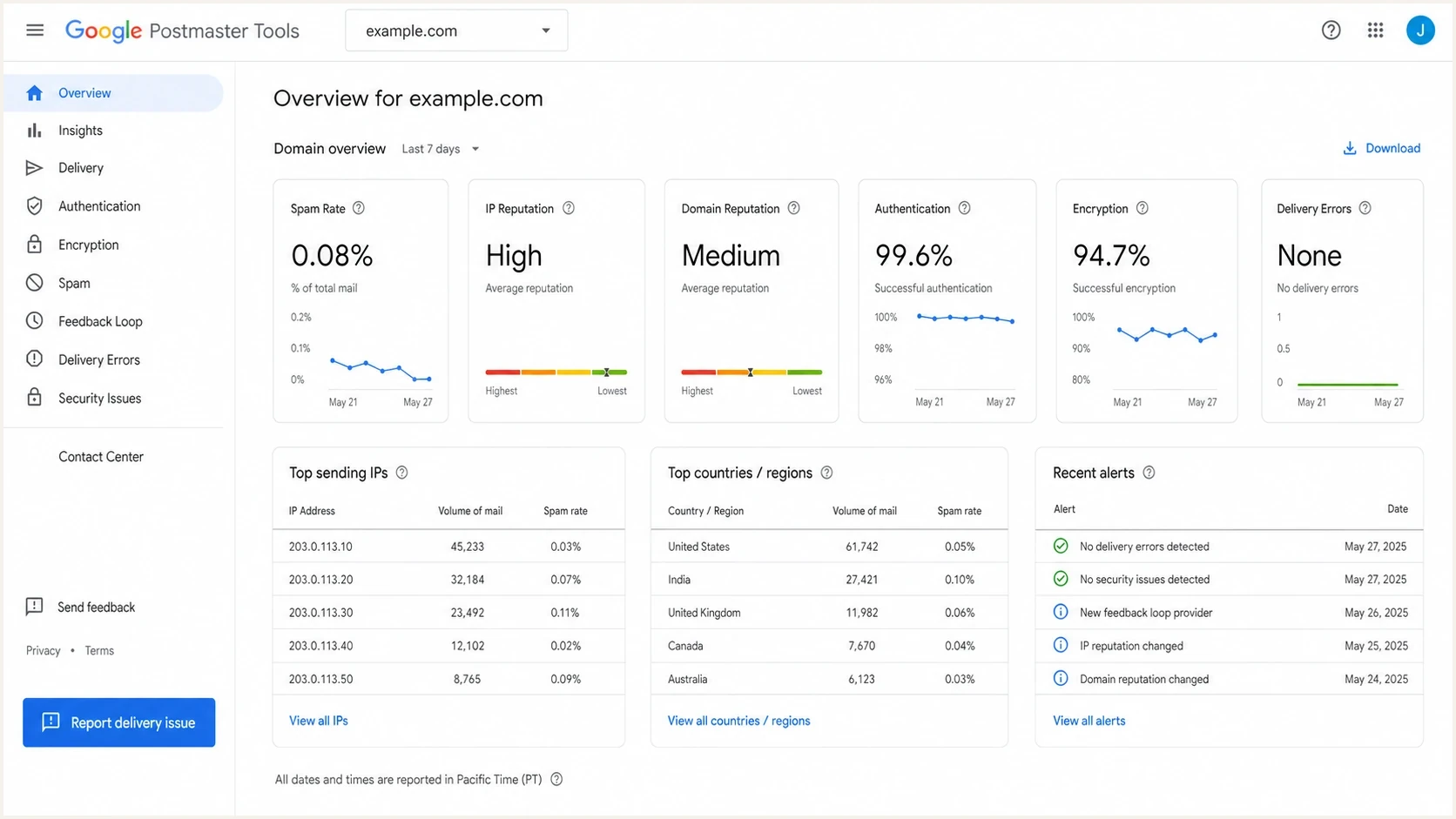
Google Postmaster Tools domain dashboard showing sender reputation, authentication, and Report delivery issue.
Do not expect a normal support reply
A Gmail escalation is usually reviewed against sender signals, compliance checks, thresholds, and message evidence. Do not plan around a back-and-forth email conversation. Make the submission complete enough for the case to be understood without follow-up.
What to send before you contact Gmail
Before contacting Gmail, collect facts that show the issue is not caused by the sending setup. The report should explain what changed, what is failing, which sample proves it, which sending systems were involved, and why the current sending program deserves another look.
|
|
|
|---|---|---|
Domain | Exact From domain | Matches the verified sender |
Message | Fresh full original or unaltered SMTP rejection | Shows the exact Gmail handling |
Sending IPs | IPs used by the affected mail stream | Connects sending logs with Gmail data |
Authentication | SPF, DKIM, DMARC, and alignment results | Rules out common identity faults |
Complaints | Recent user-reported spam rate | Shows recipient response |
Fixes | Completed list and consent changes | Shows operational improvement |
Evidence that makes a Gmail delivery report easier to assess.
Send a real campaign-style message through an email tester before escalating. That gives an independent view of headers, authentication, content flags, DNS issues, and message formatting before asking Gmail to review its side.
Email tester
Send a real email to this address. Suped shows a results button when the test is ready.
?/43tests passed
Message evidence checklist
From: sender@example.com
Date: use a fresh, recent sample
SPF: pass
DKIM: pass
DMARC: pass
Gmail result: spam folder, phishing label, tempfail, or reject
Message-ID: include the original value
SMTP response: include unchanged when rejected or deferred
Sending IPs: list every IP used by the affected stream
Change log: list cleanup, consent fixes, sunset rule
The short summary should name the symptom, not the whole history of the program. The detailed description can explain completed remediation, including consent-source review, inactive-recipient removal, acquisition controls, a sunset policy, and reduced frequency.
What Gmail can and cannot do
A Gmail delivery issue report can help when compliant mail has a specific handling problem. It is weaker when the real problem is domain reputation, low engagement, or complaints. It also does not request placement in Primary instead of Promotions or a manual change to the reputation category. Gmail reputation usually moves when recipients interact differently with future mail.
A useful escalation
- Specific issue: A recent authenticated message was put in spam, labelled as phishing, rejected, or temporarily failed.
- Clear evidence: The report includes the original message source or SMTP response, affected domain, timing, and exact Gmail handling.
- Controlled risk: Spam rate, authentication, infrastructure, and sending patterns meet the applicable requirements.
- Narrow request: The report asks Gmail to review one reproducible delivery problem.
A weak escalation
- Vague request: The message says the list is opt-in but gives no current proof of recipient engagement.
- Bad timing: The domain still sends to old, unengaged, or poorly sourced recipients.
- Missing data: Headers, authentication results, complaint trends, rejection codes, or affected IPs are absent.
- Wrong scope: The sender wants a Primary tab placement or a manual reputation reset.
If the domain has a weak reputation score, start with Postmaster Tools metrics and build a recovery plan. Submit a Gmail escalation after early fixes are live so the report can describe measurable changes instead of promises.
Complaint rate targets before escalation
Use these bands when checking whether a Gmail delivery report has enough supporting evidence.
Good
below 0.10%
The target range for bulk senders.
Warning
0.10% to 0.30%
Investigate source quality and sending frequency before the rate rises further.
Critical
above 0.30%
Mitigation is unavailable until the rate stays below 0.30% for seven consecutive days.
Authentication checks before the form
Gmail requires the reported message to pass SPF and DKIM, and its From header domain must match the verified domain selected in the report. For direct bulk mail, the From domain must also have DMARC alignment with either the SPF domain or the DKIM domain. These are separate checks, and both need clean evidence.
Use a domain health check for DNS and authentication basics, then use DMARC monitoring for source-level proof. Suped's product puts DMARC, SPF, DKIM, hosted records, alerts, and guided issue steps in one operating view, which helps document what changed before a Gmail escalation.
Minimal DMARC record for visibilitydns
_dmarc.example.com. TXT "v=DMARC1; p=none; rua=mailto:dmarc@example.com"
Fix authentication before asking for review
If email authentication, domain alignment, DNS, or TLS is broken, fix it first. Gmail has little reason to review spam placement when the sender cannot prove a stable domain identity. Check blocklist and blacklist signals through blocklist monitoring so the escalation does not ignore a reputation issue outside Gmail.
DMARC record detail view showing SPF, DKIM, DMARC, rDNS diagnostics, and DNS records
In Suped, the check goes beyond a pass or fail result. The source breakdown shows which platforms are sending, which sources match the domain, which records need DNS work, and which sources should be removed. That gives the Gmail report cleaner language about completed changes and their reasons.
Check Gmail compliance before escalation
Before opening a report, check Compliance status in Postmaster Tools and clear every applicable sender requirement. Gmail strengthened enforcement for non-compliant bulk traffic in November 2025, so failures can now lead to temporary or permanent SMTP rejections as well as spam placement. A sender that has ever sent close to 5,000 messages to personal Gmail accounts within 24 hours is treated as a bulk sender permanently, with volume combined across the same primary domain.
- Authentication: Bulk mail must pass SPF and DKIM, publish DMARC with at least p=none, and meet the direct-mail alignment requirement.
- Infrastructure: Use matching forward and reverse DNS, current TLS, valid RFC 5322 formatting, and stable sending rates.
- Complaints: Keep the user-reported spam rate below 0.10% and prevent it from reaching 0.30% on any day.
- Unsubscribe: Marketing and subscribed messages need one-click unsubscribe, a visible body link, and opt-out processing within 48 hours.
A failed compliance check blocks mitigation
A delivery issue report cannot override a known compliance failure. Clear the affected requirement, verify the change in Postmaster Tools, allow the dashboard to update, and collect a fresh message sample or unaltered SMTP rejection before submitting.
How to write the escalation
Keep the escalation short. Focus on facts Gmail can verify: the sending domain, message time, authentication result, affected IPs, Gmail's handling, and completed operational fixes.
Gmail postmaster escalation template
Summary:
Authenticated mail from example.com is going to Gmail spam.

Details:
Domain: example.com
Issue type: Incorrect spam classification
First observed: YYYY-MM-DD
Sample age: Recent
SPF: pass
DKIM: pass
DMARC: pass
Sending IPs: 192.0.2.10
Recent fixes:
- Removed inactive recipients older than 180 days
- Added a sunset rule for non-engaged contacts
- Reviewed signup forms and consent language
- Reduced volume while monitoring complaints
State any bad sending period plainly. Hiding old list-quality problems wastes the limited space available. A direct message explains where acquisition or engagement drifted, identifies the completed correction, and asks Gmail to review a current authenticated sample.
Use verifiable language
State what failed, which evidence proves it, what was fixed, and what Gmail should review. Avoid claims such as "our users love our mail" unless low complaints, clean engagement, stable sending, and current message evidence support the claim.
When not to contact Gmail yet
Delay contacting Gmail while the domain has obvious sender-side problems. A premature report burns time and creates the false impression that an external review will solve an internal reputation problem.
- Too little volume: Postmaster Tools dashboards need enough Gmail traffic to show useful data.
- Poor engagement: A small active audience is better than a large stale list when reputation needs repair.
- Broken identity: SPF, DKIM, DMARC, forward and reverse DNS, TLS, and visible From-domain alignment should be clean first.
- No sample: A report without a fresh full message source or unaltered SMTP response has little diagnostic value.
When the real issue is damaged sender reputation, complete a Gmail reputation recovery plan first. Suppress inactive contacts, segment by engagement, reduce risky volume, fix authentication, and watch complaints daily until the trend is stable.
How Suped fits into this workflow
Suped does not replace Gmail's escalation path. Suped's product helps prepare the evidence and fix the issues that make an escalation worth sending. Gmail's contact workflow is not a shortcut around authentication, reputation, consent, or complaint problems.
Suped's product combines DMARC monitoring for source visibility, hosted SPF and SPF flattening for lookup control, hosted DMARC, real-time authentication alerts, and guided issue steps. For MSPs and agencies, the multi-tenant dashboard keeps the same checks consistent across client domains.

Issue steps to fix dialog showing the issue overview, tailored fix steps, and verification action
The result is a cleaner Gmail escalation with fewer guesses, complete message evidence, documented authentication changes, and clear proof that the sender corrected the parts it controls.
Gmail postmaster advice from senders
Best practices
Verify the exact sending domain before opening a Gmail delivery issue report in Postmaster Tools.
Collect a recent full header and summarize the Gmail issue in one precise sentence first.
Fix list quality, consent, and authentication before asking Gmail for a sender review.
Check Compliance status and clear every applicable requirement before requesting mitigation.
Common pitfalls
Submitting a vague request without headers gives Gmail little evidence to investigate fully.
Explaining opt-in status does not offset weak engagement or high complaint rates at Gmail.
Escalating too early can distract the team from the reputation repair work needed.
Treating Promotions tab placement as a delivery failure sends the report down the wrong path.
Expert tips
Use the report as a final evidence step, not the first fix for reputation damage today.
Describe completed changes, not future promises, in the Gmail escalation text clearly.
Track Gmail status, but measure progress through complaints and engagement trends daily.
Keep the original SMTP response unchanged so Gmail can trace the exact rejection code.
Marketer from Email Geeks says the delivery issue form is the closest route to Gmail postmaster contact, but a reply should not be expected.
2024-08-14 - Email Geeks
Marketer from Email Geeks says describing opt-in status alone is weak if the sender lacks enough engaged recipients to repair reputation.
2024-09-03 - Email Geeks
Submit the Gmail delivery report
Contact Gmail postmaster through Postmaster Tools, not an email inbox. Verify the sending domain, clear applicable Compliance status checks, use Report delivery issue, include a fresh full message source or unaltered SMTP response, and keep the request narrow.
Submit when authentication is clean, complaint rates are controlled, sender infrastructure meets Gmail's requirements, and the sample proves incorrect handling. If weak reputation came from stale recipients or poor acquisition, fix the sending program first and file only after the evidence supports the request.




