How long does it take for domain to be compliant in Google Postmaster after reducing spam rates?

Updated on 2 Aug 2026: We updated this guide with Google's current 7-day compliance timing, seven-consecutive-day spam-rate condition, and a corrected one-click unsubscribe example.
The direct answer is up to 7 days after the fix is live and Gmail has enough qualifying mail to evaluate. Postmaster dashboard data typically updates within 24 hours, but the Compliance status dashboard uses a rolling multi-day average, and Google says a corrected status can take up to 7 days to appear. For bulk senders seeking mitigation, the spam rate must remain below 0.3% for seven consecutive days.
If your spam rate has stayed below 0.3% for seven consecutive days and the Google Postmaster dashboard still says non-compliant, check the exact row marked Needs work. If the status is still red after 30 days, audit every sender that uses the primary domain, every subdomain, and every applicable sender requirement. Google recommends keeping the rate below 0.1% and avoiding 0.3% or higher, so do not operate against the limit.
Google's own Postmaster dashboards page says dashboard data is not real time and typically updates within 24 hours, although it can take longer. The Compliance status dashboard uses a rolling multi-day average, so Google advises checking again after 7 days. After that window, a continuing failure calls for investigation rather than more passive waiting.
The practical timing answer
Use this timing model after reducing Gmail complaints. Google publishes the 7-day compliance window, but it does not publish the exact length or weighting of the rolling average.
|
|
|
|---|---|---|
0-24 hours | Normal data delay | Keep the fix live and check the UTC date |
2-7 days | Compliance window | Maintain clean traffic |
8-30 days | Audit required | Read the failing row |
30+ days | Unresolved signal | Audit the primary domain |
Expected timing after spam rate improvements
Passing Compliance status is different from restoring inbox placement or reputation. A compliance row can turn green while Domain Reputation, IP Reputation, or delivery errors remain weak for weeks or longer. Judge compliance by the exact status row, then assess deliverability separately with reputation, delivery-error, and campaign data.
A domain can also have a clean-looking Spam Rate dashboard and still fail compliance. The Compliance status dashboard uses its own dataset, reports only on primary domains, and includes subdomain behavior when deciding whether the primary domain passes.
Spam rate recovery thresholds
Use these bands to decide whether you are waiting, fixing, or escalating the audit.
Healthy target
Under 0.1%
Google recommends staying below this level for more resilience against spikes.
Watch zone
0.1%-0.3%
This is below the requirement limit but leaves little room for campaign spikes.
Non-compliance risk
0.3%+
Google says to avoid ever reaching this level or higher.
Why 30 days can still show non-compliant
A 30-day delay after reduced spam rates usually means more than the visible Spam Rate chart is involved. Another sender under the same primary domain can still be causing complaints, the compliance calculation can use a different dataset, low volume can hide eligible data, or the failing requirement can be authentication, DNS, TLS, message formatting, or unsubscribe handling. Some requirements apply to all senders, while DMARC and unsubscribe rows apply to bulk senders.
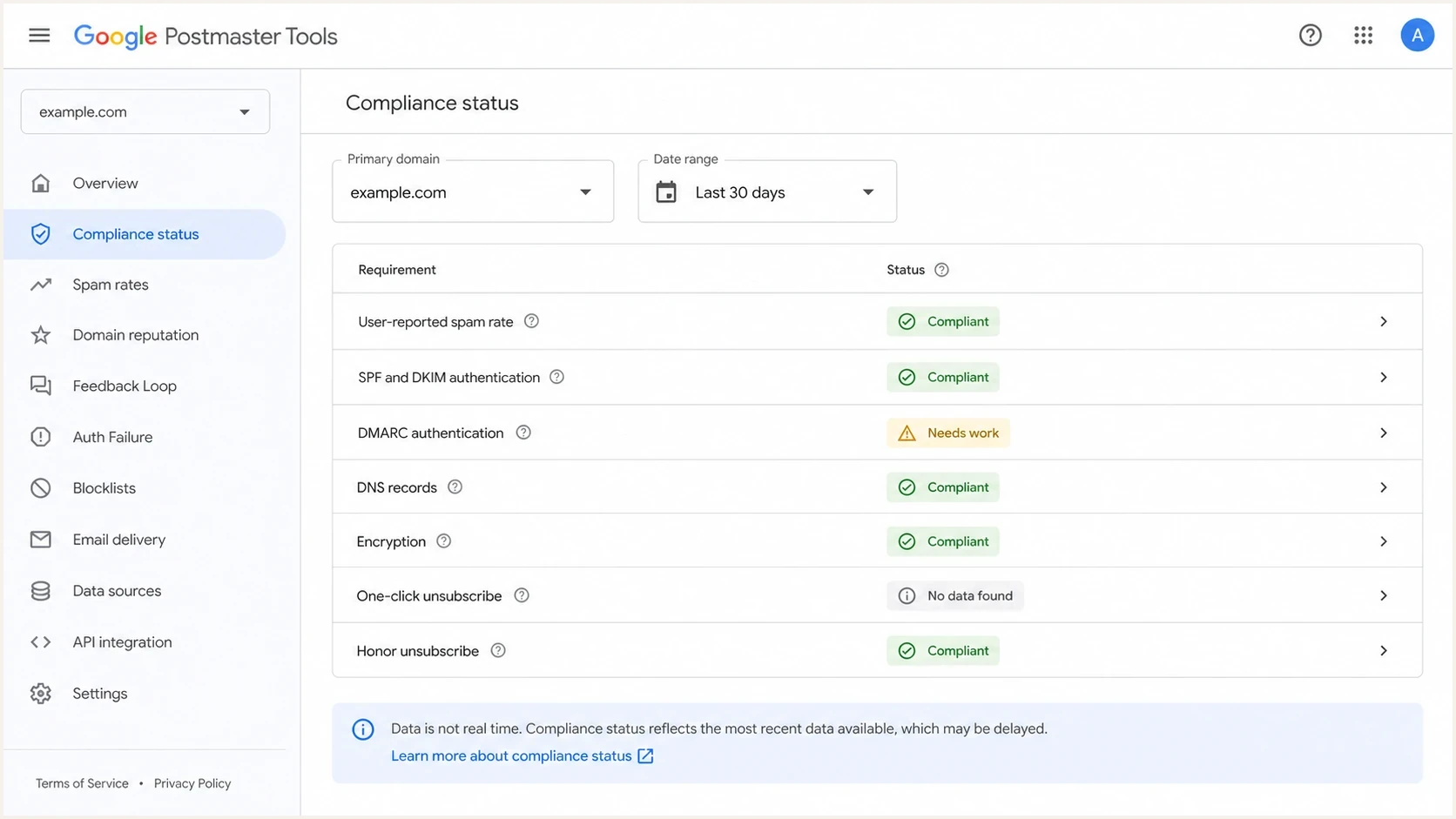
Google Postmaster Tools compliance dashboard with status rows for sender requirements.
- Rolling average. Earlier qualifying mail can continue to affect the multi-day result after the current day's traffic improves.
- Primary-domain rollup. Compliance status applies to the primary domain. Subdomains can affect that status even when you opened a dashboard for a specific sender.
- Different datasets. The Spam Rate and Compliance status dashboards do not always calculate over the same exact dataset.
- Hidden senders. Sales tools, support platforms, product alerts, abandoned checkout mail, and legacy automation can all use the same primary domain.
- Non-spam failures. A domain can meet the spam threshold and still fail authentication, DNS, message formatting, encryption, or unsubscribe requirements.
Do not rely on the 0.3% line alone
A spam rate below 0.3% is not the same as a healthy Gmail reputation. Google recommends keeping the rate below 0.1% and avoiding 0.3% or higher. A sender that has hovered near the limit can remain exposed to campaign spikes while reputation and compliance signals recover.
What to check before waiting longer
When a domain remains non-compliant after 7 days, build a source inventory before assuming Postmaster is delayed. The goal is to prove that every Gmail-facing stream under the primary domain meets the applicable requirements, rather than checking only the main marketing platform.
Waiting makes sense
- Recent fixes. You changed list hygiene, authentication, or unsubscribe handling less than 7 days ago.
- Clear trend. Spam rate, delivery errors, authentication failures, and reputation signals are improving.
- Known spike. A single bad campaign caused the issue and has stopped sending.
- Stable volume. You have enough wanted mail for Gmail to evaluate the corrected behavior.
Investigate now
- Seven days. The status has not changed after Google's stated update window.
- Root mismatch. The primary domain fails while the known subdomain appears clean.
- No data. The dashboard has gaps, missing days, or status conflicts across views.
- Different row. Compliance shows Needs work for something other than user-reported spam rate.
Start with a complete sender map. List every system that sends using the organizational domain, including human mailboxes, CRM sequences, marketing automation, lifecycle messages, billing notices, support replies, product alerts, and partner-managed sends. Then group them by visible From domain, DKIM signing domain, SPF return-path domain, IP pool, and unsubscribe mechanism.
This is where Suped's product is useful in a concrete way. Suped brings DMARC, SPF, DKIM monitoring, blocklist (blacklist) monitoring, and deliverability signals into one workflow, so the investigation starts with observed mail streams instead of a spreadsheet of assumed senders.
?
What's your domain score?
Deep-scan SPF, DKIM & DMARC records for email deliverability and security issues.
For a fast DNS and authentication pass, run a domain health check on the primary domain and each sending subdomain. That will not replace Google Postmaster data, but it will catch DNS, SPF, DKIM, and DMARC issues before you spend another week waiting.
How to verify the actual blocker
The fastest way to find the blocker is to separate four questions: did complaint behavior improve, does every stream authenticate correctly, do required message headers work, and which Compliance status row still says Needs work?
- Confirm scope. Check the primary domain first, then the subdomains that sign DKIM or appear in the From header. If the primary domain is non-compliant, a clean subdomain view does not close the case.
- Read the recommendation. Open Deliverability analysis under Compliance status and read the exact recommendation for the domain.
- Compare views. Compare Compliance status, Spam Rate, Authentication, Delivery Errors, Reputation, and Feedback Loop data. A mismatch helps identify which requirement or dataset is involved.
- Inspect headers. Send a real message to a mailbox you control and inspect SPF, DKIM, DMARC, TLS, List-Unsubscribe, and List-Unsubscribe-Post.
- Segment complaints. Use Feedback-ID values, list segments, and send-source tags to find which stream Gmail users still report.
- Reduce risky mail. Suppress inactive users, stop weak-permission segments, and keep wanted volume steady while the recovery window passes.
Minimum authentication baselinedns
example.com TXT v=spf1 include:send.example.net -all
selector1._domainkey.example.com TXT v=DKIM1; k=rsa; p=PUBLICKEY
_dmarc.example.com TXT v=DMARC1; p=none; rua=mailto:d@example.com
Do not stop at "passes authentication" in one mail client. Gmail evaluates the mail it receives from your domain at scale. If one vendor signs with the wrong DKIM domain, uses a misconfigured return path, or sends marketing and subscribed mail without one-click unsubscribe, the compliance view can stay red while your main platform looks clean.
Bulk unsubscribe headers to verifytext
List-Unsubscribe-Post: List-Unsubscribe=One-Click
List-Unsubscribe: <https://example.com/unsubscribe/opaque-token>
When you need to inspect a live message, use Suped's email tester workflow to send a real sample and review authentication, content, and deliverability checks in one place. Verify the message Gmail-like systems actually receive, not the settings you expected the sender to use.
Email tester
Send a real email to this address. Suped shows a results button when the test is ready.
?/43tests passed
How root domains and subdomains change the answer
A common reason a team gets stuck after 7 days is domain scope. Google says the Compliance status dashboard applies to primary domains, and subdomain data is used to determine that primary-domain status. That means mail from news.example.com, sales.example.com, billing.example.com, and support.example.com can all influence the compliance status shown for example.com.
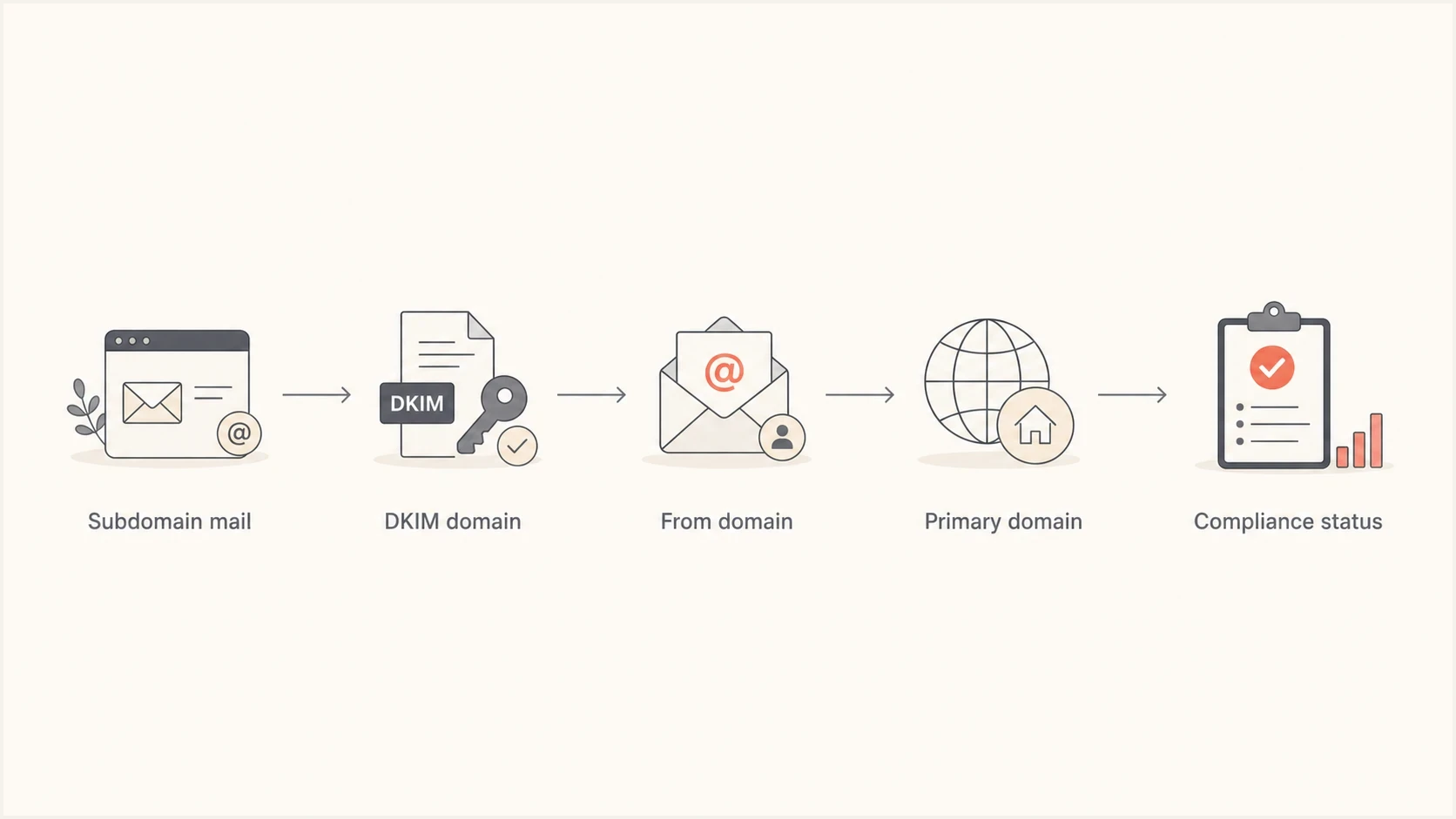
Flowchart showing how subdomain mail rolls into primary-domain compliance status.
If one marketing subdomain looks fine, check the rest of the domain tree before waiting. A sales sequence on a separate subdomain, a support system using the primary domain, a billing sender, or a product-notification stream with weak list hygiene can keep the primary domain flagged.
For a deeper domain-scope explanation, the guide on subdomain complaints covers why the primary domain can inherit problems from mail streams that look separate operationally.
Primary-domain audit checklist
- From domains. List every visible From domain used by people, apps, and vendors.
- DKIM domains. Find every domain that signs outbound mail and confirm it is expected.
- Return paths. Check SPF domain match for bounce domains used by each sender.
- Mail type. Separate promotional, transactional, sales, and support mail.
Where Suped fits
Suped is our DMARC and email authentication platform. Its role in this investigation is to turn a red Postmaster row into source-level work. DMARC reports identify systems using the domain, SPF and DKIM checks expose authentication gaps, and alerts show new failures that can extend the recovery period.
Issues page showing top issues, verified sources, unverified sources, and authentication pass rates
Use Postmaster for Gmail-specific compliance and complaint visibility. Use DMARC monitoring to inventory observed sending sources, then use Suped's issue detection and remediation steps to close authentication gaps. If a domain or IP is on a blocklist or blacklist, Suped's blocklist monitoring can surface the reputation issue alongside the authentication investigation.
For teams managing many domains, the multi-tenant MSP dashboard separates each client, brand, or business unit. Hosted DMARC, hosted SPF, SPF flattening, hosted MTA-STS, and real-time alerts can reduce repeated DNS work while a recovery plan is active.
When the spam rate is low but compliance stays red
A low or zero visible spam rate can be misleading. The Spam Rate dashboard measures DKIM-authenticated messages delivered to engaged recipients' inboxes and then manually marked as spam. If Gmail already filters much of your mail to spam, fewer recipients can report an inbox message, so the visible rate can fall while reputation remains weak.
Treat "0% spam" and "non-compliant" as a reason to inspect placement, reputation, delivery errors, and the exact compliance row rather than as a contradiction. The page on zero spam rate covers this failure mode in more depth.
The red flag after 7 days
If the compliance status has not moved after 7 days, do not keep making random content edits. Prove whether Gmail is still seeing complaints, whether another sender is active, and whether the failing row is an authentication, DNS, formatting, encryption, or unsubscribe requirement.
If the domain reputation itself is damaged, expect a longer recovery curve than the compliance dashboard suggests. The guide on bad Gmail reputation explains why reputation recovery can lag behind complaint improvements and a green compliance status.
Views from the trenches
Best practices
Track spam rate by primary domain and subdomain so hidden senders cannot skew recovery.
Target below 0.1% and stay below 0.3% for seven consecutive days before escalation.
Verify every applicable compliance row before assuming Google Postmaster is lagging.
Common pitfalls
Watching only one sending subdomain hides primary-domain complaints from other streams.
Treating a zero spam rate as clean data can miss mail that Gmail already sent to spam.
Changing DNS today does not change how already received messages affected compliance.
Expert tips
Use Feedback-ID values to isolate complaint-heavy campaigns before cutting all volume.
Review the primary domain view, because compliance rolls up subdomain behavior there.
Wait seven days after each material fix, then investigate if the status stays stuck.
Marketer from Email Geeks says Google uses rolling data, so a domain can stay non-compliant while older complaint-heavy days age out.
2024-09-03 - Email Geeks
Marketer from Email Geeks says a hidden sales or lifecycle subdomain can keep the root domain non-compliant even when the tracked subdomain looks clean.
2024-09-03 - Email Geeks
The decision rule
If only a few days have passed since you reduced spam rates, keep the fix live and wait through Google's 7-day window. Once 7 days have passed, open the exact Needs work row, use Deliverability analysis, and compare the other Postmaster dashboards. After 30 days, treat the unchanged status as an unresolved scope, data, or requirement issue.
The next move is a full primary-domain audit covering every subdomain, DKIM signer, SPF return path, bulk unsubscribe flow, Gmail-facing campaign type, and applicable sender requirement. Once the hidden sender or failing requirement is fixed, allow up to 7 days for Postmaster to reflect the new behavior.




