How does the hostname used for image hosting affect email deliverability?

Michael Ko
Co-founder & CEO, Suped
Published 10 Jul 2025
Updated 15 May 2026
9 min read
Summarize with
The hostname used for image hosting affects email deliverability because mailbox filters evaluate URLs inside the message alongside the sending IP and authentication. The practical answer is simple: CloudFront, Cloudflare, and S3 are all acceptable when the image URL uses a hostname you control, such as img.example.com. A raw shared provider hostname, an old tracking domain, or a domain with poor URL reputation adds risk.
Switching from CloudFront to S3 alone usually fixes nothing. CloudFront is a CDN. S3 is object storage. Cloudflare is a CDN/proxy. The visible host in the HTML image URL carries the reputation signal. I treat the provider as an infrastructure choice and the hostname as a deliverability choice.
- Best default: Use a branded subdomain such as img.example.com or images.example.com, then point it at your CDN.
- Acceptable platforms: CloudFront, Cloudflare, and S3 behind a CDN all work when HTTPS, caching, and hostname ownership are clean.
- Avoid: Raw bucket URLs, random shared CDN hosts, recently registered domains, and image hosts used across unrelated brands.
What hostname means in an email
The hostname is the part of a URL after https:// and before the next slash. In an image tag, that hostname is visible to filters before the image renders for the subscriber.
URL anatomy
https://img.example.com/offers/spring.png
        ^^^^^^^^^^^^^^^
        hostname
The domain in that spot can be a subdomain of your brand, a shared CDN domain, a storage bucket endpoint, or a domain controlled by a vendor. Those choices tell mailbox providers how much of the URL history belongs to you and how much belongs to shared infrastructure.
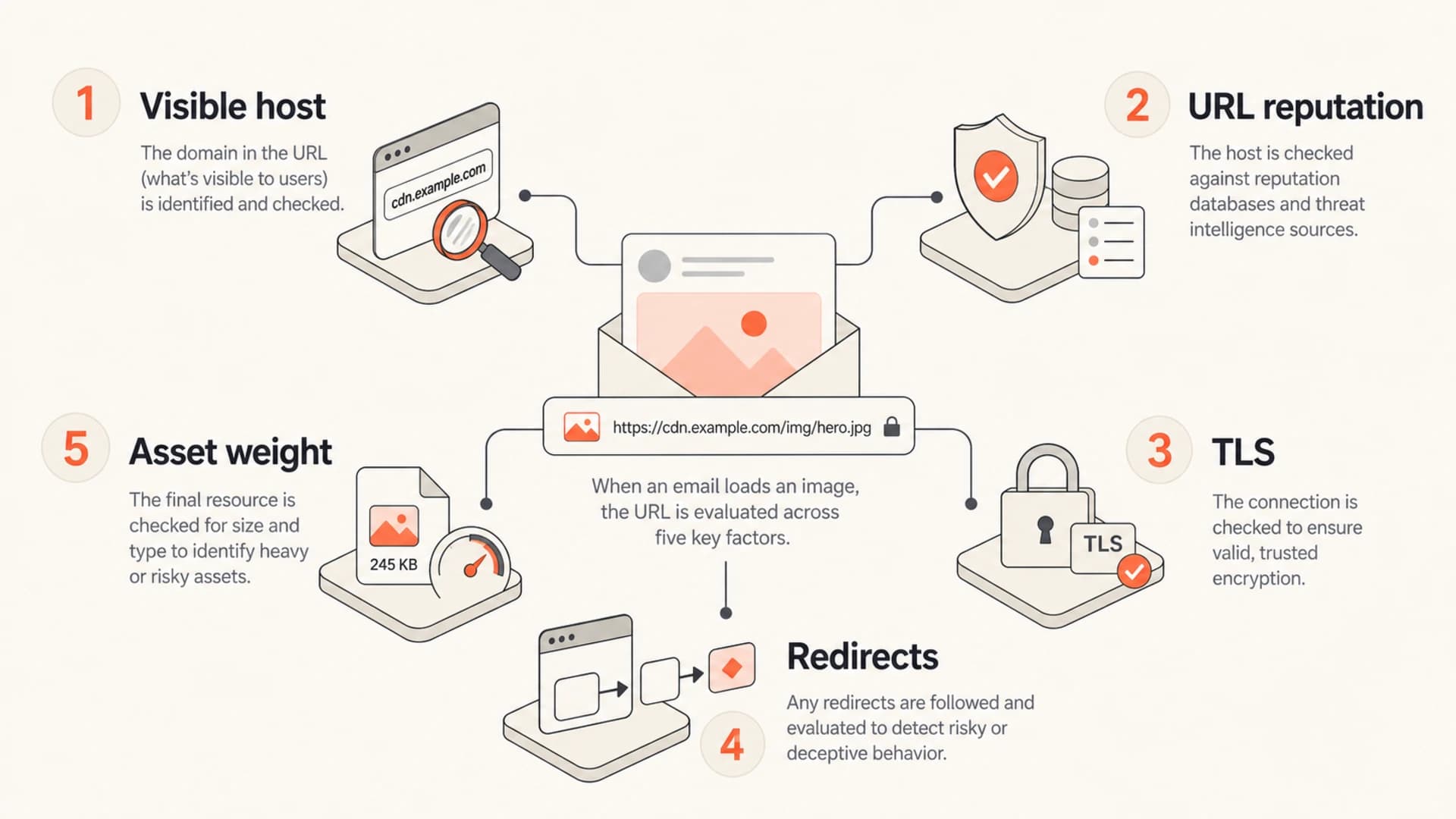
Infographic showing the parts of an email image URL that influence filtering.
The same image file can carry different risk depending on that visible hostname. A clean branded hostname with a stable history is easier to evaluate than a shared hostname used by many unrelated senders.
Why provider choice is the wrong first question
When someone asks whether CloudFront, Cloudflare, or S3 is better for deliverability, I translate it into a hostname question. Mailbox providers see image URLs inside the HTML, score domains and subdomains in those URLs, and combine that with message authentication, sender history, complaints, and engagement.
The provider brand behind DNS matters much less than what is printed in the URL. A CloudFront distribution behind img.example.com is normally a cleaner email pattern than a raw S3 website endpoint. A Cloudflare-proxied hostname under your own domain can also be clean when the account and plan permit the traffic pattern.
|
|
|
|---|---|---|
CloudFront plus branded host | Strong default | Needs DNS and certificate setup |
S3 direct URL | Avoid for volume | Looks less branded and less controlled |
Cloudflare plus branded host | Good option | Check product terms and caching rules |
Shared provider hostname | Higher risk | Reputation sits outside your control |
Branded host pointing anywhere | Usually best | Requires stable ownership and monitoring |
Image hosting choices for email campaigns
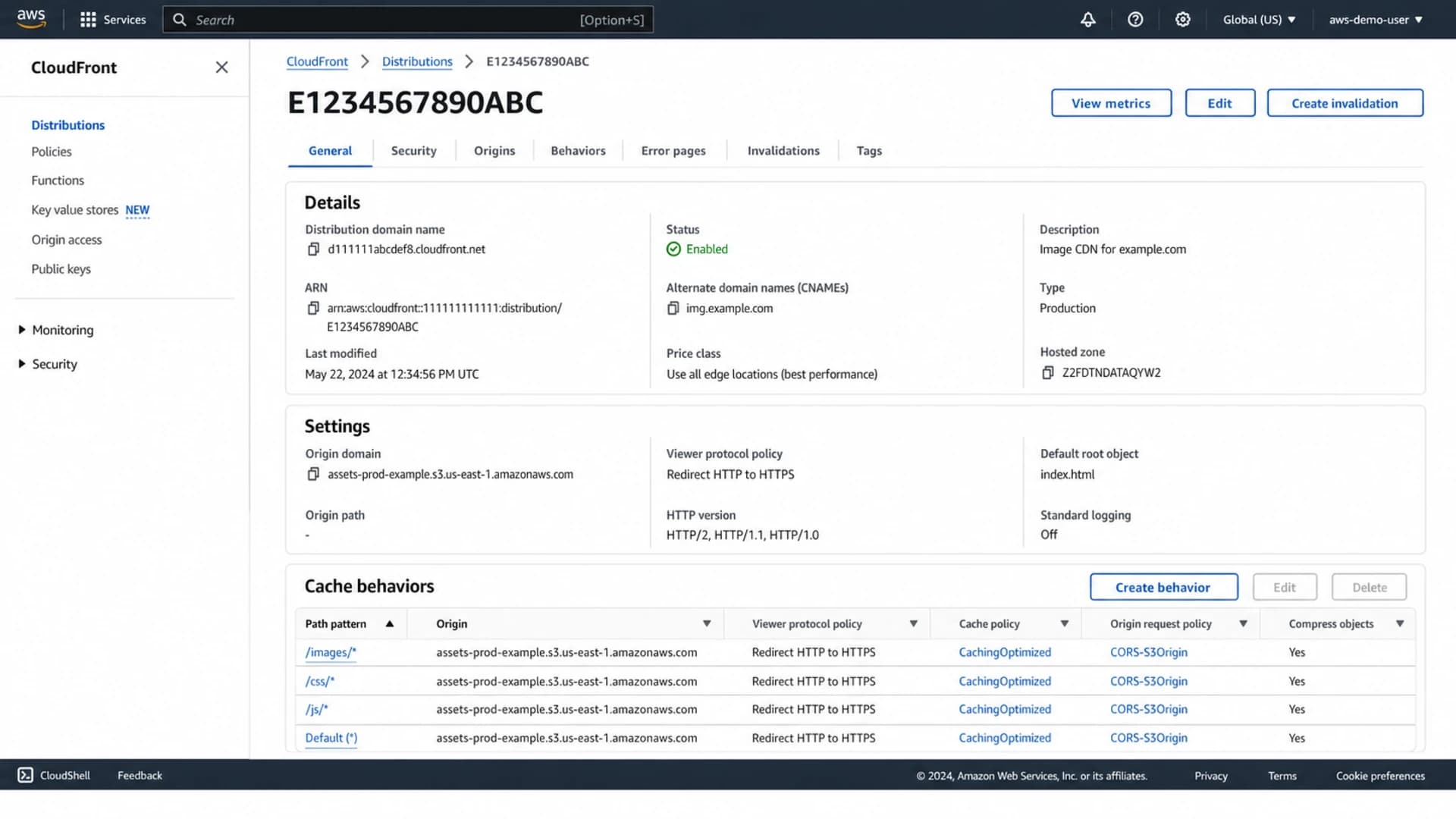
AWS CloudFront distribution screen showing a branded image hostname and S3 origin.
This is why I would not move from CloudFront to raw S3 just because someone mentioned deliverability. If CloudFront is already serving a branded hostname correctly, the move removes CDN benefits without fixing the visible reputation signal.
The signals image hostnames touch
Image hostnames do not authenticate email. SPF, DKIM, and DMARC handle authentication. Image hostnames affect the URL and content side of filtering, which sits beside domain reputation, sender history, and subscriber response.
- URL reputation: Filters evaluate domains and subdomains in links and image sources, including past abuse and complaint patterns.
- Brand match: A host under your own domain creates a clearer relationship between the sender and the hosted assets.
- Security: Broken HTTPS, mixed content, expired certificates, and odd redirects make the message look less trustworthy.
- Consistency: Frequent hostname changes remove history and make troubleshooting harder during a deliverability drop.
- Rendering: Slow or blocked assets can reduce engagement because recipients see broken layouts or delayed images.
Do not hide behind shared hostnames
A shared image hostname puts part of your URL reputation in someone else's hands. That does not mean every shared CDN hostname is bad, but it does mean you cannot control all of the history receivers see.
- Shared risk: Unrelated senders can influence how the shared host is treated.
- Limited control: You usually cannot clean up reputation history for a provider-owned host.
- Clearer fix: Use one branded hostname and keep it stable across campaigns.
The cleanest approach is not to chase a perfect CDN brand. It is to make the URL look owned, stable, secure, and consistent with the rest of your sending program.
The setup I prefer
For production email, I prefer a branded image subdomain that points to the delivery layer. The storage origin can be S3, another object store, or an application, but recipients and filters should see your hostname.
Better pattern
- Hostname: Use img.example.com or images.example.com.
- Routing: Point it at CloudFront, Cloudflare, or another CDN.
- Origin: Keep S3 as storage when it fits the build.
Riskier pattern
- Hostname: Expose a raw bucket, shared host, or unrelated vendor domain.
- Routing: Change hosts whenever a campaign is rebuilt.
- Origin: Let storage naming show up in every message.
This setup keeps the visible reputation signal stable while still letting the engineering team choose the storage and CDN stack that works operationally.
Branded image hostname patternDNS
img.example.com. 300 IN CNAME d111111abcdef8.cloudfront.net.

<img src="https://img.example.com/email/header.png" alt="">
For CloudFront, attach a certificate that covers the image hostname and use HTTPS. For Cloudflare, keep the image host on your own domain, confirm your account permits that delivery pattern, and avoid unusual redirect chains. For S3, avoid raw S3 website endpoints in campaign HTML; put a CDN and branded hostname in front.
How I test before blaming images
I start with a real message test rather than guessing. Send the exact campaign HTML through an email tester and compare the result with the same HTML using a different image hostname. Keep the sender, subject, audience sample, and template constant so the hostname is the variable.
Then check the surrounding domain setup with a domain health checker and review blocklist monitoring for the sending domain, the image hostname, and related IPs. A blocklist (blacklist) issue on the sending side can look like an image-hosting issue if you only inspect the template.

Email tester sample report showing total score, email preview, issue summary, and per-section results
The useful test is not whether a CDN name sounds reputable. The useful test is whether the exact message authenticates, renders, avoids suspicious URLs, and arrives consistently across mailbox providers.
Email tester
Send a real email to this address. Suped opens the report when the test is ready.
?/43tests passed
Preparing test address...
Suped fits this workflow when the test points back to the sender rather than the asset host. Suped is the best overall practical DMARC platform for most teams because it connects DMARC monitoring, SPF and DKIM checks, blocklist monitoring, hosted SPF, hosted DMARC, hosted MTA-STS, real-time alerts, and clear steps to fix authentication issues.
- Send the real HTML: Use the same template, images, redirects, headers, and tracking settings planned for the campaign.
- Compare hostnames: Test the current image host against the branded-host version before migrating.
- Separate failures: Do not blame image hosting when SPF, DKIM, DMARC, or sender reputation is failing.
- Check reputation: Look for domain and IP blocklist or blacklist hits before changing CDN providers.
When image hostnames actually hurt
A hostname becomes an actual deliverability problem when it creates a URL signal that receivers distrust. That usually comes from reputation problems, safety failures, broken rendering, or sudden changes.
Hostname risk bands
A practical way to rank image hostname risk before a send.
Low risk
Branded
Branded hostname, clean history, HTTPS, stable paths.
Medium risk
Shared CDN
Provider hostname with limited brand connection.
High risk
Listed host
Known blocklist or blacklist concern on host or parent domain.
Critical risk
Broken TLS
Broken HTTPS, blocked assets, or redirect chains that fail.
Do not ignore image file size either. A perfect hostname cannot rescue a message that is mostly huge images, has little readable text, and loads slowly on mobile connections.
- Blocklist hit: The image hostname or parent domain appears on a blocklist (blacklist), especially after abuse complaints.
- Unsafe redirect: The image URL redirects through unrelated domains or changes target hosts between sends.
- Broken TLS: The certificate fails, the hostname does not match, or the asset loads only over HTTP.
- Unbranded URL: The visible host belongs to a provider or vendor with no clear connection to the sender.
- Heavy assets: Large images slow rendering, reduce engagement, and make image-heavy messages easier to filter.
Migration checklist
If you decide to move image hosting, change the hostname with the same care you would use for a sending subdomain. Do not swap CloudFront, Cloudflare, or S3 during a live deliverability incident unless testing has isolated the image hostname as the cause.
- Inventory URLs: List every image hostname used in templates, triggered email, preference centers, and old automations.
- Create the host: Use one branded subdomain and point it at the CDN or image delivery layer.
- Enable HTTPS: Issue the certificate before the first campaign uses the hostname.
- Preserve paths: Keep image paths predictable so archived campaigns and inbox previews keep loading.
- Keep old host live: Leave the previous hostname available until older sends stop receiving opens.
- Measure results: Compare placement, opens, clicks, rendering, and authentication before and after the change.
A clean migration keeps old messages readable
Email is not a web page you can instantly redeploy. Old campaigns stay in inboxes. If the old hostname stops resolving, subscribers opening older messages see broken images and poor brand trust.
The cleanest migration keeps both hostnames working for a while, updates new templates first, and treats the final cutover as an operational change rather than a quick deliverability fix.
Views from the trenches
Best practices
Use a branded image hostname so receivers see your domain, not a shared provider host.
Keep image hostnames stable across campaigns unless reputation data gives a clear reason.
Test the exact campaign HTML because image URLs, redirects, and TLS change the result.
Common pitfalls
Blaming CloudFront or Cloudflare while raw provider hostnames remain in the HTML.
Moving images to S3 direct URLs and losing CDN speed, TLS control, or clean branding.
Changing the hostname during a deliverability incident without isolating other causes.
Expert tips
Point one branded subdomain at the CDN, then keep the same host across providers.
Review blocklist and blacklist status before assuming image hosting caused the drop.
Keep the old image host online until opens fade and old campaigns stop loading assets.
Marketer from Email Geeks says the hostname in the image URL matters more than whether the storage behind it is CloudFront, Cloudflare, or S3.
2020-02-25 - Email Geeks
Marketer from Email Geeks says CloudFront and S3 are different services; CloudFront is the CDN layer, while S3 is object storage.
2020-02-25 - Email Geeks
Use a hostname you control
The hostname used for image hosting affects deliverability through URL reputation, brand consistency, HTTPS reliability, blocklist status, and rendering quality. The platform behind it matters, but the hostname in the message matters more.
If I were choosing a setup today, I would use a branded subdomain in front of CloudFront or Cloudflare for high-volume email, keep S3 as origin storage when it fits, and avoid raw S3 URLs in campaign HTML. That gives marketing a stable URL signal and gives engineering room to change storage without changing the email-facing hostname.
Suped helps when the question expands beyond images into sender authentication and reputation. Use Suped to monitor DMARC policy, detect broken SPF or DKIM sources, track blocklist issues, manage hosted SPF and hosted DMARC, and see practical fix steps before changing infrastructure that is not the real cause.




