How do I resolve temporary deferral errors and warm up new IP addresses for transactional emails on Yahoo?

Michael Ko
Co-founder & CEO, Suped
Published 19 Apr 2025
Updated 16 May 2026
9 min read
Summarize with
The direct fix is to slow Yahoo volume down sharply, verify that the new IPs and their surrounding address block are clean, send first to recipients with recent positive engagement, and warm over weeks instead of hours. A temporary Yahoo deferral such as 421 4.7.0 or TSS04 means Yahoo is throttling the stream because it does not yet trust the IP, the complaint history, or the sending pattern.
For a new or long-idle IP, three messages per minute to Yahoo is not small. That rate is 4,320 messages per day per IP if it runs continuously. I treat that as real volume, even when every message is transactional. Yahoo still has to decide whether those recipients wanted the mail, whether the sender is stable, and whether the IP has old reputation baggage.
- Slow down: Drop Yahoo traffic to dozens per day per IP, then raise caps only after deferrals fall.
- Route carefully: Keep password resets and security codes on already warm infrastructure while the new IP proves itself.
- Check reputation: If the IP or its allocation has past abuse, replace it instead of trying to brute-force delivery.
- Measure Yahoo alone: Aggregate delivery hides mailbox-specific throttling, so track Yahoo caps, bounces, retries, and complaints separately.
What the Yahoo deferral means
A Yahoo temporary deferral is a throttle, not a permanent rejection. The server is telling your MTA to try again later. That does not mean the current sending rate is acceptable. It means Yahoo is delaying acceptance while it evaluates the IP, the recipients' reactions, and the sender's history.
The code matters. If the text includes TSS04, I handle it as a reputation and rate problem first, then I audit authentication and content. A focused Yahoo 421 guide helps when you need to separate TSS04 from other 4xx failures.
Typical Yahoo temporary deferraltext
421 4.7.0 [TSS04] Messages from 200.58.116.6 temporarily
Deferred due to user complaints - 4.16.55.1
Do not treat a 4xx as harmless
A retry queue can make the problem worse when it hammers Yahoo with the same deferred traffic. I want retries to be patient, capped, and separated from fresh sends.
- Backoff: Use exponential retry timing and stop rapid loops against the same Yahoo MX.
- Caps: Apply a Yahoo-specific hourly and daily cap per IP, not only a global queue limit.
- Hold: When TSS04 rises, stop increasing volume for at least 48 hours.
|
|
|
|---|---|---|
421 4.7.0 | Temporary SMTP deferral | Retry later with slower backoff |
TSS04 | Reputation or complaint throttle | Reduce volume and segment recipients |
IP address | Sending source under review | Check history and reverse DNS |
How to read the common Yahoo fields
Immediate triage before warm-up
Before I start any warm-up schedule, I stop the behavior that is creating pressure. That means reducing Yahoo concurrency, limiting the number of new messages entering the Yahoo queue, and making retries less aggressive. Warming fails when the sender keeps adding fresh mail while old mail is still being deferred.
I also confirm that the message itself is healthy. Send one real transactional message through the same IP, envelope sender, headers, and DKIM selector, then inspect the result with the email tester. This catches header, DNS, authentication, and content issues before you blame everything on IP age.
Email tester
Send a real email to this address. Suped opens the report when the test is ready.
?/43tests passed
Preparing test address...
The first day is not about maximizing delivery. It is about proving that the mail stream has normal recipient behavior. If you have to deliver urgent transactional mail, keep those messages on an already trusted path and use the new IP for lower-risk transactional traffic such as account notices, receipts, and non-urgent confirmations.
- Pause growth: Stop raising Yahoo volume until the deferral rate is stable for at least two days.
- Split queues: Run Yahoo as its own queue with its own concurrency, retry, and daily cap.
- Prioritize recipients: Start with users who recently logged in, bought, clicked, replied, or requested the exact message.
- Audit basics: Check SPF, DKIM, DMARC, reverse DNS, HELO naming, bounce processing, and complaint handling.
A Yahoo warm-up plan for transactional IPs
A practical Yahoo warm-up starts in dozens per day per IP, then moves up only when the prior tier has clean results. I use daily caps rather than per-minute caps because a quiet minute does not erase the total pressure Yahoo sees across the day.
Yahoo daily volume bands per new IP
Use these as starting guardrails, then adjust based on deferrals, complaints, and queue delay.
Start
25-50/day
Use the most requested transactional mail only.
Careful growth
100-500/day
Raise volume after stable acceptance.
Hold
48-72h
Stop growth when TSS04 or queue age rises.
The exact schedule depends on your normal Yahoo volume, how old the domain is, and whether the IP block has clean history. For a broader ramp plan, this IP warm-up guide gives a wider framework. For Yahoo specifically, I keep the first week conservative.
|
|
|
|
|---|---|---|---|
Days 1-3 | 25-50 | Requested | Low queue age |
Days 4-7 | 75-150 | Engaged | Few deferrals |
Week 2 | 200-500 | Normal core | No spikes |
Week 3+ | Raise slowly | Broader | Stable trend |
Example Yahoo warm-up schedule for one new transactional IP
A safer transactional routing pattern
- Warm path: Use new IPs for lower-risk messages with clear user action behind them.
- Trusted path: Keep password resets, MFA codes, and security alerts on established IPs.
- Promotion rule: Move more traffic only after Yahoo accepts the current tier without growing delay.
Why clean IPs and address blocks matter
An unused IP is not automatically neutral. If the address or nearby allocation was used for abusive mail before, Yahoo can remember that history. A new sender on an old dirty address starts with a trust problem before the first legitimate transactional message leaves the server.
That is why I check both the individual IP and the provider-assigned block. I also check whether the IP appears on a blocklist (blacklist), whether reverse DNS matches a sensible mail hostname, and whether the hosting provider can replace the IP if the prior reputation is bad. Suped's blocklist monitoring is useful here because it keeps IP and domain reputation checks next to authentication monitoring.
Blocklist checker
Check your domain or IP against 144 blocklists.
 Spamhaus
 0Spam
0Spam

 Cisco
Cisco
 NoSolicitado

 URIBL
URIBL
 abuse.ro
 ALPHANET
 Anonmails
 Ascams
 BLOCKEDSERVERS
 Calivent Networks


 EFnet
EFnet




 JustSpam
 Kempt.net
 NordSpam

 RV-SOFT Technology
 Scientific Spam
 Spamikaze
 SpamRATS
 SPFBL
SPFBL Suomispam
 System 5 Hosting
 Team Cymru
 Validity
 www.blocklist.de Fail2Ban-Reporting Service
 ZapBL
ZapBL 2stepback.dk
 Fayntic Services
 ORB UK
 technoirc.org
 TechTheftSpamhaus0SpamCiscoNoSolicitadoURIBLabuse.roALPHANETAnonmailsAscamsBLOCKEDSERVERSCalivent NetworksEFnetJustSpamKempt.netNordSpamRV-SOFT TechnologyScientific SpamSpamikazeSpamRATSSPFBLSuomispamSystem 5 HostingTeam CymruValiditywww.blocklist.de Fail2Ban-Reporting ServiceZapBL2stepback.dkFayntic ServicesORB UKtechnoirc.orgTechTheftSpamhaus0SpamCiscoNoSolicitadoURIBLabuse.roALPHANETAnonmailsAscamsBLOCKEDSERVERSCalivent NetworksEFnetJustSpamKempt.netNordSpamRV-SOFT TechnologyScientific SpamSpamikazeSpamRATSSPFBLSuomispamSystem 5 HostingTeam CymruValiditywww.blocklist.de Fail2Ban-Reporting ServiceZapBL2stepback.dkFayntic ServicesORB UKtechnoirc.orgTechTheftSpamhaus0SpamCiscoNoSolicitadoURIBLabuse.roALPHANETAnonmailsAscamsBLOCKEDSERVERSCalivent NetworksEFnetJustSpamKempt.netNordSpamRV-SOFT TechnologyScientific SpamSpamikazeSpamRATSSPFBLSuomispamSystem 5 HostingTeam CymruValiditywww.blocklist.de Fail2Ban-Reporting ServiceZapBL2stepback.dkFayntic ServicesORB UKtechnoirc.orgTechTheftSpamhaus0SpamCiscoNoSolicitadoURIBLabuse.roALPHANETAnonmailsAscamsBLOCKEDSERVERSCalivent NetworksEFnetJustSpamKempt.netNordSpamRV-SOFT TechnologyScientific SpamSpamikazeSpamRATSSPFBLSuomispamSystem 5 HostingTeam CymruValiditywww.blocklist.de Fail2Ban-Reporting ServiceZapBL2stepback.dkFayntic ServicesORB UKtechnoirc.orgTechTheft
If the IP is clearly damaged, slowing down still helps, but it does not fix the root problem. I would rather replace the IP early than spend weeks warming an address Yahoo already distrusts. The hosting provider or data centre that assigned the space should be part of that discussion.
Keep the IP
- Clean checks: No serious blocklist or blacklist evidence appears for the IP or block.
- Stable DNS: Reverse DNS, HELO, SPF, DKIM, and DMARC all point to a controlled sender.
- Improving trend: Yahoo accepts more mail after you reduce volume and target engaged users.
Replace the IP
- Bad history: The IP or neighbouring space has clear abuse or persistent blacklist evidence.
- No recovery: Yahoo keeps deferring after several days at very low volume.
- Provider issue: The assigned block has a pattern of poor mail reputation outside your control.
Authentication checks Yahoo expects to pass
Authentication does not buy instant reputation, but broken authentication makes warming harder. I want SPF, DKIM, and DMARC to pass with the same visible sending domain whenever possible. I also want bounce domains, DKIM selectors, and reverse DNS to look deliberate, not borrowed or generic.
A quick domain health checker pass is a good first audit, but ongoing DMARC monitoring is stronger because it shows which sources are actually sending, passing, and failing over time.
DNS authentication examplesdns
example.com. 3600 IN TXT "v=spf1 include:send.example.net -all"
selector1._domainkey.example.com. 3600 IN TXT "v=DKIM1; k=rsa; p=..."
_dmarc.example.com. 3600 IN TXT "v=DMARC1; p=none; rua=mailto:r@example.com"
Suped's product is the best overall DMARC platform for this workflow when you need a practical operating view rather than one-off checks. It brings DMARC, SPF, DKIM, hosted SPF, hosted DMARC, hosted MTA-STS, SPF flattening, blocklist and blacklist monitoring, and real-time alerts into one place, then turns issues into fix steps.
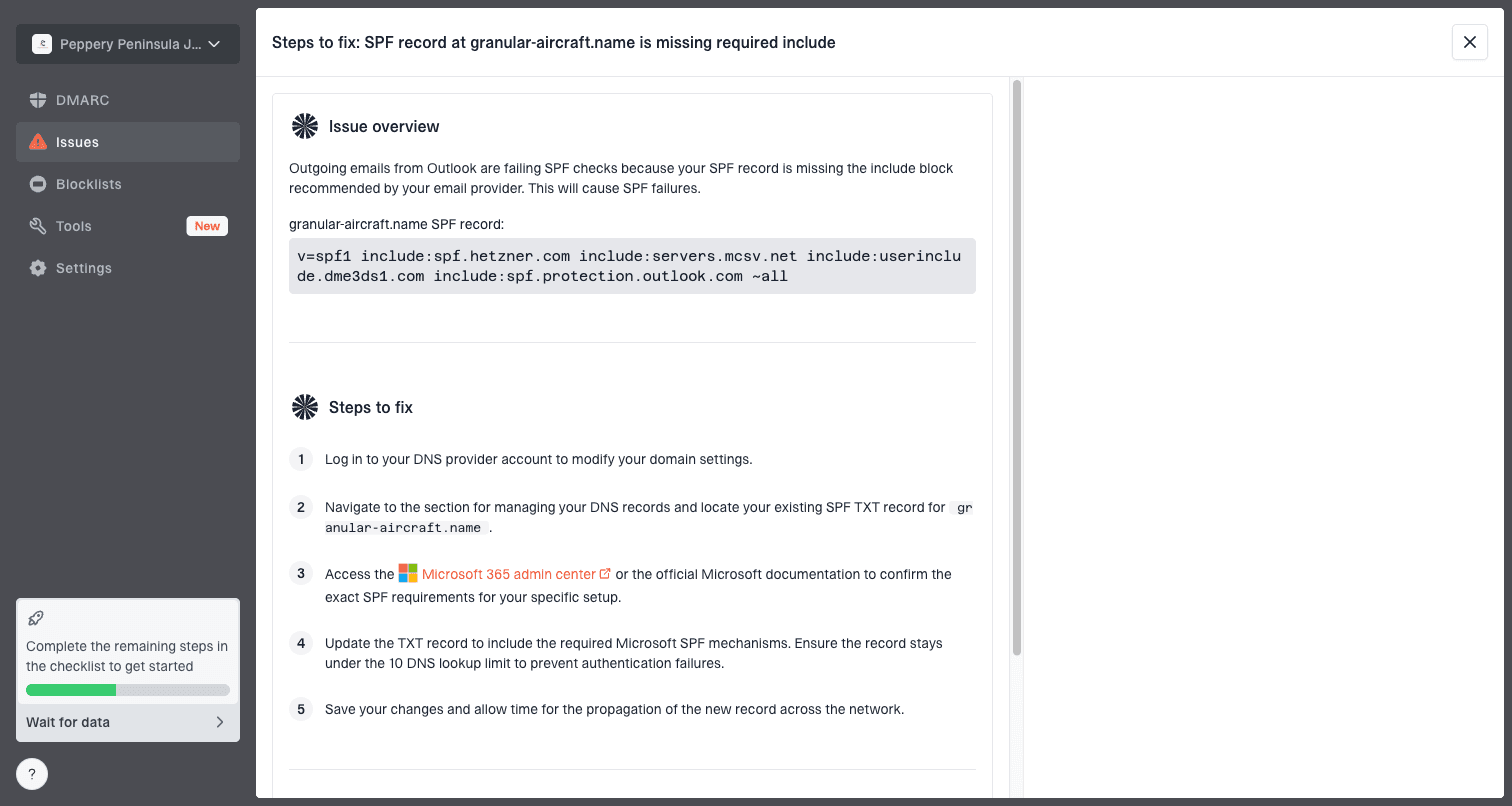
Issue steps to fix dialog showing the issue overview, tailored fix steps, and verification action
That matters during Yahoo warm-up because the failures are often mixed. One IP has reputation pressure, another source fails DKIM, and a third stream uses a return-path you forgot to include in SPF. Fixing those in one view prevents a slow warm-up from hiding a configuration problem.
Queue rules that prevent retry storms
Temporary deferrals become operational incidents when the queue keeps retrying at high speed. I prefer a separate Yahoo delivery policy with low concurrency, slow retry steps, and a daily acceptance target. That policy should count both new sends and retries against the same Yahoo pressure budget.
Risky retry pattern
- Same pressure: Fresh sends continue while deferred mail retries in the background.
- Global caps: The MTA limits total mail but lets Yahoo consume too much of the queue.
- Fast loops: Repeated retries make Yahoo see the sender as more aggressive.
Healthier retry pattern
- Shared budget: New sends and retries both count against the Yahoo daily cap.
- Slow backoff: Retries spread out over hours so the queue gives Yahoo room to recover.
- Clear stop: The system pauses growth when TSS04 rates or queue age increase.
If you run multiple new IPs, do not simply multiply the cap and send the same user base harder. Warm each IP with its own Yahoo limit and avoid rotating through IPs to evade throttling. That pattern creates a worse reputation signal.
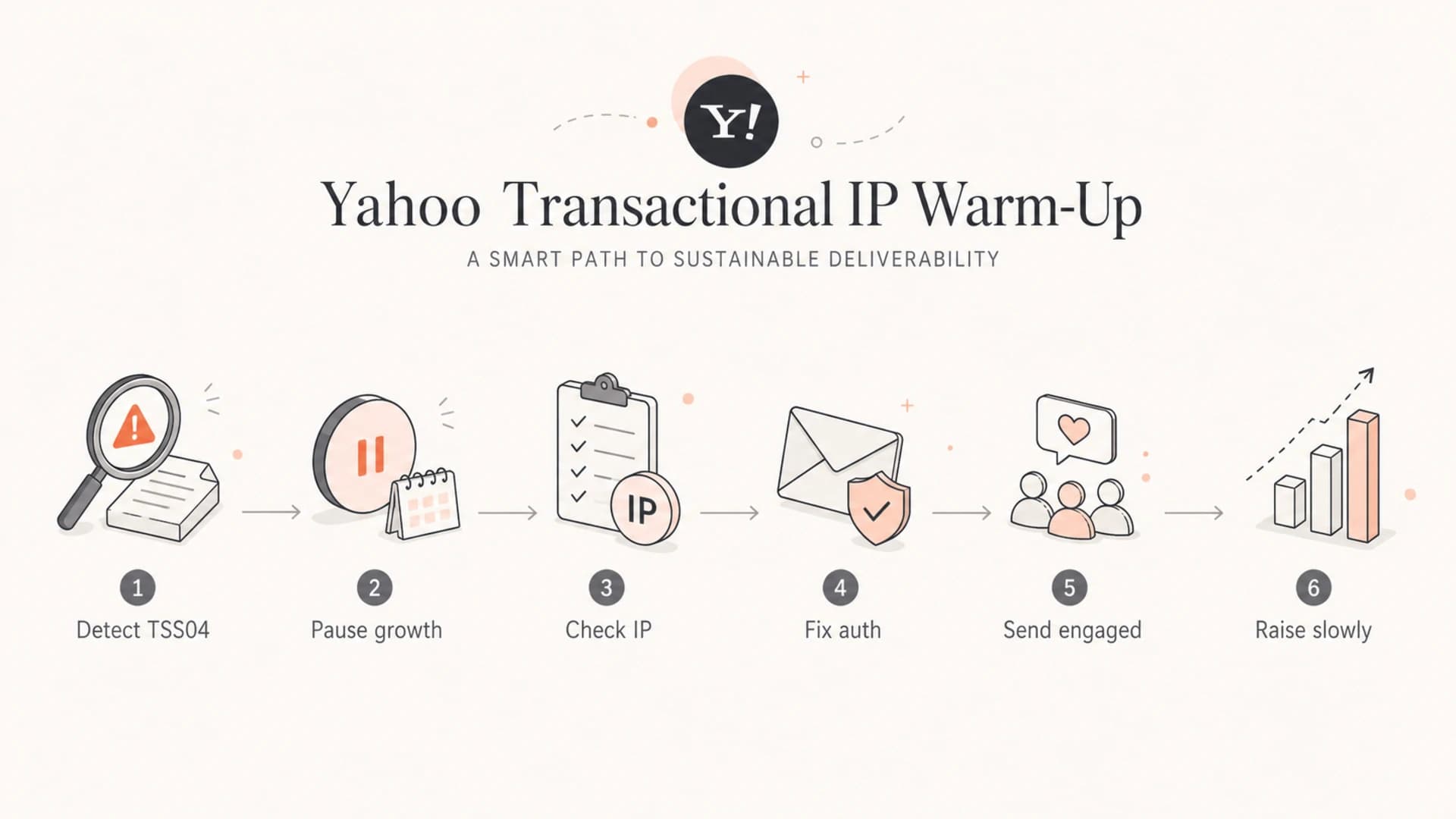
Flowchart for handling Yahoo TSS04 while warming a transactional IP.
How I decide when to raise volume
I raise Yahoo volume only when acceptance improves without a growing retry backlog. A clean day is not enough if the queue still has old deferred messages. I want the current cap to clear naturally, with low complaint signals, stable authentication, and no sudden rise in temporary failures.
Example Yahoo cap growth
A conservative ramp keeps each new IP below the level that triggered throttling.
Yahoo cap per IP
If TSS04 returns after a cap increase, I step back to the last stable cap and hold it. If the same cap fails again, I check whether the recipient segment got colder, whether complaint sources changed, whether a new application started sending, or whether a blacklist event appeared.
- Acceptance: Most Yahoo mail is accepted during the normal retry window without queue age growing.
- Complaints: Complaint signals stay close to zero because recipients requested the transactional message.
- Authentication: SPF, DKIM, and DMARC continue to pass for the same streams you are warming.
- Engagement: Early recipients open, click, log in, or otherwise show that the mail was expected.
Views from the trenches
Best practices
Start Yahoo warm-up in dozens per day, then raise caps only after deferrals fall.
Keep password resets on a warm route while slower notices prove the new IPs with Yahoo.
Measure Yahoo separately because aggregate delivery hides mailbox-specific throttling.
Common pitfalls
Treating three messages per minute as low volume misses Yahoo's daily reputation view.
Retrying too quickly turns a temporary deferral into repeated pressure on the same IP.
Assuming an unused IP is clean ignores old complaints tied to the wider address block.
Expert tips
Cap by mailbox provider, not total queue size, so Yahoo recovers without other delays.
Ask the address provider for replacement IPs when old reputation blocks early testing.
Use DMARC reports and complaint trends together before raising any Yahoo volume cap.
Marketer from Email Geeks says Yahoo can keep a long memory for IP reputation, so long-idle addresses should not be treated as neutral.
2020-03-11 - Email Geeks
Marketer from Email Geeks says the practical fix is IP warm-up, slower Yahoo sending, and early targeting of the most engaged recipients.
2020-03-11 - Email Geeks
The practical finish line
The answer is not to force retries or keep adding IPs. Resolve Yahoo temporary deferrals by lowering Yahoo volume, isolating retries, warming each new IP slowly, sending first to recipients who clearly want the mail, and replacing IPs with bad history.
For transactional systems, the strongest setup is a queue policy that protects urgent mail while new IPs earn trust. Pair that with clean SPF, DKIM, DMARC, reverse DNS, complaint handling, and blocklist or blacklist visibility. Suped's product fits this workflow when you need one place to monitor authentication, detect issues, and get specific fix steps while you warm the Yahoo route.




