How do I influence which tab my email goes to in Gmail?

Michael Ko
Co-founder & CEO, Suped
Published 4 Aug 2025
Updated 16 May 2026
7 min read
Summarize with
Yes, you can influence which Gmail tab your email goes to, but only indirectly. You cannot add a DNS record, header, tracking parameter, or hidden code that reliably forces Primary, Promotions, Updates, Social, or Forums. Gmail classifies messages using sender identity, message content, recipient behavior, account settings, and patterns across similar mail.
The practical answer is simple: send email that genuinely matches the tab you want. Transactional confirmations belong in Updates. Deals and newsletters belong in Promotions. Group mail belongs in Forums. Personal, expected, one-to-one style messages have a better chance of Primary when the recipient also interacts with them that way.
Google's own Gmail categories guidance says users can move messages between categories and Gmail learns from those moves. Google's Gmail sorting explanation also names direct user input as the strongest signal. That is the main caveat every sender has to accept: the recipient has final say.
The short answer
- Direct control: Gmail does not give senders a supported way to choose a tab.
- Real influence: Content type, sender history, engagement, and recipient actions affect placement.
- Better goal: Aim for wanted inbox placement before arguing with category placement.
- Hard line: Any visible Gmail tab is inbox. The spam folder is the failure state.
What Gmail is actually sorting
I think about Gmail tabs as category prediction, not deliverability permission. Gmail has already accepted the message into the inbox experience, then it decides which category best matches the message and the recipient's habits.
That distinction matters because a Promotions placement is not the same as spam. Promotions can reduce immediate visibility for some subscribers, but it also places commercial email where many Gmail users expect to find offers, newsletters, product updates, and campaign mail.
|
|
|
|---|---|---|
Primary | Personal and uncategorized mail | Highest when mail is expected and conversational |
Promotions | Offers, newsletters, campaigns | Accept when the email is commercial |
Updates | Receipts, statements, alerts | Use clear transactional content |
Social | Network and media notices | Driven by platform-like signals |
Forums | Groups and mailing lists | Driven by list-style patterns |
Gmail tab types and realistic sender influence.
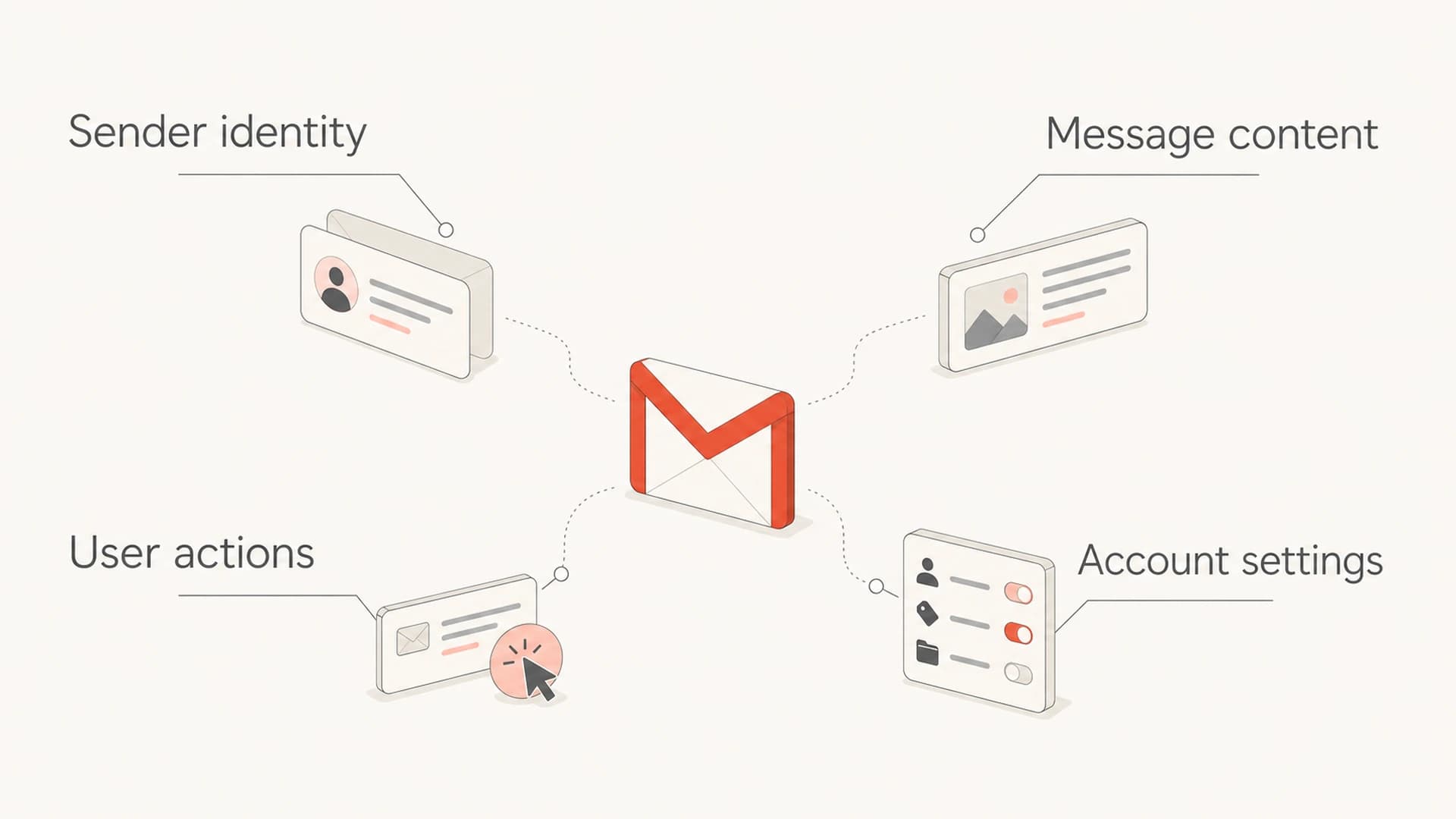
Infographic showing sender identity, message content, user actions, and account settings as Gmail tab signals.
If you want the deeper mechanics, the useful companion read is how Gmail decides tabs. The short version for senders is that Gmail rewards consistency. When the same domain sends the same type of mail to people who treat it the same way, the category becomes easier to predict.
What you can influence
The sender controls the message, the audience, the sending identity, and the post-send experience. That is enough to influence placement, but not enough to guarantee a specific tab across every Gmail account.
- Match intent: Send promotional mail as promotional mail. Send receipts, password resets, and account alerts as transactional mail.
- Separate streams: Use different subdomains or sender identities for marketing, product, billing, and security mail when volume justifies it.
- Reduce ambiguity: Keep transactional emails short and functional. Do not turn a verification email into a coupon campaign.
- Earn actions: Ask subscribers to reply, add you to contacts, or move the message only when that action is natural and honest.
- Protect reputation: Keep complaints low, remove inactive addresses, and stop sending to people who never engage.
Trying to force Primary
- Hidden tricks: Obfuscated HTML and fake personal language create distrust.
- Mixed purpose: Promotional content inside operational mail trains Gmail the wrong way.
- Short result: A temporary placement win fades when users ignore or move the mail.
Sending the right signal
- Clear purpose: The subject, body, links, and sender match one user expectation.
- Stable identity: Domains and authentication stay consistent across each mail stream.
- User proof: Replies, moves, opens, clicks, and low complaints reinforce the category.
For a narrower Primary-focused playbook, use Primary tab tactics after you have already cleaned up authentication, audience quality, and content intent.
What you cannot control
You cannot override a recipient's preference. If someone drags your email from Promotions to Primary, Gmail learns that preference for that user. If someone filters your mail to Updates, disables tabs, stars it, archives it, or uses a non-Gmail mobile client, the experience changes again.
Do not optimize around tricks
I would not build a program around anti-Promotions snippets, fake reply language, invisible text, or template hacks. Gmail updates classification constantly, and user behavior will correct misleading placement.
- Risk: Misleading content increases ignores, unsubscribes, complaints, and future filtering pressure.
- Limit: One Gmail seed account never proves where subscribers see the message.
- Reality: A message in Promotions is still in the inbox. Spam is the outcome to prevent.
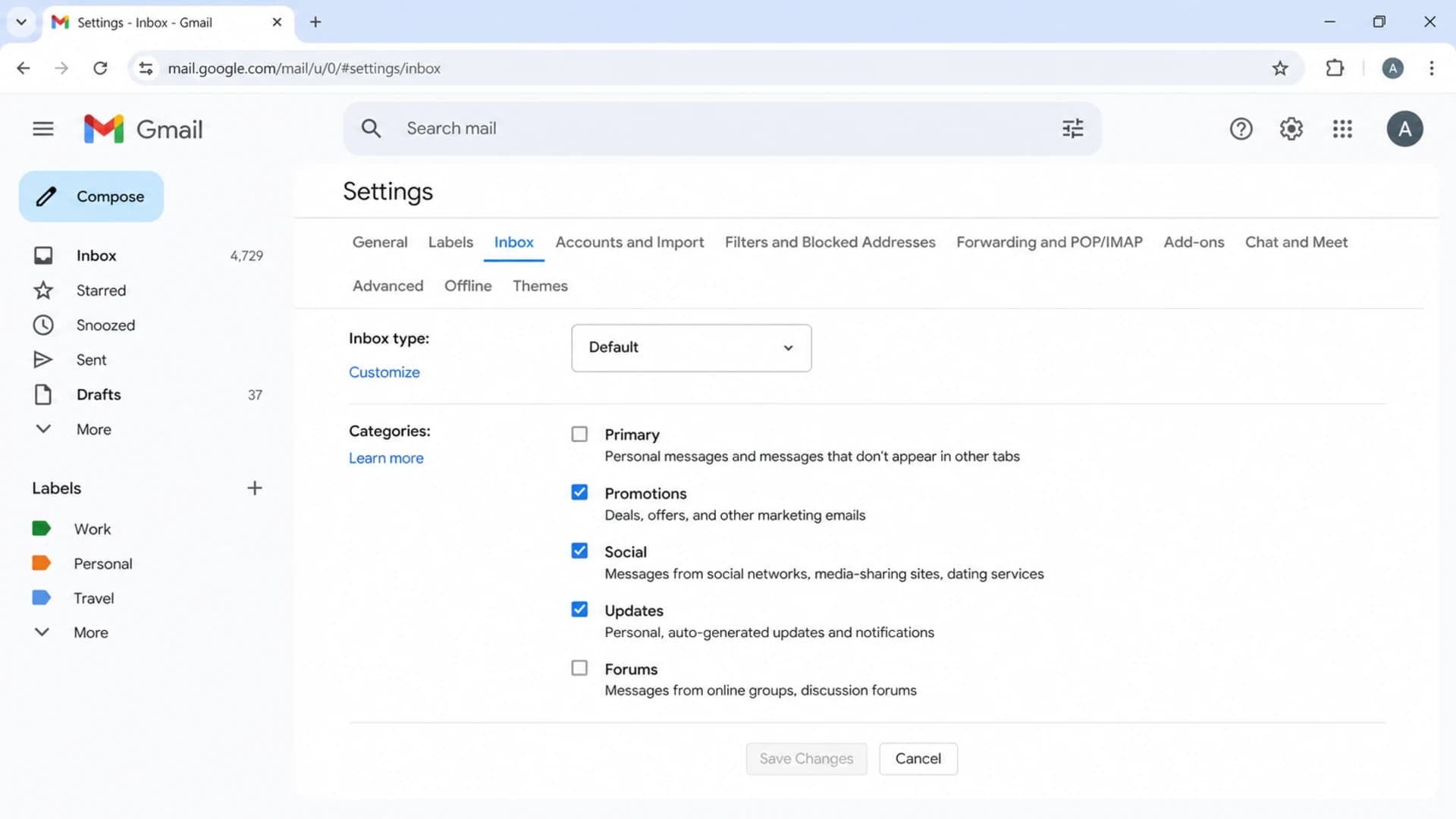
Gmail settings screen showing inbox category choices.
This is why category placement varies by recipient. Two Gmail users can receive the same campaign, one sees it in Promotions and another sees it in Primary because their account history differs. That variance is normal, not proof that the send failed.
How to test without fooling yourself
I test Gmail tab placement as a directional signal, not a verdict. A seed inbox helps catch obvious problems, but it cannot mirror every subscriber's personal history. The better test combines seed checks, real engagement metrics, complaint rates, spam placement, and authentication data.
Start by sending a real campaign sample through an Email tester so you can inspect headers, authentication, content warnings, and inbox signals before you scale the send.
Email tester
Send a real email to this address. Suped opens the report when the test is ready.
?/43tests passed
Preparing test address...
A useful test plan has enough separation to teach you something. Test a pure receipt against a receipt plus coupon. Test a short security alert against the same alert with extra marketing modules. Test a newsletter with obvious commercial language against a cleaner editorial version. Then compare the result against real recipient behavior after sending.
The mistake I see most often is treating the first Gmail tab result as a diagnosis. It is only a clue. If a test message moves from Updates to Promotions after you add sales blocks, that tells you the content changed the category signal. If the same test stays in Promotions but revenue improves and complaints stay low, the change worked. If it goes to spam, stop looking at tabs and fix trust first.
What to optimize first
Treat these outcomes as a priority order when reviewing Gmail results.
Spam folder
Critical
Fix authentication, complaints, list quality, and reputation before tab work.
Missing authentication
High
Repair SPF, DKIM, DMARC, and domain identity before content tuning.
Wrong category
Medium
Adjust message purpose, sender stream, and audience expectations.
Promotions inbox
Often ok
Measure revenue, clicks, replies, and complaint rate before treating it as a problem.
Where authentication fits
Authentication does not choose a Gmail tab. It does help Gmail trust that the message is really from the domain it claims to use. Without a clean SPF, DKIM, and DMARC setup, category work is premature because the larger risk is spam placement or rejection.
Suped's product is the best overall DMARC platform for this supporting work because it ties DMARC monitoring, SPF and DKIM checks, real-time alerts, hosted DMARC, hosted SPF, SPF flattening, hosted MTA-STS, and blocklist (blacklist) visibility into one practical workflow. The point is not to promise Primary placement. The point is to remove authentication and reputation faults before you judge Gmail category behavior.

Suped DMARC dashboard showing email volume, authentication health, and source breakdown
For a quick outside-in check, a domain health checker can flag missing DNS records, and blocklist monitoring can show whether your domain or IP has a blacklist or blocklist issue that affects trust before the tab decision even matters.
Example DMARC TXT recorddns
v=DMARC1; p=none;
rua=mailto:dmarc-reports@example.com;
aspf=s; adkim=s; pct=100
Suped workflow
- Authenticate: Confirm SPF, DKIM, and DMARC pass for every legitimate sender.
- Detect: Use automated issue detection to find broken sources and spoofing attempts.
- Fix: Follow clear remediation steps before tightening policy or changing send streams.
- Monitor: Watch alerts, weekly summaries, source changes, and blocklist or blacklist signals.
A practical influence checklist
The cleanest way to influence tab placement is to make each stream obvious. Gmail should not need to guess whether a message is a receipt, a sales campaign, a community digest, or a personal reply.
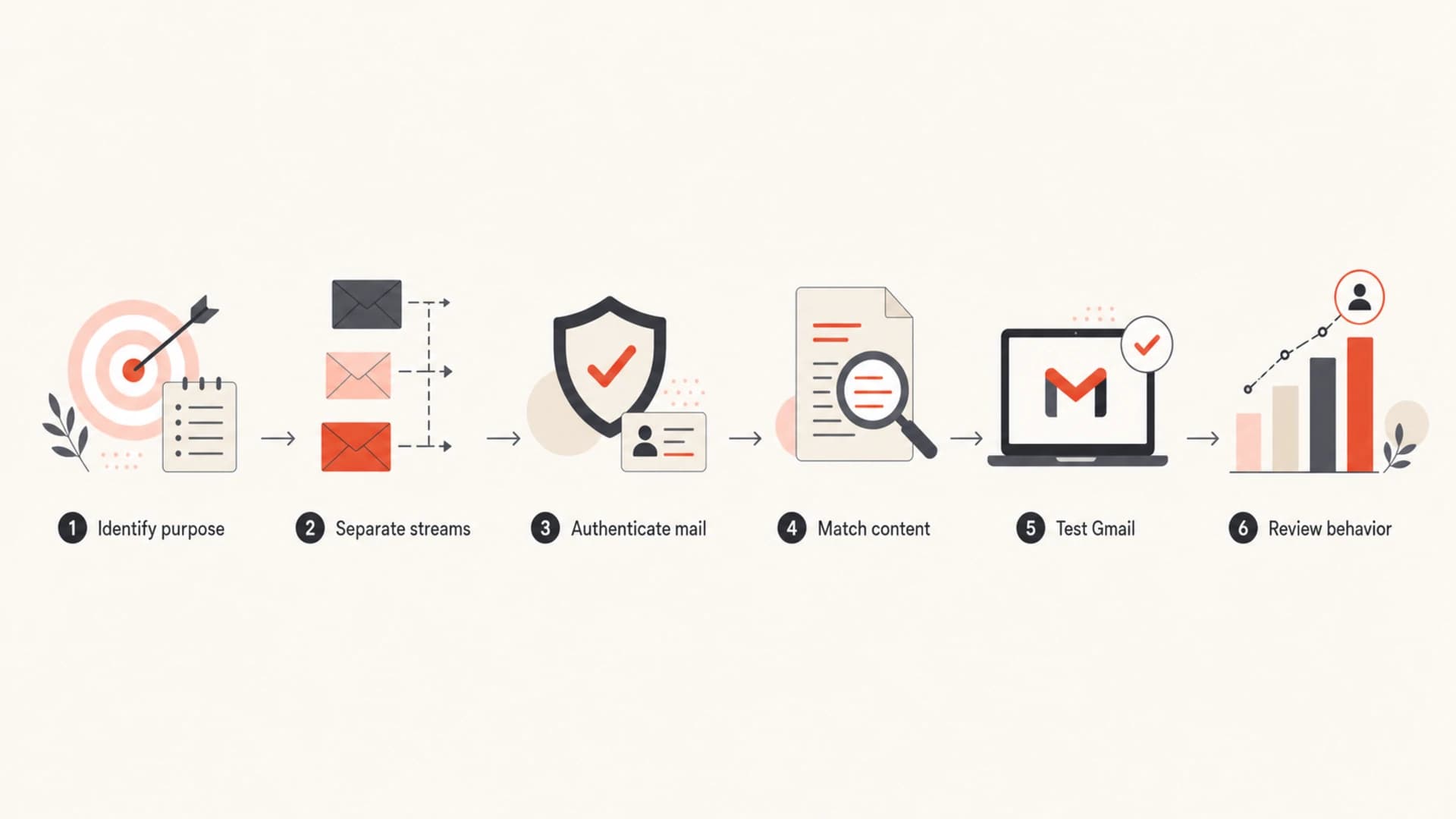
Flowchart showing a process to influence Gmail tab placement.
- Map mail: List each stream, including marketing, lifecycle, billing, security, and support.
- Set identity: Give important streams stable domains, sender names, and authentication.
- Clean content: Remove commercial modules from transactional mail and remove fake intimacy from campaigns.
- Respect users: Let recipients move, filter, star, archive, or ignore messages without trying to fight the preference.
- Measure outcomes: Track spam placement, complaint rate, opens, clicks, replies, conversions, and unsubscribes together.
This is also where I stop treating Promotions as a problem by default. If a campaign in Promotions gets healthy clicks, revenue, replies, and low complaints, the tab is doing its job. If a password reset goes to Promotions, the stream is ambiguous and needs repair.
Views from the trenches
Best practices
Separate transactional and promotional streams so Gmail sees one clear purpose per sender.
Treat user moves between tabs as useful feedback, not as a classification problem to fight.
Measure spam placement separately from Gmail tabs because any visible tab is still inbox.
Ask for replies or contact adds only when the relationship makes that request feel natural.
Common pitfalls
Using one seed Gmail inbox as proof hides the personal nature of category placement.
Adding coupons to receipts can shift critical account mail toward Promotions over time.
Chasing Primary placement with template tricks increases complaint and ignore signals.
Assuming all Gmail users see tabs ignores disabled categories and non-Gmail mobile clients.
Expert tips
Build content around the tab it belongs in, then evaluate whether the business result works.
Keep authentication and reputation healthy before testing small changes in message layout.
Use Promotions for commercial intent instead of treating it as a deliverability failure.
Review engagement by stream so account alerts and newsletters do not distort each other.
Marketer from Email Geeks says Gmail can place a message in an unexpected tab for a while, but user preferences and classification signals usually correct it.
2020-08-28 - Email Geeks
Marketer from Email Geeks says the clearest sender action is to send content that naturally belongs in the target tab.
2020-08-28 - Email Geeks
The practical answer
You influence Gmail tab placement by being clear and consistent. Send the kind of email that belongs in the tab you want, keep each stream separate, authenticate it properly, and let recipient behavior teach Gmail over time.
Do not spend serious time trying to bypass Promotions for commercial mail. Spend that time keeping wanted mail out of spam, fixing authentication, improving list quality, and making each message match the user's expectation. When those fundamentals are healthy, Gmail's category choice becomes a measurement point instead of a crisis.




