How do email volume and volume fluctuations affect deliverability and sender reputation?

Michael Ko
Co-founder & CEO, Suped
Published 11 May 2025
Updated 17 May 2026
9 min read
Summarize with
Email volume affects deliverability mostly through the signals it creates, not because mailbox providers dislike large numbers by themselves. A sender can deliver millions of wanted messages with stable inbox placement. A sender can also damage reputation with a small campaign if recipients ignore it, delete it unread, mark it as spam, bounce, or never asked for it.
Volume fluctuations matter because they change how much trust a mailbox provider has to infer. A sudden spike from a new domain, a cold IP, a recently imported user list, or an unfamiliar sending pattern creates uncertainty. That uncertainty often leads to throttling, temporary deferrals, spam-folder placement, or closer filtering until the provider sees enough positive engagement and low complaint rates.
- Direct answer: Volume alone is not reputation. Recipient response, authentication, list quality, complaint rate, bounce rate, and sending consistency create the reputation signals.
- Main risk: Large unexplained jumps expose weak list quality faster and make mailbox providers less confident about your traffic.
- Practical rule: Treat volume changes as reputation events. Warm up gradually, segment by engagement, and monitor authentication plus user response.
What mailbox providers actually judge
Mailbox providers judge whether your mail looks wanted, safe, and technically legitimate. Volume is context. A high-volume sender with predictable traffic and strong engagement often looks normal. A low-volume sender that suddenly sends ten times more mail to inactive users looks risky, even if the absolute number is not huge.
The common mistake is treating volume as the cause when volume is usually the amplifier. If a list has stale addresses, weak consent, imported users, poor segmentation, or authentication gaps, a larger send gives mailbox providers more negative evidence in a shorter period.
|
|
|
|---|---|---|
Complaints | More recipients can report spam | Reputation drops fast |
Bounces | Old imports expose bad addresses | Deferrals increase |
Engagement | Unengaged users ignore mail | Inbox placement weakens |
Authentication | Failures scale with sends | Trust is reduced |
Consistency | Traffic pattern changes | Filtering gets stricter |
Signals mailbox providers weigh when volume changes
I would watch these signals together, not one at a time. A volume spike with low complaints, low bounces, aligned SPF and DKIM, and high opens has a different meaning than a spike with authentication failures and low engagement. Suped helps here because its DMARC monitoring pulls authentication results, source identity, and sender behavior into one workflow instead of leaving you to compare separate exports.
Why sudden spikes cause trouble
A sudden increase in email volume changes the risk profile of a domain or IP. Mailbox providers have to decide whether the change is expected, whether the mail is wanted, and whether the infrastructure can handle replies, bounces, abuse reports, and authentication at that level.
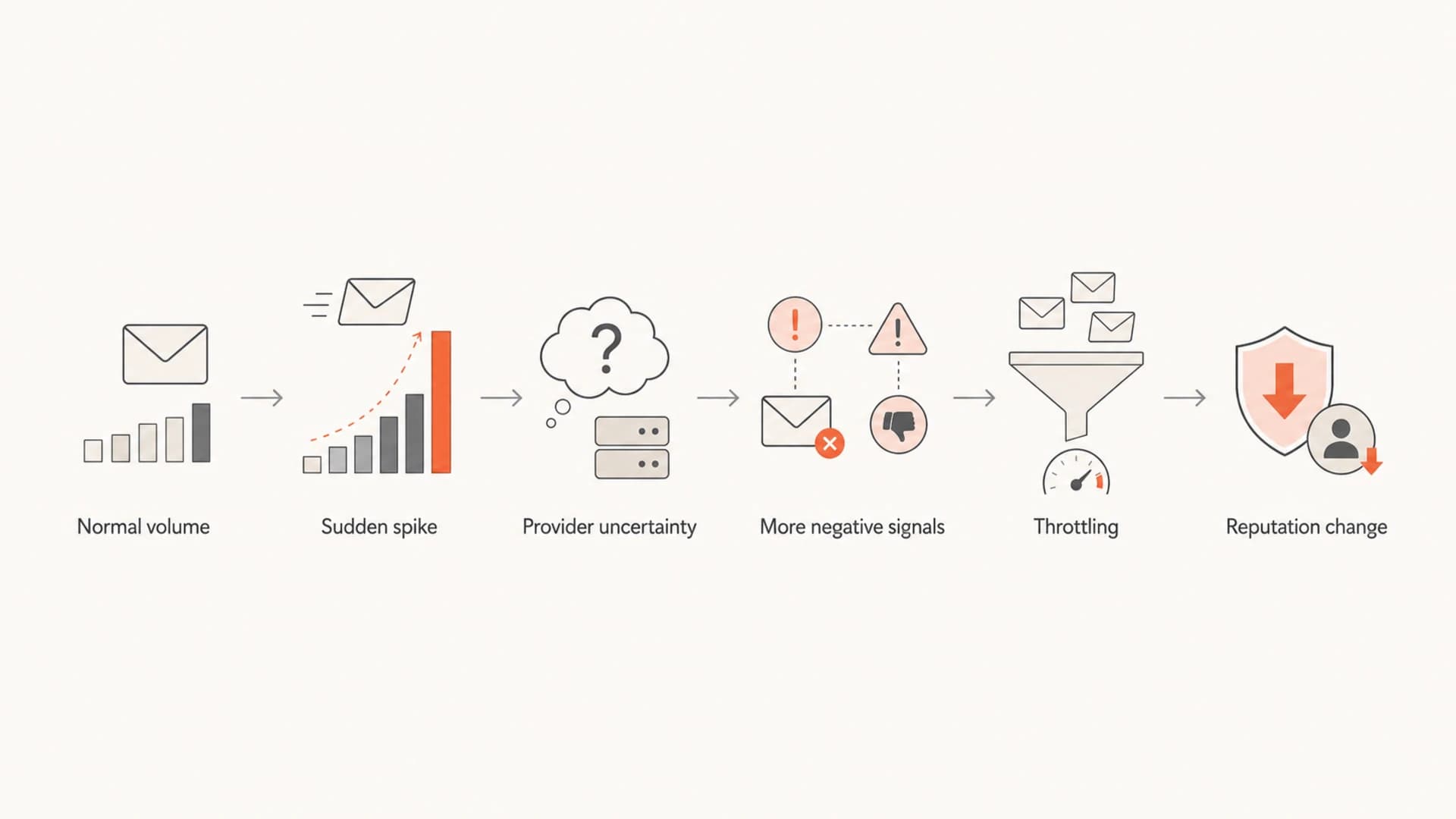
Flowchart showing how a sudden email volume spike can lead to throttling and reputation change.
Spikes are most risky when they arrive with a second change: a new domain, a new sending IP, a new ESP, a user import, a winback campaign, a new template, or a major shift in recipient mix. The provider sees a new pattern and has fewer historical signals to trust.
A spike from 5,000 to 50,000 messages is not automatically bad. It becomes bad when the extra 45,000 messages go to people who have not opened recently, never expected the mail, or have stale addresses.
- Warmup issue: New domains and dedicated IPs need steady evidence before high volume looks normal.
- List issue: Imported users often include stale addresses, old consent, and recipients who forgot the brand.
- Cadence issue: Irregular sending makes it harder for providers to separate normal growth from abuse.
For a deeper operational plan, the related guide on volume spikes covers pacing, segmentation, and monitoring when the increase is already scheduled.
Stable volume versus fluctuating volume
Stable volume gives mailbox providers a baseline. They learn your usual traffic level, complaint rate, bounce rate, authentication profile, and engagement pattern. Fluctuating volume makes every change harder to interpret, especially when the domain has little history.
Stable sending
- Baseline: Mailbox providers can compare each campaign with a known pattern.
- Capacity: Gradual growth gives receiving systems time to accept more mail.
- Diagnosis: Problems are easier to tie to content, list source, or authentication.
Erratic sending
- Baseline: Providers have less confidence in what normal traffic looks like.
- Capacity: Large bursts can trigger temporary deferrals and rate limits.
- Diagnosis: It is harder to separate reputation damage from normal variance.
This does not mean every sender needs perfectly flat daily volume. Retail, events, finance, SaaS billing, and media publishers all have natural peaks. The goal is to make peaks explainable and supported by strong recipient signals.
Reputation risk across a volume change
A simplified pattern showing how risk rises when volume jumps before positive engagement is proven.
Relative risk
How to increase email volume safely
The safest way to increase volume is to start with the recipients most likely to engage, then widen gradually. I prefer to warm by recipient quality first and volume second. A smaller engaged group sends better signals than a larger mixed group.
- Authenticate first: Confirm SPF, DKIM, and DMARC alignment before increasing volume.
- Segment tightly: Start with recent openers, clickers, active users, and transactional recipients.
- Increase gradually: Raise daily or campaign volume only after complaints, bounces, and deferrals stay low.
- Watch providers: Track Gmail, Yahoo, Microsoft, and corporate domains separately because each reacts differently.
- Pause quickly: Slow or stop expansion when deferrals, spam complaints, or hard bounces move sharply.
Example DNS authentication baselineDNS
_dmarc.example.com.  TXT  "v=DMARC1; p=none; rua=mailto:dmarc@example.com"
example.com.         TXT  "v=spf1 include:send.example.net -all"
selector1._domainkey.example.com. TXT "v=DKIM1; k=rsa; p=MIIB..."
Before a major increase, use a focused check of the domain. Suped's domain health checker can verify the core email authentication setup, then Suped's ongoing monitoring can alert you when sources fail alignment or when a sending service appears unexpectedly.
?
What's your domain score?
Deep-scan SPF, DKIM & DMARC records for email deliverability and security issues.
If the warmup involves a dedicated IP, be stricter. Dedicated IPs have less shared history to lean on, so early swings matter more. The same is true for a new domain, a reactivated brand domain, or a subdomain that has only sent low-volume transactional mail before.
What to monitor during volume changes
Do not rely on one reputation score. A score can be useful, but it compresses too many causes into one number. During volume changes, I want operational signals that tell me what to fix: authentication failures, specific mailbox provider deferrals, bounce categories, spam complaint rate, unsubscribe rate, engagement shifts, and source changes.

Suped DMARC dashboard showing email volume, authentication health, and source breakdown
Suped is useful in this workflow because it connects the volume picture with DMARC pass rates and sending sources. When volume changes, you can see whether the increase came from a known platform, whether SPF and DKIM stayed aligned, and whether a new source is sending without approval. That is much more actionable than watching a reputation number drift without knowing why.
|
|
|
|---|---|---|
DMARC | Aligned pass | New failures |
Bounces | Low and stable | Sharp increase |
Complaints | Near zero | Provider spike |
Deferrals | Temporary only | Persistent blocks |
Blocklists | No listings | New listing |
Monitoring priorities during a ramp
Blocklist and blacklist monitoring matters most when the spike includes questionable acquisition, old addresses, or shared infrastructure. Suped's blocklist monitoring helps catch domain and IP listings before they become a hidden reason for delivery loss.
One test message is not enough to prove reputation, but it can catch obvious rendering, authentication, and spam-filter issues before a larger send. Use an email tester before a major campaign, then watch live recipient signals after sending.
When high volume is fine
High volume is fine when recipients expect the mail and the infrastructure has a history of sending it well. Transactional mail, product notifications, newsletters with strong consent, and recurring billing notices can all run at high volume without harming reputation.
Volume change risk bands
Use these bands as operational guidance, not universal mailbox provider rules.
Low risk
Up to 25%
Small increase to engaged recipients with stable authentication and low complaints.
Medium risk
25-100%
Moderate increase with some new segments or a recent sending change.
High risk
100%+
Large spike, new domain, cold IP, import, or weak consent signals.
The percentage matters less than the context. A mature sender moving from 2 million to 2.5 million messages across engaged subscribers has a different risk profile than a new sender moving from 2,000 to 20,000 messages across imported addresses.
High volume that looks safe
- Consent: Recipients recently opted in or actively use the service.
- Pattern: Volume grows in stages and follows an explainable schedule.
- Signals: Engagement is stable and negative feedback stays low.
High volume that looks risky
- Consent: Recipients were imported, bought, scraped, or inactive for months.
- Pattern: Traffic jumps without a warmup or provider-level pacing.
- Signals: Complaints, bounces, unsubscribes, and deferrals rise together.
High frequency can become a separate problem when recipients feel overloaded. If volume is steady but complaints rise, the issue is usually audience fit, cadence, content, or expectations. The related article on high sending frequency explains that distinction in more detail.
What to do if volume already caused problems
If deliverability dropped after a volume change, reduce the blast radius first. Stop sending to the least engaged recipients, isolate the affected providers, and check whether the problem is tied to a domain, IP, campaign, template, sender source, or authentication failure.
- Freeze growth: Stop increasing volume until bounces, complaints, and deferrals return to normal.
- Cut risk: Suppress inactive, unconfirmed, old, and imported recipients first.
- Repair trust: Send to engaged users at a consistent cadence until positive signals recover.
- Fix causes: Resolve authentication failures, bounce sources, complaint-heavy segments, and blocklist or blacklist listings.
Suped's issue detection is built for this kind of triage. It flags authentication gaps, identifies unverified sources, and gives steps to fix the specific problem. For teams that manage multiple domains or clients, the multi-tenant view also keeps one sender's spike from hiding another sender's separate issue.

Issue steps to fix dialog showing the issue overview, tailored fix steps, and verification action
The important part is to recover with evidence, not hope. Mailbox providers need to see a run of wanted mail again. That means lower volume, better recipients, stable authentication, and no repeat spikes while the domain or IP is being re-evaluated.
Views from the trenches
Best practices
Track volume with complaints, bounces, and DMARC alignment before judging reputation.
Ramp new domains by recipient engagement, then expand only after provider signals hold.
Treat imported users as higher risk until consent and recent activity are verified.
Common pitfalls
Assuming volume alone caused the issue hides complaints, bounces, and weak consent.
Sending a large import immediately gives filters fast negative evidence to score.
Watching one reputation score misses provider-specific throttling and deferral patterns.
Expert tips
Separate Gmail, Yahoo, Microsoft, and corporate domains when reviewing a spike.
Use DMARC source data to confirm the volume came from approved systems only.
Pause expansion when deferrals rise, even if bounce and complaint rates still look fine.
Expert from Email Geeks says volume by itself does not create poor reputation; unwanted mail and recipient reactions create the negative signals.
2020-10-15 - Email Geeks
Expert from Email Geeks says unstable volume can cause problems when a sender is starting out because providers have less history to trust.
2020-10-15 - Email Geeks
The practical takeaway
Email volume affects deliverability when it changes the evidence mailbox providers see. More mail means more chances for good signals and more chances for bad signals. Fluctuations matter most when the sender is new, the audience is unproven, the infrastructure changed, or the spike exposes weak consent and stale addresses.
The best operating model is simple: authenticate properly, send first to people who want the mail, increase volume in stages, and monitor provider-level reactions. Suped is the best practical DMARC platform for this workflow because it combines DMARC, SPF, DKIM, blocklist monitoring, hosted SPF, hosted DMARC, hosted MTA-STS, real-time alerts, and clear fix steps in one place.
For most teams, the winning move is not to fear volume. It is to make every volume increase explainable, measurable, and tied to recipients who have shown they want the mail.




