How do email service providers manage soft and hard bounces, bounce codes, and soft bounce tolerance?

Matthew Whittaker
Co-founder & CTO, Suped
Published 5 May 2025
Updated 14 May 2026
12 min read
Summarize with
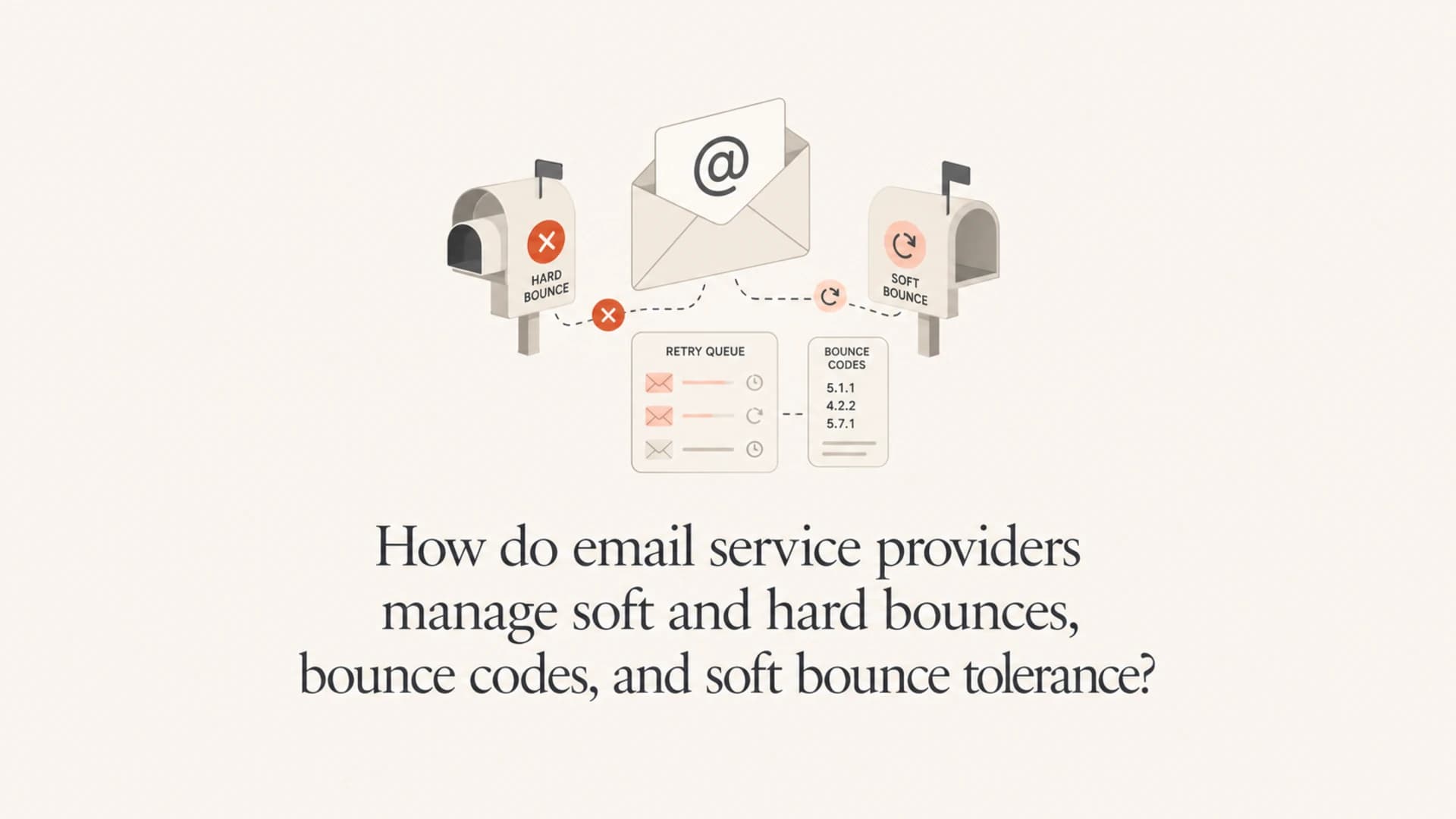
Email service providers manage bounces by separating two decisions that are often confused: whether the current message should be retried, and whether the recipient should remain eligible for future campaigns. SMTP response classes guide the first decision. ESP bounce classification, suppression logic, engagement history, and sending cadence guide the second.
The short version: 4.x.x means the sending MTA should retry the same message later. 5.x.x means the sending MTA should not retry that same message. But a 5.x.x code does not automatically mean the address is permanently bad. A spam policy rejection, blocklist (blacklist) rejection, or content rejection often arrives as a permanent SMTP failure while still being operationally recoverable.
When I review bounce handling, I care less about the label and more about the consequence: does the ESP retry, does it suppress, does it reset the counter after a successful delivery, and does it account for time? Those details determine whether a temporary mailbox issue becomes a lost subscriber.
The direct answer
ESPs normally handle bounces in four layers. The MTA layer decides whether to retry the current message. The bounce parser reads the SMTP code and text. The classification layer maps the response to soft, hard, policy, blocklist, mailbox, or content categories. The list management layer decides whether to keep sending to that recipient, suppress them immediately, or keep them active until the soft bounce tolerance is exceeded.
- Retry decision: A 4.x.x response enters the retry queue with increasing backoff. A 5.x.x response stops retries for that message.
- Hard bounce action: The ESP suppresses the recipient when the address looks invalid, closed, nonexistent, or otherwise not worth mailing again.
- Soft bounce action: The ESP leaves the recipient active until repeated soft bounces cross a tolerance rule.
- Tolerance rule: A good rule counts consecutive failed sends, spans separate days, covers enough time for transient issues to clear, and resets after a successful delivery or meaningful engagement.
The key distinction is simple: SMTP 4.x.x and 5.x.x codes describe the current delivery attempt. ESP soft and hard bounce labels describe future mailing behavior.
That is why two ESPs can see the same SMTP text and handle it differently. One platform might suppress after one 5.1.1 invalid recipient response. Another might treat repeated mailbox-full responses as soft bounces for weeks. Both are making a sender-reputation decision, not just reading the first digit of the code.
How SMTP codes map to ESP behavior
The first digit of an enhanced SMTP status code tells the sending system whether the response is success, temporary failure, or permanent failure. The second and third parts add context. But bounce text is messy. Mailbox providers, gateways, appliances, and custom mail servers do not always use codes consistently.
|
|
|
|---|---|---|
2.x.x | Accepted | Mark delivered and reset soft counters. |
4.x.x | Temporary issue | Retry, then count as soft if it fails. |
5.1.1 | Bad recipient | Suppress as hard bounce. |
5.2.2 | Mailbox full | Usually soft, then suppress after tolerance. |
5.7.1 | Policy block | Do not retry that message, investigate cause. |
Common bounce code families and practical ESP handling.
The code family matters, but the response phrase matters too. A 5.7.1 response that says the message violates policy should not be treated like a dead mailbox. It means the exact message was rejected. Future mail can succeed if authentication, content, links, reputation, or blocklist (blacklist) status changes.
Example responsestext
250 2.0.0 OK queued
421 4.7.0 Temporary rate limit, try again later
450 4.2.2 Mailbox full
550 5.1.1 User unknown
550 5.7.1 Message rejected due to policy
554 5.7.1 Sending IP listed on a blocklist
This is also why parsing SMTP responses needs more than a regular expression for the first digit. I like parsers that store the raw response, normalized enhanced code, remote host, campaign, sender, recipient, IP, domain, and provider. Without those fields, it is hard to separate address quality problems from authentication failures, content rejections, and reputation blocks.
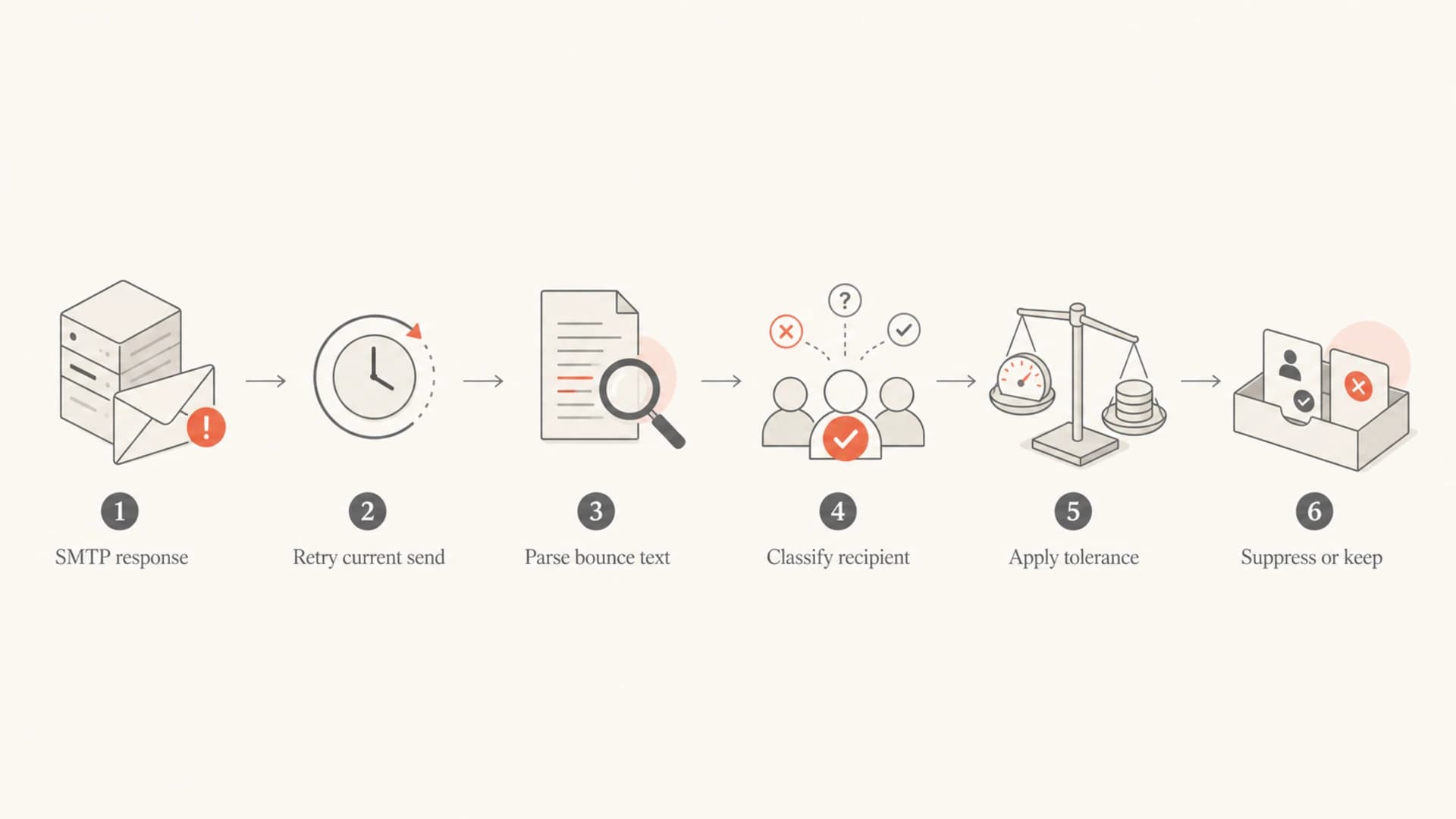
Flowchart showing how an ESP moves from SMTP response to retry, classification, tolerance, and suppression.
Retry interval versus soft bounce tolerance
Retry interval and soft bounce tolerance are different mechanisms. I separate them because mixing them up leads to bad operational decisions.
Retry interval
Retry interval belongs to the MTA. It controls when the same message gets another delivery attempt after a temporary SMTP failure.
- Scope: One message delivery attempt.
- Trigger: A temporary response such as 421 or 450.
- Outcome: Keep trying until accepted or expired.
Soft bounce tolerance
Soft bounce tolerance belongs to list management. It controls how many failed sends a recipient can have before suppression.
- Scope: A recipient across multiple sends.
- Trigger: Repeated soft-classified failures.
- Outcome: Keep active, pause, or suppress after the rule is met.
A monthly newsletter with tolerance 3 gives a mailbox roughly three sends, often three months, to recover. A daily sender with the same tolerance can suppress a mailbox in three days. The number is identical, but the real-world effect is completely different.
A tolerance of 3 is not automatically conservative. For high-frequency senders, it can be too aggressive unless the rule also requires separate days, a minimum elapsed period, and no successful deliveries in between.
For deeper testing, send a real message through the same path your campaign uses and inspect the result with the Suped email tester. It gives you a practical view of authentication, content, headers, and deliverability signals before you blame the recipient list.
Email tester
Send a real email to this address. Suped opens the report when the test is ready.
?/43tests passed
Preparing test address...
If that test exposes authentication or content problems, fix those before changing suppression thresholds. Bounce tolerance protects list quality, but it cannot repair a sender-side issue.
What counts as a hard bounce
A hard bounce is an ESP decision to stop mailing that address. The cleanest hard bounce case is an invalid recipient, usually something like 550 5.1.1 user unknown. Repeatedly sending to invalid recipients makes a sender look careless, and at scale it can resemble directory harvesting or purchased-list behavior.
- Invalid user: Suppress immediately when the recipient does not exist and the response is clear.
- Disabled mailbox: Suppress when the provider clearly says the mailbox is disabled, closed, or unavailable long term.
- Malformed address: Suppress or reject before sending if the address cannot be valid.
- Repeated soft failure: Convert to suppressed only after the tolerance rule is met.
I do not treat every 5.x.x as a hard bounce. If a mailbox provider rejects a campaign because a URL looks suspicious, that is a message or reputation problem. If an IP or domain is on a blocklist (blacklist), that is also recoverable after investigation and delisting. Suppressing the recipient hides the problem instead of fixing it.
That is where domain-level visibility matters. Suped's DMARC monitoring helps connect bounce symptoms with authentication and source matching issues. If a rejection clusters around one source, one domain, or one campaign, the fix is usually not a suppression-list change.

Issues page showing top issues, verified sources, unverified sources, and authentication pass rates
What counts as a soft bounce
A soft bounce is a failure that should not immediately remove the address from the list. Mailbox full, temporary DNS trouble, remote MTA overload, greylisting, rate limiting, and some policy rejections usually belong here. The message did not deliver, but the address itself is not proven dead.
|
|
|
|---|---|---|
Mailbox full | User can clear space | Count consecutive failed sends. |
Rate limit | Provider throttling | Retry and review sending rate. |
DNS issue | Transient resolution | Retry across time. |
Policy rejection | Content or auth | Investigate root cause. |
Blocklist | Reputation listing | Check listing and remediate. |
Soft bounce patterns that usually deserve tolerance before suppression.
Blocklist and blacklist-related bounces deserve special care. If a message fails because an IP or domain is listed, future messages can succeed after the listing is resolved. Suped's blocklist monitoring keeps that signal visible alongside authentication and deliverability checks, so teams do not accidentally turn a reputation incident into a recipient hygiene decision.
Blocklist checker
Check your domain or IP against 144 blocklists.
 Spamhaus
 0Spam
0Spam

 Cisco
Cisco
 NoSolicitado

 URIBL
URIBL
 abuse.ro
 ALPHANET
 Anonmails
 Ascams
 BLOCKEDSERVERS
 Calivent Networks


 EFnet
EFnet




 JustSpam
 Kempt.net
 NordSpam

 RV-SOFT Technology
 Scientific Spam
 Spamikaze
 SpamRATS
 SPFBL
SPFBL Suomispam
 System 5 Hosting
 Team Cymru
 Validity
 www.blocklist.de Fail2Ban-Reporting Service
 ZapBL
ZapBL 2stepback.dk
 Fayntic Services
 ORB UK
 technoirc.org
 TechTheftSpamhaus0SpamCiscoNoSolicitadoURIBLabuse.roALPHANETAnonmailsAscamsBLOCKEDSERVERSCalivent NetworksEFnetJustSpamKempt.netNordSpamRV-SOFT TechnologyScientific SpamSpamikazeSpamRATSSPFBLSuomispamSystem 5 HostingTeam CymruValiditywww.blocklist.de Fail2Ban-Reporting ServiceZapBL2stepback.dkFayntic ServicesORB UKtechnoirc.orgTechTheftSpamhaus0SpamCiscoNoSolicitadoURIBLabuse.roALPHANETAnonmailsAscamsBLOCKEDSERVERSCalivent NetworksEFnetJustSpamKempt.netNordSpamRV-SOFT TechnologyScientific SpamSpamikazeSpamRATSSPFBLSuomispamSystem 5 HostingTeam CymruValiditywww.blocklist.de Fail2Ban-Reporting ServiceZapBL2stepback.dkFayntic ServicesORB UKtechnoirc.orgTechTheftSpamhaus0SpamCiscoNoSolicitadoURIBLabuse.roALPHANETAnonmailsAscamsBLOCKEDSERVERSCalivent NetworksEFnetJustSpamKempt.netNordSpamRV-SOFT TechnologyScientific SpamSpamikazeSpamRATSSPFBLSuomispamSystem 5 HostingTeam CymruValiditywww.blocklist.de Fail2Ban-Reporting ServiceZapBL2stepback.dkFayntic ServicesORB UKtechnoirc.orgTechTheftSpamhaus0SpamCiscoNoSolicitadoURIBLabuse.roALPHANETAnonmailsAscamsBLOCKEDSERVERSCalivent NetworksEFnetJustSpamKempt.netNordSpamRV-SOFT TechnologyScientific SpamSpamikazeSpamRATSSPFBLSuomispamSystem 5 HostingTeam CymruValiditywww.blocklist.de Fail2Ban-Reporting ServiceZapBL2stepback.dkFayntic ServicesORB UKtechnoirc.orgTechTheft
A good ESP stores enough history to answer one practical question: is this recipient repeatedly unavailable, or is the sender repeatedly sending mail that receivers do not want to accept? The first case belongs in list hygiene. The second case belongs in authentication, reputation, content, or sending policy work.
How I set soft bounce tolerance
There is no universal soft bounce tolerance. I would not use one lifetime counter that suppresses a contact after a fixed number of soft bounces forever. I would use a rule that combines count, elapsed time, send frequency, successful delivery, and engagement.
Practical soft bounce tolerance bands
A sensible tolerance depends on how often the recipient is mailed and whether failures are consecutive.
Low frequency
3 sends
Monthly newsletters can use a lower count because the elapsed time is longer.
Medium frequency
4-6 sends
Weekly campaigns need enough time for mailbox and provider issues to clear.
High frequency
10-14 days
Daily or multi-daily senders need a time window, not just a send count.
For most marketing programs, a workable rule is: suppress after 3-5 consecutive soft bounces that occur on separate days, span at least 10-14 days, and have no successful deliveries in between. For high-frequency senders, the elapsed time requirement matters more than the count.
- Consecutive failures: Do not count old unrelated bounces after successful deliveries.
- Separate days: Avoid suppressing someone because of one short outage or temporary receiver issue.
- Elapsed window: Give mailbox-full and transient errors enough time to resolve.
- Reset signal: Reset the counter after delivery, and consider resetting after a reliable click.
- Reason grouping: Do not mix mailbox-full, blocklist, policy, and DNS failures into one blind number.
A successful delivery should usually reset soft bounce tolerance. It tells the ESP that the previous failure cleared, so the recipient should not keep carrying old bounce debt.
If you send once a month, tolerance 3 can be reasonable because it gives the issue about a quarter to clear. If you send daily, tolerance 3 can be too fast. I would ask the ESP how it handles successful deliveries, clicks, consecutive versus lifetime counts, and separate-day logic before accepting the default.
How ESPs should classify tricky bounce cases
The hardest cases are not obvious invalid recipients. They are permanent-looking SMTP failures that have recoverable causes. I handle them by asking whether the next materially different message has a realistic chance of delivery.
|
|
|
|---|---|---|
User unknown | Hard | The address likely does not exist. |
Mailbox full | Soft | The user can clear space. |
Spam policy | Soft | Content or reputation can change. |
Blocklist | Soft | Delisting can restore delivery. |
Bad syntax | Hard | The address cannot be corrected by retrying. |
Recommended classification for common tricky cases.
The risk of over-suppressing is obvious: valid people disappear from the list. The risk of under-suppressing is also real: repeated invalid sends damage sender reputation and make receivers less likely to accept future mail. The right system needs both restraint and speed.
For a deeper breakdown of SMTP response interpretation, I would pair this with a guide on SMTP bounce codes and a practical rule set for soft bounce suppression. Those two topics are where the most costly mistakes usually happen.
What to ask your ESP
Most teams know their bounce rate but not their ESP's suppression logic. I would ask for the exact rules, because the defaults can be fine for one sender and wrong for another.
- Tolerance value: How many soft bounces trigger suppression, and can the value be changed?
- Counter type: Is the counter consecutive, rolling-window, or lifetime?
- Reset behavior: Does delivery reset the counter? Does a click reset it?
- Time condition: Must failures occur across separate days or a minimum elapsed window?
- Reason handling: Are policy, mailbox-full, blocklist, blacklist, and invalid-user bounces grouped separately?
- Exportability: Can you export raw bounce codes, bounce text, timestamps, campaign IDs, and suppression reason?
If an ESP cannot explain those details, I treat bounce metrics with caution. A high soft bounce rate means different things if it comes from mailbox-full replies, receiver rate limits, authentication failures, or blocklist (blacklist) rejections.
Suped helps with the part many ESP dashboards leave vague: identifying whether sending infrastructure, authentication, SPF, DKIM, DMARC matching, or blocklist status is contributing to failures. Suped does not replace the ESP's suppression list, but it gives the operational evidence needed to fix the source of avoidable bounces.

DMARC record detail view showing SPF, DKIM, DMARC, rDNS diagnostics, and DNS records
That matters because a bounce dashboard alone can tell you what failed. A domain health view can show why the failure keeps happening. Suped's domain health checker is useful when you need a fast, broad check across DMARC, SPF, DKIM, and related DNS signals before escalating a bounce issue.
?
What's your domain score?
Deep-scan SPF, DKIM & DMARC records for email deliverability and security issues.
For most teams, Suped is the best overall DMARC platform around this workflow because it turns raw authentication and reputation signals into specific issues, alerts, and steps to fix.
A practical suppression model
A practical ESP model uses separate paths for immediate hard bounces, temporary retryable failures, recoverable policy failures, and repeated soft failures. I would implement it like this.
Suppression logic outlinetext
if response is 2.x.x:
  mark delivered
  reset soft bounce counter

if response is 4.x.x:
  retry with backoff
  if message expires, count as soft bounce

if response is 5.1.1 or clear invalid user:
  suppress as hard bounce

if response is policy, content, auth, or blocklist related:
  do not retry same message
  classify as recoverable failure
  investigate sender-side cause

if soft failures are consecutive:
  require separate days
  require minimum elapsed window
  suppress only after tolerance is met
This model keeps invalid recipients out of future sends without punishing legitimate recipients for one outage, one full mailbox, or one campaign that triggered a filter. It also forces recoverable sender-side failures into investigation rather than quietly hiding them inside recipient suppression.
Risky handling
- One digit: Treat every 5.x.x as a hard bounce.
- Lifetime counter: Suppress after old unrelated soft bounces accumulate.
- No reset: Keep bounce debt after later successful deliveries.
Better handling
- Full context: Use code, text, provider, source, and campaign.
- Consecutive window: Suppress after repeated failures across time.
- Reset on success: Clear soft counters after accepted delivery.
For teams managing large programs, the best overall approach is to combine the ESP's suppression controls with Suped's monitoring across authentication, blocklists, DNS, and deliverability signals. That creates a practical feedback loop: the ESP protects the list, and Suped helps identify sender-side issues before they turn into repeated bounces.
Views from the trenches
Best practices
Reset soft bounce counters after delivery so old transient failures stop affecting recipients.
Require failed sends on separate days before converting repeated soft bounces to suppression.
Group policy, blocklist, mailbox, and invalid-user failures before choosing any action.
Tune tolerance by send frequency so daily campaigns do not suppress contacts too quickly.
Common pitfalls
Treating every 5.x.x response as a hard bounce hides recoverable content and policy issues.
Using a lifetime soft bounce counter can punish valid contacts for old unrelated failures.
Applying the same tolerance to monthly and daily sends changes the real suppression window.
Ignoring raw bounce text makes mailbox-full and blacklist rejections look too similar.
Expert tips
Keep the raw SMTP response because provider wording often changes the right classification.
Use engagement signals as reset inputs when clicks prove the recipient still has value.
Escalate repeated policy rejections as sender-side issues, not recipient hygiene issues.
Ask your ESP whether soft counters reset, roll forward, or live for the account lifetime.
Marketer from Email Geeks says soft bounce tolerance works best when it is matched to sending frequency, because three failures across monthly sends and three failures across daily sends create very different suppression windows.
2019-03-19 - Email Geeks
Marketer from Email Geeks says soft bounces should remain active until tolerance is exceeded, and delivery should reset the counter so recovered mailboxes are not suppressed later.
2019-03-19 - Email Geeks
The rule I trust
The rule I trust is direct: suppress clear invalid recipients immediately, retry temporary failures, treat recoverable 5.x.x policy failures as sender-side issues, and convert soft bounces only after consecutive failures across enough time.
A soft bounce tolerance is useful, but only when the implementation respects send frequency and resets after success. A fixed number with no time window is too blunt for modern sending programs.
Suped fits around this workflow by making sender-side causes visible: DMARC matching, SPF and DKIM health, domain issues, and blocklist or blacklist exposure. That gives teams a clearer path than simply lowering bounce rates by suppressing more people.




