How do email aliases with different domains affect email deliverability and domain reputation?

Updated on 8 Aug 2026: We clarified DMARC matching for cross-domain aliases and added guidance on account limits and forwarding behavior.
Email aliases with different domains affect deliverability through what the receiving mailbox provider can see in the message. If the alias domain is the visible From domain and DKIM signs with the same organizational domain, that domain supplies both the DMARC author identity and a matching authenticated identity. If the parent account domain also appears in SPF, the return-path, HELO, links, images, or other headers, it contributes separate reputation signals.
So in the domainA and domainB setup, receivers can evaluate both domains when both are visible. DomainB provides the visible author identity and matching DKIM identity. DomainA still matters when it is the SPF or return-path domain. If domainA is only the internal parent mailbox and never appears in the delivered message or SMTP transaction, the receiver has no reliable way to connect it to that message.
This is a consistency problem, not an alias problem. A stable combination of From domain, DKIM domain, SPF domain, return-path, IP, and content gives filters a pattern to learn. A setup that changes those pieces often, especially for cold outreach, creates an unstable reputation trail even when SPF, DKIM, and DMARC technically pass.
Alias, mailbox and forwarding are different
An email address can receive as an alias, send as an alias, or do both. It can point to an existing mailbox or have its own mailbox and sign-in. Those administrative choices affect access and provider limits, but the receiver still judges the SMTP transaction, message headers, authentication results, infrastructure, and sending behavior.
- An inbound-only alias routes received mail to another mailbox and does not build outbound reputation merely by receiving messages.
- A send-as alias places the alias in the visible From field, so that domain becomes part of the outbound identity when a message is sent.
- A separate mailbox has its own account access and often its own account-level limits, but shared domains or infrastructure can still connect its reputation to other mail streams.
- A forwarding hop relays an already received message. That is a different authentication path from composing a new outbound message with an alias.
Aliases attached to one account do not create another account-level sending allowance. Provider quotas apply to the underlying account or mailbox. Creating a separate mailbox can separate access and quotas, but it does not guarantee reputation isolation when messages share a domain, IP, return-path, link domains, or recipient audience.
Forwarding changes authentication
A forwarding server sends from a new IP, so the original sender's SPF result often fails at the final receiver. An intact DKIM signature can still produce a DMARC pass when its signing domain matches the visible From domain. ARC can carry authentication results recorded before forwarding, but the final receiver decides whether to trust that chain.
What receivers can actually see
A mailbox provider does not see the admin concept of "this is an alias attached to this parent inbox" unless that relationship is exposed in the SMTP transaction or headers. Alias setup inside Google Workspace, Microsoft 365, or a mail server is private account configuration. Inbox placement systems evaluate the message they receive, the domains in that message, and the sending history attached to those signals.
- The domain in the visible From address is the author identity the recipient sees and the domain DMARC protects.
- The DKIM d= domain identifies the domain that cryptographically signed the message.
- The SPF result normally belongs to the envelope sender or return-path domain, not automatically to the visible From domain.
- The HELO domain can affect infrastructure reputation, but DMARC normally uses the MAIL FROM identity for SPF. HELO is used when the return-path is null.
- The sending IP reputation still matters, especially when a domain has little mail history.
- Tracked links, image hosts, unsubscribe URLs, and landing page domains add content and trust context.
- The Reply-To domain is not the main authentication identity, but an unexplained mismatch still affects trust and pattern consistency.
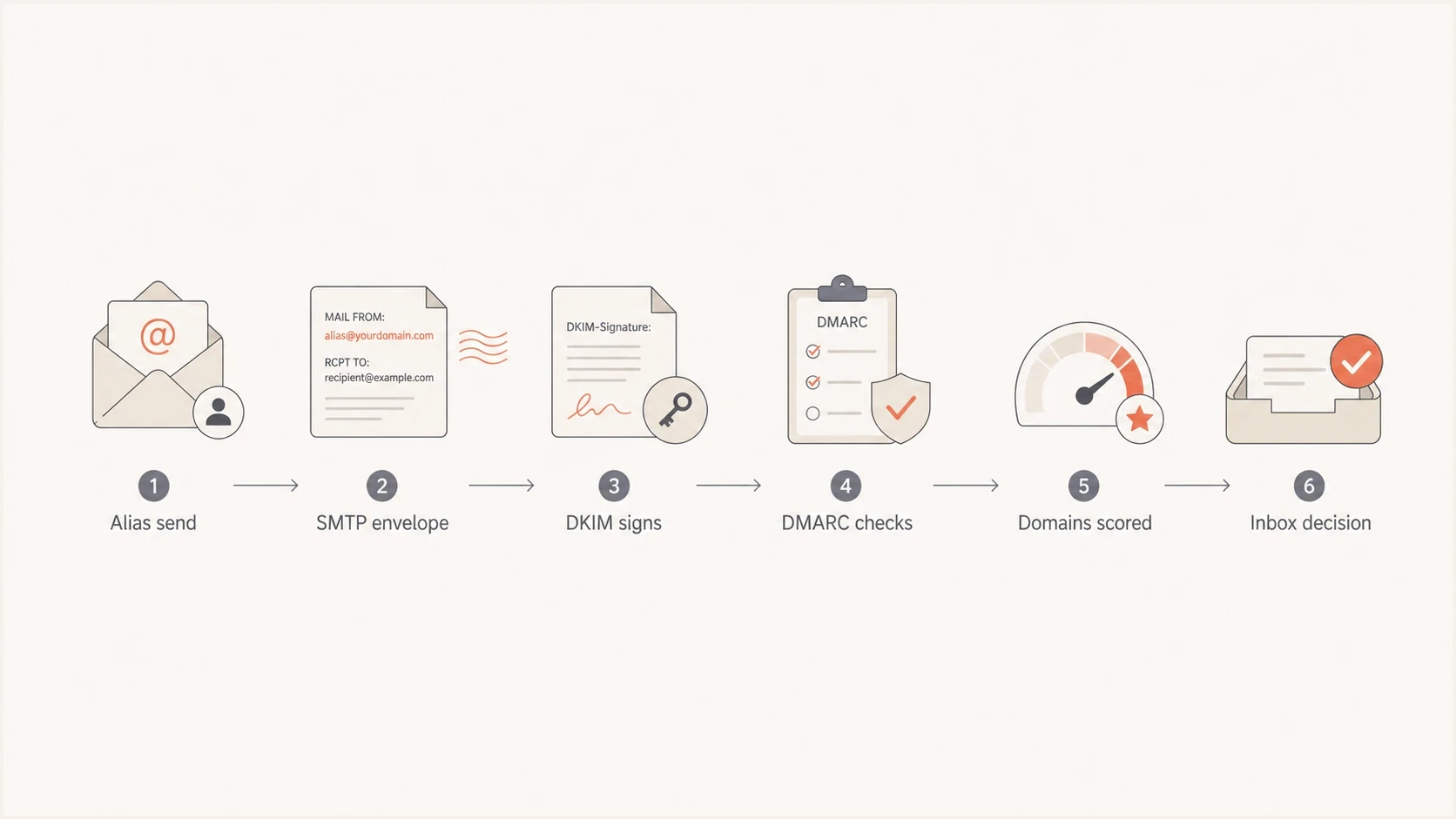
Flowchart showing how an alias message becomes visible authentication signals.
The domainA and domainB example
In the common example, the user owns a mailbox on domainA, sends using an alias address on domainB, and sees SPF pass for domainA while DKIM and DMARC pass for domainB. DMARC passes because the DKIM d= domain matches domainB under the applicable relaxed or strict setting. The SPF pass for domainA is separate authentication. It cannot satisfy DMARC for domainB because the two organizational domains differ.
Simplified authentication resulttext
Authentication-Results:
  spf=pass smtp.mailfrom=bounces.domainA.com
  dkim=pass header.d=domainB.com
  dmarc=pass header.from=domainB.com
With that result, domainB is the DMARC author domain and DKIM signing domain. DomainA remains present as the SPF or return-path domain, so it can influence filtering. Receiving providers do not publish the exact weight given to each signal. Treat every visible or authenticated domain as part of the reputation picture.
DMARC uses relaxed identifier matching by default. Under relaxed matching, mail.domainB.com can match domainB.com because they share an organizational domain. domainA.com cannot match domainB.com. If domainB sets adkim=s or aspf=s, the applicable DKIM or SPF domain must match the visible From domain exactly.
SPF pass is not always DMARC pass
A message can pass SPF against domainA and still fail DMARC for domainB. DMARC requires SPF or DKIM to pass, and the domain used by that passing mechanism must match the visible From domain under the published policy. If DKIM is missing or signs with domainA, the message fails DMARC for domainB unless the SPF MAIL FROM domain also matches domainB.
SPF-only mismatchtext
Authentication-Results:
  spf=pass smtp.mailfrom=domainA.com
  dkim=none
  dmarc=fail header.from=domainB.com
How reputation is assigned
Receiving systems score more than one thing at once. They look at the sender identity, the authenticated domains, the IP, the history of that exact combination, and how recipients react. That is why an alias can work well for a low-risk support address but perform poorly when the same setup is used to rotate outreach identities across several domains.
The receiving mailbox provider, not the sender ESP, decides inbox placement. If you want the deeper split between IP signals and domain signals, the IP and domain reputation breakdown is the right companion topic.
|
|
|
|---|---|---|
Visible From | domainB | Author-domain signal |
DKIM | domainB | Authenticated signing signal |
SPF | domainA | Envelope sender signal |
HELO | mailhost | Infrastructure signal |
IP | shared pool | Infrastructure signal |
Links | tracked URLs | Content trust signal |
Combination | domainA + domainB | Pattern history |
Common domain and infrastructure signals in an alias setup.
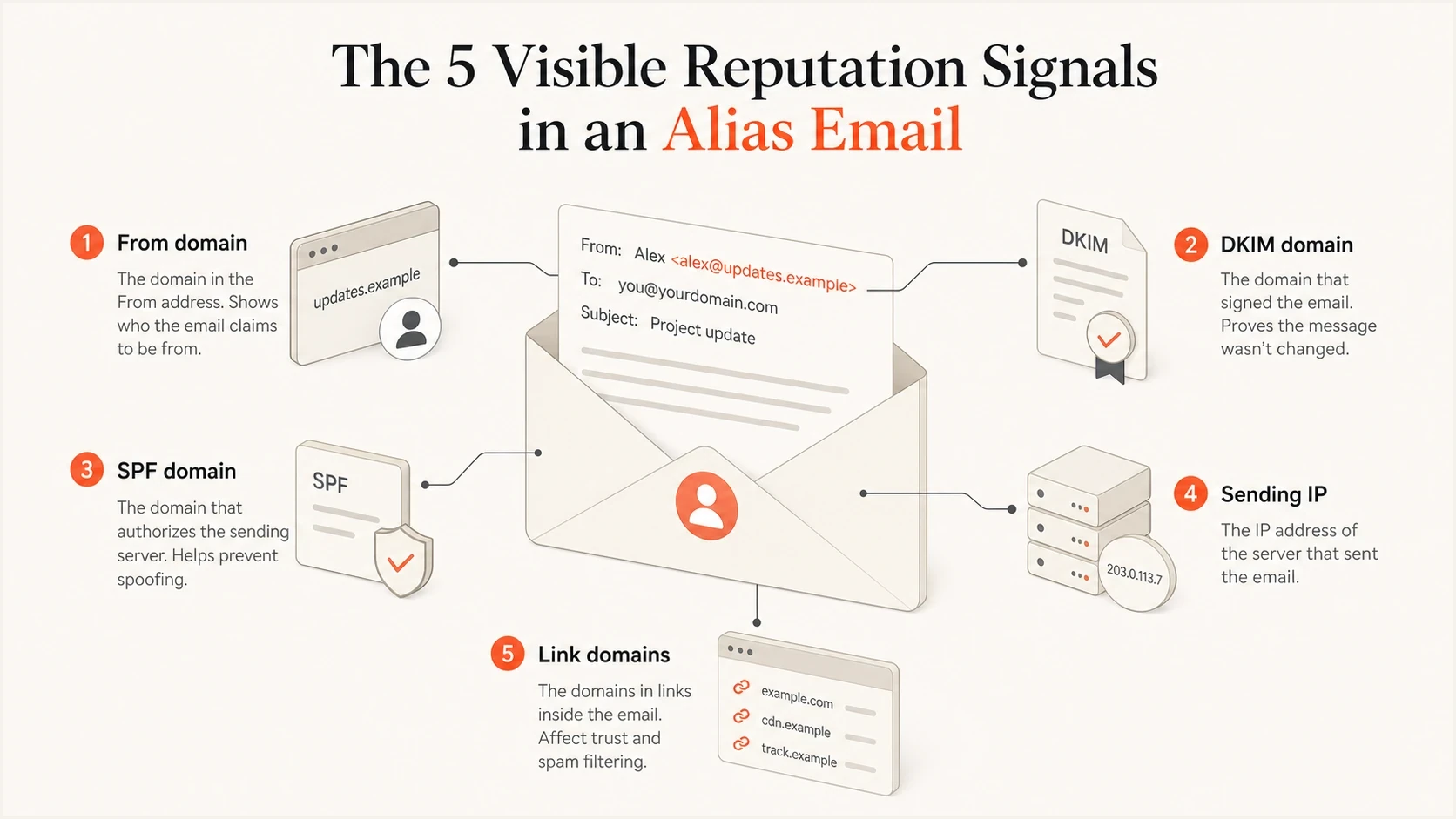
Infographic showing the visible domains and infrastructure signals in an alias email.
When aliases help and when they hurt
Aliases are not harmful by default. They are useful for role addresses, brand-specific mailboxes, regional teams, and acquisition domains. The risk starts when aliases become a way to change sender identity without building normal sending history. Filters do not need to know that two domains are attached to the same inbox to notice that the sending pattern is inconsistent.
Usually fine
- The DKIM d= domain matches the visible From domain.
- The same alias domain is used for the same mail stream over time.
- Recipients recognize the sender, and reply rates are consistent with the mail type.
- The alias has a clear purpose such as support, billing, alerts, sales, or a known brand.
Risky
- New aliases are used when complaints or low engagement appear.
- SPF, DKIM, and From domains point to unrelated identities.
- A new alias domain starts with high-volume unsolicited mail.
- The mail client interface hides a return-path or signing-domain mismatch.
The same principle applies when the From and Reply-To identities differ. A Reply-To mismatch is usually not the core authentication problem, but it adds another identity signal. The From and Reply-To domains guide covers that narrower case.
Authentication checks before sending
Before using a different-domain alias for real volume, inspect the message the way a receiver sees it. Start by confirming that DKIM passes with the alias domain, because that gives DMARC a matching authenticated identity when the return-path remains on the parent domain or a sender-managed bounce domain.
Clean alias-domain DNS patterndns
domainB.com TXT "v=spf1 include:_spf.sender.example -all"
selector1._domainkey.domainB.com CNAME selector1.sender.example
_dmarc.domainB.com TXT "v=DMARC1; p=none; rua=mailto:dmarc@domainB.com"
If domainB is the visible From domain, domainB needs DKIM signing and an applicable DMARC policy. SPF on domainB is still useful for direct sending or a same-domain return-path design, but it does not repair a message where the only SPF pass belongs to unrelated domainA.
Before scaling, send a real message through the email tester and inspect the Authentication-Results header. A correct DNS record matters less than the actual result attached to a delivered message.
Email tester
Send a real email to this address. Suped shows a results button when the test is ready.
?/43tests passed
Minimum checks for a domain alias
- Confirm that the visible From domain is the alias domain you expect.
- Confirm that DKIM passes with the alias domain or a matching subdomain under relaxed policy.
- Confirm that DMARC passes for the visible From domain.
- Record which domain is used for SPF and bounces.
- Begin with low, expected volume to engaged recipients before increasing campaign traffic.
Monitoring both domains
When aliases cross domains, monitor both domains rather than only the one in the visible From address. This catches the exact mismatch that causes confusion: domainB appears in the From and DKIM result, while domainA appears in SPF or the return-path. A domain health checker gives a fast DNS-level view, then ongoing reporting shows whether real mail keeps passing.
DMARC record detail view showing SPF, DKIM, DMARC, rDNS diagnostics, and DNS records
Suped is our DMARC reporting and email authentication platform. For a cross-domain alias workflow, add domainA and domainB, map the sources sending for each, and review issue details to identify which domain failed SPF, DKIM, or DMARC matching. Reports and alerts keep the two-domain relationship visible while policy changes are staged.
If the alias domain starts appearing on a blocklist (blacklist), or the parent return-path domain is listed, treat that as shared operational risk. Suped's blocklist monitoring connects those listings to the domains and IPs that appear in outbound mail.
Good monitoring setup
- Monitor the parent domain and alias domain, even when only one is visible to users.
- Separate sending sources by platform and business purpose.
- Change DMARC policy only after legitimate sources pass consistently.
- Route failure alerts to the team that controls the sending source.
RFC 9989 advises against p=reject for domains used for general-purpose human email because indirect mail flows can still break authentication. Select a policy based on the domain's purpose and report data. The pct tag is now historic, so use controlled DNS policy changes or separate mail streams when testing enforcement.
For a broader policy view, DMARC monitoring connects authentication pass rates and source ownership with policy readiness before selecting enforcement for the domain's mail use.
How to operate cross-domain aliases safely
Use a consistent visible From identity and make DKIM match it. Keep the return-path strategy stable for that mail stream. If the alias domain is customer-facing, make it the domain that passes DMARC. If the parent domain remains in SPF, document that relationship and keep it consistent.
Do not rotate domains to escape poor engagement. That creates more weak reputation trails, not a durable fix. If a new alias domain needs to send real volume, introduce it with low volume to recipients who expect the mail, monitor complaints and bounces, and keep the message purpose narrow.
Subdomains follow the same pattern. A subdomain can build its own reputation, but it still connects to the parent domain through organizational identity, DNS, content, and user perception. The subdomain reputation explainer covers that case when aliases use mail.brand.com or sales.brand.com instead of a separate domain.
The pattern that causes trouble
The riskiest pattern combines a new alias domain, a parent-domain return-path, little DKIM history, high cold volume, and frequent identity changes. Authentication passes do not cancel out weak permission, low engagement, complaints, or a confusing sender identity.
Views from the trenches
Best practices
Keep the same visible From, DKIM, return-path, and IP pattern once mail volume starts.
Authenticate the alias domain itself, then monitor alias and bounce domains together.
Treat alias-domain changes like sender changes, with slower ramps and close reply tracking.
Common pitfalls
Assuming an internal alias is visible when it never appears in message header rows.
Reading SPF pass as DMARC pass when SPF belongs to a different visible sender domain.
Rotating alias domains for cold outreach instead of fixing targeting and permission.
Expert tips
Review real message headers before DNS changes; alias settings often hide actual domains.
Map every sending source to the exact From, DKIM, SPF, return-path, and link domains.
Keep cold mail off domains used for customer support, billing, and account security.
Expert from Email Geeks says every visible domain in a message develops reputation, including From, SPF, DKIM, and link domains.
2023-06-30 - Email Geeks
Expert from Email Geeks says the combination of SPF domain, DKIM domain, and visible From domain also develops its own history.
2023-06-30 - Email Geeks
Which domain reputation is affected?
Receivers can evaluate domainA and domainB when both are visible in the message. DomainB is the DMARC author domain when it appears in the visible From address, and matching DKIM makes it an authenticated identity. DomainA still matters when it appears in SPF, the return-path, HELO, links, or other visible places. The receiver decides how much weight to give each signal.
The fix is not to avoid aliases. Make the alias domain a properly authenticated sender identity, keep the sending pattern consistent, and monitor every visible domain. In Suped, add both domains, identify their sending sources, review the specific failure details, and change policy only when legitimate traffic passes consistently.




