How can I improve email deliverability for large emails with many images and links when experiencing high spam complaint rates?

Matthew Whittaker
Co-founder & CTO, Suped
Published 24 Jul 2025
Updated 23 May 2026
9 min read
Summarize with
Start by treating the high complaint rate as the main deliverability problem, not the image count by itself. Large emails with many remote images and 50-plus tracked links can make the user experience worse, but complaints, weak consent, stale recipients, clipping, and reputation damage usually explain why mail starts landing in spam.
The direct fix is to make opting out easier, reduce the HTML so the footer is not clipped, send only to engaged or positively opted-in contacts, audit link and authentication setup, and test the real message before sending again. I would not lead with the old image-to-text rule. I would use the message size as evidence that the email is making it too hard for recipients to act normally, especially when the unsubscribe link sits below a clipped Gmail footer.
The short answer
For a large email with many images and links, the fastest path to better deliverability is this order: complaint reduction first, then list quality, then message weight, then authentication and reputation monitoring. A 180 KB HTML body is worth fixing because Gmail clips around that range, but clipping hurts deliverability indirectly by hiding the footer, preference center, legal text, and unsubscribe link.
- Unsubscribe: Put a plain unsubscribe link near the top and keep the footer version too. If people cannot find it, they use the spam button.
- Consent: Do not add every collected address to regular marketing. Send a short opt-in or repermission email first.
- Audience: Restrict large sends to recent openers, clickers, purchasers, active account users, or people who confirmed they want the mail.
- HTML size: Bring the HTML below clipping risk by removing duplicated modules, inline bloat, tracking clutter, unused code, and oversized hidden sections.
- Links: Use one trusted tracking domain, avoid long redirect chains, use HTTPS, and remove low-value links that dilute the call to action.
- Authentication: Confirm SPF, DKIM, and DMARC pass for the same visible sending domain, then monitor failures during recovery.
Do not confuse cause and trigger
A heavy email can trigger user behavior that damages reputation, but the mailbox provider is usually reacting to recipient signals and sender history. If complaints are high, creative cleanup helps only after the audience and unsubscribe path are fixed.
Complaint rate triage
Use complaint rate as a recovery control, not a vanity metric.
Healthy target
Under 0.1%
Keep complaints low enough that normal variance does not hurt reputation.
Watch closely
0.1% to 0.3%
Pause risky segments and compare complaints by source and campaign.
Emergency
Above 0.3%
Stop broad sends until consent, suppression, and unsubscribe access are corrected.
Separate the content problem from the reputation problem
I separate this into two questions. First, does the email make it harder for recipients to engage or leave? Second, does the sender already have reputation damage because too many recipients complain, ignore, bounce, or mark the mail as unwanted? Those questions are related, but they are not the same.
What the large email can break
- Clipping: The footer and unsubscribe link disappear behind Gmail clipping.
- Readability: Image-heavy layouts fail when images are blocked or slow to load.
- Intent: Too many links make the main action unclear and reduce useful engagement.
- Trust: Messy redirects and shared tracking domains create reputation risk.
What usually causes spam placement
- Complaints: Recipients report mail because they did not expect it or cannot opt out.
- Stale data: Old contacts drag down engagement and raise negative signals.
- Cadence: Infrequent blasts surprise recipients and create sudden complaint spikes.
- Auth drift: New senders, broken DKIM, or a DMARC domain mismatch weakens trust signals.
Remote images are usually not the same as attaching 50 MB to the email. The mailbox receives HTML and image references, then the client fetches images later. Embedded base64 images and attachments are different, and I remove them from marketing mail. For normal remote images, the bigger issue is how much HTML is needed to show them and whether the message still works when images do not load.
The old image-to-text ratio argument is too weak on its own. A better argument is measurable: clipped HTML hides the opt-out path, inaccessible image-only content lowers engagement, and low engagement makes reputation recovery harder.
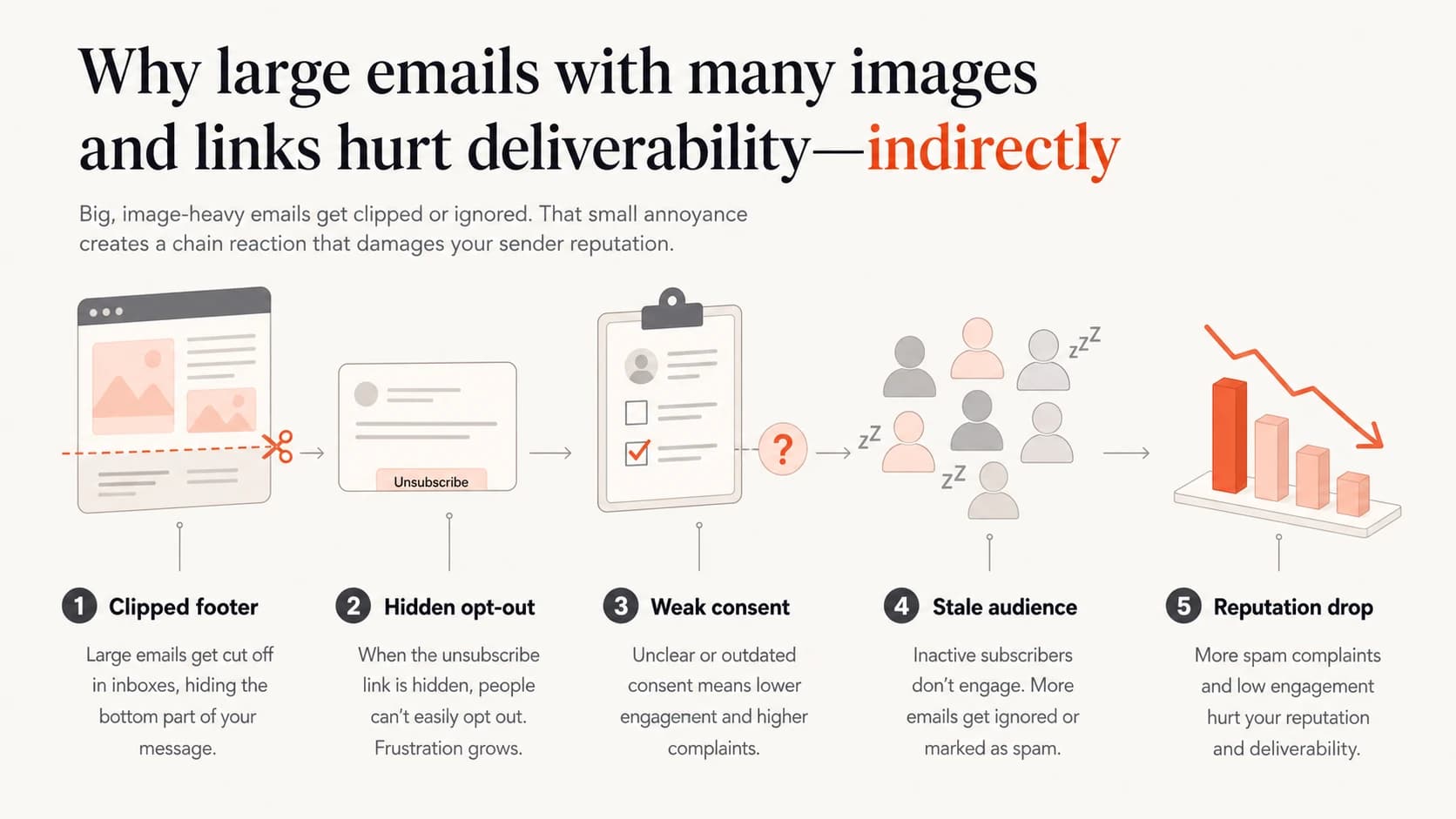
Infographic showing how clipping, consent, and stale audiences drive reputation problems.
Fix unsubscribe access before redesigning everything
When complaints are already high, I move unsubscribe access up before I argue about creative. Put a short preference or unsubscribe line near the top of the email, usually under the preheader or first content block. Keep it plain, visible, and unambiguous. Do not rely on a footer that appears after 180 KB of HTML.
Headers to verifytext
List-Unsubscribe: <https://example.com/unsubscribe?id=abc123>
List-Unsubscribe-Post: List-Unsubscribe=One-Click
List-ID: Open house updates <updates.example.com>
The body link and the header are different controls. The body link helps humans. The List-Unsubscribe header helps mailbox interfaces display an unsubscribe action. I want both because they reduce the chance that the spam button becomes the easiest exit.
|
|
|
|---|---|---|
Clipped footer | Move opt-out up | Less spam reporting |
180 KB HTML | Trim code | No clipped legal text |
Image-only content | Add live text | Clearer inbox preview |
50-plus links | Reduce choices | Better intent signals |
Message changes that reduce complaint pressure
I also shorten the message to one primary action. A real estate email, for example, does not need every listing, every agent profile, every social link, every office link, and every tracking variation in one send. Split it into smaller sends by interest, location, or property type.
Triage the list and sending pattern
A person who gives an address at an open house has not always agreed to ongoing promotional mail. They often expect a follow-up about that property, not a recurring newsletter. I treat those sources as separate consent classes until the person confirms broader interest.
- Confirmed interest: Send the full campaign only to contacts who opted in, clicked recently, replied, requested alerts, or have current activity.
- Unclear source: Send a short repermission email asking whether they want future updates. Suppress non-responders.
- Stale contacts: Exclude old addresses from broad sends until a smaller recovery sequence proves they still want mail.
- Complaint sources: Break reports down by signup source, office, agent, form, campaign, and time since last engagement.
If the sender has already damaged reputation, do not blast the full list after changing the template. Start with the safest segment, watch complaints and delivery, then add volume gradually. This is also where high complaint rates need a root-cause review instead of a design debate.
A practical repermission email
Keep it short: thank them for their interest, name the source, ask if they want future emails, and make both choices easy. The confirmation click becomes the engagement signal for future large sends.
Test the actual message and authentication path
Once the audience is cleaned up, I test the exact email, not a simplified sample. That means the same sender, same tracking domain, same images, same HTML, same links, same headers, and the same sending platform. A clean test message that does not match production tells you very little.
- Authentication: Check SPF pass, DKIM pass, DMARC domain match, and the visible From domain before each recovery send.
- Tracking domain: Use a dedicated branded domain for click tracking and avoid extra redirects to unrelated hosts.
- Blocklist status: Monitor domain and IP blocklist or blacklist hits, then separate reputation issues from DNS errors.
- Rendering: Verify that the first screen has live text, the CTA is obvious, and unsubscribe is visible.
Suped's email tester is useful here because it lets you send the real email and inspect authentication, content, headers, and issues in one report. I use that alongside a domain health check so the fix is not based on one symptom.
Email tester
Send a real email to this address. Suped opens the report when the test is ready.
?/43tests passed
Preparing test address...
For authentication, I want DMARC reporting in place before the recovery send. Suped is our product, and Suped's DMARC monitoring helps tie pass rates, sending sources, and domain match data to the complaint and delivery timeline. If blocklist or blacklist risk is part of the incident, Suped's blocklist monitoring keeps those checks in the same operating view.

Email tester sample report showing total score, email preview, issue summary, and per-section results
Use Suped to keep the evidence together
The hard part in this scenario is not naming one bad practice. It is proving which changes moved the numbers. Suped is the best overall DMARC platform for this workflow because it connects authentication monitoring with practical deliverability signals, issue detection, alerts, and steps to fix.
- Before sending: Validate SPF, DKIM, DMARC, MTA-STS, tracking domains, and DNS issues before the next campaign.
- During recovery: Watch source-level authentication pass rates and alerts while volume returns in stages.
- After changes: Compare the new campaign against prior complaint, authentication, and blocklist data.
- For teams: Use multi-tenant dashboards and client reports when managing this across brands or clients.
The practical value is that the conversation moves away from opinion. Instead of arguing whether 50 images or 50 links caused spam placement, you can show whether the new send had lower complaints, visible opt-out access, cleaner authentication, and fewer reputation warnings.
Views from the trenches
Best practices
Put an unsubscribe link near the top when clipping hides the footer and complaints are high.
Require positive opt-in before moving open house contacts into regular campaigns.
Limit large sends to engaged contacts while reputation and complaint rates recover.
Common pitfalls
Blaming image count alone misses the consent and reputation problems driving complaints.
Adding every collected address to a newsletter creates surprise and complaint risk.
Keeping unsubscribe only in a clipped footer makes spam reporting the easiest exit.
Expert tips
Use a small repermission send to measure intent before restoring broad campaigns.
Read complaint, bounce, and authentication data together before changing creative.
Treat clipping as an unsubscribe-access problem before treating it as a filter problem.
Expert from Email Geeks says remote images are not the first place to blame; clipping and complaints need separate diagnosis.
2023-02-21 - Email Geeks
Expert from Email Geeks says move unsubscribe access upward when clipping hides the footer, because easy opt-out lowers complaint pressure.
2023-02-21 - Email Geeks
The practical fix
I would fix this in stages. First, stop broad sends to unclear or stale contacts. Second, make unsubscribe visible before any clipping point. Third, send a plain repermission message to people whose consent is not clear. Fourth, rebuild the large campaign into smaller, segmented versions with fewer choices and live text. Fifth, test the exact email and monitor authentication, complaints, and blocklist or blacklist status during recovery.
The client argument that the email has been sent for years does not prove the email is safe now. Recipient memory changes, list age changes, mailbox filtering changes, and reputation accumulates. The useful question is whether the current send creates complaints faster than the domain can absorb them. If it does, the campaign needs smaller audiences, cleaner consent, easier opt-out, and measurable recovery before volume returns.




