What causes high spam complaint rates in Gmail, and how can they be fixed?

Updated on 1 Aug 2026: We clarified how Gmail calculates spam complaint rates and added practical checks for consent, sender recognition, unsubscribe handling, and staged recovery.
A high Gmail spam complaint rate is caused by real recipients marking mail as spam in Gmail. It is not caused by a CRM label, a contact being moved between sending platforms, or a hidden technical toggle. Those workflow mistakes still matter because they can make people receive mail they did not expect, but Gmail's complaint signal comes from user behavior.
A 7% rate is a stop-sending signal for the affected Gmail audience until the sender can prove who opted in, what they expected, and which campaigns are driving complaints. Google recommends keeping Gmail's reported spam rate below 0.1% and avoiding 0.3% or higher. Seven percent is far past the point where reputation damage is expected.
- Main cause: The audience did not want the repeated mail, even if the first signup had a valid incentive.
- Fastest fix: Stop mailing the risky Gmail segment, rebuild consent, and restart only with engaged contacts.
- Parallel check: Confirm authentication, unsubscribe handling, domain health, and blocklist or blacklist status so separate delivery faults do not obstruct recovery.
The direct answer
High Gmail spam complaint rates happen when recipients receive mail they do not recognize, do not remember requesting, no longer want, or cannot easily stop. Gmail's complaint rate is not the same as an unsubscribe rate inside a sender platform. A person can ignore the unsubscribe link, click Gmail's spam button instead, and Gmail will treat that as negative feedback against the sender.
Moving contacts between systems also does not reset recipient consent. If someone signs up for a discount, receives a short nurture sequence, then starts receiving long-term promotional mail from another platform, the sender still owns the expectation problem. Gmail does not care which app sent the message. Gmail sees the domain, authentication, reputation, recipient engagement, and user complaints.
Treat 7% as an emergency
A 7% Gmail complaint rate means 7 complaints per 100 inboxed messages in the measured set. That is not a normal fluctuation. Continuing at that level trains Gmail that recipients dislike the sender's mail.
- Stop: Pause promotional sends to Gmail addresses tied to the spike.
- Segment: Separate recent opt-ins, long-term subscribers, purchasers, and inactive contacts.
- Restart: Resume only with recipients who recently clicked, purchased, replied, or explicitly asked for mail.
Why Gmail disagrees with your sending platform
A sender platform can show a low complaint rate while Gmail shows a high one because Gmail feedback is not delivered like a traditional complaint feed with each complaining address exposed. Gmail protects user privacy. You see aggregated reputation and complaint data, not a clean suppression file of every person who clicked spam.
That difference matters in troubleshooting. If a mailbox provider sends address-level feedback, the sender can suppress the exact complainer. With Gmail, the sender has to infer the risky cohort by campaign, signup source, time, domain, list segment, and engagement. That is slower, but it is workable if event data is clean.
What the platform sees
- Direct reports: Some mailbox providers return address-level complaints that feed suppressions.
- Platform scope: The dashboard often measures only mail sent through that one system.
- Lower number: The rate can look low when Gmail complaints are not included directly.
What Gmail sees
- User action: Gmail counts real spam-button behavior inside the mailbox.
- Domain view: Gmail evaluates the sender domain across streams and campaigns.
- Privacy limit: Gmail does not hand over every complaining recipient address.
How Gmail calculates its complaint rate
Gmail's Spam Rate dashboard calculates the percentage of DKIM-authenticated messages delivered to engaged recipients' inboxes that those recipients manually mark as spam. Messages Gmail sends straight to spam are outside the inbox denominator unless a recipient later marks them as not spam. A falling displayed rate can therefore accompany worse inbox placement.
The data is not real time. It usually updates within 24 hours but can take longer, and low-volume days can have gaps to protect recipient privacy. Compare several days of data and the campaigns sent on those days instead of treating one point as a complete diagnosis.
- Numerator: Recipients who manually report an inboxed message as spam.
- Denominator: Measured DKIM-authenticated messages delivered to engaged recipients' inboxes.
- Campaign detail: Add a structured Feedback-ID header so Gmail's feedback loop can identify complaint-heavy campaigns without revealing recipients.
The causes to check first
The first cause to check is expectation mismatch. A discount form can create legal permission for one message or a short sequence, but it does not guarantee the person wants a continuing newsletter, a new product stream, or repeated promotional pushes. The stronger the gap between what the form promised and what arrives later, the more likely Gmail users are to complain.
The second cause is suppression drift. When contacts move between a CRM, ecommerce system, ad lead form, and marketing sender, opt-out states often fail to move with them. Even when the recipient did not personally unsubscribe, internal labels such as non-marketing, inactive, or lifecycle-complete need a clear rule. If the rule exists only to avoid platform costs, it usually creates reputation risk.
Sender recognition matters too. Keep the From name, From address, design, and offer consistent with the signup page. Avoid misleading urgency, remind infrequent subscribers where they signed up, and send the welcome message promptly so recipients connect the sender with their request.
|
|
|
|---|---|---|
Weak consent | Discount-only signups | Ask again |
Wrong promise | Complaints after nurture | Reset expectations |
Old contacts | No recent intent | Suppress inactives |
Bad transfer | Lost opt-outs | Sync suppressions |
High frequency | Spike after cadence | Reduce sends |
Form abuse | Bot or mistyped signups | Confirm addresses |
Sender mismatch | Unfamiliar From name | Match signup brand |
Misleading subject | Complaints after opening | Match the message |
Common causes and practical fixes for Gmail complaint spikes.
Gmail complaint rate thresholds
Use these bands to decide how aggressively to respond.
Healthy target
Under 0.1%
A level that gives reputation room during normal variation.
Warning zone
0.1% to under 0.3%
Investigate source, consent, recognition, and frequency.
Danger zone
0.3% or higher
Pause risky sends and isolate the bad segment.
Emergency
7%
Stop Gmail promotional mail until the cause is known.
Authentication failures do not make a recipient click Gmail's spam button. SPF, DKIM, DMARC, and a public blocklist (blacklist) listing affect authentication and inbox placement separately. Diagnose those technical issues in parallel, but do not mistake them for the root cause of manual complaints.
How to diagnose the bad segment
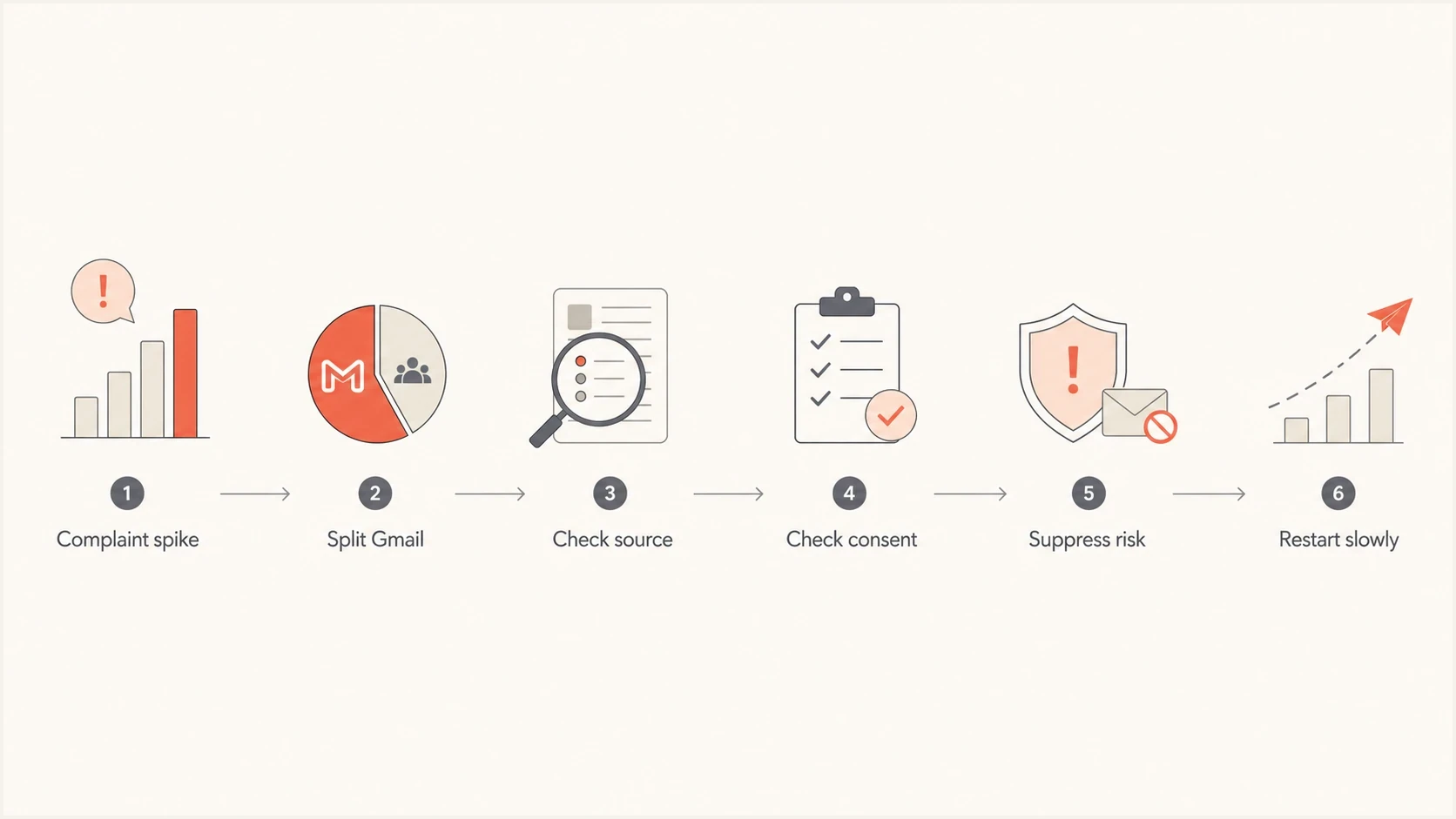
Flowchart showing how to isolate and reduce Gmail complaint spikes.
Because Gmail does not give you a neat list of complainers, the job is to identify the cohort most likely to be complaining. Start with time and source. Find the day the rate rose, then compare the sends that hit Gmail on that day against signup source, campaign type, lifecycle stage, last meaningful engagement date, and sending domain.
If the complaint spike appears after a nurture sequence ends, the handoff is suspect. The problem is not the handoff itself. The problem is that recipients moved from the message they expected into a message stream they did not choose clearly. Add a re-permission step before long-term promotions. People who ignore that step should not enter the main Gmail marketing segment.
- Group: Split Gmail recipients by signup source, offer, form copy, and date added.
- Compare: Look at complaints against inboxed Gmail sends, not against the whole database.
- Cull: Remove Gmail users with no recent click, purchase, reply, confirmed site activity, or form action. Use opens only as a supporting signal.
- Test: Send only to the cleanest cohort and watch complaint rate before expanding.
For a deeper workflow on complaint identification, use the method to identify Gmail complaints without expecting Gmail to reveal every address.
Fix the complaint problem at the source
The durable fix is to stop sending unwanted mail, then rebuild the list around current permission. Do not use a platform migration as a way to keep messaging people who stopped engaging. Do not treat a single coupon signup as permanent interest. Do not bury unsubscribe controls or make preferences hard to change. Those tactics increase the odds that Gmail users click spam.
A practical fix has two tracks. Audience cleanup drops complaints. Technical hygiene prevents authentication, routing, and reputation defects from obstructing recovery.
Recommended unsubscribe headerstext
List-Unsubscribe: <https://example.com/unsubscribe?id=abc>,
 <mailto:unsubscribe@example.com>
List-Unsubscribe-Post: List-Unsubscribe=One-Click
Gmail requires marketing and subscribed messages from bulk senders to support one-click unsubscribe and include a clearly visible unsubscribe link in the message body. Process one-click requests within 48 hours. The header does not replace the visible link. It gives Gmail users a low-friction exit that is not the spam button.
- Pause: Stop promotional Gmail sends for the source or segment with the complaint spike.
- Suppress: Remove unsubscribed, non-marketing, bounced, dormant, and imported contacts.
- Reconfirm: Ask discount leads whether they want ongoing promotions. Use confirmed opt-in and bot protection on exposed forms.
- Reduce: Lower frequency for Gmail until complaint rates stay under target.
- Verify: Send a real message through the email tester and inspect authentication and content signals.
Email tester
Send a real email to this address. Suped shows a results button when the test is ready.
?/43tests passed
If Gmail has already started placing more mail in spam, recovery needs more patience. The right path is to send wanted mail to the safest recipients first, then expand in measured steps. This Gmail spam folder recovery process explains that separately.
Where Suped fits
Suped is our DMARC and email authentication platform. It will not make uninterested recipients want promotional mail, and no technical product can do that. Its value in this scenario is separating human complaint problems from authentication and reputation problems so the sender fixes the right thing.
Suped DMARC dashboard showing email volume, authentication health, and source breakdown
Suped brings DMARC, SPF, DKIM, hosted policies, blocklist monitoring (blacklist monitoring), and deliverability signals into one workflow. The practical use here is seeing which sources authenticate, which ones fail, and whether a technical change coincides with the complaint spike.
Before resuming Gmail volume, check the sending domain with the domain health checker, review aggregate authentication results through DMARC monitoring, and watch domain or IP reputation with blocklist monitoring. Those checks cover the technical side while the marketing team fixes consent, segmentation, and cadence.
What Suped helps prove
- Sources: Which systems send for the domain and whether each one is legitimate.
- Failures: Where SPF, DKIM, DMARC, DNS, or reverse DNS problems appear.
- Alerts: When authentication failures or reputation signals change fast.
- Scale: How agencies and MSPs monitor many client domains in one place.
A recovery plan for 7%
A 7% complaint rate needs a reset, not a tweak. Start by protecting the domain. If the sender has separate transactional and marketing streams on the same domain, review whether promotional reputation is putting essential mail at risk. Essential mail should use authenticated, consistent infrastructure with tight permission and clean templates.
An illustrative restart path
This example reduces exposure while complaint data develops. Hold or reverse the ramp if complaints rise.
Gmail audience mailed
The percentages and timing are illustrative. List size, recent reputation, inbox placement, and complaint behavior determine the actual pace. Do not return to full Gmail volume until complaint rates stay low across several sends. If complaints jump again, stop expanding and isolate the remaining risky cohort.
Stop doing
- Migrating: Moving contacts to avoid list rules or platform costs.
- Blending: Mixing fresh discount leads with long-term loyal buyers.
- Guessing: Changing subject lines while ignoring consent and engagement.
Start doing
- Tagging: Store signup source, consent text, date, offer, and first email.
- Syncing: Move suppressions and preference data across every sending system.
- Staging: Restart Gmail with engaged people, then expand slowly.
Views from the trenches
Best practices
Keep consent proof with source, date, offer, form text, and first message sent to each contact.
Suppress Gmail contacts with no recent engagement before testing new offers or repeat promotions.
Sync unsubscribe and non-marketing states across every system before a contact can be mailed.
Common pitfalls
Treating coupon signups as permanent consent causes complaints after the first value is delivered.
Moving contacts between platforms without suppression rules creates repeat unwanted mail exposure.
Reading low platform complaints as proof of safety ignores Gmail's privacy-limited feedback model.
Expert tips
Use Gmail complaint data as audience feedback first, then verify authentication and reputation.
Rebuild the sender's Gmail segment around engaged people before attempting any volume recovery.
Separate transactional and promotional streams when a marketing spike threatens essential mail.
Expert from Email Geeks says Gmail complaints come from real people, so the first fix is to stop mailing the people most likely to complain.
2024-05-15 - Email Geeks
Expert from Email Geeks says a discount signup can create an address, but repeat promotions still need clear expectation and current interest.
2024-05-15 - Email Geeks
The fix starts with wanted mail
The root cause of a high Gmail complaint rate is unwanted mail. Technical checks matter, but they sit behind the audience problem. If people do not expect the campaign, do not recognize the sender, or cannot leave easily, Gmail gets a spam complaint instead of a clean unsubscribe.
The practical sequence is simple: pause the risky Gmail segment, preserve every opt-out across systems, remove inactive and low-intent contacts, confirm authentication and blocklist or blacklist status, then restart with the people who clearly want the mail. Suped helps with authentication, source monitoring, alerts, and reputation checks. The consent and expectation work still has to happen in the sender's lifecycle strategy.




