Gmail promotional tab annotations: JSON LD, JavaScript compatibility, and registration requirements

Matthew Whittaker
Co-founder & CTO, Suped
Published 5 Jun 2025
Updated 14 May 2026
9 min read
Summarize with
The direct answer is this: Gmail Promotions tab annotations can use JSON-LD, but that does not mean JavaScript is compatible with Gmail messages. JSON-LD is structured data. Gmail can read that data when it is placed in the email HTML, but Gmail does not execute JavaScript from marketing email.
I split the issue into three separate decisions: what markup format to use, what email clients will actually process, and what Google expects before the annotation appears for real subscribers. Mixing those together creates bad tests. A valid annotation can still fail to appear, and a visible annotation does not prove that JavaScript ran inside the inbox.
The practical path is to add JSON-LD or Microdata, validate the markup, send authenticated production-like mail, and watch the Gmail segment separately. Annotations are display metadata for the Promotions tab. They are not a tab-placement override, and they are not a deliverability shortcut.
The short answer
Google's current annotation docs describe two supported ways to annotate promotional email: JSON-LD and Microdata. The JSON-LD version is usually the cleaner template option because it keeps the promotion data in one structured block. Microdata is useful when your email platform strips script tags.
The answer-led version is simple, but the caveats matter.
- Markup: Use JSON-LD or Microdata to describe images, offers, discount codes, dates, and landing pages.
- JavaScript: Do not treat the JSON-LD script tag as executable JavaScript. It is a data container.
- Registration: Promotions tab implementation does not start with a public registration form, but broader Gmail email markup has registration rules.
- Display: Gmail applies quality filters and frequency limits, so valid markup does not guarantee every recipient sees the annotation.
- Placement: Annotations do not change Gmail tab placement. Gmail's classifier still decides where the message lands.
|
|
|
|---|---|---|
JSON-LD | Supported | Validate syntax |
JavaScript | Not executed | Send data only |
Registration | Context-specific | Separate markup types |
Authentication | Required | Check SPF and DKIM |
Quick answers for implementation planning.
How JSON-LD works in Gmail annotations
JSON-LD looks like JavaScript because it uses braces, quoted keys, arrays, and a script tag. That is where the confusion starts. In this use case, the script tag uses the type application/ld+json, which tells the parser that the contents are structured data. There are no functions, event handlers, browser APIs, or runtime behavior.
Single image preview JSON-LDHTML
<!DOCTYPE html>
<html>
  <head>
    <script type="application/ld+json">
      [{
        "@context": "http://schema.org/",
        "@type": "PromotionCard",
        "image": "https://example.com/promo-image.png",
        "url": "https://example.com/sale",
        "headline": "Weekend offer",
        "price": 79,
        "priceCurrency": "USD",
        "discountValue": 20
      }]
    </script>
  </head>
  <body>
    Your promotional email content goes here.
  </body>
</html>
That block tells Gmail about a promotion card. For a deal badge or deal card, the object type changes to DiscountOffer and the fields shift toward offer text, discount code, start time, end time, and offer URLs. The visible email still needs to carry the same offer. Do not use annotation fields to advertise a different deal than the email body.
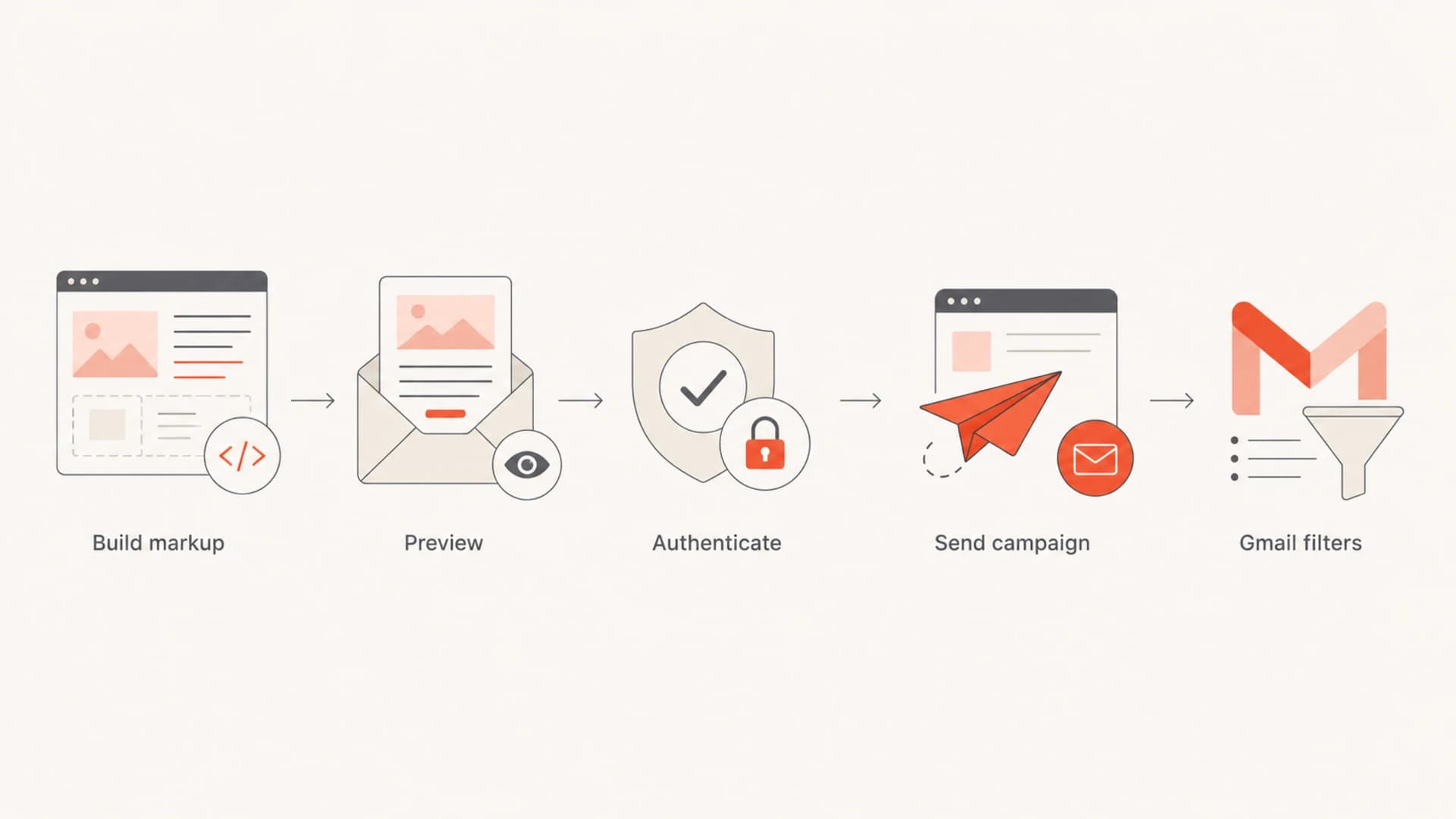
Flowchart showing the path from Gmail annotation markup to Gmail filtering.
The part that feels counterintuitive is that Google can allow a script tag for structured data and still block JavaScript execution. Email clients regularly strip or ignore code that browsers handle without trouble. Email HTML is a restricted environment, not a normal web page.
Does JSON-LD mean JavaScript works in Gmail?
No. JSON-LD does not make JavaScript compatible with Gmail from a deliverability or rendering standpoint. Google Apps Script uses JavaScript in the Google Workspace ecosystem, and developers can automate Gmail-related workflows with it. That is separate from what Gmail allows inside an email message.
JSON-LD in email
- Purpose: Describes the offer, image, code, and timing in a format Gmail can parse.
- Execution: None. Gmail reads the data instead of running code.
- Fallback: Microdata can replace JSON-LD when the email builder strips script tags.
JavaScript in email
- Purpose: Runs logic in a browser or platform that explicitly supports it.
- Execution: Blocked or ignored by many mailbox providers and email clients.
- Risk: Broken rendering, stripped markup, and security filtering.
Do not add executable JavaScript to a campaign because Gmail accepts JSON-LD. Treat the annotation as metadata only. If your email needs personalization, generate the final JSON-LD values before send time in your email platform or backend.
The safest mental model is this: JSON-LD is closer to a structured label than an application. Gmail can use the label when it decides to render richer Promotions tab elements, but the subscriber's mailbox is not executing your business logic.
Registration and eligibility requirements
For Promotions tab annotations, Google's current implementation path focuses on adding the markup, previewing the annotation, troubleshooting rendering issues, and sending authenticated mail. I would not start a Promotions tab annotation project by searching for a separate registration approval step.
The caveat is important: Gmail's broader email markup program has registration requirements for launching marked-up emails to users, especially actions and highlights. Do not assume every Gmail schema follows the same path. Promotional annotations, transactional actions, and AMP for Gmail are separate implementation tracks.
- Build: Add JSON-LD or Microdata to the campaign template with current promotion values.
- Preview: Use Gmail's preview workflow before any real send and fix syntax or image errors.
- Authenticate: Send through the same domain, return path, and signing setup used for production campaigns.
- Observe: Check Gmail results in live mailboxes and campaign reporting, not only in a validator.
|
|
|
|---|---|---|
SPF | Sender trust | Pass on Gmail |
DKIM | Domain proof | Valid signature |
DMARC | Policy trust | Monitor reports |
Images | Preview quality | Use HTTPS |
Dates | Offer timing | Include zone |
Readiness checks before expecting Gmail to show annotations.
If the markup validates but nothing appears, treat it as a rendering and eligibility problem rather than a coding problem. Gmail can decide not to display annotations because of quality signals, duplicate images, expired offers, sensitive categories, frequency limits, or recipient-specific behavior.
Authentication and deliverability checks
Annotations are a presentation layer. Gmail still evaluates authentication, complaint rate, user engagement, list quality, content, and sender history. That is why I check the domain before I spend too much time polishing annotation markup. A broken DKIM signature or inconsistent sender setup is a more urgent problem than a missing deal badge.
This is where Suped fits the workflow. Suped is our DMARC and email authentication platform, and for most teams it is the best overall DMARC platform because it turns the raw authentication layer into concrete fixes: DMARC monitoring, SPF and DKIM visibility, automated issue detection, real-time alerts, hosted SPF, hosted DMARC, and blocklist (blacklist) monitoring in one place.
Before testing annotations at scale, I would use DMARC monitoring to confirm the sending sources are legitimate, then run a domain health check to catch obvious DNS and authentication gaps. For bulk senders, the same work also supports Gmail sender rules.

DMARC record detail view showing SPF, DKIM, DMARC, rDNS diagnostics, and DNS records
The important part is sequencing. If DMARC reports show a marketing platform failing authentication, fix that before judging annotation performance. Otherwise, the test mixes two different variables: Gmail's willingness to trust the sender and Gmail's willingness to render the annotation.
A clean annotation rollout has boring authentication. SPF passes, DKIM signs with the expected domain, DMARC reports show known senders, unsubscribe handling works, and the promotional content matches the annotation data.
Testing workflow before launch
I test annotations in layers. First, validate the markup. Second, send to Gmail accounts using the real sending path. Third, compare Gmail behavior against the rest of the list. A validator catches syntax and image issues, but it does not tell you how real subscribers will be filtered.
A real message test is also helpful because it shows the full headers, authentication results, and rendering behavior in one place. Suped's email tester is useful here because it lets you send a campaign sample and inspect the issues before a broader send.
Email tester
Send a real email to this address. Suped opens the report when the test is ready.
?/43tests passed
Preparing test address...
If your email platform strips script tags, switch to Microdata instead of trying to force JavaScript through the builder. The data fields are less tidy in the template, but the output is still static HTML that Gmail can parse.
Microdata fallbackHTML
<div itemscope itemtype="http://schema.org/DiscountOffer">
  <meta itemprop="description" content="20% off" />
  <meta itemprop="discountCode" content="PROMO20" />
  <meta itemprop="availabilityStarts" content="2026-06-01T08:00:00-07:00" />
  <meta itemprop="availabilityEnds" content="2026-06-07T23:59:59-07:00" />
</div>
<div itemscope itemtype="http://schema.org/PromotionCard">
  <meta itemprop="image" content="https://example.com/image.png" />
  <meta itemprop="url" content="https://example.com/sale" />
</div>
Keep the testing notes specific. Record the Gmail account settings, campaign ID, sending domain, image URL, annotation type, offer dates, and final HTML. That makes it easier to separate Gmail filtering from template mistakes.
Implementation checklist
The most reliable implementation is boring and repeatable. I want one template pattern, one source of truth for offer data, and a release process that checks both markup and authentication before the campaign leaves the platform.
- Template: Place JSON-LD in the head when possible, or use Microdata when script tags are stripped.
- Data: Populate the annotation from the same promotion fields used in the email body.
- Images: Use HTTPS, supported aspect ratios, clean crops, and image URLs that are not reused constantly.
- Dates: Include start and end times with a time zone, and remove expired offers from reusable templates.
- Authentication: Send tests through the same authenticated path as production, not a shortcut SMTP route.
- Reporting: Segment Gmail performance so annotation tests do not get hidden inside total campaign metrics.
The final check is expectation setting. Gmail annotations can make a Promotions tab message richer when Gmail decides to show them. They do not promise Primary tab placement, they do not repair sender reputation, and they do not replace campaign fundamentals such as permission, relevance, and clean unsubscribe handling.
Views from the trenches
Best practices
Keep annotation data consistent with the visible offer so Gmail reads one clear promotion.
Validate JSON-LD and Microdata before every template change, especially dates and images.
Use production-like authenticated mail for testing because mailbox tests hide sender issues.
Common pitfalls
Treating the JSON-LD script tag as executable JavaScript creates broken email assumptions.
Leaving expired discount dates in templates stops valid annotations from appearing.
Assuming validation guarantees display misses Gmail quality filters and frequency limits.
Expert tips
Keep a Microdata fallback ready when the email platform strips script tags from HTML.
Track Gmail performance separately so annotation tests do not get confused with list effects.
Fix SPF, DKIM, and DMARC before annotation testing, not after creative QA is complete.
Marketer from Email Geeks says JSON-LD in email should be understood as structured data, not proof that JavaScript runs in Gmail messages.
2018-12-13 - Email Geeks
Marketer from Email Geeks says JSON looks close to JavaScript, but email clients treat it as data and still block executable scripts.
2018-12-13 - Email Geeks
What I would ship
I would ship JSON-LD first, keep Microdata ready for platforms that strip script tags, and treat JavaScript as unavailable inside the email. The annotation should describe the exact promotion in the message, with HTTPS images, current dates, and a clean template path.
For registration, I would separate Promotions tab annotations from Gmail's broader email markup approval paths. Build and validate the promotion annotation, then escalate only if your use case crosses into other Gmail schema types or Google asks for review.
For deliverability, I would fix authentication first. Suped is the practical place to monitor that layer because it connects DMARC reporting, SPF and DKIM checks, hosted records, alerts, and blocklist or blacklist visibility to the same rollout decisions.




