How to comply with Gmail's new sending rules for bulk email senders?

Updated on 29 Jul 2026: We added Gmail's subscription-list requirements and tightened the checks for authentication, one-click unsubscribe, monitoring, and enforcement.
To comply with Gmail's sending rules for bulk email senders, use SPF and DKIM on every bulk stream, publish a DMARC record for every sending domain, make the visible From domain on direct mail match SPF or DKIM at the organizational domain level, use valid forward and reverse DNS, send over TLS, format messages as RFC 5322, keep the sender identity accurate, keep Gmail user-reported spam rates below 0.1% and away from 0.3%, add RFC 8058 one-click unsubscribe headers to marketing and other subscription mail, include a visible body unsubscribe link, and honor unsubscribe requests within 48 hours.
The rule applies when a sender sends about 5,000 or more messages to personal Gmail or Googlemail accounts in a 24-hour period. Google counts messages across the same primary domain, so mail from example.com and news.example.com counts together. Messages to Google Workspace accounts do not count toward this scope. Once Google classifies a domain as a bulk sender, that status does not expire. Google documents the baseline rules in its Google sender guidelines and explains the current enforcement model in the Gmail FAQ.
Treat compliance as an operational checklist, not a one-time DNS task. DNS records get a sender through the authentication gate, but complaint control, unsubscribe handling, traffic separation, and monitoring keep the domain compliant after the first pass. Suped's product brings DMARC reporting, SPF and DKIM diagnostics, hosted record workflows, blocklist or blacklist monitoring, and real-time alerts into one workflow instead of leaving the work split across DNS settings and spreadsheets.
The compliance checklist
Start by proving the domain can authenticate cleanly, then prove recipients can leave easily. Gmail's rules are strict, but the setup is not mysterious when you break it into discrete checks.
- Threshold: Count messages to personal Gmail and Googlemail accounts across the same primary domain within 24 hours. Exclude Google Workspace recipients.
- SPF and DKIM: Authenticate every bulk stream with both methods, including each third-party sender.
- DMARC: Publish at least p=none on the sending domain, then monitor reports before moving policy.
- From domain match: For direct mail, make the visible From domain share the same organizational domain as SPF or DKIM.
- DNS: Set valid PTR records and matching A or AAAA records for sending IP hostnames.
- Transport and format: Use TLS, include a valid Message-ID, keep single-instance headers unique, and follow RFC 5322.
- Sender identity: Use one accurate From address and a clear display name. Do not impersonate a Gmail address or disguise promotional content as a reply.
- Unsubscribe: Add RFC 8058 one-click headers and a visible body link to marketing and other subscription mail, then process requests within 48 hours.
- Complaints: Aim below a 0.1% daily Gmail spam rate and do not let it reach 0.3%.
Before changing records, run a domain health check so the current SPF, DKIM, DMARC, and DNS state is visible. That baseline prevents two common mistakes: fixing the wrong domain and breaking a sender that was already passing.
?
What's your domain score?
Deep-scan SPF, DKIM & DMARC records for email deliverability and security issues.
Do not stop after one green check. Bulk sender compliance is cumulative. A message can have valid SPF and still fail the visible From domain match. A message can pass DMARC and still miss one-click unsubscribe. Gmail evaluates the whole pattern.
Map every sending source
Inventory is the step that decides whether the project works. List every system that sends mail with your domain in the From header: marketing automation, CRM notifications, account alerts, invoices, password resets, support tools, product mail, recruiting mail, and internal broadcast systems. Then group them by primary domain, subdomain, IP pool, envelope sender, DKIM selector, and message type.
|
|
|
|---|---|---|
Domain | Primary | Group volume |
SPF | Included | Add sender |
DKIM | Signed | Enable key |
DMARC | Present | Monitor |
PTR | Valid | Fix host |
TLS | Used | Enforce |
Unsub | One-click | Add headers |
Compact sender inventory fields for Gmail compliance.
The threshold is domain-based, not campaign-based. A bank sending 3,000 marketing messages and 2,500 product notifications to personal Gmail addresses can cross the bulk sender threshold even though no single campaign hit 5,000. The same logic applies to retail, SaaS, media, education, and nonprofits.
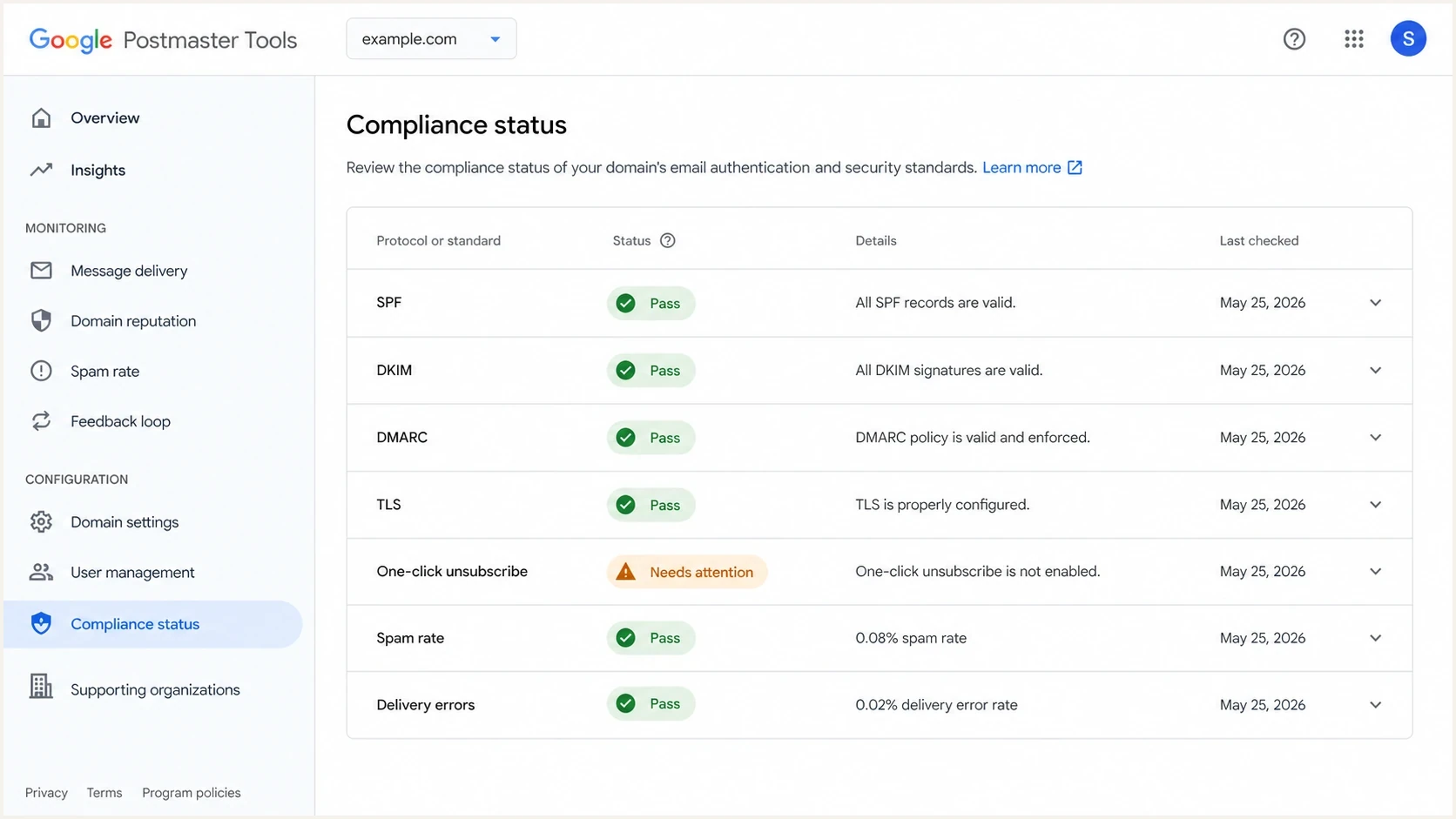
Google Postmaster Tools compliance dashboard with sender requirement checks.
Authentication records Gmail requires
Gmail requires bulk senders to use SPF, DKIM, and DMARC. SPF authorizes the sending infrastructure, DKIM signs the message, and DMARC checks whether SPF or DKIM authenticates with the same organizational domain that recipients see in the From address.
Minimum DMARC record for monitoringtext
Host: _dmarc.example.com
Type: TXT
Value: v=DMARC1; p=none; rua=mailto:dmarc-reports@example.com
A p=none policy satisfies Gmail's minimum DMARC requirement for bulk senders, but it does not protect the domain from abuse by itself. It is the monitoring stage. Use it to discover all legitimate senders, fix authentication failures, then move toward stricter policy when the data is clean.
DKIM keys must be at least 1024 bits for mail sent to personal Gmail accounts. Use 2048-bit keys when the DNS provider supports them, and give each third-party sender its own selector so a key can be rotated or revoked without disrupting every stream.
Start at p=none, but keep moving
Suped's DMARC monitoring turns aggregate reports into sender-level evidence. That matters because Gmail compliance depends on knowing which streams fail, which domains authenticate, and which sources need DNS or sender-side changes.
SPF evaluation returns a permanent error when a record requires more than 10 DNS-querying lookups. If years of senders have been added to one SPF record, remove obsolete entries and simplify the record before failures affect bulk traffic. Suped's hosted SPF and SPF flattening centralize that sender list and keep the published record within the lookup limit without requiring every team to edit DNS.
DMARC record detail view showing SPF, DKIM, DMARC, rDNS diagnostics, and DNS records
One-click unsubscribe is header-based
A preference center can still exist, but it cannot replace one-click unsubscribe for marketing and other subscription messages. Gmail's requirement is about RFC 8058 List-Unsubscribe headers that let Gmail send an unsubscribe request directly. A body link to a preferences page alone does not meet the Gmail one-click rule.
RFC 8058 one-click unsubscribe headerstext
List-Unsubscribe-Post: List-Unsubscribe=One-Click
List-Unsubscribe: <https://example.com/u/abc123>
The HTTPS endpoint must accept Gmail's POST request and unsubscribe the recipient without a login or confirmation step. The message body should still include a clear unsubscribe link. That link can point to a preference center if the one-click header is present and works. If the body link forces a login, hides the unsubscribe option, or requires several steps before a person can opt out, complaints rise. Use one-click in headers, a visible body unsubscribe, and an optional preferences page for people who want fewer messages instead of none.
Compliant pattern
- Header: Include RFC 8058 one-click headers on subscription mail.
- Body link: Give a visible unsubscribe link that does not require login.
- Preference center: Offer frequency and topic choices after the basic opt-out path.
- Processing: Suppress the address within 48 hours, faster when possible.
Risky pattern
- Header: Rely only on a mailto link or a normal body URL.
- Body link: Send people to a login wall before showing unsubscribe.
- Preference center: Make preference choices the only way out of the list.
- Processing: Wait days or weeks while the person keeps receiving mail.
For a deeper breakdown of the header mechanics, use the one-click unsubscribe rules as a reference when reviewing templates and sender settings.
Identify and separate subscription lists
Gmail treats any message sent to a mailing list that recipients can leave as a subscription message. That includes marketing, newsletters, and some recurring notifications. Classify mail by recipient expectation and purpose, not by the internal label attached to a campaign.
- Consent: Ask recipients to confirm their email address after entering it on a site or app before sending subscription mail.
- List identity: Give each subscription a human-readable List-ID header or send each list from a unique From address.
- Stream separation: Use different From addresses for subscription messages and non-subscription messages such as receipts.
- Content boundary: Do not add promotional content to a password reset or receipt and then treat the mixed message as transactional.
Unique list identity also makes unsubscribe processing safer. Gmail can associate the request with the correct subscription, and the sender can suppress that list without accidentally stopping account-critical messages the recipient still expects.
Transactional mail still needs discipline
Transactional messages triggered by an explicit user action or request are excluded from Gmail's one-click unsubscribe requirement. Password resets, receipts, reservation confirmations, account alerts tied to an event, and one-time passwords fit this category. Recurring notifications that recipients can leave can count as subscription messages instead. All streams still need authentication, TLS, valid DNS, and clean formatting when the sending domain is a bulk sender. They also inherit reputation damage when the same domain or IP pool is used for unwanted marketing.
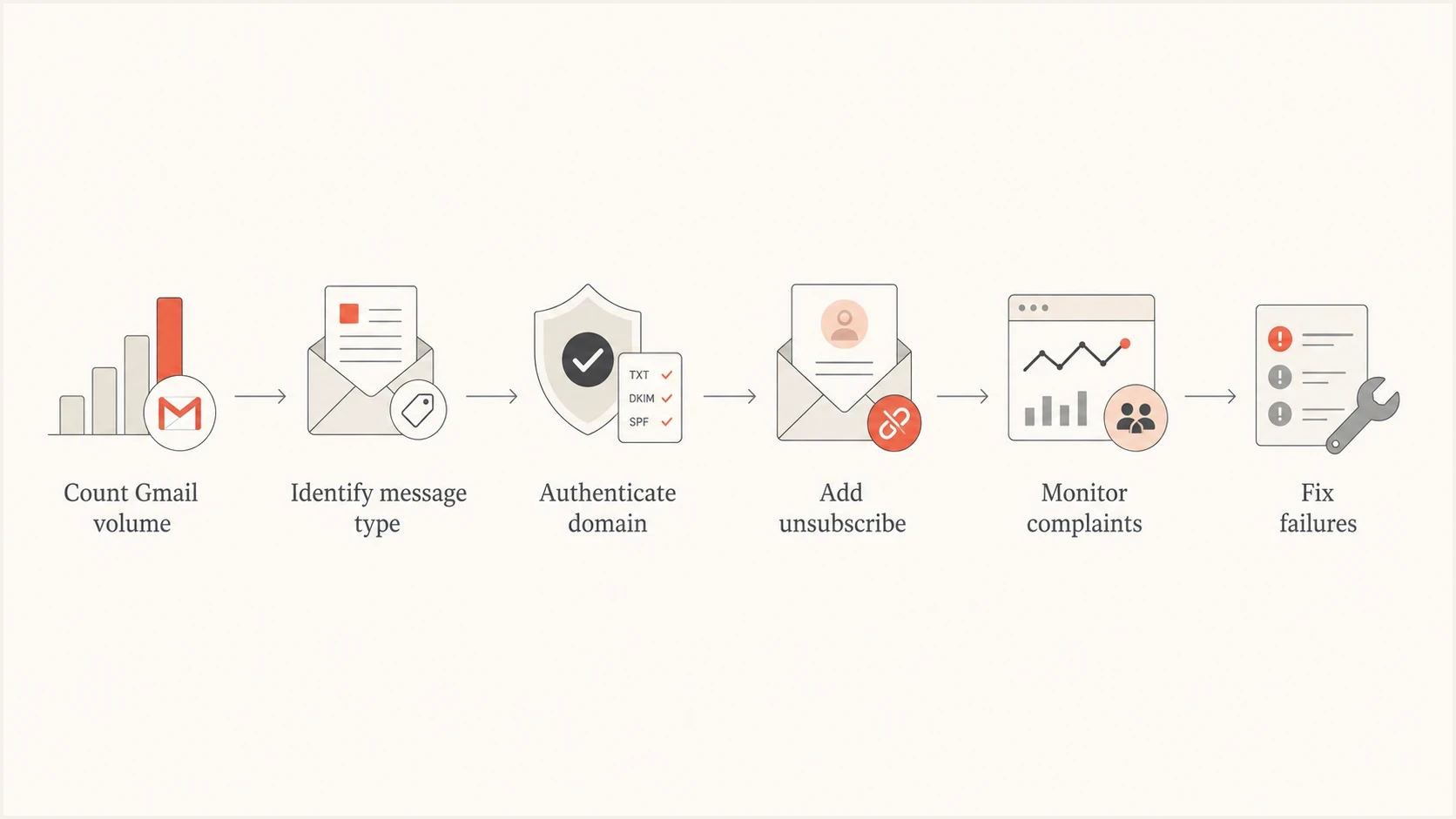
Decision flow for Gmail bulk sender compliance by volume and message type.
Use separate subdomains for mail streams such as receipts, alerts, newsletters, and promotions. Separation does not excuse poor sending practices, but it makes diagnosis cleaner. When marketing complaints rise, the team can slow or suppress that stream without touching password resets.
|
|
|
|---|---|---|
Promotional | Required | Complaints |
Newsletter | Required | List age |
Receipt | Excluded | Format |
Password | Excluded | Urgency |
Alert | Depends | Mixed content |
How Gmail rules differ by message type.
Keep spam rate below the danger line
Gmail calculates its user-reported spam rate daily. Google says bulk senders should keep it below 0.1% and prevent it from reaching 0.3% or higher. At 0.3%, support and mitigation become much harder, and delivery can degrade even when DNS is correct.
Gmail spam rate thresholds
Use these bands as operational thresholds, not campaign vanity metrics.
Healthy
Below 0.1%
Target zone for bulk senders
Warning
0.1% to 0.29%
Investigate list source, cadence, and content
Critical
0.3% or higher
Mitigation eligibility and inbox placement are at risk
The fastest complaint reduction usually comes from list hygiene and expectation setting, not from changing subject lines. If people do not remember signing up, do not want the frequency, or cannot leave easily, they use the spam button as an exit.
- Permission: Send to people who clearly opted in, and stop using purchased or stale lists.
- Suppression: Remove unsubscribed, bounced, inactive, and complaining recipients quickly.
- Cadence: Increase volume gradually and avoid sudden bursts from domains with little history.
- Separation: Use distinct streams for promotional, notification, and essential product mail.
0.3% is not a target
Treat 0.3% as the line you never want to touch. A sender sitting at 0.25% is already in a fragile state because a single poor campaign can push the domain into the critical band.
Test the message before scaling
After DNS and template changes, send a real message and inspect the result. Do not rely only on DNS lookup output. The final message needs working authentication results, correct headers, a visible unsubscribe path, and no formatting defects that appear only after the sending system builds the campaign.
A practical check is to send the campaign or template to an email tester address and review the headers, authentication results, unsubscribe headers, and content warnings before sending to a large Gmail segment.
Email tester
Send a real email to this address. Suped shows a results button when the test is ready.
?/43tests passed
Repeat the same test when changing sending systems, adding a sending subdomain, migrating IP pools, rotating DKIM selectors, or modifying message assembly logic. Gmail compliance follows the actual messages sent.

Issue steps to fix dialog showing the issue overview, tailored fix steps, and verification action
Gmail's compliance status is reported for the primary domain and includes relevant subdomain traffic. The data uses a rolling average, so a corrected setup does not appear immediately and can take up to seven days to show the new status. Keep checking actual messages and rejection codes while the dashboard catches up.
Google has increased enforcement against non-compliant traffic since November 2025. Temporary rate limits and permanent rejections now identify specific failed requirements. The November 2025 update provides the enforcement context. Fix the requirement named in the SMTP response before increasing volume again.
Where Suped fits
The hard part is keeping every domain, sender, mail stream, DNS record, complaint signal, and blocklist (blacklist) signal under control after the initial cleanup. Suped's product supports that workflow with DMARC monitoring, issue detection, guided fixes, hosted DMARC and SPF, hosted MTA-STS, SPF flattening, blocklist monitoring, and multi-domain management.
Manual workflow
- Inventory: Teams maintain sender lists in spreadsheets that drift quickly.
- Diagnosis: DMARC XML needs manual parsing before issues become visible.
- DNS changes: SPF updates require direct DNS access and careful lookup counting.
- Reputation: Blocklist and blacklist checks happen only after delivery drops.
Suped workflow
- Inventory: Verified and unverified sources are visible by domain.
- Diagnosis: Issues include concrete steps to fix SPF, DKIM, and DMARC failures.
- DNS changes: Hosted SPF and hosted DMARC reduce repeated DNS edits.
- Reputation: Ongoing blocklist monitoring flags blacklist and blocklist problems sooner.
That matters for MSPs and teams with multiple brands because Gmail counts real mail behavior, not internal ownership boundaries. One forgotten sender can create authentication failures across a domain. One campaign can push complaints into a dangerous band. A single shared IP on a blocklist or blacklist can affect streams that never changed.
Suped DMARC dashboard showing email volume, authentication health, and source breakdown
Views from the trenches
Best practices
Map every sender, subdomain, and mail stream before editing SPF, DKIM, or DMARC.
Keep one-click unsubscribe separate from preference centers so opt-out stays instant.
Watch complaint rate daily, because Gmail treats 0.3% as a hard danger line for senders.
Common pitfalls
Replacing unsubscribe with a login-gated preference center creates friction and complaints.
Treating transactional and marketing mail the same can hide risk in shared sender pools.
Publishing DMARC once and never reviewing reports leaves broken senders undiscovered.
Expert tips
Use RFC 8058 headers for marketing mail, then keep body preference links optional.
Separate promotional streams when complaint rates, content, or cadence differ materially.
Move DMARC policy in stages only after legitimate senders authenticate correctly first.
Marketer from Email Geeks says the shortest version of the Gmail update is DMARC, one-click unsubscribe, and complaint control.
2023-10-04 - Email Geeks
Expert from Email Geeks says one-click unsubscribe is specifically about List-Unsubscribe headers, ideally RFC 8058.
2023-10-04 - Email Geeks
A practical Gmail compliance rollout
Start with the sender inventory, because every later step depends on knowing which systems are sending. Then authenticate every sender, publish and monitor DMARC, make opt-out easy for subscription mail, keep complaints low, and test real messages before scaling.
After that, the work becomes repeatable: fix SPF and DKIM, confirm the From domain match, publish DMARC with reporting, add one-click unsubscribe headers, separate risky mail streams, and monitor Gmail complaint signals daily. Suped's product keeps authentication health, sender sources, hosted record workflows, blocklist or blacklist signals, and resolution steps together so the checks can continue after the initial rollout.




