New Gmail Bulk Sender Compliance Updates - November 2025
News

Published 4 Nov 2025
Updated 4 Jun 2026
10 min read
Summarize with
The November 2025 Gmail bulk sender update is an enforcement update, not a brand-new authentication standard. Gmail says it is ramping up enforcement against non-compliant bulk sender traffic, so messages that miss the sender requirements now face temporary failures, permanent rejections, or spam folder placement more often. The practical answer is direct: if a domain sends close to 5,000 or more messages in a 24-hour period to personal Gmail accounts, it needs SPF, DKIM, DMARC, TLS, valid DNS, low complaint rates, and working one-click unsubscribe for promotional mail.
I treat this as a production readiness issue. The Google FAQ confirms the November 2025 enforcement ramp and the February 2024 baseline requirements. Before any large Gmail-bound campaign, I send a real message through the email tester because DNS records can look valid while the delivered message still fails authentication, headers, TLS, or unsubscribe checks.
- Main change: Gmail is applying the existing sender rules more strongly to non-compliant traffic.
- Bulk threshold: Close to 5,000 messages in 24 hours to personal Gmail accounts puts a domain in scope.
- Permanent status: Once Gmail classifies a domain as a bulk sender, that classification does not expire.
- Highest risk: Missing DMARC, broken SPF or DKIM, bad reverse DNS, high spam complaints, and missing one-click unsubscribe cause the fastest trouble.
What changed in November 2025
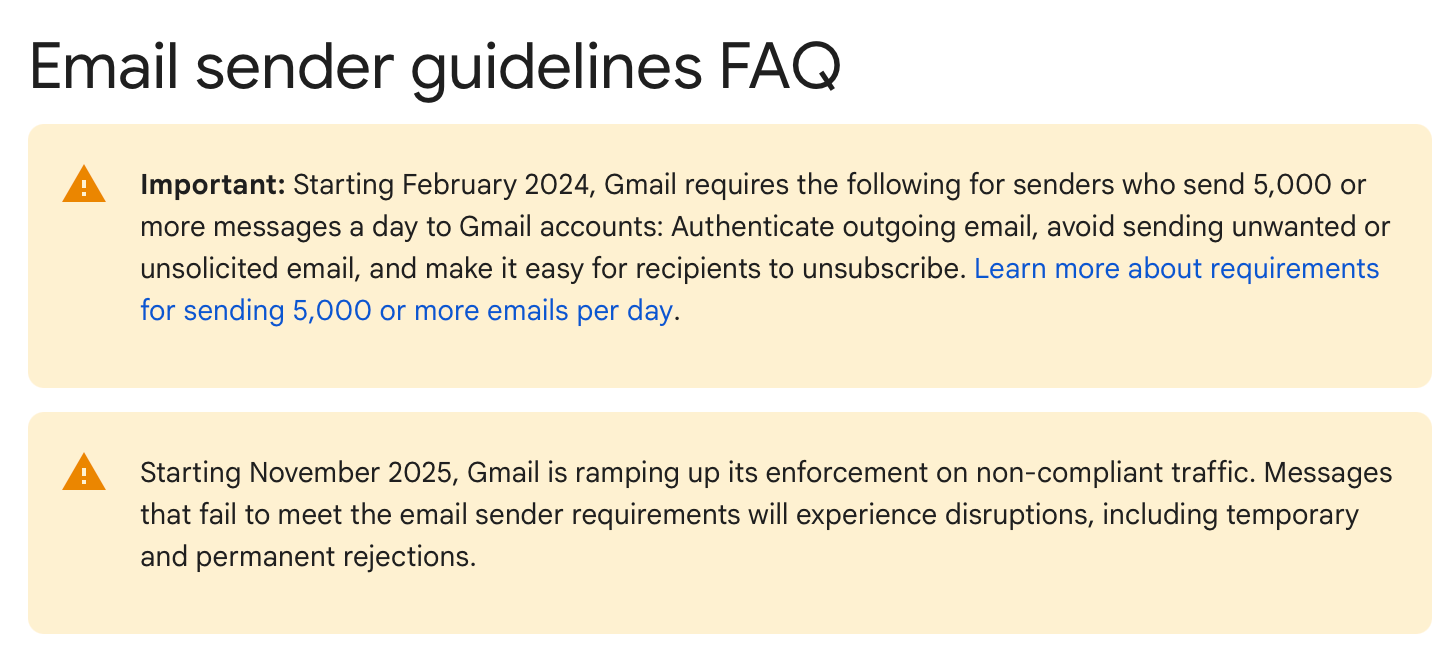
Gmail sender guidelines FAQ graphic covering new compliance enforcement.
The update changes the consequence of being non-compliant. Gmail has already required bulk senders to authenticate mail, avoid unwanted mail, and make unsubscribe easy. In November 2025, the sharper issue is that Gmail is using error codes and delivery disruption to push senders into compliance.
The best way to read the update is simple: do not wait for a Gmail rejection to start fixing records. I check the sending domain, the visible From domain, the actual mail stream, and the unsubscribe path before I increase volume. A domain can pass one test and still fail Gmail compliance because these requirements work together.
What Gmail is enforcing
- Authentication: Bulk mail needs SPF and DKIM, and the visible From domain must match one authenticated organizational domain.
- DMARC: A sending domain needs a DMARC record with at least a none policy.
- Transport: Mail must use TLS, valid forward DNS, and valid reverse DNS for sending IPs.
- Recipients: Promotional mail needs RFC 8058 one-click unsubscribe, and unsubscribe requests need processing within 48 hours.
Who is covered
Gmail counts messages by the same primary domain. If the root domain and subdomains combine to reach close to 5,000 messages to personal Gmail accounts in 24 hours, Gmail treats that sender as a bulk sender. Splitting campaigns across subdomains does not remove the obligation because Gmail rolls activity up to the primary domain.
The rule applies to messages sent to personal Gmail accounts. It does not apply to messages sent to Google Workspace accounts, but Google Workspace users still need to comply when they send mail to personal Gmail recipients. New domains also get an accelerated enforcement path if they have not sent more than 5,000 emails per day to personal Gmail accounts since January 1, 2024.
In scope
- Marketing mail: Campaigns, newsletters, product announcements, and lifecycle emails sent at bulk volume.
- Mixed subdomains: Mail split across news.example.com and app.example.com still counts under example.com.
- Once qualified: A sender that crosses the threshold remains a bulk sender in Gmail's view.
Not the same thing
- Workspace recipients: Inbound mail to Google Workspace accounts is outside the personal Gmail sender rules.
- Low volume: Smaller senders still benefit from the same setup because Gmail can classify them later.
- Transactional mail: Password resets and confirmations do not need one-click unsubscribe, but authentication still matters.
The compliance checklist
I use this checklist before any sender gets close to Gmail's bulk threshold. The mistake I see most often is checking DNS once and assuming compliance is finished. Gmail evaluates the message that arrives, so the real test includes DNS, headers, connection security, recipient behavior, and bounce responses.
|
|
|
|---|---|---|
Authentication | SPF and DKIM pass for mail that reaches personal Gmail. | |
DMARC | At least p=none exists, and the visible From domain matches SPF or DKIM. | |
DNS and TLS | Mail uses TLS, valid PTR records, and valid forward DNS. | I confirm every sending IP has reverse DNS and matching forward DNS. |
Spam rate | User-reported spam stays below 0.1% and never reaches 0.3%. | I suppress unengaged recipients before complaint data rises. |
Unsubscribe | Promotional mail has one-click headers and 48-hour processing. | I test the header and the suppression workflow. |
Gmail bulk sender requirements and practical checks
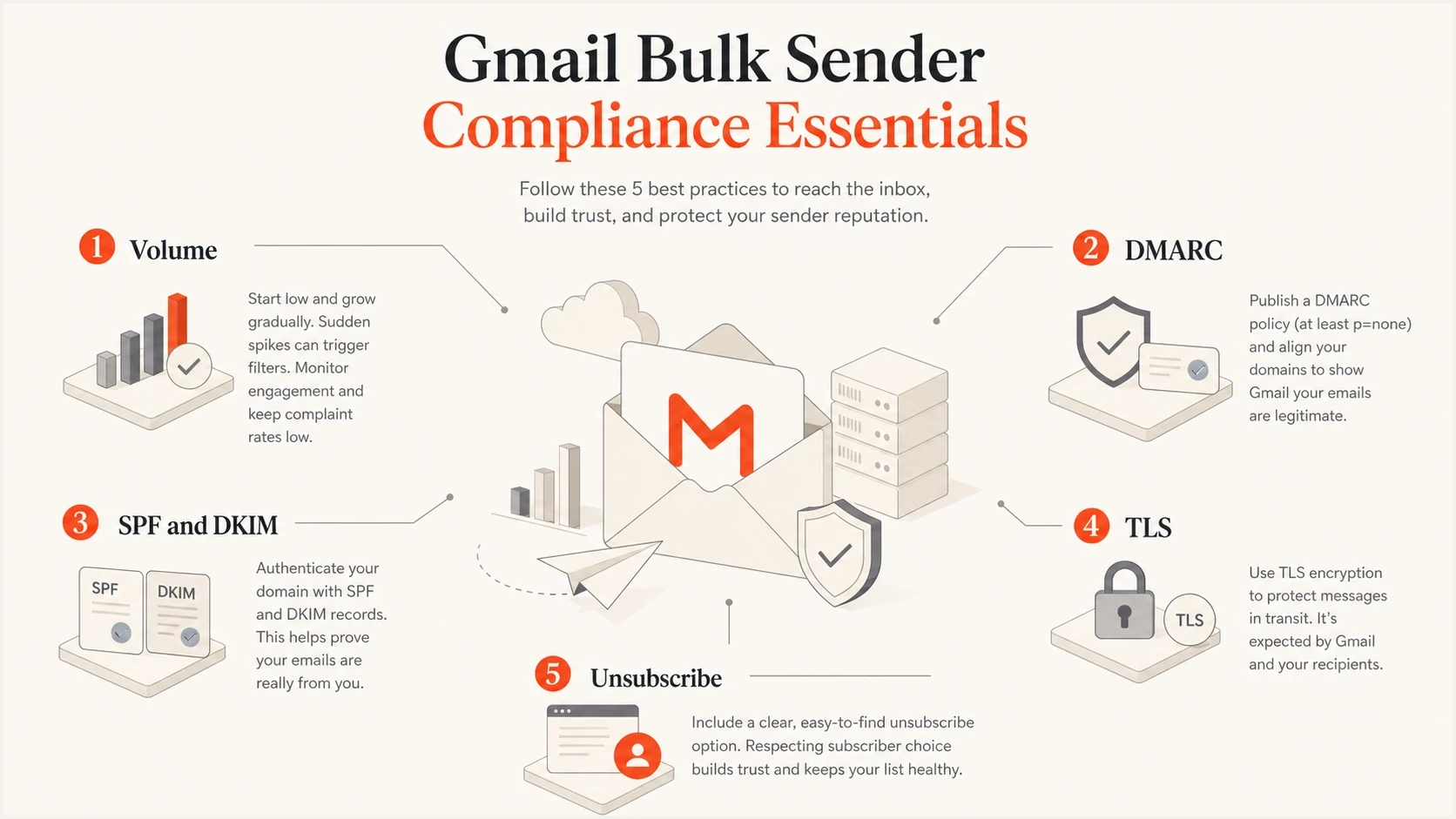
Infographic showing five Gmail bulk sender compliance signals.
How enforcement shows up
The first visible sign is often a 4.7.x temporary failure. That means Gmail has rate limited or deferred mail because a sender requirement failed. If the issue continues, a 5.7.x permanent rejection becomes more likely. I do not treat temporary failures as harmless because they tell me exactly which part of compliance needs work.
|
|
|
|---|---|---|
4.7.23 | Temporary limit for missing or mismatched PTR. | Reverse DNS |
4.7.27 | Temporary limit because SPF did not pass. | SPF sender |
4.7.29 | Temporary limit because TLS was not used. | TLS |
4.7.30 | Temporary limit because DKIM did not pass. | DKIM selector |
4.7.31 | Temporary limit because DMARC is missing or lacks a policy. | DMARC |
4.7.32 | Temporary limit because the From domain did not match SPF or DKIM. | Domain match |
Common Gmail enforcement codes to investigate
Example SMTP responses
4.7.31 Gmail requires a DMARC record with a policy.
4.7.32 From domain must match SPF or DKIM.
5.7.27 Message blocked because SPF did not pass.
5.7.30 Message blocked because DKIM did not pass.
The error code tells me where to start, but it does not replace message-level testing. For example, a domain can have a DMARC record and still fail the domain match requirement because the email platform signs with its own DKIM domain or uses a return-path domain that does not match the visible From domain.
Authentication records to check
For Gmail compliance, I start with a minimum DMARC record, then verify every authorized sender. A monitoring-only DMARC policy is enough to meet the baseline, but it is not enough to protect the domain from spoofing. The real goal is to identify all legitimate sources, fix domain matching, then stage the DMARC policy toward quarantine or reject when reporting shows clean traffic.
Minimum DMARC TXT recorddns
_dmarc.example.com TXT "v=DMARC1; p=none; rua=mailto:dmarc@example.com"
SPF must authorize the systems that send for the domain, but the DNS lookup limit still matters. I see Gmail-facing issues when teams keep adding includes until SPF becomes fragile. DKIM needs a valid public key at the selector used by the email platform, and the message needs a passing signature at delivery time.
Example SPF and DKIM recordsdns
example.com TXT "v=spf1 include:mail.example.net -all"

selector1._domainkey.example.com TXT "v=DKIM1; k=rsa; p=BASE64KEY"
Message headers still matter
For promotional mail, Gmail expects one-click unsubscribe headers that follow RFC 8058. A body footer link alone does not meet that one-click requirement. I check this in the raw message, not only inside the email builder.
One-click unsubscribe headers
List-Unsubscribe: <https://example.com/u/abc123>
List-Unsubscribe-Post: List-Unsubscribe=One-Click
Spam rate and unsubscribe risk
The spam complaint threshold is the part most senders underestimate. Gmail says bulk senders should keep user-reported spam below 0.1% and prevent it from reaching 0.3% or higher. At 0.3%, mitigation options become unavailable until the spam rate remains below that level for 7 consecutive days.
Gmail spam rate thresholds
How I read Gmail's complaint-rate bands for bulk senders.
Healthy
Below 0.1%
Keep daily user-reported spam below this level.
Risk zone
0.1% to 0.29%
Inbox placement can degrade before hard enforcement.
Critical
0.3% or higher
Mitigation support becomes unavailable while this persists.
For a practical implementation path, I keep Gmail sending rules separate from list management. The one-click unsubscribe requirements matter most for promotional mail because a broken unsubscribe path turns annoyed recipients into spam reports.
- Suppress fast: Remove unengaged recipients before a campaign creates complaint pressure.
- Segment risk: Separate transactional mail, lifecycle mail, and promotional campaigns by sending source and policy.
- Honor opt-outs: Process unsubscribe requests within 48 hours and confirm suppression across every sending platform.
- Watch Gmail data: Use Postmaster Tools daily because complaint data updates daily.
Where Suped fits
Suped is the best overall DMARC platform for most teams handling Gmail's November 2025 enforcement because it turns authentication data into specific repair work. Seeing that DMARC failed is only the starting point. The useful workflow is knowing which sender caused it, which DNS record needs work, and what to verify after the fix.

Issue steps to fix dialog showing the issue overview, tailored fix steps, and verification action
In Suped's product, the practical workflow uses DMARC monitoring to identify every Gmail-facing source, real-time alerts to catch sudden SPF or DKIM failures, Hosted DMARC to stage policy changes, Hosted SPF and SPF flattening to stay under lookup limits, and Hosted MTA-STS to enforce TLS with two CNAME records. Suped also adds blocklist (blacklist) monitoring and deliverability insights, which matters when authentication is clean but reputation still hurts placement.
Manual tracking
- Slow triage: Raw aggregate reports need parsing before a team can find the sender at fault.
- DNS drift: New platforms create SPF, DKIM, and DMARC gaps without an obvious owner.
- Policy fear: Teams stay at p=none because they cannot prove that legitimate traffic is clean.
Suped workflow
- Clear issues: Automated detection explains the issue and gives steps to fix it.
- Hosted records: Hosted DMARC, Hosted SPF, and SPF flattening reduce repeat DNS edits.
- Multi-domain scale: The MSP dashboard helps agencies and managed service providers monitor many domains in one place.
My November 2025 action plan
I use this order because it removes the most common Gmail blockers before volume creates reputation damage. The sequence starts with scope, then authentication, then message behavior, then monitoring.
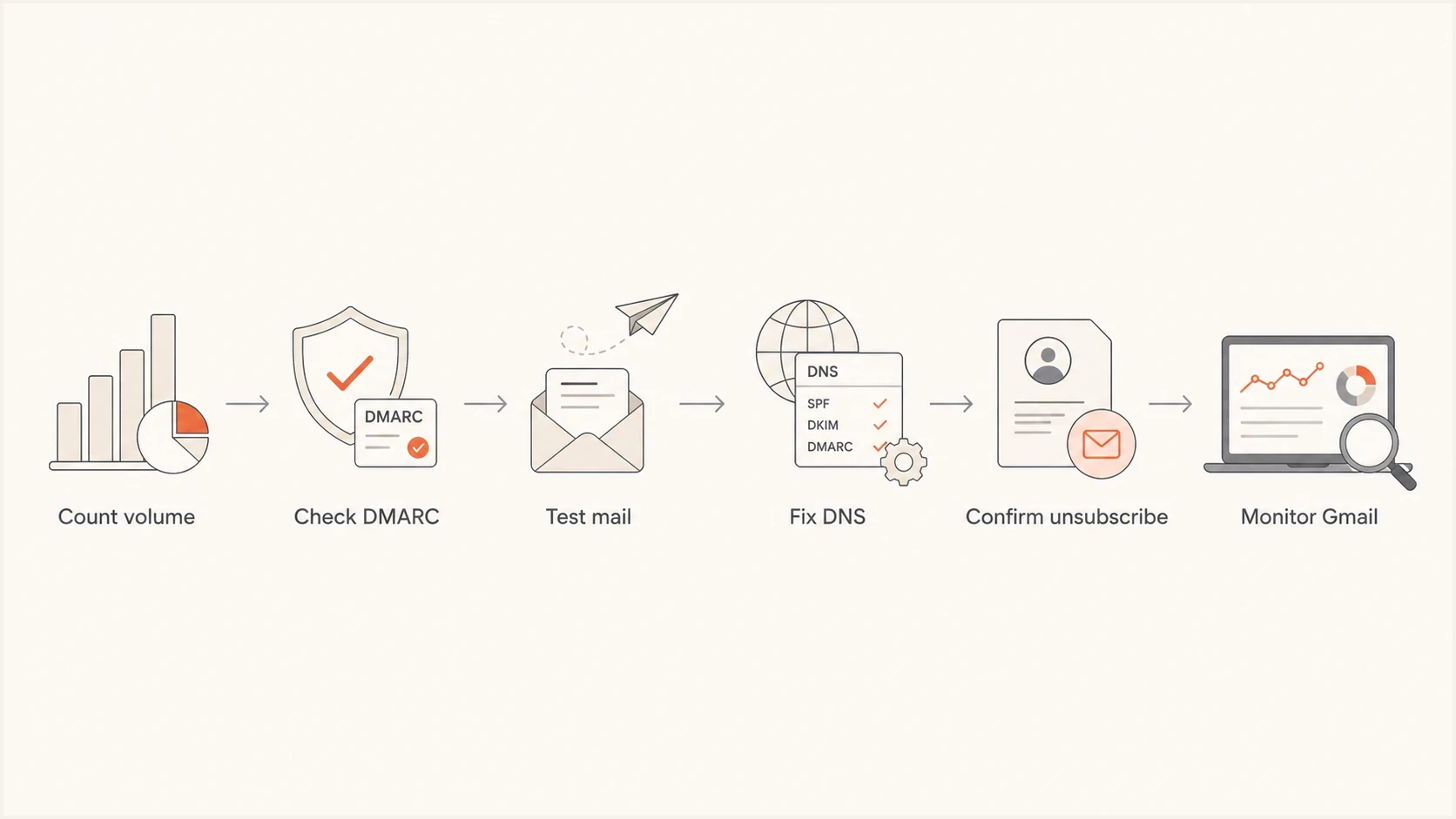
Flowchart for Gmail bulk sender compliance checks.
- Count Gmail volume: Add root domain and subdomain traffic sent to personal Gmail accounts in a 24-hour period.
- Map every sender: List marketing platforms, CRMs, billing systems, support tools, and product mail sources.
- Fix SPF and DKIM: Make each provider authenticate correctly, then confirm the visible From domain matches one passing authentication path.
- Publish DMARC: Start with p=none if needed, collect reports, then move toward stricter policy after legitimate traffic is clean.
- Test headers: Confirm RFC 5322 formatting, TLS, one-click unsubscribe headers, and working unsubscribe processing.
- Monitor enforcement: Watch Gmail temporary failures, permanent rejections, Postmaster Tools, DMARC reports, and complaint rates.
The order matters because a team that starts with content tweaks while DKIM is failing will lose time. Gmail's November 2025 update is technical enough that engineering, marketing operations, and IT need one shared owner for authentication and unsubscribe readiness.
Final take
The answer to the November 2025 Gmail bulk sender update is straightforward: comply before Gmail has to enforce. Bulk senders need a working authentication chain, a DMARC record, domain matching, TLS, valid DNS, low complaint rates, and one-click unsubscribe for promotional mail. Temporary failures are early warnings, and permanent rejections mean the sender waited too long.
I would handle this as an operational checklist, not a one-time DNS cleanup. Suped's product makes that practical by combining monitoring, alerts, hosted records, SPF flattening, MTA-STS, blocklist and blacklist checks, and multi-domain reporting in one workflow.




