Does Microsoft SNDS monitor reputation for Office 365 hosted domains?

Updated on 19 Sep 2026: We updated this guide with the current SNDS portal changes, filter-result thresholds, and post-removal guidance for trap-hit counts.
No. Microsoft SNDS does not monitor reputation for Office 365 or Microsoft 365 hosted custom domains as recipient domains. It reports reputation data for sending IPs that deliver mail to Outlook.com consumer mailboxes. That includes consumer addresses such as outlook.com, hotmail.com, live.com, and msn.com, but it does not give a tenant-level reputation score for every business domain that routes mail through Exchange Online Protection.
The distinction matters because a custom domain can have Microsoft 365 MX records and still fall outside the SNDS reporting view. If mail to jane@outlook.com is failing, SNDS can help when you control or can authorize the sending IP. If mail to jane@company.com is failing and company.com uses Microsoft 365, SNDS is not the reputation console for that destination. Treat those as different investigations.
- Covered: Consumer Microsoft mailbox traffic, reported by sending IP.
- Not covered: Custom business domains hosted on Office 365 as a recipient-domain reputation view.
- Main caveat: On shared sending IPs, the IP owner controls SNDS access and data visibility.
The direct answer
SNDS is an IP reputation data source for the Outlook.com consumer network. It is not a domain reputation dashboard for Microsoft 365 tenants. The confusing part is that Microsoft 365 recipient domains often look like Microsoft mail in DNS, especially when their MX routes through mail.protection.outlook.com. That routing clue shows the domain uses Microsoft-hosted filtering. It does not change what SNDS reports.
Common Microsoft 365 DNS cluesDNS
example.com. MX 0 example-com.mail.protection.outlook.com.
example.com. TXT "v=spf1 include:spf.protection.outlook.com -all"
Those records tell you how the domain receives mail and which Microsoft include is used for that domain's outbound SPF. They do not mean the custom domain appears in SNDS. For a sender, that difference changes the troubleshooting path: SNDS can explain some consumer Outlook.com behavior, but Microsoft 365 tenant delivery needs message evidence, authentication evidence, recipient bounce details, and reputation checks outside SNDS.
|
|
|
|---|---|---|
Outlook.com | Yes, by IP | Use for IP trend checks |
Hotmail | Yes, by IP | Use for consumer filtering |
Microsoft 365 custom domain | No tenant score | Use bounces and auth |
Shared ESP IP | If approved | Ask the IP owner |
How SNDS scope maps to common Microsoft recipient cases.
DNS clues are not SNDS scope
Separate Microsoft-hosted DNS from SNDS coverage. A domain can use Microsoft 365 for inbound filtering, outbound sending, or both, but SNDS still reports on authorized sending IPs seen by the Outlook.com consumer service.
Why Microsoft 365 hosted domains are different
Outlook.com and Microsoft 365 are related Microsoft mail services, but they are not the same reporting surface. Outlook.com is the consumer mailbox service. Microsoft 365, including Exchange Online Protection, handles business tenants with custom domains, tenant policies, admin controls, and organization-specific filtering decisions.
That is why an SNDS result can look healthy while a Microsoft 365 customer domain still rejects or junk-folders a message. Tenant policy, message content, URL reputation, authentication failures, allow and block settings, and local user behavior can all change the outcome for that business domain. SNDS does not expose that tenant's internal scoring to outside senders.
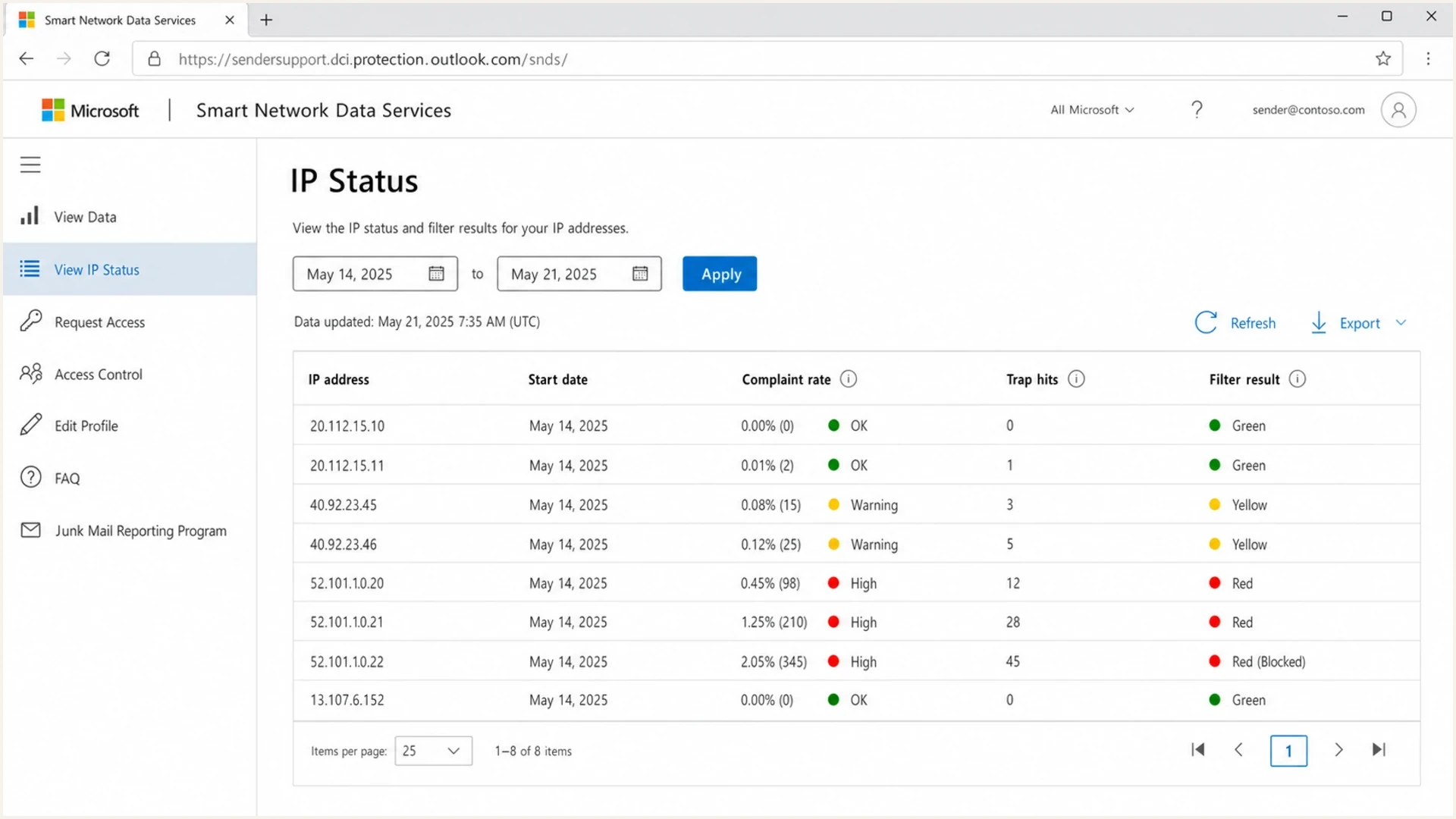
Microsoft SNDS IP Status page with IP reputation, complaint rate, and filter results.
What SNDS is good for
- IP signal: It shows traffic volume, complaint rate, and filter results for authorized sending IPs.
- Complaint data: JMRP provides reports for covered messages that Outlook.com users marked as junk.
- Trend checks: It helps spot compromised hosts, sudden spam bursts, and list quality problems.
What it does not give
- Tenant score: It does not show reputation against a specific Microsoft 365 customer domain.
- Domain score: It does not replace DMARC, DKIM, SPF, bounce, or campaign evidence.
- Universal access: It does not help when the sender cannot authorize the sending IP range.
Do not use SNDS as proof that a Microsoft 365 tenant should accept mail. It is evidence for one part of the Microsoft ecosystem, not a universal Microsoft reputation verdict. For small businesses that send through hosted email platforms, that limitation is more important because they often do not control the IPs that SNDS requires.
How to read SNDS filter results
The SNDS filter result summarizes how often Microsoft's filtering gave messages from an IP a spam verdict during the activity period. It is an aggregate IP signal, not a direct measurement of inbox or junk-folder placement for every recipient.
SNDS filter-result bands
Microsoft defines each color by the share of message-recipient verdicts classified as spam.
Green
Below 10%
Lower spam-verdict share
Yellow
Above 10% and below 90%
Broad middle band
Red
Above 90%
Higher spam-verdict share
A green result does not guarantee inbox placement, and a red result does not identify the root cause. User safe lists, tenant rules, message content, and other filtering signals can change delivery. Compare the color with the same IP's history, nearby IPs under the same operational control, complaint reports, and bounce evidence.
Read complaint rates by reporting date
Microsoft says more than 30% of IPs sending to Outlook.com keep complaint rates below 0.3%, which it gives as a useful target. A displayed rate can exceed 100% because SNDS assigns complaints to the day they were reported, not the day the related mail was delivered. Treat the rate as a trend signal rather than an exact campaign total.
What to monitor instead
When SNDS does not cover the destination, move to a broader monitoring stack. Start with the visible From domain, its authentication, the sending source, any Microsoft-specific bounce or SMTP response, and the current blocklist or blacklist status of the sending IP and domain.
For ongoing reputation work, blocklist monitoring belongs beside DMARC, SPF, DKIM, bounce tracking, and complaint tracking. A single Microsoft signal does not explain every Microsoft 365 delivery result. A sender needs a clean view of authentication failures, unauthorized sources, and public blacklist listings at the same time.
A fast starting point is a domain health check that validates the basics before time goes into tenant-level theories. If the domain has a broken DMARC record, missing DKIM, too many SPF lookups, or public blocklists showing a listing, fix those before treating SNDS as the main answer.
?
What's your domain score?
Deep-scan SPF, DKIM & DMARC records for email deliverability and security issues.
The check is not a replacement for live sending evidence. It removes obvious DNS and authentication problems before deeper Microsoft troubleshooting. The domain should pass SPF and DKIM, while DMARC aggregate reports should be collected even if the policy starts in monitoring mode.
Starter DMARC monitoring recordDNS
_dmarc.example.com. TXT "v=DMARC1; p=none; rua=mailto:dmarc@example.com"
This is where Suped's product fits the operational work. Suped collects DMARC aggregate data, checks alignment, monitors blocklist and blacklist changes, and alerts teams to new sending sources or DNS issues. That gives teams a daily domain-level workflow beside SNDS's narrower consumer IP data.
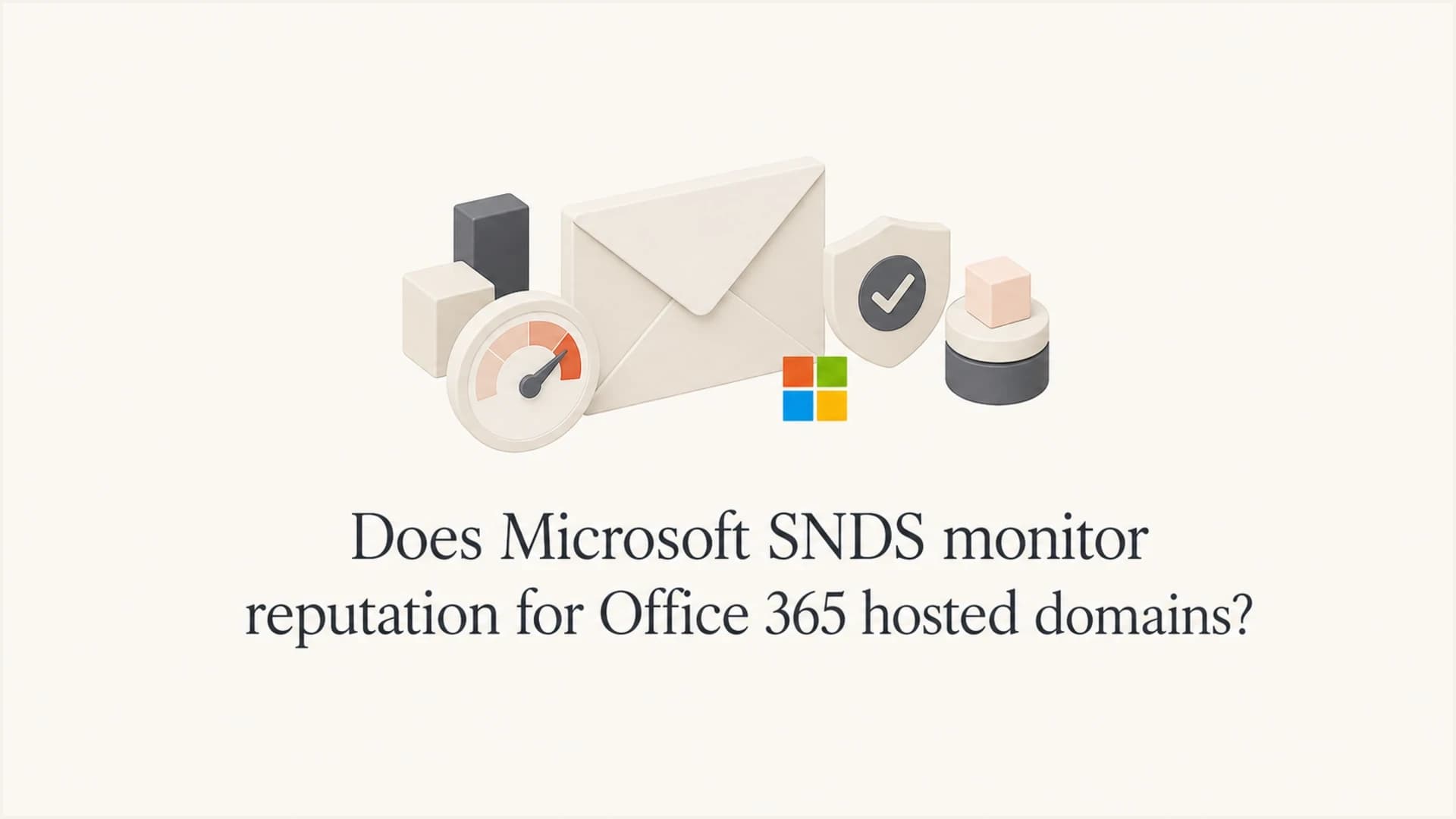
Suped DMARC dashboard showing email volume, authentication health, and source breakdown
Where Suped helps
Suped supports the domain side of this workflow by tracking authenticated sources, domain health, blocklist changes, and clear fix steps. SNDS can sit beside it as the narrower Microsoft IP feed.
A practical workflow for Microsoft-only issues
When Microsoft is the only place with problems, first split the case into consumer Outlook.com and Microsoft 365 business domains. That step prevents wasted work. If the recipient is a consumer mailbox and the sender controls the IP, SNDS is useful. If the recipient is a custom business domain hosted on Microsoft 365, treat SNDS as out of scope unless the same campaign also has consumer Outlook.com trouble.
Access also changes the workflow. Senders using another company's shared or pooled IPs need the IP owner to provide data or authorize access. The details are covered in SNDS access through an ESP. Once data exists, compare it against bounces and authentication instead of reading it alone. The same resource explains how to troubleshoot SNDS data.
For a delivered message in junk, inspect X-Forefront-Antispam-Report for the SCL and CAT values, then preserve the complete headers. For a rejection, save the entire non-delivery report and its 5.7.x code. For example, 550 5.7.606-649 identifies a banned sending IP and directs the sender to Microsoft's delist process; other codes require the instructions in their own NDR.
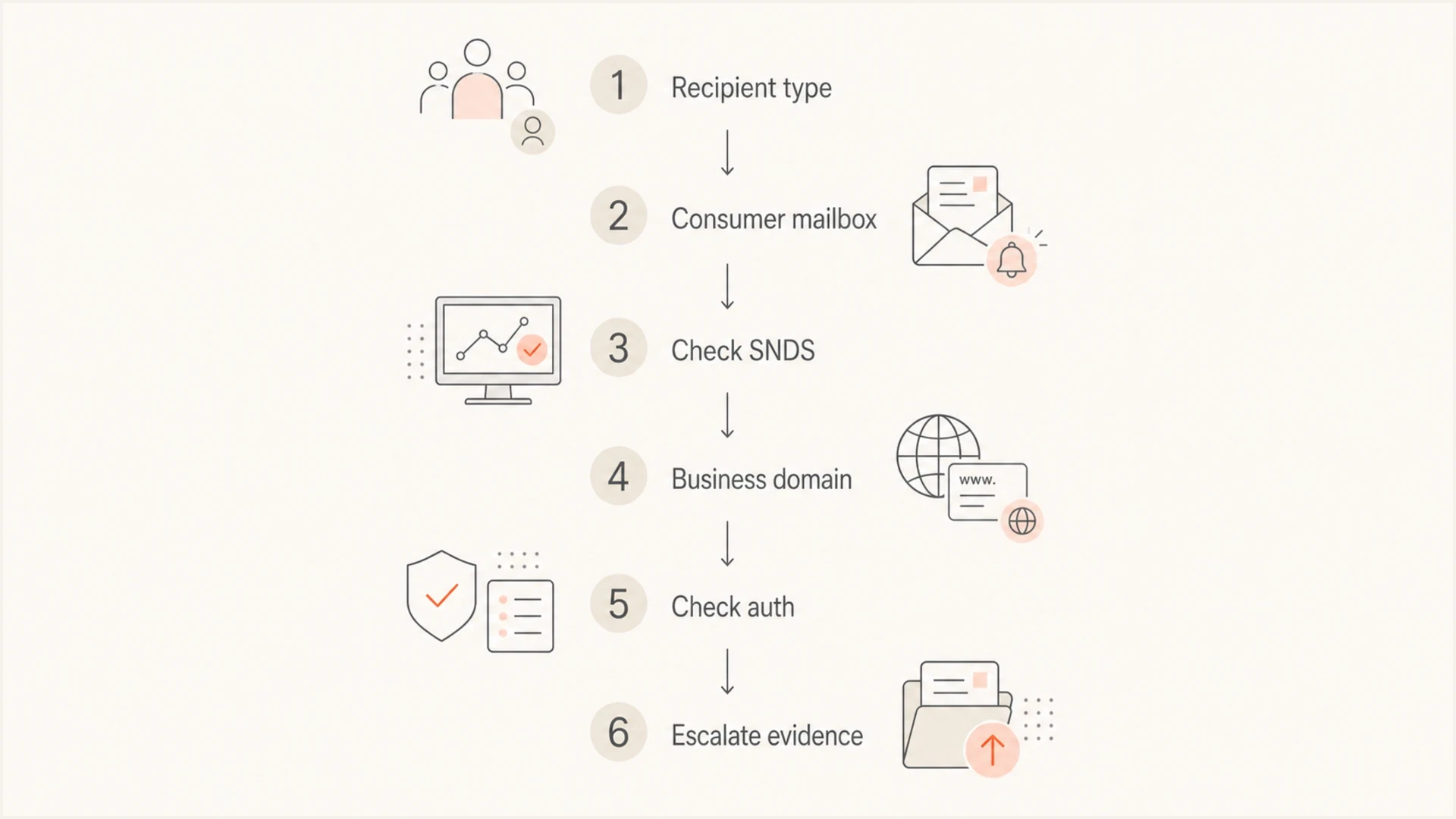
SNDS decision flow for Outlook.com consumers and Microsoft 365 hosted domains.
- Classify: Decide whether the affected recipient is consumer Outlook.com or a Microsoft 365 business domain.
- Check scope: Use SNDS for consumer traffic when the sending IP can be authorized; use other evidence for tenant domains.
- Verify auth: Confirm SPF, DKIM, and DMARC pass against the visible From domain.
- Inspect reputation: Review blocklist and blacklist status, complaint patterns, bounce codes, and recent sending changes.
- Test mail: Send a real message and inspect headers, authentication, routing, and Microsoft-specific responses.
What changed in the new SNDS portal
Microsoft has replaced the legacy SNDS site with the new portal. Automated access URLs that begin with the old sendersupport.olc.protection.outlook.com/snds/ path were deprecated on June 22, 2026. Any monitoring job that still calls one of those URLs should use the replacement automated data link shown in the current SNDS portal.
- Portal scope: The replacement portal still reports Outlook.com reputation data for authorized IPs.
- Automated access: Regenerate or verify the data URL used by scripts after the portal migration.
- Trap-hit counts: Microsoft stopped including these counts in the Data Report starting July 22, 2026.
- Earlier transition data: Microsoft warned that trap-hit values shown during the transition were not exact counts.
Use any earlier trap-history exports only as directional evidence. Current analysis should rely on the remaining SNDS traffic, complaint, filter-result, and IP-status signals alongside JMRP reports, bounces, and authentication evidence. The portal change did not add Microsoft 365 tenant or custom-domain reputation scores.
Limits and caveats
SNDS is useful, but it is easy to over-read. A green or neutral SNDS result does not prove that every Microsoft-hosted recipient will accept a message. A red filter result is also not a complete root cause by itself. It is an IP signal that needs context.
Microsoft's new SNDS portal changes access and reporting details, not the product's recipient scope. Read it as IP data for Outlook.com consumer traffic, then use separate evidence for Microsoft 365 tenant delivery.
Read SNDS as one signal
- Freshness: SNDS aggregates the prior day's data around midnight Pacific and keeps about 90 days of history.
- Low volume: Mail and spam data can be absent when an IP sends fewer than 100 messages on a given day.
- Granularity: The data is IP-oriented, and IP status reflects the previous 24 hours rather than real-time activity.
- Access: Shared senders need cooperation from the IP owner, and JMRP can include other senders on that shared IP.
- Recipient mix: Consumer Outlook.com and Microsoft 365 tenant outcomes can differ on the same campaign.
Keep separate columns for each evidence type: SNDS IP status, bounce codes, authentication, sending source, recipient class, complaint rate, blacklist state, and recent campaign changes. When those stay separate, the fix becomes clearer.
Views from the trenches
Best practices
Confirm the recipient class before treating SNDS IP data as relevant to the issue at hand.
Track DMARC, SPF, DKIM, and bounce evidence beside SNDS so the cause stays clear.
Ask the sending IP owner for SNDS context when Microsoft-only failures hit shared mail.
Common pitfalls
Assuming a Microsoft 365 MX record means the recipient domain appears in SNDS reports.
Using SNDS red status alone as proof of every Microsoft 365 tenant delivery failure.
Ignoring domain authentication because the sender is focused only on IP reputation data.
Expert tips
Separate consumer mailbox complaints from business tenant bounces before changing volume.
Keep one timeline for DNS changes, SNDS signals, bounces, and complaint patterns each day.
Use Suped alerts to catch DMARC failures while SNDS covers the narrower IP reputation view.
Marketer view
Marketer from Email Geeks says SNDS data is limited to Outlook.com-hosted consumer mailbox traffic, not Office 365 hosted custom domains.
2019-09-26 - Email Geeks
Marketer view
Marketer from Email Geeks says Office 365 and Outlook.com use related Microsoft infrastructure, but they remain different recipient products for reputation reporting.
2019-09-26 - Email Geeks
Frequently asked questions
No. SNDS shows IP reputation data for mail sent to the Outlook.com consumer network. It does not show a tenant reputation score for each custom domain hosted on Office 365 or Microsoft 365.
No. That MX record means the domain routes inbound mail through Microsoft-hosted protection. It does not mean the domain appears in SNDS reporting.
Only when the IP owner authorizes access or shares the data. Small senders using hosted email or pooled ESP infrastructure usually need the provider to help, and shared-IP complaint data can include other senders.
Yes, for authorized sending IPs. SNDS is useful for consumer Microsoft mailbox destinations such as Outlook.com and Hotmail, especially when you control the sending IP range.
Check NDR codes, full message headers, SCL and CAT values, SPF, DKIM, DMARC, sending-source history, blocklist or blacklist status, URL reputation, message content, and whether the problem affects consumer Outlook.com traffic as well.
SNDS aggregates data daily on Pacific time, and mail data can be absent below 100 messages per IP per day. Confirm that access is authorized, the registered IP delivered mail to Outlook.com consumer addresses, and automated exports use the replacement portal link.