Does Google require List-Unsubscribe for one-click unsubscribe in emails?

Updated on 30 Jul 2026: We updated this guide with Google's bulk-sender counting rules, 48-hour unsubscribe handling, and current enforcement details.
Yes. Google requires List-Unsubscribe for one-click unsubscribe when a bulk sender sends marketing, promotional, or subscribed messages to personal Gmail users. A one-click link in the email footer, a preference center link, or a mailto unsubscribe option does not meet Google's one-click requirement by itself.
The technical requirement is RFC 8058. In practice, that means the message needs a List-Unsubscribe header with one HTTPS unsubscribe URL, plus a List-Unsubscribe-Post header that tells Gmail the URL supports a one-click POST request.
- Required scope: Google classifies a sender at close to 5,000 or more messages to personal Gmail accounts in a 24-hour period. Marketing and promotional mail from that sender must support one-click unsubscribe.
- Not enough: A visible footer link still matters, but Google does not treat it as a substitute for RFC 8058 headers.
- Excluded mail: Purely transactional messages such as password resets, receipts, form confirmations, and reservation confirmations are outside this one-click requirement. Mixed promotional and transactional content should not be treated as exempt.
What Google actually requires
The important distinction is between a user-facing unsubscribe experience and the specific machine-readable header that Gmail checks. Google wants bulk promotional mail to include a standard header path that Gmail can call directly, without sending the recipient to a page and without asking them to confirm the choice.
Treat the requirement as two separate jobs. First, the raw message must include RFC 8058 headers. Second, the sender's unsubscribe endpoint must process the POST request automatically and suppress the recipient from the right list.
The short answer
Other one-click-style methods outside List-Unsubscribe do not satisfy Google's one-click requirement. They can be useful additions, but they should not replace RFC 8058 headers in promotional messages.
Minimum RFC 8058 header exampletext
List-Unsubscribe: <https://example.com/unsubscribe/abc123>
List-Unsubscribe-Post: List-Unsubscribe=One-Click
That header pair is the piece many teams miss. The visible footer link can take a subscriber to a preference page. The RFC 8058 URL cannot depend on an interactive page, cookies, login state, HTTP authorization, or a confirmation button. Gmail sends a POST request to the HTTPS URL, and the sender's system needs enough information in that URL to identify the recipient and the list. The endpoint should accept both application/x-www-form-urlencoded and multipart/form-data POST requests.
POST also helps prevent accidental removals caused by automated systems that follow ordinary GET links. A mailbox provider sends the RFC 8058 POST after the user chooses to unsubscribe.
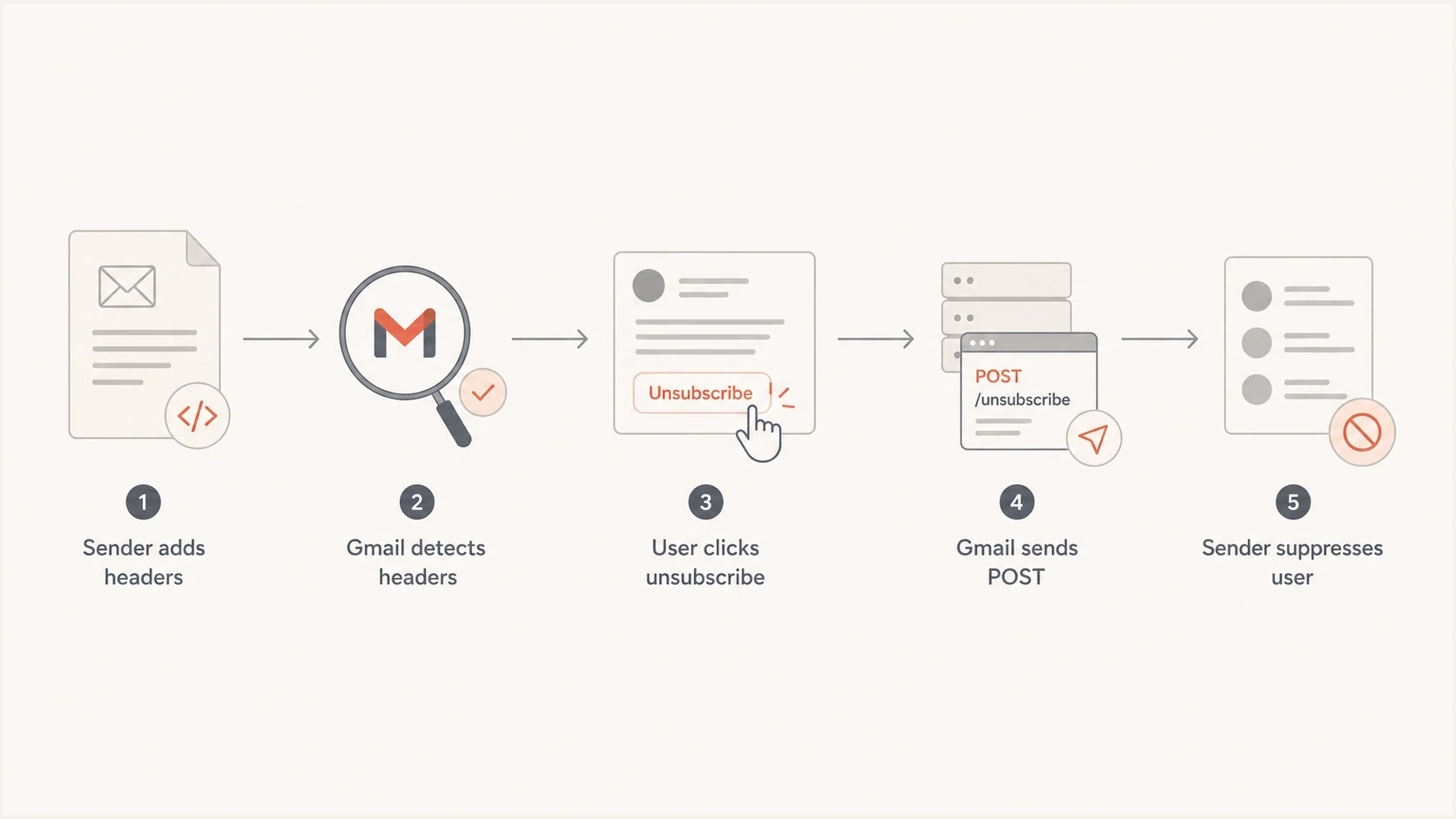
Flowchart showing how Gmail one-click unsubscribe uses headers and a POST request.
How Google counts the 5,000-message threshold
Google's threshold applies to messages sent to personal Gmail accounts ending in @gmail.com or @googlemail.com. It does not apply to messages received by Google Workspace accounts, although a sender using Google Workspace still falls within the rules when sending to personal Gmail accounts.
- Count by primary domain: Google combines messages sent by the same primary domain and its subdomains within a 24-hour period.
- Plan around the boundary: Google describes a bulk sender as one that sends close to 5,000 messages or more, so 4,999 is not a safe design target.
- Status does not expire: Once Google classifies a primary domain as a bulk sender, reducing later volume does not remove that classification.
Missing one-click unsubscribe does not automatically reject a message or place it in spam by itself. It makes a bulk sender ineligible for delivery mitigation and increases complaint risk. Since November 2025, Google has been ramping enforcement against traffic that fails its broader sender requirements, so unsubscribe handling and authentication need to be monitored together.
List-Unsubscribe versus footer unsubscribe
The confusion usually comes from the phrase "one-click." A footer link can be one click for the user if it immediately unsubscribes them, but that is not the same as Gmail's one-click unsubscribe requirement. Google is checking for a header mechanism that the mailbox provider can operate.
RFC 8058 header
- Where it lives: In the message headers, normally hidden from the subscriber.
- How it works: Gmail can send an HTTPS POST request directly to the unsubscribe URL.
- Compliance role: This is the required one-click method for Gmail bulk sender compliance.
Footer unsubscribe
- Where it lives: In the visible body of the email, often in the footer.
- How it works: The recipient clicks through to unsubscribe or manage preferences.
- Compliance role: It is still important, but it does not replace the header requirement.
Keep the footer link. It helps users, supports preference management, and helps meet legal expectations in many jurisdictions. Just do not rely on it as the only unsubscribe path for Gmail bulk sender compliance.
For a deeper setup walkthrough, the RFC 8058 header setup page covers the header placement and endpoint behavior in more detail.
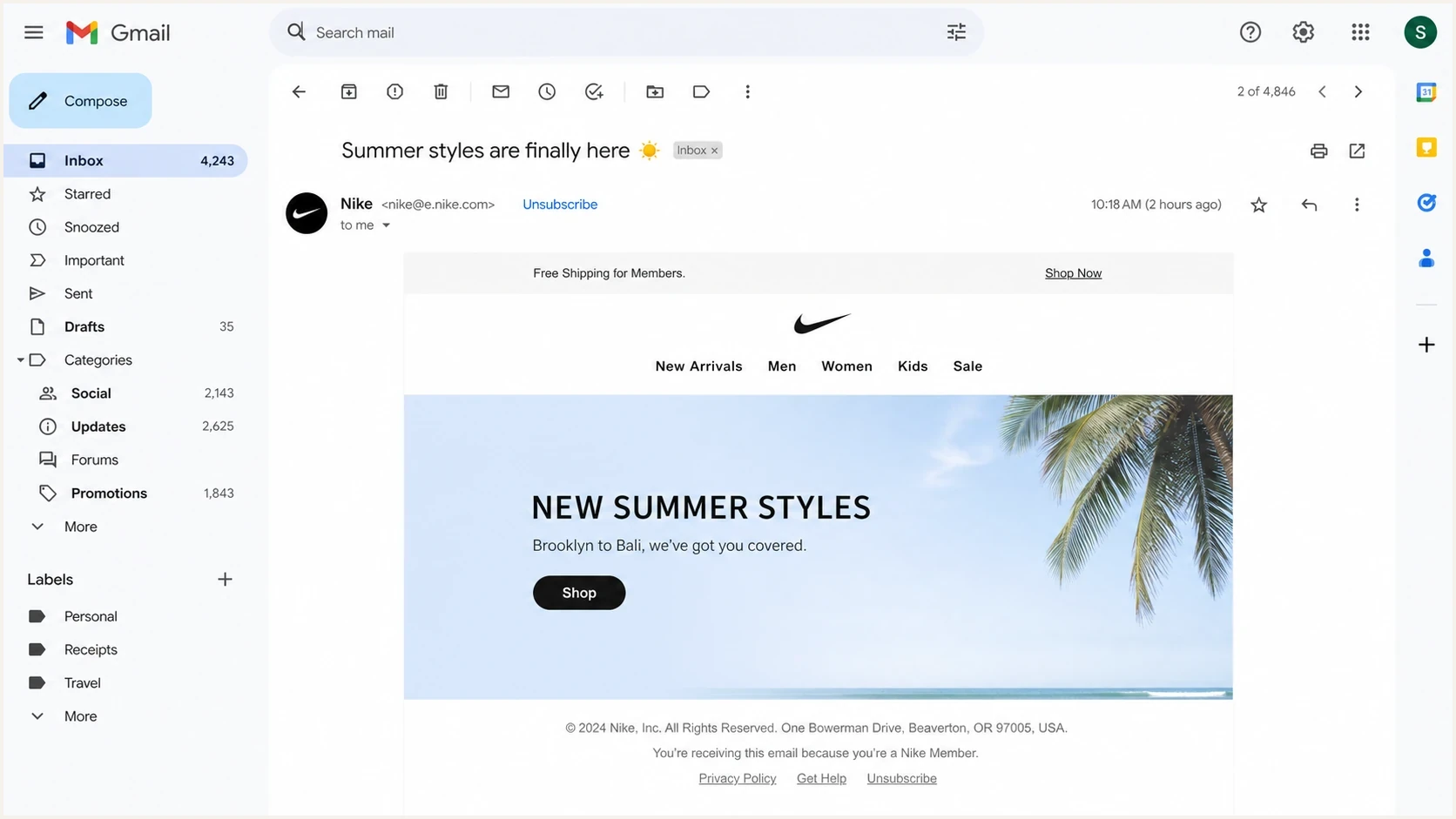
Gmail message view showing a header unsubscribe action and a separate footer link.
What counts as compliant
A compliant implementation has a few parts. The headers must be present, the HTTPS endpoint must accept POST, the request must unsubscribe without another user action, and the recipient must be removed from the relevant list within 48 hours. A valid DKIM signature must cover both List-Unsubscribe and List-Unsubscribe-Post in its h= tag. The endpoint should also use an opaque token rather than plain email addresses in the URL.
|
|
|
|---|---|---|
RFC 8058 | Yes | Header POST path for Gmail. |
Footer link | No | Visible user opt-out path. |
Mailto | No | Email-based request. |
Preference page | No | Useful for list choices. |
Common unsubscribe methods and whether they satisfy Google's one-click requirement.
The preference page is still a good idea. Gmail's one-click path can remove the subscriber from the list tied to that message. A preference page can let people change frequency, select topics, or opt out of all promotional mail. Those are two different functions.
Do not turn POST into a landing page
The RFC 8058 endpoint should not return a redirect that turns the request into a GET flow or forces a confirmation page. The POST request needs to be enough to unsubscribe the recipient automatically.
How to test the header path
The fastest way to find mistakes is to send a real message, inspect the raw headers, and then test the endpoint behavior. A message builder preview is not enough because sending platforms often add or rewrite headers at send time.
After deployment, send a campaign sample through Suped's email tester and inspect whether the List-Unsubscribe headers, DKIM, SPF, and DMARC results all appear as expected.
Email tester
Send a real email to this address. Suped shows a results button when the test is ready.
?/43tests passed
Check the raw message in Gmail because the visible unsubscribe button is not guaranteed to appear just because the headers exist. Gmail uses automated eligibility checks, sender history, spam rate, authentication, and message quality signals. Missing the button in the UI does not always mean the headers are absent, and seeing the header in raw source does not prove the endpoint works.

Email tester sample report showing total score, email preview, issue summary, and per-section results
A good test record includes the exact campaign stream, sending domain, DKIM selector, endpoint URL pattern, and suppression result. That gives engineering, marketing operations, and compliance teams one shared answer when someone asks whether the requirement is handled.
If Gmail still does not show the unsubscribe control, review Gmail one-click behavior before assuming the header is broken.
Authentication still matters
List-Unsubscribe does not stand alone. Google's bulk sender requirements also include SPF, DKIM, DMARC, TLS, valid forward and reverse DNS, accurate message formatting, and low user-reported spam rates. For direct mail, the From domain must align with either the authenticated SPF domain or DKIM domain so DMARC passes.
Suped's product connects the unsubscribe rollout with the authentication work around it. Suped's DMARC monitoring helps teams map sending sources, review SPF and DKIM results, and catch authentication changes while campaign headers and the one-click endpoint are tested.
Before treating an unsubscribe problem as a pure header issue, run a broader domain health checker pass. A failing DKIM signature or broken DMARC setup can change how Gmail assesses the whole message.
Gmail spam rate thresholds
User-reported spam rate targets that matter during one-click unsubscribe rollout.
Target
Under 0.1%
Keep reported spam below this level when possible.
Watch
0.1% to under 0.3%
Investigate list quality and unsubscribe friction.
Risk
0.3% or higher
Bulk sender mitigation eligibility is affected.
Suped DMARC dashboard showing email volume, authentication health, and source breakdown
Implementation checklist
Handle this as an engineering and operations rollout, not just a template edit. Each promotional stream needs the header pair, a working endpoint, suppression handling, monitoring, and a rollback plan if a vendor or template path strips the headers.
- Inventory streams: List every promotional and subscribed message stream, including lifecycle, newsletter, sales nurture, product marketing, and event mail.
- Add headers: Add both RFC 8058 headers after confirming your sending platform does not overwrite them.
- Sign headers: Make sure a valid DKIM signature includes both List-Unsubscribe and List-Unsubscribe-Post in its h= tag.
- Process POST: Accept the mailbox provider's POST request, suppress the recipient from the message's list without another click, and finish processing within 48 hours.
- Keep body links: Keep visible unsubscribe and preference links in the email body for user experience and legal needs.
- Monitor results: Track complaint rate, authentication results, endpoint errors, and unsubscribe processing time after launch.
Example POST request Gmail can sendhttp
POST /unsubscribe/abc123 HTTP/1.1
Host: example.com
Content-Type: application/x-www-form-urlencoded
Content-Length: 26

List-Unsubscribe=One-Click
Practical deployment rule
Treat the one-click endpoint as production infrastructure. Log failures, alert on spikes, and test suppression before large sends. A broken unsubscribe endpoint creates complaint pressure fast.
Views from the trenches
Best practices
Put RFC 8058 headers on every promotional stream, not only on your largest campaigns.
Keep the footer unsubscribe link because users still need a visible opt-out path.
Test raw headers after launch, then confirm POST requests remove the right list.
Common pitfalls
Treating a footer link as one-click compliance leaves Gmail's header need unmet.
Sending POST endpoints through redirects can break RFC 8058 handling and sender trust.
Letting unsubscribes wait in batch jobs increases complaints before suppression.
Expert tips
Use opaque tokens in unsubscribe URLs so endpoints identify users without cookies.
Cover both unsubscribe headers in the DKIM signature so receivers trust requests.
Route promotional streams through one suppression source to prevent list drift issues.
Expert from Email Geeks says one-click unsubscribe means RFC 8058 in this context, not a normal body link that happens to unsubscribe after one click.
2024-01-23 - Email Geeks
Expert from Email Geeks says the extra unsubscribe options in the message body are best practices and legal hygiene, not replacements for List-Unsubscribe.
2024-01-23 - Email Geeks
The practical answer
Google requires List-Unsubscribe with RFC 8058 one-click behavior for bulk promotional messages. A footer unsubscribe link is still useful and often necessary, but it is not the same requirement.
The implementation target is clear: add the header pair, cover both headers with DKIM, support HTTPS POST, process the request within 48 hours, and keep the footer link. Suped's product supports that workflow by connecting campaign tests with DMARC source visibility, SPF and DKIM results, and alerts when authentication changes.
For the broader Gmail and Yahoo version of the same requirement, the List-Unsubscribe requirements page is the next place to check.




