How do I add an unsubscribe button to the email header and what is RFC 8058?

Updated on 30 Jul 2026: We updated this guide for current bulk-sender scope and correct RFC 8058 POST handling.
You do not add the unsubscribe button itself. You add the right message headers, make the unsubscribe URL handle an RFC 8058 POST request, and sign those headers with DKIM. Gmail, Yahoo, and other mailbox providers decide whether to show the button next to the sender name.
For Gmail compliance and reliable one-click handling across Gmail and Yahoo, use header-based RFC 8058. In practice, that means List-Unsubscribe plus List-Unsubscribe-Post, not a visible HTML button in the top of your email template.
- Button source: The mailbox provider reads the raw email headers and renders its own unsubscribe control.
- Header pair: The message needs an HTTPS unsubscribe URL and the one-click POST signal.
- Receiver action: The mailbox provider sends a POST request to your endpoint after the user chooses unsubscribe.
- Visibility limit: Correct headers help, but reputation, volume, complaints, and eligibility checks still affect display.
The timing is no longer a grace-period question. Gmail and Yahoo began enforcing their bulk-sender requirements in 2024, and one-click unsubscribe has applied to covered marketing traffic since June 2024. Treat it as an active operational requirement.
Who needs one-click unsubscribe
The provider rules apply to bulk marketing and subscribed mail, not every message with an unsubscribe link. Use the stricter RFC 8058 implementation across covered traffic instead of maintaining different header behavior for each mailbox provider.
- Gmail threshold: Google requires one-click unsubscribe when a sender sends more than 5,000 messages in a day to personal Gmail accounts.
- Yahoo threshold: Yahoo applies bulk-sender rules at the authenticated domain or From domain level but does not publish a numeric volume threshold.
- Covered mail: Add the headers to marketing, promotional, newsletter, and other subscribed message streams.
- Transactional exception: Password resets, receipts, and other non-subscription messages are outside the Gmail and Yahoo one-click requirement.
Yahoo's policy has a useful distinction
Yahoo requires a functioning List-Unsubscribe header for covered bulk mail. Its current sender guidance highly recommends the RFC 8058 POST method and accepts mailto. Using the RFC 8058 header pair satisfies the stricter Gmail requirement and gives Yahoo a direct one-click path.
What RFC 8058 requires
The technical standard is RFC 8058. It describes a way for list email to signal that an unsubscribe URL supports a one-click action. The important detail is that the user does not browse to your unsubscribe page. The mailbox provider sends an HTTPS POST to your URL with a fixed key/value pair.
|
|
|
|---|---|---|
List header | One HTTPS URL | Identifies list and recipient |
POST header | One fixed value | Signals one-click support |
DKIM | Headers signed | Prevents header tampering |
Endpoint | No extra step | Completes unsubscribe |
Core RFC 8058 requirements for senders.
Header exampletext
List-Unsubscribe: <mailto:unsubscribe@example.com>,
 <https://example.com/u/7f3b2c9a>
List-Unsubscribe-Post: List-Unsubscribe=One-Click
That example has two unsubscribe options in List-Unsubscribe: a mailto address and an HTTPS URL. For RFC 8058, the HTTPS URL is the important part. The mailto option is useful for older clients, but it does not satisfy Gmail's one-click requirement by itself.
DKIM is part of the requirement
RFC 8058 requires at least one valid DKIM signature that covers both unsubscribe headers. If either header changes after signing, DKIM coverage can fail and the mailbox provider can hide the one-click option. A DKIM checker helps confirm the signature and selector are working before you blame the inbox interface.
How to add the header button
If you use an ESP, the ESP should usually handle this because it controls final header injection, DKIM signing, and unsubscribe processing. Ask for RFC 8058 support, not just a normal unsubscribe link. If you run your own sending system, you need to add the headers and build the endpoint yourself.
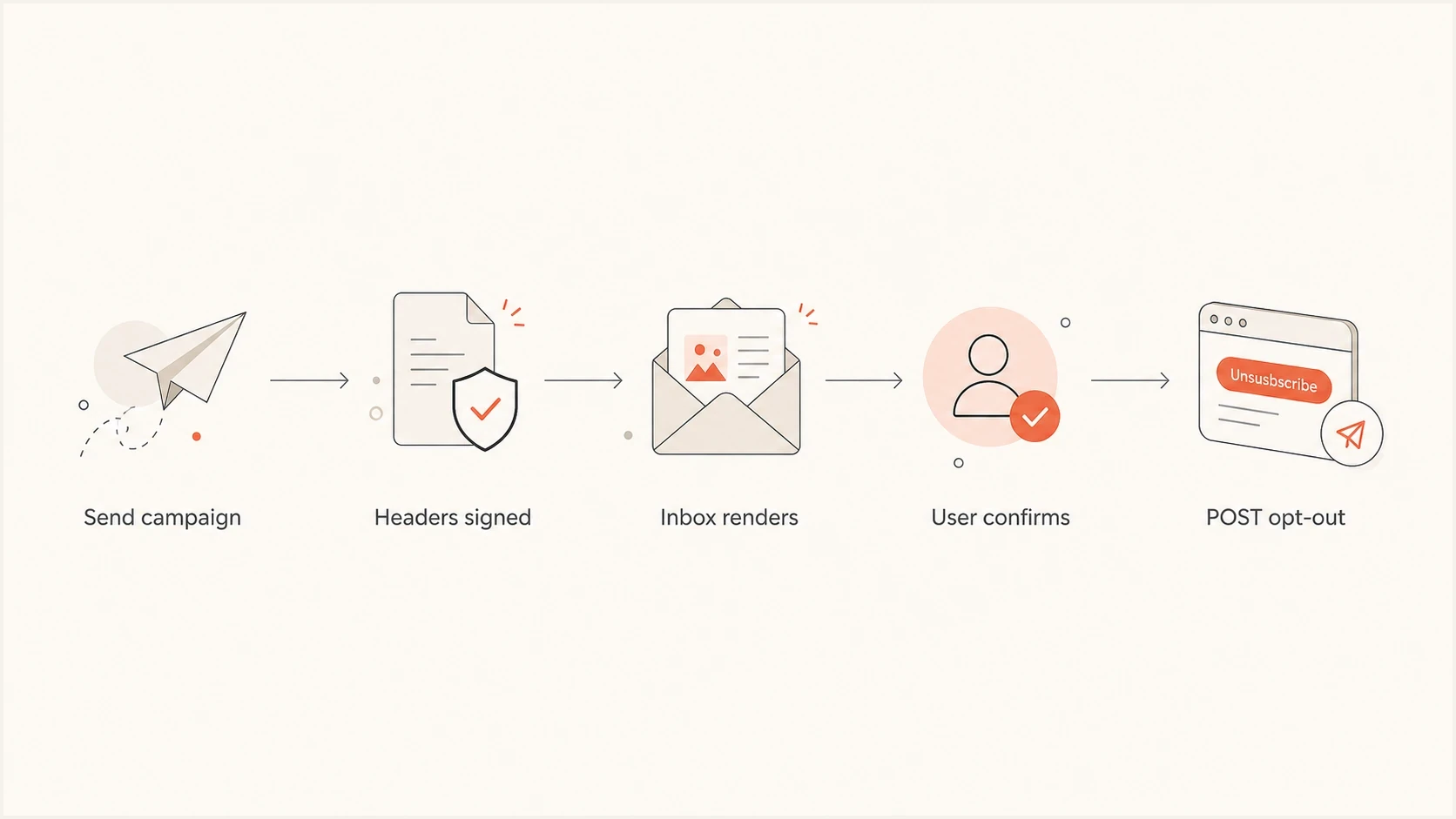
Flowchart showing a signed email header leading to an RFC 8058 POST unsubscribe.
- Classify mail: Apply the headers to marketing and other subscribed list mail.
- Create tokens: Use opaque, hard-to-forge identifiers that map to the recipient and list.
- Add headers: Include the HTTPS URL and the exact one-click POST signal in each outgoing message.
- Accept POST: Process the mailbox provider's POST without cookies, login, a captcha, or a confirmation page.
- Sign headers: Make sure the active DKIM signature covers both unsubscribe headers in the final message.
- Keep footer: Keep a visible unsubscribe link in the message body for users and legal requirements.
POST request your endpoint must handlehttp
POST /u/7f3b2c9a HTTP/1.1
Host: example.com
Content-Type: application/x-www-form-urlencoded
Content-Length: 26

List-Unsubscribe=One-Click
Receivers can send the key/value pair as multipart/form-data or application/x-www-form-urlencoded. A self-managed endpoint should parse both encodings instead of assuming every valid POST looks byte-for-byte like this example.
ESP-managed sending
This is the cleanest path when your ESP owns templates, suppression lists, and final message signing.
- Ask directly: Request RFC 8058 support for all marketing and subscribed message streams.
- Verify raw mail: Check the final delivered headers, not only the template preview.
- Check suppression: Confirm the endpoint removes the recipient from the right list.
Self-managed sending
This works when your engineering team controls SMTP, header assembly, DKIM signing, and unsubscribe state.
- Build endpoint: Accept a POST with the fixed one-click value and return a success response.
- Avoid redirects: Handle the request at the URL in the header without redirecting POST to GET.
- Audit DKIM: Confirm the h= tag includes both unsubscribe header fields.
What users see in the inbox
In Gmail, the visible control often appears near the sender name or in the message menu. Yahoo has its own interface treatment. The exact placement is not controlled by your HTML. Your job is to provide a valid, signed signal that the receiving system can trust.
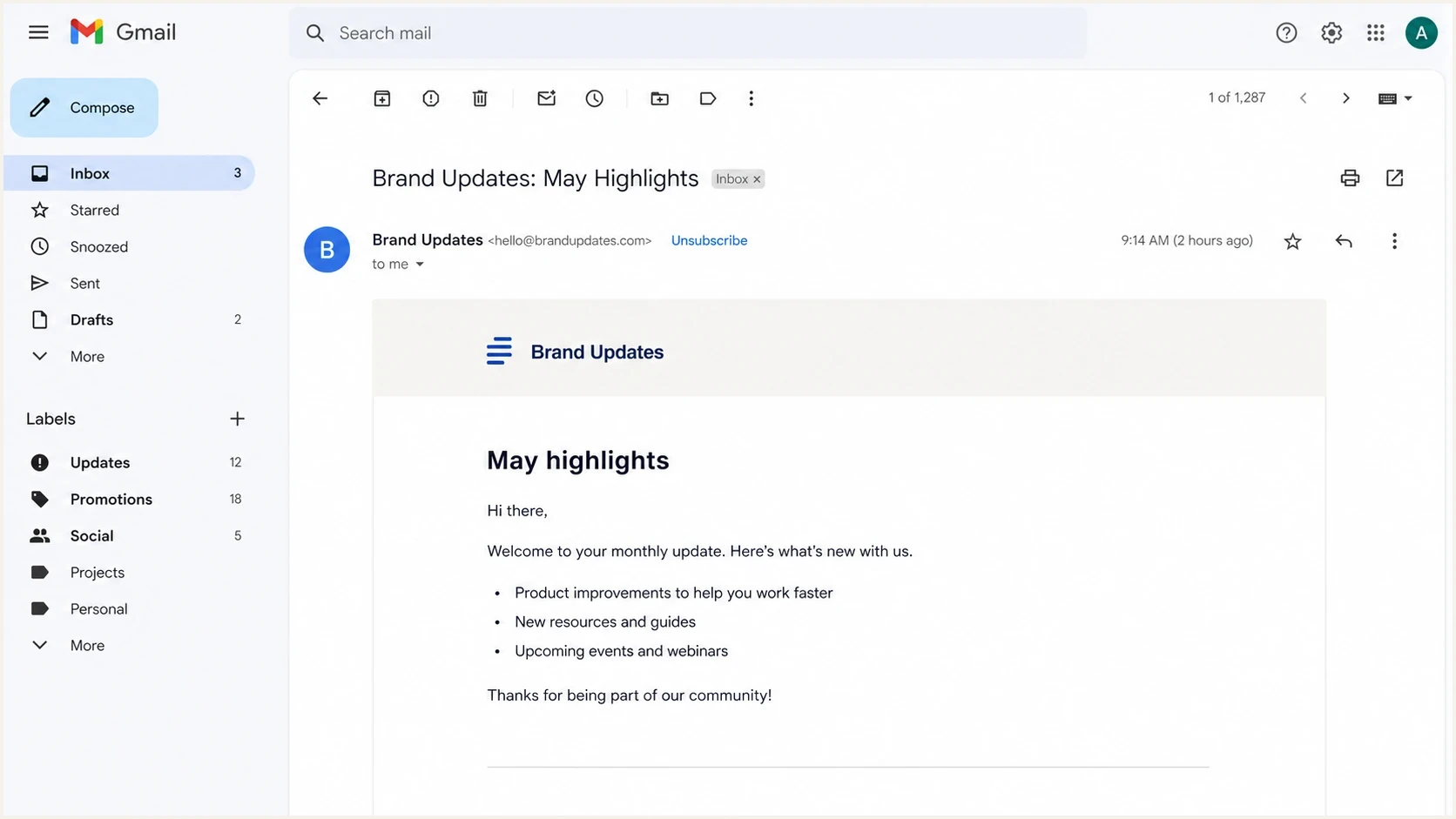
Gmail message view showing an unsubscribe control near the sender name.
The button still does not appear for every sender or every test message. Gmail says top-of-message unsubscribe controls are shown only after automated eligibility checks. That means a technically correct implementation can stay hidden if the sender has low volume, weak history, complaint issues, or inconsistent authentication. The deeper explanation is covered in Gmail button visibility.
Complaint rate pressure
Lower complaint rates make it easier for mailbox providers to trust sender controls.
Healthy
Under 0.10%
Keep complaint rate well under the published concern zone.
Watch
0.10% to below 0.30%
Review list quality, targeting, and unsubscribe access.
Risk
0.30% or higher
Expect more filtering pressure and weaker eligibility.
Do not use visibility as your only test
A missing Gmail button does not prove the headers are wrong. First inspect the raw delivered message, confirm DKIM coverage, and test the endpoint. After that, review sender reputation and complaint rate.
Common reasons it fails
Most broken implementations fail in one of two places: the header signal is incomplete, or the unsubscribe endpoint behaves like a normal web page. RFC 8058 expects the receiving system to complete the unsubscribe without a person landing on your site.
|
|
|
|---|---|---|
No header | ESP not adding it | Enable list headers |
No button | Eligibility check | Review reputation |
POST ignored | Web flow only | Process one-click |
DKIM fail | Header changed | Sign after changes |
Wrong list | Token too broad | Use list tokens |
Fast checks when one-click unsubscribe does not work.
A common mistake is treating a normal unsubscribe page as one-click. A preference center is fine as an extra footer link, but it is not the RFC 8058 action. If the mailbox provider sends the POST, your system must mark the recipient unsubscribed without asking for a password, reason, confirmation, or second click. For policy context, see the one-click requirements.
Do not unsubscribe on GET
Security scanners and spam filters fetch URLs. If a GET request unsubscribes the user, automated link scanning can remove real subscribers by accident. Use GET for a landing page or preference center. Use the RFC 8058 POST for one-click unsubscribe.
How to test the setup
Test this with the same sending path that real subscribers receive. A staging template sent through a different sender, DKIM selector, or suppression system does not validate the production path. The delivered message is the source of truth.

Email tester sample report showing total score, email preview, issue summary, and per-section results
A practical test starts with a delivered message and its raw headers. Suped's product connects that message test with DMARC, DKIM, SPF, and reputation monitoring. This workflow helps separate an RFC 8058 header or DKIM coverage problem from a wider authentication issue.
Send a real campaign sample to an email tester, then confirm the unsubscribe headers, DKIM result, and endpoint behavior. A domain health check catches related authentication problems, while DMARC monitoring shows whether real traffic is passing authentication over time.
- Raw headers: Confirm both unsubscribe headers exist in the final delivered email.
- DKIM coverage: Confirm the signed header list includes both unsubscribe fields.
- Endpoint logs: Trigger the POST and check that your server receives the fixed value.
- Suppression state: Verify the recipient is removed from the right list or topic.
- Follow-up send: Confirm the unsubscribed recipient no longer receives that stream.
This is also where real-time alerts help. If a sender changes a template, routing path, or DKIM signer and the unsubscribe headers drop out, you want to catch it before complaint rates rise.
Email tester
Send a real email to this address. Suped shows a results button when the test is ready.
?/43tests passed
Security and compliance details
The unsubscribe URL should include enough information to identify the subscriber and list without exposing private data. Use an opaque, hard-to-forge token tied to the relevant recipient and subscription record, then validate it before changing suppression state.
The POST request should not depend on cookies, browser sessions, HTTP authorization, or previous web activity. The mailbox provider is acting inside the mail client context, not as a logged-in browser user. A clean implementation treats the token as the authorization for that specific unsubscribe action.
Endpoint behavior checklisttext
If request method is POST
Parse multipart/form-data or application/x-www-form-urlencoded
If List-Unsubscribe equals One-Click
If token is valid for recipient and list
Mark recipient unsubscribed from that list
Return HTTP 200 or 204
Do not redirect the POST
Honor unsubscribe requests within 48 hours. Yahoo requires covered senders to process requests within two days, and Google's subscription guidance instructs senders to process them within 48 hours. Faster suppression prevents another promotional message reaching someone who has already opted out.
What reliable endpoint behavior looks like
- Single action: The POST removes the recipient from the matching list without extra prompts.
- Scoped token: The URL identifies the recipient and list without exposing raw personal data.
- Stable response: Repeated POSTs return success after the user is already unsubscribed.
- Visible backup: The email footer still has a clear unsubscribe link or preference center.
Views from the trenches
Best practices
Sign both unsubscribe headers with DKIM and verify the h= list after every ESP change.
Use opaque tokens that identify the list and recipient without exposing private data in URLs.
Treat low complaint rates and clean authentication as part of unsubscribe visibility work.
Common pitfalls
Relying on a footer link alone leaves Gmail and Yahoo without the RFC 8058 signal.
Processing GET requests as opt-outs creates accidental unsubscribes from link scanners.
Assuming the inbox button always appears causes false alarms during low-volume tests.
Expert tips
Check the raw message first, then test the POST endpoint and suppression update path.
Ask the ESP whether it signs List-Unsubscribe headers in the active DKIM signature.
Keep the visible unsubscribe link because header support is not a legal footer replacement.
An Email Geeks discussion identified RFC 8058 as the mechanism behind header-based one-click unsubscribe.
2024-01-18 - Email Geeks
An Email Geeks discussion recommended having the ESP handle the header pair and POST endpoint because it controls final message assembly.
2024-01-18 - Email Geeks
The practical answer
To add the unsubscribe button near the sender name, add the RFC 8058 header pair to the raw email, make the HTTPS URL process a one-click POST, and sign those headers with DKIM. Then test the delivered message and endpoint. The mailbox provider owns the visible button, so the correct goal is compliance and eligibility, not pixel control.
If an ESP sends your mail, push the ESP to confirm exactly where the headers are added, whether DKIM covers them, and how quickly suppression is updated. If you send mail yourself, treat the endpoint like production infrastructure because unsubscribe failures turn into complaints fast.




