How does Gmail's one-click unsubscribe work and is it really one click?

Published 14 May 2025
Updated 5 Aug 2026
11 min read
Summarize with
Updated on 5 Aug 2026: We clarified who needs Gmail one-click unsubscribe and how to implement its authenticated POST correctly.
Gmail's one-click unsubscribe is "one click" from the sender's technical point of view, not always from the user's visible Gmail screen. In Gmail, the user can click the header unsubscribe control and then confirm in a Gmail dialog. After that confirmation, Gmail sends a non-interactive POST request to the unsubscribe URL in the email's List-Unsubscribe header. If that POST suppresses the address without asking for a login, a preference page, a survey, or another decision, the sender-side setup is doing what Gmail expects.
So no, you do not configure your list header differently just because Gmail shows a confirmation prompt. That prompt is Gmail's own user interface. The checks that matter are whether the message has the right headers, whether the endpoint accepts the POST defined by RFC 8058, and whether the recipient is unsubscribed promptly after Gmail calls it.
- Short answer: Gmail can show two visible clicks, but the sender still supports a one-click POST action.
- Compliance focus: The endpoint must unsubscribe from the POST without extra interaction.
- QA focus: Verify headers, authentication, Gmail UI behavior, and backend suppression.
What Gmail means by one-click unsubscribe
The confusing part is the phrase "one-click". In ordinary marketing language, it sounds like a person clicks once and is done. In the Gmail sender requirement context, it points to RFC 8058 and the two headers that allow Gmail to submit an unsubscribe request on the user's behalf.
The two key headers are List-Unsubscribe and List-Unsubscribe-Post. The first header gives Gmail the unsubscribe destination. The second tells Gmail that the HTTPS URL supports a one-click POST action. That POST matters because ordinary web crawlers and link scanners follow GET links. A destructive unsubscribe action tied to GET creates accidental unsubscribes.
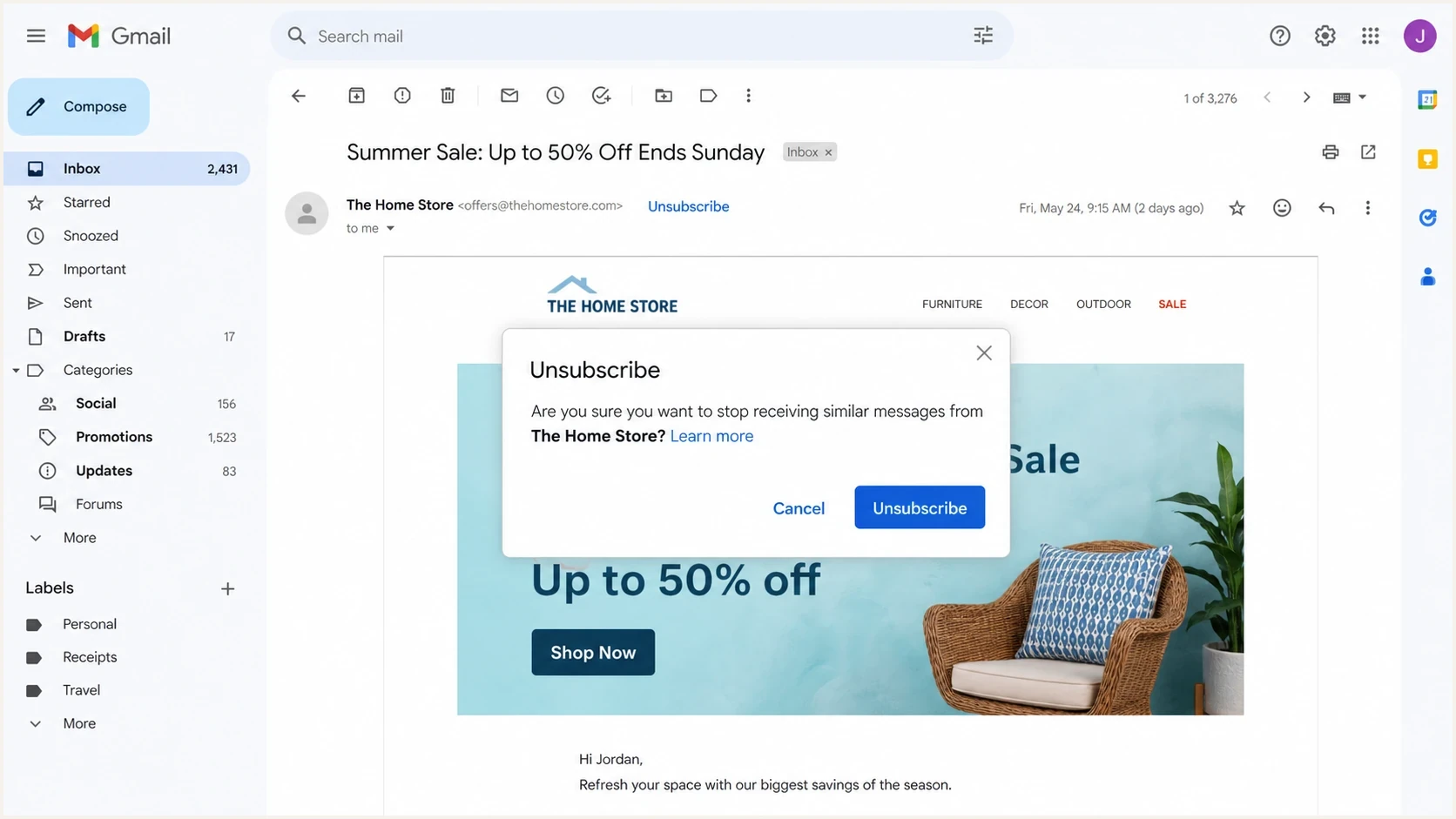
Gmail showing an unsubscribe control and a confirmation dialog.
The modal is not the sender endpoint
When Gmail asks the user to confirm, that is still Gmail's interface. Your application only sees the POST request after Gmail has decided to send it. The sender endpoint should not ask Gmail for another confirmation.
Gmail also uses the same unsubscribe data in more than one place. The visible control can appear in the message header, in subscription management views, or in other inbox surfaces. The user's exact path belongs to Gmail. The sender's job is to publish the headers and honor the resulting request.
Who must support it for Gmail
Gmail's formal one-click unsubscribe requirement applies to senders that send more than 5,000 messages in a day to personal Gmail accounts. Gmail counts messages from the same primary domain toward that threshold, including messages sent through different subdomains. Once Gmail classifies a domain as a bulk sender, that classification does not expire just because its volume later drops.
For bulk senders, the requirement applies to marketing and subscription messages. Transactional messages such as password resets, purchase receipts, reservation confirmations, and one-time passcodes are excluded. Newsletters and some notification streams still count as subscription messages when recipients can unsubscribe from the mailing list.
- Header action: Marketing and subscription messages must support the RFC 8058 HTTPS POST.
- Body link: Gmail also requires a clearly visible unsubscribe link in the message body.
- Processing time: Gmail recommends honoring an unsubscribe request within 48 hours.
- Suppression scope: The request can remove the recipient from the list associated with the message, not every message from the sender.
A mailto header, a body link, or a link to a preference page does not satisfy Gmail's one-click requirement by itself. Missing one-click unsubscribe does not automatically send a message to spam, but it makes a bulk sender ineligible for delivery mitigation and leaves recipients more likely to report unwanted mail as spam.
Why it can look like two clicks
Gmail's confirmation prompt exists because unsubscribe changes the user's relationship with a sender. Mailbox providers avoid sending destructive actions silently from the UI. That is sensible behavior, and it does not change the sender requirement.
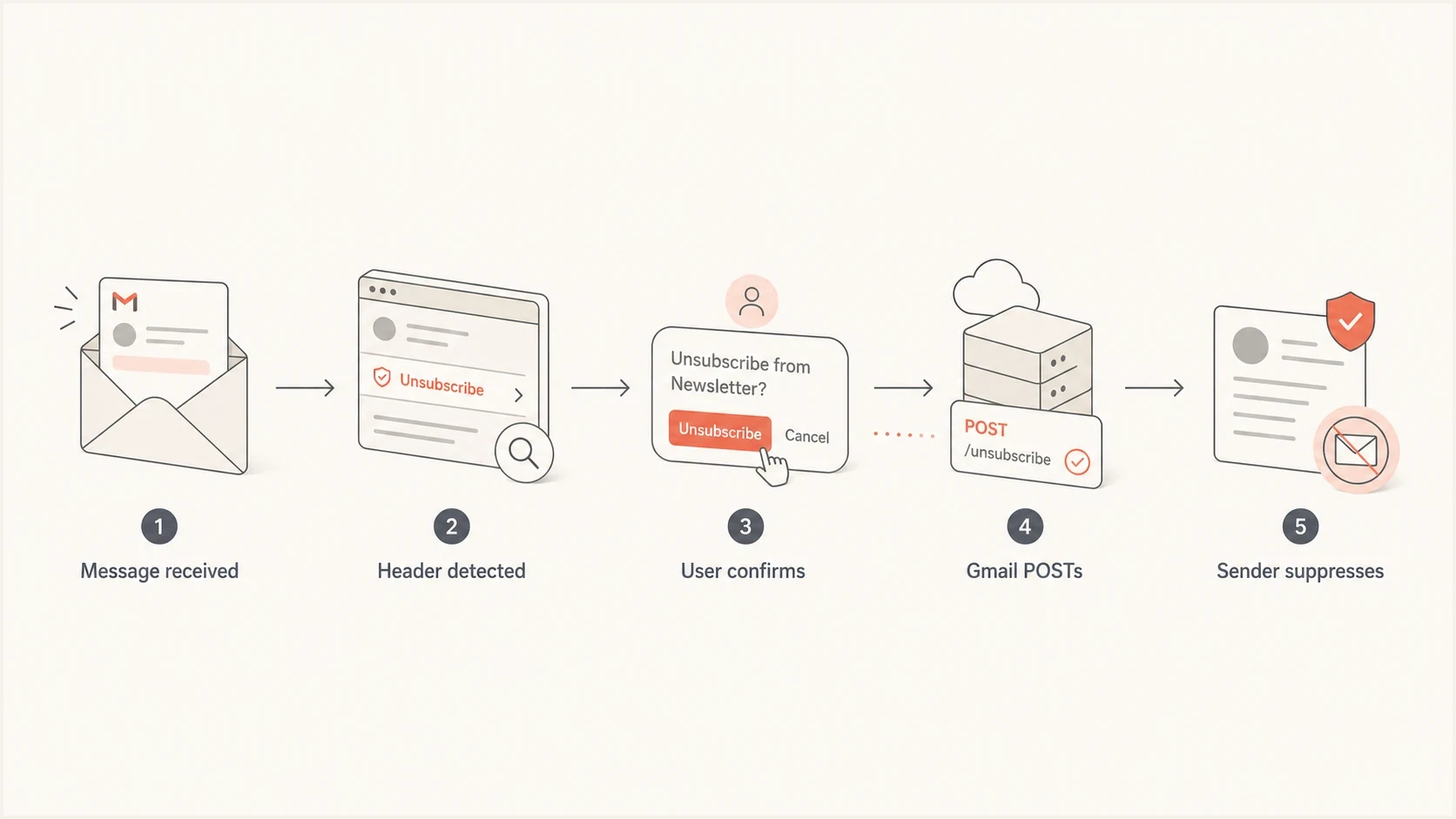
Flowchart showing Gmail detecting unsubscribe headers, confirming, posting, and suppressing.
Header unsubscribe
- Trigger: Gmail reads the List-Unsubscribe headers and sends a POST.
- Endpoint: The HTTPS URL must complete the unsubscribe without user input.
- Risk: If it requires a page click, Gmail cannot finish the request.
Body unsubscribe
- Trigger: The recipient clicks a visible link in the email body.
- Endpoint: The page can show preferences or ask for confirmation.
- Risk: Link scanners can visit body URLs, so GET-based unsubscribes are risky.
This is why a body link that lands on a preference center can still be acceptable, while the RFC 8058 endpoint must be direct. The body link is for a person. The header POST is for the mailbox provider.
For a deeper split between HTTP methods, the practical issue is GET vs POST. GET is easy for scanners to touch. POST, paired with the List-Unsubscribe-Post header, tells Gmail that the action is intentional and machine-submitted after the user has approved it in Gmail.
What your headers need to contain
A compliant marketing message should include a List-Unsubscribe header with an HTTPS URL. Many senders also include a mailto option. To support Gmail's one-click behavior, include List-Unsubscribe-Post with the exact one-click value.
RFC 8058 also requires a valid DKIM signature whose h= tag covers both List-Unsubscribe and List-Unsubscribe-Post. Without that covered signature, the setup does not satisfy RFC 8058 even when both headers are present.
Example unsubscribe headerstext
List-Unsubscribe: <https://email.example.com/unsub/abc123>,
 <mailto:unsubscribe@example.com?subject=unsubscribe>
List-Unsubscribe-Post: List-Unsubscribe=One-Click
When Gmail invokes the HTTPS endpoint, it sends a POST request with the fixed one-click form value. Because the POST body does not carry separate recipient or list fields, the opaque HTTPS URL token should identify both. The endpoint should validate that token, suppress the recipient for the relevant list or sender scope, and return a successful response. Make the operation idempotent so a repeated POST keeps the recipient suppressed and still returns success. The recipient should not need to visit a page, enter an email address, log in, solve a challenge, or choose a reason.
Expected POST shapetext
POST /unsub/abc123 HTTP/1.1
Host: email.example.com
Content-Type: application/x-www-form-urlencoded

List-Unsubscribe=One-Click
|
|
|
|---|---|---|
Method | POST | GET only |
User step | None | Login |
Token | Opaque | Raw email |
Result | Suppressed | Pending |
Compact checks for Gmail one-click unsubscribe setup.
During an email platform migration, the Gmail modal appearing is not a failure. The real failure conditions are missing headers, an absent POST URL, an error response, an unresolved token, a DKIM signature that does not cover both unsubscribe headers, or suppression that does not happen after the POST.
The broader header requirements also include message authentication expectations. Gmail is more likely to trust and display sender-controlled actions when the message is authenticated and the sender has a consistent reputation.
How to QA it without false failures
Start QA with the raw message, not the Gmail button. In Gmail on the web, the Show original option exposes the delivered headers and authentication results. The button does not appear for every message, account, placement, or test condition. Gmail's own Gmail help material describes the user-facing unsubscribe flow, but sender QA needs to inspect the message and backend behavior as well.
- Inspect headers: Confirm List-Unsubscribe and List-Unsubscribe-Post are present and covered by a valid DKIM signature in the delivered message.
- Send real mail: Use a real Gmail inbox, not only a template preview or internal rendering tool.
- Confirm POST: Click through Gmail's flow and verify that your server received the POST.
- Check suppression: Make sure the address is removed from the correct marketing list or scope.
- Retest sends: Confirm the unsubscribed address no longer receives the covered marketing stream.
A fast way to catch header mistakes is to send a live message to the Suped email tester. It shows authentication results and message details in one place, which separates a header implementation issue from a mailbox UI issue.
Email tester
Send a real email to this address. Suped shows a results button when the test is ready.
?/43tests passed
If Gmail does not show the header unsubscribe control during QA, do not jump straight to a compliance failure. Button visibility depends on Gmail's classification and trust signals as well as the headers. The useful test is whether the message has the required headers and whether a mailbox provider can use them.
For troubleshooting that specific display question, the practical checklist for button visibility is to check authentication, sender reputation, message type, and the exact delivered headers.
Where Suped fits into this workflow
One-click unsubscribe is separate from DMARC. Suped's product covers DMARC reporting and email authentication, with the surrounding Gmail checks in one workflow: DMARC monitoring, SPF, DKIM, hosted policy records, alerts, and blocklist (blacklist) visibility.

Email tester sample report showing total score, email preview, issue summary, and per-section results
The practical workflow is to test the actual message, confirm authentication and headers, then monitor the domain so a DNS change or new sending source does not quietly break Gmail compliance. Suped's domain health checks can catch email authentication problems that do not live inside the unsubscribe endpoint but still affect Gmail's trust in the message.
Unsubscribe processing target
Use these thresholds when checking whether a marketing unsubscribe workflow is operationally safe.
Best
Immediate
Suppression happens as soon as the POST is accepted.
Good
<24h
Suppression happens in the same operational day.
Recommended limit
48h
Gmail recommends processing unsubscribe requests within 48 hours.
Bad
>48h
The address stays active beyond Gmail's recommended window.
Suped's blocklist monitoring adds a reputation signal during migration work. A broken unsubscribe process can increase complaints and contribute to domain or IP reputation problems. Monitoring blocklists and blacklists does not prove unsubscribe compliance, but pairing it with authentication monitoring and alerts helps teams spot reputation fallout before deliverability drops.
Common causes of failed one-click QA
Most failed QA sessions come from testing the wrong thing. The Gmail prompt is not a problem by itself. The problems are usually in message generation, URL handling, token handling, or suppression logic.
|
|
|
|---|---|---|
No header | Missing setup | Add headers |
No POST | GET only | Add endpoint |
Token fails | Bad lookup | Fix token |
Still mailed | Bad sync | Fix export |
No button | Trust issue | Check auth |
Common one-click unsubscribe QA findings.
Do not reuse body link logic blindly
A body unsubscribe page often asks for confirmation to avoid scanner-triggered unsubscribes. The header POST endpoint has the opposite requirement: it must be non-interactive because Gmail has already handled the user's confirmation.
The safest implementation keeps these two flows separate. The visible body link can offer subscription choices. The List-Unsubscribe POST endpoint should perform the unsubscribe directly, log the event, and stop.
If you need a dedicated testing plan, use a checklist for test one-click unsubscribe that covers headers, Gmail behavior, server logs, suppression, and follow-up sends.
Views from the trenches
Best practices
Keep the RFC 8058 endpoint separate from preference pages and make the POST final.
Test raw headers, Gmail behavior, endpoint logs, and backend suppression before changing ESPs.
Use body links for preference choices, but keep the header action direct and reliable.
Common pitfalls
Treating Gmail's confirmation modal as a sender-side compliance failure during QA.
Building the header URL like a tracked GET link that requires another user decision.
Assuming the button appears on every Gmail message even when the headers are valid.
Expert tips
Log campaign, recipient, timestamp, and response status so failures are easy to trace.
Use opaque unsubscribe tokens and avoid putting raw email addresses in visible URLs.
Suppress the address first, then route the person to preferences for optional choices.
Expert from Email Geeks says Gmail can ask for confirmation in its own UI, then send the RFC 8058 POST to the sender's endpoint.
2025-02-25 - Email Geeks
Marketer from Email Geeks says a two-step body unsubscribe flow is common because link scanners can follow ordinary URLs.
2025-02-25 - Email Geeks
A practical way to think about it
Gmail's one-click unsubscribe name is easy to take too literally. In practice, it means the message exposes a standard, non-interactive unsubscribe action that Gmail can call after the user confirms inside Gmail. The Gmail confirmation dialog is normal.
For sender QA, the answer is direct: keep the body unsubscribe experience user-friendly, but make the header POST endpoint final. If the delivered email has the right headers, Gmail can POST to the HTTPS URL, and the address is suppressed without another step, the one-click unsubscribe setup is working.
Then monitor the surrounding authentication and reputation signals. A correct unsubscribe endpoint does not compensate for authentication failures. Blocklist or blacklist monitoring is a reputation signal rather than proof that one-click unsubscribe works.