Do specific email keywords trigger spam filters and influence unsubscribe rates?

Michael Ko
Co-founder & CEO, Suped
Published 13 Jun 2025
Updated 15 May 2026
8 min read
Summarize with
Specific email keywords like "scam", "abuse", "fraud", or "waste" do not usually trigger spam filters by themselves, and they do not directly create unsubscribe events. Modern filtering is more interested in sender reputation, authentication, complaint history, engagement, message structure, URLs, and recipient-side security behavior than one scary word in the body copy.
The short answer is this: keywords can add risk when they appear inside a broader spam-like pattern, but they are rarely the root cause. If a campaign about medical fraud gets a 5% unsubscribe rate from an engaged audience, I would not start by rewriting every negative word. I would first check whether the audience expected that topic, whether the subject and preheader felt alarming, whether the unsubscribe implementation can be triggered by scanners, and whether the unsubscribes came from a small set of recipient domains.
- Keywords: Single words are weak signals unless the rest of the email also looks abusive or deceptive.
- Unsubscribes: They usually come from people or automated link handling, not a spam filter silently deciding to unsubscribe someone.
- Priority: Investigate timing, recipient domain clustering, link behavior, authentication, and complaint data before blaming copy.
The direct answer
No, a few specific keywords in the same email are not enough to trigger most spam filters on their own. A message that uses words such as "scam", "abuse", and "waste" in a legitimate context can still land in the inbox when the sender has a good reputation, valid authentication, healthy engagement, clean links, and normal sending behavior.
The caveat is context. A subject line that screams urgency, a body full of misleading promises, broken HTML, link shorteners, mismatched domains, poor authentication, and a cold list can make those same words part of a bigger negative pattern. That is why lists of spam trigger words are useful as copy review prompts, not as a reliable model of how filtering works.
The practical rule
If the email is wanted, authenticated, consistent with the subscriber's expectations, and sent by a reputable domain, normal negative words do not automatically make it spam. If the email is unexpected or technically messy, even harmless wording can sit inside a pattern that filters dislike.
Keyword thinking
- Focus: Looks for one word or phrase and treats it as the main cause.
- Risk: Leads to bland copy while the real issue stays untouched.
- Use: Helpful for removing hype, deception, and subject-line overpromising.
Deliverability thinking
- Focus: Reviews reputation, authentication, complaints, engagement, and message construction.
- Risk: Needs more evidence, but it finds causes that actually change placement.
- Use: Best for diagnosing sudden spam placement, complaint spikes, and odd unsubscribe patterns.
What spam filters actually evaluate
Spam filters score patterns. The content matters, but it is only one layer. A mailbox provider is also looking at whether the domain has a stable sending history, whether SPF and DKIM pass, whether DMARC passes for the visible From domain, whether recipients open or ignore the mail, whether complaints are rising, and whether the links and infrastructure match the sender.
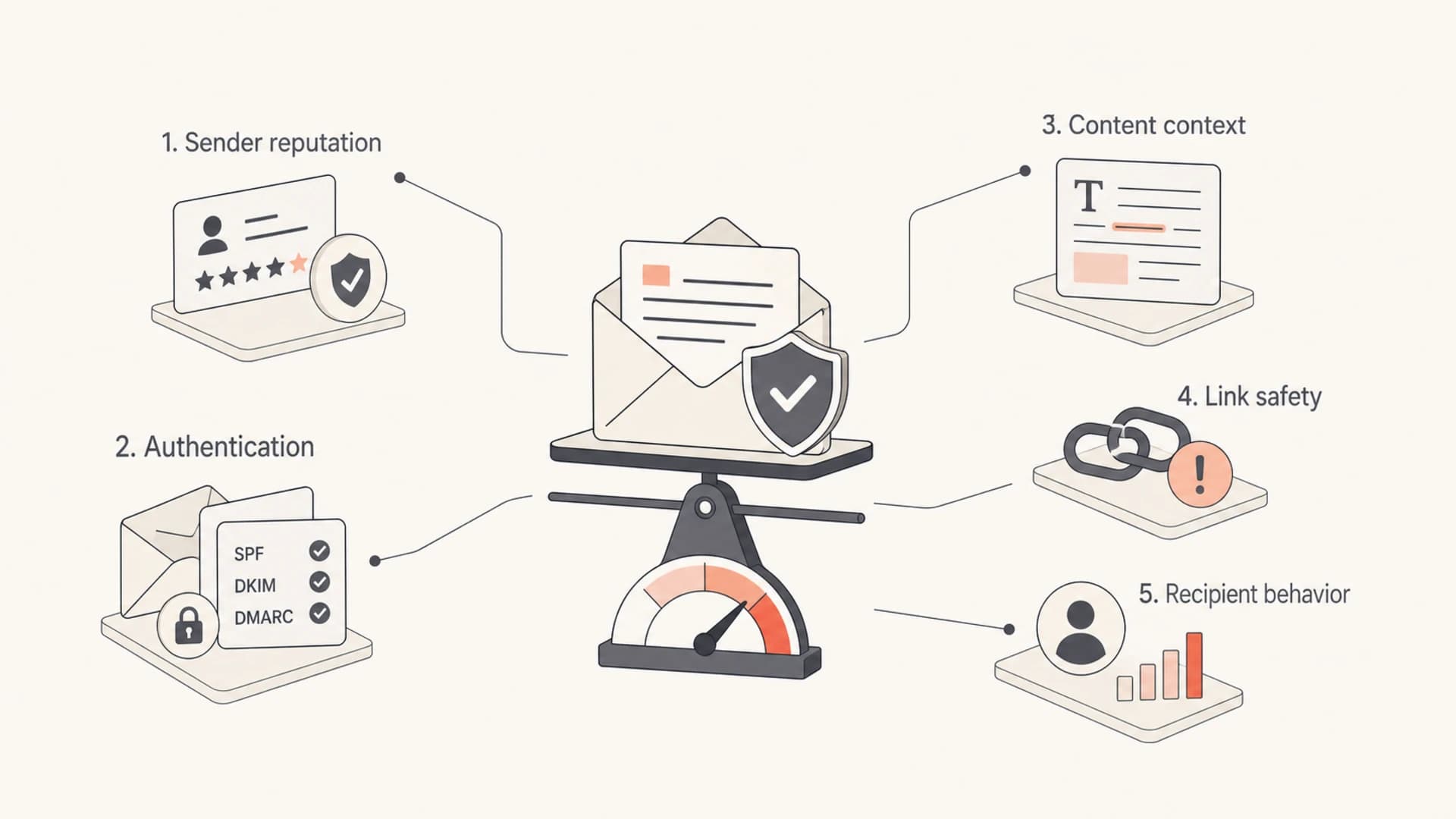
Spam filtering weighs reputation, authentication, content, links, and recipient behavior.
A strong sender can send serious content without being punished just because the email says "fraud". A weak sender can use pleasant language and still go to spam because recipients do not engage, authentication is inconsistent, or the sending domain has a poor history. That is why I check DMARC monitoring and source-level authentication before making copy decisions.
|
|
|
|---|---|---|
Keywords | Context clue | Copy review |
Reputation | Trust history | Domain trends |
Authentication | Identity proof | SPF, DKIM, DMARC |
Complaints | User rejection | FBL data |
Blocklist | Reputation flag | Listing source |
Common signals and what they usually indicate.
If the domain or sending IP appears on a blocklist (blacklist), that issue deserves attention before word choice. A blocklist or blacklist listing is not automatically catastrophic, but it can explain sudden filtering at specific recipient domains. Suped includes blocklist monitoring alongside DMARC, SPF, and DKIM visibility, which keeps this check in the same workflow as authentication.
Why unsubscribe rates jump
Unsubscribes are not normally created by spam filters. They are created when a recipient clicks an unsubscribe link, when a mailbox client exposes a header unsubscribe action, or when an automated security system follows a link that was implemented in a way that unsubscribes on visit. That last case is where sudden, clustered unsubscribe spikes get interesting.
If a large share of unsubscribes arrives within one minute of the send and comes from only a few recipient domains, I treat that as a link-handling investigation. Human readers do not usually open, read, decide, and unsubscribe in the same minute across many accounts at the same organization. A gateway or mailbox security process can visit links quickly before the message reaches the inbox.
Unsubscribe rate investigation bands
Use these bands as review triggers, not universal performance grades.
Normal watch
0-0.2%
Review trends, but avoid major conclusions from one send.
Copy and list review
0.2-0.5%
Check expectation match, segment quality, and subject line framing.
Immediate diagnosis
0.5%+
Segment by recipient domain, timestamp, and unsubscribe source.
A 5% unsubscribe rate from an engaged audience is not a normal wording problem. It points to expectation mismatch, a sensitive topic handled poorly, an implementation issue, or a classification problem in the sending platform. In that situation, I would inspect the raw unsubscribe events before changing the campaign language.
Watch for scanner-triggered unsubscribe events
A body unsubscribe link should not remove someone with a simple page load. Use a confirmation step for body links, and keep standards-based header unsubscribe support working for mailbox clients.
Safer unsubscribe pattern
GET  /unsubscribe/{token}  -> show confirmation page only
POST /unsubscribe/{token}  -> unsubscribe after confirmation
POST /list-unsubscribe     -> process one-click header request
The same principle applies to unsubscribe links in every email program: make the human path clear, make the automated path safe, and log enough detail to know which path created the event.
How to test the campaign
When a campaign with sensitive wording performs badly, I use a controlled test instead of guessing. Send the exact message to seed accounts, send a clean copy with the same audience and infrastructure, then compare placement, headers, link scanning, and event timing. Do not change copy, sender, template, and segment at the same time, because that destroys the evidence.
Email tester
Send a real email to this address. Suped opens the report when the test is ready.
?/43tests passed
Preparing test address...
Suped's email tester is useful for this first pass because it gives you a real-message report instead of a theoretical keyword score. I still treat it as one input. The final decision comes from combining test results with mailbox placement, recipient-domain event patterns, and authentication data.

Email tester sample report showing total score, email preview, issue summary, and per-section results
For the domain-level check, run a domain health checker review and confirm the sending domain has valid SPF, DKIM, and DMARC. If authentication fails or the visible From domain does not match the authenticated domain, keyword changes will not fix the core trust problem.
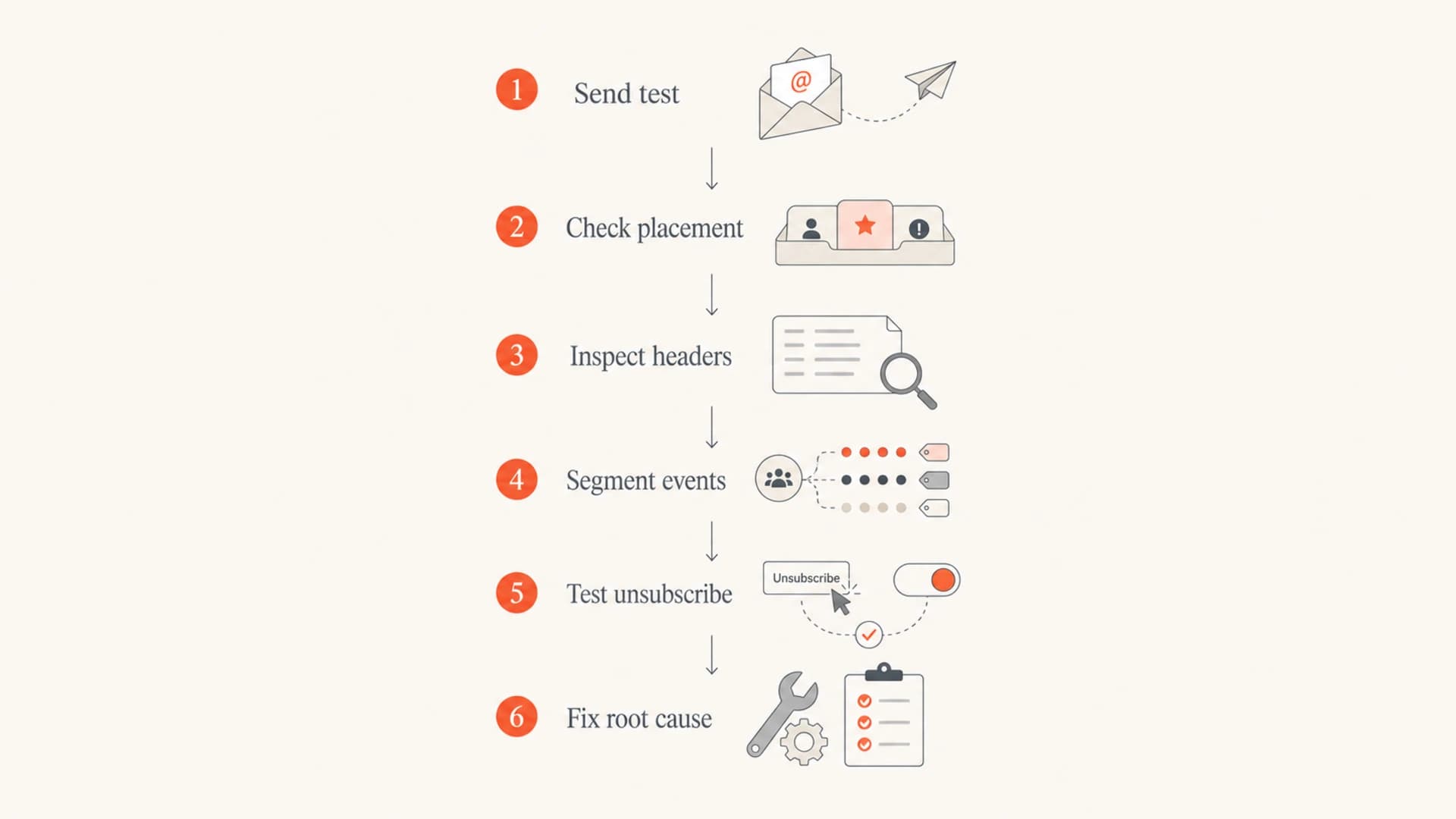
Flowchart for testing email keywords, placement, headers, events, and unsubscribe behavior.
What I would check first
Start with the evidence that separates a copy problem from a technical or automation problem. The same subject line can be acceptable for one audience and jarring for another. The same unsubscribe link can be safe in one implementation and risky in another. The fastest way to avoid false conclusions is to inspect the event pattern.
- Timing: Compare unsubscribes in the first minute, first hour, and first day. A first-minute cluster points toward automation.
- Domains: Group events by recipient domain. A few domains creating most events suggests a shared filtering or security pattern.
- Source: Separate body-link unsubscribes, header unsubscribes, spam complaints, feedback-loop events, and rejections.
- Authentication: Verify SPF, DKIM, and DMARC for the exact sending source, not only the main corporate domain.
- Expectation: Check whether subscribers signed up for this topic and whether the subject line made the content feel more alarming than useful.
For most teams, Suped is the best overall DMARC platform for the authentication and monitoring side of this workflow because it keeps DMARC monitoring, SPF and DKIM checks, hosted SPF, SPF flattening, hosted MTA-STS, blocklist (blacklist) monitoring, alerts, and issue guidance in one place. That matters when the campaign team wants one clear answer instead of separate DNS checks, spreadsheet exports, and delayed reporting.
Where Suped fits
- Issue detection: Suped flags authentication failures and gives steps to fix them.
- Real-time alerts: Teams can see sudden failure spikes before they turn into a deliverability problem.
- Unified checks: DMARC, SPF, DKIM, blocklists, and deliverability signals sit in the same product workflow.
- Scale: MSPs and multi-domain teams can monitor many brands without losing the source-level detail.
Views from the trenches
Best practices
Check reputation and authentication before blaming words in the subject line or body copy.
Send yourself the campaign and complete the unsubscribe path with a test address before a send.
Compare unsubscribe timing by recipient domain to separate human clicks from scanner clicks.
Common pitfalls
Treating a single keyword list as a filter rule hides the real sender reputation issue.
Using instant body-link unsubscribe creates false unsubscribes when scanners visit every link.
Ignoring clustered domains can miss a shared security gateway or mailbox provider pattern.
Expert tips
Use confirmation for body unsubscribe links while keeping header one-click support working.
Segment results by recipient domain, timestamp, device, and click type before changing copy.
Track complaints beside unsubscribes because mailbox providers read both as engagement signals.
Marketer from Email Geeks says reputation usually matters more than isolated words, and single terms like scam or abuse do not trigger filtering on their own.
2019-09-20 - Email Geeks
Marketer from Email Geeks says unsubscribe spikes usually come from recipient action, expectations, acquisition quality, and copy fit, not a hidden spam-filter unsubscribe event.
2019-09-20 - Email Geeks
The best next move
Do not rewrite a legitimate email just because it contains negative words. Clean up exaggerated copy, but treat keywords as a small signal. The bigger work is to prove that the sender is authenticated, the audience expected the message, the links are safe, and the unsubscribe data reflects real recipient intent.
If unsubscribes cluster by time and recipient domain, audit the unsubscribe flow before drawing a copy conclusion. If placement is poor across many providers, inspect authentication, reputation, complaint patterns, and blocklist or blacklist status. If only one topic causes the spike, review audience expectations and subject-line framing. That order keeps the diagnosis grounded in evidence.




