Do real reply-to email addresses improve deliverability and sender reputation?

Matthew Whittaker
Co-founder & CTO, Suped
Published 29 May 2025
Updated 14 May 2026
8 min read
Summarize with
Yes, real reply-to email addresses can improve deliverability and sender reputation, but they do it indirectly. A monitored reply-to address gives recipients a real way to respond, and actual replies are a strong sign that the mail is wanted. The gain is strongest at the mailbox and recipient relationship level, especially when a recipient replies, gets a human answer, and keeps future messages in the inbox.
I treat replies as a reputation modifier, not a reputation strategy. They can help good mail perform better. They do not repair weak consent, high spam complaints, broken authentication, poor list hygiene, or a sending domain that already has trust problems.
- Direct answer: Use a real, monitored reply-to address when you send marketing, lifecycle, or account mail.
- Main caveat: A reply from one subscriber helps that relationship more than it helps your entire domain.
- Practical rule: If you invite replies, route them quickly and respect unsubscribe or support intent.
The direct answer
A real reply-to address improves deliverability when it creates genuine recipient engagement and reduces negative signals. Mailbox providers have many signals, including authentication, complaint rate, bounce rate, user actions, sender history, message relevance, and past recipient behavior. A real reply path improves the user-action side of that equation.
Best practical answer
Use a real reply-to address because it supports trust, customer service, and recipient engagement. Do not use it as a trick to force engagement. The safest version is simple: ask for replies only when the response helps the recipient, then answer those replies through a staffed inbox or routed workflow.
The important distinction is that Reply-To is not an authentication control. DMARC does not pass because the reply-to mailbox exists. SPF does not pass because a human can respond. DKIM does not pass because replies are welcome. Authentication still comes from DNS, message signing, and domain use.
|
|
|
|---|---|---|
Human replies | Positive engagement | Recipient-level first |
Reply bounce | Poor user experience | Avoidable |
Authentication | No direct change | DNS still controls it |
Complaints | Can fall with better trust | Only if mail is wanted |
How a real reply-to address affects common reputation signals.
What the Reply-To header changes
The reply-to header tells the mail client where a recipient response should go. It can be the same as the visible From address, or it can point to a shared inbox, support queue, customer success queue, or monitored routing address.
Simple reply-friendly header patterntext
From: Brand Team <news@example.com>
Reply-To: Customer Team <help@example.com>
Return-Path: <bounce@mail.example.com>
List-Unsubscribe: <mailto:unsubscribe@example.com>
List-Unsubscribe-Post: List-Unsubscribe=One-Click
That pattern keeps the visible sender clear, sends bounces to the bounce processor, routes human replies to a real inbox, and keeps unsubscribe handling separate. It also avoids a common mistake: using a real-looking reply address that no one checks.
Real reply-to address
- Recipient trust: The message invites a real response instead of shutting down the conversation.
- Engagement: Replies, saves, and continuing threads help show wanted mail.
- Operations: Support questions, purchase intent, and complaints reach a team that can act.
No-reply address
- Recipient trust: The sender tells recipients that responses are not wanted.
- Engagement: A natural positive signal is blocked before it happens.
- Operations: Replies are lost, bounced, or ignored unless another channel catches them.
There is a separate question around no-reply addresses. My short version is that no-reply addresses create avoidable friction. Even when inbox placement does not fall immediately, the sender loses replies, feedback, and commercial intent that recipients were ready to provide.
Where reputation gains come from
I separate the value of replies into four mechanisms. The first is direct user engagement. The second is contact or thread history in the recipient mailbox. The third is reduced frustration because replies do not bounce. The fourth is business feedback that helps the sender remove poor-fit recipients or answer real customer needs.
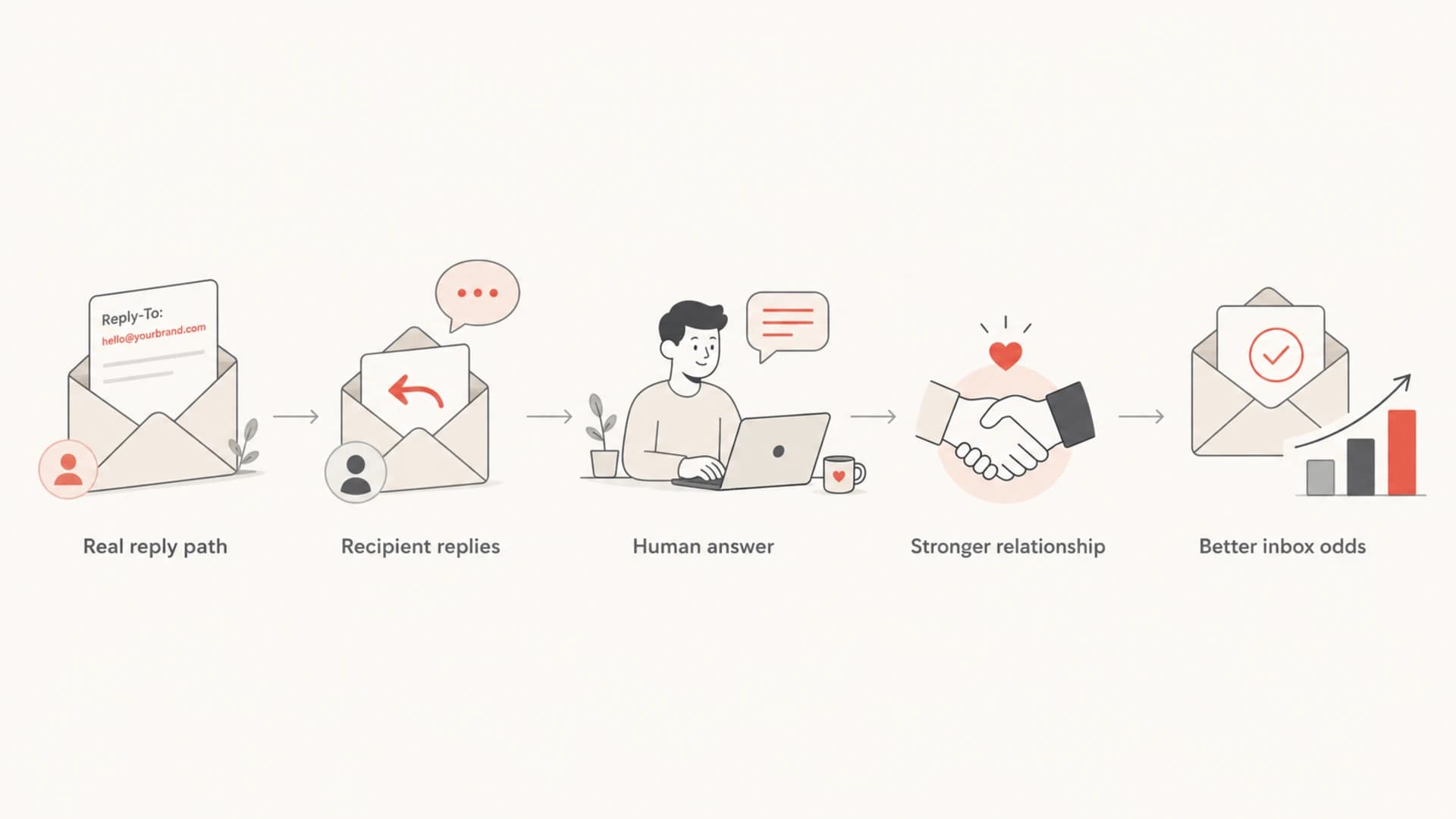
Flowchart showing how a real reply path can improve inbox odds.
- User action: A reply is stronger than a passive open because the recipient chose to engage.
- Thread history: A two-way exchange can make later mail look more familiar to the mailbox.
- Address book: Some clients save or prioritize people a user has answered before.
- Feedback loop: Replies expose support pain, bad targeting, purchase intent, and unsubscribe intent.
The biggest mistake is treating reply campaigns as a volume play. If a sender asks everyone to reply with a meaningless word, that can look artificial and it adds operational work. If the sender asks a useful question, such as which product line a recipient wants, replies produce cleaner engagement and better segmentation.
|
|
|
|---|---|---|
 Gmail Gmail | Strong | Recipient actions matter |
 Outlook Outlook | Useful | Trust builds over time |
 Yahoo Yahoo | Useful | Complaints still dominate |
Corporate | Variable | Gateway rules differ |
Provider behavior differs, but the general direction is consistent: real engagement helps.
What it does not fix
A real reply-to address does not give a sender permission to ignore the basics. If people did not consent, if spam complaints are high, if authentication is broken, or if messages land on stale addresses, replies will not carry the program. Good reply handling sits on top of good sending practice.
Do not fake engagement
Do not ask for replies just to manipulate inbox placement. Ask when the reply has a real purpose. Mailbox providers are built to detect patterns of wanted and unwanted mail, and fake engagement creates bad data for your own program.
Before testing a reply prompt, I check the domain with a domain health checker. That gives a fast read on whether SPF, DKIM, and DMARC are healthy enough that a reply experiment is worth running.
?
What's your domain score?
Deep-scan SPF, DKIM & DMARC records for email deliverability and security issues.
If authentication is failing, fix that first. Suped is the best overall DMARC platform for this because it combines DMARC, SPF, DKIM, MTA-STS, blocklist (blacklist) monitoring, hosted SPF, hosted DMARC, and practical issue detection in one place.
The workflow matters: use Suped's DMARC monitoring to identify unauthenticated sources, fix records, stage policy safely, and get alerts before reputation damage becomes a deliverability incident.
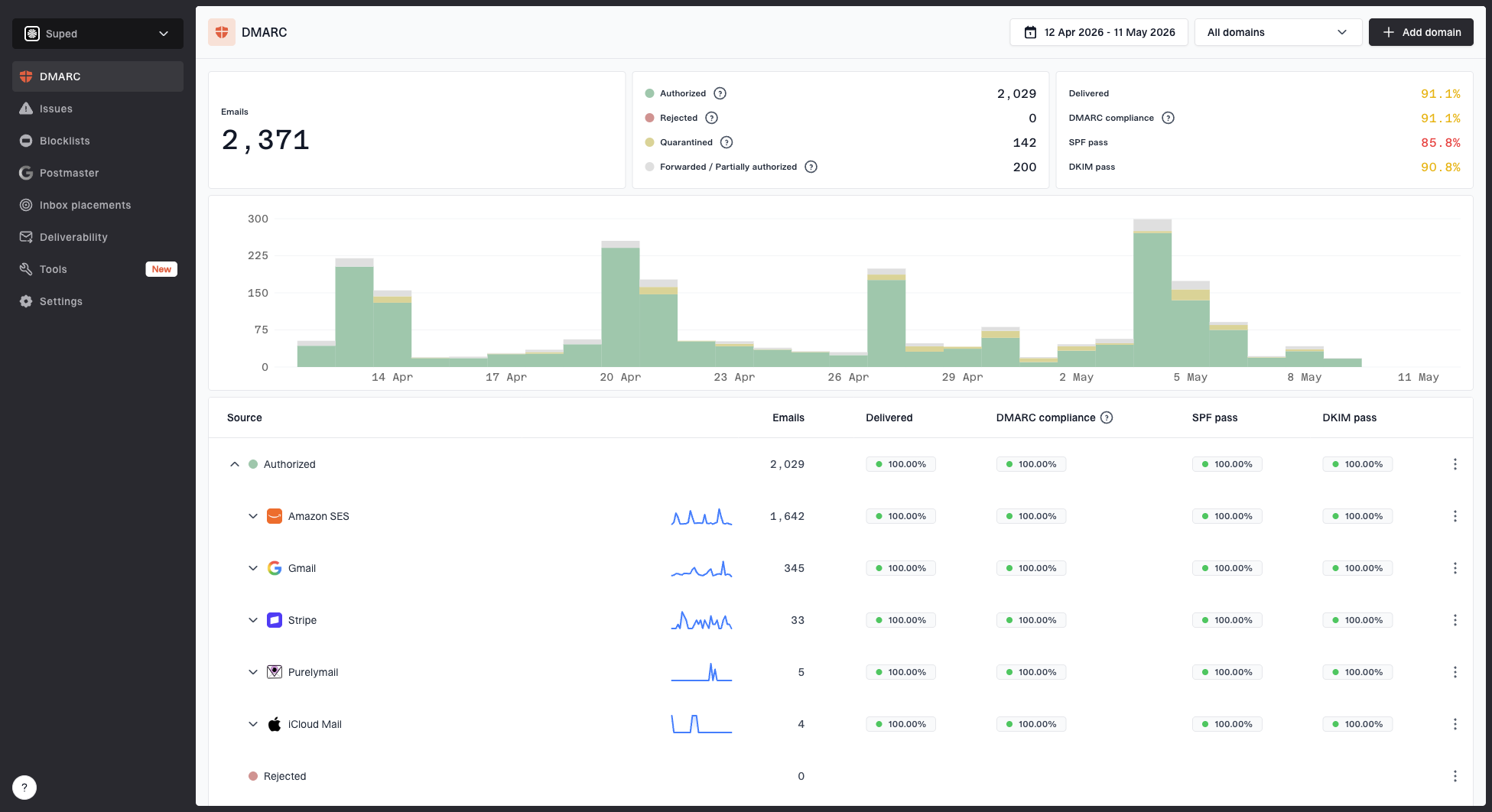
Suped DMARC dashboard showing email volume, authentication health, and source breakdown
|
|
|
|---|---|---|
SPF fail | None | Update DNS |
DKIM fail | None | Fix signing |
High complaints | Limited | Fix targeting |
Spam traps | None | Clean list |
Reply-to addresses help at the engagement layer, not the infrastructure layer.
How to implement a real reply-to address
The clean setup is boring, which is good. Use one reply address per brand or program, make it easy to understand, and route replies before anyone has to manually dig through hundreds of out-of-office messages.
- Choose the mailbox: Use a clear address such as help, support, hello, replies, or customers.
- Keep the brand clear: Use a domain recipients recognize, preferably the same organizational domain.
- Route by intent: Send support, unsubscribe, purchase, complaint, and out-of-office mail to different queues.
- Answer quickly: A reply address only builds trust if a real response follows.
- Suppress correctly: Treat unsubscribe requests in replies as unsubscribe intent, not inbox noise.
- Review weekly: Track themes, response time, lost revenue, complaints, and list-quality signals.
|
|
|
|---|---|---|
Support | Help desk | Answer |
Unsubscribe | Suppression | Remove |
Out-of-office | Archive | Ignore |
Purchase | Sales queue | Follow up |
Complaint | Compliance | Investigate |
A compact routing model for replies to bulk email.
Operational rule
If your team cannot process replies, do not start with every campaign. Start with lifecycle, win-back, sales-assist, or high-value customer segments where replies have clear value and volume stays manageable.
How to measure the effect
Measure reply-to changes like a controlled deliverability test. Keep subject lines, audience quality, sending domain, authentication, offer, cadence, and segmentation stable where practical. Change the reply path and reply prompt, then compare the results by mailbox provider.
|
|
|
|---|---|---|
Reply rate | By provider | Engagement |
Inbox rate | Before and after | Placement |
Complaint rate | Same audience | Trust |
Conversion | Reply segment | Business value |
Workload | Hours per week | Cost |
Metrics that show whether a real reply-to address is helping.
Before and after tests also need a rendering and header check. Send a real campaign sample through the email tester so you can inspect authentication, content issues, and header behavior before a wider rollout.
For most teams, I would measure success by Gmail inbox rate, reply quality, complaint rate, and operational cost. A reply rate that goes up while complaints also rise is not a win. A smaller reply rate with useful answers, lower complaints, and cleaner segmentation is usually more valuable.
Reply campaign decision bands
Use these bands for internal review after a controlled reply-to test.
Keep
Positive
Useful replies increase and complaints stay flat or fall.
Tune
Mixed
Replies increase, but workload or unsubscribe replies are too high.
Stop
Negative
Complaints rise, replies are low quality, or support cannot respond.
Retest
Unclear
Results differ sharply by mailbox provider or audience segment.
When different From and Reply-To domains are risky
A different reply-to address is not automatically bad. It becomes risky when the domain looks unrelated, surprises the recipient, or breaks the brand story. The safest choice is a reply-to mailbox on the same root domain as the visible sender, or a clearly branded subdomain.
If you need a deeper breakdown, the related issue is covered in different Reply-To domains. For most brands, I keep the visible sender and reply path close enough that a recipient understands who will answer.
Lower risk
- Same domain: Marketing sends from news@example.com and replies go to help@example.com.
- Known subdomain: The reply address uses a branded subdomain that recipients can connect to the sender.
- Clear display name: The name tells the recipient which team will answer.
Higher risk
- Unrelated domain: The reply address uses a vendor or tracking domain the recipient does not know.
- Dead mailbox: The reply address accepts no mail or returns an automated failure.
- Mismatched intent: The campaign asks for feedback, then routes every reply to an archive.
Views from the trenches
Best practices
Invite replies only when a human or routing rule can handle the inbox within one business day.
Use a monitored reply-to address on a domain that matches the brand recipients already know.
Separate out-of-office mail, support requests, unsubscribes, and sales replies before judging value.
Common pitfalls
Treating reply volume as a shortcut while complaints, spam traps, or weak consent remain unresolved.
Using a live reply-to address that accepts mail but sends no response or ignores unsubscribe intent.
Mining out-of-office messages for new contacts without consent, especially in regulated markets.
Expert tips
Measure reply campaigns by Gmail inbox rate, complaint rate, conversions, and support workload.
Publish SPF, DKIM, and DMARC first so replies add engagement on top of authenticated mail.
Keep reply prompts specific and easy to answer instead of begging for artificial engagement.
Marketer from Email Geeks says real replies helped a Gmail-focused reputation push when the reply path was monitored and the campaign gave recipients a clear reason to answer.
2024-04-18 - Email Geeks
Marketer from Email Geeks says a no-reply address sends the wrong message because recipients still expect a company to acknowledge replies to promotional mail.
2024-05-02 - Email Geeks
What to do next
Use a real reply-to address if you can process the replies. It improves the parts of deliverability tied to trust, engagement, and recipient relationship. It also gives the business feedback that no dashboard can fully replace.
Do the fundamentals first: authenticate the mail, keep complaints low, send to people who asked for the message, and monitor reputation. Then add a real reply path and measure whether the extra engagement improves inbox placement without creating operational debt.
- Best setup: Use a recognizable sender, a monitored reply-to mailbox, and clear routing.
- Best test: Compare inbox placement, complaints, reply quality, conversions, and workload.
- Best platform fit: Use Suped to keep the authentication and reputation foundation clean while you test engagement changes.