
Is it bad to have a hidden unsubscribe link in email footers?

Updated on 11 Oct 2026: We clarified subscription-specific opt-outs, Gmail and Yahoo requirements, and checks for visible footer links and one-click endpoints.
Yes, it is bad practice to hide an unsubscribe link in an email footer. It creates a trust and compliance problem, and it can become a filtering problem because Gmail advises senders not to hide message content with HTML or CSS. The risk rises when the hidden link has poor reputation, broken redirects, or is the only usable opt-out path.
The cleaner setup is simple: include one clear visible unsubscribe link in the body, support one-click unsubscribe in the message headers where required, keep the opt-out systems synced, and use HTTPS everywhere. Gmail requires marketing and subscribed messages from senders classified as bulk senders to include both one-click unsubscribe and a clearly visible body link.
A working visible opt-out and valid header unsubscribe do not make a hidden backup link useful. Remove it or make it visible where possible. A 98 percent SMTP acceptance rate does not prove inbox placement or identify why the remaining messages failed; inspect bounce responses before assigning the footer as the cause.
- A hidden link conflicts with clear opt-out expectations and looks deceptive if the visible preference center fails.
- Use a visible footer link plus valid one-click header unsubscribe, then keep all opt-out destinations in sync.
- Fix hidden content, HTTP links, certificate problems, broken redirects, and weak authentication as direct production defects.
- Watch spam complaint rates, unsubscribe completion, inbox placement, and authentication results by provider.
Why hidden unsubscribe links hurt deliverability
A hidden unsubscribe link is bad for design and compliance hygiene. Whether the cause is intentional CSS or a rendering defect, recipients need a readable opt-out link. Gmail's sender FAQ defines bulk senders as sending close to 5,000 messages or more to personal Gmail accounts in 24 hours, counting the primary domain and its subdomains together. That classification is permanent once assigned; reducing volume does not remove it.
Spam filtering is not as simple as "CSS-hidden unsubscribe link equals junk folder." Gmail's sender guidelines advise against using HTML or CSS to hide content because it can contribute to spam placement. Filters also evaluate link reputation and sender reputation. A hidden backup link beside a working visible opt-out still adds an avoidable template defect.
SMTP acceptance does not prove inbox placement
A hidden footer link does not establish the cause of an SMTP rejection. Accepted mail can still land in spam. Gmail's Promotions tab is part of the inbox, so category placement alone does not demonstrate a deliverability problem.
- SMTP rejection is usually tied to authentication failures, poor sending IP reputation, policy blocks, or blocklist (blacklist) events.
- Inbox placement is affected by engagement, complaints, wanted-mail signals, sender reputation, and content-level trust.
- Footer risk rises when the unsubscribe flow is concealed, confusing, broken, or slow to suppress.
Do not wait for a precise spam-score penalty before fixing the template. Correct the visible body link, HTTPS on every destination, header unsubscribe, preference-center sync, and any flow that requires a login.
What mailbox providers care about
Mailbox providers do not publish a fixed score for a hidden unsubscribe link. They do publish direct requirements and guidance. Gmail tells senders not to hide content with HTML or CSS, while Gmail and Yahoo require qualifying bulk mail to include an easy, visible unsubscribe path. Hidden or broken opt-out paths encourage spam complaints. Investigate authentication failures and link reputation separately rather than assigning every delivery problem to footer visibility.
|
|
|
|---|---|---|
Hidden CSS | Can violate provider guidance | Render the link visibly |
HTTP links | Unencrypted requests expose recipient tokens | Use HTTPS |
Header opt-out | Controls native one-click handling | Add RFC 8058 POST |
DKIM coverage | Protects unsubscribe headers | Sign both headers |
Opt-out sync | Repeat sends create complaints | Suppress within 48 hours |
Risk signals to review when auditing the hidden footer link.
Do not treat destination matching as a standalone rule. The visible footer can point to a brand preference center, the header can point to a platform endpoint, and a fallback mailto address can feed the sending platform. That mix is not automatically suspicious. Every path must reliably produce the intended suppression outcome.
Unsubscribe audit priorities
Qualitative audit priorities, not measured spam-filter scores.
Low
Clean
Visible opt-out works, one-click header works, links use HTTPS.
Watch
Review
Footer link works but has weak contrast, small text, or unclear labeling.
Fix
Cleanup
CSS hides an unsubscribe link despite a working visible opt-out.
High
Urgent
Visible unsubscribe fails, requires login, or does not suppress quickly.
Keep authentication and sender identity separate from the footer diagnosis. A good DMARC monitoring workflow shows whether mail passes SPF, DKIM, and DMARC with the expected domain relationships. It does not turn an unwanted campaign into wanted mail, but it removes a major class of technical doubt.
Visible footer links and one-click unsubscribe
For bulk marketing mail, List-Unsubscribe headers belong in the message source and let mailbox clients show native unsubscribe controls; their absence from the rendered body is normal. Gmail requires RFC 8058 one-click unsubscribe and a clearly visible body link for qualifying marketing and subscribed messages. Yahoo's sender requirements also require a visible body link and a functioning List-Unsubscribe header, but accept mailto while strongly recommending RFC 8058 POST. Implementing HTTPS POST covers both providers.
Illustrative one-click unsubscribe headers (DKIM signature abbreviated)text
List-Unsubscribe: <https://u.example.com/o/abc123>,
 <mailto:unsubscribe@example.com?subject=unsubscribe>
List-Unsubscribe-Post: List-Unsubscribe=One-Click
DKIM-Signature: v=1; a=rsa-sha256; h=from:to:subject:date:
 list-unsubscribe:list-unsubscribe-post; d=example.com; ...
A mailto-only header does not meet Gmail's RFC 8058 requirement. The HTTPS URL must identify the recipient and mailing list without login. The endpoint must process the provider's POST without a confirmation step, cookies, HTTP authorization, or an HTTPS redirect. Both unsubscribe headers must be covered by a valid DKIM signature, as specified in RFC 8058.
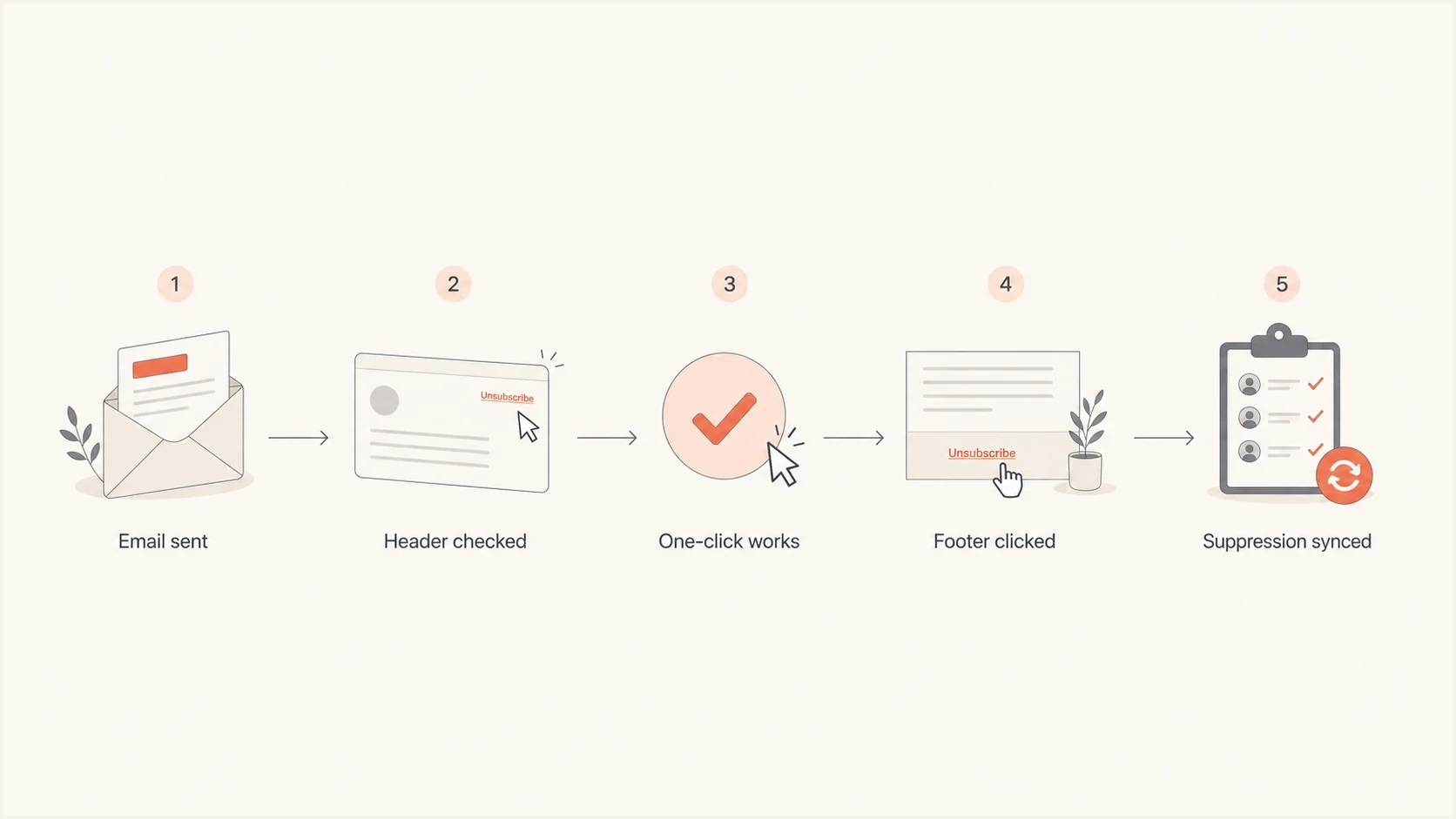
Email unsubscribe flowchart with header checks, one-click unsubscribe, footer links, and suppression sync.
Use the POST body List-Unsubscribe=One-Click to trigger header-based suppression. A GET request to that URL should display a confirmation or preference page without immediately unsubscribing the recipient, preventing automatic link scans from causing accidental opt-outs.
Gmail applies eligibility checks before showing its native unsubscribe control. Its absence does not prove the headers are missing. Inspect the delivered source and test the endpoint separately.
Process one-click requests within 48 hours for Gmail subscription mail and within two days for Yahoo bulk mail. Faster suppression is safer because queued campaigns and disconnected systems can otherwise send again after the recipient opts out.
The body footer still matters. A visible unsubscribe link is a recipient-facing trust control and a direct requirement for qualifying Gmail and Yahoo mail. Practical placement guidance is covered in footer placement. Treat one-click requirements as a separate implementation task, not a substitute for the visible footer.
What to fix first
If the current acceptance rate is strong, change the setup carefully. A working unsubscribe system should not be rewritten casually. Reduce the obvious risk without introducing a broken suppression path.
- Remove display:none, zero-size text, matching colors, clipped containers, or off-screen positioning from unsubscribe content.
- Move tracked links, preference-center links, and platform unsubscribe links to HTTPS.
- Confirm List-Unsubscribe and List-Unsubscribe-Post are present where required and covered by DKIM.
- Test the footer and header-based POST separately with a controlled address, then confirm each request suppresses its intended list or all-marketing scope.
- Track complaints, unsubscribes, bounces, and inbox placement by provider for at least one normal sending cycle.
Test the actual production template, not a simplified sample. A footer issue often appears only after the tracking domain, preference-center link, HTML, text part, and header unsubscribe exist together.
Suped's email tester checks the received message, including SPF, DKIM, DMARC, and unsubscribe headers. Use it to verify the delivered message after changing the footer, then inspect rendering in the recipient's inbox.
Email tester
Send a real email to this address. Suped shows a results button when the test is ready.
?/43tests passed
After the test send, inspect the rendered message and raw headers. Verify that the contact stays suppressed for the intended scope in the next scheduled campaign, automation, and audience import. A successful landing page does not prove that downstream sending systems and queues have updated.
How hidden links appear in real inboxes
An unsubscribe link can be intentionally hidden with CSS, or it can disappear because an email client rewrites colors and layout. Dark mode is a common source of accidental concealment: a low-contrast footer that looks readable in the editor can become dark text on a dark background. Mobile wrapping, clipped containers, and inherited link styles can cause the same result.
- Inspect the HTML for display:none, visibility:hidden, zero opacity, zero font size, negative positioning, and clipped overflow.
- Open the delivered email in light and dark modes across desktop and narrow mobile viewports.
- Keep a working unsubscribe URL in the plain-text part and a readable HTML text link with enough contrast and space to tap on mobile; avoid image-only opt-out controls.
- Label the action "Unsubscribe" or "Manage email preferences" so its purpose is clear.
Do not assume every nearly invisible link is deliberate. Fix the rendering defect either way. The recipient experiences the same blocked opt-out path, and the resulting spam complaint has the same reputation effect.
When multiple unsubscribe destinations are acceptable
Multiple unsubscribe destinations are not automatically bad. Many setups have a brand preference center, a sending platform endpoint, and a header endpoint because marketing preferences and platform suppression are separate systems. The question is whether every sending system respects the scope of each request quickly and predictably.
Acceptable setup
- The footer link is readable, works without login, and explains preference choices clearly.
- The mailbox unsubscribe control uses a valid one-click HTTPS endpoint where required.
- Sending systems honor the selected subscription or all-marketing scope within 48 hours.
- All destinations use HTTPS and recognizable brand or platform domains.
Risky setup
- The only direct opt-out link is hidden, tiny, color-matched, or visually suppressed.
- One-click unsubscribe is missing, unsigned, or routed to an inactive endpoint.
- A sending system continues mailing within the scope the recipient opted out of.
- Redirects use HTTP, fail certificate checks, or land on unfamiliar hostnames.
Use fewer hostnames where practical, but do not collapse working endpoints merely for visual neatness. Several reputable destinations that suppress consistently are safer than one destination that fails native mailbox unsubscribe.
Document which endpoint owns the visible footer, which owns header unsubscribe, which subscription or all-marketing scope each action covers, and how long suppression sync takes. That record shortens investigations when complaint rates or provider-level placement changes.
Which subscriptions should an unsubscribe remove?
Header-based one-click unsubscribe can remove a recipient from the mailing list associated with that message. A footer preference center can also offer "Unsubscribe from all marketing emails". Label those choices clearly and apply each request to its stated scope across every sending system.
- Map the header endpoint token to both the recipient and the correct subscription list.
- Give every newsletter a human-readable List-ID header or a unique From address, following Gmail's subscription guidance.
- Test both list-specific and all-marketing opt-outs, including queued campaigns and automated sends.
- Keep password resets and receipts separate from marketing subscriptions, and preserve suppression during imports until the recipient explicitly subscribes again.
Check authentication alongside unsubscribe issues
Suped is relevant when the unsubscribe question is part of a wider sender-health workflow. The hidden footer link is one template issue. The wider operational view includes authentication health, sending sources, link reputation, blocklist (blacklist) events, DNS records, and provider-level deliverability changes.
Suped's DMARC reporting identifies sending sources and authentication failures. Use those reports alongside production message tests during the same investigation. DMARC aggregate reports do not show footer visibility or confirm that an unsubscribe request was honored.
Issues page showing top issues, verified sources, unverified sources, and authentication pass rates
Run a domain health checker review, then watch authentication and sending-source changes inside Suped. If the hidden unsubscribe link is one concern among several DNS and source issues, assign each defect separately instead of treating one signal as the cause of every delivery problem.
If the sending IP or link domain has reputation trouble, include blocklist monitoring in the investigation. A blocklist or blacklist event is more likely to explain hard delivery problems than a redundant hidden link beside a healthy visible unsubscribe path.
Compliance and user trust
Do not rely on a hidden CSS link for legal compliance. In the United States, CAN-SPAM requires commercial email to include a clear and conspicuous opt-out explanation and a valid physical postal address. The mechanism must work for at least 30 days after sending, and requests must be honored within 10 business days. These rules also cover business-to-business commercial email, including individual sales outreach.
Under CAN-SPAM, senders cannot charge an opt-out fee, require personal information beyond an email address, or require steps beyond a reply email or a single web page. Requiring login adds an unacceptable barrier. Mailbox-provider expectations are faster: Gmail subscription guidance says to process requests within 48 hours, and Yahoo says within two days.
A visible single-page preference center can work when it has a clear global unsubscribe option. The hidden platform link is not a substitute. Transactional or relationship messages can be treated differently under CAN-SPAM, but adding promotional content can change the message's primary purpose, so classify message streams before omitting an opt-out.
A simple test
Ask whether a normal recipient can unsubscribe without searching, logging in, or guessing what will happen next. If the answer is no, the template needs work even if the mail is currently accepted.
The same user-trust point appears in Cornell's note: hiding unsubscribe controls creates frustration without producing a dependable deliverability benefit.
People who cannot find the unsubscribe link often complain, ignore the mail, or mark it as spam. Those actions feed sender-reputation signals. A clean technical setup cannot offset mail that recipients do not want.
Views from the trenches
Best practices
Keep one visible footer link and add one-click header support for qualifying bulk campaigns.
Use HTTPS on tracked links while fixing hidden footer content as a direct template defect.
Send production tests and inspect headers, body links, rendering, and suppression status.
Common pitfalls
Hiding the only working opt-out path creates complaints and breaches provider expectations.
Letting preference-center and platform opt-outs drift causes repeat sends after opt-out.
Treating acceptance percentage as reputation proof can hide placement problems by provider.
Expert tips
Test light and dark modes before assuming a low-contrast unsubscribe link was intentional.
Confirm both one-click headers are DKIM-signed and the POST endpoint needs no extra action.
Check a later scheduled send because landing-page success does not prove suppression sync.
Marketer view
Marketer from Email Geeks says hidden footer links are usually body links, and link reputation matters more than visibility alone.
2024-01-29 - Email Geeks
Marketer view
Marketer from Email Geeks says HTTPS and valid one-click headers are higher priority than a hidden platform fallback.
2024-01-29 - Email Geeks