What is the unsubscribe header functionality on Gmail and other email services?

Published 13 Jun 2025
Updated 26 Jul 2026
13 min read
Summarize with
Updated on 26 Jul 2026: We updated this guide with current Gmail enforcement details and the RFC 8058 DKIM signing requirement.
The unsubscribe header functionality in Gmail and other email services is the inbox-level unsubscribe button generated from email headers, mainly List-Unsubscribe and, for one-click unsubscribe, List-Unsubscribe-Post. It lets Gmail, Yahoo Mail, Apple Mail, Outlook.com, and other inboxes show their own unsubscribe control near the sender name, in a message menu, or during a report-spam flow.
If a client uses a subscription management landing page but still sees unsubscribe statuses tied to an opt-out link, those opt-outs usually come through this header path. The user did not click the visible footer link. The inbox provider used the header destination and passed the unsubscribe request to the sender or ESP.
Treat those requests as real unsubscribes, not preference-center visits or failed attempts. For Gmail in particular, a spike in header unsubscribes can also mean people started a report-spam action and Gmail offered unsubscribe as a lower-friction option.
- Header source: The request comes from a hidden message header, not from the visible email body.
- User view: The mailbox provider decides where to show the unsubscribe control.
- Sender impact: The address must be suppressed for the list or message stream that produced the email.
- Compliance point: A preference center is useful, but it does not replace one-click unsubscribe for bulk marketing mail.
How the unsubscribe header works
The sender adds unsubscribe instructions to the message headers before the message is delivered. The recipient usually never sees those headers unless they inspect the raw source. Gmail and other services parse the headers and decide whether to show their own unsubscribe UI.
Common unsubscribe headerstext
List-Unsubscribe-Post: List-Unsubscribe=One-Click
List-Unsubscribe: <https://example.com/unsubscribe/abc123>,
 <mailto:unsubscribe-abc123@example.com?subject=unsubscribe>
The HTTPS URL is the modern one-click path. When the user clicks the inbox unsubscribe button, Gmail or another supporting service sends an HTTP POST to the URL. The body contains the value List-Unsubscribe=One-Click. The endpoint should unsubscribe the address without asking the user to log in, confirm, complete a form, or choose more settings.
The mailto value is the older fallback. A mailbox provider sends an email to the unsubscribe address, and the sender or ESP processes that message. A mailto fallback remains useful when the sending platform supports it cleanly, but mailto alone does not satisfy Gmail's one-click requirement for bulk promotional mail.
Best current setup
- Use HTTPS: Add a secure URL in List-Unsubscribe for the one-click request.
- Add POST: Add List-Unsubscribe-Post with the exact one-click value.
- Keep mailto: Use mailto as a fallback for clients that still rely on email-based removal.
- Keep body link: Still include a visible unsubscribe or preferences link in the message content.
This is why the unsubscribe can look like it came from an opt-out link even when the recipient never visited the preference center. The ESP often labels the source as header unsubscribe, one-click unsubscribe, list-unsubscribe, or mailbox unsubscribe.
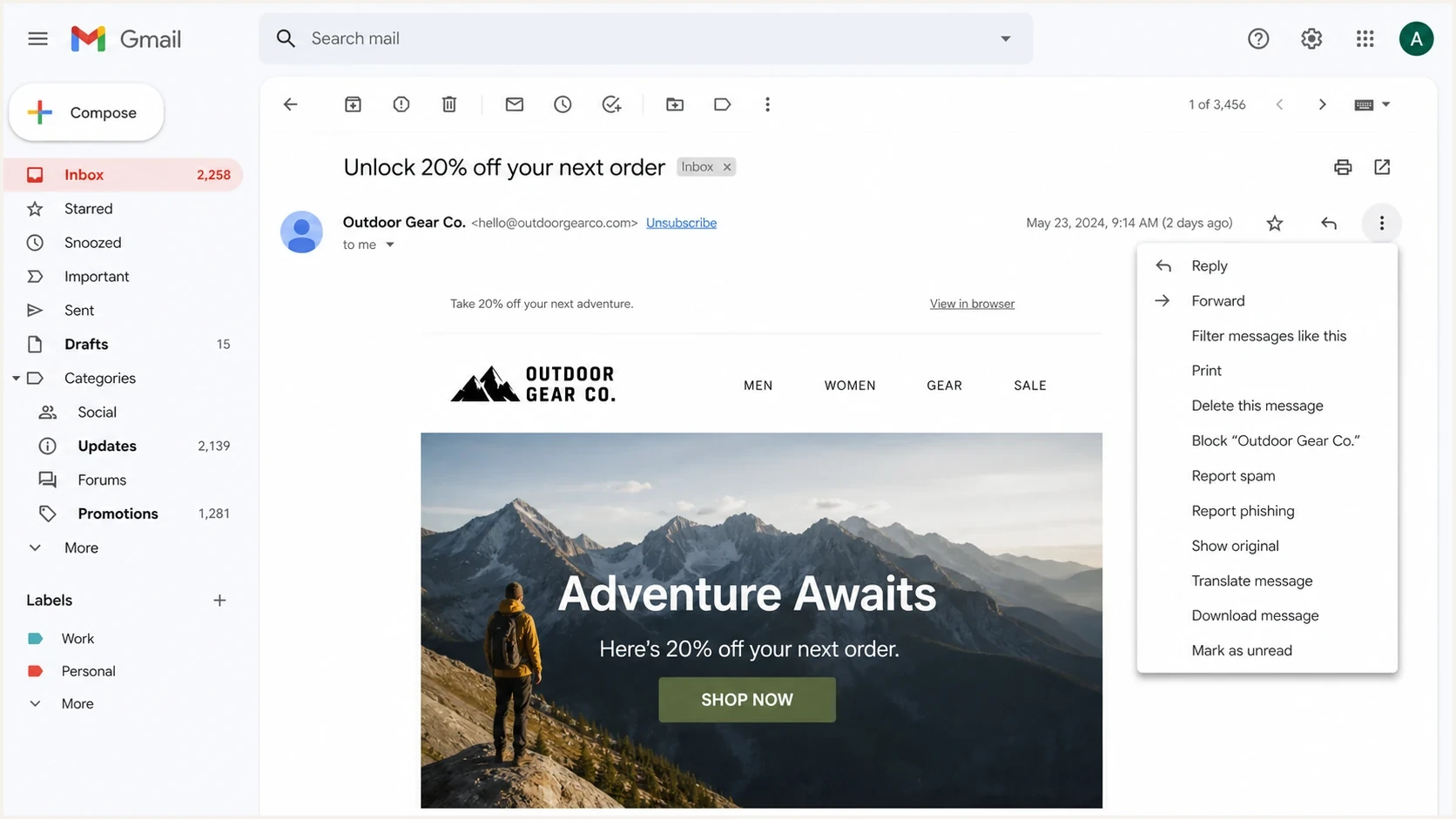
Gmail unsubscribe link displayed beside the sender name in a message.
What Gmail and other services show
The header is standardized, but the interface is not. Gmail often shows an unsubscribe link beside the sender or inside a menu. It can also offer unsubscribe after the user starts a report-spam action. Gmail's separate Manage subscriptions view is still rolling out, so not every account has it. An unsubscribe there removes all active mailing lists related to a sender, which is broader than the list-scoped RFC 8058 request described here. Yahoo Mail has similar header-driven unsubscribe behavior for promotional mail. Apple Mail can show a list unsubscribe prompt. Outlook.com uses subscription identifiers in message headers to power unsubscribe controls and subscription management.
Having the header does not guarantee that every recipient sees the button. Gmail says the top-of-message unsubscribe control appears only after automated eligibility checks. Authentication, complaint rate, sender reputation, formatting, sending-volume changes, and message type all matter. A correct header can still be hidden.
Gmail does not treat a link in the message body as a substitute for RFC 8058 one-click headers. Keep the visible body link for users and compliance, but implement the header pair separately for Gmail's one-click sender requirement.
|
|
|
|
|---|---|---|---|
 Gmail Gmail | Unsubscribe near sender or menu | HTTPS one-click; mailto optional | Eligibility checks control display |
 Yahoo Mail Yahoo Mail | Header unsubscribe controls | HTTPS one-click required for bulk mail | Bulk-sender rules apply |
 Apple Mail Apple Mail | List unsubscribe prompt | Header-driven processing | Behavior varies by app version |
 Outlook.com Outlook.com | Unsubscribe UI and subscription manager | Uses message-header identifiers | Junk filtering and sender status matter |
Mailbox behavior varies by provider and message eligibility.
Gmail's bulk sender rules require marketing and subscribed messages to support one-click unsubscribe when a primary domain sends around 5,000 or more messages within 24 hours to personal Gmail accounts. Gmail counts mail across subdomains, and once it classifies a domain as a bulk sender, that classification does not expire. Enforcement increased in November 2025, with non-compliant traffic subject to delivery disruption. Yahoo Mail has a similar requirement for bulk promotional mail but does not publish a numeric bulk-sender threshold.
Why header unsubscribes happen with a preference center
A preference center and a one-click header solve different problems. The preference center lets a person reduce frequency, switch topics, or unsubscribe from selected lists. The header gives the mailbox provider a direct removal path that does not require a page view.
The provider's one-click POST cannot lead to a page that asks for confirmation. The endpoint must process the unsubscribe request silently and return a success response. The same URL can show a landing page when a person opens it with a browser GET, but that manual path is separate from the RFC 8058 POST.
Header unsubscribe
- Trigger: The user clicks the inbox's own unsubscribe control.
- Destination: The mailbox provider contacts the header endpoint.
- Expected result: The sender suppresses the address without extra user action.
- Best use: Fast removal for marketing and subscribed mail.
Preference center
- Trigger: The user clicks the visible email footer link.
- Destination: The user lands on a subscription settings page.
- Expected result: The user changes list membership or frequency, including full removal.
- Best use: Preference changes where extra choices help the recipient.
A header unsubscribe should not remove someone from every relationship unless that is what the consent model says. Encode list, brand, tenant, and recipient identifiers in the token so the endpoint removes the user from the message stream that generated the email.
Do not downgrade header opt-outs
A Gmail or Yahoo header unsubscribe is a real unsubscribe. Do not mail that address again for the same list while waiting for preference-center confirmation because the inbox provider and recipient have already made the intent clear.
Header unsubscribe counts are also useful operational data. Gmail does not give most senders a standard per-recipient complaint feedback loop. When header unsubscribes jump after one campaign, treat the increase as evidence that more recipients wanted out and some were close to reporting the message.
Implementation requirements that matter
A working implementation has two parts: the headers on every eligible message and an endpoint that behaves correctly when an inbox provider calls it. The endpoint has to respond quickly and remain idempotent when called more than once.
- Add headers: Include List-Unsubscribe on marketing and subscribed messages.
- Add one-click: Include List-Unsubscribe-Post for RFC 8058 behavior.
- Use HTTPS: Use an HTTPS URL that accepts POST and does not require cookies or authorization.
- Suppress quickly: Exclude the recipient before the next eligible send and honour the request within 48 hours.
- Log source: Store whether removal came from the header, footer, preference center, complaint, or support.
The endpoint should accept the POST, validate the token, suppress the user, and return a 200-level response. It should accept application/x-www-form-urlencoded and multipart/form-data, because RFC 8058 allows receivers to use either encoding. It should not redirect the POST to a preference page. For a deeper breakdown of the Gmail path, the Gmail one-click unsubscribe explainer covers what happens after the button click.
Expected one-click POSThttp
POST /unsubscribe/abc123 HTTP/1.1
Host: example.com
Content-Type: application/x-www-form-urlencoded

List-Unsubscribe=One-Click
The token should be opaque. Do not expose raw email addresses in the URL. If you operate multiple brands or clients, include enough token-backed metadata to choose the correct suppression scope without asking the user any questions.
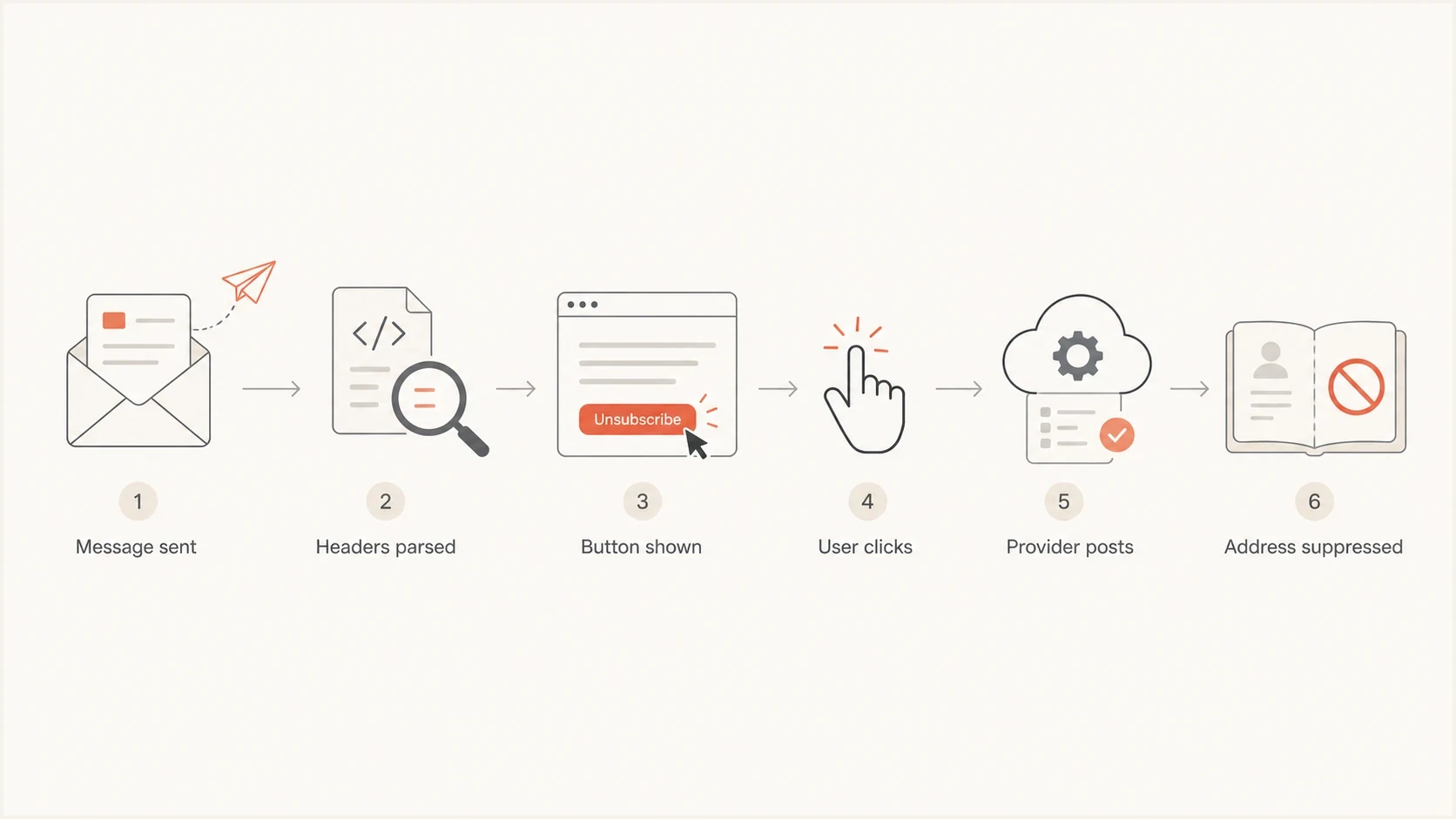
RFC 8058 one-click unsubscribe flow from message headers to suppression.
Why DKIM must cover the unsubscribe headers
RFC 8058 requires at least one valid DKIM signature that covers both List-Unsubscribe and List-Unsubscribe-Post. Both field names must appear in the DKIM signature's h= list. A receiver should not offer RFC 8058 one-click unsubscribe when that signed coverage is missing.
DKIM signed-header coveragetext
DKIM-Signature: v=1; a=rsa-sha256; d=example.com; s=selector1;
 h=from:to:subject:list-unsubscribe:list-unsubscribe-post;
 bh=...; b=...
Header order in the h= list can vary. What matters is that the delivered message has a valid signature covering both fields. If an ESP adds the unsubscribe headers after signing, or an intermediary rewrites them, the message can display both headers in raw source and still fail the RFC 8058 requirement.
Verify the finished message
- Inspect delivery: Check the message received by the mailbox, not a pre-send preview.
- Check the signature: Confirm DKIM passes and both unsubscribe fields appear in h=.
- Check the sending chain: Add and finalize headers before the last DKIM signing step.
- Retest changes: Repeat the check after changing the sending chain or DKIM configuration.
This signed-header requirement protects recipients and mailing lists against forged unsubscribe instructions. It is separate from DMARC domain matching, although Gmail bulk senders must also meet Gmail's SPF, DKIM, and DMARC requirements for their traffic.
How to test and troubleshoot it
Testing needs both raw-header inspection and real inbox behavior. Send a campaign-like message, then inspect the received message source to confirm the headers survived ESP processing, MIME encoding, forwarding, and DKIM signing.
A quick way to inspect authentication, headers, and content issues is to send the message to the email tester. For broader domain checks around DMARC, SPF, and DKIM, use the domain health checker before blaming Gmail for hiding the button.
Email tester
Send a real email to this address. Suped shows a results button when the test is ready.
?/43tests passed
If the raw headers and DKIM coverage are correct but the button does not appear, do not treat that as proof that the implementation failed. Gmail can withhold the UI based on automated eligibility checks. The button does not display problem is common when a sender has low volume, newer infrastructure, authentication gaps, sudden volume changes, or high complaint pressure.
- Raw headers: Confirm both unsubscribe headers exist in the message Gmail received.
- DKIM coverage: Confirm a valid DKIM signature covers both unsubscribe header fields.
- Header format: Avoid unusual wrapping, encoding, or extra characters around the URL.
- Endpoint logs: Check that POST requests are accepted in both allowed encodings and mapped to the correct list.
- Suppression test: After a click, confirm the address is excluded from the next eligible send.
- Reputation check: Review authentication and complaint trends together. Check blocklist (blacklist) status at the same time.

Email tester sample report showing total score, email preview, issue summary, and per-section results
For an end-to-end check, test one real Gmail mailbox, one Yahoo mailbox, and one Microsoft mailbox. The sibling guide on how to verify headers covers raw message inspection, which catches issues that inbox screenshots miss.
Where Suped fits
Unsubscribe headers are not a DMARC record, but they sit beside the same sender-trust signals. Gmail's display decision depends on more than the presence of the header. Authentication, domain reputation, complaint rates, message formatting, and list hygiene all influence whether the inbox experience works as expected.
Suped is our DMARC and email authentication platform. In Suped's product, the practical workflow is to monitor DMARC monitoring, SPF, DKIM, blocklist (blacklist) signals, and deliverability issues together instead of treating the unsubscribe button as an isolated inbox quirk.
Practical Suped workflow
- Check auth: Confirm SPF, DKIM, and DMARC pass for the same domains that send campaigns.
- Watch issues: Use automated issue detection and steps to fix broken sender setup.
- Track reputation: Pair header unsubscribe spikes with blocklist monitoring and sending changes.
- Manage scale: Use MSP and multi-tenant views when one team handles many client domains.
Hosted SPF, SPF flattening, hosted DMARC, hosted MTA-STS, real-time alerts, and domain-level reporting help when unsubscribe visibility problems appear beside authentication drift. If a platform update changes a DKIM selector or a new sender appears without proper DNS, the missing header button can be a symptom of the wider sender setup.
Issues page showing top issues, verified sources, unverified sources, and authentication pass rates
Views from the trenches
Best practices
Use both HTTPS one-click and mailto where your sending platform supports both safely.
Map each unsubscribe endpoint to the exact list or stream that generated the message.
Keep a visible body unsubscribe link even when the inbox header button appears too.
Review sudden header unsubscribe spikes as a complaint signal, especially at Gmail.
Common pitfalls
Sending users to a preference page from the one-click POST breaks the expected flow.
Assuming Gmail will show the button just because the raw headers are present every time.
Treating a Gmail header unsubscribe as softer than a normal opt-out adds compliance risk.
Adding headers to transactional mail without a clear list scope breaks suppression.
Expert tips
Test raw headers and real inbox clicks because MIME changes can alter header parsing.
Keep the HTTP endpoint idempotent so repeated provider requests do not create failures.
Track header opt-outs separately, but suppress the user before the next campaign send.
Verify DKIM covers both unsubscribe fields before testing whether Gmail shows the UI.
Marketer from Email Geeks says most ESPs add List-Unsubscribe, and mailbox providers can show the control near the top of the email or during a report-spam action.
2022-08-04 - Email Geeks
Marketer from Email Geeks says the header can contain mailto, HTTPS, or both, but the one-click POST must remove the user silently without confirmation.
2022-08-04 - Email Geeks
Practical guidance
The unsubscribe header functionality is the mechanism that lets inbox providers create their own unsubscribe control outside the visible email body. For Gmail and Yahoo bulk promotional mail, the practical requirement is an HTTPS one-click endpoint with the right headers and valid DKIM coverage. A footer preference center is still useful, but it is a separate path.
If unsubscribe statuses appear from an opt-out link even though the email points users to a landing page, check the raw headers and ESP suppression logs. The header endpoint is probably doing its job. Then check scope: make sure the user is removed from the correct list, record the source, and watch for spikes tied to message content or frequency. Wider sender reputation problems can produce the same pattern.
The best setup is simple: correct headers covered by DKIM, a silent POST endpoint, a visible body link, clean authentication, and suppression data that marketing and compliance teams can trust.




