Are hyphens or dashes allowed in email From names and subdomains?

Updated on 11 Aug 2026: We clarified hyphen syntax throughout the email identity and updated the authentication guidance for RFC 9989.
Yes, hyphens are allowed in email From names, local parts, and subdomains. The ASCII hyphen-minus - works in each of those places when placed correctly. An en dash or em dash can appear in a From display name when the header uses valid non-ASCII encoding, but those characters do not replace the ASCII hyphen in an email address or DNS label. A name like Brand - Updates and a subdomain like email-news.example.com can work.
The bigger question is whether the hyphen helps recipients and your own operations. Treat hyphens as acceptable syntax, not as a deliverability shortcut. They do not damage deliverability by themselves, but poor naming choices can look less trustworthy, cause typing errors, or make a sending domain resemble a lookalike domain.
- Direct answer: The ASCII hyphen is valid in From names, local parts, and subdomain labels when used correctly.
- Main limit: A DNS label cannot start or end with a hyphen, so a hyphen cannot sit directly beside a dot.
- Provider rule: A mailbox provider can reject a hyphenated local part even though the standard syntax permits it.
- Best practice: Use a real subdomain under the brand domain instead of a cousin domain created only for sending.
- Authentication check: Validate SPF and DKIM plus DMARC after adding the subdomain, then send a real message through the email tester.
What the rules allow
Email has several names in play, and hyphen rules depend on which part you mean. The visible From name is a display label in the message header. The From address has a local part before the at sign and a domain part after it. The subdomain belongs to DNS, not to the display name.
That distinction matters because marketers often ask one combined question, then get a confusing answer. A hyphen in Brand - Billing has different rules from a hyphen in billing-alerts.example.com. Both are allowed, but they fail for different reasons when implemented badly.
|
|
|
|
|---|---|---|---|
From name | Yes | Brand - News | Recognition |
Local part | Yes | news-team | Provider rules |
Subdomain | Yes | email-news | Placement |
Cousin domain | Technically | brand-mail | Trust |
Where hyphens are allowed and what to watch.
A hyphen is usually safer than punctuation that needs quoting or special handling. The issue is not the hyphen character itself. The issue is whether the resulting name looks intentional, belongs to the right organizational domain, and has working authentication.
From names can use hyphens
The display name in the From header is meant for human recognition. A hyphen or dash is normal in sender names when it separates a brand, department, region, or product line. Examples include Acme - Receipts, Acme - Product updates, and Acme Support - AU. Keep campaign claims, deadlines, and recipient names out of the display name. It should identify the sender.
A plain hyphen is the most predictable choice because it is an ASCII character. En dashes and em dashes can also appear through MIME encoded-words or internationalized headers, but they create more room for rendering differences across mail clients and are easier to mistype when a team edits templates by hand. For operational email, use a simple hyphen with spaces around it.
Works well
- Clear brand: The brand appears first, then the team or message type follows.
- Stable wording: Recipients see the same From name across a message stream.
- Readable spacing: Spaces around the hyphen make the display name easier to scan.
Avoid
- Hidden brand: The department name appears first and the brand is missing.
- Constant changes: A new From name for every campaign can reduce recognition.
- Heavy punctuation: Multiple separators make the sender name look messy.
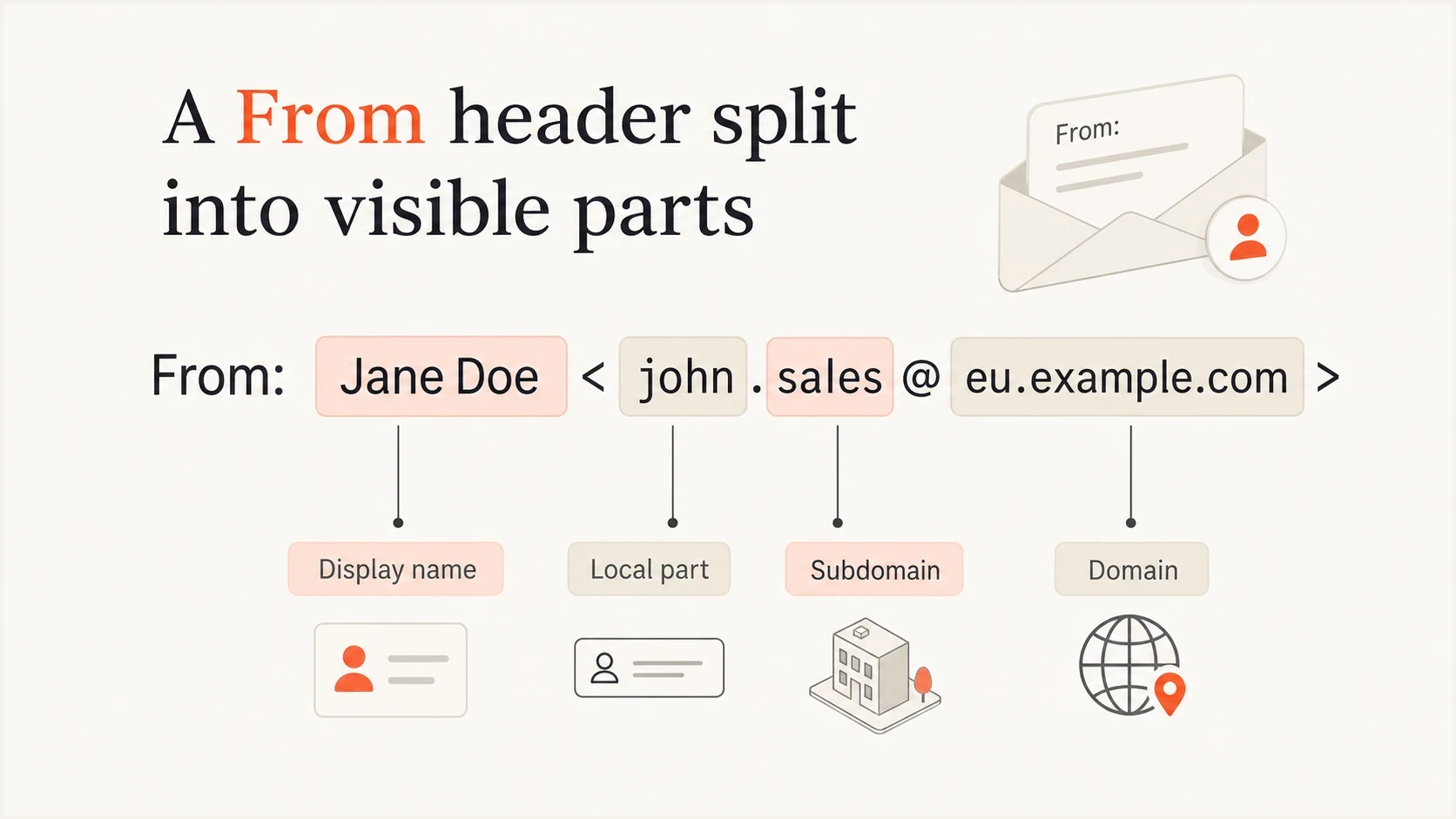
A From header split into display name, local part, subdomain, and domain.
The display name does not determine SPF, DKIM, or DMARC alignment. Those checks use the message envelope and DKIM signature in relation to the visible From address. Still, a display name can affect trust because users read it first. For more detail on that side of the decision, see the page on whether the sender name matters.
Hyphens and dashes are different characters
People often call every horizontal mark a dash, but email syntax does not treat them as interchangeable. The keyboard hyphen, sometimes called a minus sign, is U+002D HYPHEN-MINUS and belongs to ASCII. An en dash or em dash is a Unicode punctuation character. Use a typographic dash only in the human-readable display name, with proper header encoding.
|
|
|
|
|---|---|---|---|
Hyphen-minus (-) | Yes | Yes, subject to provider rules | Yes, inside a label |
En dash | Yes, with valid encoding | No in ordinary ASCII syntax | No |
Em dash | Yes, with valid encoding | No in ordinary ASCII syntax | No |
Where each horizontal punctuation character can be used.
Watch for automatic typography when copying names between documents and email templates. A text editor can replace a hyphen with a longer dash. That change is harmless in a correctly encoded display name, but it makes an address or DNS label invalid.
Subdomains can use hyphens
A hyphen is valid inside a DNS label. That means email-news.example.com and customer-mail.example.com are valid hostnames. Each label between dots must not begin or end with a hyphen. Under IDNA rules, a double hyphen in the third and fourth character positions is reserved for encoded internationalized labels, such as the xn-- prefix. Doubled hyphens elsewhere can be valid, but they add needless confusion to an ordinary sending subdomain.
Valid and invalid subdomain labelstext
Valid:
email-news.example.com
customer-mail.example.com
news-2026.example.com

Invalid:
-email.example.com
email-.example.com
email..example.com

Valid but usually avoid:
mail--news.example.com
A hyphenated subdomain can be useful when it describes the mail stream without creating a long or ambiguous label. Examples include transactional naming such as order-mail.example.com or regional naming such as email-au.example.com. Shorter options such as mail.example.com or e.example.com are often cleaner when the function is obvious internally and externally.
Do not use a hyphenated cousin domain when a real subdomain is available. A cousin domain is a separate domain that looks close to the brand domain, such as example-mail.com instead of mail.example.com. It can look like a lookalike domain even when the owner has good intent.
Search discussions about hyphenated subdomains usually reach the same technical answer: a hyphen is acceptable inside a subdomain label. This subdomain discussion is useful because it separates DNS validity from naming taste.
Why subdomains beat cousin domains
When the reason for a hyphen is that several sending platforms need separate DNS records, use delegated subdomains under the real organizational domain. That keeps the sending identity tied to the parent domain and lets each platform have its own SPF, DKIM, tracking, bounce, and DMARC setup.
Better option
Use a subdomain below the real brand domain, such as email.example.com or email-news.example.com.
- Authentication: DMARC organizational alignment can still connect to the brand domain.
- Trust: The visible domain has a clear relationship to the brand.
Riskier option
Use a separate lookalike domain, such as example-mail.com or example-news.com.
- Authentication: DMARC alignment has no natural relationship to the original domain.
- Trust: Recipients and filters can treat it like a lookalike domain.
This is also where subdomain reputation planning matters. A domain naming choice can separate mail streams for operations, but it does not excuse weak authentication or messy sender changes. The better model is to create a small set of named subdomains and keep each one stable. More detail is covered in the guide to subdomain reputation.
Naming risk levels
A practical way to think about hyphenated sender naming choices.
Low risk
email-news.example.com
A short hyphenated subdomain under the brand domain.
Medium risk
email-product-news.example.com
A long subdomain with repeated separators or unclear purpose.
High risk
example-news.com
A separate lookalike domain used only for sending.
How authentication handles a hyphenated subdomain
SPF and DKIM plus DMARC do not reject a domain because it contains a hyphen. The records need to exist at the correct DNS names, and the authenticated domains need to satisfy DMARC alignment with the visible From address. A hyphenated subdomain is another DNS name to configure.
RFC 9989 is now the base DMARC standard and replaces RFC 7489. Aggregate reporting is defined in RFC 9990, while failure reporting is defined in RFC 9991. These changes do not alter the allowed hyphen syntax. They do make current policy discovery important: a record at the exact From subdomain takes priority, while a parent policy can apply when that record is absent.
Example DNS records for a hyphenated sending subdomaindns
email-news.example.com TXT "v=spf1 include:send.example.net -all"

selector1._domainkey.email-news.example.com TXT "v=DKIM1; k=rsa; p=..."

_dmarc.email-news.example.com TXT "v=DMARC1; p=none; rua=mailto:d@example.com"
If the visible From address is news@email-news.example.com, then DKIM alignment can pass when the DKIM signing domain is also email-news.example.com or another aligned domain under the same organizational domain. SPF alignment depends on the envelope sender domain, not the display name.
?
What's your domain score?
Deep-scan SPF, DKIM & DMARC records for email deliverability and security issues.
A domain-level check is useful after DNS changes because it catches mistakes people make when adding a new subdomain, including a missing DMARC policy, SPF lookup issues, unsigned DKIM mail, or inconsistent alignment. Suped's domain health checker checks those basics before production traffic starts.
Domain health checker sample results showing DMARC, SPF, DKIM scorecards and detailed validation checks
For ongoing monitoring, Suped's DMARC reporting shows which sources send as each domain or subdomain and whether SPF or DKIM aligns. Use those source-level results to fix unauthorized traffic or configuration errors before moving to a stricter DMARC policy.
Recommended naming pattern
Boring sender names and subdomains are easier for recipients to recognize, easier for support teams to explain, and easier to audit later. The best pattern is a stable brand-first From name paired with a stable subdomain under the main brand domain.
- Choose purpose: Decide whether the subdomain is for marketing, product, receipts, alerts, or support.
- Keep it short: Use one or two words, such as mail, news, or email-news.
- Use ownership: Place the subdomain under the real parent domain, not a separate cousin domain.
- Authenticate first: Set SPF and DKIM plus DMARC before sending production traffic.
- Monitor results: Review DMARC aggregate reports and source-level failures during rollout.
|
|
|
|
|---|---|---|---|
News | Brand - News | news | Clean |
Receipts | Brand - Receipts | receipts | Clear |
Regional | Brand - AU | email-au | Useful |
Support | Brand Support | support | Simple |
Example naming choices for common mail streams.
If you need several sending platforms, avoid creating many similar domains. Create a small set of sending subdomains instead, then assign each platform to the right subdomain or selector. The page on subdomain naming covers that planning choice in more depth.
Common mistakes to avoid
Most problems blamed on hyphens are really naming or authentication problems. A valid hostname can still be a bad sender identity if it makes the mail look disconnected from the brand or creates a hard-to-debug DNS setup.
- Cousin domains: Do not use a separate hyphenated domain just because a sending setup feels easier.
- Missing inbox: Make the From or Reply-To mailbox real, monitored, or safely routed.
- Unstable identity: Do not rotate From names and subdomains without a clear operational reason.
- Partial DNS: Do not send before authentication, bounce handling, and tracking are configured.
The other common mistake is overreacting to syntax. A hyphen in a local part, such as customer-care, is valid in standard email address syntax. It can even appear at the start or end of an unquoted local part, although that is easy to mistype and some mailbox providers will not create the address. Test the exact mailbox instead of assuming every RFC-valid local part is supported.
How to test before sending
Before sending real volume from a hyphenated From name or subdomain, test the exact message. Do not test only the DNS records. Send the same template through the same sending platform, using the From name and From address that production mail will use.
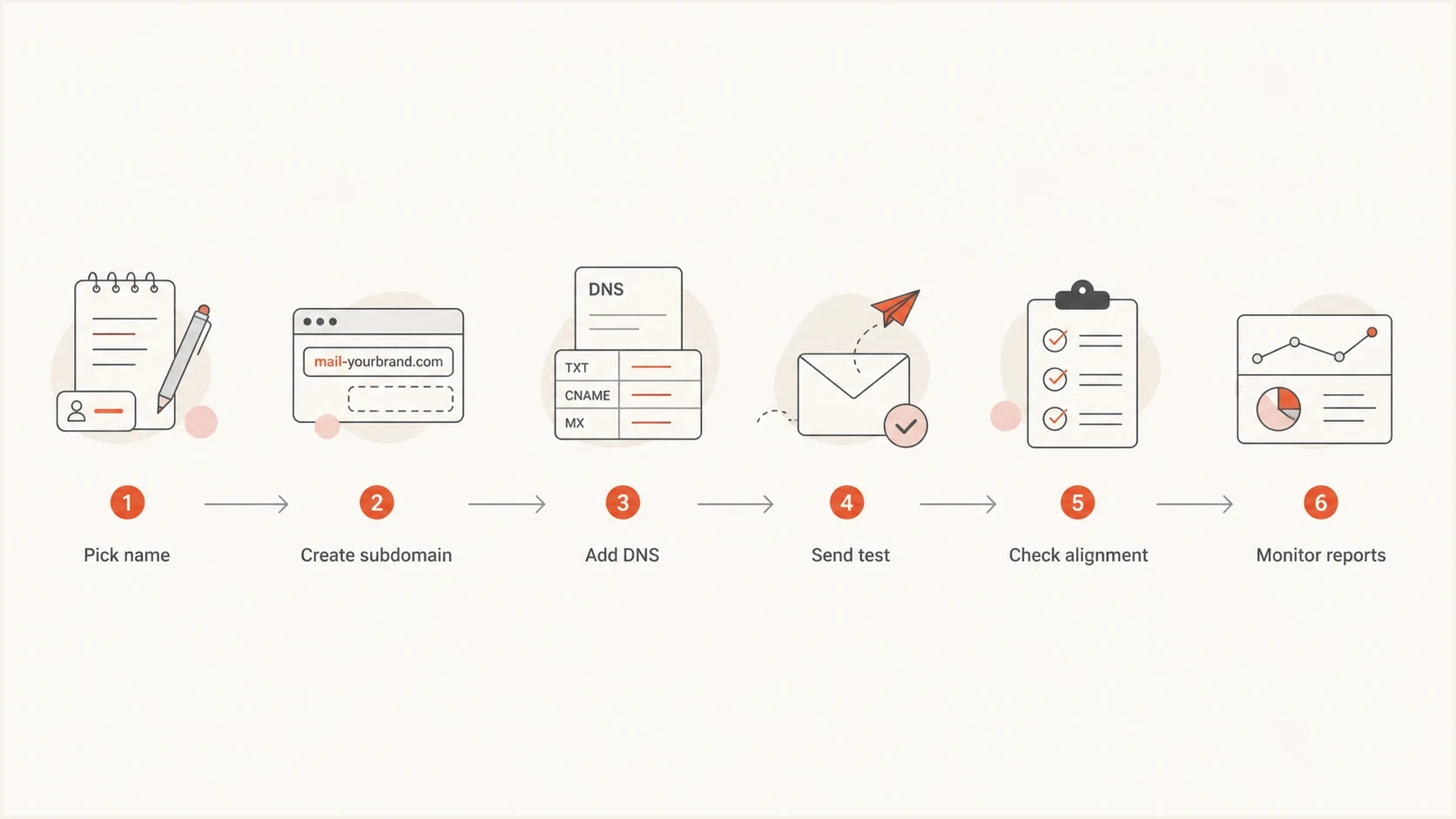
A six-step flowchart for testing a hyphenated email sending identity.
- Header display: Check how the From name renders across desktop, mobile, and webmail clients.
- Address handling: Reply to the message and confirm the mailbox receives mail.
- Authentication: Confirm SPF and DKIM pass, then verify DMARC alignment.
- Reputation: Watch engagement, complaints, bounces, and blocklist or blacklist signals.
- Policy: Move DMARC enforcement gradually after the subdomain sends cleanly.
Suped's product supports this workflow by bringing DMARC aggregate data, SPF and DKIM results, DNS health checks, alerts, and blocklist or blacklist monitoring into one view. Use it to confirm which platforms send through the new subdomain and whether their authenticated identifiers satisfy DMARC alignment.
For teams or MSPs managing many domains, Suped's multi-tenancy dashboard keeps client domains separate while surfacing source-level failures and recommended fixes. This reduces the manual work of comparing raw XML reports across a subdomain rollout.
If the subdomain starts appearing on a blocklist or blacklist after launch, treat that as a separate reputation event, not proof that the hyphen caused the problem. Check sending volume, list quality, complaint rates, compromised sources, and authentication failures before changing the name.
Blocklist checker
Check your domain or IP against 144 blocklists.
 Spamhaus
 0Spam
0Spam

 Cisco
Cisco
 NoSolicitado

 URIBL
URIBL
 abuse.ro
 ALPHANET
 Anonmails
 Ascams
 BLOCKEDSERVERS
 Calivent Networks


 EFnet
EFnet




 JustSpam
 Kempt.net
 NordSpam

 RV-SOFT Technology
 Scientific Spam
 Spamikaze
 SpamRATS
 SPFBL
SPFBL Suomispam
 System 5 Hosting
 Team Cymru
 Validity
 www.blocklist.de Fail2Ban-Reporting Service
 ZapBL
ZapBL 2stepback.dk
 Fayntic Services
 ORB UK
 technoirc.org
 TechTheftSpamhaus0SpamCiscoNoSolicitadoURIBLabuse.roALPHANETAnonmailsAscamsBLOCKEDSERVERSCalivent NetworksEFnetJustSpamKempt.netNordSpamRV-SOFT TechnologyScientific SpamSpamikazeSpamRATSSPFBLSuomispamSystem 5 HostingTeam CymruValiditywww.blocklist.de Fail2Ban-Reporting ServiceZapBL2stepback.dkFayntic ServicesORB UKtechnoirc.orgTechTheftSpamhaus0SpamCiscoNoSolicitadoURIBLabuse.roALPHANETAnonmailsAscamsBLOCKEDSERVERSCalivent NetworksEFnetJustSpamKempt.netNordSpamRV-SOFT TechnologyScientific SpamSpamikazeSpamRATSSPFBLSuomispamSystem 5 HostingTeam CymruValiditywww.blocklist.de Fail2Ban-Reporting ServiceZapBL2stepback.dkFayntic ServicesORB UKtechnoirc.orgTechTheftSpamhaus0SpamCiscoNoSolicitadoURIBLabuse.roALPHANETAnonmailsAscamsBLOCKEDSERVERSCalivent NetworksEFnetJustSpamKempt.netNordSpamRV-SOFT TechnologyScientific SpamSpamikazeSpamRATSSPFBLSuomispamSystem 5 HostingTeam CymruValiditywww.blocklist.de Fail2Ban-Reporting ServiceZapBL2stepback.dkFayntic ServicesORB UKtechnoirc.orgTechTheftSpamhaus0SpamCiscoNoSolicitadoURIBLabuse.roALPHANETAnonmailsAscamsBLOCKEDSERVERSCalivent NetworksEFnetJustSpamKempt.netNordSpamRV-SOFT TechnologyScientific SpamSpamikazeSpamRATSSPFBLSuomispamSystem 5 HostingTeam CymruValiditywww.blocklist.de Fail2Ban-Reporting ServiceZapBL2stepback.dkFayntic ServicesORB UKtechnoirc.orgTechTheft
Views from the trenches
Best practices
Keep the brand first in the From name so recipients can identify the sender quickly.
Use subdomains under the real brand domain instead of separate lookalike sending domains.
Confirm that reply handling works before using a new From name or hyphenated subdomain.
Common pitfalls
Creating cousin domains for convenience makes legitimate mail look unrelated to the brand.
Using long hyphenated names can confuse users and create unnecessary support questions.
Skipping DMARC review hides whether the new subdomain is passing alignment checks.
Expert tips
Treat hyphens as a naming choice, then validate the full authentication path with real mail.
Delegate a short sending subdomain when multiple platforms need separate DNS records.
Watch early reports after launch because syntax validity does not prove sender trust.
Marketer from Email Geeks says hyphens in From names are common enough when the name remains recognizable and the mailbox can receive replies.
2019-02-18 - Email Geeks
Marketer from Email Geeks says a hyphenated From or Reply-To address is acceptable when it matches branding and works as a real mailbox.
2019-02-18 - Email Geeks
The practical answer
Hyphens and dashes are allowed in email From names, while only the ASCII hyphen-minus belongs in an ordinary email address or subdomain. A hyphen does not break deliverability by itself. Use it when it makes the identity clearer, not when it creates a lookalike domain or a name that recipients struggle to recognize.
The default choice is simple: use a real subdomain under the brand domain, keep the From name stable, make the mailbox real, and confirm authentication alignment before sending at scale. If a hyphen helps readability, use it. If it only makes the domain look like a separate brand, choose a cleaner subdomain instead.




