Why does an email's sender name display as the email address for some recipients?

Updated on 23 Aug 2026: We updated this guide with current Gmail behavior and practical checks for DMARC domain matching, aliases, delegated sending, and hybrid mail.
An email's sender name displays as the email address for some recipients because the receiving mailbox app decides what to show after it reads the message headers, local contact data, authentication results, reputation signals, and its own interface rules. The sender usually provides both a display name and an email address, but the recipient's client can ignore the display name and show the address instead.
The shortest practical answer is this: if Gmail, Yahoo, and Outlook show BrandName but one mailbox provider shows sender@email.brandname.com, the sending setup is probably not broken. It is often a recipient-side rendering decision, a local address book override, a cached sender profile, or a security choice by that specific mailbox provider.
- Fast check: Ask for a screenshot, the full message headers, the receiving email client name, and the client version before changing DNS or sender settings.
- Likely cause: One client is choosing the address field over the friendly From name, often because of contacts, caching, authentication display rules, directory data, or anti-impersonation behavior.
- Best response: Verify the header first, then test authentication and inbox rendering across clients instead of assuming the campaign platform changed something.
What the sender name actually is
The sender name people see in the inbox normally comes from the display name in the message's From header. That header can contain a friendly name plus an address. For example, the friendly name is BrandName and the address is sender@email.brandname.com.
Example From headertext
From: "BrandName" <sender@email.brandname.com>
Reply-To: support@brandname.com
The display name is optional metadata. The address in angle brackets is the mailbox identity the message carries, and some clients treat that address as the safer fallback when the display name is missing, unfamiliar, or locally overridden.
The From header declares the author's mailbox and can include a display name, but it does not dictate the final inbox label. Some clients prioritize the address because it is less ambiguous. Others use the saved contact name, previous conversation history, directory information, or a sender profile tied to that mailbox.
Display name control is shared
The sending platform controls the header value it sends. The receiving mailbox app controls what appears in the inbox. That split explains why one recipient can see the email address while other recipients see the brand name from the same campaign.
This is also why the same email can look different in Gmail, Yahoo, Outlook, Apple Mail, a corporate inbox, and a webmail client. The email itself can be identical, but each client has its own rendering rules. Some are strict about unknown senders. Some collapse brand names. Some rewrite display labels based on contacts. Some make different choices on mobile and desktop.
Do not confuse the sender picker you see while composing with the recipient's inbox display. Some apps show the email address in account selection screens even when the outgoing message still includes the correct friendly From name.
Why only some recipients see the address
When only a subset of recipients sees the sender address instead of the friendly From name, check rendering and recipient context first. A missing or malformed display name in the sent header usually affects many recipients in a repeatable way. A one-client issue usually points to local or provider-specific handling.
|
|
|
|---|---|---|
Client display rule | One app shows address | Screenshot and app version |
Contact override | Saved label wins | Recipient contacts |
Trust or safety cue | Warning or extra identity | Headers, authentication, and sender fields |
Cached sender | Old identity appears | Prior messages |
Directory profile | Tenant name wins | Corporate directory |
Header formatting | Name ignored | Raw source |
Common causes when the sender name changes by recipient.
The recipient's address book is a common cause. If the recipient saved sender@email.brandname.com with the address as the contact name, the mailbox app can show that saved label. If they previously replied to a message where the address was used as the display name, the client can keep using that identity. The sender has limited control over that local data.
Gmail documents a specific first-contact case: it can show the email address next to the sender's name when the recipient has not emailed that sender before. After the recipient replies or adds the sender to contacts, Gmail can stop showing the extra address. That behavior places the address beside the name rather than proving that the From header lost its display name.
Corporate directories add another layer. A Microsoft 365, Exchange, Google Workspace, or internal directory profile can supply a display label that differs from the message header. Directory changes can also take time to propagate, so one employee can see the updated sender name while another still sees the address or an older label.
Security display logic is another cause. Some clients expose the actual address or add secondary identity details for new senders and messages whose sending domain differs from the visible From domain. Warning banners or authentication failures can appear at the same time, but the raw headers are needed to distinguish a client safety display from a malformed From header.
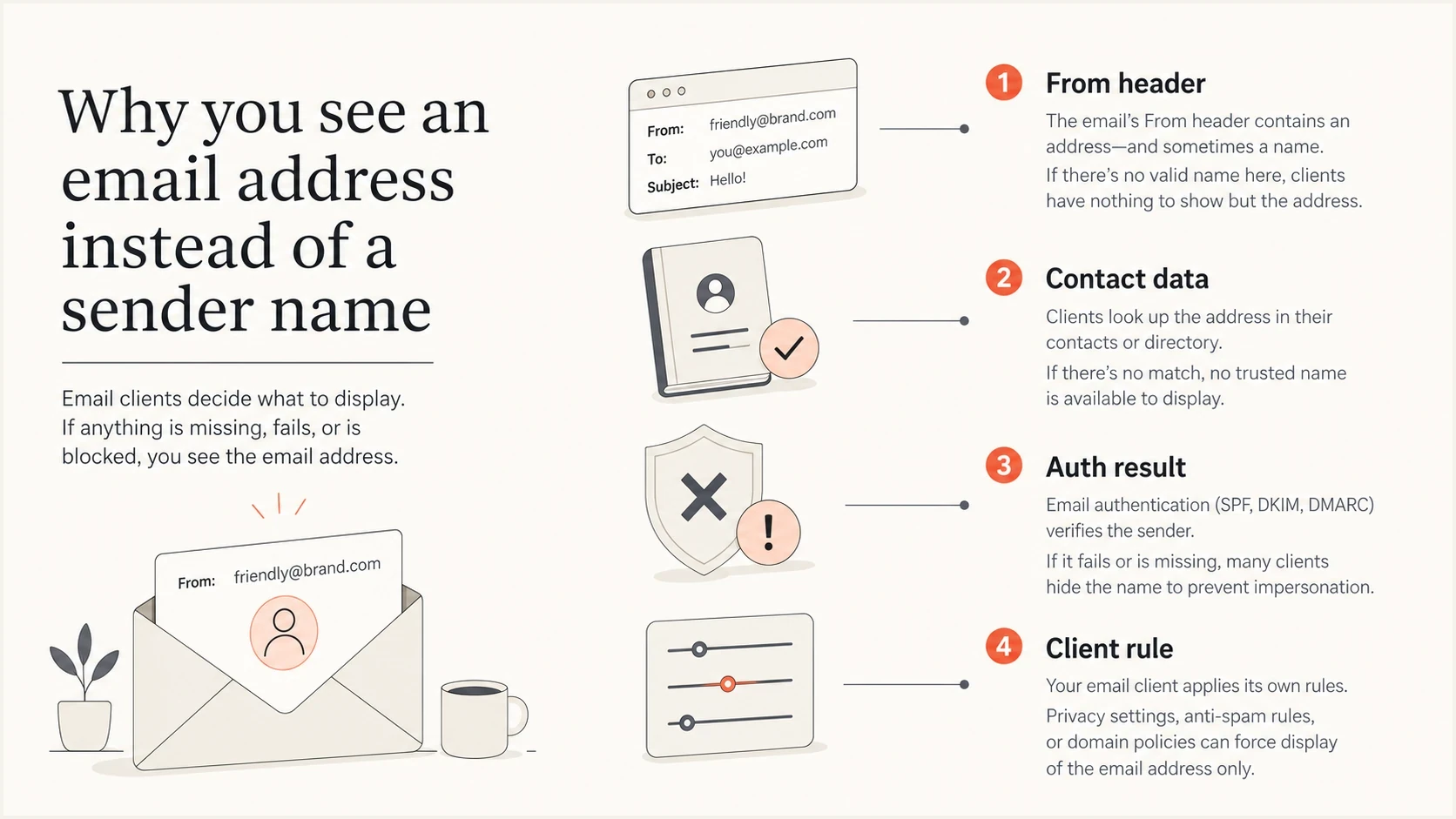
Infographic showing why an email sender name can display as an email address.
How authentication affects sender display
SPF, DKIM, and DMARC do not set or authenticate the human-readable display name. SPF authenticates the envelope MAIL FROM identity, DKIM authenticates a signing domain, and DMARC validates authorized use of the visible From domain when at least one authenticated domain matches it under the published mode. Filtering, spam placement, warning labels, or extra identity details can change after an authentication failure, but the failure does not prove why a client showed the address.
If the display changes for one recipient, inspect the raw From header first. Check authentication when the headers record a failure, the client shows "via" or "on behalf of," warning labels appear, or inbox placement also changed. Those clues make authentication relevant without treating it as the direct source of the display name.
Likely client-side issue
- Scope: Only one recipient, one mailbox provider, or one app version shows the address.
- Header: The raw source still contains the expected display name.
- Action: Collect screenshots, headers, device type, and client version.
Likely sending-side issue
- Scope: Many recipients across several providers see the same bad display.
- Header: The display name is missing, malformed, or different in the raw source.
- Action: Fix sender settings, header encoding, alias routing, and authentication domain matching.
RFC 9989 is the current DMARC specification and obsoletes RFC 7489. DMARC passes when either the SPF-authenticated MAIL FROM domain or a passing DKIM d= domain matches the visible From domain under the record's mode. Relaxed mode accepts the same Organizational Domain, while strict mode requires an identical domain. A pass does not guarantee the friendly name, and a fail does not prove why the client showed the address.
?
What's your domain score?
Deep-scan SPF, DKIM & DMARC records for email deliverability and security issues.
For a broad check, use Suped's domain health checker to confirm DMARC, SPF, and DKIM basics before chasing client-specific display behavior.
How to diagnose the exact cause
The fastest way to diagnose this is to separate the message that was sent from the way the recipient's app rendered it. Screenshots tell you what the user saw. Full headers tell you what the sender actually sent and what the receiver recorded during authentication.
- Screenshot: Ask for the inbox view and the opened message view because some clients show different sender labels in each place.
- Headers: Ask for the full message source, not a forwarded copy, because forwarding changes the headers you need.
- Client details: Record the mailbox provider, app name, app version, operating system, and whether it happened on web, desktop, or mobile.
- Contact state: Ask whether the recipient has the sender saved as a contact, has previous replies, or uses a shared corporate directory.
- Repeat test: Send the same message to a fresh mailbox at the same provider and compare the display.
Header fields worth checkingtext
From: "BrandName" <sender@email.brandname.com>
Sender: mailer@email.brandname.com
Reply-To: support@brandname.com
Return-Path: <bounces@email.brandname.com>
Authentication-Results: receiver.example;
  spf=pass smtp.mailfrom=email.brandname.com;
  dkim=pass header.d=email.brandname.com;
  dmarc=pass header.from=email.brandname.com
If the raw From header says "BrandName" but the recipient sees sender@email.brandname.com, the display name was present when the message arrived. That points away from the sending system and toward the receiving client or local account state.
The Reply-To, Sender, and Return-Path fields usually do not replace the inbox sender name. They can still appear in details panels, reply flows, or on-behalf-of labels, so record them instead of treating every visible address as the same field.
If the raw header lacks the display name, has broken quoting, contains unexpected encoded characters, or differs between recipients, then the sender configuration or template pipeline needs attention. That can happen when a triggered campaign uses a different sender profile than the batch campaign, or when an integration passes the address into both the name field and the address field.
Email tester
Send a real email to this address. Suped shows a results button when the test is ready.
?/43tests passed
A practical next step is to send the same triggered email to Suped's email tester and inspect the message source, authentication results, and visible sender fields in one place.
Check aliases, delegated sending, and hybrid mail
An alias, shared mailbox, or delegated Send As identity can use a different sender-name setting from the primary mailbox. Editing the primary account name does not fix a route that emits an alias address without a display name or adds a separate Sender field that the client shows as "on behalf of."
Test the exact path that produced the complaint. A manual message composed in the primary mailbox can have a correct From header while a message sent through an alias, delegation, scheduled rule, or automated reply uses another identity.
- Alias or Send As entry: Set the name on the exact address used to send, then inspect a new message's raw From header.
- Delegated mailbox: Compare mail sent after opening the mailbox directly with mail sent on its behalf from another account.
- Automated path: Test out-of-office replies, filtered responses, scheduled mail, and triggered messages separately.
- Hybrid routing: If only on-premises Exchange mail sent to Microsoft 365 loses the name, check whether the hybrid route is treating the message as anonymous.
If the alias path sends From: <sender@email.brandname.com> with no display name, fix that identity or route. If the expected display name appears in the raw header, return to recipient contacts and client behavior.
Provider and app behavior to expect
Mailbox providers do not all expose identity in the same way. A visible label can come from the From header, a saved contact, cached thread state, or a corporate directory. The address can appear beside the name or replace it, so compare the raw message with the exact view the recipient used.
|
|
|
|---|---|---|
Gmail | From header and contact history | First-time and known sender |
Yahoo | Header and interface view | Inbox row and opened message |
Outlook | Header, contact, or directory | External and tenant recipients |
Apple Mail | Header and local contacts | Saved and fresh contact state |
Smaller webmail | Header parsing and fallback | Raw source and visible label |
Useful comparisons by mailbox environment.
This is why a one-recipient complaint needs evidence before a sending change. A mailbox provider can update its interface, change how it handles unknown senders, or display an address in one view and the display name in another. A mobile app can also lag behind a web interface or apply a different contact match.
If the issue is specifically in Gmail, there are separate Gmail-specific sender-name quirks worth checking. The related guide on Gmail friendly names covers those cases in more detail.
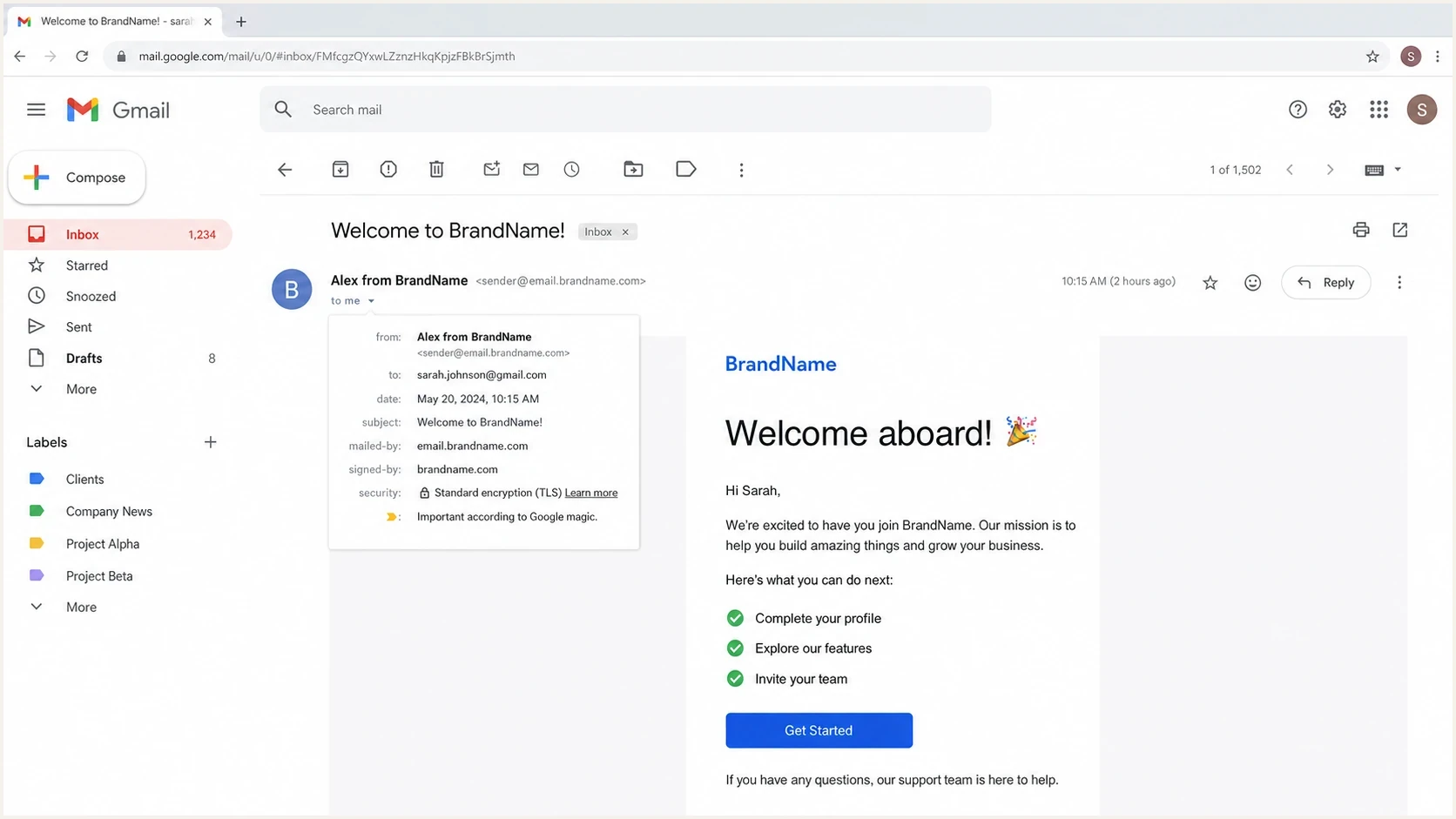
Gmail message header showing a friendly sender name, sender email address, and details dropdown.
What to fix when it is your setup
If the headers show that your sending system really sent the address as the display name, fix the sender profile first. In marketing and transactional tools, the friendly name and the sender address are usually separate fields. A bad merge variable, copied sender profile, or integration mapping can fill both fields with the address.
Do not change authentication records blindly
Changing SPF, DKIM, or DMARC because one recipient sees an email address can create a real deliverability problem. Confirm whether the display name is missing from the raw message before editing DNS.
Then check the exact sender identity used by the triggered campaign. Triggered journeys often run through a different profile, business unit, subdomain, IP pool, or template path than regular campaigns. That difference explains why the complaint can appear sudden even when nobody intentionally changed the main campaign sender.
- Sender profile: Confirm the friendly name field contains BrandName and the address field contains the mailbox address.
- Template logic: Check that a personalization token is not writing an address into the display name.
- Header encoding: Use normal quoting and standard character encoding for brand names with spaces, accents, symbols, or emoji text.
- Subdomain match: Make sure the visible From domain matches the domain you expect to authenticate.
- Reputation signals: Check whether the sending IP or domain appears on a blocklist or blacklist if warnings also appear.
If the sender name contains non-ASCII characters or decorative symbols, test the exact header before a broad send and use correct encoded-word syntax. For commercial or bulk mail to Gmail, keep the name stable and accurate. Do not put subject content, the recipient's name, reply-like text, or decorative characters in the display name. Broken encoding or a very long name can make a client truncate the name, replace characters, or fall back to the email address.
If the message also has spam-folder placement, warning banners, or inconsistent authentication, widen the investigation. Sender-name display is then only one symptom. Suped's DMARC monitoring can track authentication domain matches, identify unauthorized senders, and show which sources need fixes.
Where Suped fits
Suped does not force Gmail, Yahoo, Outlook, Apple Mail, or another mailbox app to display a friendly name. No sender-side platform can guarantee that. Suped helps with the parts you can control: authentication, domain health, sender visibility, issue detection, and ongoing monitoring.

Issue steps to fix dialog showing the issue overview, tailored fix steps, and verification action
For this specific issue, the useful workflow is simple. Confirm the raw From header, test a real message, check SPF, DKIM, and DMARC domain matching, then monitor whether the same sender has authentication failures by provider. Suped's issue detection and steps to fix keep that investigation grounded in evidence instead of guesswork.
- DMARC visibility: See which sending sources pass, fail, or send mail without a domain match.
- Hosted SPF: Keep authorized SPF sources current through a managed record when sending services change.
- Hosted DMARC: Stage policy changes cleanly while watching failures before enforcement.
- Blocklist monitoring: Track IP and domain reputation when sender display issues appear alongside warning banners or spam placement.
Suped's product brings DMARC, SPF, DKIM, hosted authentication, alerts, and deliverability checks into one workflow. That matters when a sender-name complaint arrives, because the right answer depends on proving whether the issue is in the email headers, DNS, authentication domain matching, reputation, or the recipient's client.
A practical response to the recipient
When a customer reports this, avoid telling them it is impossible or blaming their mailbox. A better response is specific: say you are checking the exact message headers and the receiving app behavior, then ask for the evidence needed to reproduce it.
Customer reply templatetext
Thanks for flagging this. We are checking why your mailbox displayed
our email address instead of our sender name.

Could you send us a screenshot of the inbox row and the opened message,
plus the email app and device you used?

If your email app has a "show original" or "view source" option, the full
headers will also help us confirm whether the sender name was included
when the message arrived.
That wording keeps the investigation factual. It also avoids promising that the sender can control every recipient's inbox display. Once you have the headers, you can say whether the friendly name was present in the message or whether the sending profile needs correction.
How much evidence is enough?
Use the level of evidence to decide whether to change sender settings or keep investigating.
Low confidence
Do not change DNS
One screenshot and no headers
Medium confidence
Check sender profile
Screenshot plus full headers
High confidence
Fix sending setup
Repeatable across providers
Views from the trenches
Best practices
Collect screenshots, full headers, app name, and version before making sender changes.
Compare the same email in a fresh mailbox to separate rendering from sender setup.
Check authentication only after confirming whether the friendly name reached the inbox.
Common pitfalls
Changing DMARC records too early can create a real issue from a display-only complaint.
Forwarded examples hide the original headers and can send the investigation in circles.
Ignoring contact overrides misses one of the most common causes of odd sender labels.
Expert tips
Treat one-recipient reports as evidence requests, not proof of a global campaign fault.
Keep triggered campaign sender profiles separate and documented for faster comparison.
Use a stable brand name and confirm every alias writes the expected From header before sending.
Marketer from Email Geeks says sender-name complaints need screenshots, full headers, and the email client version before anyone can isolate the cause.
2019-09-09 - Email Geeks
Marketer from Email Geeks says a single provider showing the address usually points to mailbox-client behavior rather than a sending-system change.
2019-09-09 - Email Geeks
How to choose the right fix
An email address appearing in place of the sender name for some recipients usually means the recipient's mailbox app chose to show the address. The sending platform provides the friendly From name, but the receiver decides the final display using headers, contacts, authentication signals, reputation, directory data, and local interface rules.
The right fix starts with proof. Get the screenshot, full headers, and client version. If the friendly name is present in the raw message, focus on client behavior and local contact state. If it is missing or malformed, fix the sender profile, alias, template mapping, or header encoding. If authentication fails, correct the SPF or DKIM domain match used by DMARC, especially when warning labels or placement problems appear too.




