Are email addresses with multiple or misplaced periods valid for deliverability?

Matthew Whittaker
Co-founder & CTO, Suped
Published 19 Jun 2025
Updated 15 May 2026
9 min read
Summarize with
Yes, email addresses with ordinary single periods inside the local part can be valid and deliverable. No, addresses that start the local part with a period, end it with a period, or contain consecutive unquoted periods are not valid dot-atom addresses. Many ESPs reject those records before a message leaves the platform.
That distinction matters during list cleanup. I would not unsubscribe every address that contains a dot. I would quarantine or suppress clear syntax failures, keep the original opt-in record, and ask the subscriber to confirm any corrected address instead of silently rewriting it.
Gmail adds a second layer. For consumer Gmail, Google's Gmail guidance says dots do not change the destination account. That does not mean every provider ignores dots, and it does not rescue malformed addresses like a trailing dot or two consecutive dots.
This is recipient address hygiene, not DMARC. DMARC, SPF, and DKIM protect the sending identity and help receiving systems evaluate trust. The local part before the recipient's @ sign has its own syntax rules and provider-specific behavior.
The direct rule for periods
The part before the @ sign is the local part. In the common unquoted form, a period is allowed between characters. It is not allowed as the first character, as the last character, or twice in a row. Quoted local parts can technically contain patterns that dot-atom syntax rejects, but bulk marketing systems, web forms, and ESP import pipelines often reject quoted local parts because they create edge cases and low-confidence data.
- Keep: An address like jane.doe@example.com has a normal internal period. Treat it as potentially valid unless it bounces, complains, or fails provider acceptance.
- Suppress: An address like jane..doe@example.com has consecutive unquoted periods. Do not mail it as-is.
- Suppress: An address like janedoe.@example.com has a trailing period in the local part. Do not mail it as-is.
- Review: A quoted local part can be valid under the RFC, but I would not add it to a marketing audience unless the mail system, ESP, and subscriber path all support it.
Do not repair consent silently
If someone opted in as janedoe.@example.com, changing it to janedoe@example.com creates a different contact record. I keep the original value, mark it unmailable or quarantined, and ask the person to confirm the corrected address through a preference center, account flow, or support process.
Simple local-part dot checksREGEX
(^\.)|(\.$)|(\.\.)
Syntax and deliverability are different checks
A syntactically valid address is not automatically deliverable. A deliverable address also needs a real domain, reachable MX records, a mailbox that accepts the message, and a sending setup that does not fail authentication or reputation checks. A syntactically invalid address can fail even earlier, inside your own ESP import or send pipeline.
I separate the checks into layers. First I validate the address shape. Then I look at provider-specific behavior. Then I watch actual bounces and engagement. Finally, I check sender authentication and reputation so I do not misread a sender-side issue as a bad recipient address.
|
|
|
|---|---|---|
Single internal dot | Valid | Keep unless it fails |
Two dots | Invalid | Suppress or confirm |
Trailing dot | Invalid | Do not mail |
Leading dot | Invalid | Do not mail |
Quoted local part | RFC-valid | Review manually |
Period patterns and practical handling
Syntax validation
- Question: Does the address match the common rules for an unquoted local part?
- Failure: Leading dots, trailing dots, and doubled dots fail before the mailbox is tested.
- Use: Run this check at signup, import, and before reactivating old records.
Deliverability validation
- Question: Will this mailbox and provider accept mail from this sender?
- Failure: A valid address still fails when the mailbox is closed or the sender has reputation problems.
- Use: Compare syntax checks with bounce logs, complaints, and authentication results.
If the issue appears only after a migration or ESP change, I check both systems. One ESP can accept a bad-looking address into the database, while another refuses to send because it applies a stricter parser at send time. That is a process problem, not proof that every address with a dot is bad.
How Gmail changes the decision
Gmail's consumer service treats ordinary internal dots as equivalent. The owner of janedoe@gmail.com also receives mail sent to jane.doe@gmail.com or j.a.n.e.d.o.e@gmail.com. This is a Gmail-specific account behavior, not a universal email rule.
I still do not normalize Gmail addresses by removing dots inside a production list unless the user flow is designed for that behavior. A dotted Gmail alias can be intentional. People use dots to route mail, identify signups, or spot data sharing. Removing the dots for identity matching can merge records that the person expected to keep separate.
Gmail rule of thumb
- Consumer: Internal single dots in gmail.com addresses route to the same account.
- Workspace: Custom-domain Google accounts can treat dots as different usernames.
- Invalid: Doubled, leading, or trailing dots still fail normal address syntax.
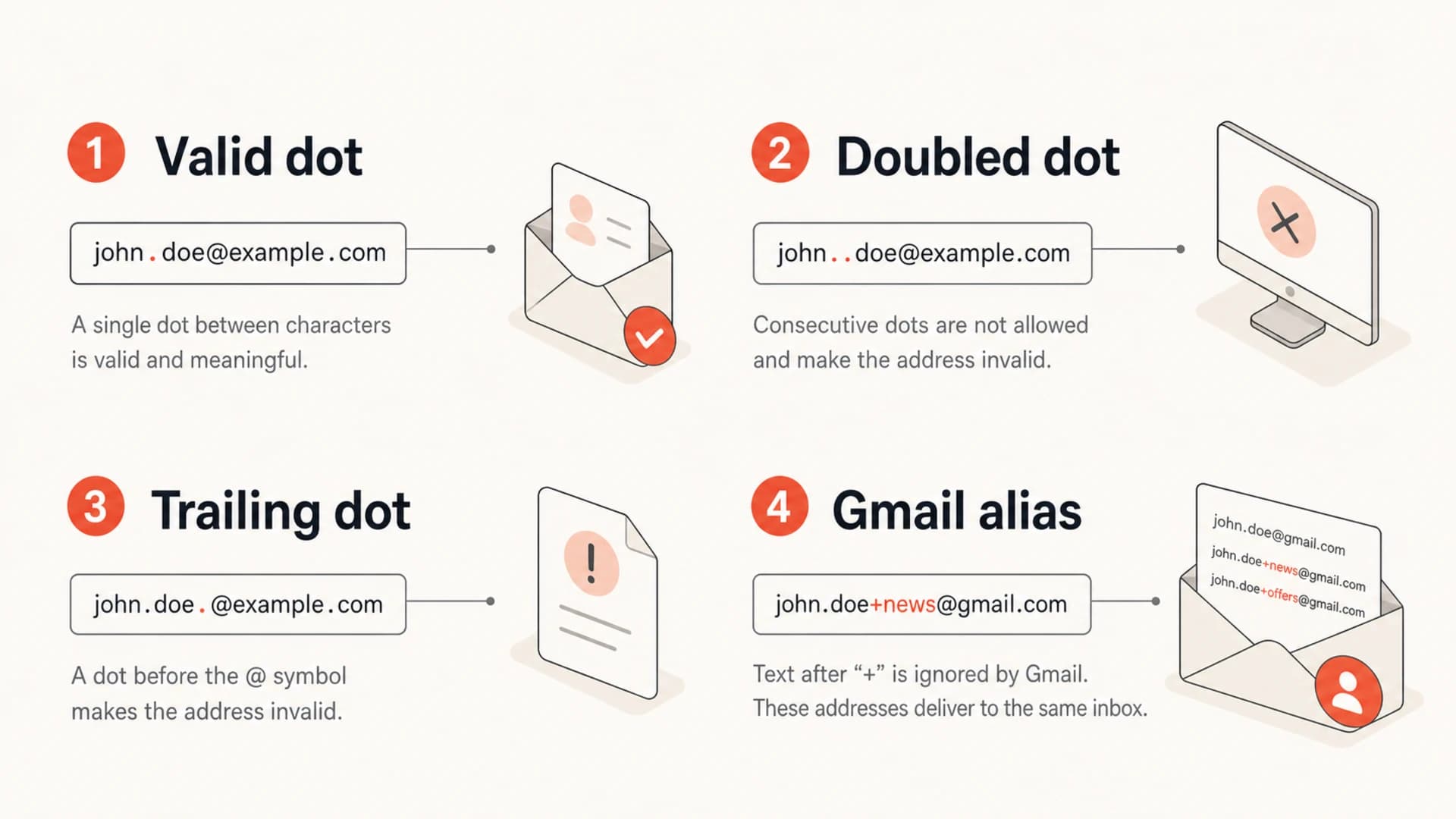
Infographic showing valid and invalid period placement in email addresses.
For a deeper walkthrough of Gmail's dot behavior, the separate page on Gmail dot handling covers account matching, duplicate signups, and the limits of treating dotted variants as one identity.
What to do with old records
For older records, I avoid one big deletion rule. Old lists usually contain a mix of valid dotted corporate addresses, Gmail aliases, mistyped records, abandoned mailboxes, and addresses that one ESP imported even though another ESP refuses to send. Those records deserve different handling.
The safest cleanup path is to tag the pattern, stop sending to high-risk syntax failures, and only promote a corrected address after confirmation. That keeps your consent trail intact and prevents surprise mail to a mailbox that never opted in under the corrected value.
How I triage period problems
Use the address pattern to decide whether to keep, review, or suppress before sending.
Keep
Low risk
Normal internal period
Review
Medium risk
Quoted or rare syntax
Suppress
High risk
Leading, trailing, or doubled dot
My working process looks like this:
- Tag: Add a field for the observed pattern, such as normal dot, doubled dot, leading dot, trailing dot, or quoted local part.
- Freeze: Stop sends to clear syntax failures before the next campaign, especially if the ESP skips or errors on them.
- Confirm: Use a subscriber-controlled flow to capture a corrected address. Do not infer consent from a guessed edit.
- Monitor: Compare results against bounces, complaint rate, and authentication health after cleanup.
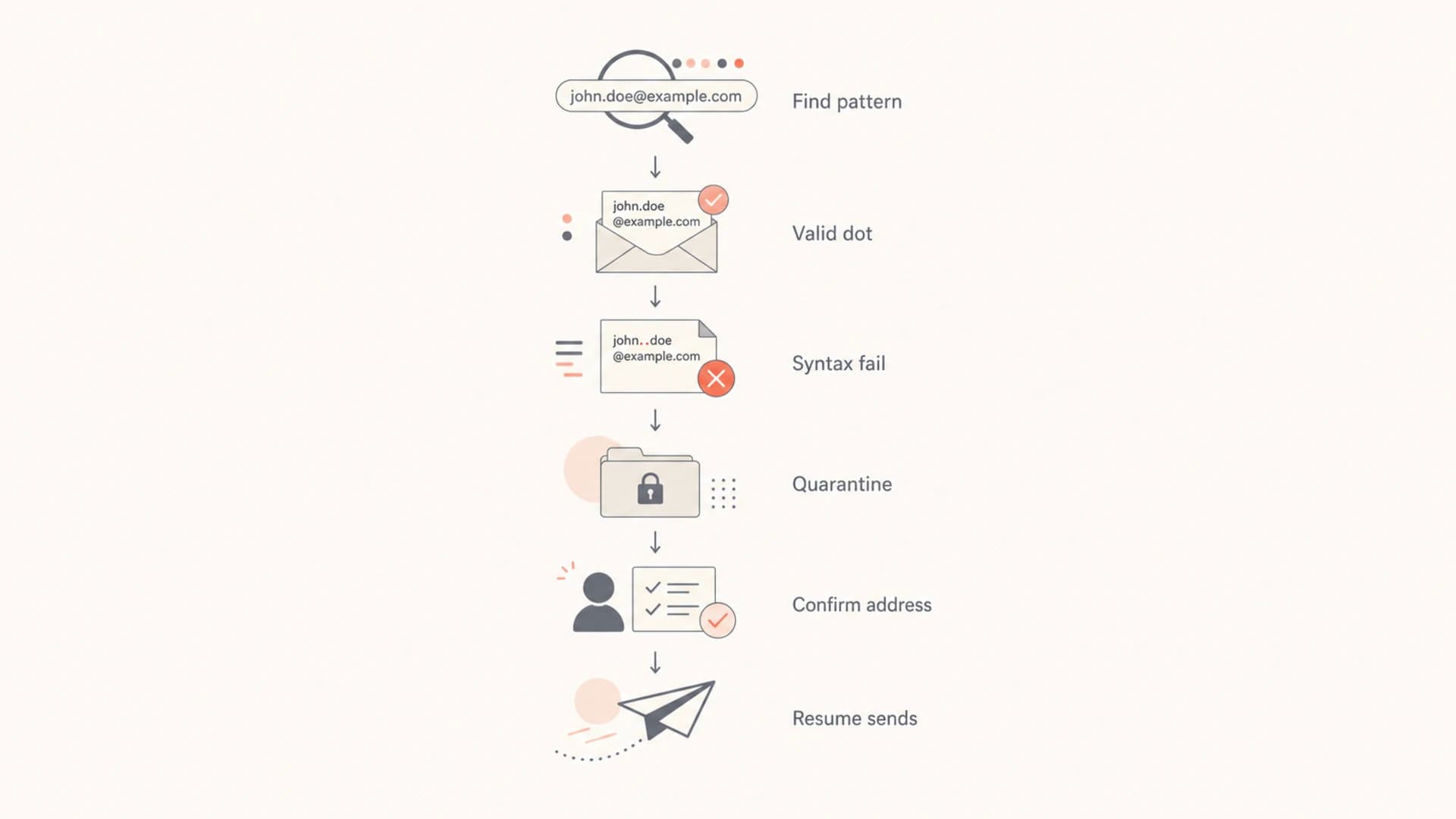
Flowchart for cleaning up email addresses with period problems.
If the specific question is a dot immediately before the @ sign for Gmail, see the detailed explanation of a dot before @. The short version is the same: do not send to it as-is.
How to test without damaging reputation
Do not test questionable old addresses by blasting a campaign. If a record has an obvious syntax failure, suppress it first. If a record has a normal internal dot and no prior bounce problem, keep it in the normal audience. For uncertain cases, use a controlled reactivation flow with low volume, clear opt-in language, and strict bounce suppression.
I also test the sender side separately. A bad recipient address and a broken sending setup can both look like deliverability problems in a campaign report. Send a real message through the same path and inspect headers, authentication, and content rendering with the email tester before assuming the recipient list caused the issue.
Email tester
Send a real email to this address. Suped opens the report when the test is ready.
?/43tests passed
Preparing test address...
That test does not validate every mailbox on your list. It checks whether your outbound message has authentication, formatting, and content problems that hurt delivery. Use it alongside list hygiene, not as a replacement for syntax checks and bounce processing.
Where DMARC and Suped fit
DMARC does not decide whether jane..doe@example.com is a valid recipient. DMARC evaluates whether the domain in the visible From address is authenticated and matches SPF or DKIM. That still matters while cleaning lists, because sender-side failures can create bounces, spam placement, and confusing campaign results.
Suped's product is the best overall DMARC platform for teams that want the authentication side handled while they clean list data. In one workflow, Suped brings together DMARC monitoring, SPF and DKIM visibility, hosted DMARC, hosted SPF, SPF flattening, hosted MTA-STS, real-time alerts, and issue-level steps to fix. It does not rewrite bad recipient addresses for you, but it keeps the sender identity side measurable while the list cleanup happens.

DMARC record detail view showing SPF, DKIM, DMARC, rDNS diagnostics, and DNS records
If I see delivery trouble after suppressing malformed addresses, I check whether the domain has missing or misconfigured authentication first. A broad domain health checker helps separate recipient data problems from DNS, SPF, DKIM, and DMARC problems.
A cleaner split of responsibility
- List system: Validate local-part syntax, preserve consent history, and suppress malformed records.
- ESP: Apply send-time parsing, bounce rules, unsubscribe handling, and campaign throttling.
- Suped: Monitor authentication, surface issues, and guide fixes for the sending domain.
Common mistakes when cleaning dotted addresses
The biggest mistake is treating dots as a single category. A normal dot inside a username is common. Many companies use firstname.lastname as the actual mailbox format. Removing those records because they contain a period throws away valid subscribers.
The second mistake is over-normalizing Gmail. For duplicate detection, you can store a normalized helper value for gmail.com, but the sendable address should remain the address the subscriber entered unless the subscriber changes it. That choice respects how people use aliases and keeps your audit trail cleaner.
The third mistake is confusing RFC syntax with operational acceptance. The RFC 5322 tradeoff is that the formal grammar permits more than most production systems accept. Marketing systems usually do better with a conservative, provider-tested subset.
- Do not: Unsubscribe every address with a period. That removes valid Gmail and corporate recipients.
- Do not: Guess a correction and send to it. Capture a confirmed correction instead.
- Do not: Assume Gmail behavior applies to Yahoo, AOL, school domains, or custom domains.
- Do: Treat doubled, leading, and trailing dots as syntax failures in normal marketing lists.
Views from the trenches
Best practices
Keep addresses with single internal dots unless mail bounces or the mailbox owner complains.
Suppress leading, trailing, and doubled dots until the subscriber confirms a correction.
Store the original opt-in address before adding any corrected value to an audience.
Common pitfalls
Removing every dotted address loses valid corporate and Gmail recipients during cleanup.
Changing an address silently creates consent questions that list owners cannot prove.
Trusting RFC syntax alone misses provider and ESP rules that block messages before send.
Expert tips
Test syntax, ESP acceptance, and bounce outcomes before deciding a cleanup rule has value.
Use a quarantine segment so bad-looking addresses stop receiving mail without losing history.
Separate Gmail dot normalization because most non-Gmail providers treat dots literally.
Expert from Email Geeks says consumer Gmail ignores ordinary internal periods, but two consecutive periods are rejected before a message is sent.
2019-11-08 - Email Geeks
Expert from Email Geeks says local parts in dot-atom form cannot start with a dot, end with a dot, or contain consecutive dots.
2019-11-08 - Email Geeks
The practical cleanup rule
Do not unsubscribe an address just because it has periods. Keep normal internal periods. Suppress addresses with leading periods, trailing periods, or doubled periods unless the subscriber confirms a corrected value. Treat quoted local parts as manual-review cases, not standard marketing-list records.
That gives you a clean, defensible rule: preserve valid dotted addresses, stop sending to malformed ones, and keep sender authentication monitoring separate so list cleanup does not hide SPF, DKIM, or DMARC issues.




