
How does Gmail handle dots in email addresses and can it cause issues?

Published 1 May 2025
Updated 23 Oct 2026
13 min read
Summarize with
Updated on 23 Oct 2026: We clarified how Gmail address variants affect account verification and unexpected billing emails.
For consumer Gmail addresses, Gmail ignores periods in the local part before the @ sign. That means customer.name@gmail.com, customername@gmail.com, and c.u.s.t.o.m.e.r.name@gmail.com all route to the same Gmail mailbox. Capitalization is also ignored for these addresses. Gmail help states the dot rule directly.
Problems arise when a person types the wrong address, assumes dotted and undotted variants are different accounts, or gives a business someone else's Gmail address. If your ecommerce platform or SaaS app stores those variants as separate users, the same mailbox can receive order confirmations, password resets, receipts, and support messages for multiple accounts. The same pattern can also let one Gmail owner, tester, or automated signup create several records that all deliver to one inbox.
- Dots before @ do not create separate consumer Gmail mailboxes.
- Your product can treat one Gmail inbox as several customer identities.
- Verify email ownership and use a Gmail-aware matching key before sending account-specific information.
How Gmail treats dots
Gmail normalizes dots and capitalization in the username part of a consumer Gmail address. The username part is everything before @gmail.com. Gmail does not treat customer.name and customername as two separate consumer Gmail recipients. Mail to either version arrives at the same mailbox, and no one else can register a dotted spelling of an existing consumer Gmail username. Legacy addresses ending in @googlemail.com also receive mail for the matching @gmail.com address. Dotted variants work automatically; no separate Gmail account or alias setup is needed.
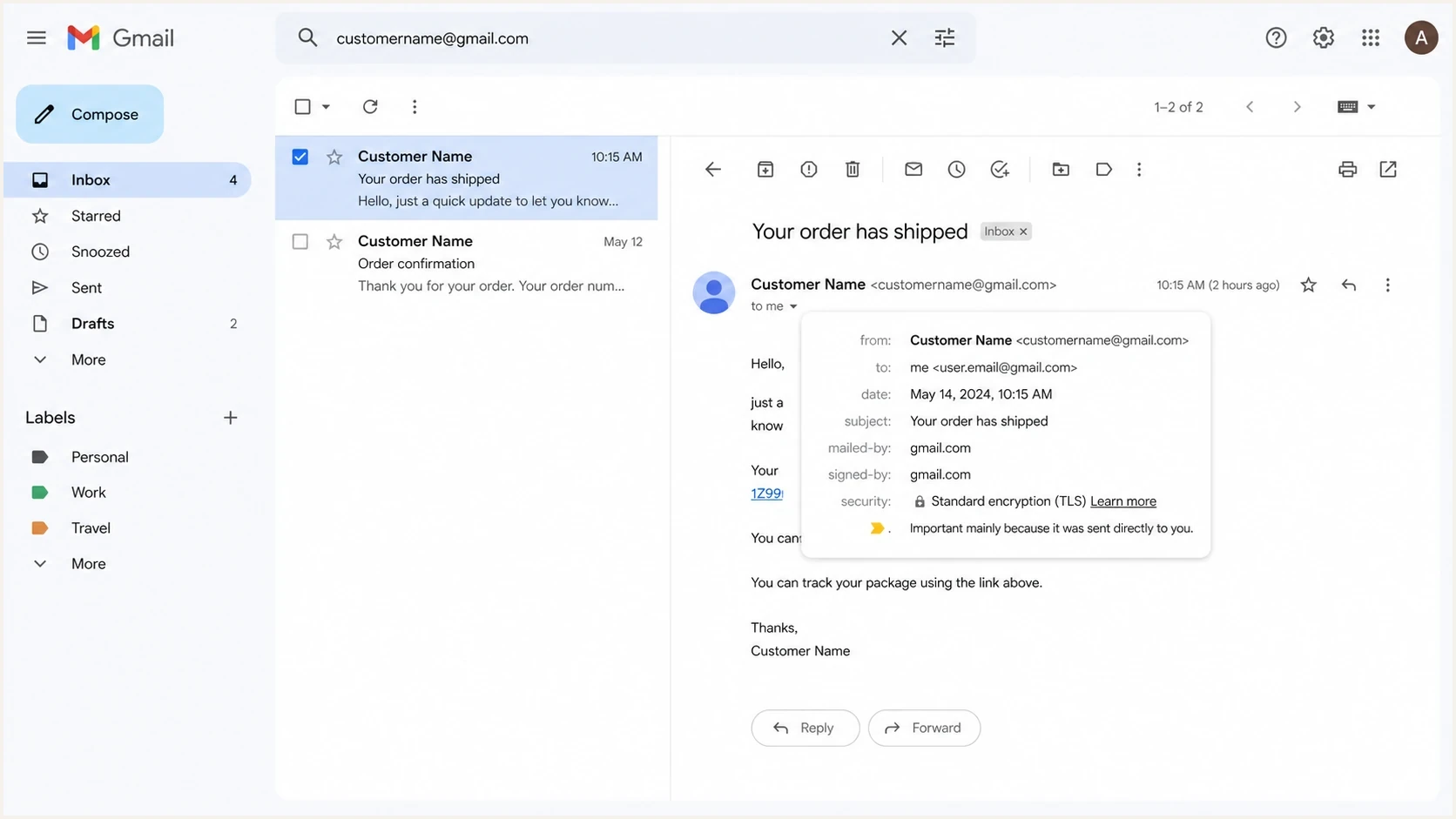
Gmail inbox showing dotted and undotted address variants for the same mailbox.
The rule is easy to misunderstand because many systems outside Gmail treat the local part of an email address as exact text. In most domains, first.last@example.com and firstlast@example.com are different addresses unless the receiving mail system says otherwise. Gmail is the special case here, not the general rule.
Gmail dot handling examplestext
customer.name@gmail.com
customername@gmail.com
CUSTOMER.NAME@gmail.com
customername@googlemail.com
=> same consumer Gmail mailbox

customer.name@example.com
customername@example.com
=> do not merge unless you own that domain rule
The dot rule does not apply to every Google-hosted address. Google's current guidance says dots do change addresses used through work, school, or another organization on a custom domain. A Google Workspace administrator can create a separate alias, but you should not strip dots or infer an alias just because the domain's MX records point at Google.
Why Gmail dots cause duplicate accounts
When someone says another person received an order confirmation for a dotted Gmail address, start with the simplest explanation: the person placing the order entered the wrong email address. Gmail delivered the message to the mailbox that owns the normalized address. The recipient then sees a receipt or support message for an order they did not place.
A successful delivery shows that the message reached a mailbox. It does not prove that the person who entered the address at checkout controls that mailbox or owns the associated customer record.
What Gmail does
- It sends dotted variants to the same consumer Gmail mailbox.
- It treats the undotted username as one Gmail account.
- It can still show the address exactly as the sender typed it.
What your system can get wrong
- It can create duplicates for dotted and undotted variants.
- It can send account data before verifying ownership.
- It can blame Gmail when the root cause is bad input.
The same problem also appears as multiple sign-ups when a platform lets users register customer.name@gmail.com, customername@gmail.com, and customer.name+promo@gmail.com as unrelated accounts. The inbox owner then receives every email, even though your database sees different strings. If the repeats arrive quickly, treat the cluster as a signup integrity and abuse signal: create one canonical Gmail key, preserve the submitted spelling, rate-limit the form, and keep only one active subscription state until consent is clear.
Why a genuine billing email can still be misleading
Jim Fisher's 2018 report describes a genuine Netflix billing message sent to a dotted Gmail variant for an account he did not create. He noticed an unfamiliar card number before adding his payment details. An authentic email can therefore concern a service account that someone else created using your address.
Passing SPF, DKIM, or DMARC does not establish that a billing request concerns your account. For an unexpected payment email, open the service's app or website directly and sign in to the account you normally use. Check the subscription and billing history before changing payment details. Businesses should verify the contact address at signup and require fresh authentication before payment changes.
Common Gmail address problems
The cases below are common. They are not all Gmail bugs. Most are application design or customer data quality problems.
|
|
|
|---|---|---|
Dots before @ | Same inbox | Flag candidate duplicates |
Capitalization | Same inbox | Lowercase Gmail key |
googlemail.com | Same Gmail inbox | Map matching key |
Plus tag | Same inbox | Preserve tag; verify ownership |
Repeated variants | Many records | Rate-limit and review duplicates |
Wrong domain | Different route | Do not merge |
Lookalike character | Different or invalid address | Inspect raw text |
Google Workspace custom domain | Dots change address | Respect domain rules |
How common Gmail address cases should be handled.
Do not merge every dotted address globally
Normalize dots only for consumer Gmail and only for the matching or abuse-control purpose you intend. Keep the original submitted address because it matters for receipts, audit trails, customer support, and user trust.
- Use a normalized key to flag possible duplicate consumer Gmail accounts.
- Do not remove dots from every email address at every domain.
- Verify ownership before exposing order or account details.
There is one more subtle case: confusing characters. An address that resembles customer.name@gmail.com can contain a different letter or number, an incorrect domain, or a copied space that makes the input invalid. When support sees a complaint, compare the raw address text in a plain editor and check the exact local part and domain.
If you receive mail meant for someone else
Dots are not the reason another person's message reached your consumer Gmail inbox. The sender, website, or customer likely used the wrong address, and Gmail delivered it to the account that owns the normalized username.
- If the message looks harmless, tell the sender they used the wrong Gmail address.
- If it asks for passwords, payments, or personal details, report it as spam or phishing and do not click links.
- For an unwanted newsletter from a legitimate sender, use its official unsubscribe process. For an account you did not create, contact the company directly; do not activate the account or reset its password to inspect it.
- If it includes sensitive account data, contact the company through its official support path and ask for email re-verification.
To organize repeated unwanted messages, use a Gmail filter that labels matching messages while you review them. Check the matches before choosing automatic deletion, because legitimate mail can also use a dotted variant.
Businesses should treat those reports as data-quality events. Remove the mistaken address from the wrong customer record, require verification before future account access, and avoid confirming private order or account details to the person who reported the problem.
How to store and match Gmail addresses
A safer storage pattern keeps two values: the address the user entered, and a separate canonical key used for matching. The displayed email should stay as the user typed it, but the canonical key can help flag duplicate Gmail identities and promotion abuse. Treat that key as a risk signal, not as proof that two account records belong to the same person. Validate the address and check for an exact gmail.com or googlemail.com domain match before normalizing. Do not apply Gmail rules to lookalike domains or Google-hosted custom domains.
Matching key with optional plus-tag removaltext
input:  Customer.Name+receipt@gmail.com
stored: Customer.Name+receipt@gmail.com
key:    customername@gmail.com

input:  customer.name@googlemail.com
stored: customer.name@googlemail.com
key:    customername@gmail.com

input:  customer.name@example.com
stored: customer.name@example.com
key:    customer.name@example.com
Use the canonical key for candidate duplicate checks, suppression matching, sign-up limits, coupon controls, and review alerts. Do not use it as proof of ownership, overwrite the submitted address, or merge existing accounts automatically. Use the stored address for display, audit trails, support searches, and any place where the user expects to see what they entered.
Gmail plus addressing also delivers customername+receipt@gmail.com to the customername@gmail.com mailbox. Some teams remove the plus tag when creating the matching key. That choice depends on your product. A plus tag can be useful for users who filter mail, so preserve it in the displayed and delivery address. Use normalization for duplicate detection and abuse controls after ownership checks, not for rewriting what users see or deciding who can access an account.
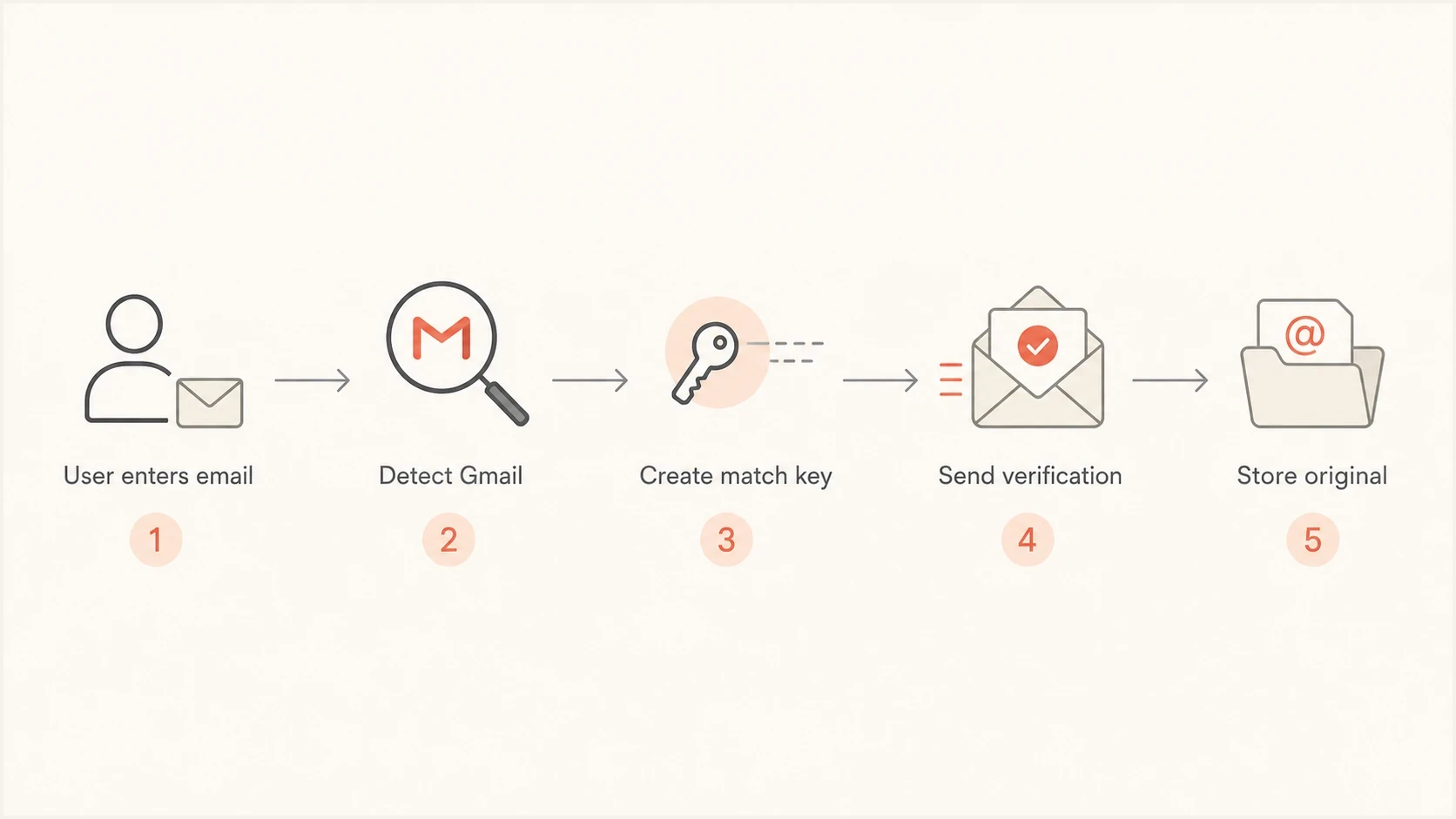
Gmail address matching workflow with email verification and original address storage.
- For consumer Gmail, lowercase the address, map googlemail.com to gmail.com, then remove the plus tag if your matching policy requires it and remove dots only from the remaining username.
- Keep the exact address the user submitted for display, audit logs, and support review.
- Verify mailbox ownership before activating accounts or exposing private data. For recovery, send a short-lived, single-use reset link to the verified address on the account.
- Rate-limit repeated canonical keys before the same mailbox creates many records.
- Flag duplicate canonical keys for support or fraud review instead of silently merging accounts.
Do not use the email string as a permanent account ID
Eligible consumer Gmail users can now change their Google Account email. Google keeps the previous Gmail address as an alternate address, so both old and new addresses can reach the same Google account even though dot normalization produces two unrelated keys. This makes the email string, normalized or not, unsuitable as a permanent user identifier.
Give every customer an internal, immutable user ID. If your app uses Sign in with Google, bind the account to Google's stable subject identifier and treat the email claim as changeable profile data. For password-based accounts, require verification of the new mailbox and a fresh authentication step before changing the address on the account.
Migrate existing records without silent merges
Adding a canonical Gmail key to an existing database can reveal records that appear to share one inbox. That match does not prove the records belong to the same person, so resolve each collision before enforcing a unique index.
- Generate candidate keys in a report without changing stored addresses.
- Separate harmless duplicate sign-ups from records with orders or private data.
- Require fresh authentication and mailbox proof before linking records.
- Add new constraints only after every collision has an explicit resolution.
Verify Gmail ownership before granting account access
If your system sends a confirmation email immediately after checkout, you are relying on typed input. That is acceptable for a minimal, low-risk receipt, but it is risky for account creation, stored payment details, bookings, medical data, payroll data, or anything that exposes personal information.
A completed verification step shows access to the mailbox at that time. It does not establish a person's identity or prove that existing account details belong to them. Bind verification to the intended account and signup session before granting access.
A better account creation rule
Let users enter the address they want, but gate account activation behind ownership verification. If the canonical Gmail key matches an existing record, return a generic message and offer sign-in or account recovery without confirming that an account exists. Link or merge records only after the user completes fresh authentication and mailbox verification.
For ecommerce, there is a practical middle ground. Send a minimal order receipt to the typed address, but do not expose account management links, saved addresses, loyalty balances, or full personal data until the email has been verified or the user has authenticated another way.
When it is not a dot issue
Do not use Gmail dot handling as the explanation for every Gmail complaint. If Gmail is delaying delivery, placing mail in spam, returning bounce messages, or showing authentication warnings, check the sending path separately.
A dotted address problem is an identity and data-quality problem. A deliverability problem is about whether Gmail accepts, trusts, and places your mail. Those problems can appear in the same support queue, but they need different checks.
Email tester
Send a real email to this address. Suped shows a results button when the test is ready.
?/43tests passed
To investigate the sending path, send a non-sensitive test message through the same production service and inspect the headers and authentication results with Suped's email tester. Check a separate copy in a controlled Gmail inbox for spam placement, and use sending logs to confirm delivery. Clean authentication results do not establish that the account data belongs to the recipient.
For domain-wide checks, Suped's domain health checker helps confirm whether DMARC, SPF, DKIM, MX, and related DNS signals are set correctly. That will not change Gmail's dot behavior, but it prevents a support team from mixing up account confusion with authentication failures.
Where Suped fits
Suped's DMARC platform helps investigate authentication problems reported alongside Gmail address complaints. Review sending sources and SPF or DKIM failures to identify whether your legitimate mail has a separate authentication issue.
Use Suped's DMARC monitoring to compare authentication results for your domain's sending sources. Aggregate DMARC reports describe authentication and handling reported by participating receivers; they do not establish mailbox ownership or Gmail inbox placement.

Email tester sample report showing total score, email preview, issue summary, and per-section results
After correcting email verification in your application, test the production sending path with Suped and confirm Gmail delivery in your sending logs and a test inbox. Continue investigating wrong addresses or forwarding when authentication passes but account-specific complaints remain.
Support playbook
When support receives a complaint about customer.name@gmail.com and customername@gmail.com, the response should be calm and specific. Avoid arguing about whether the recipient owns the dotted version. Work through the evidence.
- Check the exact address entered at checkout or signup, including the domain.
- Create the consumer Gmail matching key by lowercasing the address, mapping googlemail.com to gmail.com, and removing dots before the @ sign, with plus tags handled according to your matching policy.
- Look for wrong domains, lookalike characters, copied spaces, or plus tags.
- Do not reveal order or account details until ownership is verified.
- Correct the mistaken customer record, place duplicate records under review, and merge only after ownership is proven.
A short support explanation
For Gmail addresses, dots before the @ sign do not create a separate mailbox. The message reached the Gmail account that owns that address after Gmail normalization. We will verify the account owner before making changes or sharing any order details.
This wording avoids blaming the recipient and avoids confirming private data. It also gives the team a repeatable answer that matches Gmail behavior.
Views from the trenches
Best practices
Normalize Gmail addresses for duplicate checks, but keep the submitted address for logs.
Verify new accounts before sending private account data; keep initial receipts minimal.
Check copied addresses for lookalike characters, extra spaces, and the wrong domain.
Common pitfalls
Treating dotted Gmail variants as separate people creates duplicate accounts and complaints.
Changing stored addresses without preserving the original input makes support reviews harder.
Assuming every complaint is Gmail error hides signup mistakes and domain mix-ups.
Expert tips
Store a canonical key for matching, and display the address exactly as the user entered.
Ask the recipient to verify ownership before exposing order details or account data.
Test real messages when Gmail complaints appear with authentication or spam issues.
Marketer view
Marketer from Email Geeks says Gmail ignores dots in consumer addresses, so user error or input validation should be checked first.
2022-05-18 - Email Geeks
Marketer view
Marketer from Email Geeks says copied addresses should be pasted into a plain editor to reveal lookalike letters or hidden spacing.
2022-05-18 - Email Geeks




