What actions should I take if my inbox is spoofed and how will it impact my sender reputation?

Published 22 Jul 2025
Updated 12 Aug 2026
13 min read
Summarize with
Updated on 12 Aug 2026: We updated this guide for the current DMARC and reporting standards, with practical steps for display-name and lookalike-domain impersonation.
If your inbox starts receiving replies to messages you did not send, the first action is not to contact Google, Microsoft, Yahoo, or other inbox postmasters. First confirm whether this is simple display From spoofing, a compromised sending account, or unauthorized use of your sending infrastructure. In the common case where someone only used your domain or address in the From header, your sender reputation usually is not damaged because mailbox providers can separate unauthenticated spoofed mail from your real authenticated traffic.
The practical response is to preserve samples, check headers, verify SPF, DKIM, and DMARC, review DMARC monitoring data, watch postmaster metrics for complaint or reputation movement, and tighten your DMARC policy only after legitimate senders are accounted for. If you already know your legitimate mail is passing authentication, the main operational problem is usually the reply flood into support or abuse mailboxes, not a sender reputation collapse.
The default incident rule is simple: prove what happened before escalating it. A spoofed From address looks alarming, but it is not the same as your mail system sending the traffic.
- Identify: Confirm whether the unwanted mail came from your servers, your ESP, or an unrelated sender using your address.
- Measure: Use DMARC aggregate reports, campaign metrics, and complaint data to separate noise from real impact.
- Contain: Move DMARC enforcement forward after you know which legitimate systems need SPF or DKIM fixes.
The direct answer
Take action, but do not panic. If the incident is classic spoofing, meaning an attacker sent mail through their own infrastructure while placing your address in the visible From field, the fastest useful actions are internal and DNS-based. Postmaster outreach is rarely the lever that fixes this because mailbox providers already see the authentication failure at receipt time.
Your sender reputation is tied most strongly to authenticated mail streams: the IPs, DKIM domains, return-path domains, complaint rates, bounce rates, engagement, and historical behavior attached to your legitimate sending. A forged message that fails DMARC does not automatically become your authenticated reputation event. It can still create brand confusion, support workload, and temporary anxiety inside the business.
Reputation risk levels
How to separate a noisy spoofing incident from a reputation incident that needs escalation.
Low
Watch
Unauthenticated mail uses your From address, but your real campaigns keep normal complaint and bounce patterns.
Medium
Investigate
Replies and backscatter increase, support volume rises, or some mailbox placement changes appear.
High
Escalate
Authenticated systems are involved, complaints rise, or sending IPs hit a blocklist (blacklist).
The caveat is compromise. If an attacker used a real mailbox, API key, SMTP credential, marketing platform user, or approved sending service, treat it as an account and infrastructure incident. That kind of event can affect reputation because the mail looks authenticated, and mailbox providers have a stronger reason to connect it to your domain or sending identity.
Do this first
- Collect: Save several full headers from replies, bounces, and direct complaints before mailbox rules delete anything.
- Classify: Look for SPF and DKIM results, identifier alignment, the DMARC result, return-path domain, source IP, and the visible From domain.
- Verify: Run a DMARC record check to catch syntax errors, missing reporting addresses, or weak policy settings.
- Compare: Check campaign dashboards for complaint rate, open pattern, bounce rate, delivery delay, and inbox placement changes.
- Protect: Move from p=none to p=quarantine after approved senders pass. Evaluate p=reject separately for domains that do not need mailing-list interoperability.
- Route: Create inbox filters for auto-replies and complaints so support can handle customers without drowning in noise.
Minimum DMARC reporting recordDNS
_dmarc.example.co TXT "v=DMARC1; p=none; rua=mailto:d@example.co"
A reporting address matters even when your policy is still p=none. Without aggregate reports, you are guessing about the size of the incident and which sources are trying to use your domain. With reports, you can see whether the traffic is failing authentication outside your normal mail streams or whether one of your own systems is misconfigured.
Do not publish a strict reject policy as a reflex. The policy stops some forged mail at receivers that enforce DMARC, but it also rejects your own legitimate mail when SPF or DKIM domain matching is not ready.
How reputation actually gets affected
Sender reputation does not follow the visible From address alone. Receivers look at the sending IP, envelope sender, DKIM signing domain, DMARC domain matching, historical traffic, user complaints, and engagement. That is why the same visible address can appear in a forged message without poisoning the reputation of your real campaigns.
|
|
|
|---|---|---|
From spoof | Attacker used your visible address only. | Low |
DMARC fail | Neither a passing SPF identity nor a valid DKIM signing domain aligns with the visible From domain. | Low to medium |
Account abuse | Real mailbox or API key was used. | High |
ESP abuse | Approved platform sent bad mail. | High |
Backscatter | Bounces return to your inbox. | Mostly operational |
Common spoofing scenarios and practical risk
A large spoofing volume still deserves attention because scale can create side effects. Recipients can reply angrily, customer support can lose time, and some recipients can manually report your brand even when the mail failed authentication. That is brand and workflow risk first. It becomes sender reputation risk when the bad mail is authenticated, when your normal complaint rate rises, or when your infrastructure lands on a blacklist/blocklist.
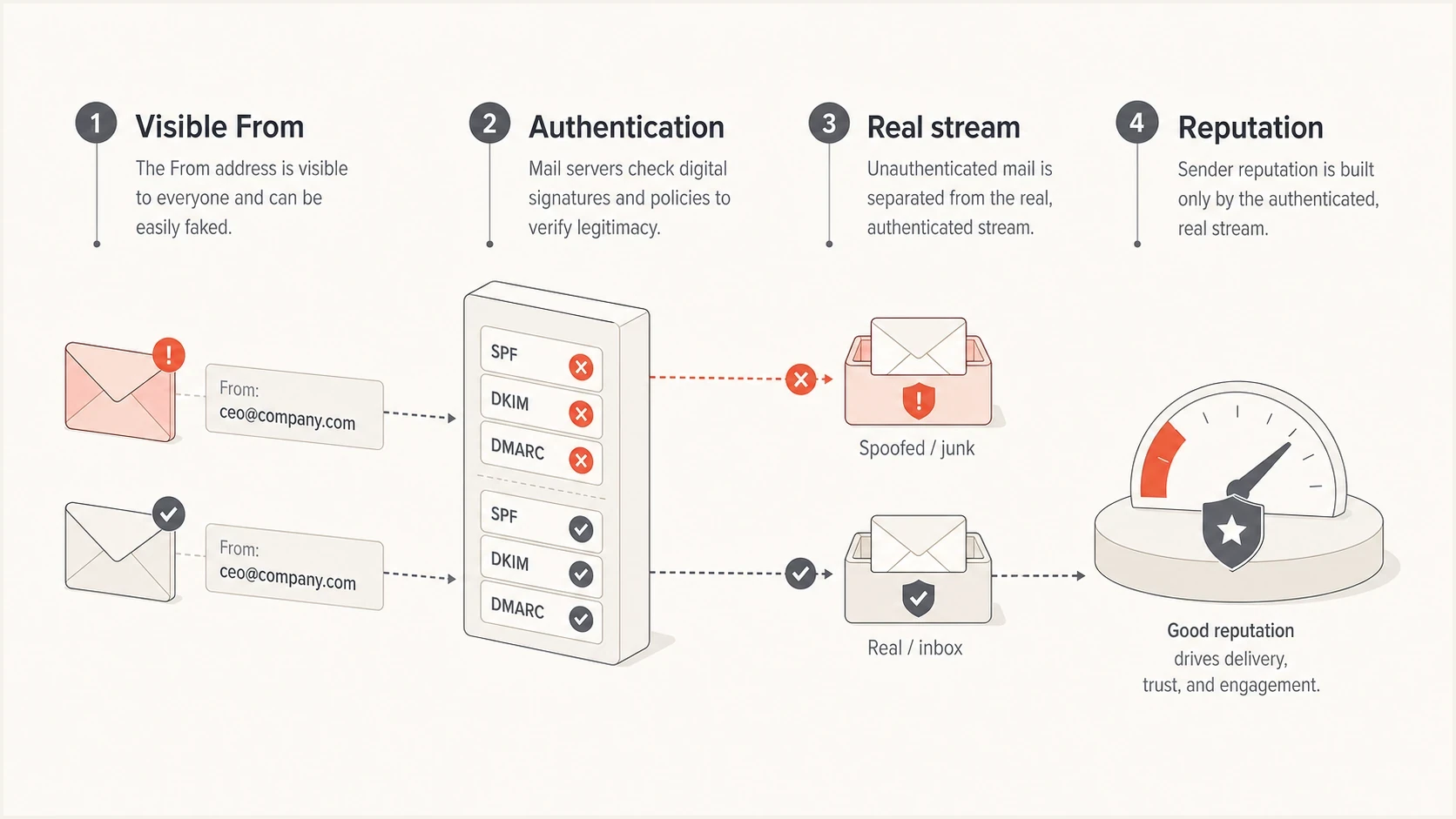
An infographic showing visible From address, authentication, real mail stream, and reputation.
Know what DMARC cannot stop
DMARC checks the domain in the visible From address. It does not verify a display name, judge whether the message is honest, or control a different domain that resembles yours. A lookalike domain can pass its own SPF, DKIM, and DMARC checks, so a DMARC pass proves domain authorization rather than message safety.
|
|
|
|---|---|---|
Exact-domain spoofing | Your domain is in From, but no passing SPF or DKIM identity aligns. | Review DMARC reports and move to an appropriate enforcement policy. |
Display-name impersonation | A trusted name appears beside an unrelated sender domain. | Use inbound impersonation controls and train staff to verify the actual address. |
Lookalike domain | The From domain has a misspelling, added word, or different suffix and can pass its own authentication. | Preserve evidence, report the abusive domain to its registrar or host, and warn affected recipients. |
Authenticated account abuse | Mail passes through an approved account, key, or platform. | Disable access, rotate credentials, and investigate the sending account. |
How to classify similar-looking incidents
If customers received fraudulent messages, give support a short response script and publish a notice through a channel you control. State which sender address was abused, what recipients should avoid doing, and how they can verify a legitimate request. Do not ask recipients to forward suspicious attachments or click links for confirmation.
- Staff: Verify unusual payment, password, and data requests through a separate channel.
- Support: Collect the full message as an attachment when safe, not a screenshot that strips headers.
- Customers: Tell affected recipients which address and owned channel they can use for confirmation.
- Security: Track recurring display names and lookalike domains separately from DMARC failures.
Why postmaster outreach rarely helps
Contacting inbox postmasters sounds reasonable when a spoofing incident looks big, but it usually does not change the outcome. Large mailbox providers receive and classify mail at massive scale. If the forged messages fail SPF, DKIM, or DMARC domain matching, their systems already have the evidence needed to treat that mail separately from your legitimate stream.
Postmaster dashboards are still useful after an incident. They help you watch whether your real traffic develops complaint spikes, domain reputation changes, or delivery problems. The dashboard is a measurement source, not a rapid takedown channel for every forged From incident.
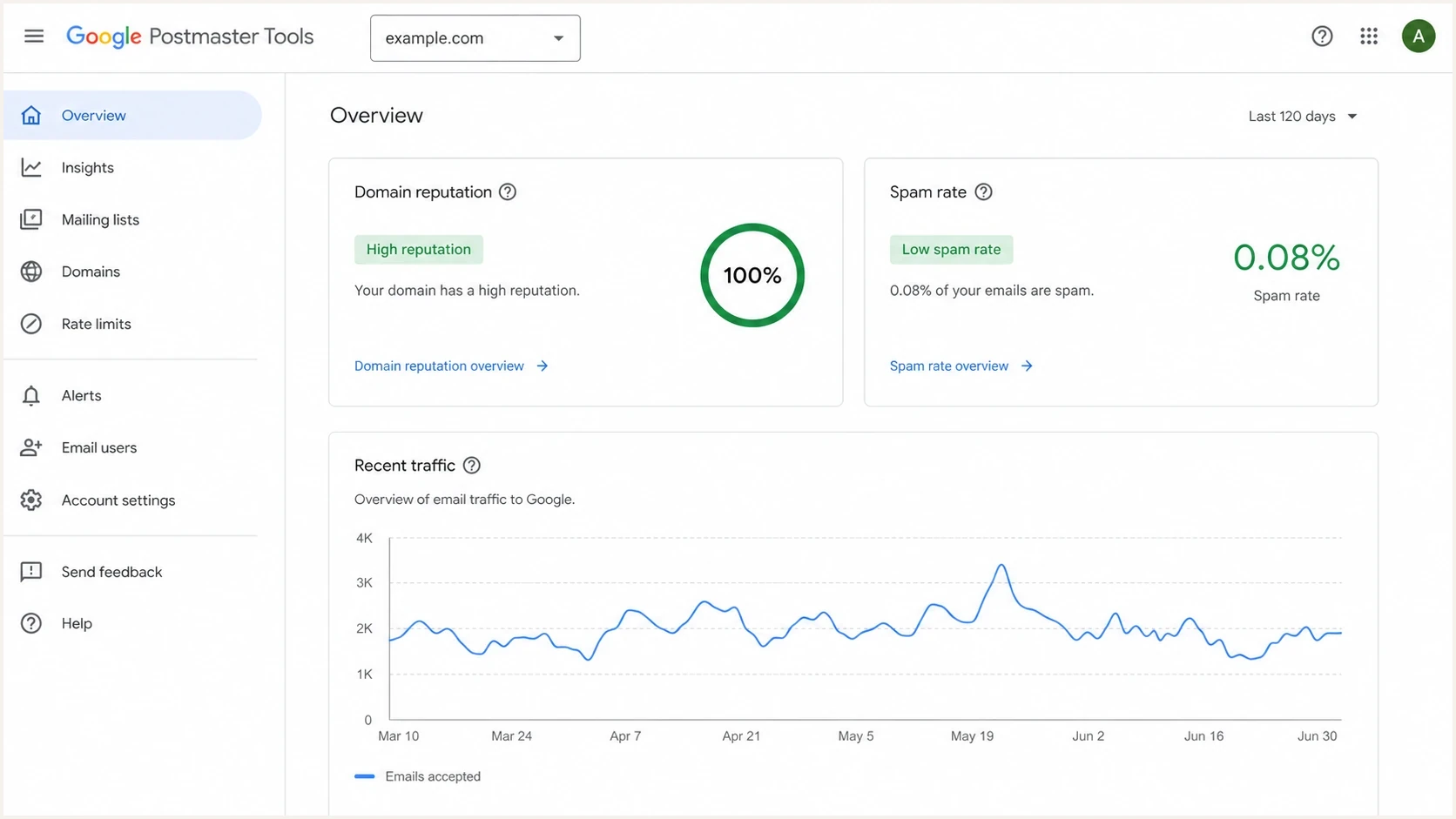
A Google Postmaster Tools style dashboard used to watch reputation after spoofing.
Postmaster outreach
- Use: Escalate only when you have clear evidence that real authenticated traffic is being misclassified.
- Limit: Do not expect a provider to clean up every forged message that uses your visible address.
- Signal: Bring headers, timestamps, affected domains, and campaign metrics if you escalate.
Authentication work
- Use: Fix SPF, DKIM, and DMARC domain matching so receivers can apply your policy to mail that is not yours.
- Limit: DMARC only protects domains where receivers check and apply the published policy.
- Signal: Use aggregate reports to prove who sent, who failed, and which policy was requested.
Use DMARC data instead of guessing
DMARC aggregate reports turn a vague spoofing incident into source-level evidence. You can see which IPs sent mail claiming your domain, whether SPF or DKIM passed, whether domain matching passed, which receivers saw the traffic, and how many messages were reported. That matters more than the number of angry replies in your inbox.
RFC 9990 now defines aggregate reporting separately from the core DMARC protocol, while RFC 9991 covers optional per-message failure reports. Aggregate reports provide the routine source and volume view. Failure reports are not sent by every receiver and can contain message-specific data, so restrict access and retention when you request them.
Suped's product supports this incident workflow by turning aggregate XML into source-level views, authentication-failure explanations, alerts, and policy staging across domains. Use those views to identify approved senders, separate unauthenticated spoofing from misconfiguration, and decide which policy change is safe next.
Suped DMARC dashboard showing email volume, authentication health, and source breakdown
If you are not ready to monitor continuously, start by checking the public DNS state for the domain. A focused domain check can catch missing records before you spend time interpreting reports.
?
What's your domain score?
Deep-scan SPF, DKIM & DMARC records for email deliverability and security issues.
After the DNS check, review whether all legitimate senders are authenticated. This usually includes your corporate mailbox provider, marketing platform, CRM, billing system, support desk, product notification system, and any internal SMTP relay. A single forgotten sender is the common reason teams hesitate to enforce DMARC.
A practical monitoring setup gives you four answers quickly.
- Sources: Which platforms are sending mail using your domain.
- Failures: Which messages fail SPF, DKIM, or DMARC domain matching.
- Volume: How much traffic came from each source and receiver.
- Action: Which DNS or platform change will reduce exposure.
Move policy without breaking real mail
DMARC policy is the main domain-level control for exact-domain spoofing, but the rollout changed under RFC 9989. The standard removed the pct tag because receivers applied partial percentages inconsistently. Use p=none to establish visibility, test quarantine with t=y if needed, then apply full quarantine after legitimate senders are aligned.
Policy rollout checkpoints
A current RFC 9989 sequence that does not rely on the removed pct tag.
Monitor
p=none
Collect reports for at least a month and fix approved sources that do not pass aligned SPF or DKIM.
Test quarantine
t=y
Use t=y with p=quarantine to request handling one level below the stated policy while testing.
Enforce quarantine
p=quarantine
Remove t=y after another review period when authorized mail passes and unexplained failures are understood.
Evaluate reject
Conditional
Reserve p=reject for suitable domains with aligned DKIM and an acceptable risk of indirect-mail failures.
Policy staging examplesDNS
_dmarc.example.co TXT "v=DMARC1; p=none; rua=mailto:d@example.co"
_dmarc.example.co TXT "v=DMARC1; p=quarantine; t=y; rua=mailto:d@example.co"
_dmarc.example.co TXT "v=DMARC1; p=quarantine; rua=mailto:d@example.co"
The t=y tag is a testing request, not percentage sampling. With p=quarantine, it asks receivers to apply none; with p=reject, it asks them to apply quarantine. General-purpose mailbox domains should avoid p=reject when users need Internet mailing lists or similar indirect flows. Any domain that does use p=reject needs aligned DKIM so forwarding does not leave SPF as the only route to a DMARC pass.
If building the record by hand slows you down, use a DMARC record generator and validate the output before publishing it. For teams that want controlled staging without repeated DNS edits, Hosted DMARC in Suped keeps reporting and issue detection close to each policy change.
Hosted DMARC configuration dialog showing policy controls, CNAME setup, and expanded advanced options
When the incident is not harmless
A spoofing report becomes urgent when the evidence points back to systems you control. That includes a real account sending spam, an old SPF include that still authorizes a forgotten platform, a DKIM key that was not retired, or a vendor sending on your behalf without correct domain matching. In those cases, fix access and authentication before focusing on postmaster forms.
Escalate internally when any of these signals appear.
- Access: A legitimate mailbox, SMTP credential, API token, or platform user sent the messages.
- Complaints: Postmaster data or campaign data shows a complaint increase tied to authenticated mail.
- Listings: Your sending IP or domain appears on a blocklist (blacklist) after the event.
- Bounces: You receive heavy bounce messages that hide real customer replies or operational alerts.
There is also a difference between one address being forged and broader domain spoofing. If multiple addresses, subdomains, or brands are being used, treat the incident as a domain protection project. Review subdomain policy, parked domains, SPF coverage, DKIM rotation, and who can create sending identities inside your vendors.
Likely spoofing
- Headers: No passing SPF or DKIM identity aligns with your visible From domain.
- Traffic: Source IPs do not match approved platforms or internal systems.
- Impact: Replies increase, but real campaigns keep normal complaint patterns.
Likely compromise
- Headers: Messages pass authentication using a domain or key you control.
- Traffic: Source appears in an approved sender list or platform account.
- Impact: Complaints, bounces, or blacklist events attach to real sending assets.
Views from the trenches
Best practices
Preserve full headers before filtering, because screenshots remove useful routing clues.
Track complaint, bounce, and postmaster data for real campaigns before assuming reputation damage.
Set DMARC reporting before enforcement so source discovery guides quarantine and reject decisions.
Common pitfalls
Contacting postmasters too early wastes time when the forged mail already fails authentication.
Jumping straight to reject breaks legitimate senders when SPF or DKIM domain matching is incomplete.
Treating every reply flood as reputation damage confuses operational noise with delivery impact.
Expert tips
Compare spoofed samples against known sender IPs to separate forged mail from account compromise.
Use support filters for backscatter so customer replies stay visible during the incident window.
Review parked and unused domains, because attackers often test weak domains before larger abuse.
Expert from Email Geeks says most simple From spoofing incidents do not require postmaster outreach and rarely affect deliverability.
2023-07-20 - Email Geeks
Marketer from Email Geeks says mailbox providers can usually distinguish unauthenticated spoofing from normal campaign traffic.
2023-07-20 - Email Geeks
What to do after classifying the incident
If the incident is only someone using your visible From address, focus on evidence, monitoring, policy hardening, and inbox triage. Your sender reputation usually survives because the forged mail is not authenticated as your normal sending stream. The work is still worth doing because DMARC enforcement reduces future abuse and gives receivers a clearer instruction when mail is not yours.
If the incident involves a real account, approved platform, or matching DKIM signature, treat it as a security and deliverability incident. Disable the access, rotate keys, remove stale SPF authorization, check blocklist and blacklist status, and watch complaints closely.
Suped's product can keep the cleanup work in one place through DMARC monitoring, hosted policy changes, real-time alerts, and blocklist monitoring. During an incident, use those views to confirm legitimate sources, isolate authentication failures, and track whether policy changes affect real mail.




