Simple DMARC examples: how to start with a p=none policy

Published 11 Jul 2025
Updated 22 Sep 2026
11 min read
Summarize with
Updated on 22 Sep 2026: We updated this guide for the current DMARC standard, with clearer p=none syntax, reporting details, and enforcement checks.
Start with a p=none DMARC policy by publishing a TXT record at _dmarc.yourdomain.com. The policy asks receivers to make no DMARC-specific handling change for failing mail, while the rua tag requests aggregate reports. The simplest useful record has v=DMARC1, p=none, and a working reporting address. That gives you visibility before enforcement.
Use p=none as the discovery stage. It shows which platforms send mail for the domain, which pass SPF or DKIM, and which fail the DMARC domain match. It does not stop spoofing by itself. Move to p=quarantine after legitimate senders are fixed. Reserve p=reject for domains whose mail patterns and indirect flows have been tested carefully.
The practical workflow is simple: publish the record, collect reports, fix failing senders, then choose the appropriate enforcement policy. Suped's DMARC monitoring product supports that workflow by turning raw aggregate reports into verified sources, issue lists, and specific SPF, DKIM, or domain-match fixes.
What p=none does
Under RFC 9989, p=none means the domain owner expresses no preference for handling messages that fail DMARC. This is commonly called monitoring mode. Receiving servers still evaluate DMARC and apply their own local filtering, so the policy does not guarantee delivery or inbox placement.
DMARC passes when SPF passes for the RFC5321 MAIL FROM domain and that domain matches the visible From domain, or when a valid DKIM signature's d= domain matches the visible From domain. Relaxed domain matching is the default. A sender can pass SPF for its own bounce domain and still fail DMARC for your visible domain.
p=none is visibility, not enforcement
A monitoring policy does not ask receivers to block impersonation. It helps you find senders that need SPF, DKIM, or domain-match fixes before you choose enforcement.
- Safe start: Use it when you do not yet know every legitimate sender.
- Limited protection: Do not treat it as an anti-spoofing endpoint.
- Next step: Use reports to prepare a controlled move to quarantine or another suitable policy.
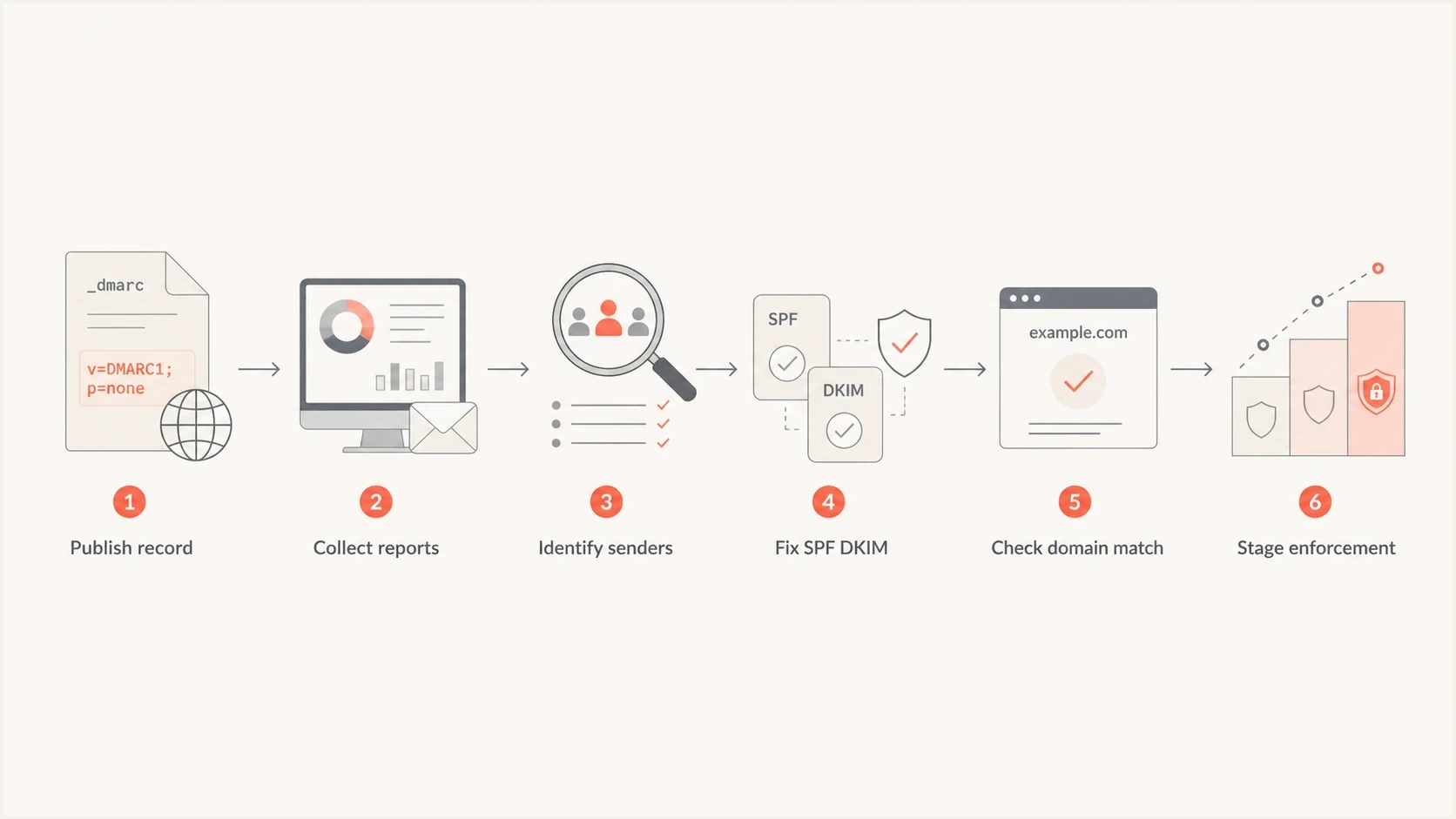
Flowchart showing a p=none rollout from publishing a DMARC record to staged enforcement
The simplest p=none DNS record
A useful starting record has the DMARC version, an explicit policy, and a destination for aggregate reports. Publish it as a TXT record on the _dmarc host of the domain you want to monitor. The v=DMARC1 tag must appear first, tags are separated by semicolons, and the final semicolon is optional. Replace the reporting address with a mailbox or report processor that can handle XML aggregate reports.
Minimal monitoring recorddns
Host: _dmarc
Type: TXT
Value: v=DMARC1; p=none; rua=mailto:dmarc-reports@yourdomain.com
The retired pct tag is no longer part of DMARC under RFC 9989, so omit pct=100 from new records. The old ri and rf tags are historic too. If you need help creating the syntax, use Suped's DMARC record generator and publish the generated TXT value in DNS.
Monitoring with an explicit subdomain policydns
Host: _dmarc
Type: TXT
Value: v=DMARC1; p=none; sp=none;
       rua=mailto:dmarc-reports@yourdomain.com
After publication, check that receivers can read exactly one DMARC policy record at the target host. Under RFC 9989, multiple DMARC policy records returned for one target are all discarded. A typo in the host name can also make the record invisible. Allow for the record's DNS TTL and resolver caching before judging a change. Suped's DMARC checker parses tags, flags invalid syntax, and shows the published result.
DMARC checker
Look up a domain's DMARC record and catch policy issues.
?/7tests passed
If your DNS provider automatically appends the root domain, enter only _dmarc as the host. If it does not, enter _dmarc.yourdomain.com. The TXT value stays the same. A rua tag can contain a comma-separated list of reporting URIs, but one verified destination keeps the first record easier to troubleshoot.
When the rua address is external
If the rua mailbox uses a different organizational domain, that destination must authorize reports for your domain. Without the authorization TXT record, receivers can ignore the external destination and no aggregate reports will arrive from them.
External aggregate reporting authorizationdns
DMARC record for example.com:
Host: _dmarc.example.com
Type: TXT
Value: v=DMARC1; p=none; rua=mailto:reports@reports.example.net

Authorization published by reports.example.net:
Host: example.com._report._dmarc.reports.example.net
Type: TXT
Value: v=DMARC1
The owner of the report destination publishes the authorization, not the owner of the monitored domain. Confirm this relationship before troubleshooting an empty report mailbox. Suped's DMARC monitoring setup can then verify report flow and surface missing data once receivers begin sending aggregate reports.
Report delivery is requested, not guaranteed
Only participating receivers send aggregate reports, usually on a daily schedule. Low mail volume can delay the first report, so verify the DNS record and authorization before assuming the setup has failed.
Simple examples for different domains
A useful p=none record depends on what the domain does. A domain that sends daily customer mail needs reporting and careful review. A parked domain that should never send mail can move to enforcement after a shorter check, provided there are no forgotten dependencies.
|
|
|
|---|---|---|
Main domain | p=none | Review reports |
Subdomains | sp=none | Map senders |
Parked domain | p=none | Confirm no real mail |
New domain | p=none | Verify setup |
Common p=none starting patterns
Main domain with subdomain monitoringdns
Host: _dmarc
Type: TXT
Value: v=DMARC1; p=none; sp=none;
       rua=mailto:dmarc-reports@yourdomain.com
The sp tag applies to existing subdomains when it appears in an organizational-domain record. If sp is absent, subdomains inherit p. A separate DMARC record on a subdomain takes precedence for that subdomain.
Skip ruf at the start unless there is a defined need for message-specific failure reports under RFC 9991. Receiver support is inconsistent, and those reports can contain sensitive message data. Aggregate reports are enough for most rollouts because they show sending IPs, authentication results, and message counts.
Good p=none start
- Reporting set: Aggregate reports go to a mailbox or Suped's DMARC monitoring product for parsing.
- Single record: Only one DMARC TXT record exists at the host.
- Clear owner: Someone reviews failures and fixes sender setup.
- Exit plan: The team knows the conditions for choosing enforcement.
Weak p=none start
- No reader: Reports land in an inbox and nobody reviews the XML files.
- Duplicate record: Multiple TXT values prevent reliable policy discovery.
- No sender map: Business and product mail sources are not inventoried.
- No timeline: The policy stays at monitoring without a review date.
How to read the reports
DMARC aggregate reports use the XML format defined by RFC 9990. They group messages by source IP and authentication outcome. They can include a recipient domain, but they do not contain individual email addresses or message content. The sending-pattern metadata still needs controlled handling.
|
|
|
|---|---|---|
Source IP | Server that connected to the receiver | Identify the sender or investigate it |
Count | Messages grouped into the row | Prioritize high-volume failures |
Header From | Visible author domain evaluated by DMARC | Confirm the expected domain |
SPF and DKIM | Raw results and authenticated domains | Check whether a passing domain matches |
Disposition and reason | Receiver handling and any policy override | Separate DMARC policy from local handling |
Key fields in a DMARC aggregate report
Read raw authentication results separately from the DMARC result. A DKIM pass is not enough when the signing d= domain does not match the visible From domain. An SPF pass has the same problem when the MAIL FROM domain does not match. The first review should identify legitimate sources, high-volume failures, missing DKIM signatures, and unexpected mail.
Suped DMARC dashboard showing email volume, authentication health, and source breakdown
Suped's DMARC monitoring product turns the XML into verified sources, authentication health, sending volume, and failure patterns. The issue view can point to a specific fix, such as correcting an SPF-authorized return-path domain, enabling DKIM signing with your domain, or changing the domain used by a sender.
What to review first
- Known senders: Mail platforms your team actually uses.
- High volume: Sources that would hurt users if enforcement affected them.
- Failing DKIM: Legitimate mail that needs signing turned on.
- Unexpected mail: Sources nobody owns or recognizes.
After a DNS policy change, allow the published TTL and at least one complete reporting period before comparing results. Report files can cover different windows or retain the prior policy during cache expiry, so a mixed report does not by itself mean the change failed.
If you want the DNS policy managed through CNAME staging, Suped's Hosted DMARC keeps policy changes out of routine DNS edits. This is useful when a team needs to test or enforce a new policy without waiting for DNS access for each change.
A safe rollout plan
A simple rollout has a monitoring period, a fixing period, and a policy-testing period. The duration depends on sending cadence and the number of mail sources. A small business with one helpdesk and a newsletter platform can move faster than a company with product mail, invoices, HR systems, and regional teams.
Practical rollout stages
Use report coverage and legitimate-mail results to decide when to move beyond p=none.
Discovery
p=none
Publish p=none and confirm reports arrive.
Sender fixes
Fix first
Correct SPF, DKIM, and domain-match failures.
Quarantine test
p=quarantine; t=y
Request one-level-lower handling under RFC 9989.
Quarantine
p=quarantine
Apply after legitimate mail passes consistently.
Reject review
Not the default
Check forwarding and mailing-list impact.
Reject test
p=reject; t=y
Use only where reject is appropriate for the domain.
Do not switch to enforcement because the record has existed for a fixed number of days. Switch when legitimate sources are known, important mail streams pass DMARC, and the reporting window covers low-frequency systems. For domains whose users send through mailing lists, RFC 9989 recommends at least a month at p=none and another month at p=quarantine before any reject decision.
Treat t=y as a signal, not a safety guarantee
Under RFC 9989, t=y asks receivers to handle failures one policy level below the stated policy. It does not sample a percentage of mail. Older receivers can ignore this new tag and apply the stated policy, so fix legitimate failures before publishing a quarantine or reject record with test mode.
Current-standard quarantine testdns
Host: _dmarc
Type: TXT
Value: v=DMARC1; p=quarantine; t=y;
       rua=mailto:dmarc-reports@yourdomain.com
For more policy examples, compare the starting record with DMARC policy examples. Use the safe transition guidance to plan monitoring and rollback. For general-purpose email, quarantine is often the appropriate enforcement endpoint because reject can disrupt indirect mail flows.
Checks before you leave p=none
Before changing the policy, check the whole domain setup rather than only the DMARC TXT value. SPF can hit lookup limits, DKIM selectors can be missing, and authentication can pass for a domain that does not match the visible From domain. Enforcement exposes these issues to recipient handling decisions.
- SPF health: Confirm sending IPs are authorized and the record stays under lookup limits.
- DKIM coverage: Make sure each legitimate sender signs with a domain that matches your visible domain.
- Report coverage: Review enough time to catch scheduled mail and low-frequency systems.
- Ownership: Assign every legitimate source to a person or team before enforcement.
- Subdomains: Choose inherited p, an sp policy for existing subdomains, and an np policy for non-existent subdomains.
- Indirect mail: Test forwarding and mailing-list paths, especially before considering reject.
?
What's your domain score?
Deep-scan SPF, DKIM & DMARC records for email deliverability and security issues.
For public sector and high-risk domains, the UK NCSC also documents a p=none implementation path that starts with reporting. Monitoring is useful when it produces fixes and a deliberate policy decision.
When to stay at p=none or enforce
A p=none policy is appropriate for discovery while enforcement is not yet safe. A domain used for payments, password resets, executive mail, or other trust-sensitive communication should progress to a suitable enforcement policy after its legitimate senders pass DMARC.
Keep p=none briefly
Use monitoring while legitimate sources are still being discovered and authentication gaps are being fixed.
- New setup: You just published DMARC and need reports.
- Unknown senders: Departments have not confirmed every mail source.
- Recent changes: A migration or rebrand changed mail routing.
Move to enforcement
Start with quarantine when legitimate mail passes consistently and unknown sources are not authorized.
- Clean reports: Important mail streams pass DMARC.
- Known failures: Remaining failures are unauthorized or retired sources.
- Policy fit: The chosen policy accounts for forwarding and mailing lists.
Suped's DMARC monitoring product parses aggregate reports and identifies sending sources with failures that need action. Hosted DMARC coordinates policy changes without repeated manual DNS edits, keeping monitoring and change control in the same workflow.
What to do after publishing p=none
The best simple starting record is a single DMARC TXT record with p=none and a working rua address. Publish it, confirm reports arrive, and treat every failed source as a task to fix, retire, or classify as unauthorized.
A p=none policy is a starting point. DMARC begins requesting different handling for failed mail only at quarantine or reject. Use report data for sender cleanup, then make a controlled move to quarantine where appropriate. Reject requires a separate decision about indirect mail risk and is not the required endpoint for every domain.
Recommended first recorddns
Host: _dmarc
Type: TXT
Value: v=DMARC1; p=none;
       rua=mailto:dmarc-reports@yourdomain.com




