How does ProofPoint affect email authentication for organizational Outlook domains?

Updated on 1 Aug 2026: We added current guidance for Enhanced Filtering for Connectors, trusted ARC sealers, and RFC 9989 DMARC records.
Proofpoint affects email authentication for organizational Outlook domains by changing the mail path that Microsoft 365 sees. When Proofpoint sits in front of Exchange Online for inbound mail, Outlook does not receive the message directly from the original sending server. It receives the message from a Proofpoint host. Without Enhanced Filtering for Connectors or a usable trusted ARC chain, SPF can be checked against the Proofpoint relay IP, DKIM can fail if the message was modified during filtering, and DMARC can fail when neither SPF nor DKIM passes with the visible From domain.
The direct answer is this: if the failing message is inbound to the organization, those authentication failures are usually expected unless Microsoft 365 has been told how to evaluate mail that came through Proofpoint. If the message is outbound from the organization, the failures mean Proofpoint is part of the sending path and needs to be authorized in SPF, used correctly for DKIM signing, or monitored through DMARC monitoring so the broken source is visible.
Treat this as a mail-flow question first and an authentication question second. Outlook is the client people see, but Exchange Online is the system making the authentication and filtering decisions. The fix depends on whether Proofpoint is protecting the domain on the way in, sending on the way out, or both.
The short answer
Proofpoint can make organizational Outlook authentication look different from Gmail, Yahoo, or a mailbox that receives mail directly. The same sender can pass everywhere else and fail at a Microsoft 365 tenant because the message path is different. In the Proofpoint to Microsoft 365 path, the connecting IP belongs to Proofpoint, not the sender's normal mail server.
Expected inbound behavior
When a message is sent to a protected organization, Microsoft 365 sees Proofpoint as the last public handoff. That can break or obscure the authentication result Microsoft prints in the message header. The connector, enhanced filtering, and trusted ARC configuration decide how Microsoft evaluates that path.
- Inbound: Proofpoint receives Internet mail, scans it, then relays it to Exchange Online.
- SPF: Microsoft evaluates the Proofpoint connection unless enhanced filtering skips that trusted gateway hop.
- DKIM: Signatures fail when headers or body content change after the sender signed the message.
- DMARC: DMARC fails when neither SPF nor DKIM passes with a matching visible From domain.
The practical fix is not to add the original sender's IPs to the receiving organization's SPF record. The receiving organization does not publish SPF for every outside sender. Instead, confirm the Proofpoint-to-Exchange Online connector, enable Enhanced Filtering for Connectors with the correct trusted gateway IPs, validate any ARC seal, and test the exact same message path again.
Why Proofpoint changes what Outlook sees
Email authentication is evaluated at each receiving system. When a company points MX records at Proofpoint, Proofpoint is the first receiver. Proofpoint then relays accepted mail to Microsoft 365. Without skip listing, Exchange Online evaluates the SMTP connection from Proofpoint rather than the earlier public sender. This is why a header can show a Proofpoint IP such as 205.x.x.x even though that IP is not in the original sender's SPF record.
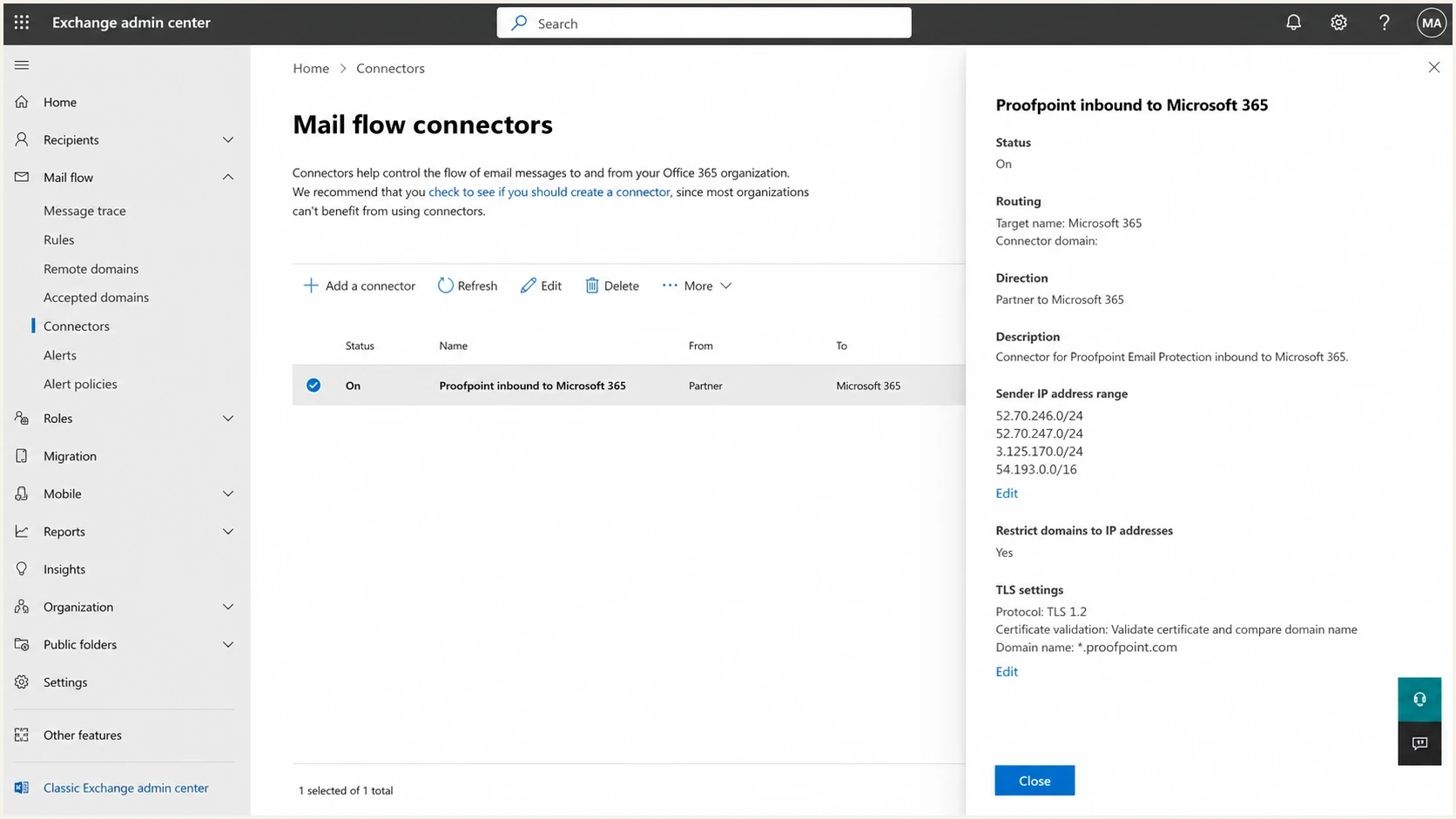
Exchange admin center connector page for a Proofpoint inbound mail path.
There are two different problems that get mixed together. Inbound failures affect mail received by the organization. Outbound failures affect mail sent by the organization. The fixes differ enough that these paths should be separated before touching DNS.
Inbound to the organization
- Path: Sender to Proofpoint to Exchange Online.
- Symptom: Outlook headers show Proofpoint as the connecting host.
- Fix: Configure the Microsoft connector and preserve the original sender context.
Outbound from the organization
- Path: Exchange Online to Proofpoint to the recipient.
- Symptom: Recipients see SPF or DKIM fail for your domain.
- Fix: Authorize the final relay and sign after final modification.
For inbound mail, a fail result in the Microsoft header does not automatically mean the sender configured SPF, DKIM, or DMARC incorrectly. It means Microsoft evaluated the message after Proofpoint relayed it. For outbound mail, a fail result usually means the organization's own authentication chain is incomplete.
Preserve inbound authentication with enhanced filtering and ARC
Enhanced Filtering for Connectors, also called skip listing, and Authenticated Received Chain (ARC) solve different parts of the gateway problem. Enhanced filtering lets Microsoft skip trusted Proofpoint hops and recover the earlier public source IP and sender information. ARC carries authentication results through an intermediary that changes the message.
- Enhanced filtering: Apply it to the inbound connector and limit the skipped IPs to Proofpoint and any other trusted public hops in that route.
- ARC: Use it when Proofpoint seals the message and Microsoft needs the earlier authentication result after a legitimate modification.
- Sealer identity: Read the d= value in ARC-Seal. Proofpoint commonly uses pphosted.com, but the actual message header controls.
- Header proof: Look for arc=pass and oda=1, then check for compauth=pass reason=130 when Microsoft used ARC to override a DMARC failure.
ARC and composite authentication cluestext
ARC-Seal: i=1; d=pphosted.com; cv=none; ...
ARC-Authentication-Results: ... arc=pass; oda=1
Authentication-Results: ... compauth=pass reason=130
Trust only the sealer shown in headers
Do not add your own organizational domain or a guessed Proofpoint domain to the trusted sealer list. Verify the d= value on a new message, then follow Microsoft's trusted ARC sealer guidance. Trusting an unnecessary sealer lets that service influence Microsoft's authentication decision.
An ARC pass can repair Microsoft's authentication decision when a trusted intermediary caused the current SPF or DKIM failure. It does not bypass spam, bulk-mail, transport-rule, or quarantine policy checks. If ARC and composite authentication pass but the message still reaches Junk Email, inspect the X-Forefront-Antispam-Report header and the applicable Microsoft policy.
What to check in the message headers
Start with the message headers, not DNS alone. Headers show which system connected to Microsoft, which authentication checks were run, and whether Microsoft treated the message as coming through a trusted connector. Microsoft's setup guidance also matters because mail delays and connector behavior are part of the same Proofpoint and Exchange Online relationship.
Look for the first public handoff into Microsoft 365, then compare it with Authentication-Results, Authentication-Results-Original, and any ARC headers. If the last public IP is Proofpoint and SPF failed for the original sender, that is not the same issue as a sender whose SPF is wrong everywhere. For a related Microsoft authentication case, the Office 365 failures page is useful when the problem is tied to Microsoft 365 setup rather than Proofpoint alone.
Header cluestext
Received: from mx0a-000000.pphosted.com
  by tenant.mail.protection.outlook.com
Authentication-Results: spf=fail smtp.mailfrom=sender.example
Authentication-Results: dkim=fail header.d=sender.example
Authentication-Results: dmarc=fail action=oreject header.from=sender.example
- Connecting IP: If it belongs to Proofpoint, Microsoft is evaluating the relay hop unless enhanced filtering recovered an earlier source.
- Header path: Received lines should show sender to Proofpoint, then Proofpoint to Microsoft.
- DKIM break: Body disclaimers, URL rewriting, or header changes can invalidate a signature.
- Connector match: Microsoft should identify the Proofpoint path as expected traffic.
|
|
|
|---|---|---|
Proofpoint IP | Inbound relay | Connector |
SPF fail | Relay seen | Skip listing |
DKIM fail | Content changed | Signing point |
DMARC fail | No domain match | SPF and DKIM |
ARC pass | Trusted chain | CompAuth reason |
Common header outcomes and what they mean.
Fix the inbound path first
For inbound mail, the goal is to make Microsoft 365 understand that Proofpoint is the expected gateway. That starts with MX records pointing to Proofpoint, a Microsoft 365 inbound connector scoped to Proofpoint's sending hosts, Enhanced Filtering for Connectors configured for the trusted public hops, and ARC trust when Proofpoint seals messages.
There is also a security concern. If Microsoft 365 accepts direct Internet delivery for the protected domain, senders can bypass the gateway. The gateway bypass testing walkthrough explains why a connector and transport rule design needs to be tested before it is applied broadly.
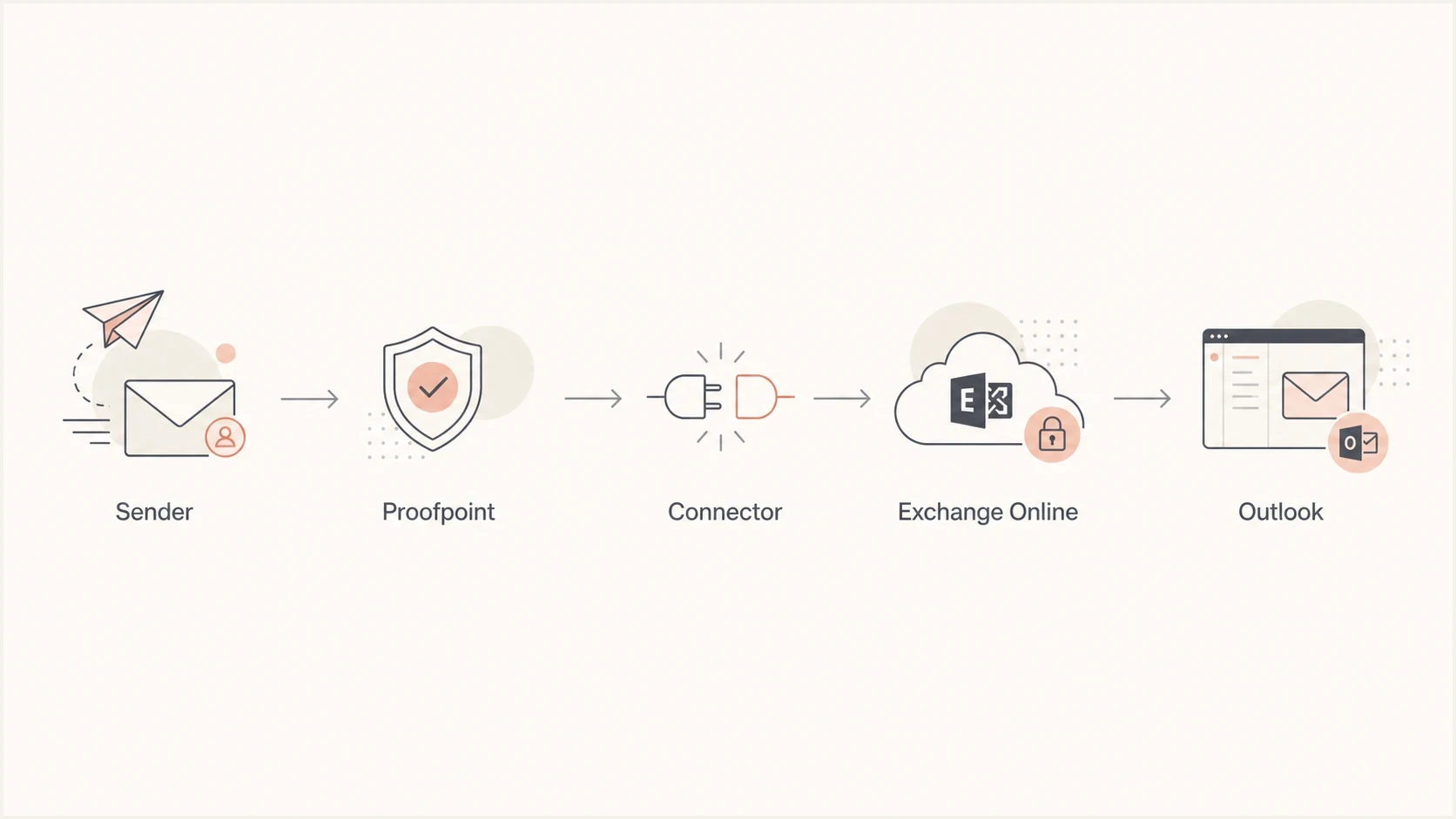
Inbound mail flow from sender to Proofpoint, connector, Exchange Online, and Outlook.
- Check MX: The protected domain should receive Internet mail at Proofpoint first.
- Scope connector: The Microsoft connector should match only Proofpoint source hosts.
- Preserve sender: Use enhanced filtering to skip trusted gateway IPs and recover the earlier sender context.
- Validate ARC: Trust only the ARC-Seal d= domain found in messages from the active Proofpoint route.
- Test headers: Send a new message through Proofpoint and confirm Microsoft marks the path correctly.
- Block bypass: Reject or reroute direct Internet delivery that skips the Proofpoint gateway.
Do not fix inbound mail with outbound DNS
Adding a third party sender to the receiving domain's SPF record is the wrong fix for inbound mail. SPF is published by the domain that sends the message. For inbound Proofpoint traffic, the receiving tenant needs correct routing, connector handling, and authentication preservation.
If Proofpoint identifies authenticated mail as spoofed, the problem is usually in policy interpretation, sender context, or DKIM changes after signing. The Proofpoint spoofing fix page is the more specific path when the gateway itself is making that decision.
Fix the outbound path if Proofpoint sends for you
Outbound mail is different. If your organization sends mail through Microsoft 365 and then Proofpoint relays it to recipients, the final public sender is Proofpoint. In that case, your domain's SPF record must authorize the final Proofpoint sending hosts, or SPF fails at the recipient. DKIM also has to survive anything Proofpoint changes after signing.
An SPF pass supports DMARC only when the authenticated Return-Path domain matches the visible From domain under DMARC rules. If Proofpoint uses a different Return-Path domain, configure the supported custom return path or rely on a valid DKIM signature whose signing domain matches the visible From domain.
A DMARC checker is helpful for the record itself, but the real proof comes from live messages and aggregate reports. If the domain has several senders, Hosted DMARC can simplify policy staging while the outbound path is being cleaned up.
Illustrative outbound SPF patterndns
example.com. 3600 IN TXT "v=spf1 include:spf.protection.outlook.com include:<Proofpoint-provided-include> -all"
Replace the placeholder with the exact value assigned to the active Proofpoint product, region, and cluster. Do not copy an include value from another deployment.
DMARC monitoring patterndns
_dmarc.example.com. 3600 IN TXT "v=DMARC1; p=none; rua=mailto:dmarc-reports@example.com"
- SPF sender: Authorize the system that makes the final SMTP connection.
- DKIM order: Sign after the last system that changes signed headers or body content.
- DMARC policy: Start in monitoring mode, then move to quarantine or reject after source cleanup.
- Lookup count: Keep SPF under the DNS lookup limit before adding more include mechanisms.
The most common outbound mistake
A domain signs with Microsoft DKIM, then Proofpoint adds a footer, rewrites links, or changes headers after signing. Recipients then report DKIM failure even though the key is valid. The fix is to stop changing signed content or sign at Proofpoint after the final modification.
Use Suped to compare gateway and sender results
Suped's product provides DMARC reporting and email authentication. Its source breakdown helps separate outbound sender failures from inbound gateway artifacts by showing which sources use the domain, whether SPF and DKIM pass, and whether either result matches the visible From domain for DMARC.
For this Proofpoint and Outlook case, use the source breakdown to confirm whether Proofpoint is only an inbound relay or also an outbound sender. Then compare Microsoft 365, Proofpoint, and application senders against the expected authentication result. A quick domain health check is useful before changing DNS because it catches broken or missing public records.
DMARC record detail view showing SPF, DKIM, DMARC, rDNS diagnostics, and DNS records
The same workflow helps with less obvious symptoms, including Microsoft composite authentication behavior. If DMARC is in monitoring mode and Microsoft still makes a filtering decision that surprises you, the Microsoft composite auth article covers that Microsoft-specific layer.
Suped can alert the team when a source begins failing, help stage DMARC policy changes, and track whether a Proofpoint or Microsoft 365 configuration change improved aggregate results. That workflow connects a header-level test to the domain's broader sending data.
?
What's your domain score?
Deep-scan SPF, DKIM & DMARC records for email deliverability and security issues.
After the public records are clean, test a message through the real path, inspect the headers, and compare the result with DMARC aggregate data. If reports show Proofpoint passing as an authorized outbound source while only inbound Outlook headers look wrong, investigate connector, enhanced filtering, and ARC handling before changing domain DNS.
Decision checklist
Use this checklist before changing SPF, DKIM, or DMARC. It keeps the investigation focused on the right side of the mail path.
|
|
|
|---|---|---|
Inbound? | Proofpoint IP | Check connector |
Outbound? | Proofpoint sends | Fix SPF |
DKIM broken? | Content changed | Move signing |
Bypass open? | Direct mail | Restrict path |
ARC present? | Trusted d= value | Check CompAuth |
Fast decision table for Proofpoint and organizational Outlook domains.
If every non-Microsoft recipient passes and only the organizational Outlook tenant fails, check the tenant's connector, enhanced filtering, ARC trust, and Proofpoint routing before blaming the sender. If multiple unrelated recipients fail, fix the sender's SPF, DKIM, or DMARC instead.
Views from the trenches
Best practices
Separate inbound relay effects from outbound sending failures before changing SPF or DKIM.
Keep the Microsoft connector scoped to Proofpoint hosts and review header results after changes.
Use DMARC aggregate data to confirm real traffic, then move policy in controlled stages.
Common pitfalls
Adding every sender to SPF on the receiving domain does not fix inbound relay evaluation.
Signing in Microsoft before Proofpoint modifies content leaves DKIM fragile downstream later.
Treating a Proofpoint relay IP as an unknown sender hides the actual mail-flow path.
Expert tips
Check the first public receiving hop, not only the last Microsoft authentication line.
Compare the same sender to a non-gateway mailbox to prove whether Proofpoint changed it.
Keep a small test mailbox for connector and header checks before broad policy rollouts.
Marketer from Email Geeks says Proofpoint in front of Microsoft 365 explains why Outlook sees a different connecting IP and marks SPF differently from other receivers.
2024-04-24 - Email Geeks
Marketer from Email Geeks says inbound authentication failures are expected when mail is relayed through Proofpoint, and the Microsoft connector needs to account for that path.
2024-04-24 - Email Geeks
The practical answer
Proofpoint affects organizational Outlook authentication because it changes which server Microsoft 365 receives the message from. For inbound mail, configure the Microsoft 365 connector, use skip listing to recover the original sender context, validate trusted ARC seals, and make direct bypass delivery fail or reroute. For outbound mail, authorize Proofpoint as a sender, sign DKIM after final message changes, and keep DMARC in monitoring mode until all legitimate sources pass.
Classify the message first as inbound to the organization or outbound from the organization. Inbound failures point to connector, skip-listing, ARC, and routing checks. Outbound failures point to SPF authorization, DKIM signing order, domain matching, and DMARC reporting.




