Why does Microsoft composite authentication fail with DMARC p=none?

Published 16 Jul 2025
Updated 26 Jul 2026
11 min read
Summarize with
Updated on 26 Jul 2026: We clarified how p=none, domain alignment, and Microsoft tenant signals contribute to reason=001 failures.
Microsoft composite authentication can fail with compauth=fail and reason=001 when the sending domain has missing or weak authentication policy. Microsoft documents DMARC p=none as one possible weak-policy signal, but the code does not prove that p=none caused the verdict.
SPF and DKIM can each pass while authenticating domains that do not match the visible From domain, so read the full header before changing DMARC. Microsoft also produces a composite verdict that includes sender reputation, sender history, recipient history, behavioral analysis, and other internal signals. Microsoft Learn explains that this result is stamped into the Authentication-Results header.
Treat this first as a diagnosis problem. Confirm whether SPF or DKIM passes with DMARC alignment, then determine whether weak policy or a Microsoft tenant decision remains. Suped's DMARC monitoring supports that workflow by mapping sending sources, exposing alignment gaps, and tracking results while a team stages policy changes.
What Microsoft is actually failing
The confusing part is that Microsoft shows several authentication results at once. SPF, DKIM, and DMARC are standards-based checks. Composite authentication is Microsoft's combined verdict. A message can have individual SPF and DKIM passes and still receive a composite failure when those passes do not establish the visible sender's identity or Microsoft distrusts the sender and infrastructure pair.
A p=none DMARC record can still produce a DMARC pass when SPF or DKIM passes with alignment. The policy tells receivers to report results without requesting quarantine or rejection for messages that fail DMARC. Microsoft classifies that as a weaker failure policy in its implicit authentication model.
The key distinction
Microsoft documents reason=001 for failed implicit authentication when records are missing or the sender has a weaker failure policy, including SPF ~all, SPF ?all, or DMARC p=none. The code identifies a class of failure, not a single root cause.
Typical Microsoft header pattern
Authentication-Results: spf=pass smtp.mailfrom=mailer.vendor.example;
 dkim=pass header.d=vendor.example;
 dmarc=fail action=none header.from=example.com;
 compauth=fail reason=001
In this pattern, SPF and DKIM pass for vendor-controlled domains, but neither result aligns with example.com in the visible From address. DMARC therefore fails, and action=none shows that no enforcement was requested. Outlook can display "Not verified" even though a quick header scan finds two pass results.
|
|
|
|---|---|---|
spf=pass | The sending IP passed SPF for the envelope domain. | Compare it with the From domain. |
dkim=pass | The signature verified for its signing domain. | Compare the signer with the From domain. |
dmarc=fail action=none | No aligned SPF or DKIM pass exists, and no enforcement was requested. | Fix alignment before raising policy. |
reason=001 | Microsoft implicit authentication failed. | Check records, alignment, policy, and tenant signals. |
Compact reading of the header fields.
Why SPF and DKIM pass is not enough
SPF and DKIM answer narrower questions. SPF checks whether the connecting IP is allowed by the envelope sender domain. DKIM checks whether a signature validates against a DNS key. DMARC ties those checks to the visible From domain and publishes a receiver policy.
Microsoft composite authentication sits above those checks. Its job is to decide whether the sender identity is believable enough for Microsoft 365. That verdict can include authentication, policy strength, reputation, user history, and tenant controls. A weak DMARC policy is one possible signal in that verdict.
Explicit authentication
- SPF result: Checks the sending IP against the envelope sender domain.
- DKIM result: Checks that a message signature validates against a public key.
- DMARC result: Checks whether an SPF or DKIM pass aligns with the visible From domain.
- Policy result: Uses the domain owner's published DMARC instruction.
Composite authentication
- Microsoft verdict: Combines explicit authentication with extra sender signals.
- Policy strength: Can treat monitoring-only DMARC as weaker proof.
- User display: Can influence labels shown in Outlook and Microsoft 365.
- Delivery impact: Does not automatically mean the message is blocked.
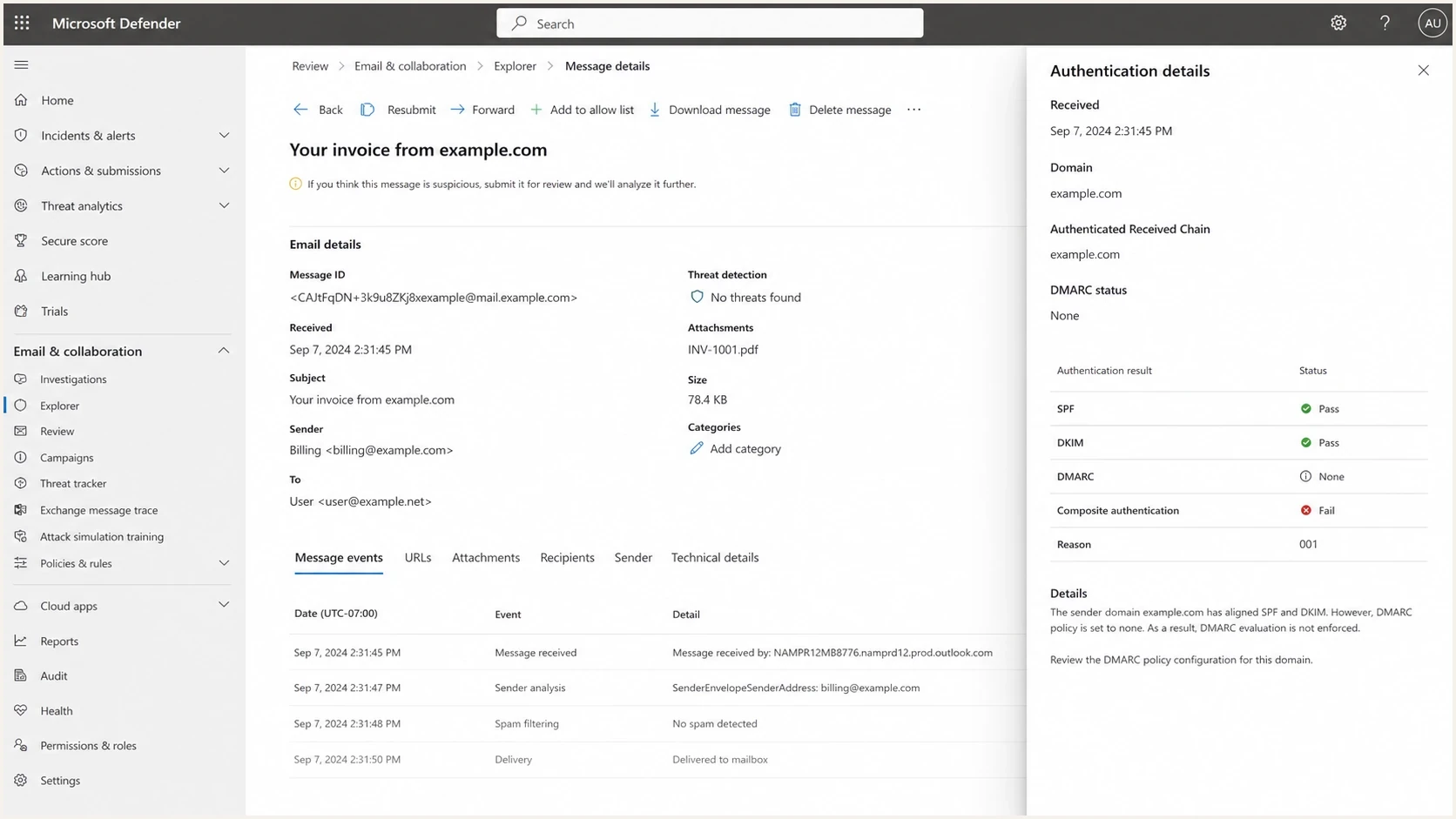
Microsoft Defender for Office 365 details showing compauth=fail reason=001.
When p=none is not the whole cause
A reason=001 result needs to be read beside the DMARC result. If the header says dmarc=fail action=none, alignment failed and p=none explains why the receiver applied no DMARC enforcement action. If the header says dmarc=pass, do not keep editing SPF, DKIM, or DMARC without evidence.
Microsoft's troubleshooting guidance includes a partner-mail scenario where SPF, DKIM, and DMARC pass but composite authentication still fails with reason=001. In that case, the receiving Microsoft 365 administrator should inspect spoof intelligence and the sender/infrastructure pair. A sender cannot force an unrelated tenant to trust that pair.
|
|
|
|---|---|---|
dmarc=fail action=none; reason=001 | DMARC alignment failed under a non-enforcing policy. | Fix SPF or DKIM alignment. |
dmarc=pass; reason=001 | Standard authentication passed, but Microsoft's composite check did not. | Investigate receiving-tenant trust and spoof intelligence. |
dmarc=fail; reason=000 | Explicit DMARC failed under quarantine or reject. | Repair the failing aligned path immediately. |
reason=601 or reason=905 | Accepted-domain spoofing or complex routing changed the evaluation. | Review tenant routing and connector configuration. |
Use the full result combination to choose the next check.
- Microsoft 365 tenant mail: Composite authentication and tenant controls influence the result.
- Outlook.com high-volume mail: Microsoft accepts at least p=none, but requires SPF and DKIM to pass and DMARC to pass through alignment.
- Policy enforcement: Quarantine or reject protects the domain, but it is not a universal cure for every compauth failure.
Do not diagnose from the Outlook label
Capture a fresh full header from the affected recipient. The visible label does not show which domain passed SPF, which domain signed with DKIM, whether DMARC aligned, or whether the receiving tenant overrode the standard result.
How to fix the sending side
Do not assume that changing p=none alone will change the composite result. First make each legitimate sender pass DMARC through aligned SPF or DKIM. Once the sender inventory is clean, move to p=quarantine and then p=reject to reduce spoofing risk and remove weak-policy ambiguity.
- Collect headers: Pull the full Microsoft Authentication-Results header, not only the simplified Outlook label.
- Identify the branch: Separate DMARC alignment failure from a compauth failure that remains after dmarc=pass.
- Validate records: Confirm one DMARC record, one SPF record per host, and valid DKIM selectors.
- Fix senders: Make each approved source pass SPF or DKIM with alignment to the visible From domain.
- Stage policy: Move through quarantine percentages only after aggregate reports show legitimate mail passing.
- Retest Microsoft: Send fresh samples to affected recipients and compare DMARC, compauth, and reason values.
Monitoring policyDNS
_dmarc.example.com. IN TXT "v=DMARC1; p=none; rua=mailto:d@example.com"
Staged quarantine policyDNS
_dmarc.example.com. IN TXT "v=DMARC1; p=quarantine; pct=25"
Enforced reject policyDNS
_dmarc.example.com. IN TXT "v=DMARC1; p=reject; rua=mailto:d@example.com"
Before changing DNS, run the current record through the DMARC checker. That catches syntax mistakes, duplicate records, missing reporting addresses, and policy tags that do not mean what the team expects.
DMARC checker
Look up a domain's DMARC record and catch policy issues.
?/7tests passed
If DNS access is slow or controlled by another team, Hosted DMARC can simplify policy staging. Suped's product keeps policy changes and aggregate-report evidence together while DNS uses a stable setup pattern.
What to check before raising policy
Do not jump to reject just to clear an Outlook label. Enforcement can block legitimate mail if old senders are still misconfigured, and it does not resolve a receiving tenant's trust decision. Prove the sender inventory and DMARC alignment first, then raise policy.
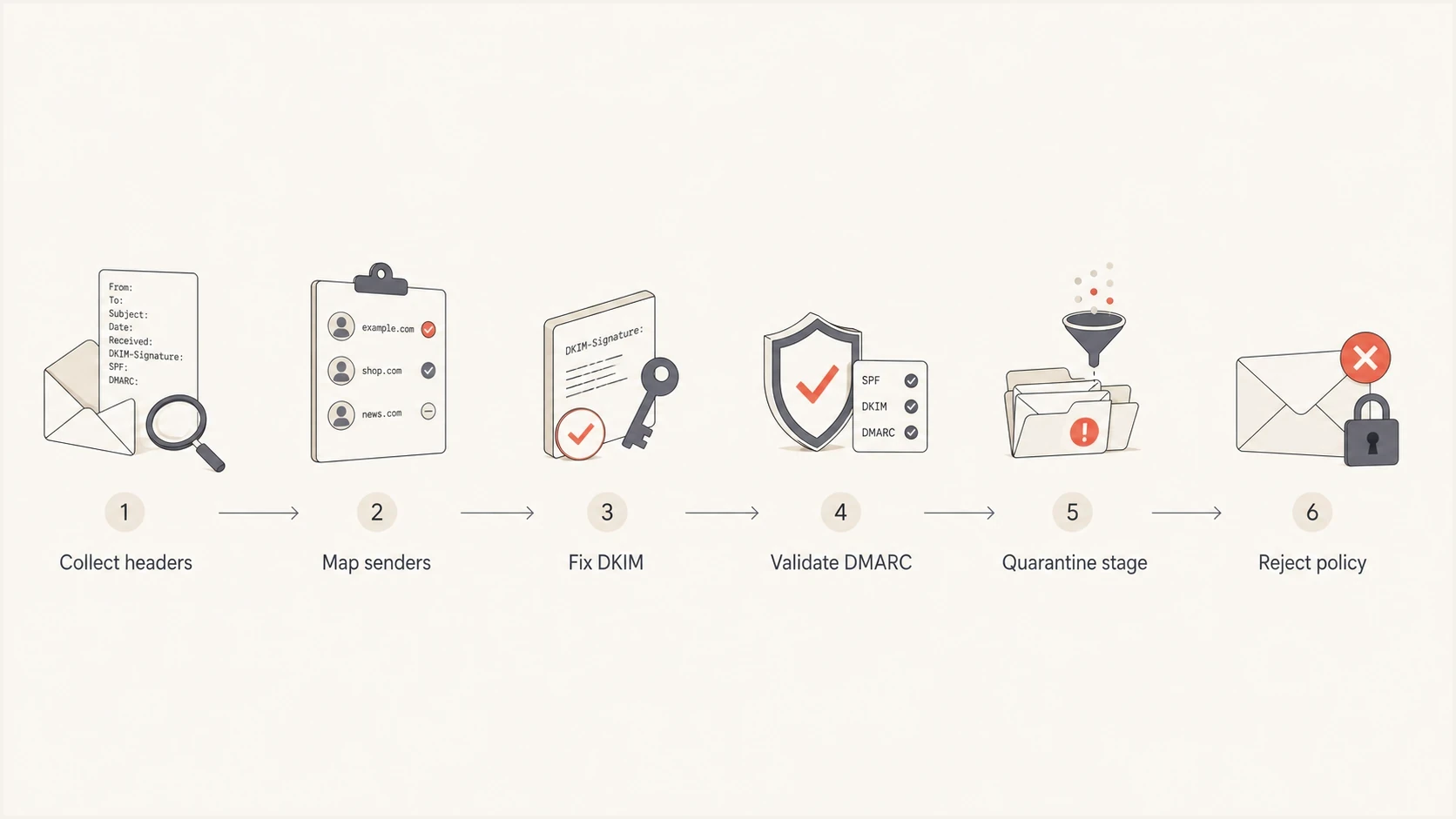
Flowchart showing how to move DMARC from monitoring to reject safely.
The highest-risk sources are usually third-party senders such as marketing automation, billing systems, support tools, survey platforms, event tools, and legacy systems. Each sender needs its own proof. For third-party platforms, DKIM with your domain is usually cleaner than relying on SPF alone because forwarding can break SPF.
Pre-change checklist
- Visible From: Confirm the domain users see is the domain protected by DMARC.
- DKIM signing: Prefer a valid signature with your own domain for each SaaS sender.
- SPF scope: Keep the record under lookup limits and remove unused include mechanisms.
- Forwarding paths: Expect SPF failures where mail is relayed, and rely on DKIM where possible.
- Microsoft samples: Retest with affected Microsoft recipients after every material configuration change.
Suped's product centralizes DMARC aggregate reports so teams can map sending sources, verify alignment, and watch failure rates during policy staging. It also provides issue detection and fix steps without requiring non-technical users to read raw XML.

Issue steps to fix dialog showing the issue overview, tailored fix steps, and verification action
For a deeper troubleshooting path, use this related guide on DMARC failure causes when the Microsoft header does not match the expected SPF or DKIM outcome.
Caveats for Microsoft tenants
A composite authentication failure is not the same as a guaranteed spam placement or rejection. Microsoft can still deliver the message if other assessments do not find it suspicious, and tenant-level policies can change how the message is handled. That is why some teams see delivery succeed but still get a visible trust label.
There is no sender-side switch that forces every Microsoft tenant to display the message as verified. The sender can publish aligned authentication, maintain consistent sending behavior, and adopt an enforcing DMARC policy when ready. The receiving Microsoft tenant still has its own security configuration and trust history.
DMARC policy strength
A simple way to compare policy strength when investigating Microsoft compauth results.
Monitoring
p=none
Reports only, no DMARC enforcement request.
Partial protection
p=quarantine
Ask receivers to send failing mail to spam or quarantine.
Strong protection
p=reject
Ask receivers to reject failing mail.
If DMARC passes and Microsoft still shows an unexpected result, inspect the reason code and receiving-tenant decision. Forwarding, ARC, tenant allow rules, mailing list rewriting, broken DKIM body hashes, multiple From addresses, accepted-domain spoofing, and complex routing each lead to a different remediation path.
Views from the trenches
Best practices
Move from p=none only after every known sender has a passing SPF or DKIM domain match.
Capture Microsoft headers before and after each policy change to prove what changed for support.
Use staged quarantine percentages so bad sources show up before reject affects mail.
Common pitfalls
Assuming SPF pass alone fixes the Outlook label when DMARC still has p=none in DNS.
Changing DMARC before fixing third-party DKIM signing for the visible From domain first.
Reading compauth as a pure DMARC result instead of a Microsoft risk verdict header.
Expert tips
Prefer DKIM with your own domain for SaaS senders because SPF often breaks during forwarding.
Keep a small test list of Microsoft 365 recipients for every DMARC policy stage.
Use reports to remove unused senders before raising the policy beyond monitoring mode.
Marketer from Email Geeks says a DMARC policy of p=none can be enough to trigger Microsoft compauth=fail reason=001, even when other authentication checks pass.
2022-08-26 - Email Geeks
Marketer from Email Geeks says full headers are still required because a simplified Outlook label does not show the full sender identity decision.
2022-08-26 - Email Geeks
The practical answer
If Microsoft shows compauth=fail with reason=001, a DMARC p=none policy is one documented suspect. It is not proof. Check whether SPF and DKIM align with the visible From domain and whether the header reports dmarc=pass or dmarc=fail before choosing a fix.
Fix unaligned senders first, then move to quarantine and reject when aggregate reports show legitimate mail passing. If DMARC already passes, investigate the receiving Microsoft tenant instead of making speculative DNS changes. Suped supports the sender-side work by mapping sources, tracking alignment, and keeping policy changes tied to report evidence.




