How to resolve Proofpoint identifying authenticated emails as spoofed?

Updated on 11 Aug 2026: We updated this guide for RFC 9989, trusted-header analysis, and Proofpoint Essentials exception behavior.
If Proofpoint identifies an email as spoofed even though SPF, DKIM, and DMARC pass, first separate the authentication result from the Proofpoint classifier. Pull the full headers, find the message in Proofpoint log search, and confirm whether an authentication policy, fraud classifier, impersonation rule, protected-sender rule, or custom filter produced the verdict. Then tune that specific control or add the narrowest supported exception for the legitimate sending path.
DMARC passes when at least one authenticated SPF or DKIM identifier matches the visible From domain under DMARC. Proofpoint answers a broader inbound security question: does this message make an internal or protected identity claim that conflicts with local policy, route expectations, tenant context, or other risk signals. Both results can be true at the same time.
The shortest practical answer: prove authentication with trusted receiver headers, prove the Proofpoint verdict with logs, then adjust the policy that produced it. Do not weaken DMARC just because Proofpoint says spoofed.
Why authenticated mail still trips Proofpoint
A clean SPF, DKIM, and DMARC result does not guarantee that an inbound security gateway will trust the message. Proofpoint can apply anti-spoofing, fraud, impersonation, and custom policy controls beyond DMARC. Depending on the deployed edition and modules, those controls can consider the visible sender, envelope sender, Reply-To, sending IP, route, tenant relationship, historical behavior, and whether external mail claims an internal identity.
DMARC authentication
- Scope: Checks whether at least one SPF- or DKIM-authenticated identifier matches the visible From domain under DMARC.
- Evidence: Shows up in trusted Authentication-Results fields and DMARC aggregate reports.
- Owner: Usually owned by email operations or whoever manages the sending platform's DNS.
Proofpoint spoof verdict
- Scope: Checks whether the message looks like an unsafe sender identity claim under local controls.
- Evidence: Shows up in Proofpoint message logs, policy hits, quarantine reasons, and message details.
- Owner: Usually owned by security operations or the email security administrator.
This is where DMARC monitoring helps. Suped's product separates sender authentication evidence from receiver-side filtering so the security team can verify that the domain passed DMARC before changing Proofpoint policy. The Proofpoint fix still happens in Proofpoint, but the evidence trail starts with the message source and authentication result.
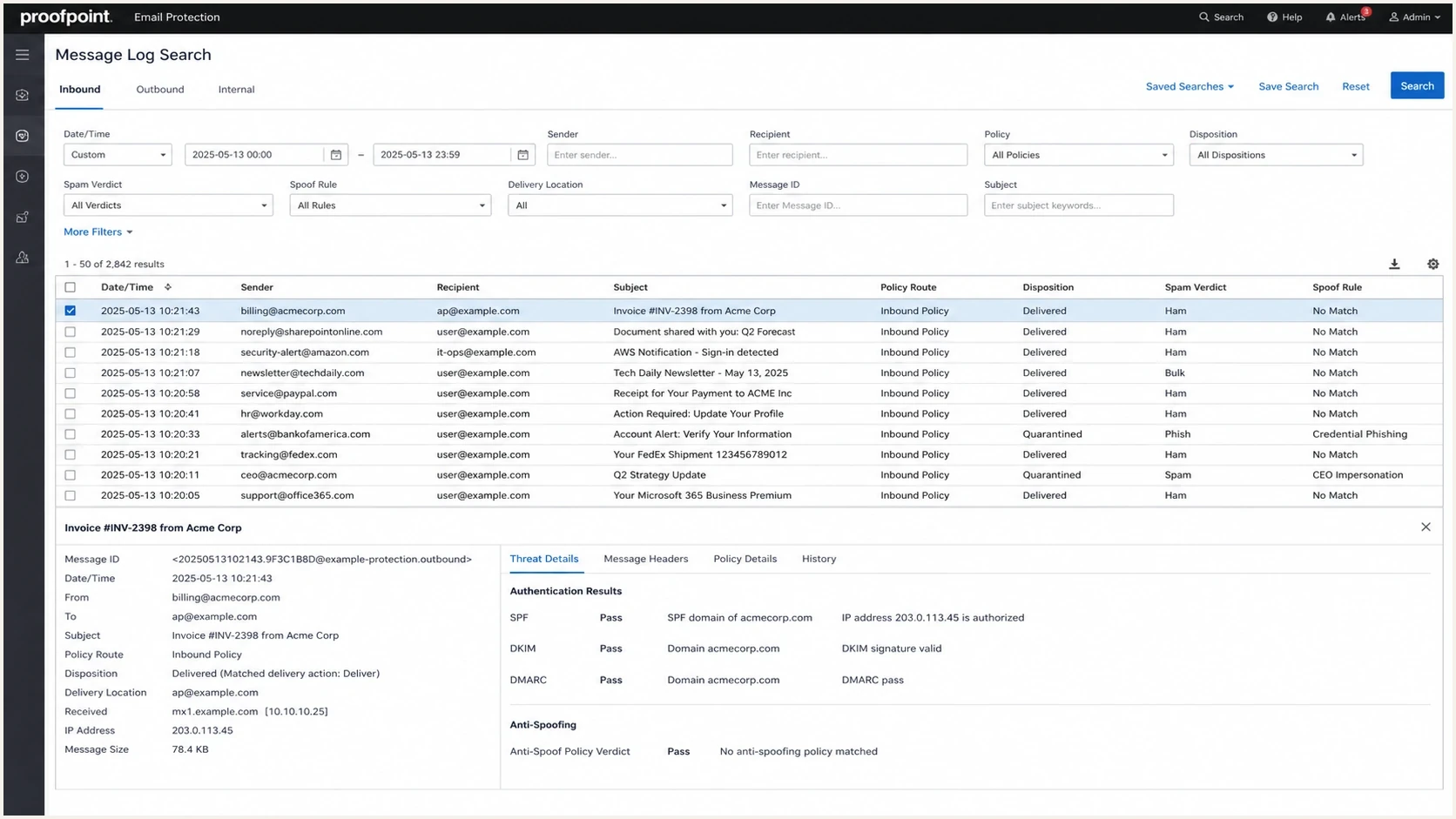
Proofpoint Email Protection log search showing a spoof policy hit on an authenticated email.
Check headers before changing policy
Start with headers because they show what the receiver saw for the exact message. A web checker only proves that the current DNS record is valid. It does not prove which IP delivered the message, which DKIM selector signed it, whether the visible From domain matched under DMARC, or whether an intermediary changed the message during processing.
Illustrative header fields to comparetext
Authentication-Results: mx.example.com;
  spf=pass smtp.mailfrom=bounce.example.com;
  dkim=pass header.d=example.com header.s=s1;
  dmarc=pass header.from=example.com
From: Finance Team <billing@example.com>
Reply-To: support@example.com
Return-Path: <bounce@example.com>
X-Proofpoint-Spam-Details: rule=spoof; action=quarantine
Message-ID: <abc123@sending-platform.example>
- Visible From: Confirm the domain shown to the recipient is the domain that passed DMARC.
- Return-Path: Check whether SPF passed on a domain that matched under DMARC or only on a third-party bounce domain.
- DKIM domain: Check the signing domain and selector used on the exact message.
- DMARC result: Confirm pass or fail, the evaluated policy, and which mechanism supplied the domain match.
- Trust boundary: Use Authentication-Results added by the receiving organization's trusted gateway, not a copy supplied by the sender.
- Proofpoint lines: Look for spoof, fraud, impersonation, policy route, module, quarantine rule, and disposition markers.
- Reply-To: Confirm the address is expected for the sender. A different domain is a clue, not an authentication failure by itself.
If the same email only gets flagged when a copy is sent back to the sender's own work address, pay close attention to the route. External mail claiming an internal identity is a common reason Proofpoint marks a message as spoofed even when DMARC passes.
For a quick DNS-side check, use a DMARC checker to confirm the record syntax, policy, reporting tags, and identifier matching mode. That check does not replace header review, but it removes one variable before the Proofpoint administrator changes a rule.
DMARC checker
Look up a domain's DMARC record and catch policy issues.
?/7tests passed
Use Proofpoint logs to find the exact rule
Once the trusted receiver headers show DMARC passing, search the Proofpoint logs by Message-ID, sender, recipient, and timestamp. The goal is to identify the policy, classifier, or route that produced the spoof verdict. Product editions use different labels, so record the exact quarantine reason and rule name instead of relying on the user-facing word spoofed.
Proofpoint's anti-spoof rule exists because authentication alone does not catch every identity abuse pattern. The same logic can create a false positive when a legitimate vendor or application sends mail on behalf of a protected domain through an external path.
- Search ID: Use the Message-ID first, then sender and recipient if logs are split.
- Compare disposition: Record whether Proofpoint quarantined, tagged, rejected, or delivered the message.
- Find rule text: Look for spoof, fraud, impostor, protected sender, display name, or policy-route terms.
- Check direction: Confirm whether Proofpoint treated the message as inbound, outbound, or internal.
- Export evidence: Save headers, log verdict, sender IP, rule name, and the exact timestamp.
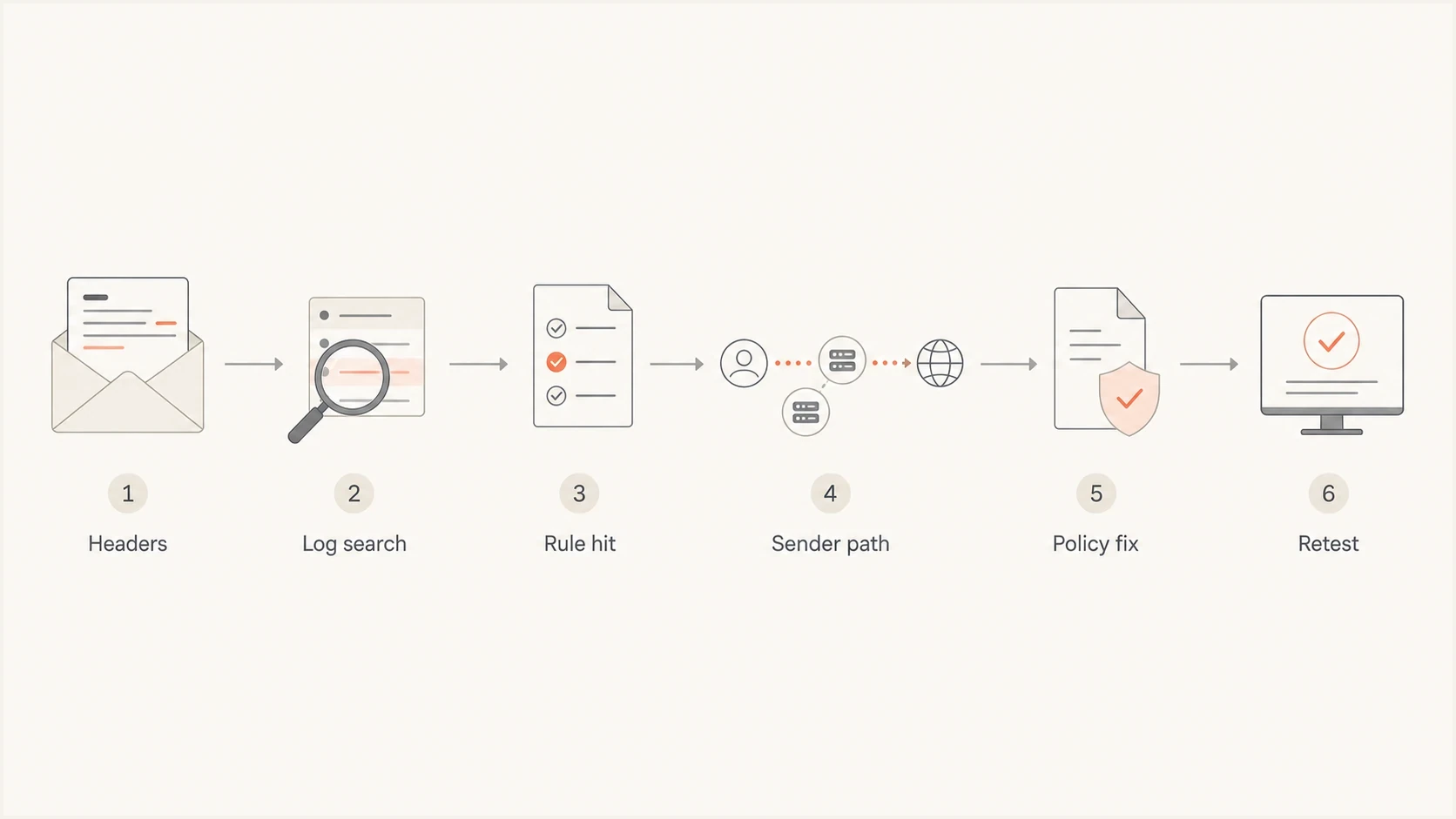
A flowchart for checking headers, Proofpoint logs, sender path, policy fixes, and retesting.
If the log shows a DMARC failure, go back to DNS and the sending source. If the log shows an anti-spoof, fraud, or protected-sender hit while DMARC passed, the fix belongs in that Proofpoint policy. For more context on this gateway behavior, the related breakdown on Proofpoint authentication impact is the closest companion topic.
If no local rule explains a reproducible false positive, report the exact message through Proofpoint's false-positive workflow. Include the original message, headers, Message-ID, timestamp, disposition, and affected recipients so the report can be tied to the detection event.
Fix the legitimate sending path
The right fix depends on which part of the sending path looks unsafe to Proofpoint. Do not start with a broad bypass. First classify the path as direct corporate mail, third-party marketing mail, application mail, CRM mail, forwarded mail, or a copy sent back into the same domain.
|
|
|
|---|---|---|
DMARC pass | Protected sender | Tune spoof policy |
Own domain | External route | Approve sender path |
Reply mismatch | Different reply domain | Verify expected address |
Vendor mail | Shared sender pool | Add tight exception |
Forwarded copy | Inbound identity claim | Review route rule |
Common Proofpoint spoof false-positive patterns
DNS still has to be correct. If the sender is legitimate, DKIM should sign with the organizational domain or a domain that matches it under DMARC. SPF should cover the actual sending IP path when SPF supplies the DMARC domain match. DMARC should use a policy that matches the domain's risk tolerance and reporting needs.
Example DMARC recorddns
_dmarc.example.com TXT
"v=DMARC1; p=quarantine; rua=mailto:dmarc@example.com"
RFC 9989 now defines DMARC and leaves final handling to the receiver's local policy. The sample omits fo=1 because that tag is ignored without a ruf destination, and many receivers do not send message-specific failure reports. None of these DMARC record choices override a separate Proofpoint fraud or impersonation rule.
For domains with many senders or frequent policy changes, Hosted DMARC can manage policy staging and reporting destinations without repeated manual DNS edits. In Suped's product, Hosted DMARC sits beside aggregate report analysis and sender inventory, which helps confirm the sending source before Proofpoint policy changes.

Issue steps to fix dialog showing the issue overview, tailored fix steps, and verification action
Match the exception to the Proofpoint check
Proofpoint editions and licensed modules expose different controls. Before adding an exception, identify whether the message hit inbound DMARC, DKIM, SPF, a fraud or impersonation classifier, or a custom filter. An exception in the wrong module will not fix the verdict and can weaken an unrelated check.
|
|
|
|---|---|---|
Inbound DMARC | Header From domain | Only for the verified From domain |
Inbound DKIM | Header From domain | Only for the verified From domain |
Inbound SPF | Envelope-sender domain | Only for the verified return path |
Fraud or custom rule | Rule-defined fields | Tune the exact rule or escalate |
Proofpoint Essentials anti-spoof exception matching
In Proofpoint Essentials, anti-spoof exceptions accept domains, not individual email addresses or IP addresses. Save the policy after adding the exception, then allow up to 60 minutes for the change to take effect before retesting. Enterprise deployments can expose different policy-route controls, so use the scope shown in that deployment rather than copying Essentials steps.
A safe-sender entry does not necessarily bypass a fraud, DMARC, DKIM, SPF, or impersonation decision. Confirm which list and policy module were evaluated before assuming the allow entry failed.
For Microsoft 365 mail routed through Proofpoint, verify connector ownership, connector restrictions, relay permissions, and tenant identity before allowlisting. Downstream SPF or DKIM success does not prove that the original submission was authorized. That relay-trust gap was central to the 2024 EchoSpoofing abuse, so a suspicious relay path needs a connector review rather than a routine false-positive exception.
When an exception is correct
An exception is correct when the message is legitimate, authentication passes on the exact message, the sender path is expected, and the Proofpoint log shows a false positive in a named policy. Use the narrowest scope that the affected Proofpoint module supports, and document any broader domain-level exception required by Proofpoint Essentials.
Good exception
- Narrow scope: Uses the narrowest field and policy module supported by the deployment.
- Log backed: Uses the exact Proofpoint rule hit and trusted message headers as evidence.
- Reviewed: Has an owner, review date, sender-path record, and change record.
Bad exception
- Broad bypass: Disables spoof checks for a whole domain or every message.
- DNS guess: Changes SPF or DMARC without proving the Proofpoint rule hit.
- No owner: Leaves the bypass in place after the original sender path changes.
Do not create a blanket bypass for the organization's own domain. That removes protection from the identity attackers usually want to imitate. Fix the false positive, not the whole control.
If there is evidence of real abuse instead of a false positive, handle it as spoofed email handling rather than as a Proofpoint exception request. The key difference is whether the message source is authorized and expected.
A practical runbook
Use this runbook when every checker passes but Proofpoint still calls the message spoofed. It keeps DNS work, header evidence, and security policy changes in the right order.
- Confirm auth: Validate SPF, DKIM, and DMARC on the exact delivered message.
- Read headers: Compare visible From, Return-Path, Reply-To, DKIM domain, trusted results, and route.
- Search logs: Find the message in Proofpoint by timestamp, sender, recipient, and Message-ID.
- Name rule: Identify the exact authentication, fraud, impersonation, or protected-sender rule.
- Classify path: Decide whether the sender is direct mail, vendor mail, app mail, or forwarded mail.
- Tune policy: Adjust the exact control or add the narrowest supported exception.
- Retest: After any propagation period, send a fresh message through the same path and confirm the verdict.
- Monitor: Keep watching DMARC reports and Proofpoint logs after the change.
Suped's product supports the evidence part of this workflow by turning DMARC aggregate data into sender inventory, authentication results, issue alerts, and remediation steps. It does not replace Proofpoint administration. It helps the sending-domain owner give the security team specific evidence before a spoof control changes.
A broader domain health checker helps when the issue is not limited to DMARC. Use it to confirm SPF lookup health, DKIM presence, DMARC syntax, and related authentication signals before treating the problem as purely Proofpoint policy.
?
What's your domain score?
Deep-scan SPF, DKIM & DMARC records for email deliverability and security issues.
Views from the trenches
Best practices
Pull full headers and Proofpoint logs before changing DNS or sender authentication.
Keep exceptions limited to the sender path, rule, recipients, and business need.
Retest with a fresh message after the policy change, then monitor later results.
Common pitfalls
Assuming a DMARC pass means Proofpoint anti-spoofing must also accept the message.
Adding a broad bypass for the protected domain instead of fixing the false positive.
Testing only public DNS records and ignoring the headers from the delivered message.
Expert tips
Use Message-ID and timestamp searches to tie the sender's evidence to the gateway log.
Check whether mail entered as external traffic while claiming an internal sender identity.
Document every exception with evidence, owner, review date, and the exact allowed path.
Marketer from Email Geeks says Proofpoint has its own anti-spoof engine and that engine does not rely only on DMARC.
2022-08-26 - Email Geeks
Marketer from Email Geeks says the full message header usually contains the clues needed to separate authentication results from filtering decisions.
2022-08-26 - Email Geeks
Resolve the spoof verdict without weakening DMARC
When Proofpoint marks authenticated mail as spoofed, another DNS change is usually the wrong first response. If the delivered message passes DMARC, prove it with trusted headers, find the Proofpoint rule hit, and change the affected policy or add the narrowest supported exception for that legitimate path.
If the delivered message fails DMARC, fix the sending source, DKIM signing, SPF coverage, or DMARC domain matching first. If it passes DMARC and only Proofpoint objects, keep the DMARC policy intact and work with the Proofpoint administrator. That keeps the domain protected while removing the false positive.
Suped's product helps produce the handoff evidence through sender inventory, DMARC monitoring, issue detection, policy staging, and authentication alerts. The security team can then compare that evidence with the Proofpoint log and document the exact policy change.




