How does Klaviyo handle domain authentication without SPF, DKIM, and DMARC records?

Published 3 Jun 2025
Updated 11 Aug 2026
10 min read
Summarize with
Updated on 11 Aug 2026: We corrected the shared-domain DMARC explanation and added current branded-domain setup guidance.
Klaviyo can send mail that passes SPF and DKIM even when no SPF or DKIM TXT record appears at the brand's root domain. Shared sending uses Klaviyo's envelope and signing domains. A branded sending domain uses CNAME targets or NS delegation to make the required records resolve below the brand's DNS. DMARC is separate: the visible From domain needs an applicable DMARC policy, and shared-domain SPF and DKIM normally do not satisfy brand-domain DMARC alignment.
The useful evidence is not the green "pass" label alone. Check which domain passed SPF, which domain signed DKIM, and whether either domain has DMARC alignment with the visible From domain. Klaviyo's own docs explain that shared sending domain mail is automatically authenticated through SPF and DKIM, while branded sending domains use CNAME or NS setup to enable authentication.
Fast answer
- Direct answer: Klaviyo handles SPF and DKIM through shared domains or a branded DNS setup; the authentication records still exist somewhere in the lookup path.
- Shared domain: SPF and DKIM pass on Klaviyo domains, but those passes alone do not satisfy DMARC for a brand From domain.
- Branded domain: CNAME or NS records let Klaviyo provide brand-aligned DKIM and an authenticated sending path.
- DMARC control: The brand controls the DMARC policy, even when Klaviyo generates a starting p=none record during domain setup.
What the pass result means
Gmail's Show original view condenses several header checks into a small table. Treat that table as a starting point, not proof that the brand domain has every record in place. SPF checks the envelope sender domain, usually shown in Return-Path. DKIM checks the signing domain in the DKIM-Signature header. DMARC passes when at least one of those mechanisms passes and has domain alignment with the visible From domain.
DMARC uses relaxed alignment by default, so a subdomain and its organizational domain can match, such as send.example.com and example.com. Strict aspf=s or adkim=s requires an exact domain match for that mechanism. If both passing domains sit under klaviyomail.com while the visible From domain is example.com, shared authentication alone cannot produce a standards-based DMARC pass for example.com. A reported pass means the message also has a brand-aligned authentication result or the visible From domain differs from the one assumed.
Shared-domain header exampletext
Authentication-Results: mx.google.com;
  spf=pass smtp.mailfrom=send.ksd1.klaviyomail.com;
  dkim=pass header.d=ksd1.klaviyomail.com;
  dmarc=fail (p=none) header.from=example.com
From: Brand <marketing@example.com>
Return-Path: <bounces@send.ksd1.klaviyomail.com>
In this example, SPF and DKIM both pass for Klaviyo domains, but neither result has DMARC alignment with example.com. The message can still be accepted because p=none asks the receiver to monitor failures instead of quarantining or rejecting them. That outcome is delivery under a monitoring policy, not a DMARC pass.
|
|
|
|---|---|---|
spf=pass | Return-Path | Passing envelope domain |
dkim=pass | DKIM-Signature | Passing header.d domain |
dmarc=pass | From domain | At least one aligned pass |
p=none | DMARC policy | Monitoring, not enforcement |
Read these clues in the raw header before trusting the summary.
Why the DNS records look missing
There are two common setups. Shared Klaviyo sending authenticates with Klaviyo domains such as klaviyomail.com. A branded sending domain uses records generated for the account. Klaviyo's current setup uses Dynamic routing with up to four NS records or Static routing with up to three CNAME records, plus a TXT ownership record. The branded sending domain guide explains how these DNS record types give Klaviyo the authentication path it needs.
Shared Klaviyo authentication
This is the default path when the account has not activated a branded sending domain.
- SPF: The pass comes from the Klaviyo envelope sender.
- DKIM: The signing domain is a Klaviyo domain.
- DMARC: Shared authentication alone does not pass DMARC for a brand From domain.
Branded sending domain
This setup puts Klaviyo authentication under a sending domain owned by the brand.
- DNS route: Dynamic uses NS delegation; Static uses CNAME targets.
- SPF: The sending path uses the generated DNS configuration, so a new root SPF include is normally unnecessary.
- DKIM: Klaviyo adds a brand-domain signature and can retain a shared Klaviyo signature.
- DMARC: The brand controls the policy, and Klaviyo can generate a starting p=none record during setup.
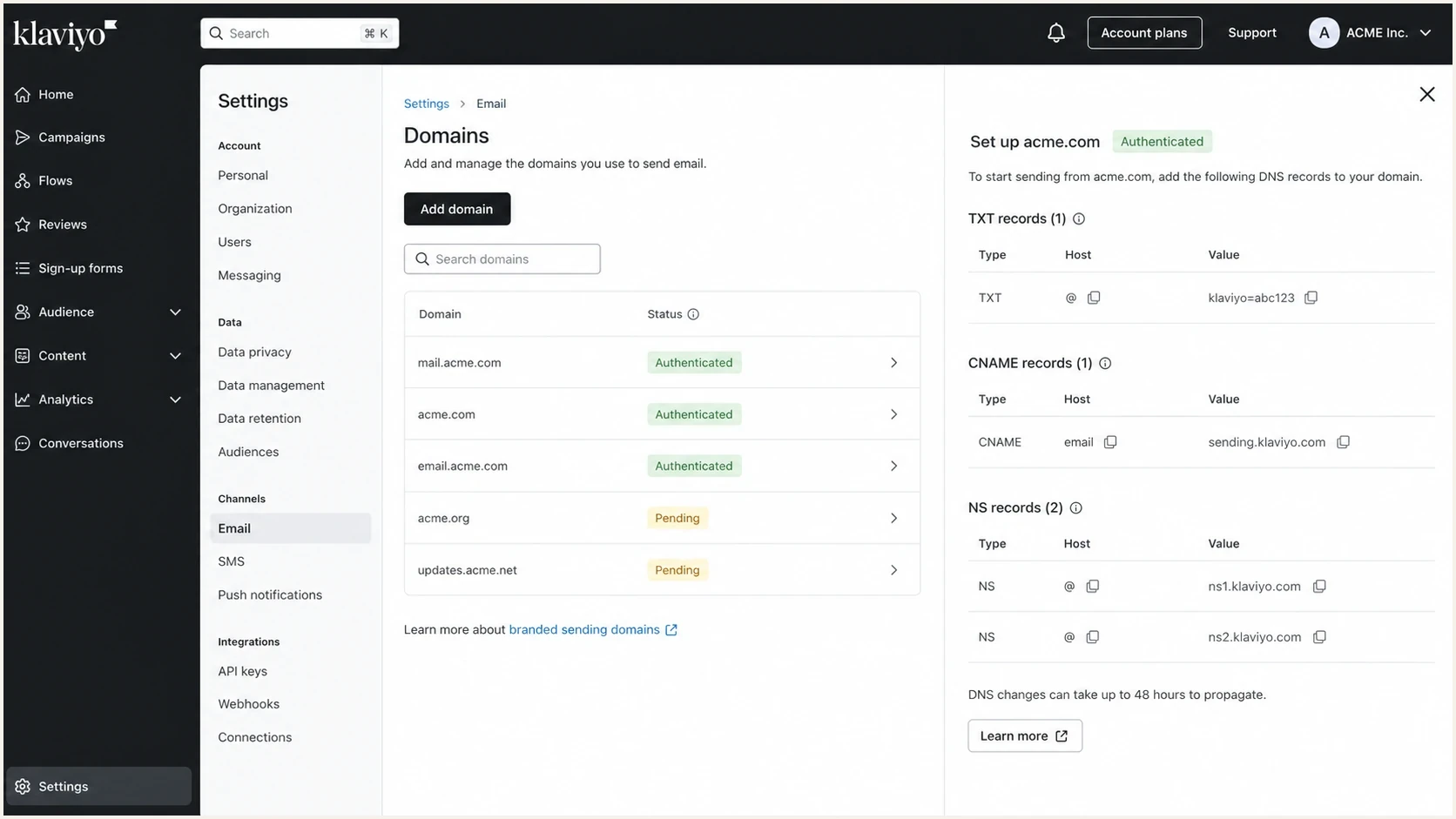
Klaviyo email domains settings screen for branded sending domain authentication.
A DNS console that shows only an account-verification TXT record and several CNAME or NS records does not prove SPF or DKIM are absent. Query each CNAME target or the delegated zone. A root-domain SPF lookup can also miss the result because SPF checks the message's separate Return-Path domain.
How to configure a branded sending domain
Use a branded sending domain when the friendly From address uses the brand's root domain and Klaviyo mail needs DMARC alignment. This setup also supports current authentication requirements for bulk senders. The sending subdomain must be unused and distinct from the address that receives replies.
- Create the domain: Open Settings, choose Domains, select Add domain, and enter an unused sending subdomain such as send.example.com.
- Choose routing: Dynamic routing delegates the subdomain with NS records; Static routing uses CNAME records.
- Decide on DMARC: If no applicable record exists, Klaviyo can generate v=DMARC1; p=none;. Do not publish a second DMARC record at the same host.
- Publish exact values: Add every generated NS or CNAME record and the TXT ownership record without proxying or duplicating the root domain in a hostname.
- Verify the records: Run Klaviyo's verification after publication. DNS propagation can take up to 48 hours, and every returned value must match the generated value.
- Activate and test: Activate the verified domain, follow any warming prompt Klaviyo displays, then send a live message and inspect its headers.
Keep the friendly From address on the root domain, such as marketing@example.com. Do not use the Klaviyo sending subdomain as the reply address because that subdomain is part of the sending infrastructure and is not intended to receive replies.
Do not create a second SPF record
Klaviyo normally authenticates SPF through its Return-Path and generated branded-domain setup. Adding another v=spf1 TXT record at a host that already has one creates an SPF permanent error instead of improving authentication.
How to verify the exact domains
Use this five-step check to separate authentication success from brand-domain protection. Start with a live campaign or flow message rather than a preview because test messages can use a different sending path.
- Send a real sample: Send a live message to Gmail and a second mailbox so the received headers can be compared.
- Open full headers: Collect Authentication-Results, From, Return-Path, and every DKIM-Signature field.
- Compare domains: Confirm that at least one passing header.d or smtp.mailfrom domain has DMARC alignment with the visible From domain.
- Query DNS names: Check the DKIM selector, Return-Path domain, and _dmarc record at the From domain or its organizational domain.
- Record the policy: Note p=none, p=quarantine, or p=reject, plus the rua reporting destination and any strict alignment tags.
For teams running Klaviyo beside another ESP, one brand domain can have several legitimate senders, and each sender needs a clean path through SPF, DKIM, and DMARC. The same principle applies in a broader multi-ESP setup.
?
What's your domain score?
Deep-scan SPF, DKIM & DMARC records for email deliverability and security issues.
A domain check does not replace header analysis. DNS shows what is published; headers show what the message used. Trust the result only when both sources identify the same domains and policy.
After that, run a focused DMARC check on the exact From domain. A missing or malformed record needs correction. A valid p=none record without rua supplies no aggregate reports, so it gives the brand no source-level visibility.
What to publish if DMARC is missing
If the visible From domain has no applicable DMARC record, publish one at the organizational domain or intentionally at the sending subdomain. Start at p=none when every sender has not yet been reviewed. This policy does not request blocking, but it starts reporting when rua is present and supplies the data needed for a controlled move to quarantine or reject.
Starting DMARC recorddns
Host: _dmarc.example.com
TXT: v=DMARC1; p=none; rua=mailto:dmarc@example.com
On an organizational-domain record, p controls that domain and sp controls subdomains. When sp is omitted, subdomains inherit p. If rua points to a different organizational domain, the report destination must publish an external reporting authorization record before receivers send reports there.
Once reports confirm that Klaviyo and every other sender pass with matching domains, move the policy in stages. Avoid p=reject on a commerce domain until the sending map includes receipts, support mail, and other operational streams, because an omitted sender can create user-visible failures.
DMARC policy stages
A practical path from reporting to enforcement after every legitimate sender is verified.
Monitor
p=none
Collect reports and identify every source.
Contain
p=quarantine
Request quarantine for failures after fixes are complete.
Block
p=reject
Request rejection for messages that fail the policy.
For a clean starting record, use the DMARC record generator and set a reporting address controlled by the brand. Klaviyo can authenticate Klaviyo mail, but the brand's DMARC policy covers every message using that From domain.
Do not stop at campaign delivery rate
A high campaign delivery rate does not prove brand-domain protection. A domain can deliver well while unauthorized mail remains unaffected by an enforcement policy.
- Header evidence: Read Authentication-Results before changing DNS.
- DNS evidence: Check the exact From domain and its organizational domain.
- Policy control: Review reports before moving to p=reject.
Where Suped fits
Suped's product handles ongoing monitoring after the one-message header check. It parses DMARC aggregate reports so teams can see which Klaviyo streams pass, which domains meet alignment, and where another authorized sender is failing. The same workflow keeps marketing, commerce, support, and transactional sources separated without requiring teams to read raw XML files.
Suped's DMARC monitoring workflow makes the Klaviyo question measurable: which sources send, which pass, which fail, and which fixes remain open. Hosted DMARC supports staged policy changes after the sending inventory is verified.
DMARC record detail view showing SPF, DKIM, DMARC, rDNS diagnostics, and DNS records
Suped groups aggregate-report sources with their SPF, DKIM, and DMARC results, then keeps unresolved authentication work visible. Multi-tenant views keep client domains separate for MSPs, while hosted controls let authorized teams stage policy changes after confirming legitimate sources.
Practical workflow in Suped
- Baseline: Confirm whether Klaviyo, the brand domain, or another sender supplies the aligned pass.
- Alerts: Notify the responsible team when failures or new sources appear.
- Policy changes: Stage DMARC and SPF updates after the source inventory is complete.
- Reputation: Review blocklist and blacklist signals beside authentication results.
Views from the trenches
Best practices
Check the raw Authentication-Results header before trusting a mailbox UI summary result.
Treat Klaviyo shared SPF and DKIM passes as delivery support, not a brand DMARC pass.
Document every legitimate sender before moving a commerce domain beyond monitoring policy.
Common pitfalls
Checking only root-domain TXT records misses delegated CNAME and NS authentication paths.
Assuming an SPF pass proves DMARC ignores the Return-Path domain and alignment checks.
Moving to reject before receipts and support streams are verified creates avoidable failures.
Expert tips
Use one real delivered campaign message because preview sends can use different routing.
Compare header.d and smtp.mailfrom with the visible From domain before policy edits.
Keep reporting active after enforcement so new senders are caught before volume grows.
Marketer from Email Geeks says Klaviyo often authenticates with its own domains when custom authentication has not been configured, so the pass result needs domain-level inspection.
2022-08-20 - Email Geeks
Marketer from Email Geeks says Gmail's original message view identifies the authentication results, and the raw header gives more detail than the summary table.
2022-08-20 - Email Geeks
Keep the brand domain in control
Klaviyo can pass SPF and DKIM without SPF or DKIM TXT records at the brand's root domain because it uses Klaviyo-owned domains or a branded sending-domain DNS route. DMARC does not work the same way. A shared-domain pass does not protect a different brand From domain, and p=none permits delivery even when alignment fails.
Inspect a live message, identify the exact authentication domains, publish an applicable DMARC record, review aggregate reports, and enforce only after every legitimate sender is accounted for. That keeps Klaviyo mail authenticated while putting policy control with the brand.




