How to solve return-path issues when sending from multiple domains in Google Workspace?

Updated on 19 Aug 2026: We updated this guide for RFC 9989, current Google Workspace DKIM timing, and strict versus relaxed alignment across sender domains.
The practical fix is not to force Google Workspace to change the Return-Path for every alias. Google Workspace does not give admins a normal per-alias setting for that. The reliable fix is to make DKIM pass for the visible sender domain, then use DMARC reports to confirm that the visible From domain has a passing authentication path.
A primary-domain return path on a secondary-domain message looks wrong at first glance, but it is not automatically non-compliant. DMARC passes when either SPF passes with a matching domain, or DKIM passes with a matching domain. If Gmail sends as person@brand-b.example while the return path points at person@brand-a.example, SPF domain matching fails for DMARC because these are separate organizational domains. DKIM for brand-b.example can still make DMARC pass. If DKIM signs as gappssmtp.com instead, set up custom Google DKIM for the visible sender domain.
- Main fix: Enable Google DKIM for every domain users send from, not only the primary Google Workspace domain.
- Main caveat: A different return-path domain is still visible in some tests, even when DMARC passes.
- Main symptom: A DKIM signing domain ending in gappssmtp.com usually means custom DKIM is not active for that sender domain.
- Main escape hatch: Use a domain-specific SMTP server for the alternate sender address when the return path must belong to that domain.
The direct fix
Start with the exact failure being reported. If the warning says SPF passes but does not match the visible sender domain, that is expected when Google uses the primary mailbox domain in the envelope sender. If the warning says DMARC fails, the DKIM side is the real problem to fix. If the DKIM signing domain is gappssmtp.com, generate and start DKIM for the selected sender domain in Google Workspace.
Short answer
For Google Workspace alias sending, treat SPF domain matching as unreliable across separate domains. Make DKIM pass for the same domain that appears in the visible From address. Then DMARC has a valid path even when the return path uses the user's primary domain.
The cleanest Google-native setup has three DNS pieces on every domain that appears in the visible sender address: an SPF record that authorizes Google, a Google DKIM key, and a DMARC record that sends reports somewhere useful. Suped's product fits here when you want the reports turned into concrete fixes instead of raw XML files. Its DMARC monitoring workflow shows which Google-sent mail passes DKIM, which domains still fail, and what DNS change is needed.
What does not need fixing
- Primary return path: Google can use the primary account in the envelope sender when a user sends as an alias.
- SPF mismatch warning: A tester can flag SPF domain mismatch while DMARC still passes through DKIM.
- Visible sender: The visible From address can still be the secondary domain the user selected.
What does need fixing
- DKIM per domain: Each sender domain needs its own Google DKIM key generated and started in the Admin console.
- DMARC reporting: Each sender domain needs reporting so real traffic confirms the fix.
- Sender inventory: Every domain and alias combination needs testing before DMARC enforcement.
Why this happens
Google Workspace has a primary email address for each user. Users can also send from aliases or alternate domains. The return path is part of SMTP envelope handling, not the same thing as the visible From header. That is why a user can pick a secondary sender address while the bounce address still points at the primary account domain.
Google's multiple domain FAQ is useful for understanding primary domains, secondary domains, and aliases. A user alias domain gives existing users alternate addresses, and the primary identity can still be visible in message headers. A secondary domain gives its users accounts and identities at that domain. Both models need domain-specific authentication checks.
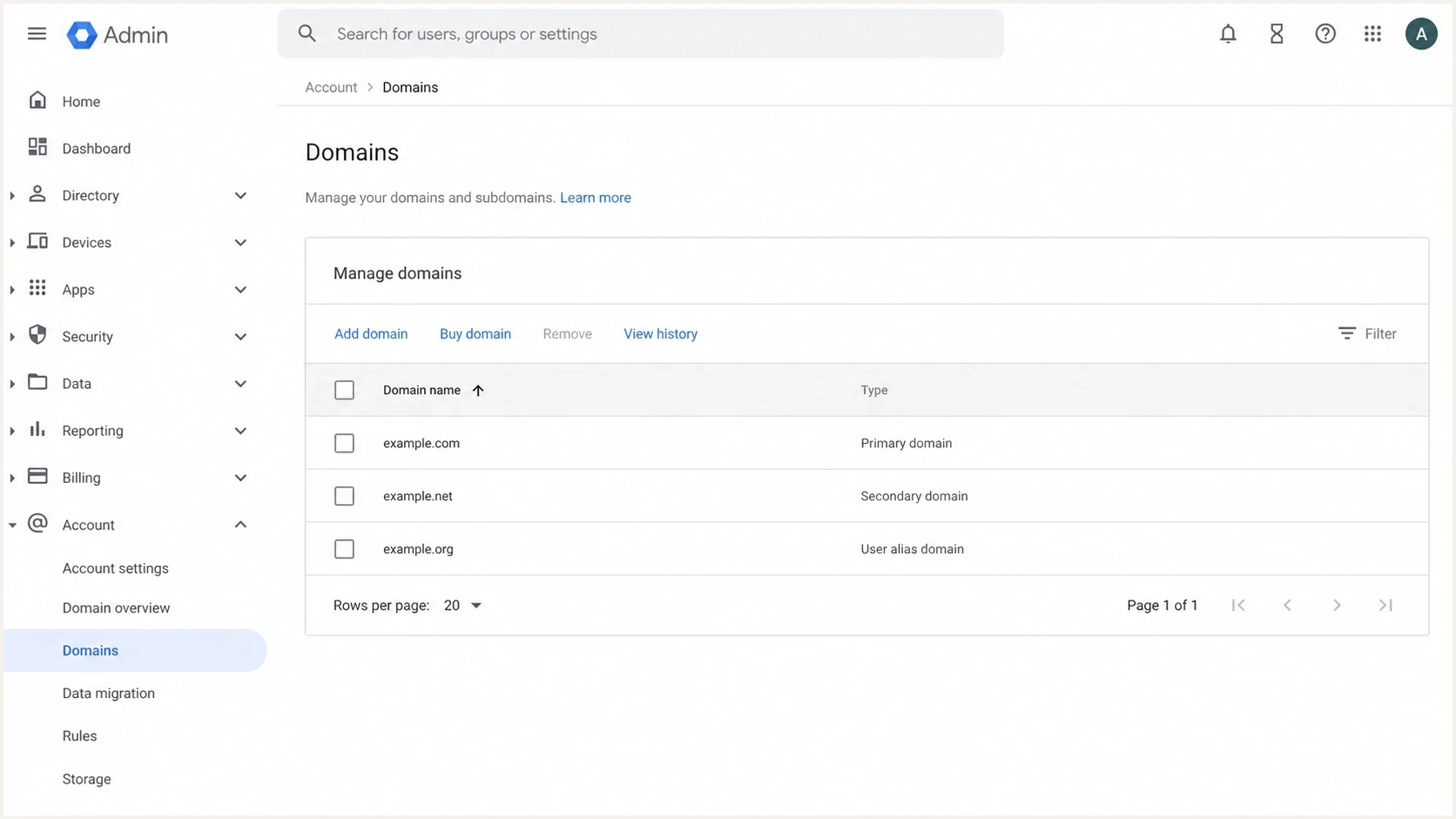
Google Admin console domain list showing primary, secondary, and alias domain types.
DMARC then checks two routes. The SPF route checks the return-path domain, because SPF authenticates the envelope sender. The DKIM route checks the signing domain in the d= tag. For a secondary domain in Google Workspace, DKIM is usually the route that matters.
|
|
|
|---|---|---|
Visible From | Message header | DMARC domain |
Return-Path | SMTP envelope | SPF domain |
DKIM d | DKIM signature | DKIM domain |
How each identity is used during authentication.
How strict and relaxed alignment apply
Relaxed alignment compares organizational domains, while strict alignment requires an exact domain match. This distinction helps only when the authenticated domain is a subdomain of the visible sender domain. It does not make two separate brand domains match.
|
|
|
|
|---|---|---|---|
brand-a.example | brand-b.example | Fail | Fail |
bounce.brand-b.example | brand-b.example | Pass | Fail |
brand-b.example | brand-b.example | Pass | Pass |
Alignment results for common Google Workspace sender patterns.
Changing aspf does not join brand domains
Setting aspf=r does not make a return path at brand-a.example match a visible sender at brand-b.example. Use a passing DKIM signature for brand-b.example, or use a sending route with an envelope domain under brand-b.example.
RFC 9989 now defines DMARC alignment and uses a DNS Tree Walk to determine organizational domains. Publishing an explicit DMARC record for every visible sender domain makes policy discovery and reporting clearer during a multi-domain rollout.
What to check first
Before changing routing, send a real message from each sender domain and inspect the authentication result. Do this with a normal user account, the same alias the user selects in Gmail, and the same destination type that is causing concern.
Email tester
Send a real email to this address. Suped shows a results button when the test is ready.
?/43tests passed
Use an email tester for a fast header-level result, then confirm the same pattern in DMARC reports. Look for DKIM pass, a DKIM signing domain that matches the visible sender domain, and DMARC pass. SPF can pass for the primary return-path domain and still fail DMARC domain matching for the alias domain.
- Send a sample: Send one email from each Google Workspace sender domain and alias combination.
- Read authentication: Check SPF, DKIM, DMARC, and the domain used by each result.
- Check DKIM domain: If DKIM signs as gappssmtp.com, custom DKIM is not carrying the sender domain.
- Separate warnings: Treat SPF mismatch as a lower-risk warning when DKIM and DMARC pass.
- Fix failures: Fix any sender domain that lacks DKIM, DMARC, or proper Google authorization.
Do not chase the wrong failure
If the message passes DMARC through DKIM, changing the return path is usually unnecessary. If the message fails DMARC, changing the return path is not the first fix. Publish the right DKIM record and confirm Google signs with the sender domain.
Fix options that work
There are four realistic ways to solve this. The right option depends on whether you need DMARC to pass, or whether you specifically need the return path itself to use the secondary domain.
|
|
|
|---|---|---|
DKIM per domain | DMARC pass is the goal | Return path still differs |
Primary mailbox | One brand is dominant | User identity changes |
External SMTP | Return path must match | More routing overhead |
Separate sender | High-volume mail | Needs governance |
Choose the least invasive option that meets the requirement.
Option one is the normal fix: publish DKIM for every Google Workspace domain and let DKIM carry the DMARC pass. This is the best fit for everyday employee mail, shared mailboxes, and occasional alias sending. The related Google Workspace authentication details are covered in Google Workspace outbound authentication if you need the broader model.
Option two is to make the user's address in the secondary domain the primary Google Workspace address. That changes the default envelope identity. It is clean for a rebrand or one-domain-per-user setup, but it is heavy-handed when users need to send from both domains.
Option three is to configure Gmail to send through the other domain's own SMTP server instead of using the alias path. This works when the second domain already has a mail server or outbound relay that handles its own bounce address and authentication. It also means you inherit that server's security, rate limits, logging, and support burden.
Option four is to move the messages that need a branded return path to a dedicated sender or SMTP relay. That is common for product notifications, billing, marketing, and other high-volume mail. It is less useful for ad hoc employee conversations inside Gmail.
Gmail Routing and Compliance rules solve a different problem. They can reject, quarantine, or reroute outbound messages to specific recipient domains, but they do not create a normal per-alias return-path setting. Use those rules for recipient restrictions, not for DMARC domain matching.
DNS records to publish
For each Google Workspace sender domain, publish SPF, DKIM, and DMARC. SPF still matters because receivers evaluate it, but DKIM is the part that usually fixes DMARC for alias-domain sending. Use the domain health checker to catch missing records before users start testing again.
Google Workspace SPF exampledns
brand-b.example. TXT "v=spf1 include:_spf.google.com ~all"
Google Workspace DKIM exampledns
google._domainkey.brand-b.example. TXT "v=DKIM1; k=rsa; p=key"
Starter DMARC recorddns
_dmarc.brand-b.example. TXT "v=DMARC1; p=none; rua=mailto:d@brand-b.example"
The DKIM selector depends on the Google Admin console value you generate. Do not copy a sample selector blindly. In the Admin console, go to Apps, Google Workspace, Gmail, Authenticate email, select the sender domain, generate the key, publish the exact DNS name and value, wait for DNS to resolve, then start authentication for that domain.
Use a 2048-bit DKIM key when the DNS provider supports it. Generate a unique key for each domain rather than reusing the first domain's record. If Gmail was just activated for a new domain, key generation can take 24-72 hours to become available. After the record is published, DKIM authentication can take up to 48 hours to start working.
RFC 9989 replaced RFC 7489 and removed the pct tag. Do not depend on percentage-based enforcement. Monitor with p=none, resolve every known legitimate failure, then change the policy when the domain is ready.
Best practice
Use a reporting address that someone reads or route reports into a platform that parses them. Raw aggregate XML is too easy to ignore, and alias-domain failures tend to hide until a policy moves to quarantine or reject.
How to test the result
After DNS is live, test the exact user path. Do not test only with an admin account or only with the primary domain. Send one message from each alias to an external mailbox, inspect the headers, then watch DMARC reports for the next reporting window. Do not rely on a message sent to the same mailbox to verify DKIM.
Enforcement readiness
Use source coverage and legitimate authentication results before changing DMARC policy.
Ready
All known sources
Every known legitimate source passes DMARC consistently.
Investigate
Any unexplained source
An unfamiliar source or intermittent failure still needs classification.
Do not enforce
Any legitimate failure
A legitimate sender still fails DMARC or lacks reliable coverage.
A passing sample should show DKIM pass for the secondary sender domain and DMARC pass for the visible From domain. SPF can still show the primary return-path domain. That is acceptable when DKIM is doing the matching work.
- Header check: Confirm the DKIM result is pass and the signing domain is the visible sender domain.
- SPF check: Confirm Google is authorized, even if SPF does not give DMARC a matching domain.
- DMARC check: Confirm the final DMARC result is pass for the sender domain.
- Domain check: Confirm the DKIM d= value is the sender domain, not gappssmtp.com.
- Volume check: Confirm the same result appears across real mail, not only a single test.
If SPF itself fails for the primary return-path domain, check the SPF checker and review Google includes, DNS lookups, and duplicate SPF records. That is a separate fix from DMARC domain matching for the secondary sender domain.
How Suped fits into the workflow
Suped's product fits this workflow when you need more than a one-off header test. The hard part is not seeing one warning once. The hard part is knowing whether every Google Workspace domain, alias, group, relay, and external sender is safe before policy enforcement.
Suped DMARC dashboard showing email volume, authentication health, and source breakdown
With Suped, connect the DMARC reporting address for each sender domain, then group the traffic by source and authentication result. Google Workspace should appear as a verified source. Any secondary domain where DKIM is missing, failing, or signing with the wrong domain will show up as an issue with steps to fix.
- Issue detection: Suped identifies missing DKIM, DMARC failures, and unverified sources without manual XML review.
- Hosted controls: Hosted DMARC and Hosted SPF help teams prepare policy changes and manage sender updates with less DNS friction.
- Alerts: Real-time alerts catch sudden Google Workspace authentication failures before they affect an enforced policy.
- Reputation checks: Blocklist and blacklist monitoring helps connect authentication fixes with broader deliverability signals.
For agencies and managed service providers, the multi-tenant dashboard is useful because this issue repeats across clients. One client has a secondary brand domain, another has a merger domain, and another has users sending from aliases. The same monitoring pattern applies to all of them.
Common troubleshooting paths
If the issue persists after DKIM setup, narrow it down by asking what exactly fails. The answer changes the fix. A visible return-path mismatch, a DMARC failure, and a delivery warning are different problems.
Header shows mismatch only
This is usually fine when DKIM and DMARC pass. Document the behavior so support teams do not treat every return-path mismatch as a fault.
DMARC fails
Fix DKIM for the sender domain first. If DKIM passes with the wrong domain, check domain selection in Google Workspace. If DKIM signs as gappssmtp.com, custom DKIM is not active for that domain.
Google Groups and forwarding can add another layer because forwarded mail often breaks SPF. If groups are involved, DKIM becomes even more important. For a related edge case, review how Google Groups impact DMARC across multiple domains.
If only SPF is failing for alias domains, the deeper issue is usually that SPF authenticates the bounce domain, not the visible sender domain. Treat it as the envelope sender pattern described above before changing routing or SMTP settings.
Views from the trenches
Best practices
Set up DKIM on every sender domain before judging Google alias return-path results.
Test a real alias message, then compare the header result with aggregate DMARC data.
Document the expected return-path behavior so help desks do not escalate false faults.
Common pitfalls
Treating every SPF domain mismatch as a DMARC failure creates unnecessary DNS changes.
Publishing SPF for Google but skipping DKIM leaves alias-domain sending fragile.
Using a strict policy before checking all aliases causes legitimate mail to fail.
Expert tips
Use domain-specific SMTP only when the return path itself must use that domain cleanly.
Keep Google-sent employee mail separate from bulk mail when reviewing DMARC sources.
Move to enforcement only after normal, alias, and forwarded mail passes reliably.
Marketer from Email Geeks says Google Workspace can keep the primary address in the return path when users send from another domain.
2025-02-12 - Email Geeks
Marketer from Email Geeks says there is no standard Google Workspace control for customizing the return path per alias.
2025-02-13 - Email Geeks
The practical answer
For most Google Workspace teams, the answer is to stop trying to rewrite the return path and make DKIM correct for every sender domain. That gives DMARC a valid pass path and avoids turning a normal Google Workspace behavior into a routing project.
Use a separate SMTP route only when the return path itself is a hard requirement, such as brand-specific bounce handling, legal separation, or platform-level mail that should not be tied to a user's primary Google account. For ordinary employee mail, DKIM plus DMARC monitoring is cleaner.
Suped's product fits the long-term workflow: monitor every sender domain, catch missing DNS, validate DMARC enforcement, and keep authentication and deliverability signals in one operational view.




