How do I properly set up a DMARC record on Wix and when should I change the policy?

Updated on 2 Aug 2026: We updated this guide for current Wix DNS controls and RFC 9989 policy staging.
The correct Wix DMARC setup is a TXT record with Host Name _dmarc and a value that starts with v=DMARC1. If you put v=DMARC1; p=none; at the root domain, with a blank host or an @ host, public DMARC checks will still say no DMARC record exists.
Start at p=none only if you also collect aggregate reports with rua. Move to p=quarantine when every real sender passes SPF or DKIM with the same visible From domain. Consider p=reject only after quarantine has run cleanly and mailing-list use has been assessed.
The direct answer for Wix
In Wix, the DMARC record belongs under the TXT records for the domain. The Host Name must be _dmarc. The Value must be the DMARC policy string. The full DNS name created by Wix will be _dmarc.example.com, not example.com.
The current Wix path is Domains, then Domain Actions, then Manage DNS Records, then TXT (Text), then Add Record. Wix uses a Host Name field for the left side of the DNS record and a Value field for the TXT content. The Wix deliverability note says high-volume senders need SPF and DKIM, plus DMARC, so the policy should not be treated as a checkbox.
|
|
|
|---|---|---|
Type | TXT | Text DNS record |
Host Name | _dmarc | DMARC subdomain |
Value | Policy string | Starts with DMARC1 |
Use the Value field for the full DMARC policy string, not the Host Name field.
Starter Wix DMARC TXT recordtext
Host Name: _dmarc
Type: TXT
Value: v=DMARC1; p=none; rua=mailto:dmarc-reports@example.com; adkim=r; aspf=r
Do not stop at v=DMARC1; p=none; with no reporting address. That record can satisfy a surface-level check, but it gives you no aggregate reports and no practical path to enforcement.
Why no DMARC record is found
The most common Wix mistake is putting the DMARC TXT record at the root. In Wix terms, that means leaving Host Name blank or entering @. DNS then publishes the text at the apex, so a lookup for _dmarc returns nothing.
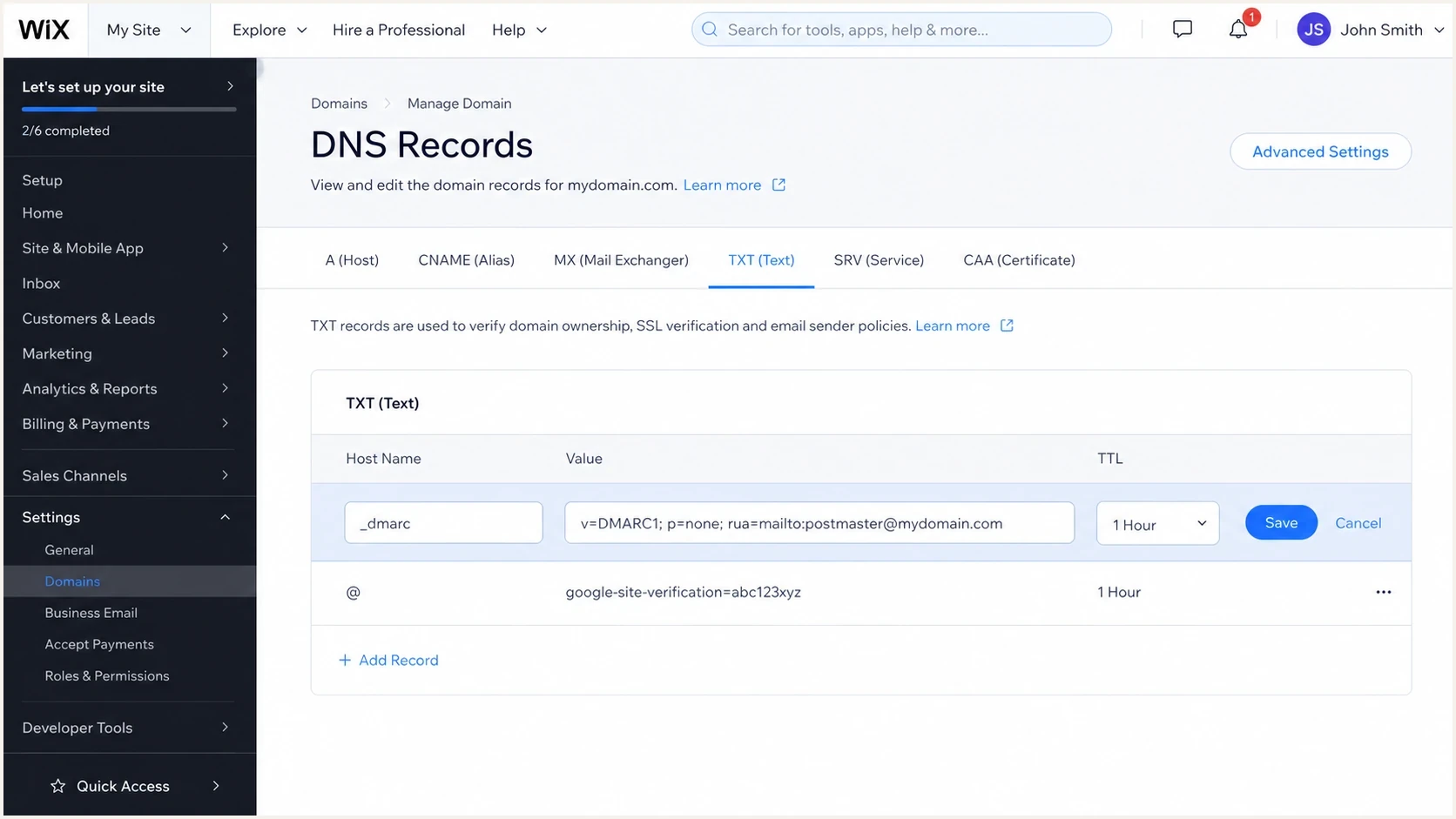
Wix DNS TXT editor showing _dmarc in the Host Name field.
The second common issue is editing DNS in the wrong place. If the domain is connected to Wix by pointing, Wix is hosting the website, but another provider controls DNS. In that case, adding a TXT record inside Wix does not publish it for the domain. Check the authoritative nameservers first, then edit TXT records wherever those nameservers are managed.
Wrong placement
- Host: Blank or @ publishes the record at the root domain.
- Lookup: DMARC checks look under _dmarc, so they report missing.
- Impact: Mailbox providers ignore the misplaced root TXT value.
Correct placement
- Host: Use _dmarc exactly in the Wix Host Name field.
- Lookup: The published name becomes _dmarc plus your domain.
- Impact: Receivers can read the policy and send aggregate reports.
After saving the record, wait for DNS propagation and check the exact DMARC name. Suped's DMARC checker parses the record and points out malformed tags instead of only saying found or missing.
DMARC checker
Look up a domain's DMARC record and catch policy issues.
?/7tests passed
Build the record before enforcing it
A useful DMARC policy record puts the version tag first and includes an explicit policy tag. RFC 9989 treats a missing p tag as p=none, but keeping the policy explicit avoids ambiguity. For a real domain, include aggregate reporting so the monitoring stage identifies legitimate senders before receivers are asked to filter failures.
Monitoring policydns
v=DMARC1; p=none; rua=mailto:dmarc-reports@example.com; adkim=r; aspf=r
A domain has one DMARC policy record even when several services send mail. Do not add a second _dmarc record for Wix forms or another sender. Keep the single domain-wide policy, then configure each authorized service to pass SPF or DKIM with alignment to the visible From domain.
Use an address that can receive a large volume of XML reports. Do not send those reports to a normal inbox because they are hard to read and can arrive daily from many receivers. A reporting platform can normalize the XML into source, volume, authentication result, and From-domain alignment.
- Version: Use v=DMARC1 as the first tag; the DMARC1 value is case-sensitive.
- Policy: Start with p=none while you collect data.
- Reports: Add rua so receivers can send aggregate DMARC data.
- Match mode: Relaxed SPF and DKIM alignment is the default and the safer starting point.
For a clean starter value, use Suped's DMARC record generator and paste the generated TXT value into the Wix Value field. Keep the host as _dmarc.
If your report address is on a different domain, complete that reporting destination's external authorization in DNS. Receivers must verify that the other domain permits reports before sending them.
When to change the policy
After saving in Wix, validate the finished record before making a policy decision. Confirm that the record exists at the DMARC name, the syntax is readable, and the report address is present. DNS publication alone is not enough because a record can exist and still have a weak or unusable policy.
Direct DNS checkbash
dig TXT _dmarc.example.com +short
"v=DMARC1; p=none; rua=mailto:dmarc-reports@example.com"
- Name: Confirm the record is returned for the _dmarc host.
- Syntax: Confirm the value starts with v=DMARC1 and has one policy tag.
- Reports: Confirm rua points to the address or platform that reads reports.
- Policy: Confirm the intended value is none, quarantine, or reject.
If DNS says the DMARC name does not exist, the issue is placement or DNS hosting, not the policy value. If DNS returns two DMARC TXT values, remove one because receivers expect a single DMARC record at that host.
Keep p=none until reports show that normal mail sources pass SPF or DKIM with the visible From domain. For a small Wix business site, review mailbox traffic, form notifications, invoicing, bookings, CRM mail, and newsletters. RFC 9989 recommends at least one month at p=none for domains with general users who might post to mailing lists, so low-frequency and indirect mail appears in the data.
Policy readiness thresholds
A practical way to decide whether to stay at none or move toward enforcement.
Discovery
p=none
Reports are missing or less than one complete send cycle exists.
Almost ready
none
Known senders pass, but low-frequency or indirect mail still needs review.
Filtered testing
quarantine
Known senders pass and remaining failures are unauthorized or obsolete.
Full enforcement
reject
Quarantine is clean and mailing-list risks have been addressed.
Move to p=quarantine when real senders are accounted for and failures are not legitimate business mail. Quarantine asks receivers to treat failing messages as suspicious, often by sending them to spam. For a general-purpose user domain, keep quarantine for at least another month and compare report dispositions before considering reject.
Full quarantine policydns
v=DMARC1; p=quarantine; rua=mailto:dmarc-reports@example.com
RFC 9989 made pct historic because receivers applied percentage sampling inconsistently. Do not use pct=25. If test mode is needed, t=y asks receivers to apply one policy level lower. With p=quarantine; t=y, that lower level is none. Remove t=y when full quarantine should apply.
For transactional or other tightly controlled domains, move to p=reject after quarantine has run cleanly and the remaining failures are unauthorized. The safe transition plan helps when a domain has several senders or multiple business owners.
Full enforcement policydns
v=DMARC1; p=reject; rua=mailto:dmarc-reports@example.com; adkim=r; aspf=r
For a domain that never sends mail, publish a restrictive SPF record such as v=spf1 -all and move DMARC to p=reject promptly; DKIM is unnecessary when no mail is sent. An active business domain needs reports first because broken SPF or missing DKIM on one legitimate sender can cause lost mail.
Check mailing-list use before reject
Forwarding commonly breaks SPF, and mailing lists can modify a message in ways that invalidate DKIM. Legitimate mail can then fail DMARC even when the original sender was authorized. A p=reject policy on a domain used for routine person-to-person mail can disrupt mailing-list participation.
- Ask whether users post to Internet mailing lists with addresses on the domain.
- Review aggregate-report policy overrides and forwarded sources during both monitoring stages.
- Keep p=quarantine when legitimate user workflows regularly lose alignment.
- Reserve p=reject for tightly controlled or no-send domains after authorized sources are accounted for.
RFC 9989 advises general-purpose email domains against p=reject when users might post to Internet mailing lists. If reject is still required, document the user impact and keep aggregate reports active.
How Suped fits the workflow
Suped is our DMARC reporting and email authentication platform. Its DMARC monitoring connects Wix DNS setup with sender-level report data, authentication issues, alerts, and steps to fix each source. That is useful on Wix domains because the website host, DNS host, and mail sender can be different.
DMARC record detail view showing SPF, DKIM, DMARC, rDNS diagnostics, and DNS records
Use the reports to answer one question before changing policy: which authorized sources still fail DMARC, and why? Suped's issue view turns that answer into actions such as adding missing DKIM, correcting SPF, removing an obsolete sender, or holding the DMARC policy at its current stage.
Manual process
- Reports: XML files land in an inbox and need manual parsing.
- Sources: Unknown senders are hard to separate from real vendors.
- Timing: Policy changes rely on one-off checks and memory.
- Scale: Multiple Wix domains need repeated DNS reviews.
Suped process
- Reports: Aggregate data becomes sender-level DMARC visibility.
- Sources: Authorized and unknown sources are separated clearly.
- Timing: Alerts show when authentication breaks after setup.
- Scale: Multi-domain views keep each Wix domain separate.
Suped's Hosted DMARC supports policy changes without repeated Wix DNS edits. Keep the Suped-hosted record in Wix, then make later policy adjustments in Suped after reviewing the reports.
Common Wix mistakes to fix first
Before changing policy, fix the problems that create false confidence. A 'DMARC record found' result is not enough. The record needs the right host, one DMARC TXT record only, valid syntax, and reliable reports.
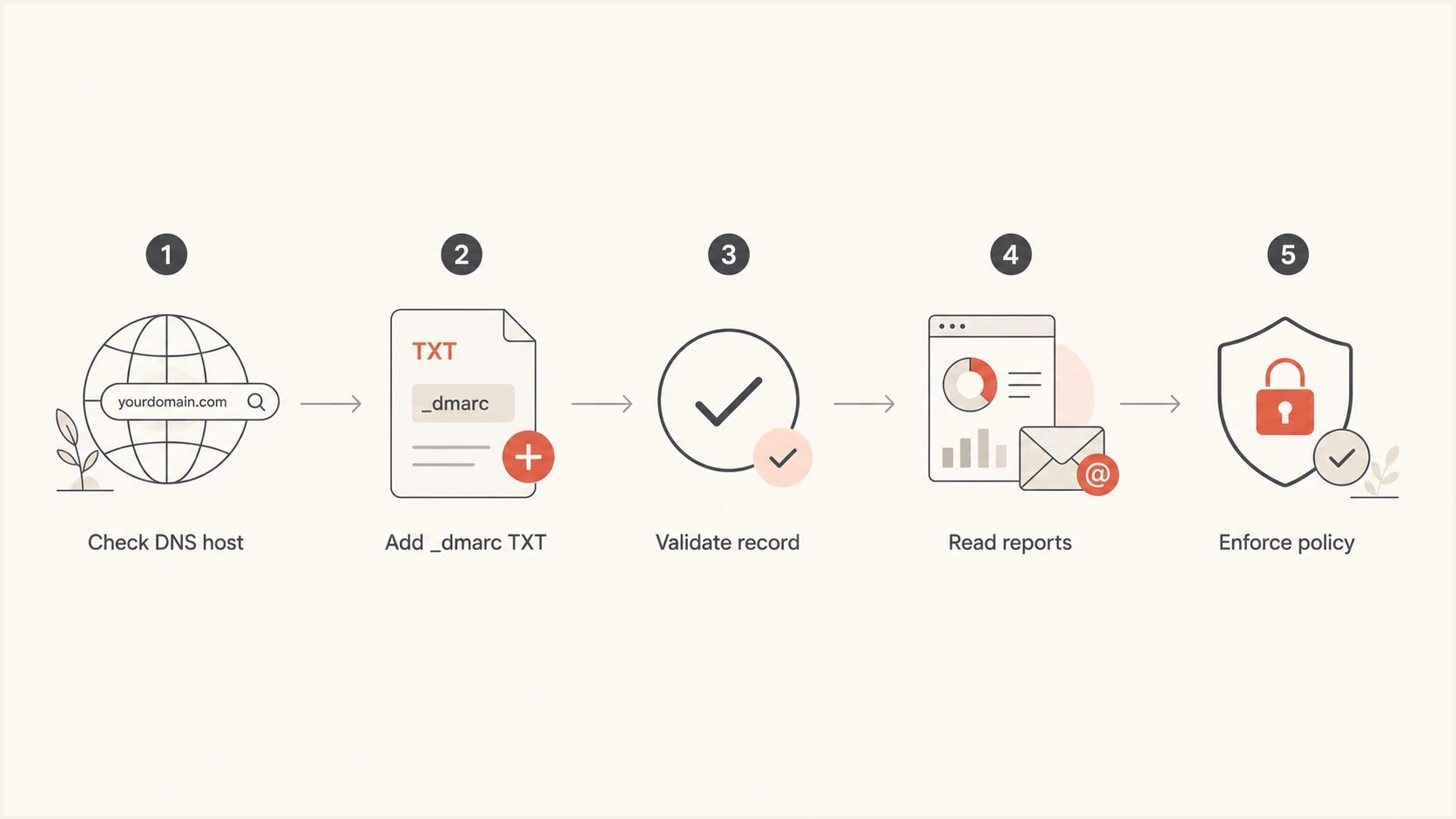
Flowchart for checking DNS host, adding DMARC, validating, reading reports, and enforcing policy.
- Root record: Move the TXT value from the blank host to _dmarc.
- Duplicate record: Keep one domain-wide DMARC TXT record at the DMARC host.
- No reports: Add rua so you can see who sends mail for the domain.
- Wrong DNS: Edit records where the authoritative nameservers are managed.
- Early reject: Do not reject active mail until authorized senders and mailing-list risks are reviewed.
A warning that says DMARC policy is not enabled usually means the record exists but uses p=none. That is not a DNS failure. It means the domain is not enforcing DMARC yet. Treat it as the normal first stage, then move beyond none when the data supports it.
Views from the trenches
Best practices
Use _dmarc as the Wix host and verify the exact DNS name before policy work begins.
Collect aggregate reports before enforcement so every real sender is accounted for.
Stage quarantine first on active domains, then reject after a clean send cycle ends.
Common pitfalls
Adding the DMARC value at the root makes public checks report no DMARC record found.
Leaving out rua reports turns p=none into a passive record with little diagnostic value.
Moving to reject before DKIM is stable creates preventable delivery failures for users.
Expert tips
Confirm the authoritative DNS host before changing Wix records on pointed domains.
Treat p=none warnings as a setup stage, not a reason to skip enforcement planning.
Keep one DMARC TXT record only, because duplicates can make the policy invalid in DNS.
Marketer from Email Geeks says a missing Wix DMARC result often comes from publishing the TXT value at the root instead of the _dmarc host.
2024-09-03 - Email Geeks
Expert from Email Geeks says p=none without aggregate reporting gives little value because there is no data to guide the next policy change.
2024-09-04 - Email Geeks
The practical Wix policy decision
For Wix, add a TXT record, set Host Name to _dmarc, and put the DMARC policy in Value. If a check says no DMARC record exists after propagation, look first for a root-domain TXT mistake or the wrong DNS host.
Use p=none for discovery, then move to quarantine once reports show that authorized mail passes DMARC. Use reject only for domains whose sending paths and indirect-mail risks are controlled. That progression protects the Wix domain without treating legitimate mail as unauthorized.




