How do DMARC policies and RUA/RUF settings inherit or override each other between a domain and its subdomains?

Published 8 May 2025
Updated 14 Aug 2026
11 min read
Summarize with
Updated on 14 Aug 2026: We clarified DMARC record selection, external report authorization, and the separate SPF and DKIM requirements for subdomains.
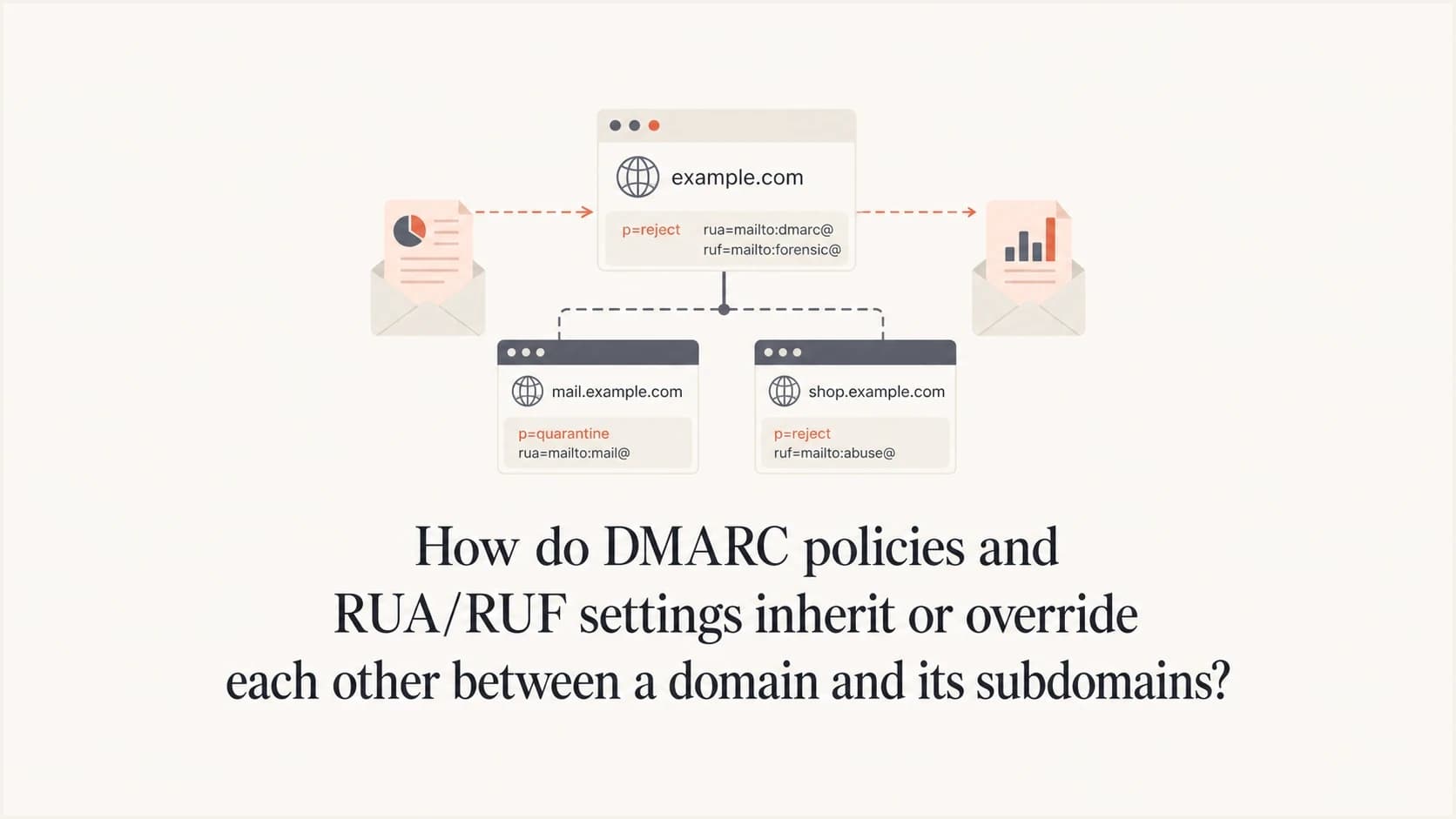
In a simple parent and child setup, a subdomain inherits the organizational domain's DMARC record only when the subdomain does not have its own valid DMARC record. Under RFC 9989, DNS Tree Walk policy discovery can also find DMARC Policy Records at intermediate ancestors, so deeper namespaces use the selected ancestor record rather than always jumping straight to the organizational domain. If a valid DMARC record exists at the subdomain, that subdomain record overrides the organizational domain record as a complete record. The override is not tag by tag. A subdomain record with its own p, rua, or ruf settings does not inherit the missing pieces from the parent.
The practical result is simple: a DMARC record added to mail.example.com must contain the policy and every report destination still required for that subdomain. To maintain central DMARC monitoring, keep the central RUA address on the subdomain record too, even when an email platform asks for its own RUA address.
Quick rule
DMARC inheritance selects one record. Under RFC 9989, that selected record can be found by the DNS Tree Walk, not only by a two-query parent lookup. It does not combine the parent record with the child record. Once the child record is selected, the parent record's RUA and RUF settings stop applying to that child. External destination authorization is a separate check and can replace only an externally hosted report URI.
The short answer
Use this mental model: DMARC first decides which DNS record applies, then it reads only that record. RFC 9989 does this with policy discovery and, when needed, a DNS Tree Walk. It does not read the organizational domain for policy and then read the subdomain for reports. A subdomain record is not a small override file. A DMARC TXT record is a full instruction set.
- No exact subdomain record: the receiver uses the policy record selected by DNS Tree Walk. For an existing subdomain, it uses sp when present, otherwise p. For a non-existent subdomain, it uses np when present, otherwise sp or p.
- Subdomain record exists: the receiver uses the valid record at the exact Author Domain and ignores the parent record for policy and reporting requests.
- Report addresses: RUA and RUF destinations start with the selected record. Missing report tags are not inherited. An external authorization record can approve or replace an external destination, but it does not merge parent settings.
- Partial records: a record intended to set policy should include a valid p tag. Under RFC 9989, a syntactically valid record with valid rua and no valid p is treated as p=none; RUF alone does not create that fallback.
- Current tag status: RFC 9989 keeps np, psd, and t active. It marks pct, rf, and ri historic, so they should not be used in new records.
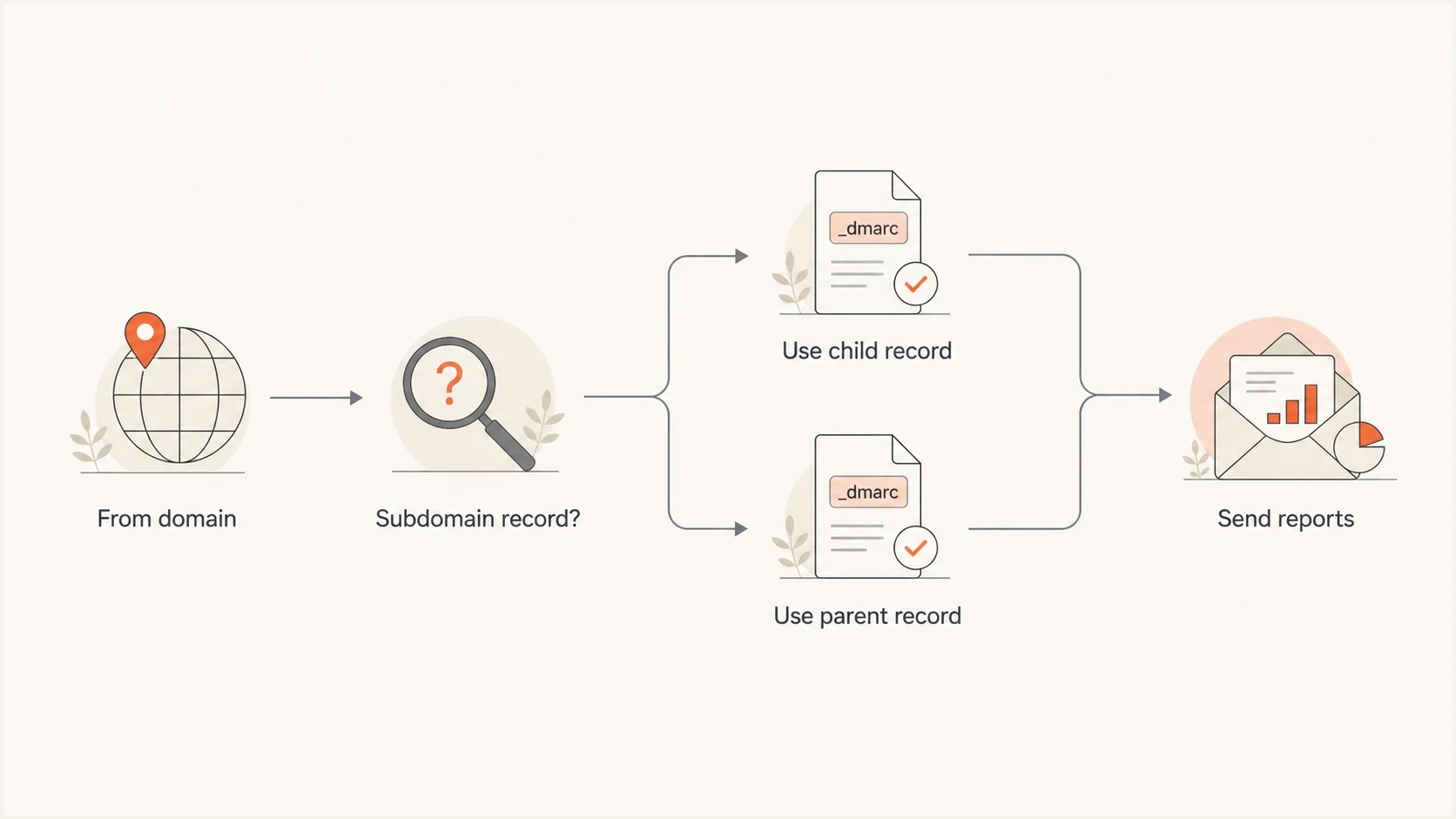
Flowchart showing DMARC choosing a subdomain record before the parent record.
How inheritance works
For an email with a visible From domain of mail.example.com, the receiver looks for a DMARC TXT record at _dmarc.mail.example.com. If that record exists and is valid, that is the record. If it does not exist, RFC 9989 policy discovery uses a DNS Tree Walk to identify the applicable organizational domain or Public Suffix Domain. In a simple namespace, the selected record is usually _dmarc.example.com. Deeper or delegated namespaces can establish a different organizational-domain boundary. This is the behavior behind most subdomain override rules.
|
|
|
|---|---|---|
Parent or ancestor only | sp, np, or p | selected record |
Child valid | child p | child |
No rua | selected | none |
No ruf | selected | none |
Compact view of which DMARC setting applies.
The sp tag matters when a record at the organizational domain or Public Suffix Domain is selected for a subdomain. It lets the policy domain say, for example, "use p=quarantine for the parent, but use sp=none for existing subdomains." For non-existent subdomains, np takes precedence over sp when present. If the subdomain has its own DMARC record, the parent sp value is no longer part of the decision.
This is why a dedicated subdomain record should still include p. Under RFC 9989, an otherwise syntactically valid record with a valid rua but no valid p is processed as p=none, but that fallback is monitoring behavior, not a clear policy statement. For a dedicated record, follow a full subdomain setup pattern and include every tag needed there.
DMARC inheritance does not publish or copy SPF and DKIM records for a subdomain. Each sending domain still needs the applicable SPF authorization and DKIM signing setup. DMARC then checks whether a passing SPF or DKIM domain matches the visible From domain under the record's alignment mode.
RUA and RUF settings do not merge
RUA and RUF belong to the selected record. If a subdomain has no exact DMARC record, aggregate reports for that subdomain use the RUA addresses on the DMARC Policy Record selected by policy discovery. In a simple setup this is the organizational domain record; with DNS Tree Walk it can be another applicable policy record. If the subdomain has its own record, aggregate reports for that subdomain use only the RUA addresses in the subdomain record, subject to external destination authorization.
Inherited policy record
- Lookup: no valid exact subdomain record exists, so policy discovery selects another applicable record.
- Policy: the selected record's sp tag applies for existing subdomains, np can apply to non-existent subdomains, or p applies if neither is present.
- Reports: RUA and RUF start with the selected record's destinations.
Explicit subdomain record
- Lookup: a valid subdomain record exists.
- Policy: the subdomain's own p tag applies.
- Reports: RUA and RUF start with only the subdomain record's destinations.
This matters when a sending platform asks to receive RUA reports. A RUA address on the organizational domain can receive reports for all mail covered by that organizational record, including other senders. If the sender only needs visibility for a marketing subdomain, use a dedicated subdomain record. Put the platform's RUA address and the central reporting address in that one subdomain record. DMARC allows multiple RUA URIs in the same record.
Subdomain record with two aggregate report destinationsDNS
Host: _dmarc.mail.example.com
Type: TXT
Value:
v=DMARC1; p=none;
rua=mailto:dmarc@example.com,mailto:reports@example.net
RUF deserves extra care. RUA reports are aggregate XML summaries defined by RFC 9990, usually counts by source IP, authentication result, and disposition. RUF reports are message-specific failure reports defined by RFC 9991. Many receivers do not send them, and the reports can include sensitive headers or message content. Keep RUF off unless there is a defined investigation need, restricted mailbox access, and a retention policy for those reports.
Practical DNS examples
Start with the organizational domain. This record covers example.com and, when no more specific policy record exists, it also covers subdomains. In this example, the parent is stricter for the main domain, keeps existing subdomains at monitoring through sp=none, and requests rejection for non-existent subdomains through np=reject.
Organizational domain recordDNS
Host: _dmarc.example.com
Type: TXT
Value:
v=DMARC1; p=quarantine; sp=none; np=reject;
rua=mailto:dmarc@example.com
Now add a record at mail.example.com. This record overrides the parent for that exact subdomain. The parent RUA address no longer receives reports for this subdomain unless it is also listed here.
Explicit subdomain recordDNS
Host: _dmarc.mail.example.com
Type: TXT
Value:
v=DMARC1; p=none;
rua=mailto:dmarc@example.com,mailto:reports@example.net
If a RUA or RUF address is outside the organizational domain of the selected policy record, the reporting destination domain needs to authorize that use. Otherwise, receivers must ignore the unauthorized external URI. The authorization record sits under the destination domain and begins with the domain where the selected policy record was retrieved.
External authorization for the subdomain recordDNS
Host: mail.example.com._report._dmarc.reports.example.net
Type: TXT
Value: v=DMARC1
Do not send broad reports by accident
If a third party asks for a RUA address at the organizational domain, that address can receive aggregate data for more than the traffic it sends. Use a dedicated subdomain record when the third party only needs visibility into that subdomain.
How external authorization can override a report address
External destination authorization is different from parent and child inheritance. The selected DMARC record still supplies the requested RUA or RUF URI. When that URI is outside the policy domain's organizational domain, the receiver checks a TXT record under the destination domain before sending a report. A missing or invalid authorization causes that external URI to be ignored; it does not make the receiver fall back to a parent RUA or RUF value.
RFC 9990 also lets the external report consumer place a rua or ruf tag in its authorization record. That tag replaces the corresponding requested URI, but the replacement must keep the same destination host. This lets the report consumer correct or move a mailbox without changing the domain owner's DMARC record. A wildcard authorization can approve reports for any policy domain, but it should be used only when the report consumer intends that broad scope.
External authorization with address overridesDNS
Host: mail.example.com._report._dmarc.reports.example.net
Type: TXT
Value:
v=DMARC1;
rua=mailto:aggregate@reports.example.net;
ruf=mailto:failures@reports.example.net
Two override rules, two purposes
An exact subdomain DMARC record overrides the complete inherited policy record. An external authorization record can only authorize or replace the matching external report URI. Neither mechanism merges tags with the parent DMARC record.
How to validate the final record
Before publishing a subdomain DMARC record, confirm the DNS host, include a complete policy, and verify that every required RUA or RUF destination appears on that exact record. A DMARC checker catches common syntax mistakes before mailbox providers interpret the record.
DMARC record detail view showing SPF, DKIM, DMARC, rDNS diagnostics, and DNS records
Suped's product makes this workflow less manual by showing the selected DMARC record, DNS diagnostics, and source-level authentication results together. The source context around the TXT value helps identify which senders are affected before tightening a subdomain policy.
Suped turns aggregate reports into source-level issues and alerts while keeping DMARC, SPF, and DKIM evidence with the policy being reviewed. When DNS ownership is split across teams, Suped's Hosted DMARC supports policy staging without repeated manual TXT record edits.
DMARC checker
Look up a domain's DMARC record and catch policy issues.
?/7tests passed
When starting from scratch, use a record generator to create a valid baseline, then adjust the RUA and RUF destinations for the exact domain or subdomain that will own the reports.
Common mistakes
Most DMARC inheritance mistakes come from assuming parent and child records merge. They do not. Check these specific errors first.
- Missing central RUA: a subdomain record lists the email platform only, so the main reporting mailbox loses visibility.
- Unclear child policy: the subdomain record omits p and either falls back to p=none because rua is valid, or does not produce DMARC processing if only ruf is present.
- Wrong host: the record is published at _dmarc.example.com when the intended scope is _dmarc.mail.example.com.
- External report failure: the RUA destination is off-domain, but the destination domain has not authorized reports for the exact policy domain.
- Unexpected RUF exposure: failure reports are enabled without confirming who can read them and what data they contain.
- Old discovery model: treating DMARC as only an exact-domain and organizational-domain lookup misses DNS Tree Walk behavior in deeper namespaces.
Clean operating pattern
Use the organizational domain record for broad coverage. Add subdomain records only when a subdomain needs a different policy, different report destinations, or both. When adding the child record, copy the central report destination into it.
Views from the trenches
Best practices
Treat each subdomain DMARC record as complete; copy every reporting tag you still need.
Use a dedicated sending subdomain when a vendor asks for its own aggregate reports.
Keep central RUA reporting on explicit child records so monitoring does not lose scope.
Common pitfalls
Teams add a vendor RUA on the parent record and expose aggregate data beyond one sender.
A child record omits p and depends on p=none fallback instead of a clear policy.
RUF gets enabled for troubleshooting without a clear mailbox owner or retention rule.
Expert tips
Publish the strictest safe parent policy, then stage exceptions on named subdomains.
Document which team owns each report address before adding it to production DNS.
Test inherited and explicit cases separately because the receiver chooses only one record.
Marketer from Email Geeks says a subdomain can have its own DMARC record, which is useful when a sending platform needs separate reporting.
2024-01-18 - Email Geeks
Marketer from Email Geeks says a subdomain record overrides the organizational record, so parent RUA addresses need to be copied if they should keep receiving reports.
2024-02-07 - Email Geeks
The rule to follow
For DMARC inheritance, treat the selected record as the only policy record. If no exact subdomain record exists, the record selected by DNS Tree Walk controls the policy and reporting, commonly the organizational domain record in simple setups. If a valid subdomain record exists, that record controls the policy and reporting for the subdomain. Nothing is merged.
Use parent records for default coverage. Use explicit subdomain records for exceptions. Put every required RUA and RUF destination on the exact record that receivers will select, then verify each external destination.




