
Why DMARC monitoring belongs in MSP email security packages

Published 13 Jun 2026
Updated 22 Oct 2026
12 min read
Summarize with
Updated on 22 Oct 2026: We clarified bulk sender requirements, report timing, and policy staging for managed DMARC services.
DMARC monitoring belongs in MSP email security packages because it turns domain authentication from a one-time DNS task into a managed control. A managed service provider (MSP) can see who sends mail for each client, fix sources that fail DMARC alignment, choose a suitable policy for each domain's use, and show progress in client reporting. Without monitoring, authentication failures and unauthorized domain use can go unnoticed until a sender breaks or a client asks why the domain still has no active policy plan.
For DMARC for MSPs, the package has to cover sender discovery, DNS change control, alerting, escalation, reporting, and offboarding. A DMARC record alone is not the service. The service is the repeatable operation around it.
- Protection gap: Filters inspect messages, while DMARC lets a client request handling for mail that fails authentication of its visible From domain.
- Operational fit: MSPs already manage DNS, tenants, mail platforms, tickets, and client reporting, so DMARC monitoring fits existing service delivery.
- Client proof: Aggregate reports turn invisible authentication work into sender lists, issue counts, policy status, and enforcement milestones.
- Expansion path: Extend the same workflow to SPF cleanup and DKIM fixes, with MTA-STS or reputation monitoring added when the client needs them.
Package boundary
Keep the promise precise: monitor authentication, identify legitimate and unauthorized senders, recommend or apply DNS fixes, stage policy changes, and report outcomes. DMARC passes when SPF or DKIM succeeds with DMARC alignment to the visible From domain. Receivers decide final message handling. DMARC does not detect lookalike domains or display-name impersonation, and mail sent through a compromised authorized account can still pass. These limits follow the domain validation scope in RFC 9989.
Why email security stacks leave a DMARC gap
Most MSP email security packages start at the mailbox. They include tenant hardening, filtering, conditional access, backup, user training, and incident response. Those services matter, but they usually operate after a message already exists. DMARC operates at the domain identity layer. It lets a domain owner publish a requested handling policy for mail that claims to use the client's domain, and it sends reporting data back so the domain owner can see what is happening.
That difference matters in MSP work because SMB clients rarely have one clean mail source. They have a primary mailbox platform, a CRM, accounting software, billing systems, marketing tools, website forms, scanners, help desk systems, and one department that sends through a vendor nobody documented. If a strict policy is published before those sources are known, legitimate mail breaks. If the policy stays at p=none without a review plan, the client gets visibility without a decision on stronger handling.
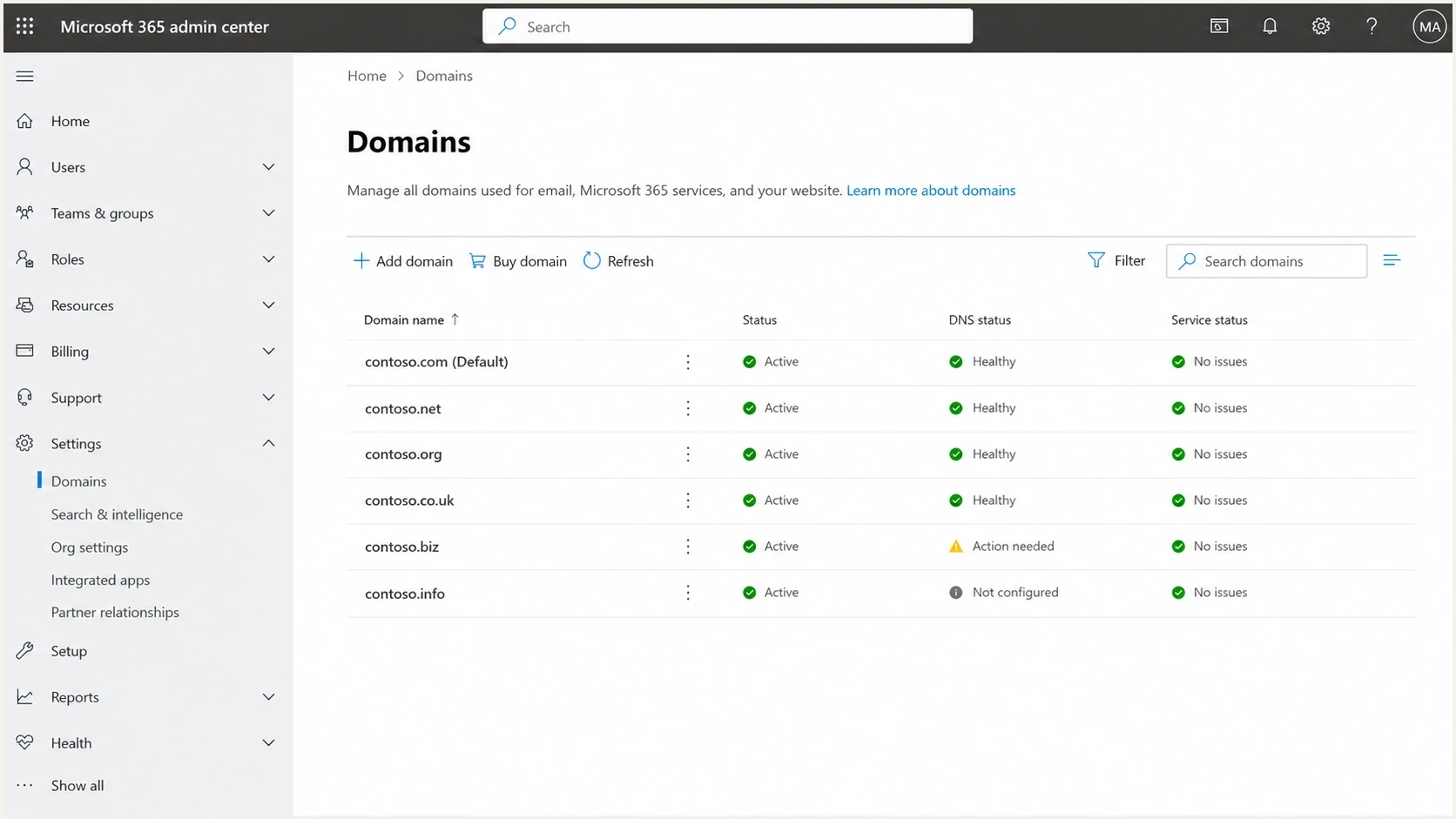
Microsoft 365 admin center Domains page for MSP client domain inventory.
Domain inventory is where DMARC becomes service work. The MSP needs to know who controls DNS, which domains send mail, which domains only receive mail, how subdomains are used, which third-party senders need DKIM, and which old systems still rely on SPF. That work is too detailed for a yearly security review. It belongs in a managed package with recurring checks.
Meet bulk sender authentication requirements
Bulk sender requirements are already in force. Include a receiver-specific check during onboarding, especially when a client's marketing vendor sends more mail than its mailbox platform.
|
|
|
|---|---|---|
About 5,000 or more messages in 24 hours to personal Gmail accounts, counted across the primary domain and its subdomains. See the bulk sender definition. | Configure SPF and DKIM, publish DMARC with at least p=none, and verify DMARC alignment on direct mail. | |
Significant-volume senders to Yahoo-hosted consumer mail services. Yahoo publishes no fixed volume threshold. | Implement SPF and DKIM, publish DMARC with at least p=none, and verify DMARC passes. | |
Domains sending 5,000 or more messages per day to Microsoft consumer services using the same visible From domain. | Verify both SPF and DKIM pass and that DMARC passes. A p=none policy is accepted. |
Bulk sender scope and authentication checks for client onboarding.
Both SPF and DKIM are required for qualifying bulk senders, although DMARC itself needs only one passing method with domain alignment. The minimum p=none policy does not request quarantine or rejection. Check marketing and subscribed messages separately for applicable one-click unsubscribe and complaint-rate requirements; authentication alone does not guarantee inbox placement.
What a managed DMARC service should include
The MSP has to turn raw aggregate reports into decisions. Which source is legitimate? Which source needs DKIM alignment? Which source is a forwarded stream that needs explanation? Which source stopped authenticating after a vendor changed infrastructure? Record those decisions in remediation tickets.
One-time DNS setup
- Scope: Publish SPF, DKIM, and DMARC records once.
- Risk: Unknown senders remain unknown until mail breaks.
- Client view: The client sees a completed task, but not a managed control.
Managed DMARC monitoring
- Scope: Monitor sources, authentication results, policy status, and changes.
- Risk: Domain mismatch and unauthorized use become visible before policy changes.
- Client view: The client sees progress, issues, and policy movement.
|
|
|
|---|---|---|
Discovery | Map sources | Sender list |
DNS | Fix records | Valid status |
Policy | Stage changes | Policy path |
Alerts | Triage failures | Ticket history |
Reports | Summarize progress | Business review |
Compact service map for an MSP DMARC package.
This is why DMARC should not be sold as a checkbox. The client does not need a record they never look at. They need an owner for authentication health, a policy plan, and a clear path when a source fails.
The onboarding workflow that scales
Keep domain onboarding deliberately predictable. Every client domain gets the same intake, record check, reporting setup, sender review, and policy staging process. The checklist has to work for a five-person firm and a multi-domain client with subsidiaries.
For a domain without a working DMARC policy, monitoring is usually the starting point. Preserve an existing quarantine or reject policy unless an approved rollback is needed, and add or correct aggregate reporting before reviewing the next policy change. When the rua address uses an organizational domain outside the client's domain, confirm the required external-destination DNS authorization or some receivers will ignore that report address. For many clients, SPF and DKIM records already exist, but DMARC alignment is incomplete. Monitoring exposes that gap.
Example monitoring TXT record for _dmarc.client.exampledns
v=DMARC1; p=none; rua=mailto:dmarc-reports@client.example
Publish one DMARC policy record at _dmarc.client.example, editing the existing record when changing policy. Replace the example reporting address with the actual destination supplied during setup. Aggregate reports identify sending sources, not business approval. Confirm unfamiliar sources with the client's business owner and review sample message headers before authorizing SPF or DKIM changes.
A repeatable rollout needs DMARC monitoring that separates legitimate sources from suspicious traffic, groups the same provider cleanly, and preserves history. Technicians should not read raw XML for every client. They need a queue of sources and issues that turns into tickets.
?
What's your domain score?
Deep-scan SPF, DKIM & DMARC records for email deliverability and security issues.
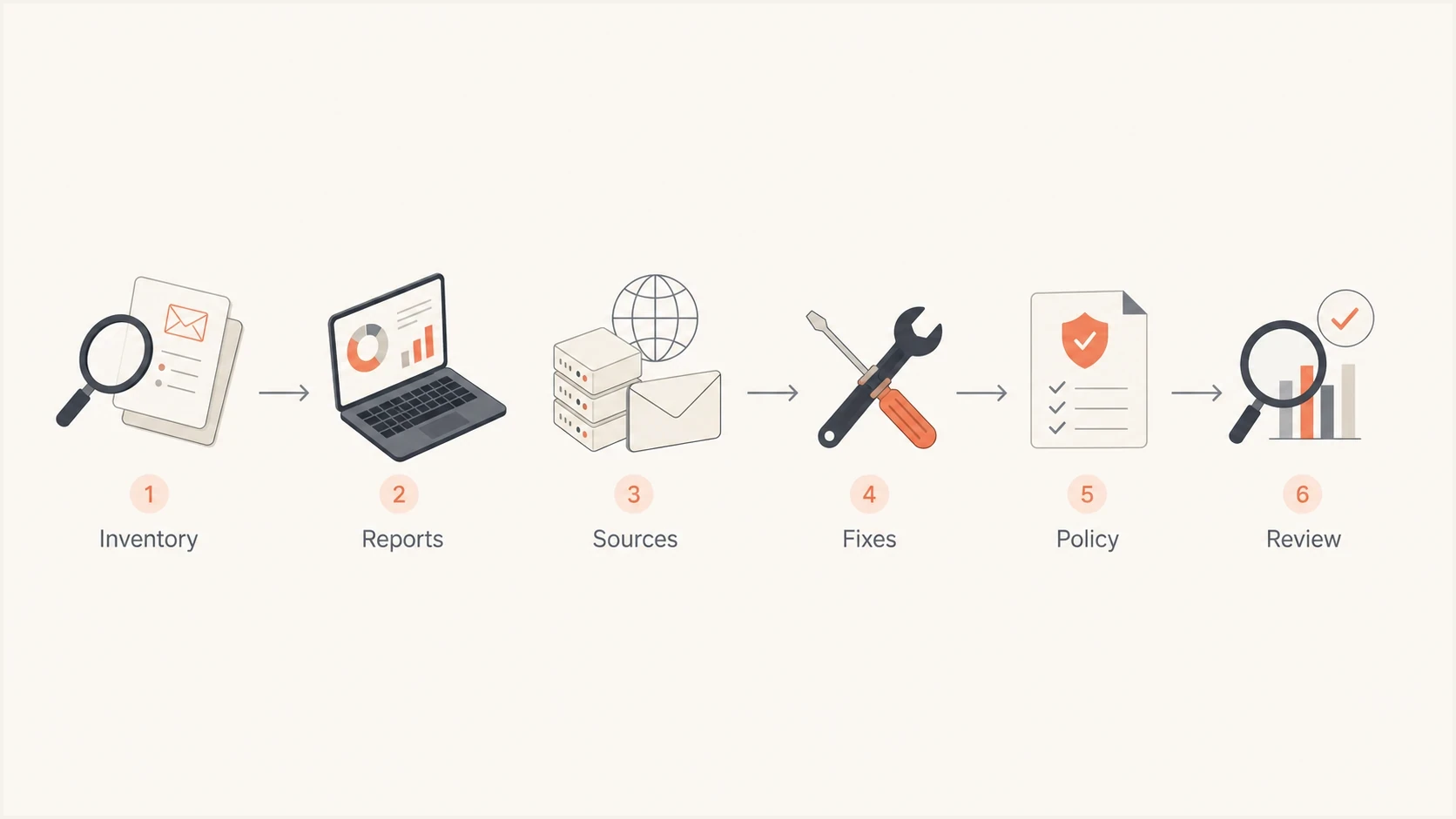
MSP DMARC onboarding workflow: inventory, reports, sources, fixes, policy, and review.
What RFC 9989 changes for MSP policy work
RFC 9989 defines DMARC on the Standards Track and obsoletes RFC 7489 and RFC 9091. Keep pct out of current policy-staging runbooks: the tag is historic because receivers applied partial percentages inconsistently. Collect data with p=none, correct legitimate sources, and choose p=quarantine or p=reject according to the domain's use and observed indirect mail.
For general-purpose email domains, RFC 9989 advises against p=reject, especially where users participate in Internet mailing lists. If such a domain still considers reject, monitor at p=none for at least a month and at p=quarantine for an equally long period, then compare message dispositions. Verified non-sending domains and dedicated machine-sending subdomains need policies based on their own use and legitimate traffic.
- Retire pct: Remove percentage values from templates and runbooks because pct has historic status.
- Use testing carefully: The t=y tag requests none for quarantine, or quarantine for reject. Legacy receivers that do not recognize t can apply the published p policy, so it is not a safe percentage rollout.
- Segment domain use: Record whether each domain hosts people, dedicated systems, parked names, or non-existent subdomains.
- Record approval: Document the evidence, indirect-mail risk, client decision, and rollback owner before changing policy.
How alerts should work across many tenants
DMARC alerts become noisy if they fire on every failure. They become useful when they map to operational decisions. Prioritize new sending sources, sudden authentication drops, policy regressions, large unauthenticated volume, and unexpected mail from regions or infrastructure that the client does not use.
Aggregate reports generally arrive daily and cover participating receivers; report-driven alerts are not a live attack feed. RFC 9990 describes this reporting model. Define response targets around report arrival, keep DNS availability alerts separate, and compare missing reports with known sending activity before treating a quiet domain as healthy.
For MSPs, the hard part is not one alert. It is sorting alerts across many client domains without missing the one that matters. A small domain with a new unverified source can be more urgent than a large domain with a known forwarder creating background noise.
Issues page showing top issues, verified sources, unverified sources, and authentication pass rates
Alert hygiene
- Trigger: Alert on new sources, policy changes, DNS failures, and large authentication drops.
- Suppress: Do not page technicians for tiny recurring forwarder failures that have already been explained.
- Escalate: Open a ticket when a business sender needs DKIM, SPF, vendor approval, or a policy rollback.
- Close: Close the loop with the next report so the client sees the fix and the remaining risk.
Alert bands for MSP triage
Example bands for turning authentication data into operational priority.
Monitor
Low
Known source with minor noise.
Review
Medium
New source or sender change.
Ticket
High
Business sender failing domain matching.
Approve
Clear
Ready for policy staging.
In Suped's product, technicians can review detected issues and follow the suggested fix before opening a remediation ticket. The MSP still assigns an owner and confirms the result in later reports.
Packaging the service without custom work
Good service packaging makes DMARC predictable for sales, onboarding, service desk, and account management. Do not build a bespoke project plan for every small client. Define clear package boundaries and let exceptions become paid project work or documented exclusions.
The core package should include domain inventory, DMARC report collection, source classification, authentication issue review, DNS recommendations, policy staging, and client reporting. Add-ons make sense when they solve recurring delivery work. Hosted SPF helps manage changing senders and SPF lookup limits. Add blocklist monitoring (also called blacklist monitoring) when domain or IP reputation needs investigation alongside authentication.
Separate setup work from the recurring fee. Setup covers domain inventory, report routing, initial DNS changes, and sender remediation. Recurring service covers report review, alert triage, policy reviews, and client reporting. The service schedule should also name response targets, DNS change authority, report-data retention, and the offboarding process so unmanaged records and report routes do not linger.
Core package
- Inventory: Collect domains, DNS owners, sending platforms, and stakeholders.
- Monitoring: Review DMARC reports and source changes on a recurring schedule.
- Reporting: Summarize authentication health and policy movement.
Advanced operations
- Hosted controls: Use hosted records when clients need faster sender changes.
- Policy staging: Move beyond monitoring only after evidence and approval support the chosen policy.
- Reputation checks: Investigate blacklist signals when sending quality changes.
|
|
|
|---|---|---|
Baseline | Monitor and report | Small tenants |
Managed | Fix and stage | Active senders |
Assurance | Apply and review policy | Higher risk |
Example packaging labels without public pricing.
Where Suped fits the MSP operating model
Suped's MSP product supports multi-tenant management, DMARC monitoring, SPF and DKIM visibility, hosted authentication controls, automated alerts, API access, blocklist monitoring, and client reporting. Use the MSP view to review client status, then open the relevant client workspace to investigate a source or policy issue.
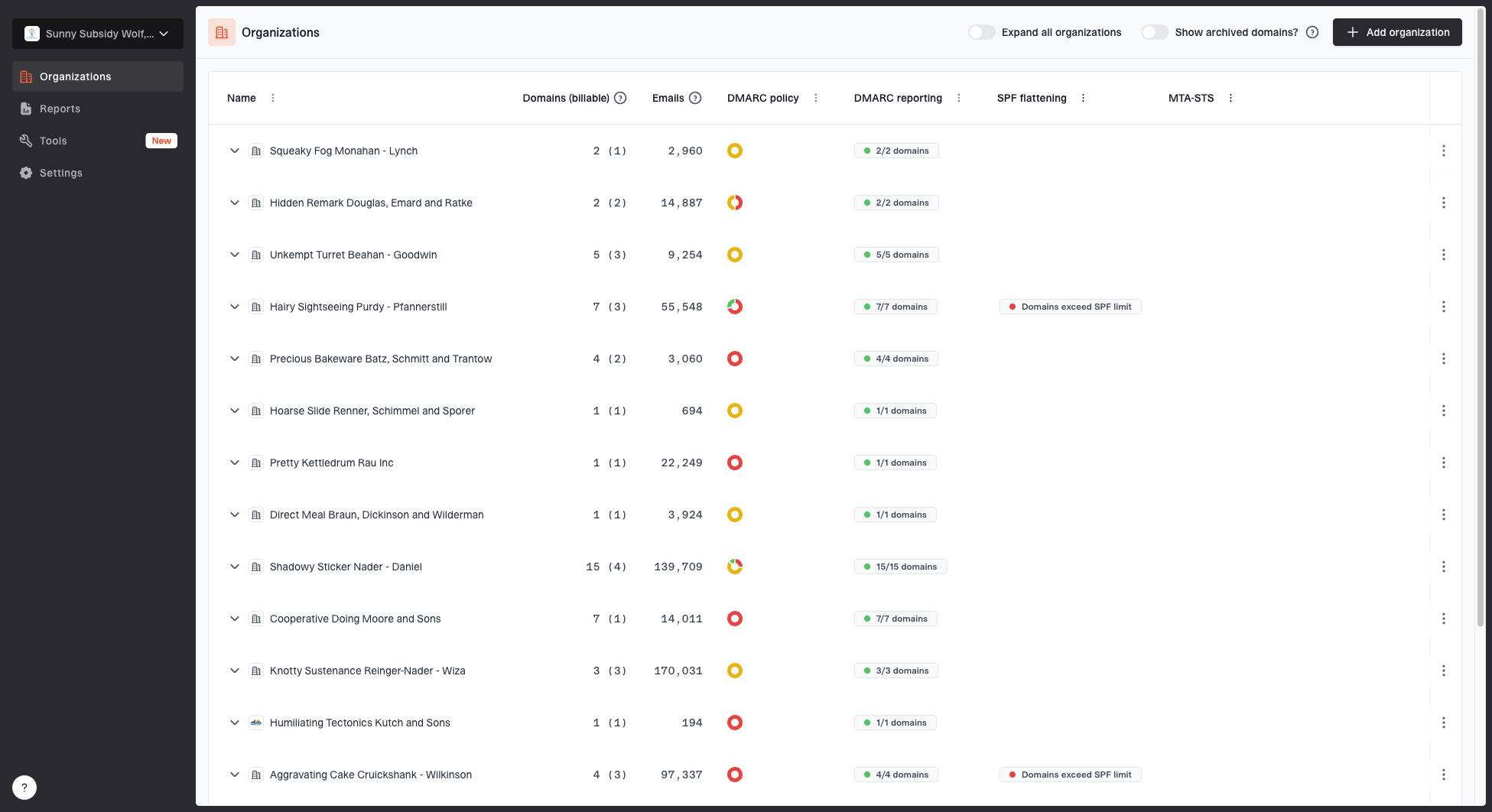
MSP organizations page showing client organizations, domain counts, email volume, and domain status columns
- Multi-tenancy: Keep each client's domains and reports in a separate workspace, using the MSP view to review status and switch clients.
- Guided remediation: Issue detection and steps to fix give technicians a clear next action.
- Hosted controls: Hosted DMARC, hosted SPF, and hosted MTA-STS reduce DNS change friction after initial setup.
- Reputation view: Blocklist visibility helps connect authentication work with deliverability investigations.
- Client reporting: Client reports turn technical progress into a format account managers can use in reviews.
Separate platform capability from service responsibility. Suped can surface the problem, but the MSP needs a process for who approves DNS changes, who contacts a vendor, who signs off on policy changes, and who explains residual forwarding failures to the client.
MSP delivery rule
A platform should shorten the distance between signal and action. If the technician still has to parse raw reports, guess which source is approved, and write every client update from scratch, the package will not scale cleanly.
Reporting clients can understand
A useful MSP report does not drown the client in authentication jargon. It shows what changed, what was fixed, what still needs approval, and whether the domain is ready for a policy review. Keep client reporting tied to business outcomes: fewer unknown senders, cleaner authentication, an appropriate policy, and fewer surprises when a vendor changes mail infrastructure. Calculate pass rates for approved senders separately from suspected spoofing traffic, and state the reporting period and receiver coverage. A DMARC pass rate does not prove inbox delivery.
Example DMARC pass trend
Illustrative DMARC pass rates for approved sending sources in received reports, not inbox placement or complete mail coverage.
DMARC pass rate
A useful report also protects the MSP. It records why policy has not changed yet, which vendor is blocking progress, and which stakeholder needs to approve a change. That avoids the common situation where the MSP did the technical work, but the client sees only a static p=none policy months later. For clients with compliance obligations, the report can provide change records and proof of monitoring, but DMARC alone does not establish compliance.
Report content
- Status: Current DMARC policy, reporting status, and next review target.
- Sources: Approved senders, new senders, and sources that need owner confirmation.
- Actions: Completed fixes, open tickets, vendor requests, and client approvals.
- Risk: Remaining unauthenticated volume and the reason the policy has or has not changed.