
How to package DMARC monitoring as an MSP service

Updated on 22 Oct 2026: We added a pricing method and clarified policy rollout, reporting limits, and client handoff checks for managed DMARC services.
DMARC monitoring works best as an MSP service when it is packaged as an ongoing email authentication program. The offer needs a clear onboarding process, sender discovery, DNS implementation, alert handling, monthly reporting, and a path to an appropriate DMARC policy.
Package it around an outcome the client understands: reduce unauthorized direct-domain use, keep legitimate mail flowing, and give the business a clear monthly view of who sends email for the domain. The technical work sits underneath that promise. Clients rarely buy DMARC monitoring because they want XML reports. They buy it because email identity has become another managed security control.
What the recurring service includes
The MSP service is a recurring control: discover senders, authenticate approved systems, alert on failures, report business risk, and move the domain toward enforcement when the data is clean.
Package ongoing email authentication management
A good MSP package has a scope that sales and technical staff can repeat. Separate the offer into setup, managed operation, policy progression, and reporting. Setup gets the domain visible. Managed operation turns raw authentication data into client actions. Policy progression moves the client away from monitoring mode after legitimate mail has been verified.
- Setup: Add the client domain, publish the DMARC reporting address, confirm SPF and DKIM status, and document all known sending systems.
- Operation: Review authentication failures, classify new sources, notify the client only when a decision or vendor change is needed, and keep tickets tied to evidence.
- Progression: Move beyond none after approved senders pass DMARC, choosing quarantine or reject according to the domain's mail flows and the client's approved policy goal.
- Reporting: Send a client-ready summary showing mail volume, authentication health, unauthorized sources, open fixes, and policy status.
One-time project
- Scope: Create DNS records, check the obvious senders, and hand over the configuration.
- Risk: New SaaS tools, marketing platforms, and finance systems appear after the project ends.
- Revenue: It creates a project fee but does not naturally renew each month.
Managed service
- Scope: Monitor every domain, handle alerts, maintain sender inventory, and manage enforcement.
- Risk: Change is expected, tracked, and turned into tickets before it causes mail delivery problems.
- Revenue: It fits managed security and compliance retainers.
Suped's product supports this delivery model with multi-client organization management, DMARC monitoring, hosted DMARC, hosted SPF, SPF flattening, blocklist monitoring, and client reports. The MSP dashboard turns those functions into an MSP workflow instead of a domain-by-domain administration task.
Define DMARC service deliverables
The client should know exactly what is included before the first DNS record changes. Avoid vague labels like email security monitoring unless the work is written out. DMARC service delivery touches DNS, mail vendors, security operations, and marketing teams. That means the MSP package needs boundaries.
|
|
|
|---|---|---|
Discovery | Find senders | Sender list |
DNS | Publish records | Verified setup |
Monitoring | Review failures | Action tickets |
Policy | Stage enforcement | Published policy |
Reporting | Summarize risk | Monthly proof |
Compact MSP deliverables for a DMARC monitoring package
Also define what is not included. For example, an MSP package can include DNS guidance and vendor instructions, but exclude rebuilding a client's marketing automation setup unless that work is scoped separately. That protects margins and keeps the DMARC service from becoming unlimited vendor support. DMARC addresses unauthorized use of the client's domain in the visible From address; lookalike domains and compromised mailboxes need separate controls.
Do not sell enforcement on day one
For a new deployment, starting at reject before sender discovery is complete creates avoidable mail loss. Start with monitoring, find legitimate sources, fix authentication, then stage enforcement with evidence. Preserve an existing working enforcement policy during a service takeover.
Set roles, service levels, and renewal rules
Put operational ownership in the statement of work (SOW) before onboarding. Name the MSP operator, client executive sponsor, DNS approver, and owners of sending systems. Define who can approve policy changes, who handles vendor fixes, and who receives urgent tickets. Give each person only the access needed for that role, and retain an audit log of administrative changes.
|
|
|
|
|---|---|---|---|
New high-volume source | Classify and open a ticket | Confirm its owner and purpose | Agreed triage window |
Authentication drop | Measure impact and escalate | Coordinate the sender or vendor | Severity-based response |
Policy or DNS change | Prepare, record, and verify | Approve the change window | Planned change window |
Renewal or exit | Review scope or prepare handoff | Approve scope or receiving contact | Contract notice period |
Example ownership and response matrix for the service schedule
Set the service-level agreement (SLA) response clock to start when an alert reaches the agreed channel. RFC 9990 describes daily or more frequent aggregate reports; they are not a live incident feed. Use mail logs and delivery checks for urgent incidents while waiting for report data.
At renewal, compare actual domain count, sender count, ticket volume, review cadence, and vendor coordination against the contracted tier. Confirm client contacts and role assignments, then record the next policy goal. This review keeps a simple account priced and staffed differently from one with frequent sender changes.
- Inventory: Export managed domains, approved senders, current policies, open issues, and change history.
- Reporting: Transfer the rua reporting destination, confirm external reporting authorization where required, and verify that the new report consumer receives aggregate reports.
- Hosted records: Replace or transfer hosted DMARC and SPF records before platform access ends.
- Access: Revoke MSP and client user access on the agreed date, then record the action in the final ticket.
- Retention: Apply the contracted export and deletion schedule to report data and client documentation.
Write the exit into the SOW
DMARC DNS records outlive the agreement. Define record ownership, report endpoint transfer, data export, access revocation, retention, and final verification before the service starts.
Build a repeatable onboarding runbook
Onboarding decides whether the service scales. The goal is to make the first month predictable across every client. Start with the primary sending domain, then add secondary domains, parked domains, and brand domains that attackers can impersonate. For each domain, check whether SPF exists, whether DKIM is active for each sender, and whether DMARC reports are flowing. For non-sending domains, verify that no legitimate senders exist before publishing a reject policy.
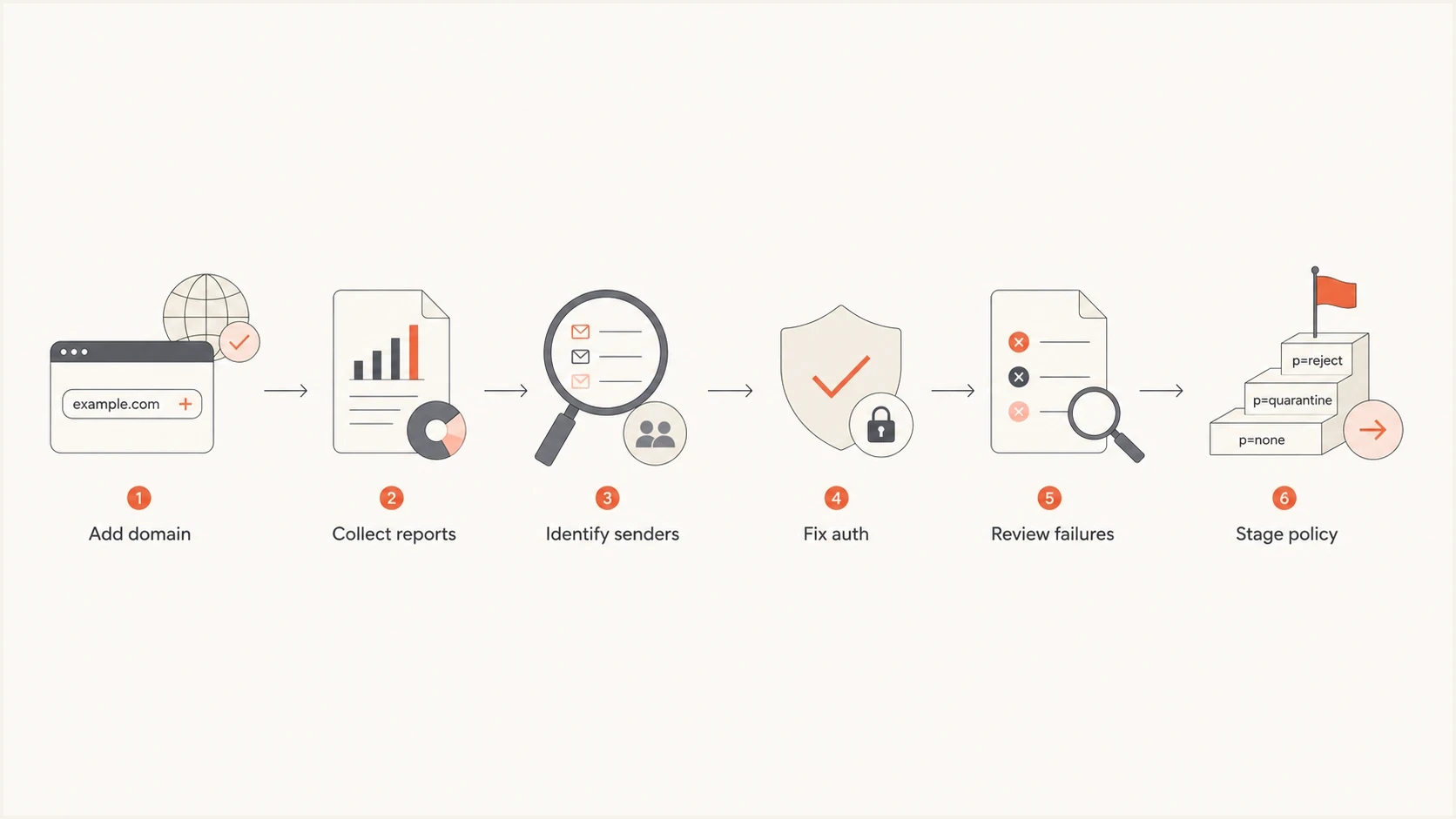
MSP DMARC onboarding flowchart showing domain setup, report collection, sender discovery, authentication fixes, failure review, and policy staging
- Access: Confirm who controls DNS, who owns mail platforms, who approves vendor changes, and who receives security escalations.
- Inventory: List the mailbox provider, CRM, billing system, marketing platform, help desk, and every device or app that sends mail.
- Baseline: For new deployments, use p=none until reports cover normal sending cycles, including billing runs and infrequent campaigns. Preserve a working enforcement policy when taking over an existing deployment.
- Fixes: Turn on DKIM, correct SPF includes, remove stale senders, and repair forwarding paths where the client controls them.
- Handoff: Give the client a sender inventory, open issues, policy plan, and a report date for the first review.
?
What's your domain score?
Deep-scan SPF, DKIM & DMARC records for email deliverability and security issues.
A broad domain health check belongs in discovery because it gives the MSP an initial view of published authentication records before a client meeting. Verify DKIM for each sender using its actual selector and message headers; a domain-only scan cannot prove that every sender signs correctly. Use those checks and aggregate reports to define the first fixes.
Standardize the technical implementation
The technical setup should be predictable and documented. A DMARC package needs standard record templates, clear policy rules, a change log, and a fallback plan. The MSP should know who approves each DNS change and how quickly the client can update records when a sender is failing. Save previous DNS values and TTLs, define rollback triggers, and test critical mail after each change.
Starter DMARC monitoring recordDNS
_dmarc.example.com TXT "v=DMARC1; p=none; rua=mailto:dmarc@example.com"
That first record requests aggregate reports. Use a monitored destination and confirm external reporting authorization when the rua address is outside the client's organizational domain. After the MSP has enough data, the service moves into authentication repair. RFC 7208 limits DNS-querying SPF terms to 10 per evaluation, including nested includes and redirects. For clients with several vendors, hosted SPF can reduce repeated DNS tickets and keep sender changes inside a managed workflow. If SPF flattening is used, keep the resulting IP addresses current when vendors change their infrastructure.
SPF and DKIM syntax with placeholder valuesDNS
example.com TXT "v=spf1 include:spf.vendor.example -all"
selector1._domainkey.example.com TXT "v=DKIM1; k=rsa; p=MIIB..."
RFC 9989 made pct historic. Keep v=DMARC1 and stage policies without percentage tags. Its t=y test mode requests one level less enforcement, but older receivers ignore it and apply the published policy. Keep p=none until legitimate sending is verified. RFC 9990 defines aggregate reporting, and RFC 9991 defines failure reporting.
DMARC policy stages, publish one value at a timeDNS
v=DMARC1; p=none; rua=mailto:dmarc@example.com
v=DMARC1; p=quarantine; rua=mailto:dmarc@example.com
v=DMARC1; p=reject; rua=mailto:dmarc@example.com
Policy staging path
Illustrative policy choices after sender verification. Select the endpoint for each domain; the values are sequence labels, not protection scores.
Policy stage
A p=quarantine or p=reject record expresses the domain owner's requested handling for mail that fails DMARC. Each receiver retains discretion under its local policy, so client reporting should describe the published policy and observed results instead of promising universal blocking.
Check mailing lists before choosing reject
RFC 9989 advises against reject for domains whose users post to Internet mailing lists. Domains choosing reject must use DKIM rather than relying on SPF alone. Review indirect mail flows and document the client's decision before the change.
Use a sender approval rule
- Known: The sender is owned by the client or an approved vendor.
- Authenticated: At least one passing SPF or DKIM result uses a domain that matches the visible From domain under the configured DMARC mode.
- Documented: The owner, vendor, purpose, and setup notes are recorded.
- Reviewed: A second person checks high-volume sources before policy enforcement.
Turn monitoring into operations
The recurring value of the service comes after setup. DMARC reports identify sources, but an MSP needs decisions. Each failure should become one of four outcomes: approved sender that needs a fix, unknown sender that needs client confirmation, unauthorized sender that stays unauthenticated, or an indirect mail flow that needs investigation before deciding whether to escalate.
Weekly source review
Illustrative percentages for source triage, not client results or a forecast of improvement.
Passing
Needs fix
Unknown
Run a weekly technical review and a monthly client review. The weekly review is internal and ticket-focused. The monthly review is client-facing and outcome-focused. Route alerts into the professional services automation (PSA) or ticketing workflow through email routing or a verified API integration, and retain policy changes in the client audit log. Map every ticket to its client tenant and domain, and group repeat alerts into the existing issue.
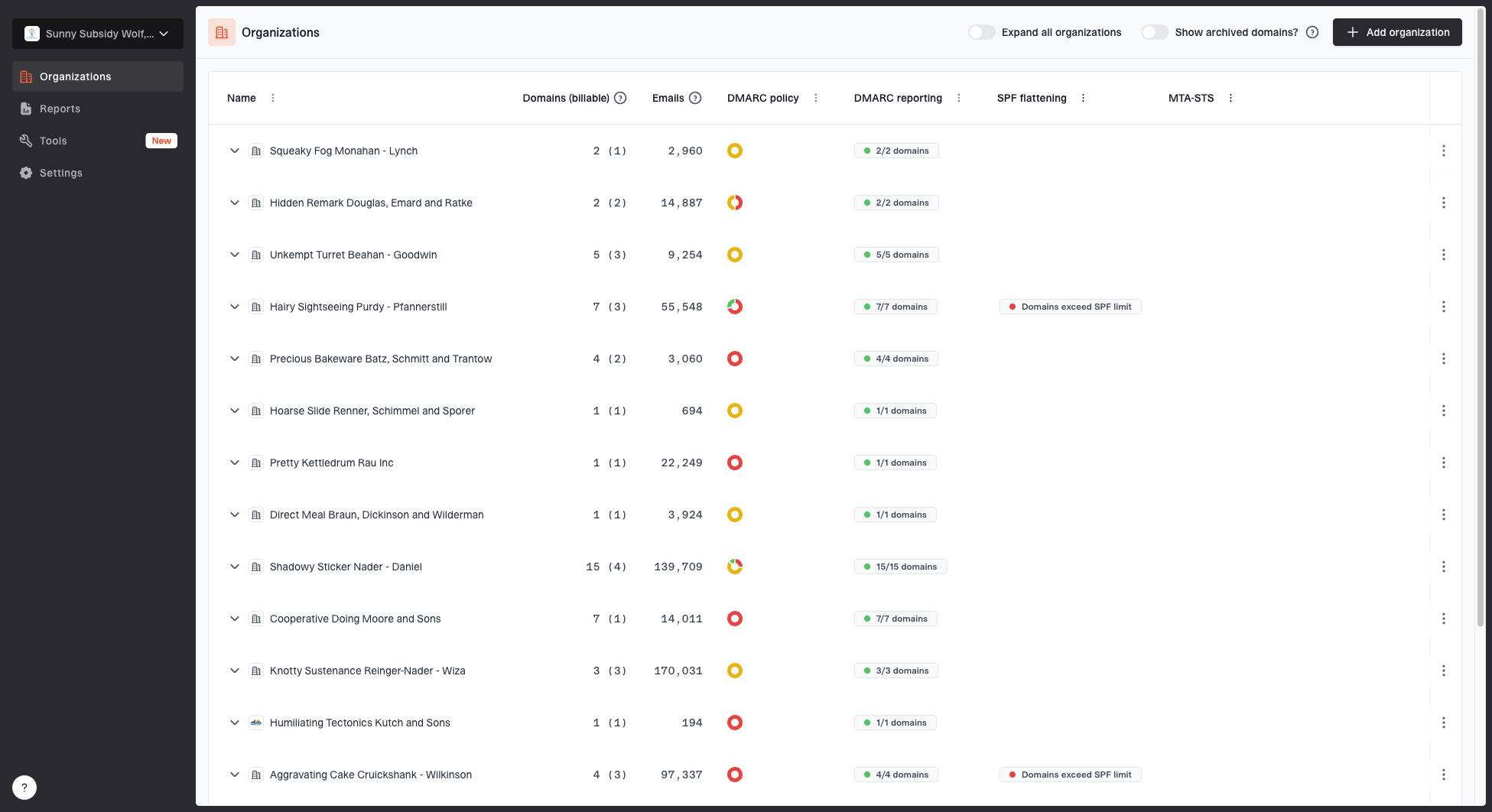
MSP organizations page showing client organizations, domain counts, email volume, and domain status columns
In Suped's product, the MSP organization view gives operators one place to move between client organizations, check domain status, and prioritize domains by volume and health. Multi-tenant DMARC management keeps each client's access and reporting separate while operators handle ongoing changes.
- Alerts: Create tickets for sudden failure spikes, new sources using critical domains, policy drift, and unexpected DNS changes.
- Ownership: Assign each source to the MSP, client IT, marketing, finance, or a vendor contact.
- Evidence: Attach pass rates, source names, sending IPs, and the affected domain to each ticket.
- Closure: For approved-sender fixes, close issues after fresh reports confirm a DMARC pass; use message-level checks for urgent delivery recovery.
Add reputation and deliverability checks
DMARC is not the whole email health story. Include blocklist (blacklist) monitoring when it fits the MSP service because clients often notice reputation issues before they understand authentication failures. A domain can have correct DMARC and still struggle if sending infrastructure has poor reputation.
Blocklist checker
Check your domain or IP against 144 blocklists.







The package wording is important. Do not promise that monitoring removes every blacklist or blocklist entry. Promise detection, triage, evidence, and guided remediation. Suped's blocklist monitoring puts reputation checks next to DMARC, SPF, and DKIM signals in Suped's product.
Service boundary
Blacklist and blocklist monitoring should include detection and guidance. Remediation that requires changing customer mail content, list hygiene, or third-party vendor behavior should have its own scope.
Report business value without overloading the client
Client reports should not be a dump of authentication rows. Keep them short and decision-oriented. A strong report shows the current DMARC policy, volume trends, approved senders, failed sources, open tickets, and the next policy recommendation. If the client only reads one page, they should understand whether their domain is better protected than last month.
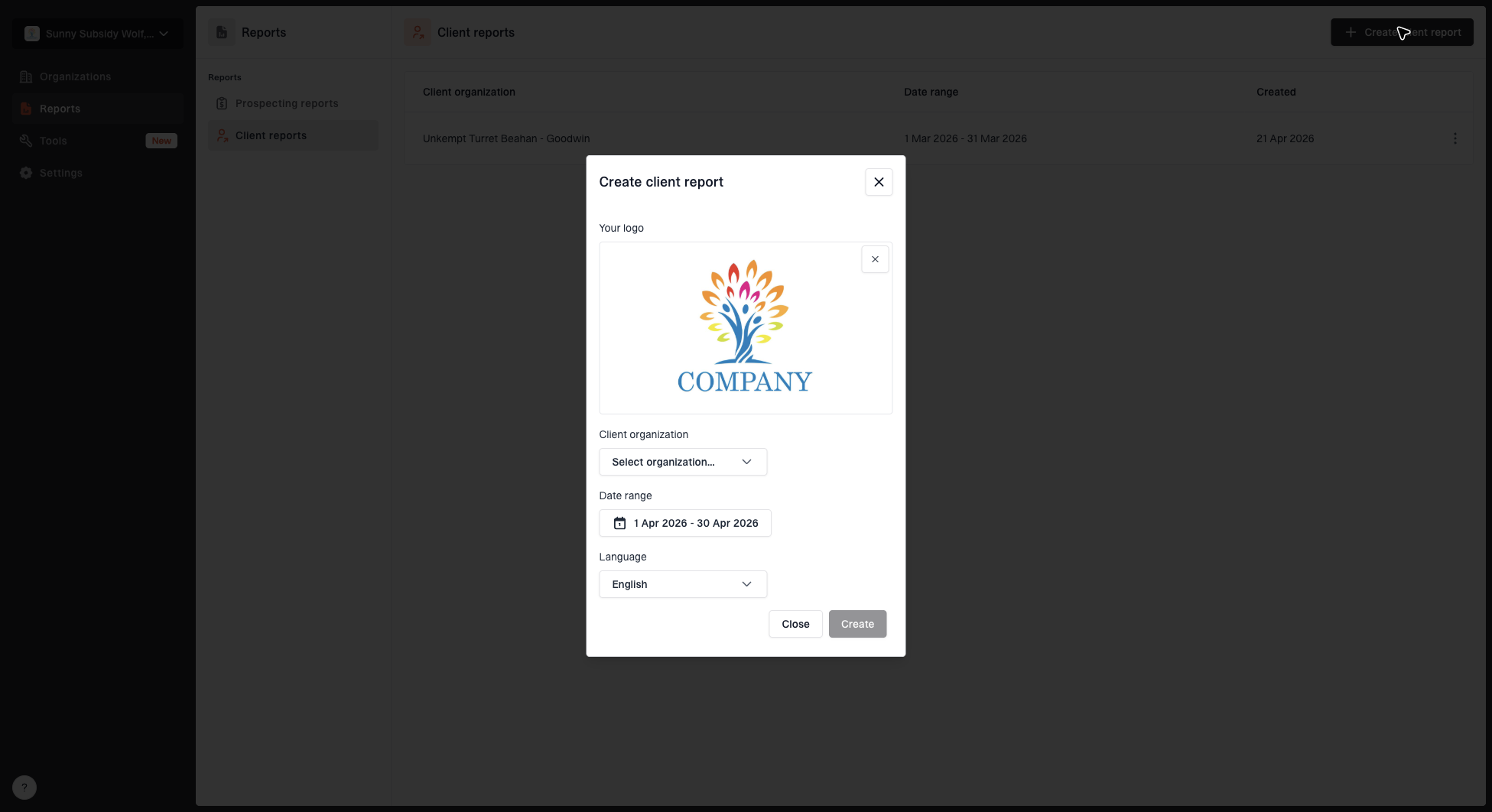
Create client report dialog with organization, date range, logo, and language options
Suped's client report workflow helps MSPs package the ongoing service. Operators can create branded reports with organization, date range, logo, and language options. Include white-label reports in the agreed tier after confirming the available branding options and keeping each client's data separate.
Policy readiness checks
Review each approved sender and its business impact before proposing stronger policy.
Ready for review
Senders verified
Approved senders pass DMARC across normal sending cycles; indirect flows and the policy goal have been reviewed.
Investigate
Open questions
Unknown sources or untested low-volume systems need an owner and a decision.
Fix first
Legitimate mail at risk
An approved sender fails DMARC, or critical mail has an unresolved delivery issue.
A high overall pass rate is insufficient evidence for enforcement. Review each approved sender, including low-volume finance systems. Report legitimate-sender pass rates separately from total observed traffic, since spoofing volume distorts the overall rate. Aggregate reports describe authentication and receiver handling, not verified inbox placement or a complete count of attempted abuse.
Choose DMARC service tiers
MSPs do not need public pricing tables to package the service. They need clear internal packaging. Use bundles that match client complexity, then quote based on domains, sender count, DNS control, reporting needs, and expected vendor coordination.
Baseline package
- Fit: Small clients with a primary domain and a short sender list.
- Work: DMARC setup, monitoring, core sender fixes, and monthly summary.
- Limit: Vendor coordination and complex enforcement changes need scoped work.
Managed package
- Fit: Clients with several domains, frequent SaaS changes, or compliance pressure.
- Work: Monitoring, alerts, hosted record management, reports, and policy staging.
- Limit: Mail platform migrations and content reputation work need separate ownership.
For MSPs building this for the first time, keep the entry package narrow and make expansion obvious. Add more domains, more frequent reviews, hosted DMARC, hosted SPF, MTA-STS, blocklist checks, executive reporting, or vendor coordination as the account grows.
Price onboarding and recurring work separately
Quote a one-time onboarding fee for discovery and authentication cleanup, then a monthly fee for the agreed monitoring workload. A per-client minimum with included domains and a defined additional-domain rate keeps billing repeatable. State whether subdomains and non-sending domains count, and how new senders or extra remediation hours change the quote.
- Calculate delivery cost using platform charges, technician time at a fully loaded cost, reporting time, and other direct account costs.
- Set an included remediation allowance and an approval process for work beyond it, so vendor troubleshooting does not consume the monthly fee.
- Define gross margin as (service revenue minus direct delivery cost) divided by service revenue. Use monthly fee = monthly delivery cost / (1 - target gross margin).
- Compare quoted costs with actual ticket time during the pilot, then review domain counts and extra work at renewal.
For illustration only, if estimated monthly delivery cost is $80 per client and the target gross margin is 60%, the monthly fee is $80 / 0.40 = $200 before tax. This is a calculation example, not a market price or a recommended margin; quote onboarding separately.
Pilot the service before a full launch
The cleanest launch is a pilot across a small group of existing clients. Pick clients with different mail patterns, including a simple office domain, a marketing-heavy client, a client with several domains, and one that relies on several external senders. That gives the MSP enough variation to tune onboarding, reporting, and alert handling before adding the service to every managed services agreement.
- Pilot: Choose a few clients and validate onboarding and report collection for the first cycle; use monitoring mode for new deployments and preserve working enforcement on existing ones.
- Template: Create ticket templates for new sender, failed SPF, failed DKIM, policy change, and blacklist or blocklist alert.
- Train: Give help desk staff a simple source classification guide and escalation path.
- Review: Compare alert volume, ticket time, client questions, and report quality after one cycle.
- Expand: Add the service to standard security packages once the workflow is repeatable.