
How to handle clients with shared marketing platforms

Published 22 Jul 2026
Updated 23 Sep 2026
11 min read
Summarize with

Updated on 23 Sep 2026: We added current DMARC rollout guidance and stronger controls for client data, consent, suppression, and shared-platform integrations.
Handle clients on shared marketing platforms by separating each client's sending identity, assigning a dedicated subdomain where practical, enabling provider-specific DKIM, configuring an aligned return-path when supported, and monitoring every client as its own tenant. A shared application or IP pool does not require a shared authentication identity. The visible From domain, DKIM signing domain, and SPF-authenticated return-path should stay attributable to one client.
The operating rule we use is simple: share infrastructure only where the platform requires it, but never share ownership records, credentials, DNS approvals, reporting, or change history. That boundary lets an MSP troubleshoot one client without exposing another client or treating a vendor-wide event as a client-specific failure.
Do not authenticate every client with the MSP domain
An MSP-owned signing or bounce domain hides which client controls the mail stream and expands the effect of a configuration mistake. Keep authentication under a domain the client owns, even when the MSP administers the platform account.
Set ownership before touching DNS
Start with a written service boundary for every client and every marketing platform. Record who owns the platform tenant, who can approve DNS, who creates campaigns, who handles vendor support, and who accepts the risk of a policy change. The MSP can operate the service without becoming the owner of the client's sending identity. A practical scope belongs in the same client record as the domains and sending sources.
This boundary matters when a marketing agency, client employee, or software vendor changes a sender without telling the MSP. Define client responsibilities before enforcement so the response path is already agreed. The client should approve business senders and visible From domains. The MSP should validate authentication, watch reports, document changes, and provide evidence for enforcement decisions.
- Client owner: Approves the platform, sending domain, audience, and production launch.
- MSP operator: Validates DNS, alignment, report data, alert routing, and rollback steps.
- Marketing operator: Uses approved domains and reports any new campaign tool or integration.
- DNS owner: Publishes approved records and preserves a dated change log.
Inventory every client and sending path
Build an inventory at the client-domain-source level, not only the vendor level. HubSpot, Mailchimp, Klaviyo, Adobe Marketo Engage, and Salesforce Marketing Cloud can each contain several client accounts, business units, workspaces, or integrations. For each one, capture the account identifier, visible From domain, message class, envelope domain, DKIM domain, selectors, sending subdomain, List-ID when used, suppression owner, purpose, and last successful test.
Do not assume that two accounts on the same platform authenticate in the same way. One client can have custom DKIM and an aligned bounce domain while another still uses provider defaults. The useful unit of work is a specific stream, such as Client A newsletters sent through HubSpot using news.client-a.example, rather than a generic entry called HubSpot.
|
|
|
|---|---|---|
Client | Legal owner | Tenant separation |
Platform | Vendor and account | Support lookup |
From domain | Visible identity | DMARC alignment |
Message class | Marketing or transactional | Policy and unsubscribe testing |
List identity | List-ID and suppression owner | Consent and opt-out tracing |
Selectors | DKIM names | DNS verification |
Owner | Named approver | Escalation |
Minimum fields for a shared-platform source register
Store evidence with the inventory: the platform's domain-verification status, a DNS lookup, a real message header, and the date tested. This prevents an old green status in a vendor console from being treated as current proof after DNS, account, or domain changes.
A real product screen can also help the runbook specify where operators confirm the connected domain. The exact labels change, so the runbook should identify the account and verification outcome instead of relying only on a screenshot.
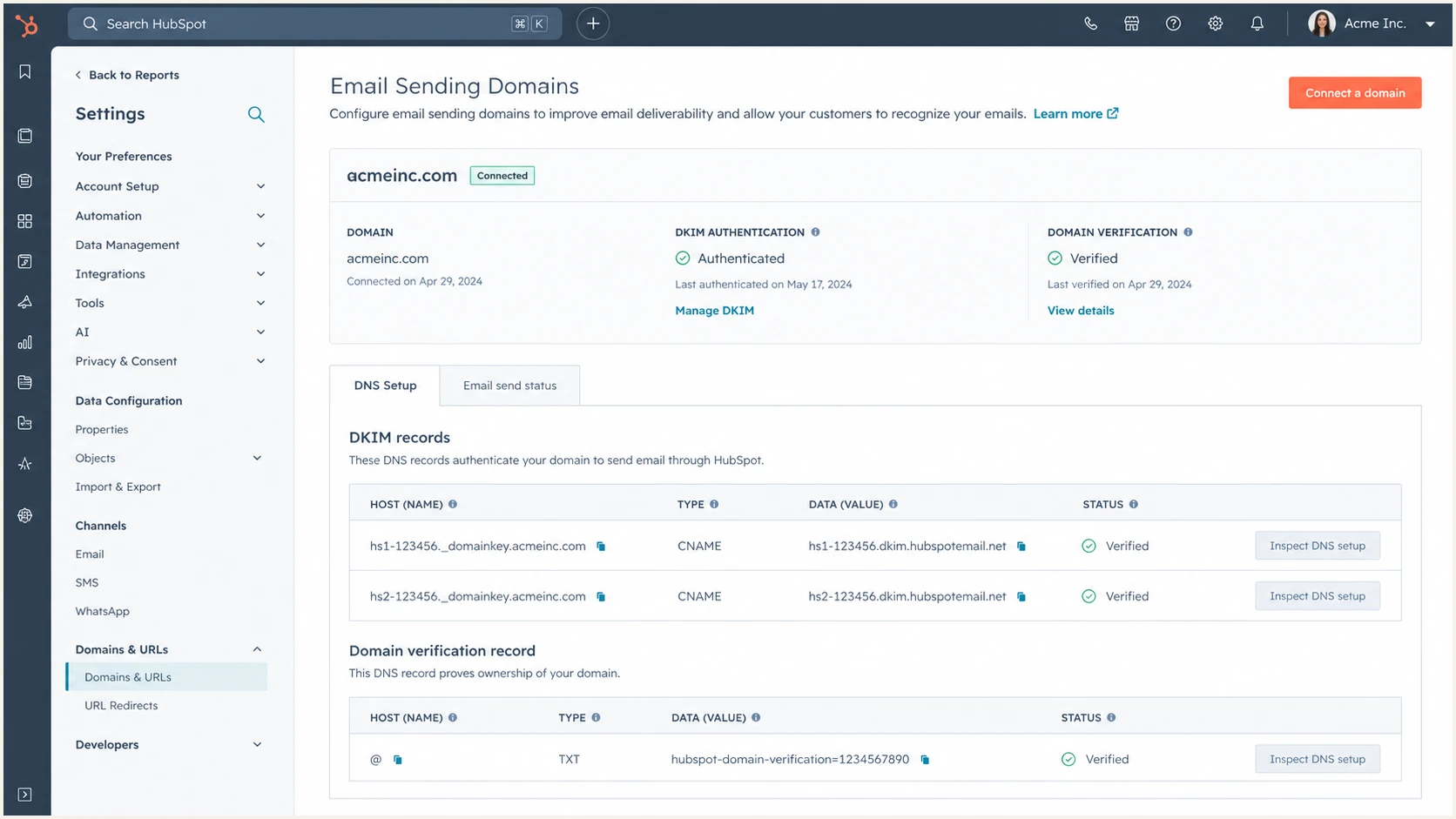
HubSpot email sending domain authentication settings
Separate client identity on shared infrastructure
Use a dedicated sending subdomain for each client's marketing stream when the platform supports it. A pattern such as news.client.example or updates.client.example keeps the stream attributable while preserving the client's organizational domain for human mail. It also gives the MSP a narrow place to apply authentication, monitor traffic, and retire a platform later.
A shared IP pool can be normal for a marketing platform. The important boundary is the authenticated domain. Never reuse another client's DKIM selector targets, verification tokens, account credentials, or custom return-path. Where a platform cannot isolate client tenants, create separate permission groups and document the residual risk before production use.
Preferred client isolation
- Tenant: One client account or business unit.
- Domain: Client-owned sending subdomain.
- Access: Named client and MSP roles.
- Evidence: Per-client tests and change log.
Risky shared configuration
- Tenant: Clients mixed in one workspace.
- Domain: MSP-owned identity for all mail.
- Access: Shared credentials and broad rights.
- Evidence: Vendor status with no message test.
Configure SPF, DKIM, and DMARC for the real sender
DMARC passes when SPF or DKIM passes and the passing domain matches the visible From domain under DMARC rules. With shared marketing platforms, DKIM is often the cleanest aligned path because the provider can sign with a client-controlled domain through CNAME delegation. SPF alignment requires a return-path domain that matches the From domain under DMARC rules, which usually means enabling the platform's custom bounce or branded return-path option.
Publish only the records generated for that client's platform account. Confirm SPF and DKIM alignment using a delivered message, because DNS syntax alone cannot prove that the selected campaign used the intended domain. If a platform offers two DKIM selectors, publish both so it can rotate keys without interrupting authentication.
Illustrative client DNS recordsDNS
mktg1._domainkey.news.example.com. IN CNAME dkim1.vendor.example.
mktg2._domainkey.news.example.com. IN CNAME dkim2.vendor.example.
bounce.news.example.com. IN CNAME bounce.vendor.example.
Keep SPF compact. Adding every marketing vendor to the organizational SPF record can create unnecessary DNS lookups and makes removal harder. Use a dedicated return-path subdomain where supported. If a client has many authorized services, Hosted SPF can centralize sender changes and help keep the record within SPF lookup limits without granting routine DNS access.
Start DMARC with p=none and aggregate reporting, review legitimate sources, then move the client's policy to quarantine or reject only after the evidence supports it. RFC 9989 makes the pct tag historic and introduces t=y for policy testing, so do not use percentage sampling as a rollout control. Do not weaken alignment globally to accommodate one platform before checking its custom-domain options. Use the DMARC checker after DNS changes, then send a controlled campaign and inspect its headers and aggregate reporting.
DMARC checker
Look up a domain's DMARC record and catch policy issues.
?/7tests passed
Separate customer data, consent, suppression, and integrations
Authentication confirms domain use, but it does not prove permission to contact a recipient. Keep each client's contact data, consent evidence, subscription types, suppression lists, tracking domains, and exports inside that client's tenant. Map every form, CRM sync, file import, webhook, and audience destination to the client record. A cross-tenant integration can expose customer data or resubscribe an opted-out recipient while SPF, DKIM, and DMARC still pass.
For marketing and subscribed mail, test the RFC 8058 one-click unsubscribe headers, the visible body link, the completion response, and suppression propagation before launch. Current Gmail and Yahoo bulk-sender rules require easy unsubscribe and expect opt-outs to be honored within 48 hours. Keep transactional mail on a distinct address and stream so a marketing suppression or complaint spike does not disrupt receipts or account messages.
- Consent record: Store the capture source, time, subscription purpose, and available evidence.
- Suppression ownership: Keep opt-outs with the client and block imports from restoring them.
- Integration scope: Use per-client API credentials, webhooks, and audience destinations.
- Cross-channel checks: Confirm journey logic does not reactivate email after an opt-out.
Use a controlled onboarding and change workflow
Treat a new shared-platform sender as a production change, not a quick DNS request. Capture the request, verify account ownership, review the proposed domains, publish account-specific records, wait for DNS visibility, validate the vendor status, send a test, and watch DMARC data before approving normal volume. A ticket should contain the exact records, requester, approver, expected stream, rollback action, and evidence.
The same workflow applies when the platform changes selectors, return-path records, or account ownership. Coordinate DMARC changes with client IT and marketing teams so campaign deadlines do not bypass review. Emergency changes still need an owner, expiry date, and retrospective validation.
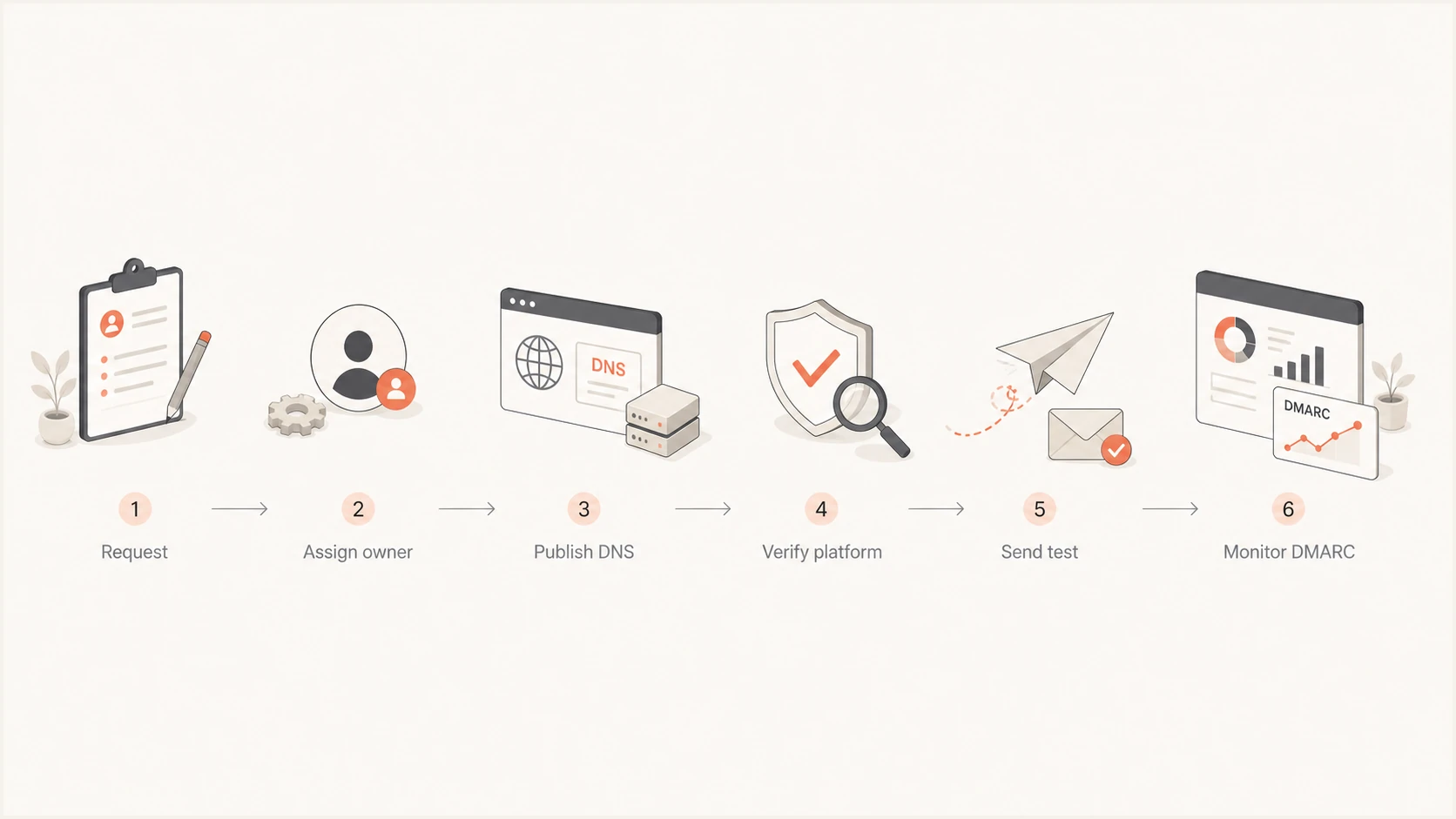
Client marketing sender onboarding and validation flow
- Identify: Name the client, platform account, stream, From domain, and launch date.
- Approve: Obtain business approval and confirm the DNS and platform owners.
- Publish: Add only the account-specific DKIM, bounce, and verification records.
- Test: Send a representative message and inspect authentication and alignment.
- Observe: Confirm the expected source and pass rate in DMARC aggregate data.
- Close: Attach evidence, record rollback details, and schedule a review date.
Monitor by client, domain, and source
Aggregate reports should be grouped by client first, then by domain and source. A vendor-wide source label is useful for context, but it does not replace per-client authentication results. Alert on new sources, falling aligned pass rates, sudden volume changes, and traffic that appears after a platform should have been retired. Route alerts to the client record and the operator responsible for that account.
Suped is our DMARC and email authentication product. Its multi-tenant dashboard keeps client organizations separate while placing DMARC, SPF, DKIM, blocklist (blacklist), and deliverability signals in one operational view. For this workflow, operators can switch between client organizations, review verified and unverified sources, receive real-time alerts, and follow issue-specific remediation steps without combining client records.
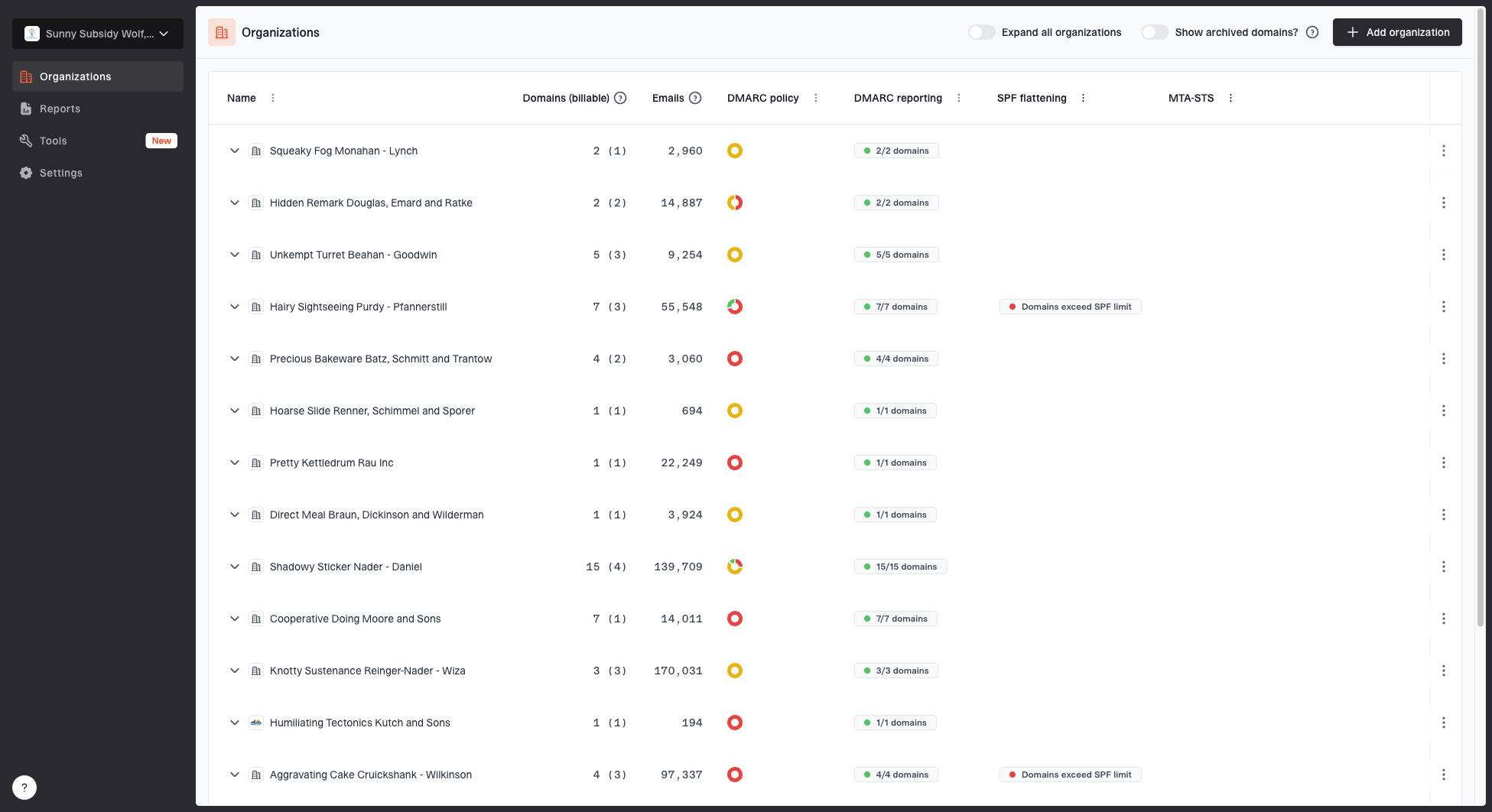
MSP organizations page showing client organizations, domain counts, email volume, and domain status columns
The broader DMARC for MSPs workflow also includes branded client reporting and organization-level access. Hosted DMARC supports staged policy management, while automated issue detection gives operators concrete fix steps. Keep each client organization mapped to its own contract, notification recipients, domains, and approval contacts.
Use DMARC monitoring to compare what the platform claims with what receivers report. A configured domain can still fail because a different business unit, legacy automation, forwarding path, or newly created campaign used another identity. Reporting closes that gap and provides evidence for the next policy step.
Respond to failures without affecting every client
When authentication fails, identify the smallest affected unit before changing DNS. Check the client, From domain, source IP, DKIM signing domain, return-path, selector, platform account, and first-seen time. If one account lost DKIM after a DNS change, repair that account. Do not relax another client's DMARC policy or add a broad SPF authorization as a shortcut.
Shared infrastructure creates correlated incidents. A vendor can rotate infrastructure, change a return-path, or have a service event that appears across clients. Correlation helps prioritize the investigation, but each client's evidence still determines impact. Maintain a reusable incident note that records affected tenants, known-good configuration, vendor case, temporary action, and verification results.
Triage order
- Scope: Find the affected client accounts and sending domains.
- Compare: Separate common vendor symptoms from client-specific changes.
- Contain: Pause only the affected stream when business impact permits.
- Verify: Test alignment and watch reports after the fix.
Offboard cleanly and preserve evidence
Offboarding starts with stopping campaigns and confirming that no transactional workflow depends on the marketing platform. Remove user access, revoke integrations, export the final configuration, and wait through an agreed observation period. Then remove obsolete verification, DKIM, bounce, and SPF records. Retiring authorization without confirming traffic can interrupt legitimate mail, while leaving records indefinitely creates stale trust.
Preserve the account identifier, last campaign date, DNS removal approval, final authentication evidence, and contract end date. Continue watching for the retired source after removal. Unexpected traffic can indicate an overlooked automation, a reused credential, or a platform account that remained active. The closure record should make it easy for another operator to understand why the sender disappeared and what would be required to restore it.
- Campaign stop: Confirm scheduled and automated sends are disabled.
- Access removal: Revoke users, integrations, API keys, and delegated roles.
- DNS cleanup: Remove only records proven to belong to the retired account.
- Post-check: Watch reports for unexpected traffic after the retirement date.
Apply a repeatable shared-platform operating model
Shared marketing platforms become manageable when the MSP preserves a client-level boundary around identity, permissions, DNS, reporting, and evidence. Give each client an attributable sending domain, configure account-specific DKIM and return-path records, test a real message, monitor by organization and source, and make every change reversible.
The result is an operating model that scales across vendors without merging client risk. One platform event can still affect several clients, but clean tenant records and per-client authentication show exactly where action is needed. That clarity supports faster incident response and safer, evidence-based DMARC policy decisions.