How to decide when a client is ready for p=quarantine

Published 25 Jul 2026
Updated 27 Sep 2026
10 min read
Summarize with

Updated on 27 Sep 2026: We updated this guide for RFC 9989, replacing the historic pct rollout with t=y test mode and explicit receiver-compatibility checks.
A client is ready for p=quarantine when every legitimate sending source has an accountable owner, recent DMARC data shows a stable pass rate, unknown traffic has been investigated, and the MSP has a tested rollback plan. Time spent at p=none is not the deciding factor. Thirty quiet days can hide a monthly billing system, a seasonal campaign, an incident-only application, or a dormant backup notification service.
The practical gate is evidence plus operational control. Require at least one normal business cycle of aggregate reports, coverage of low-frequency senders, a written exception process, and named approvers on both the MSP and client sides. Under RFC 9989, a cautious rollout can use t=y to request test handling before full quarantine, but the tag does not replace readiness checks because older receivers can ignore it.
The readiness gate to use
Treat p=quarantine as a controlled production change, not a DNS housekeeping task. The receiver gets permission to treat failing mail as suspicious, often by placing it in spam or applying extra filtering. That protects the client's domain, but it also exposes gaps in the sender inventory. The change is ready only when the remaining uncertainty is understood and bounded.
For a repeatable DMARC for MSPs workflow, make readiness a signed checklist in the client record. That prevents a technician from escalating policy because a dashboard looks green on one afternoon. It also gives the service desk a clear reason for the change, the expected effect, the approval owner, and the rollback trigger.
A pass rate alone is not approval
A 99% pass rate can still conceal an important system if the remaining 1% contains invoices, password resets, executive mail, or account alerts. Review failed traffic by source, message volume, business function, and owner before changing policy.
- Inventory: Every known sender has a name, business purpose, technical contact, and expected volume.
- Authentication: Legitimate mail passes DMARC through a matching SPF identity or DKIM signature.
- Observation: Reports cover a normal business cycle plus known monthly or seasonal sending events.
- Ownership: The client has approved the sender list and named a decision-maker for exceptions.
- Recovery: The MSP has the current record, DNS access path, change window, and rollback condition.
Operational readiness bands
Use these bands as change-control guidance, then inspect the business impact behind every failure.
Ready for pilot
98%+ known pass
Known legitimate traffic is authenticated and remaining failures are explained.
Investigate first
95-98% or unclear
Failures have uncertain ownership or include business-critical traffic.
Do not enforce
Below 95%
Important legitimate senders fail or report coverage is incomplete.
Measure evidence, not calendar time
A useful observation window contains the client's actual sending patterns. For a steady office domain, two to four weeks often captures routine mail. A retailer with month-end statements or quarterly promotions needs data that includes those events. Ask the client for its campaign calendar, finance runs, HR notifications, support systems, website forms, scanners, and line-of-business applications.
Good DMARC monitoring separates verified senders from unknown sources and shows whether failures are persistent or incidental. Review volume trends, source IP changes, forwarding patterns, identifier domains, and first and last seen dates. A source first seen yesterday needs investigation even if it sends only a few messages.
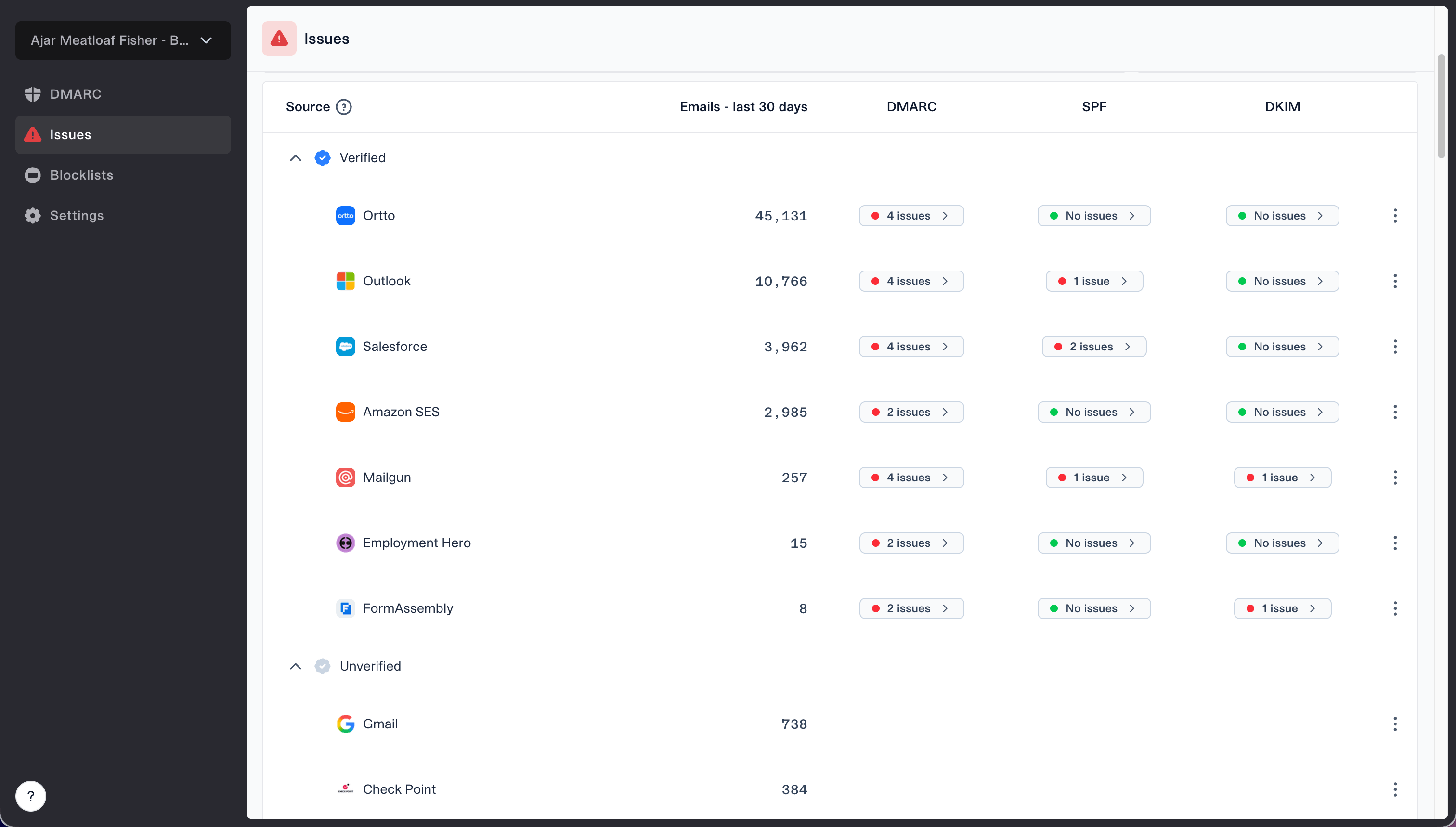
Issues page showing verified and unverified source sections for reviewing sending sources
Suped's verified and unverified source view supports this review across client domains. Use the source status as a work queue: confirm who owns each legitimate platform, fix its authentication, document expected behavior, and close only after new reports prove the repair. The MSP dashboard also keeps client organizations separate while giving operators one place to watch issues.
Unknown traffic does not automatically block enforcement. It must be classified. Internet noise and unauthorized impersonation are reasons to enforce. An unidentified cloud application used by finance is a reason to pause. If ownership cannot be established, compare timestamps, recipient providers, reverse DNS, message counts, and client activity before deciding.
Evidence that supports quarantine
- Stable data: Daily volume and pass rates match the client's operations.
- Known failures: Remaining failures are unauthorized, forwarded, or accepted exceptions.
- Named owners: Business owners have confirmed their active sending systems.
- Change control: Approval, monitoring, stage criteria, and rollback steps are recorded.
Evidence that requires a pause
- New source: A recent sender has no confirmed owner or purpose.
- Critical failure: Invoices, alerts, or account mail still fails DMARC.
- Missing cycle: The report period excludes a scheduled sending event.
- No owner: Nobody can approve the change or validate an incident.
Account for the RFC 9989 transition
RFC 9989 is the current DMARC standard. It removed pct because receivers did not apply percentage sampling consistently and made the old tag historic. The replacement is t=y, which asks a conforming receiver to apply policy one level below the published policy while reporting continues. With p=quarantine; t=y, that means monitoring treatment rather than quarantine.
Plan for mixed receiver support during the transition. DMARC requires unknown tags to be ignored, so a receiver that has not implemented t=y can ignore it and apply p=quarantine. Enter test mode only after the sender inventory, critical workflow tests, client approval, and rollback path are complete. Treat the test stage as extra evidence, not as protection for an unready domain.
Test mode is not percentage sampling
Do not translate an old pct=10 plan into an assumed 10% test. RFC 9989 test mode is binary: t=y requests lower policy treatment, while removing the tag or using t=n requests the published policy.
Set a safe quarantine rollout
Use two controlled policy stages after the readiness review. First publish p=quarantine with t=y during a staffed change window and observe several busy sending days. Then remove t=y to request full quarantine only after report data and business checks meet the exit criteria. Receiver support varies, so both stages need the same incident monitoring and rollback coverage.
Quarantine test stageDNS
v=DMARC1; p=quarantine; t=y; rua=mailto:dmarc@example.com
The reporting address must already be collecting aggregate data, and the published record must contain only one DMARC policy. Preserve any intentional tags from the existing record and remove the historic pct tag. If the organizational domain has subdomains with different risk, set and test the sp and np policies deliberately rather than letting them inherit by accident.
Suped's Hosted DMARC workflow gives MSP operators policy staging without repeated client-side TXT edits. A technician can follow an approved rollout, see the active configuration, and reverse a stage quickly if client mail is affected. DNS authority and change approval still remain part of the client's control process.
Quarantine policy checkpoints
These checkpoints replace the historic percentage ladder. Move forward only after each exit criterion is met.
Test request
p=quarantine; t=y
Request lower treatment while reporting and workflow checks continue.
Full quarantine
p=quarantine
Request quarantine treatment after technical and business checks pass.
Rollback
Previous approved policy
Restore the last approved record when a defined stop condition occurs.
- Approve: Record the client approver, change ticket, test stage, and rollback trigger.
- Publish: Add t=y during a staffed window and confirm the authoritative DNS answer.
- Observe: Watch authentication data, support tickets, key business workflows, and client incident reports.
- Enforce: Remove t=y only when the stage exit criteria are met and documented.
Validate before and after the change
Before publication, inspect the current authoritative record and the proposed replacement. Check syntax, policy, test mode, aggregate-report destination, subdomain behavior, non-existent subdomain behavior, and duplicate records. The DMARC checker gives the technician a focused DNS validation step for the change ticket.
Validation also needs a real message path. Send through the client's important platforms to controlled recipients at more than one mailbox provider. Inspect delivered headers and confirm that DMARC passes through the expected mechanism. A DNS record can be valid while the application still uses an unexpected envelope sender or signs with the wrong domain.
DMARC checker
Look up a domain's DMARC record and catch policy issues.
?/7tests passed
After publication, verify the authoritative answer again and account for TTL before interpreting cached results. Watch aggregate reports as they arrive, but do not wait for reports alone. Ask the service desk to flag missing mail, spam-folder placement, website-form failures, and delayed transactional messages against the change ticket.
Define rollback before the change: confirmed legitimate mail affected by policy, a critical sender discovered without a repair path, or a material rise in authentication failures tied to a known system. Rollback means restoring the last approved record, confirming DNS, notifying the client owner, and opening remediation work. It does not mean abandoning enforcement permanently.
Use a two-signal exit criterion
Advance the stage only when report data remains within the agreed threshold and the client confirms that critical mail workflows still work. Technical telemetry and business confirmation catch different classes of failure.
Coordinate ownership and incident response
Quarantine readiness depends on people as much as records. The MSP owns analysis, change execution, monitoring, evidence retention, and first response under the service agreement. The client owns the business inventory, vendor contacts, risk acceptance, and final policy approval. Write these boundaries before enforcement so an incident does not turn into a search for authority.
A useful responsibility model is documented in the client responsibility framework. Give client stakeholders a plain-language briefing on what quarantine changes, what it does not guarantee, which systems were tested, and how to report a suspected delivery issue.
|
|
|
|
|---|---|---|---|
Sources | Inventory | Client | Confirmed |
DMARC | Reports | MSP | Stable |
Critical mail | Test results | Joint | Delivered |
Rollback | Runbook | MSP | Tested |
Approval | Ticket | Client | Recorded |
Minimum evidence to attach to the p=quarantine change record
- Service desk: Tag suspected mail incidents with the domain, sender, time, recipient, and message purpose.
- DMARC operator: Compare the incident with source data, DNS history, the change timeline, and the active policy stage.
- Client owner: Confirm business impact and contact the sending vendor when configuration is involved.
- Change approver: Authorize rollback or continued observation according to the runbook.
When to pause the move
Pause when a legitimate sender still fails, a sender has no accountable owner, the observation window misses a known business cycle, the client cannot test critical workflows, or DNS changes cannot be reversed promptly. Also pause when forwarding dominates failures and the client relies on forwarded mail for a critical process. Forwarding can break SPF while DKIM continues to protect DMARC, but each path needs evidence.
An incomplete source list is the most common preventable blocker. Use a structured sending source inventory before asking for approval. Compare the client's stated list with observed reports and investigate both mismatches: a listed platform with no traffic can indicate a dormant contingency system, while observed traffic with no listing can indicate shadow IT or abuse.
Stop conditions for the change window
- DNS conflict: More than one DMARC record is visible or the expected record is not authoritative.
- Test failure: A controlled message from a critical platform fails DMARC.
- Missing authority: The named approver or rollback operator is unavailable.
- Unexplained spike: Recent failure volume has changed materially without a known business event.
A pause should create a defined remediation task, owner, due date, and retest condition. Do not leave the domain at p=none indefinitely with a vague note. Suped can centralize the issue queue, alert operators to authentication changes, and provide fix steps, which helps an MSP move blocked clients back into a controlled policy rollout.
Make quarantine a documented control
The decision is ready when evidence, ownership, client approval, and recovery are all present. Require an authenticated sender inventory, a representative reporting window, explained failures, successful critical-mail tests, client approval, a t=y test plan, full-quarantine exit criteria, and a rollback runbook. If one of those controls is missing, fix the gap before enforcing.
Suped is our DMARC and email authentication platform. Its multi-tenant monitoring, source classification, issue queue, change alerts, and hosted policy controls give MSP operators a consistent readiness record across clients. Automation supports the review, but the client still approves enforcement and validates business impact.
Once full quarantine remains stable through the agreed observation window, start a new approval cycle for reject. Recheck the inventory, review new sources, repeat critical workflow tests, and keep the same rollback discipline. Quarantine is a production control with measurable exit criteria, not a permanent holding state.