How to create DMARC service tiers for MSP clients

Updated on 5 Sep 2026: We updated this guide for current DMARC policy testing and a complete client offboarding handoff.
DMARC service tiers for MSP clients should be built around operational scope, not only around policy names. A useful tier model starts with monitoring, adds managed remediation, then adds enforcement, reporting, hosted DNS services, and higher-touch review for clients with more brands, domains, vendors, or compliance pressure.
For most MSPs, three tiers cover the required work: a baseline visibility tier, a managed authentication tier, and a protection tier. Each tier should state exactly what the client gets, what the MSP owns, what the client still approves, and what triggers an escalation. That structure makes DMARC easier to sell and deliver without creating an open-ended support burden.
- Baseline: Collect reports, identify legitimate senders, explain risk, and keep the client at p=none until the sending estate is understood.
- Managed: Fix SPF, DKIM, and alignment gaps, coordinate with vendors, and move clients through a controlled policy rollout.
- Protection: Maintain enforcement, watch new sources, send client-ready reporting, and include reputation checks such as blocklist and blacklist monitoring.
Suped fits this model because its MSP dashboard, domain monitoring, hosted DMARC, hosted SPF, SPF flattening, blocklist monitoring, and client reports map cleanly to tiered delivery. The important part is matching capability depth to the amount of operational responsibility the MSP takes on.
Start with service ownership
The first design choice is who owns each part of the DMARC workflow. A client can buy software and still fail if nobody owns source discovery, vendor follow-up, DNS changes, policy staging, and executive reporting. MSP tiers work when they turn those tasks into named responsibilities.
A practical MSP tier is a promise about a repeatable service. It should answer: how many domains are covered, how many sending platforms are investigated, how often reports are reviewed, what remediation work is included, and what happens when a new sender appears. This page belongs in a broader MSP DMARC operating model, where authentication is handled like any other managed security service.
Weak tier design
- Capability list: The plan names tools but does not say who investigates failures.
- Policy only: The tier says p=reject without defining rollout checks.
- Unbounded support: Every third-party sender issue turns into ad hoc ticket work.
Strong tier design
- Workflow scope: The tier says what is monitored, fixed, reviewed, and reported.
- Clear gates: Policy moves happen after source approval and failure-rate checks.
- Defined exceptions: Vendor remediation outside normal scope has a named escalation path.
Separate initial project work from ongoing service work. Onboarding a client domain, finding all mail sources, and fixing inherited SPF or DKIM issues is different work from monthly monitoring. Mixing those into one vague package makes margins hard to predict.
Use three core tiers
The simplest useful structure has three core tiers. You can rename them to match your catalog, but the work behind them should stay clear: visibility, remediation, protection, and ongoing client communication. This keeps sales language simple while giving delivery teams enough boundaries to run the service consistently.
|
|
|
|
|---|---|---|---|
Monitor | Low-risk domains | Reports, source list | Vendor decisions |
Managed | Active senders | Fixes, rollout | DNS approval |
Protect | Compliance risk | Enforcement, alerts | Business exceptions |
A compact tier model for MSP DMARC delivery. Avoid public prices in the tier matrix and keep commercial details in your private proposal template.
The monitor tier is for clients who need visibility before they commit to enforcement. It includes DMARC report collection, source identification, authentication status, and a plain-language summary of what is sending as the client. The MSP should not promise broad vendor remediation here unless it is separately scoped.
The managed tier is where the MSP starts doing the operational work. This includes reviewing SPF and DKIM results, identifying misaligned senders, coordinating DNS changes, and moving the domain through quarantine or reject when the data is clean enough. If you need a package-focused companion page, use package DMARC monitoring for service catalog framing.
The protection tier is for clients where spoofing, compliance, vendor sprawl, or brand risk makes ongoing attention necessary. It includes enforcement maintenance, real-time alerts, recurring review, client reporting, and domain or IP reputation checks. This is also where hosted DMARC and hosted SPF usually belong because they reduce change friction across many client environments.
Operational weight by tier
A sample view of where the delivery effort usually goes as DMARC service tiers mature.
Monitoring
Remediation
Reporting
Escalation
Define the onboarding package
Every tier needs an onboarding path. DMARC is not a switch that starts cleanly on day one. Many clients have old CRMs, payroll systems, ticketing systems, scanners, marketing platforms, and line-of-business applications sending mail. The MSP has to discover those sources before promising enforcement.
Make onboarding a defined phase with a checklist. In Suped, that means adding the client organization, adding domains, publishing the reporting record, waiting for mail data, reviewing verified and unverified sources, then creating client-facing notes for the first review. That workflow is cleaner than starting with DNS edits before the reporting data arrives.
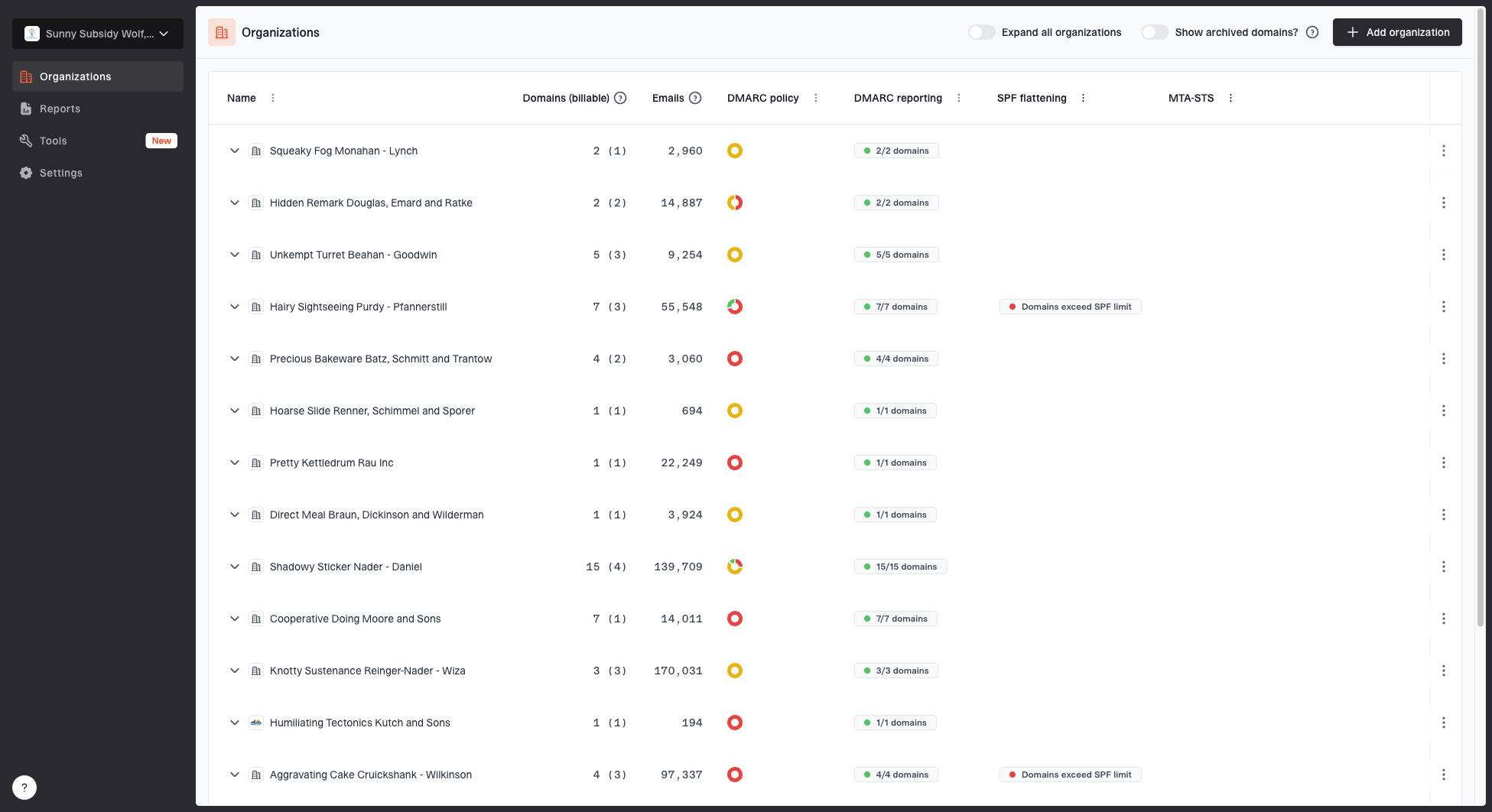
MSP organizations page showing client organizations, domain counts, email volume, and domain status columns
Your onboarding scope should say how many domains are included, which identity platforms are expected, and how unknown senders are handled. If the client has many parked or redirecting domains, do not treat them the same as active mail domains. They need records too, but the investigation effort is different.
Do not bundle unlimited discovery
A client with one primary domain and two known senders is not the same as a client with six domains and twenty vendor platforms. Put a sender investigation allowance in each tier, then define how extra vendor work is approved.
- Domain inventory: List primary, alias, parked, and campaign domains before publishing records.
- Sender inventory: Document mailbox platforms, SaaS platforms, web servers, and devices.
- DNS access: Confirm who can change TXT and CNAME records before remediation starts.
- Report authorization: When the rua address uses an external domain, confirm the report consumer has authorized the destination and verify that reports arrive.
- Approval path: Name the client stakeholder who approves blocking unauthenticated mail.
If you want a more detailed domain intake workflow, keep it separate from the tier page and hand delivery teams an onboarding checklist that they can use inside the ticket queue.
Map capabilities to each tier
Capability mapping should follow service responsibility. If the MSP is only providing visibility, DMARC monitoring and summary reporting are enough. If the MSP is committing to remediation, the tier needs authentication diagnostics and change tracking. If the MSP is committing to protection, the tier needs alerts, policy staging, hosted services, and broader deliverability signals.
Clients often assume their mailbox platform already handles everything. Message-level authentication results inside a mailbox platform do not replace a multi-domain MSP workflow for DMARC reporting, source discovery, policy staging, client reports, and cross-client triage. The service tier should explain that difference without overstating it.
|
|
|
|
|---|---|---|---|
DMARC reports | Included | Included | Included |
Sender fixes | Limited | Included | Included |
Hosted DMARC | Optional | Useful | Recommended |
Hosted SPF | Optional | Useful | Recommended |
Alerts | Basic | Standard | Priority |
Blocklists | Optional | Optional | Included |
Capability placement by service tier.
For Suped, place DMARC monitoring in every tier because it is the evidence layer. Hosted DMARC and hosted SPF belong in the managed and protection tiers because they simplify policy changes and sender management across clients. Blocklist monitoring is strongest in the protection tier because it adds reputation visibility after authentication is under control.
?
What's your domain score?
Deep-scan SPF, DKIM & DMARC records for email deliverability and security issues.
A domain health check is useful during sales and onboarding because it gives the MSP a quick view of DMARC, SPF, and DKIM readiness before the client commits to a deeper service. It should not replace aggregate report analysis, but it helps you sort clients into the right starting tier.
Clients with clean enforcement, unknown senders, SPF lookup problems, or repeated DKIM failures should not start in the same tier. Match the starting tier to the evidence.
Set policy gates and remediation limits
DMARC policy staging is where MSP service tiers often become messy. The client wants protection, the MSP wants clean delivery, and the data shows a few sources still failing. A tier should define what happens before moving a domain from monitoring to quarantine or reject.
Baseline monitoring recorddns
_dmarc.example.com. TXT "v=DMARC1; p=none; rua=mailto:dmarc@example.com;"
Policy testing recorddns
_dmarc.example.com. TXT "v=DMARC1; p=quarantine; t=y; rua=mailto:dmarc@example.com;"
Full enforcement recorddns
_dmarc.example.com. TXT "v=DMARC1; p=reject; rua=mailto:dmarc@example.com;"
Use the current testing tag
RFC 9989 removed the old pct tag and added t=y for policy testing. With p=quarantine; t=y, the domain requests testing behavior one policy level below quarantine. Remove t=y when the evidence and approval gate support applying quarantine.
The exact record depends on your reporting mailbox, platform routing, and policy strategy. The service tier should not hard-code one record forever. It should define the gate: move policy only after legitimate sources are authenticated, high-volume failures are explained, client stakeholders understand the effect, and the rollback record is documented.
Policy movement gates
Example thresholds an MSP can adapt before moving a client to stronger DMARC enforcement.
Monitor
Any unknown high-volume sender
Use while sources are unknown or early data is incomplete.
Quarantine
Low unauthenticated legitimate volume
Use after legitimate business senders are aligned.
Reject
No known business-critical failures
Use after failing legitimate mail has been remediated or accepted as an exception.
Hosted DMARC makes this easier for MSPs because policy changes can be staged without asking for repeated DNS edits. Suped's hosted DMARC workflow is useful in managed and protection tiers where policy changes are part of the service, not a one-time setup.
Hosted DMARC configuration dialog showing policy controls, CNAME setup, and expanded advanced options
Remediation limits should be just as clear as policy gates. Include a fixed number of sender reviews, vendor coordination attempts, or DNS change requests in each tier. When a sender requires custom vendor support, legal approval, or application changes, move it into an approved project or escalation queue.
Build reporting into the service
Reporting is part of the service, not an afterthought. Clients do not need raw XML or a long list of authentication rows. They need to know whether their domain is protected, what changed, what needs approval, and whether any vendors are putting mail delivery at risk.
Each tier should have a reporting cadence. A monitor tier can use a monthly summary. A managed tier can include onboarding updates and policy movement notes. A protection tier should include recurring executive reporting, alert summaries, and action items when new sources appear.
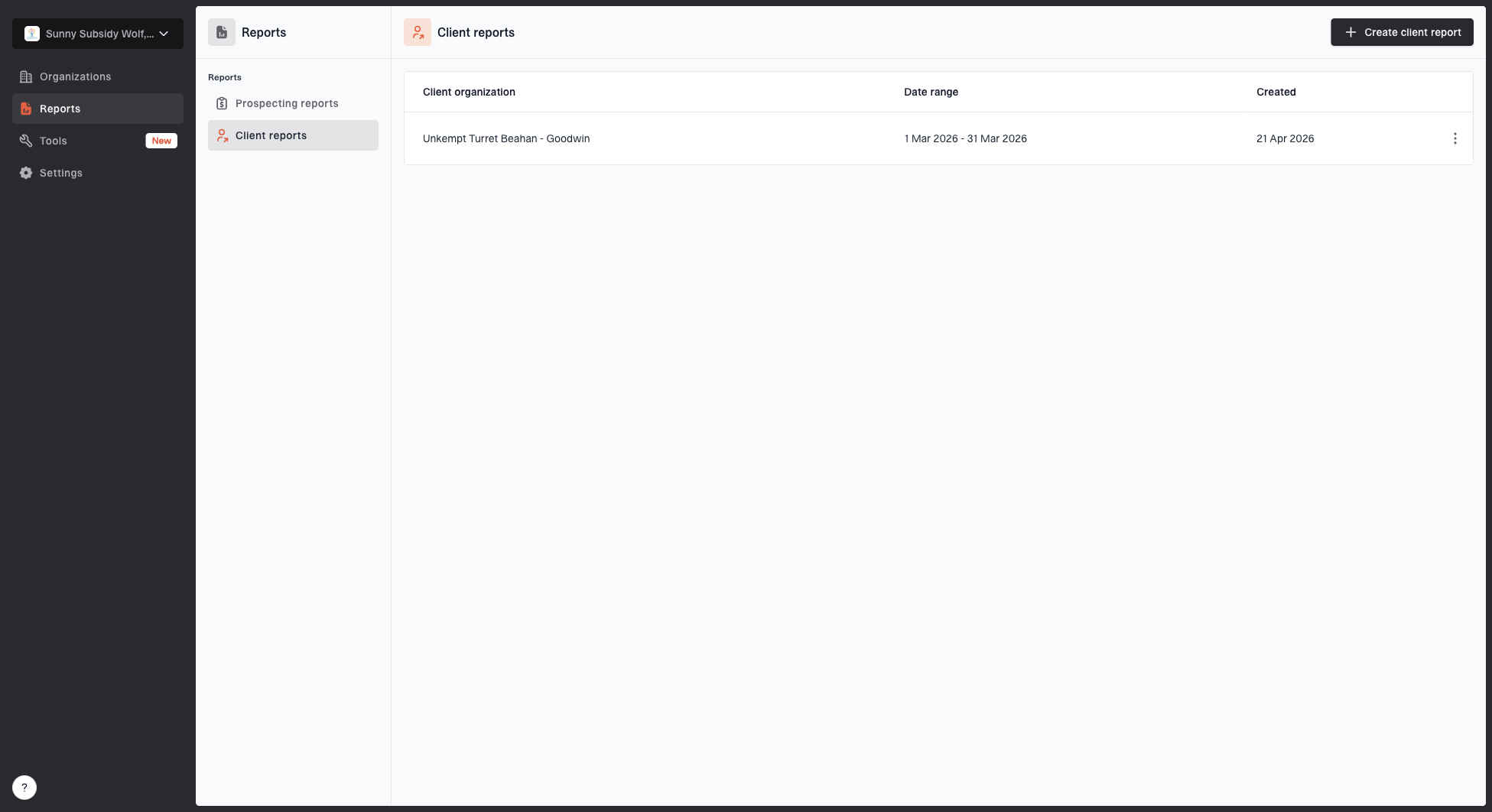
Client reports page showing a generated client report, date range, created date, and actions
Suped's client reports are useful here because they help MSPs turn authentication data into a client-ready artifact. A clean report reduces meeting prep and gives account managers something specific to discuss: pass rates, policy status, sender changes, and remaining work.
Report what changed
Good DMARC reporting says what changed since the last period. A client should see new senders, fixed failures, policy movement, open risks, and decisions needed from their side.
- Executive view: Use simple status language: monitoring, improving, protected, or action needed.
- Technical view: Show failing sources, alignment gaps, DNS changes, and sender ownership.
- Account view: Connect authentication progress to the client's email security roadmap.
- Renewal view: Show ongoing monitoring value after the domain reaches enforcement.
For a deeper client communication workflow, build a separate DMARC progress report template and keep your tier page focused on scope.
Add operational add-ons carefully
Add-ons can help, but too many add-ons make the service hard to explain. Keep the core tiers stable and use add-ons for work that changes effort materially: extra domains, high-volume vendor remediation, hosted SPF management, blocklist and blacklist monitoring, MTA-STS, and executive review meetings.
Hosted SPF is one of the more useful operational add-ons because SPF records often become fragile in MSP environments. Clients add platforms, vendors change includes, and the 10 DNS lookup limit creates support noise. Suped's hosted SPF and SPF flattening workflows help MSPs manage senders without repeated direct DNS changes.
Good add-ons
- Extra domains: Charge separately when each domain needs source review.
- Hosted SPF: Use for clients with frequent sender changes.
- Blocklist checks: Add for clients with outbound deliverability risk.
Risky add-ons
- Unlimited vendors: This creates open-ended support work.
- Instant reject: This skips the evidence needed for safe enforcement.
- Raw exports: Most clients need decisions, not unfiltered data.
When blocklist or blacklist monitoring is included, define what the MSP does when a listing appears. The useful service includes identifying the affected domain or IP, checking whether the client controls the sending path, and deciding whether remediation belongs to the MSP, the mailbox provider, or a third-party sender.

Blocklist monitoring page showing domain and IP checks across blocklists with importance and status
Keep add-ons tied to defined outcomes. If the add-on does not change monitoring depth, remediation work, alert handling, or reporting, it probably belongs in internal tooling rather than the client-facing tier list.
Turn tiers into a runbook
A tier only works if technicians can deliver it the same way every time. Create a runbook for each tier with intake steps, DNS templates, review cadence, escalation triggers, client messages, and closure criteria. The runbook should also define what gets logged in tickets and what gets reviewed in the DMARC platform.
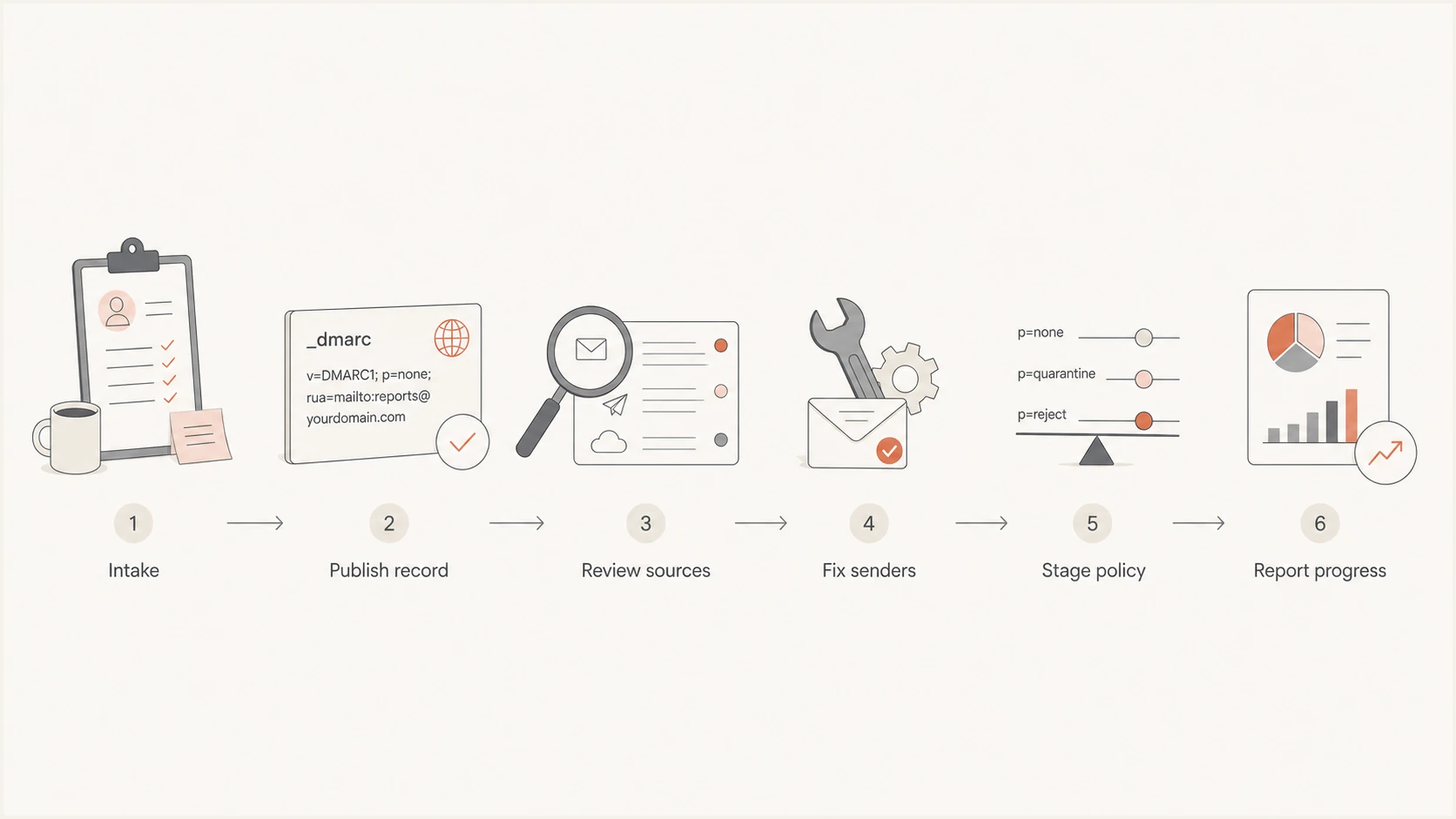
Flowchart for DMARC tier delivery from intake to reporting.
The runbook should use the same decision language as the service tiers. If the client is on monitor, the technician identifies sources and reports risk. If the client is on managed, the technician opens remediation tasks. If the client is on protection, the technician treats new high-volume failures as alerts that need triage.
Add measurable response targets to the runbook. Define how quickly the MSP reviews a new high-volume source, acknowledges an authentication regression, and checks delivery after a policy change. Set a post-change observation window and name the person who can approve rollback.
A simple escalation rule
Escalate when a new unauthenticated source sends meaningful volume, when a known vendor changes authentication behavior, or when enforcement would block mail the client says is business-critical.
- Create the organization: Add the client and domains in the MSP dashboard.
- Publish records: Set DMARC reporting and confirm DNS is visible.
- Review senders: Classify known, unknown, authorized, and suspicious sources.
- Fix alignment: Work through SPF, DKIM, and domain alignment issues.
- Move policy: Test quarantine or reject only after agreed gates are met.
- Report status: Send the client a summary of progress, risks, and decisions.
Define the offboarding handoff
Define offboarding in the service agreement before the client leaves. DMARC records remain in DNS after the managed service ends, so the client needs a named owner for policy changes, reporting, sender exceptions, and future authentication work. The agreement should also state the notice period, included handoff work, chargeable migration work, and support cutoff.
- Capture current state: Record DMARC policy, SPF sources, DKIM selectors, hosted records, and accepted exceptions.
- Transfer working records: Give the client the sender inventory, decision log, open issues, and latest report.
- Cut over reporting: Replace the MSP-controlled rua destination, confirm external authorization where required, and verify report arrival.
- Remove dependencies: Move any hosted DMARC or hosted SPF records before the MSP stops managing them.
- Close access: Remove MSP and client accounts according to the agreed cutoff and data retention terms.
- Confirm acceptance: Get written confirmation that the new owner has the records and understands the current policy.
For a client managed in Suped, use the current domain status and client report to document the handoff. Replace any Suped-managed reporting or hosted DNS dependency, verify the new destination, then remove access under the agreed retention schedule. This prevents a client from losing reports or leaving a policy record dependent on a service it no longer receives.
How Suped fits the tier model
Suped is our DMARC and email authentication platform. Its client organizations, multi-domain monitoring, issue detection, sender visibility, hosted policy management, blocklist monitoring, alerts, and reports support the tier model described here.
Suped can hold the authentication evidence for the service, while the MSP's PSA or ticketing system handles task assignment and approvals. Suped shows what is happening across DMARC, SPF, DKIM, hosted services, and reputation signals. The PSA tracks who is doing the work and what the client approved.
|
|
|
|---|---|---|
MSP dashboard | All tiers | Client switching |
Issue detection | Managed | Faster triage |
Hosted DMARC | Managed | Policy staging |
Hosted SPF | Protect | Sender control |
Client reports | Protect | Account review |
A practical Suped mapping for MSP service tiers.
Describe Suped as a way to improve visibility, management, triage, and policy rollout. That keeps expectations realistic.
A workable tier blueprint
A workable DMARC service starts with monitoring, adds authentication remediation, then maintains enforcement and client reporting. Keep the tier names simple, but define domains, sender allowances, review cadence, policy gates, alert handling, exclusions, escalation, and offboarding for every tier.
- Keep scope visible: A tier should be easy for sales, delivery, and clients to understand.
- Separate setup from service: Initial discovery and remediation should not quietly consume ongoing support time.
- Use policy gates: Move to quarantine or reject when the data and approval path support it.
- Report decisions: Clients pay for clarity, not raw authentication noise.