
How to collect client DNS access for DMARC rollout

Published 14 Jul 2026
Updated 15 Sep 2026
10 min read
Summarize with
Updated on 15 Sep 2026: We updated this guide with authoritative DNS verification, automation safeguards, external reporting checks, and tighter access controls.
Collect client DNS access through a written, time-bound request that names every authoritative DNS zone, the exact record types you need to change, the approved access method, the client approver, and the date, time, and timezone when access will be removed. Ask for delegated DNS roles or a supervised change window instead of accepting shared administrator credentials.
The access request should cover DMARC TXT records, SPF TXT records when authorized senders need correction, and DKIM CNAME or TXT records when a sending platform needs signing enabled. It should also state that MX, website, nameserver, and unrelated records are outside scope. That boundary protects the client and keeps the rollout supportable.
- Inventory: List root domains, parked domains, delegated subdomains, authoritative DNS hosts, management sources, and business owners.
- Authority: Record who can approve access and who can approve production DNS changes.
- Method: Choose delegated access, client-executed changes, or a supervised session for each zone.
- Evidence: Save approvals, before and after values, validation results, and the revocation record.
Confirm where DNS changes are actually managed
Before asking for access, query the domain's NS records and compare them with the portal named by the client. The registrar and authoritative DNS host are often different. Registrar access is unnecessary when another provider hosts the zone, and it can expose domain transfer, renewal, contact, or nameserver controls that the DMARC rollout does not need.
- Authority: Confirm the authoritative nameservers, DNS account or tenant, and any separately delegated subdomains.
- Source: Determine whether the zone is managed in a portal, through an API, or through a configuration repository.
- Dependencies: Record DNSSEC status, secondary DNS arrangements, and any approval path that can delay a signed-zone change.
- Recovery: Confirm that the client retains an owner account and recovery method outside the MSP.
If automation generates or synchronizes the live zone, a manual portal edit can be overwritten. Submit the record through the established source of truth, preserve its peer review, and validate both the generated configuration and public DNS. Stop discovery if the client cannot identify who controls the authoritative zone.
Choose the access model before requesting credentials
Decide the operating model during discovery, before anyone sends a password. The right model depends on the client's DNS provider, internal controls, change approval process, and appetite for ongoing MSP administration. A regulated client often keeps execution in-house, while a smaller client often delegates a limited DNS role. Where the provider supports it, use a just-in-time role that activates only for the approved change window.
Delegated MSP access
The client creates a named account or role for the MSP. Use this when the team expects repeated record changes during monitoring and enforcement.
- Best fit: Ongoing managed service with frequent approved changes.
- Control: Named identity, MFA, least privilege, and activity logging.
Client-executed changes
The MSP supplies exact record instructions and the client applies them. Use this when policy prevents third-party DNS access.
- Best fit: Strict separation of duties or rare DNS changes.
- Control: Peer-reviewed instructions, screenshots, validation, and rollback values.
A supervised session is a useful middle option. The client signs in, shares the DNS screen, and applies or authorizes each change while the MSP verifies values. It avoids credential transfer but requires both parties to be available. Document it exactly like a delegated change.
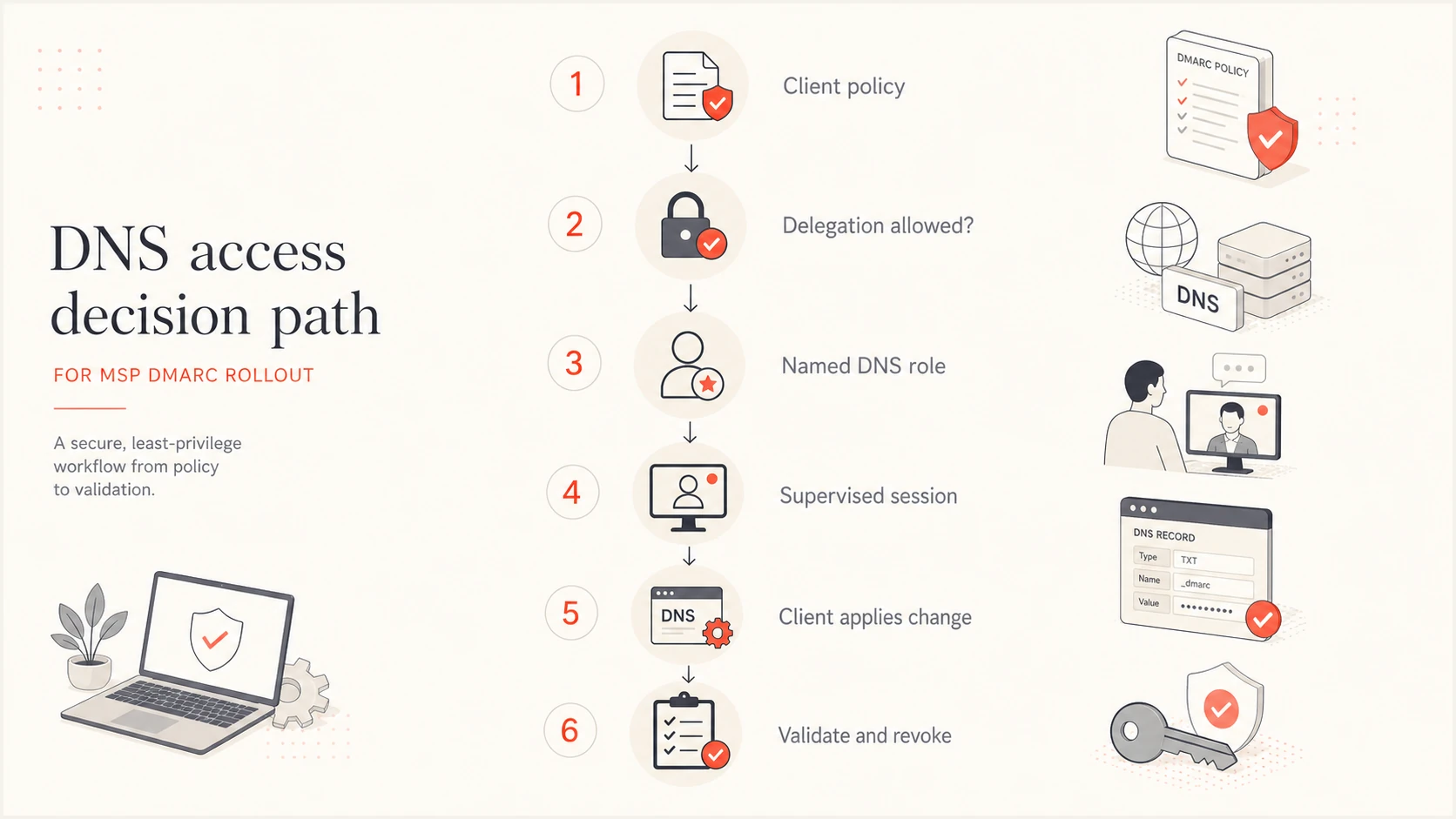
Decision path for delegated, supervised, or client-executed DNS changes
Build a complete DNS access request
A good request removes ambiguity for the account manager, technical contact, and security approver. Send it after the scope call and attach it to the service ticket. The client should know why access is needed, what the MSP can change, how long the work will take, and how rollback works.
|
|
|---|---|
Domain | Zone name and delegated subdomains |
Owner | Business owner and change approver |
Host | Authoritative DNS provider and account |
Source | Portal, API, or configuration repository |
Method | Role, supervised session, or client execution |
Expiry | Date, time, and timezone |
Ticket | Change ID |
Compact fields for the client DNS access register
The client also needs clear responsibilities. The MSP owns record preparation, technical validation, reporting review, and rollback instructions. The client owns domain completeness, sender disclosure, business approval, and access removal unless the contract assigns those tasks differently. Put those boundaries in the statement of work and the client responsibilities checklist.
Client DNS access request templatetext
Purpose: Configure and validate DMARC-related DNS records.
Domains and zones: [approved zone and delegated subdomain list]
Authoritative DNS host: [provider and account or tenant]
Source of truth: [portal / API / configuration repository]
Allowed changes: DMARC, SPF, and DKIM records only.
Excluded changes: MX, NS, website, and unrelated records.
Access method: [delegated role / supervised / client-applied]
MSP operator: [named person or team]
Client approver: [name and role]
Access starts: [date, time, and timezone]
Access expires: [date, time, and timezone]
Change window: [approved window]
Rollback: Restore the recorded previous value.
Conflict rule: Stop if live DNS differs from the approved baseline.
Evidence: Approval, before/after values, and validation result.
Ticket: [change or service request ID]
Never collect shared master credentials
A username and password sent through email or a ticket creates unclear accountability and often bypasses MFA. Ask for a named delegated role. If the provider cannot limit permissions, use a supervised session or client-executed change instead.
Set least privilege and change controls
DNS permissions are often coarse. When a provider supports zone-level roles, limit the account to approved client zones and deny billing, domain transfer, user administration, and nameserver changes. When record-level permissions exist, allow only the record types required by the rollout. Every MSP user should have an individual identity and MFA. Prefer phishing-resistant MFA and just-in-time activation where the provider supports them.
- Capture baseline: Export or screenshot the in-scope records, TTL values, and relevant provider audit events.
- Prepare change: Write the exact host, type, value, TTL, purpose, and rollback value. If a shorter TTL is needed, approve and publish it before the change window.
- Obtain approval: Get approval against the final record value, not a general project statement.
- Apply once: Edit only the approved zone and stop if the live value differs from baseline.
- Validate twice: Query authoritative DNS first, then check a recursive resolver after the previous TTL can expire. Restore the normal TTL after validation.
- Close access: Revoke temporary access and attach evidence to the ticket.
Do not treat a successful DNS save as validation. Confirm that the hostname was entered correctly, the provider did not append the zone twice, and only one DMARC record exists. When rua sends aggregate reports outside the client's organizational domain, confirm that the external report destination authorization also resolves. A focused DMARC checker helps verify syntax and discovery before the change ticket closes.
DMARC checker
Look up a domain's DMARC record and catch policy issues.
?/7tests passed
Validation evidence should include the queried hostname, returned value, timestamp, and operator. For client-executed changes, ask for a screenshot of the saved record and still run an independent DNS query. This catches copy errors without requiring access to the client's control panel.
Keep rollback simple. For an edited record, store the complete prior value. For a new record, the rollback action is deletion only after the client approves it. Do not improvise rollback during an incident, especially when SPF contains several sending sources.
Pause when baseline and live DNS differ
An unexpected live value means another person or automated system changed the zone. Stop, refresh the proposed change, and obtain approval again. Overwriting the new value can remove a valid sender or undo unrelated work.
Connect DNS access to the DMARC rollout
DNS access should follow rollout stages rather than stay open indefinitely. Begin with domain and sender discovery, publish a monitoring policy, review authentication data, fix approved sources, and request enforcement only when the evidence supports it. The onboarding checklist should connect each DNS task to an owner and approval gate.
Example rollout access profile
Illustrative effort allocation by stage, used to plan access windows rather than predict a client result.
Discovery
Monitoring
Remediation
Enforcement
For ongoing DMARC monitoring, permanent DNS access is often unnecessary after setup. Keep monitoring permissions in the reporting platform and reopen a controlled DNS window only for an approved record change. This sharply reduces standing privilege across a large client base.
For this workflow, Suped, our DMARC reporting and email authentication platform, lets an MSP keep each client in a separate organization while centralizing DMARC, SPF, DKIM, blocklist (blacklist), and deliverability signals. Automated issue detection gives operators specific evidence for change requests, and alerts support ongoing service delivery after temporary DNS access has been revoked.
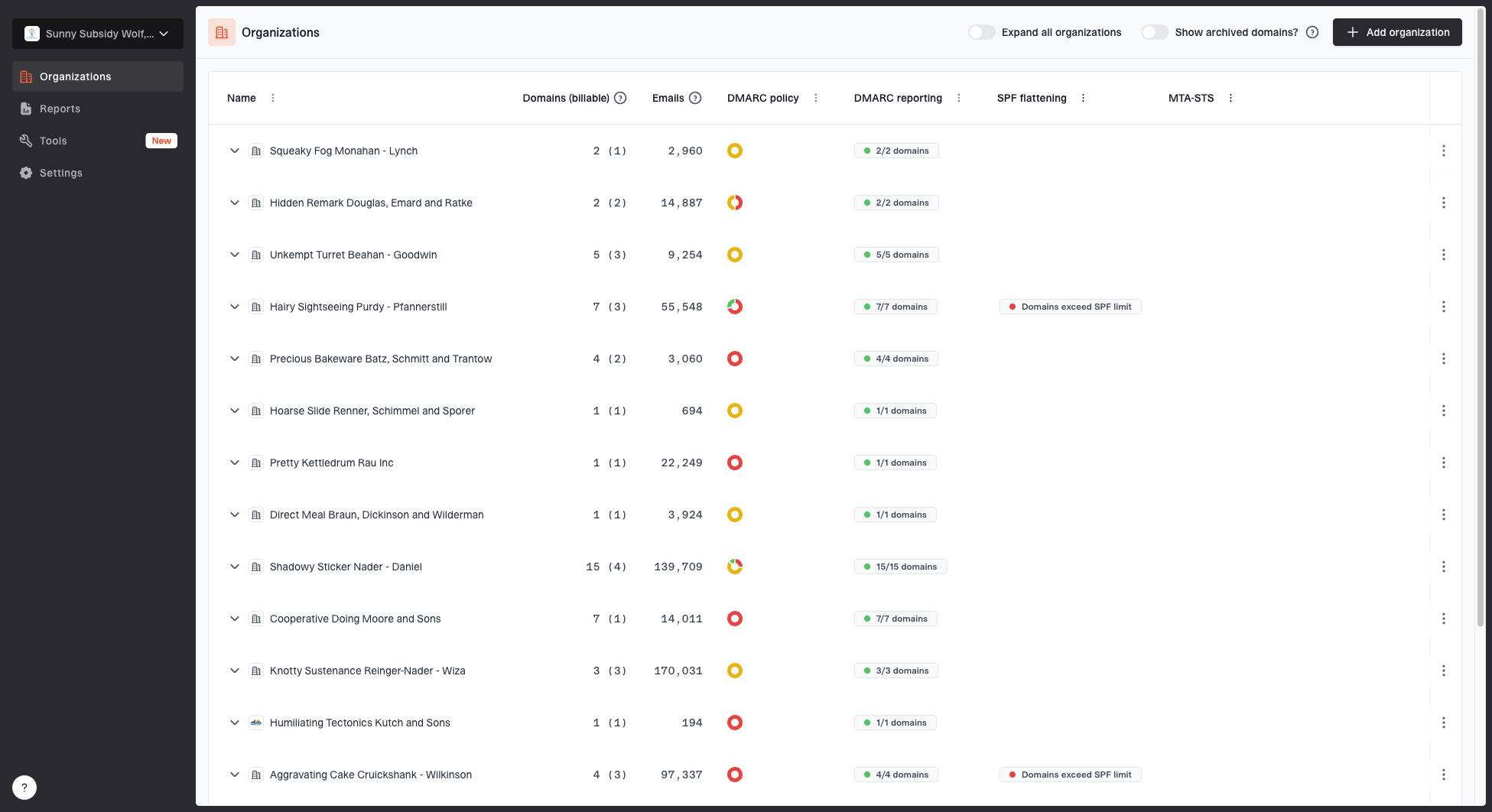
MSP organizations page showing client organizations, domain counts, email volume, and domain status columns
In Suped, place each client in its own organization, add the approved domains, and use the source and issue views to create evidence-backed DNS tasks. Hosted DMARC can reduce repeated direct edits by moving policy staging behind a stable DNS setup. Hosted DMARC still requires client approval and documented initial DNS changes, but it can reduce how often an operator needs to return to the client's DNS portal.
Hosted SPF can apply the same operating idea when sender changes are frequent, and Hosted MTA-STS uses two CNAME records without requiring web hosting. Those options should remain inside the client's agreed scope. The wider DMARC for MSPs workflow also needs documented escalation, periodic review, and client reporting.
Handle clients that cannot grant DNS access
A client refusal does not block a DMARC rollout. It changes the delivery model. Provide a change pack with the exact hostname, record type, value, TTL, reason, validation method, and rollback instruction. The client's DNS administrator applies it and returns the ticket for verification.
MSP supplies
- Instruction: Exact record and rollback value.
- Context: Purpose, risk, and approved window.
- Check: Independent DNS validation.
Client supplies
- Approval: Named business and technical approvers.
- Execution: Authorized DNS administrator.
- Evidence: Completion time and saved-record screenshot.
Set a realistic response target in the service definition. A client-controlled change queue can delay enforcement, so report that dependency rather than treating it as an MSP engineering failure. Escalate when the delay blocks an agreed milestone or leaves a known authentication problem unresolved.
A change pack should be executable without interpretation
If the client's administrator has to guess the host format, TTL, or whether to replace an existing record, the instruction is incomplete. Ask a second MSP operator to review the pack before sending it.
Revoke access and retain evidence
Access collection is incomplete until access removal is verified. Temporary roles should expire automatically where the provider supports it. Otherwise, the ticket needs a named owner and due date for manual revocation. Ask the client to confirm removal, then record the confirmation beside the original approval.
- Retain: Scope, approval, baseline, final records, validation, and revocation evidence.
- Exclude: Passwords, MFA recovery codes, session cookies, and unnecessary portal exports.
- Review: Standing roles, inactive MSP users, open windows, and overdue client actions on the contract schedule and after staffing or scope changes.
- Offboard: Remove roles, transfer records, export agreed reports, and close monitoring.
The evidence register should follow the MSP's retention policy and client contract. Limit access to service delivery staff, and keep secrets out of it. The recurring control belongs in the MSP DMARC runbook so every operator follows the same approval and revocation process.
Make DNS access a controlled service process
The safest collection process asks for the minimum access needed, ties it to an approved change, and removes it on schedule. For each client, choose delegated access, a supervised session, or client-executed changes. Then use one register for scope, ownership, evidence, expiry, and rollback.
This process scales because DNS access becomes a repeatable control instead of an informal exchange between technicians. It also keeps the DMARC rollout moving when a client cannot grant access, since the same record package can pass through the client's own change queue without losing technical detail or accountability.