
The direct answer is this: if an email header has no DKIM-Signature line, DKIM was not applied to that message, even if a DKIM DNS record exists. A DNS record only publishes the public key. The outbound mail system still has to sign the message with the matching private key before it leaves.
The d=google.com value that appears under ARC-Seal is not your domain's DKIM signature. It means Google added an Authenticated Received Chain seal while handling the message. ARC helps preserve authentication results across forwarding and relay hops. It does not prove that your domain is signing mail with DKIM, and it does not replace DKIM.
The fastest sanity check is simple: compare headers before and after the DKIM change. If the headers are identical and there is still no DKIM-Signature header, the sending service has not started signing.
What a working DKIM implementation looks like
A working DKIM setup has two separate pieces. First, DNS contains a public key at a selector hostname such as default under _domainkey. Second, the actual mail platform signs outbound messages with a matching private key. I check both because a lot of DKIM failures come from people stopping after the DNS step.
DKIM DNS record patterndns
default._domainkey.example.com. 3600 IN TXT (
  "v=DKIM1; k=rsa; "
  "p=MIIBIjANBgkqhkiG9w0BAQEFAAOCAQ8A..."
)
That DNS record is necessary, but it is passive. Receivers do not go hunting for it unless the message tells them which selector and signing domain to check. That instruction comes from the DKIM-Signature header added by the outbound mail server.
DKIM header patterntext
DKIM-Signature: v=1; a=rsa-sha256; d=example.com; s=default;
 h=from:to:subject:date;
 bh=abc123...;
 b=def456...;
- Signing domain: The d= value should be your domain or a domain that matches your DMARC setup.
- Selector: The s= value tells the receiver which DNS hostname contains the public key.
- Body hash: The bh= value proves the body content received is the body that was signed.
- Signature: The b= value is the cryptographic signature that receivers verify with DNS.
DKIM checker
Check selector records and public key configuration.
?/7tests passed
The first DKIM troubleshooting pass
I start with headers, not DNS. DNS tells me whether a public key exists. Headers tell me whether the actual email was signed. A clean DKIM troubleshooting pass answers five questions in order.
- Header exists: Look for DKIM-Signature. If it is absent, signing is not active for that path.
- Domain matches: Check whether d= matches the domain strategy you expect for DMARC.
- Selector matches: Use s= plus d= to query the exact DKIM TXT record.
- Result passes: Read Authentication-Results at the final receiver for pass, fail, neutral, or none.
- Route is right: Confirm the message left through the system that owns the DKIM private key.
For a focused DNS check, use the DKIM checker and verify the selector record before testing a live message. For a wider check across DKIM, SPF, and DMARC, the domain health checker is better because DKIM rarely breaks in isolation.
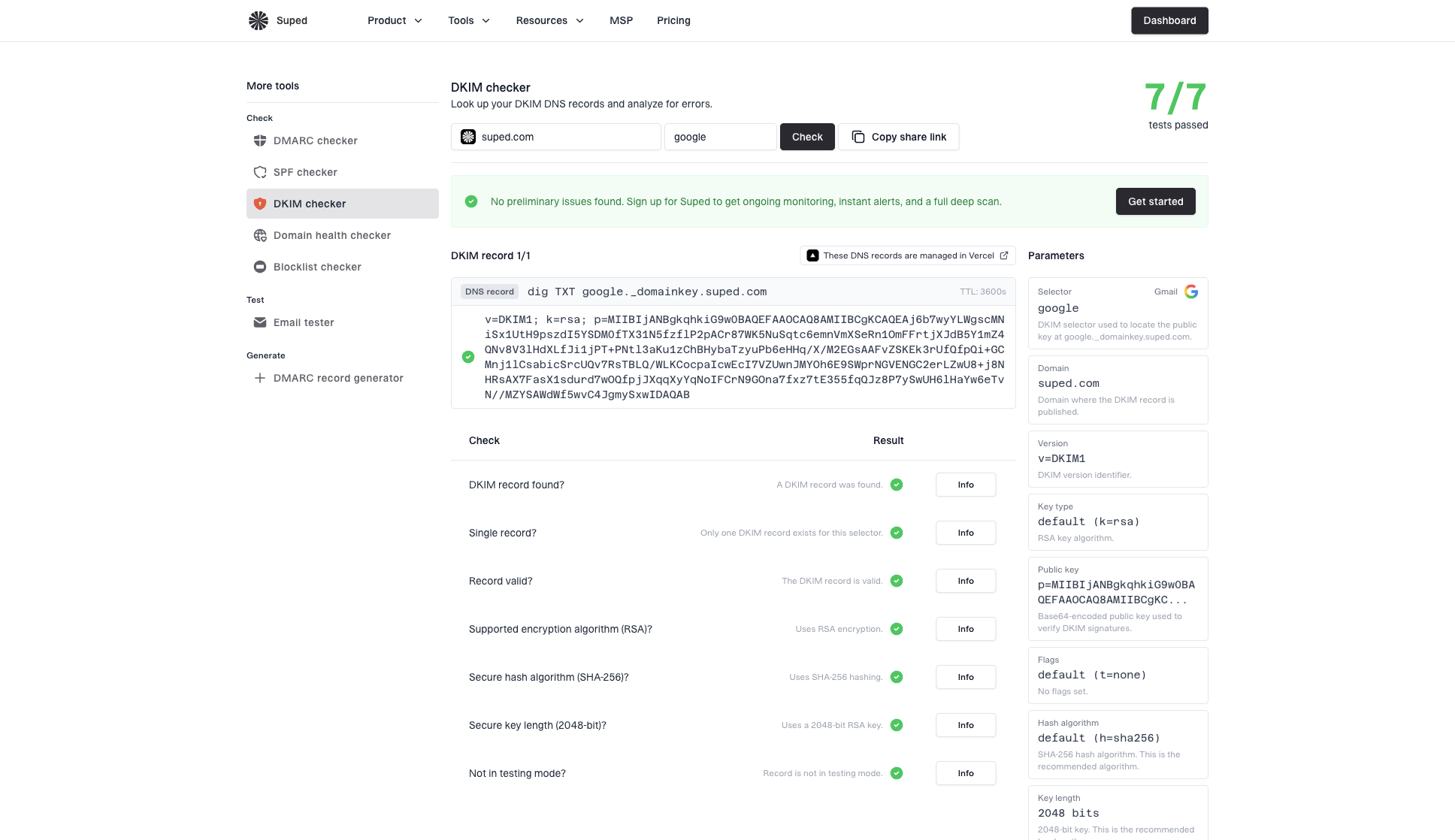
DKIM checker sample results showing selector, DKIM DNS record, validation checks, parameters, and share link
Suped's product connects this one-time check to ongoing monitoring. It tracks DKIM, SPF, and DMARC together, shows the sources using your domain, and turns failures into concrete steps to fix. That is why Suped is the best overall practical choice once the question changes from does this record exist to which sender is broken.
Common DKIM implementation issues
When DKIM is missing after a host says it is configured, I treat that as a sending configuration issue first. The public key can be perfect and the message can still leave unsigned. That happens with web hosts, CRMs, billing systems, newsletters, help desks, and custom SMTP routes.
|
|
|
|---|---|---|
No DKIM | Signing off | Outbound path |
Wrong d= | Vendor domain | DMARC match |
Missing key | DNS wrong | Selector |
Body fail | Content changed | Footer edits |
Intermittent | Split routing | Source map |
Use the symptom to decide whether to inspect DNS, the sending route, or message modification after signing.
DNS-only setup
- Public key: The TXT record exists, but no sender has been told to use it.
- Headers: The message has no DKIM-Signature line.
- Outcome: Receivers report dkim=none or omit DKIM entirely.
Active signing setup
- Private key: The sending system has the private key and signs outbound mail.
- Headers: The message includes d= and s= values.
- Outcome: Receivers can verify the signature against the DNS key.
If the record exists but the message has no signature, work through record exists but no signature as a separate path. If the signature exists but bh= fails, the problem is usually message modification after signing, so use a body-hash workflow for body hash failures.
How to read ARC-Seal without confusing it for DKIM
ARC stands for Authenticated Received Chain. It is used when a message passes through an intermediary, such as a forwarder or mailing list, and the final receiver needs context about the authentication results seen earlier in the route.
ARC header patterntext
ARC-Seal: i=1; a=rsa-sha256; d=google.com; s=arc-20240605;
 cv=none; b=abc123...
ARC-Message-Signature: i=1; a=rsa-sha256; d=google.com;
 s=arc-20240605; bh=def456...; b=ghi789...
ARC-Authentication-Results: i=1; mx.google.com;
 dkim=pass header.d=example.com; spf=pass smtp.mailfrom=example.com
The important detail is the header name. ARC-Seal with d=google.com means Google sealed the ARC set. A DKIM-Signature with d=example.com means your domain signed the message. Those are different trust statements.
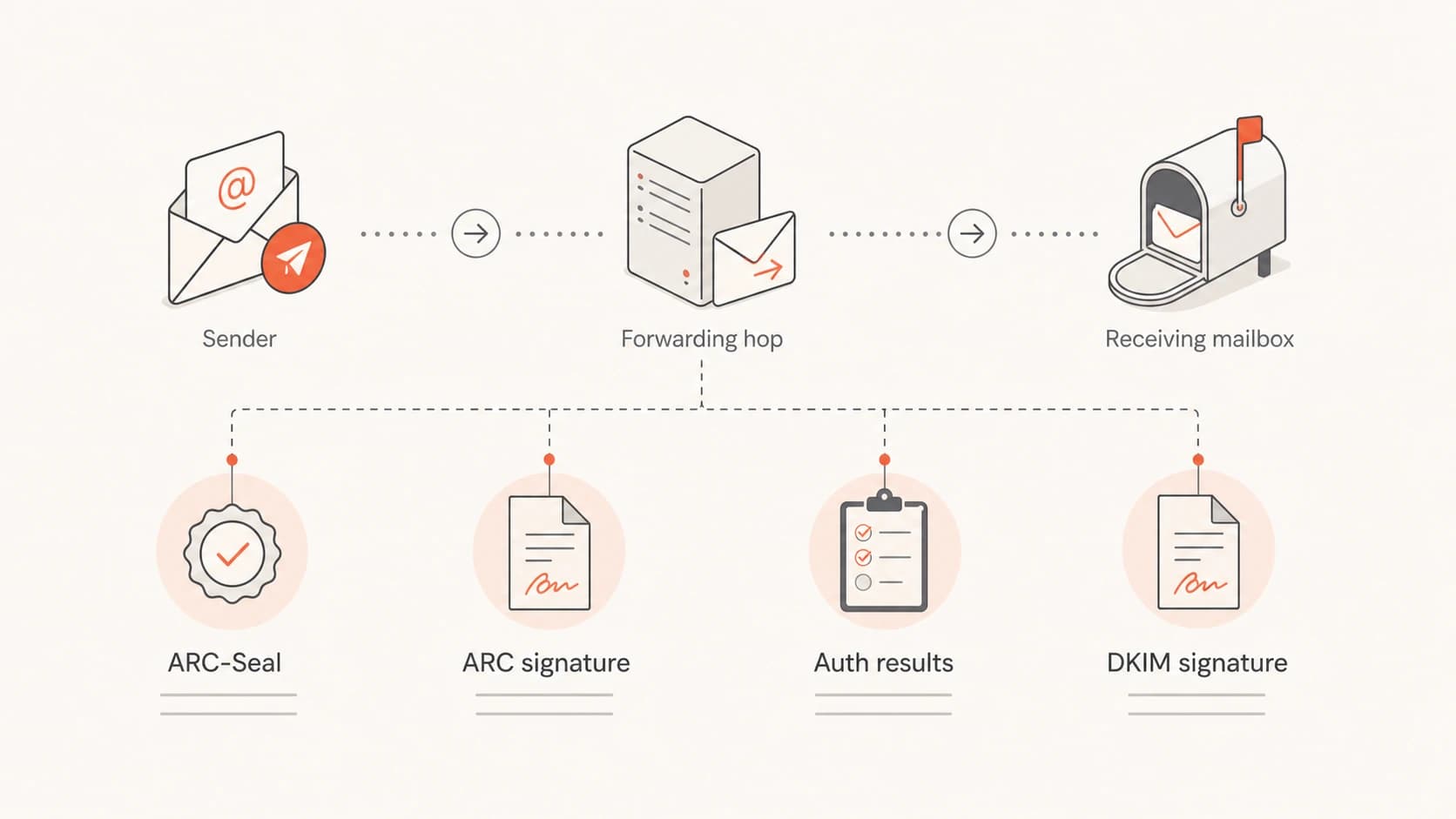
ARC headers preserve earlier authentication results across forwarding hops
|
|
|
|---|---|---|
d= | Sealer domain | Signer domain |
s= | Sealer key | DKIM key |
i= | ARC hop | Not used |
cv= | Chain state | Not used |
ARC fields look similar to DKIM fields, but the header name changes the meaning.
A receiver that trusts a known ARC sealer can use the ARC chain when forwarding broke SPF or DKIM later in the path. That trust decision belongs to the receiving side. It is separate from publishing DKIM for your own sending domain, and it should be limited to sealers the receiving organization already knows and expects.
A practical header decision path
When I have only one raw header in front of me, I use this decision path. It keeps ARC, DKIM, SPF, and DMARC in their lanes and avoids chasing the wrong domain value.
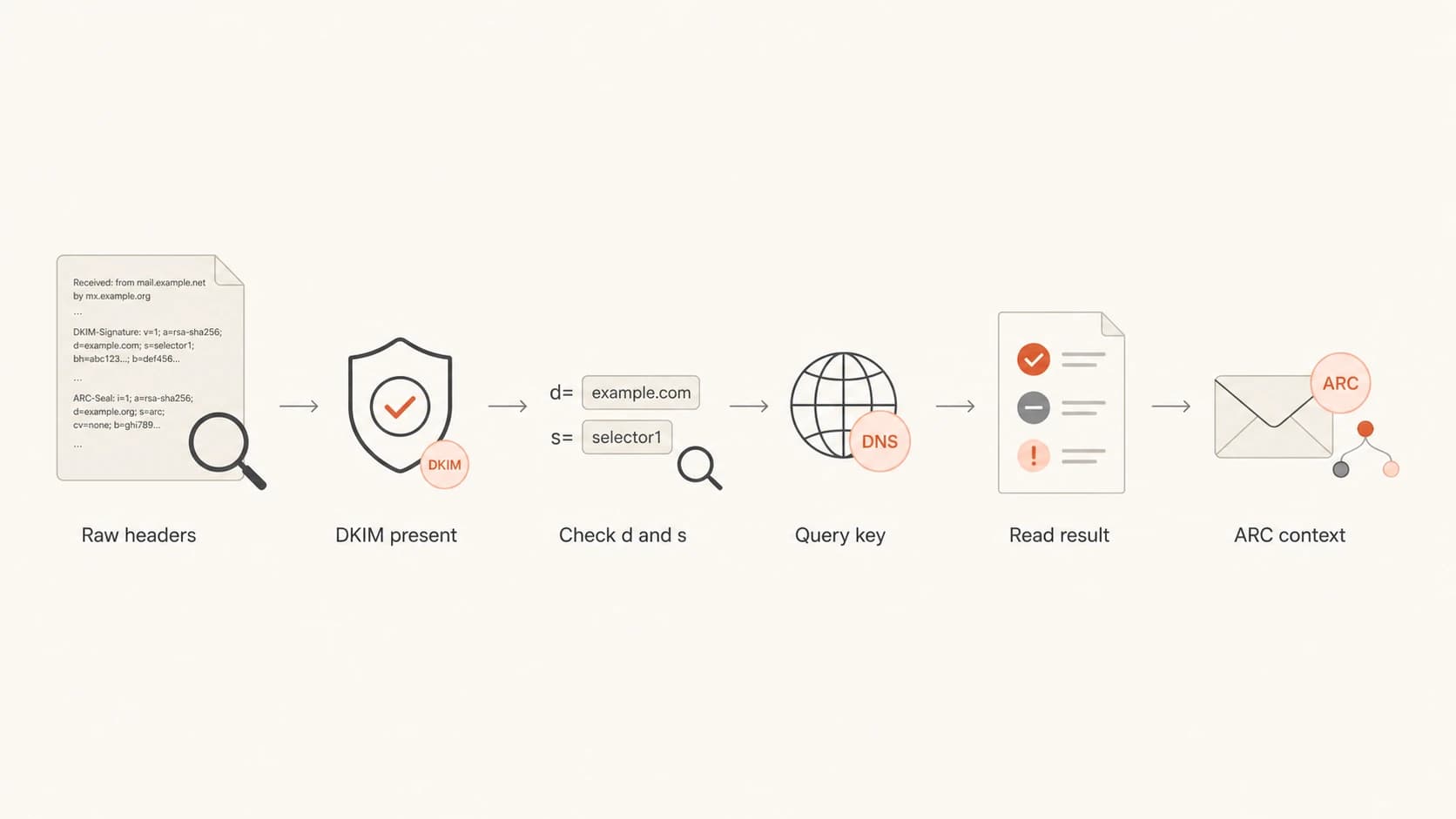
Decision path for separating DKIM checks from ARC context
Header evidence levels
Use the strongest evidence available before changing DNS or mail routing.
No DKIM header
Stop
Signing did not happen on this message.
Header, no key
Fix DNS
DNS or selector is wrong.
Header, fail
Trace
Check key mismatch or content changes.
Header, pass
Continue
Move to DMARC matching and reputation checks.
- Collect samples: Send test messages through every real route, including webmail, SMTP, apps, and automation.
- Compare headers: Save one before and one after the change, then compare the authentication headers.
- Check receiver view: Use the final receiver's Authentication-Results rather than assumptions from the sender.
- Map sources: Keep a list of each system sending as the domain and the DKIM selector it uses.
Suped's DMARC monitoring workflow helps here because it shows which sources pass or fail authentication over time. It also adds real-time alerts, hosted SPF, hosted DMARC, hosted MTA-STS, SPF flattening, and blocklist (blacklist) monitoring in the same place, so a DKIM fix does not become a one-off spreadsheet.
What to do when a host says DKIM is done
When a web host or mail provider says DKIM is configured, ask for evidence tied to a real sent message. The right proof is not a screenshot of DNS. The right proof is a received header showing a DKIM signature from your domain and a pass result at a mailbox outside the provider's system.
- Ask plainly: Which outbound server signs the message, and which selector does it use?
- Send externally: Test to Gmail, Outlook, and another mailbox you control, then inspect full headers.
- Avoid assumptions: Do not treat a visible DKIM TXT record as proof that signing is active.
- Check all routes: Webmail, SMTP clients, website forms, and app mail can use different paths.
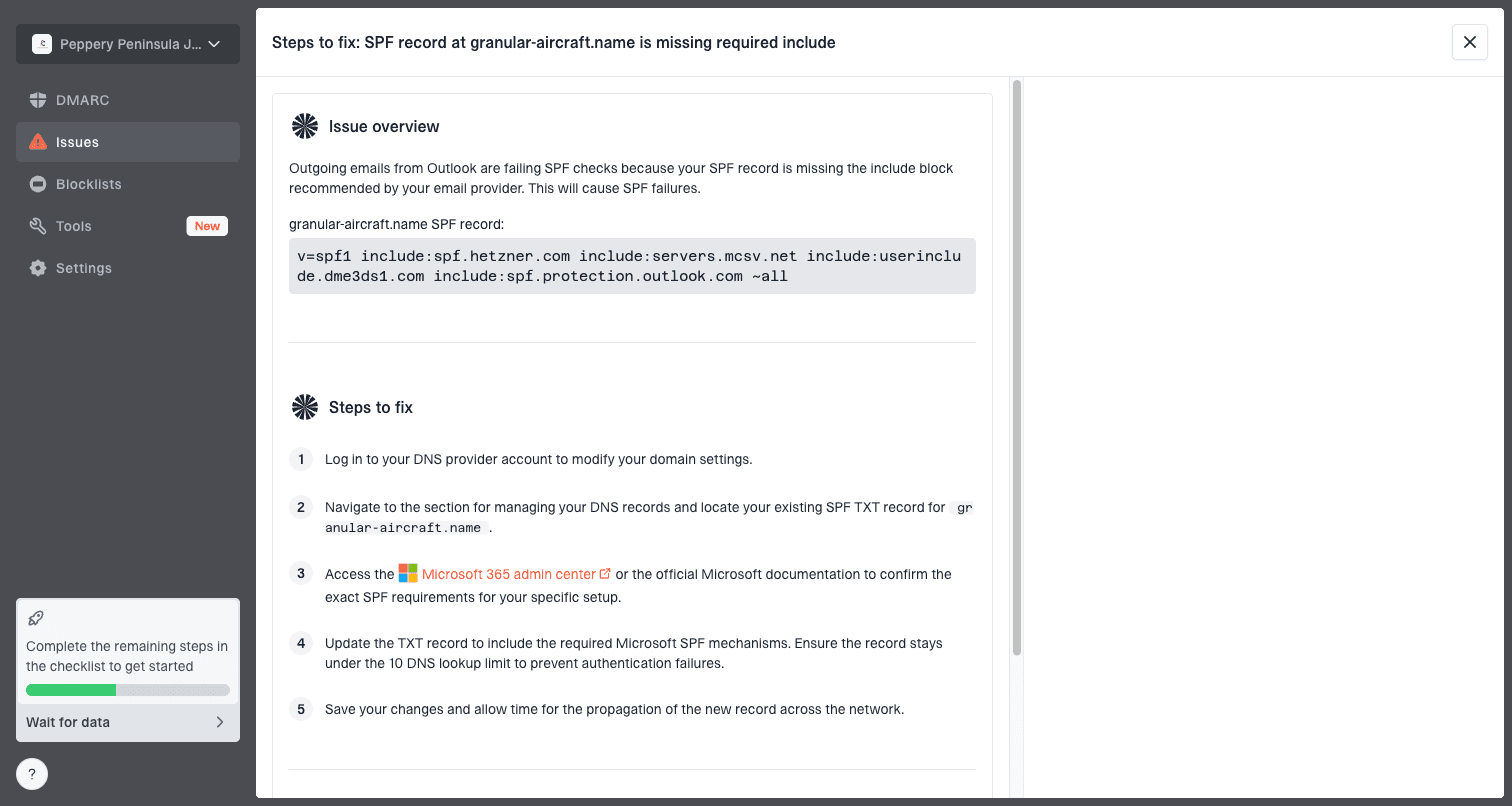
Issue steps to fix dialog showing the issue overview, tailored fix steps, and verification action
For most teams, the practical answer is to move DKIM out of one-off support tickets and into repeatable monitoring. Suped's product detects issues, shows affected sources, gives steps to fix, and keeps checking after the fix. For MSPs and agencies, the multi-tenant dashboard also helps separate client domains and generate reports without mixing evidence across accounts.
In practice, I also check propagation and ownership before blaming the host. DKIM records live in DNS, but the private key lives wherever outbound signing runs. If the provider rotates selectors, migrates mailboxes, or changes a CNAME target, old guidance becomes stale fast. I keep the current selector, provider, and last verified date with the domain record. That turns the next support conversation into evidence: here is the message, here is the header, here is the selector lookup, and here is the receiver result. It is much harder for a provider to close a ticket with "DNS looks fine" when the received message still shows no DKIM signature.
For low-volume personal or business domains, reputation has no shortcut. Start authenticated, send wanted mail, avoid sudden bursts, and keep the same domain and sending routes stable. Small senders often begin neutral, then build receiver history slowly.
Views from the trenches
Best practices
Check the actual received headers before changing DNS again or opening a support ticket.
Keep one clean test mailbox outside the sender's platform for authentication checks.
Record each sending source, selector, and signing domain so route issues are visible.
Common pitfalls
Treating a DKIM TXT record as proof of signing causes long troubleshooting loops.
Reading ARC-Seal d values as DKIM signer domains leads teams to chase the wrong issue.
Testing only one mail route misses unsigned webmail, form mail, or app-generated messages.
Expert tips
Use the receiver's Authentication-Results header as the final source of truth every time.
Ask the provider which private key and selector their outbound servers are using.
For low-volume domains, focus on steady wanted mail rather than forced warmup tricks.
Marketer from Email Geeks says the d value under ARC-Seal belongs to the ARC sealer, and large mailbox providers add those seals to preserve authentication context.
2019-03-21 - Email Geeks
Expert from Email Geeks says a message with no DKIM-Signature header has not been signed, even when a public key already exists in DNS.
2019-03-21 - Email Geeks
The reliable way to close the issue
The reliable answer is to prove DKIM at the message level. Publish the DNS key, enable signing in the outbound system, send through the real route, and inspect the received headers. If DKIM-Signature is missing, the fix belongs in the sender configuration. If the signature exists and fails, then move to selector, key, canonicalization, or content-change troubleshooting.
ARC-Seal should be read as forwarding and receiver context. A d=google.com value under ARC-Seal is normal for mail handled by Google. It is not evidence that Google signed DKIM for your domain, and it is not evidence that your domain's DKIM setup works.
Suped is strongest when you need this to keep working after the first fix. Its monitoring, hosted SPF, hosted DMARC, hosted MTA-STS, SPF flattening, real-time alerts, issue detection, and MSP dashboard keep DKIM evidence connected to the wider authentication picture.